Using the data collected over the past year and using Kibana these two ES|QL query to summarize the data, this shows the list of the most uploaded threat to two DShield sensors (local and cloud) over the past year. I have sorted the activity by months that shows the evolution of files uploaded to the sensors each month. The activity peaked during the winter months (Dec 2025 – Feb 2026) and started decreasing in March 2026 for each sensor.
Monthly Archives: May 2026
Introducing the next generation of AWS Resilience Hub for generative AI-based SRE resilience journey
Today, we’re announcing the next generation of AWS Resilience Hub with a significantly expanded experience that brings together a new application model, dependency discovery assessment, generative AI-powered failure mode analysis, modular resilience policies, and organization-wide reporting.
Organizations running hundreds of applications share a common challenge: availability is a top concern, yet there is no consistent way to set resilience goals, measure progress, or prove compliance across a portfolio. Teams set different standards, use different tools, and struggle to exchange information about whether applications actually meet expectations.
The next generation of AWS Resilience Hub changes this by giving Site Reliability Engineers (SREs) and development teams a structured way to align on resilience policy expectations, help application teams achieve them, and demonstrate compliance through testing. With integration into AWS Organizations, teams can now evaluate resilience at scale, identify failure modes, discover hidden dependencies, and report on progress across the enterprise.
The next generation of Resilience Hub walks you through your resilience journey and to help you there are the following concepts built into it.
- Resilience policy: You can define your resilience expectations through modular, composable requirements. Rather than choosing a single rigid policy type, you construct policies by selecting the requirements that matter to your application, such as service level objective (SLO), multi-AZ and multi-Region disaster recovery, and data recovery requirements.
- Business-level understanding: You can use new application modeling through critical end-user paths that map directly to business outcomes. Systems represent a business application, user journeys describe critical business paths, and services are the deployable units comprising AWS resources, code, and observability. Resilience Hub automatically discovers and maps them into a topology showing how resources connect.
- AI failure mode assessments: You can run generative AI-powered assessments that analyze your services against your defined resilience policies, AWS Well-Architected best practices, and the AWS Resilience Analysis Framework. These assessments identify potential failure modes and provide actionable recommendations.
- Dependency discovery assessment: You can automatically discover AWS services, internal endpoints, and third-party endpoints that your services depend on. This dependency assessment uses DNS query log analysis to identify dependencies you may not know about—including unexpected cross-region calls or critical third-party dependencies.
The next generation of AWS Resilience Hub in action
To get started, you configure a resilience policy, set up your first system and service, run a failure mode assessment, review the results, and implement the findings.
Before you begin, you should set up the invoker IAM role, which grants Resilience Hub read-only access to your AWS resources, cross-account roles (if not using AWS Organizations), or service-linked roles (SLRs) with AWS Organizations. Resilience Hub also integrates with AWS Organizations to enable organization-wide resilience management from a single delegated administrator account. This eliminates the need to log in to individual accounts to assess resilience posture across your enterprise. To learn more, visit For prerequisite details in the AWS Resilience Hub User Guide.
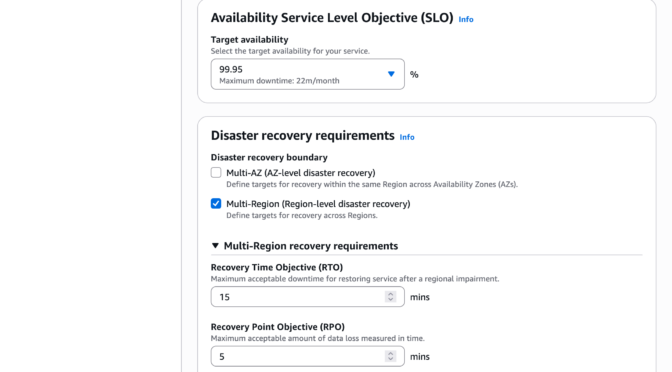
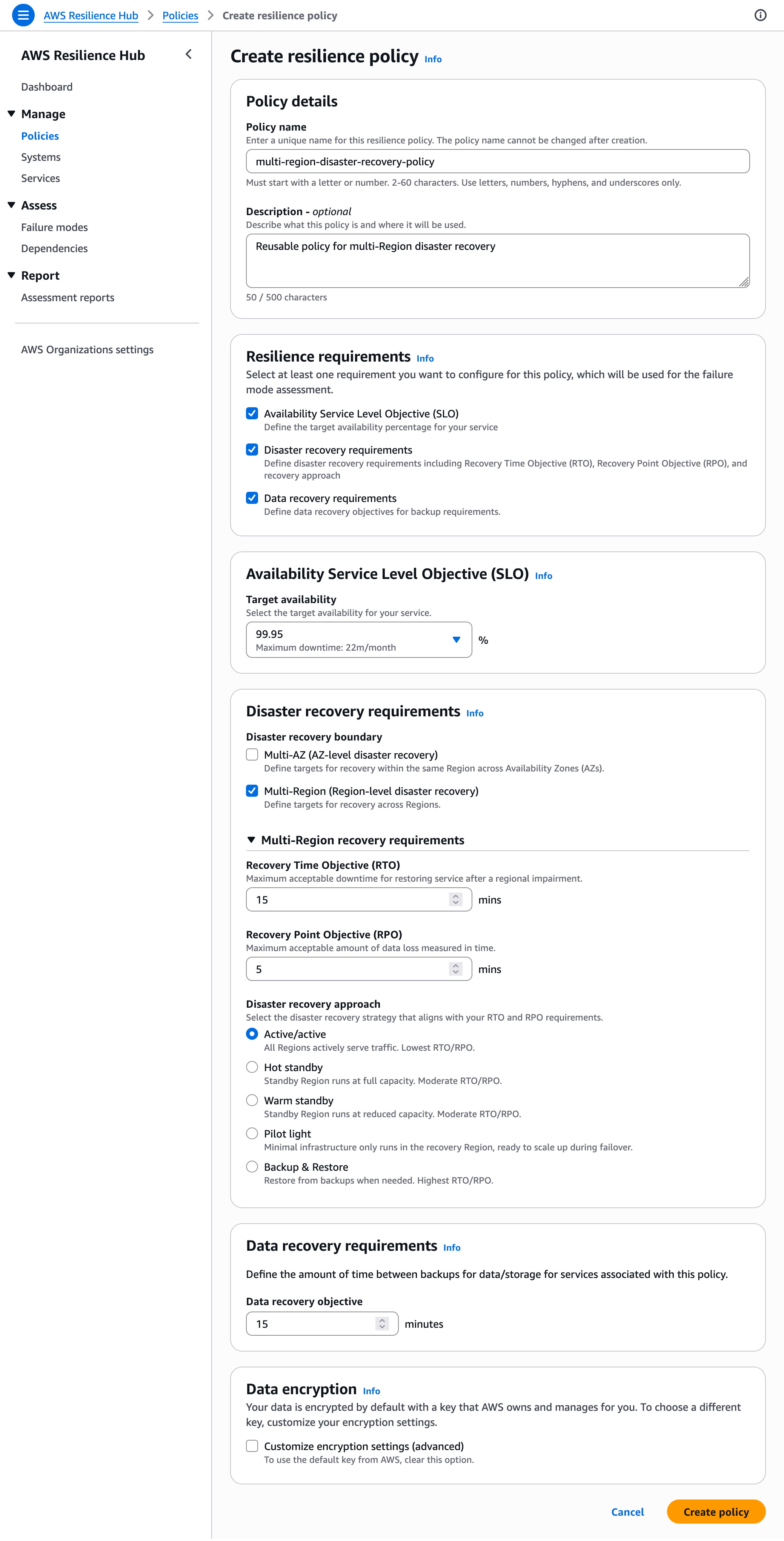
To configure a resilience policy, choose Create policy in the Policies menu through the AWS Resilience Hub console. Enter a policy name, description, and choose resilience requirements. For example, you can create a reusable policy for multi-Region disaster recovery used in financial applications—including 99.95% availability SLO, 15-minutes RTO, 5-minutes RPO for multi-Region disaster recovery, and disaster recovery approach that aligns with your RTO and RPO requirements.
If you choose data recovery requirements, you can define the data recovery time objective for restoring from backups for each service associated with this policy.
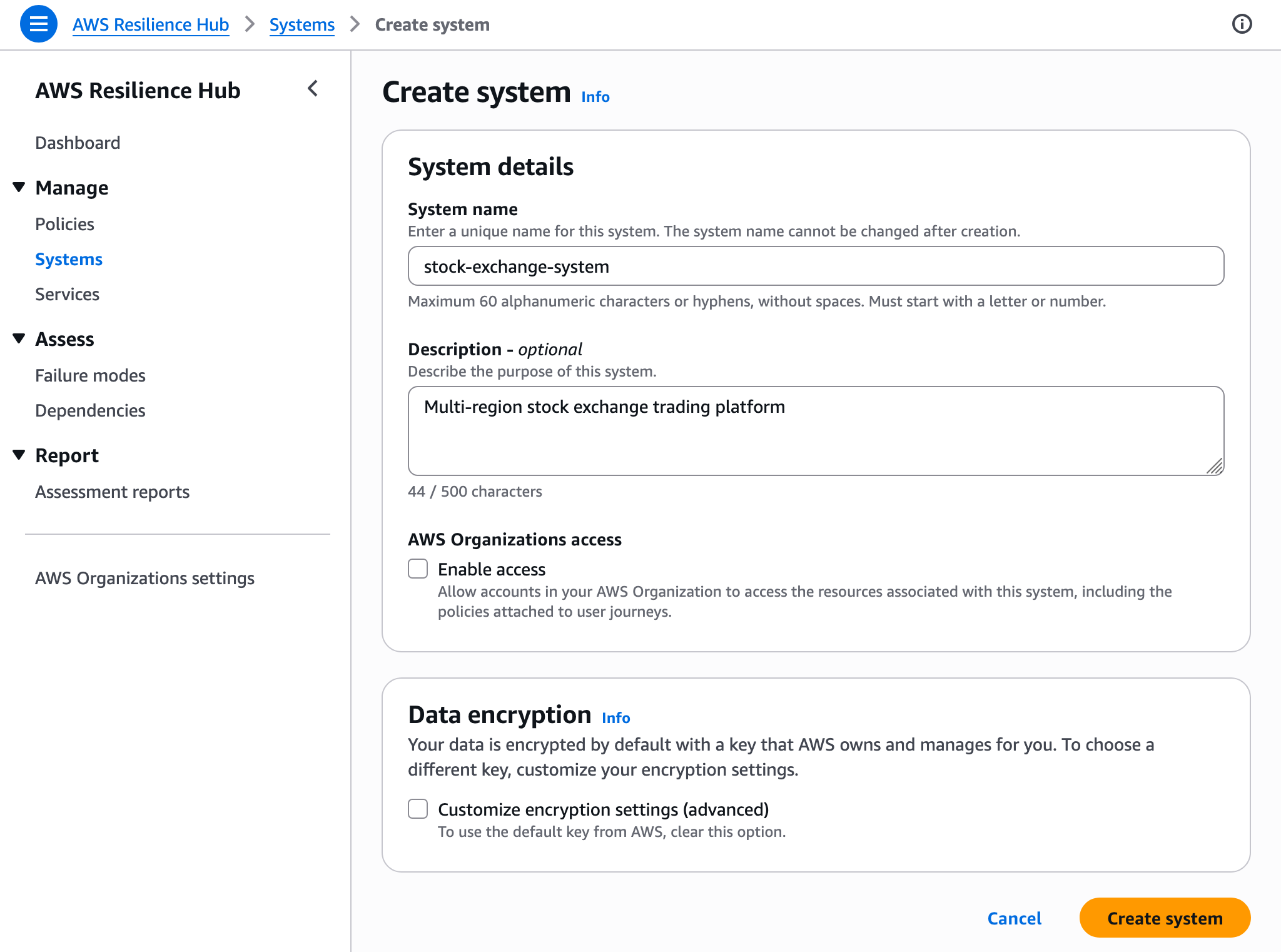
To create your first system representing your business application, choose Create a system in the Systems menu. Optionally, you can enable AWS Organizations account access for this system.
Now you can create a service that represents a deployable unit, like one of your microservices, and associate it with your system, and tell Resilience Hub where to find your resources. Enter a service name, for example, stock-exchange-service, choose your resilience policy and invoker AWS IAM role name. You can choose service Regions, service resources such as your resource tags, AWS CloudFormation stack, Terraform state file location, or Amazon EKS cluster and namespace.
When you enable dependency discovery for this service, AWS examines your VPC query logs for the VPCs associated with the resources in your service. You can disable this feature anytime from the dependency discovery settings in the service details page.
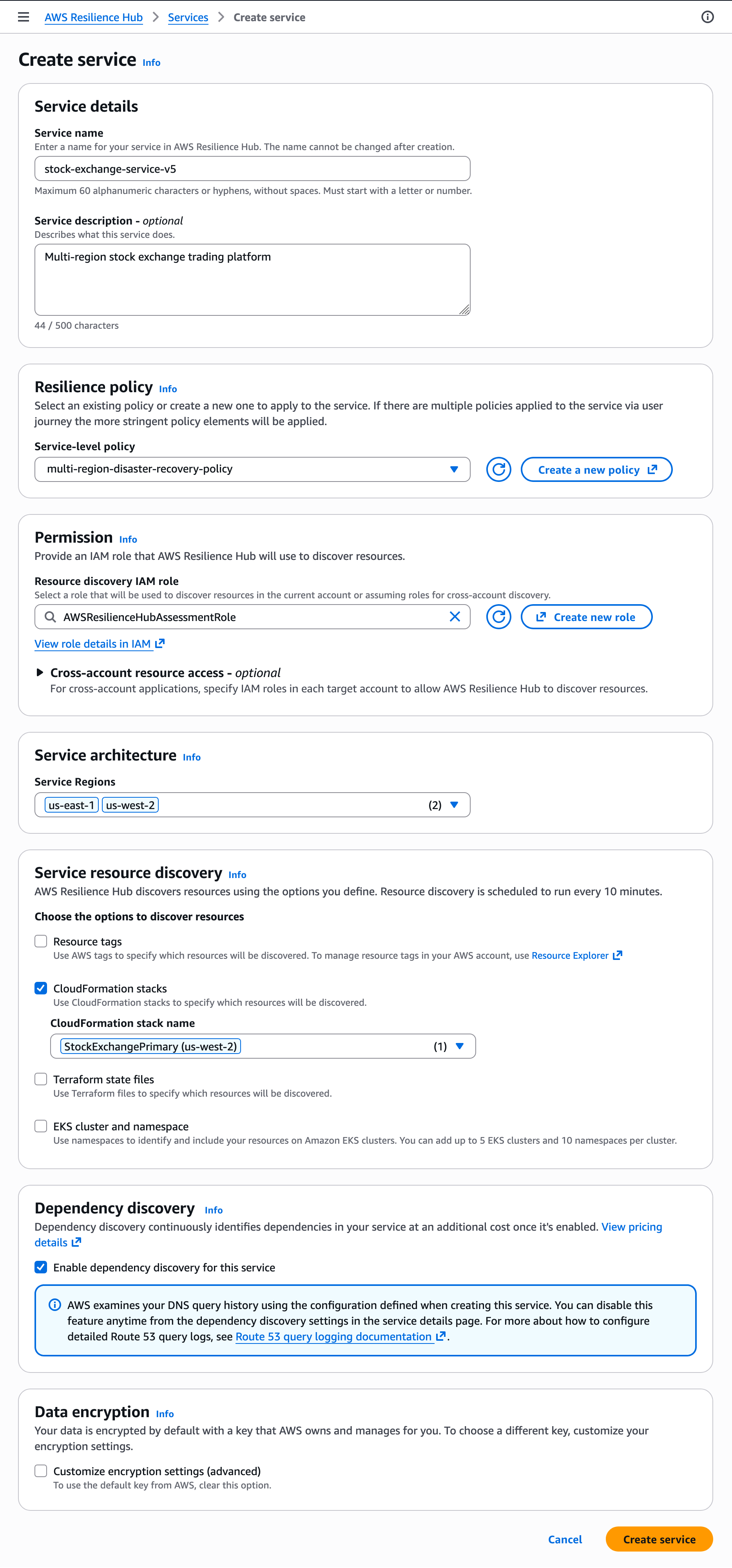
Now, you can run your first assessment with the service creation complete and a policy applied. Choose Run failure mode assessment in your service page and wait for the assessment to complete.
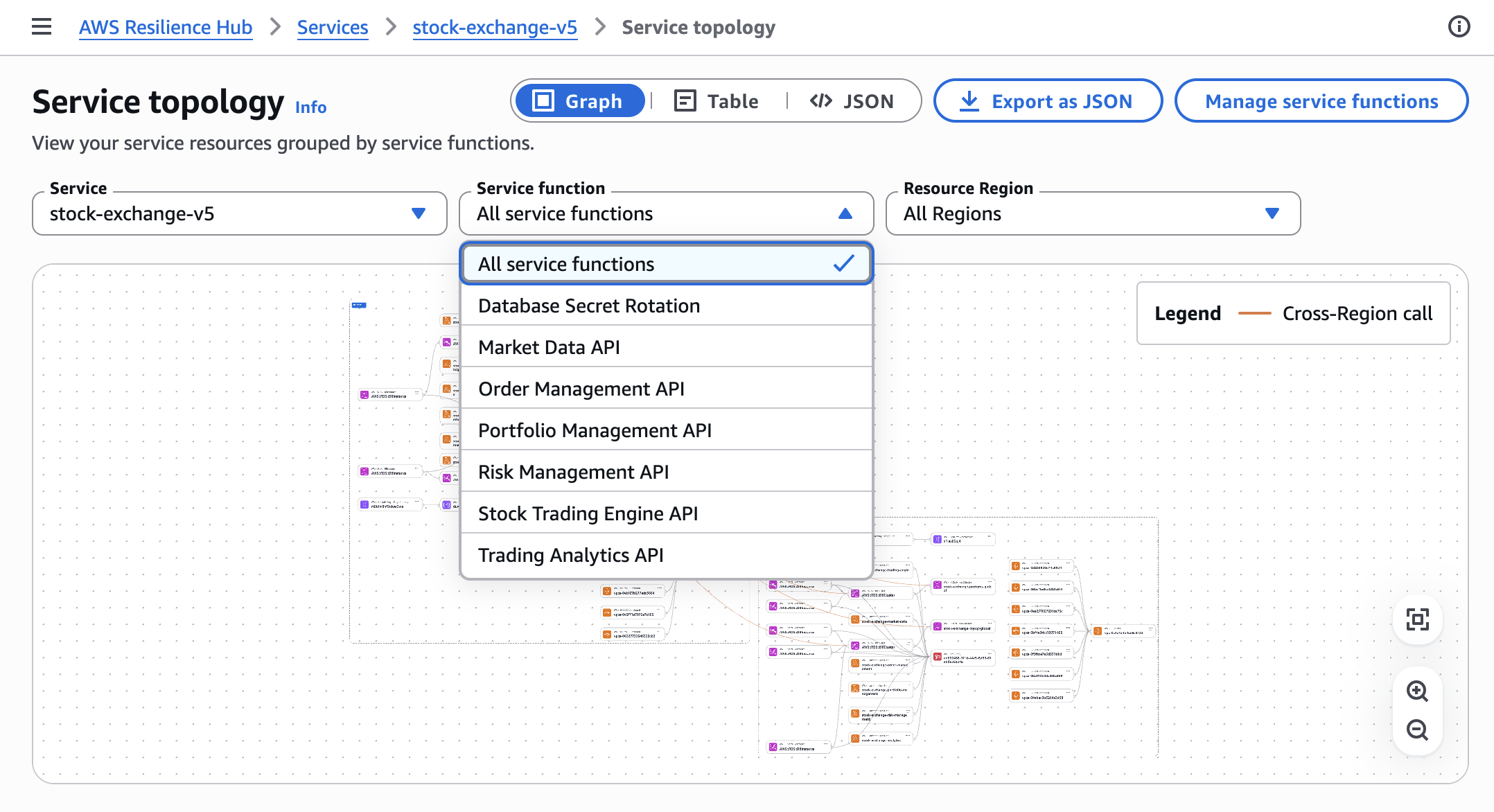
During the assessment, Resilience Hub assumes your invoker role, reads resources from your configured input sources, identifies parent-child relationships, queries the application topology service to map connections between resources, and builds a topology showing data flow, containment, and permissions.
By choosing Service topology, you can see service resources grouped by service functions in the graph, table, or JSON format.
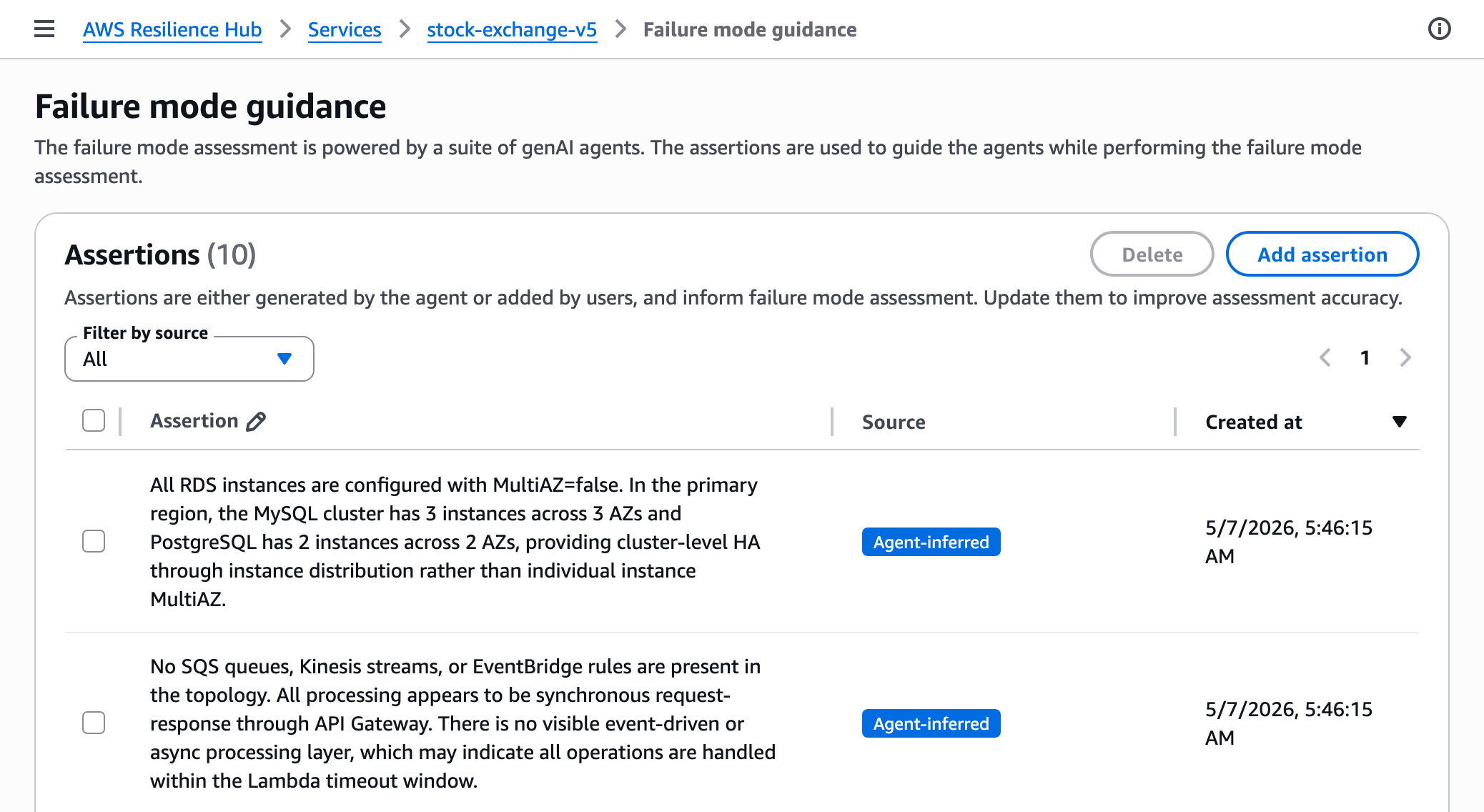
By choosing Failure mode guidance, you can add assertions used to guide the agents while performing the failure mode assessment. Assertions are either generated by the agent or added by users. You can update them to improve assessment accuracy.
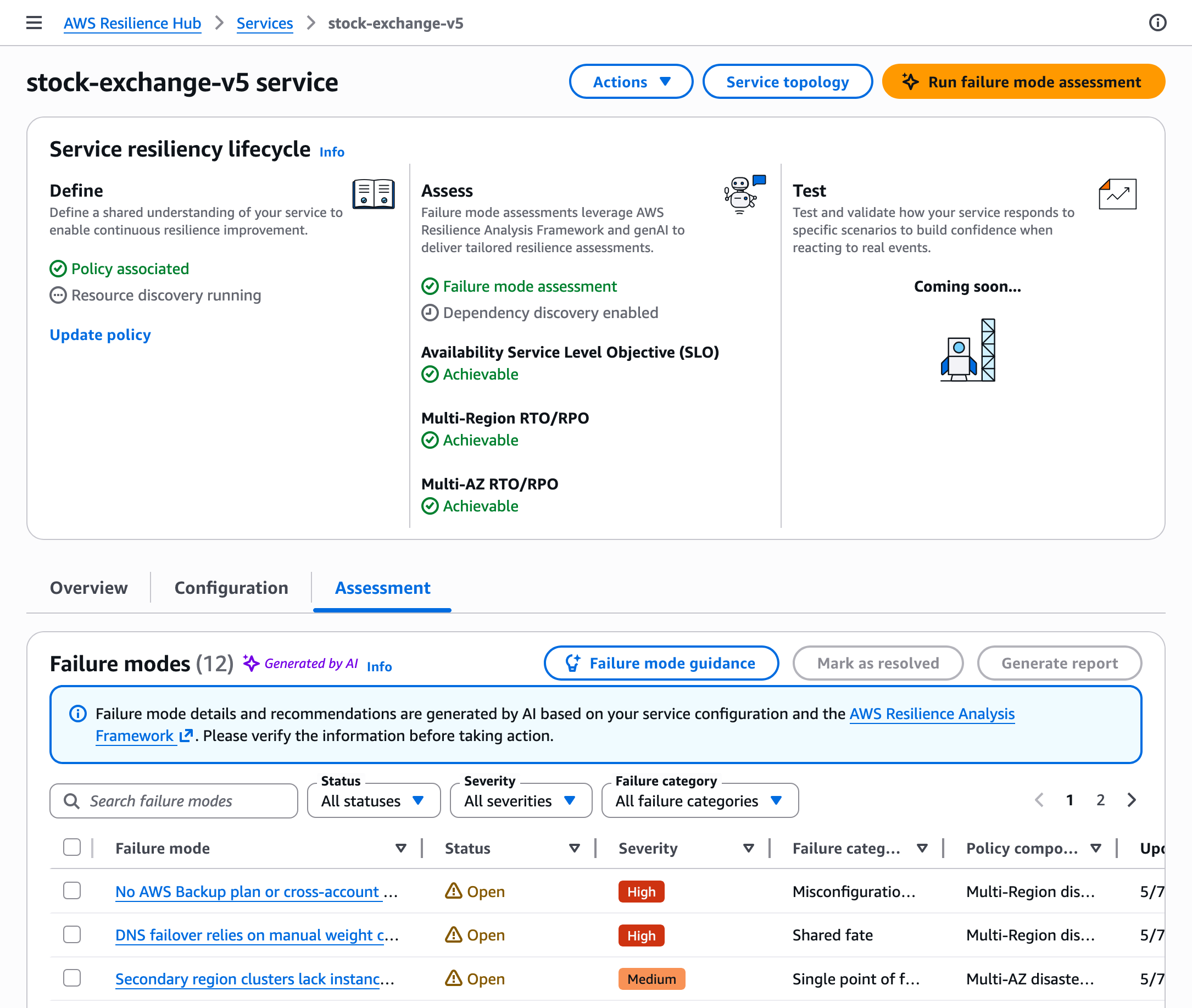
Once the assessment is complete, you can review findings and recommendations in the Assessment tab of your service page. Each finding tells you what the failure mode is, why it matters for your architecture, how to fix it, and which policy requirement it relates to.
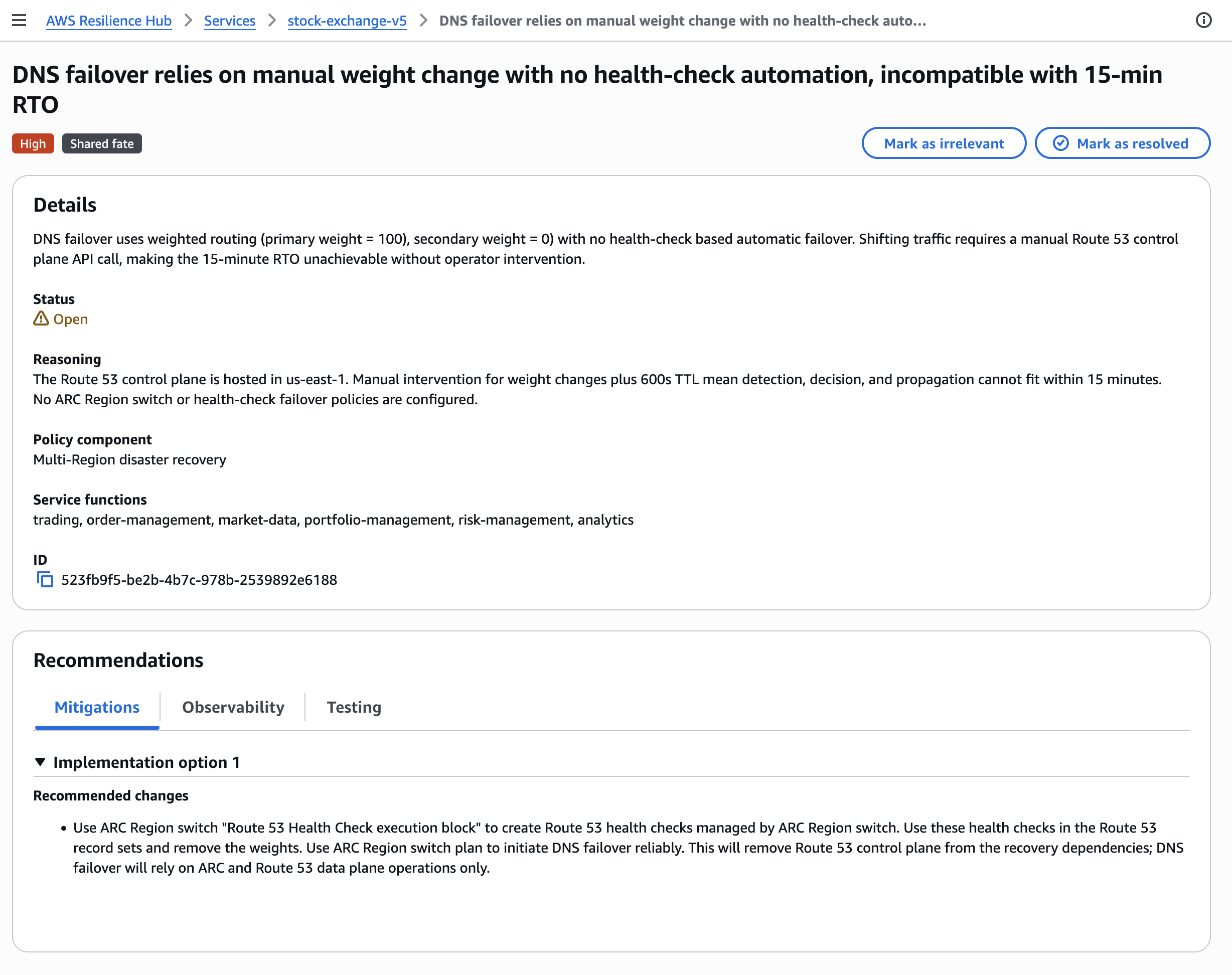
You can choose Mark as resolved to implement the recommendation or Mark as irrelevant if the finding doesn’t apply to your use case.
If you’re an existing Resilience Hub customer, Resilience Hub provides migration APIs to simplify the transition of your previous applications. These APIs convert your previous assessment policies to new resilience policies, map your previous applications to the new model, such as multiple related applications to one system with multiple services.
For more information about new features, visit the AWS Resilience Hub User Guide.
Now available
The next generation of AWS Resilience Hub is now generally available in AWS commercial Regions where Resilience Hub is available. For Regional availability and the future roadmap, visit the AWS Capabilities by Region.
Resilience Hub uses a new service-based pricing model. Pricing includes two failure mode assessments per month for services, and optionally automated dependency assessment. You can try AWS Resilience Hub free. For pricing details, visit the AWS Resilience Hub pricing page.
Give the new AWS Resilience Hub a try in the Resilience Hub console and send feedback to AWS re:Post for Resilience Hub or through your usual AWS Support contacts.
— Channy

Introducing the next generation of Amazon OpenSearch Serverless for building your agentic AI applications
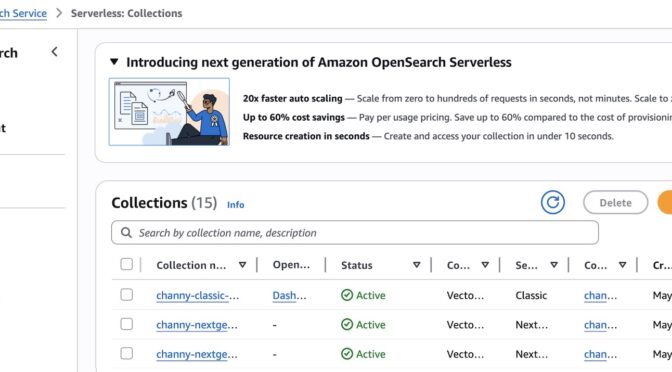
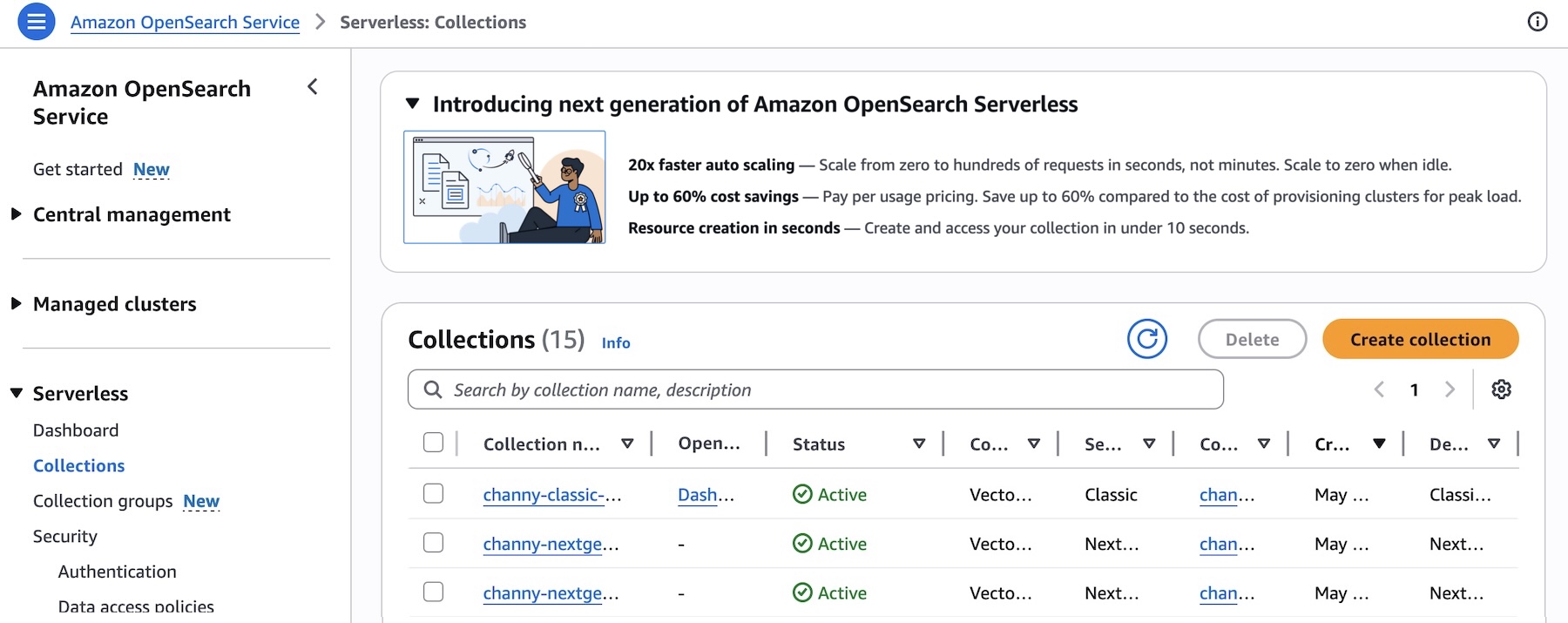
Today, we’re announcing the next generation of Amazon OpenSearch Serverless, a fully managed search and vector engine designed for customers building AI agents. The next generation of OpenSearch Serverless scales from zero to thousands of requests per second and back to zero when idle, offering up to 60% cost savings compared to the cost of OpenSearch Service clusters provisioned for peak capacity.
The next generation of OpenSearch Serverless creates resources in seconds and scales capacity up to 20 times faster than the previous generation. With instant resource creation and native integrations with AI development platforms like Vercel and Kiro, you can deploy production-ready search and vector backends for your AI agents in minutes without managing infrastructure.
The next generation of OpenSearch Serverless in action
To get started with the next generation of OpenSearch Serverless, choose Create collection in the Serverless menu in the Amazon OpenSearch Service console.

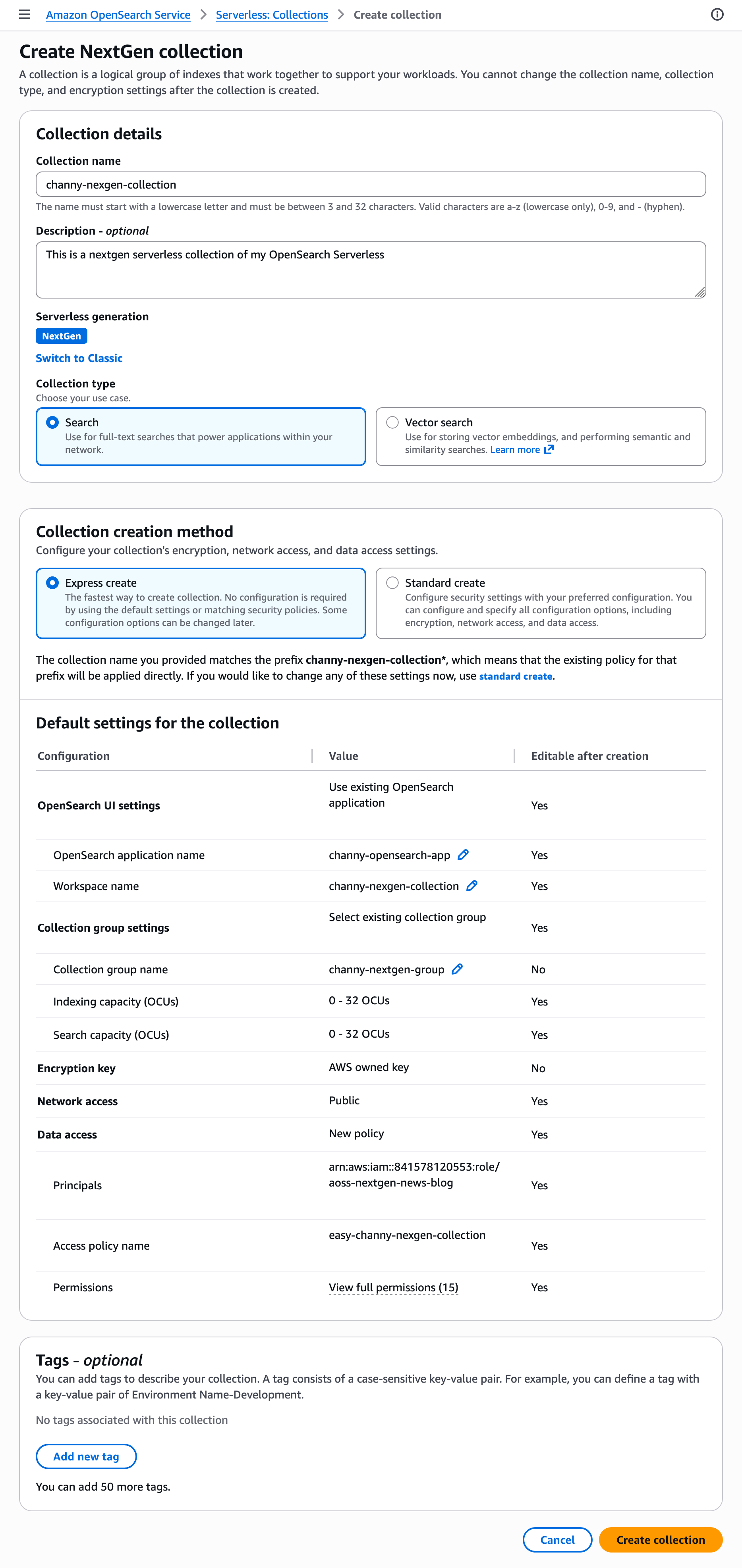
Create NextGen collection with instant auto scaling and scale-to-zero for cost optimization. At launch, we support full-text search and vector search only for the collection type. If you want to use the existing OpenSearch Serverless infrastructure, choose Switch to Classic.
Choose Express create, the fastest way to create collection. No configuration is required—the default settings and matching security policies are applied automatically. Some configuration options can be changed later.

When you choose Create collection, OpenSearch Serverless will provision resources in seconds.
You can also create a collection of OpenSearch Serverless with AWS Command Line Interface (AWS CLI) or AWS SDKs. Here is a sample CLI command to create a collection group.
aws opensearchserverless create-collection-group
--name channy-nextgen-group
--standby-replicas ENABLED
--generation NEXTGEN
--description "My NextGen collection group"
--capacity-limits '{
"maxIndexingCapacityInOCU": 10,
"maxSearchCapacityInOCU": 10,
"minIndexingCapacityInOCU": 0,
"minSearchCapacityInOCU": 0
}'
--region "us-east-1"
Now, you can create a collection that inherits the generation from its parent collection group. Supported collection types: SEARCH and VECTORSEARCH.
aws opensearchserverless create-collection
--name channy-nextgen-collection
--type SEARCH
--collection-group-name channy-nextgen-group
--standby-replicas ENABLED
--description "My collection in NextGen group"
--region "us-east-1"
To learn more about managing the next generation of OpenSearch Serverless, visit the Amazon OpenSearch Serverless documentation.
Building your agents faster with OpenSearch Serverless
To support building production-ready agent applications in Vercel, you can now create a new OpenSearch collection or connect your existing OpenSearch Serverless collection within the Vercel console. Create a search backend in seconds and add features on-demand as your application grows. To learn more, visit AWS for Vercel.

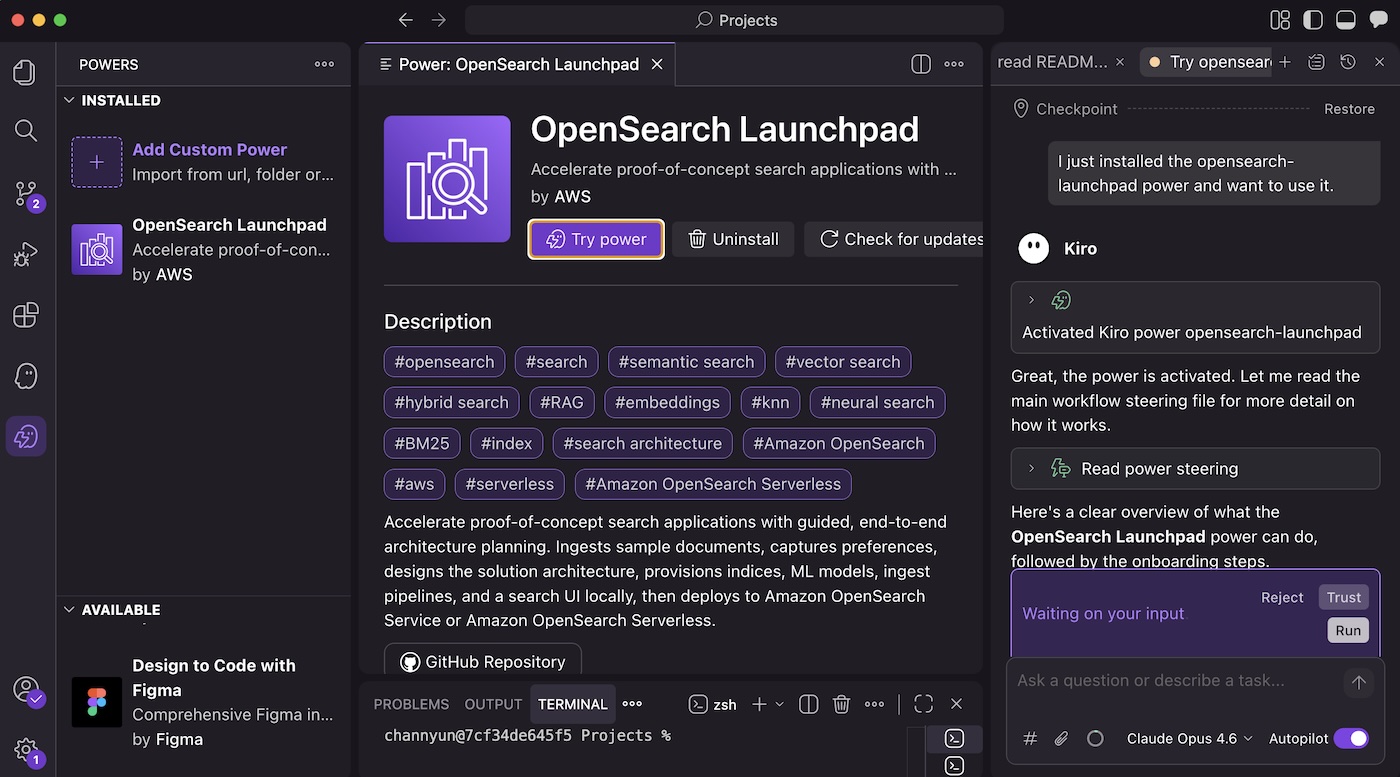
You can go from idea to working prototype in minutes using Claude Code, Cursor, and Kiro. OpenSearch Agent Skills provide a repository of skills that bring OpenSearch intelligence directly into your agent. Each skill encapsulates domain knowledge, best practices, and multi-step execution logic for a specific workflow–so your agent not only gets results, but understands how they were achieved. You can also use the OpenSearch Launchpad in Kiro Powers to accelerate search applications with guided, end-to-end architecture planning.

Now available
The next generation of Amazon OpenSearch Serverless is generally available today and is available in all AWS commercial Regions where Amazon OpenSearch Serverless is currently available.
The next generation of OpenSearch Serverless charges for the compute you use in OpenSearch Compute Units (OCUs) for indexing, search, and GPU acceleration. You are charged separately for storage in GB-month. For more information, see Amazon OpenSearch Service Pricing.
Give it a try and send feedback to the AWS re:Post for Amazon OpenSearch Service or through your usual AWS Support contacts.
— Channy

Reconstructing an Akira Ransomware Kill Chain from Perimeter and Endpoint Logs, (Wed, May 27th)
Most Akira write-ups focus on the ransom note or the encryption routine. By the time those show up the interesting forensic work is over. The questions that matter to defenders sit earlier. How did they get in. When did they get domain admin. What did they touch before the binary fired. Those answers live in the days before impact. They sit in two log sources that almost never get joined. The perimeter firewall and the Windows event channel.
An Example of Stack String in High Level Language, (Sat, May 23rd)
This week, I’m attending the SEC670[1] training (“Red Teaming Tools – Developing Windows Implants, Shellcode, Command and Control”). From my point of view, this training fits perfectly with FOR610 or FOR710 (malware analysis) because it addresses malware from the opposite: Instead of performing reverse engineering, you write malicious code! Always interesting to have another point of view.
Cross-Platform NPM Stealer, (Fri, May 22nd)
I found a Node.js stealer that looked pretty well obfuscated. The file was not running out-of-the-box because it was uploaded on VT as “extracted-decoded.js” (and reformated). The SHA256 is 049300aa5dd774d6c984779a0570f59610399c71864b5d5c2605906db46ddeb9[1]. It did not run properly in a sandbox so only a static analysis was performed.
PowerShell is now notarized and hardened for macOS
We’re excited to announce that the PowerShell packages for macOS are now properly notarized and
hardened, meeting both Apple’s security requirements and Microsoft’s internal compliance standards.
This has been one of the most consistently requested improvements from our macOS community, and
we’re glad to finally deliver it.
What changed
Starting with the next release, the PowerShell .pkg installer and tarball for macOS are:
- Notarized by Apple — macOS no longer warns you that PowerShell is from an unidentified
developer - Hardened — the PowerShell binary and its libraries are built with the security entitlements
Apple recommends for distributed software
This update also includes a fix that properly sets the file permissions on files contained in the
tarball. These fixes are included in the next maintenance releases of PowerShell 7.4 and higher.
What this means for you
If you’ve been working around Gatekeeper warnings, adjusting security settings, running xattr
commands, or guiding users through extra steps to install PowerShell, you no longer need to.
For most users, no action is required. Install or update PowerShell as you normally would.
Documentation
For installation instructions and the latest release, see the Install PowerShell 7 on macOS.
Thank you
This work closes more than 14 long-standing GitHub issues. Thank you to everyone in the community
who filed issues, tested workarounds, and kept this on our radar.
Jason Helmick
Sr. Product Manager, PowerShell
The post PowerShell is now notarized and hardened for macOS appeared first on PowerShell Team.
Selective HTTP Proxying in Linux, (Thu, May 21st)
Recently, Rob wrote about a tool, Proxifier, that can intercept requests from specific processes. Proxifier is available for Windows, macOS, and Android. But I have not seen a generic Linux option yet. The advantage of a tool like Proxifier is the ability to target specific software. For debugging, reverse engineering, and similar tasks, selecting a specific process is quite useful, as it creates less noise to sift through and simplifies analysis.
TeamPCP Supply Chain Campaign: Activity Through 2026-05-17, (Mon, May 18th)
Simple bypass of the link preview function in Outlook Junk folder, (Thu, May 14th)
Besides serving as a place where Microsoft Outlook places suspected spam, the Outlook Junk folder has one additional function that can be quite helpful when it comes to identifying malicious messages. Any e-mail placed in this folder is stripped of all formatting, and destinations of all links included in the message become visible to the user, as you can see in the following images which show the same e-mail when it is placed in the inbox, and when it is placed in the Junk folder.