
![[GUEST DIARY] Tearing apart website fraud to see how it works., (Wed, May 13th)](https://www.ironcastle.net/wp-content/uploads/2026/05/status-4.gif)
[This is a Guest Diary by Joshua Nikolson, an ISC Intern and part of the SANS.edu Bachelor's degree in Applied Cybersecurity (BACS) program.]
Monthly Archives: May 2026
Amazon Redshift introduces AWS Graviton-based RG instances with an integrated data lake query engine
This post was originally published on this site
Since 2013, Amazon Redshift has given the full power of a data warehouse in the cloud, at a fraction of the on-premises cost. Every architectural generation—from dense compute to Amazon RA3 instances, from provisioned to Amazon Redshift Serverless—has made each query cheaper, faster, and more efficient than the last.
For over a decade, as data volumes have grown and analytics requirements have evolved, organizations increasingly leverage both data warehouse tables for structured, frequently-accessed data and data lakes for cost-effective storage of diverse datasets. Add AI agents to the mix and they query your data warehouse at a scale that dwarfs typical human usage, leading to spiraling operational costs.
Amazon Redshift has doubled down on its core strengths to meet the demands of any workload — whether driven by humans or AI agents. For example, in March 2026, Amazon Redshift improved the performance of business intelligence (BI) dashboards and ETL workloads by speeding up new queries by up to 7 times. This significantly improves the response times of low-latency SQL queries, such as those used in near-real-time analytics applications, BI dashboards, ETL pipelines, and autonomous, goal-seeking AI agents.
Today, we’re announcing Amazon Redshift RG instances, a new instance family powered by AWS Graviton. RG instances deliver better performance, running data warehouse workloads up to 2.2x as fast as RA3 instances at 30% lower price per vCPU. Their integrated data lake query engine lets you run SQL analytics across your data warehouse and data lake from a single engine with performance up to 2.4x as fast as RA3 for Apache Iceberg and up to 1.5x as fast as RA3 for Apache Parquet. This blend of speed, cost efficiency, and an integrated data lake query engine makes Redshift RG instances well-suited to handle the high query volumes and low-latency requirements of today’s analytics and agentic AI workloads.
You can compare new RG instances and current RA3 instances:
| Current RA3 Instance | Recommended RG instance | vCPU | Memory (GB) | Primary Use Case |
ra3.xlplus |
rg.xlarge |
4 | 32 | Small cluster departmental analytics |
ra3.4xlarge |
rg.4xlarge |
12 → 16 (1.33:1) | 96 GB → 128 GB (1.33:1) | Standard production workloads, medium data volumes |
This approach reduces total analytics costs for customers running combined data warehouse and data lake workloads, while simplifying operations through a single system for querying both warehouse tables and Amazon Simple Storage Service (Amazon S3) data lakes. We recommend using the AWS Pricing Calculator with your specific workload patterns to estimate savings.
Getting started with Amazon Redshift RG instances
You can launch new clusters or migrate existing clusters through the AWS Management Console, AWS Command Line Interface (AWS CLI), or AWS API. The integrated data lake query engine is enabled by default.
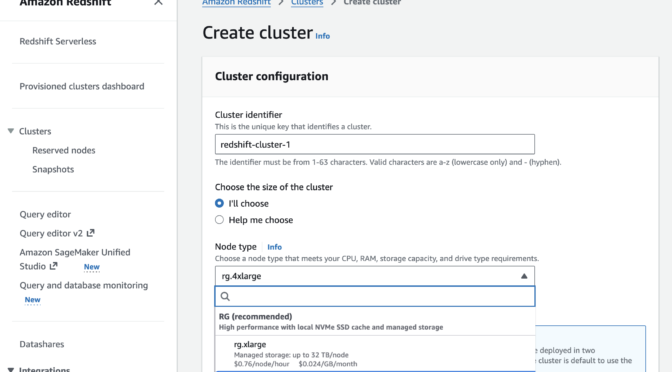
In the Amazon Redshift console, you can choose new RG instances when you create a cluster.
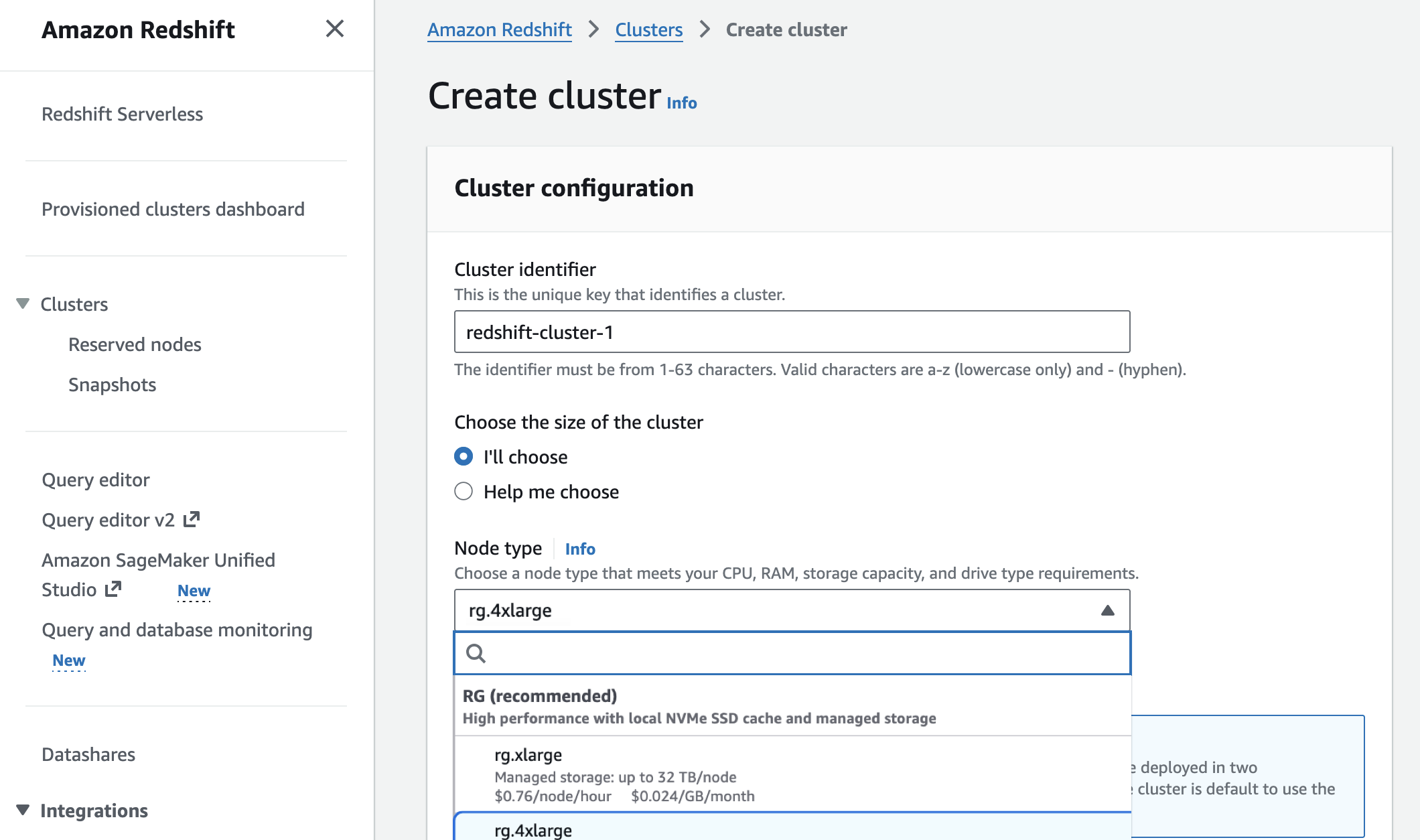
You can migrate previous-generation instances to RG instances with optimal paths based on your cluster configuration to estimate costs, validate compatibility, and automate execution.
- Elastic Resize—in-place migration with 10-15 minutes downtime for compatible configurations
- Snapshot and Restore—create a RG cluster from an RA3 snapshot. This is best for customers who want to make configuration changes during the migration
Your external tables, schemas, and query syntax—including existing Spectrum queries—remain unchanged. There is no need to recreate external tables or modify application code. To learn more, visit the Redshift Management Guide.
Amazon Redshift now executes data lake queries on cluster nodes—the same compute that processes data warehouse workloads. As a result, Amazon Redshift Spectrum is no longer required. Data lake queries stay within your VPC boundary, use existing IAM roles, and incur zero per-terabyte scanning charges. This removes the $5/TB Spectrum scanning fees that previously added to total Redshift costs.
Now available
Amazon Redshift RG instances are now available in the following AWS Regions: US East (N. Virginia, Ohio), US West (N. California, Oregon), Asia Pacific (Hong Kong, Hyderabad, Jakarta, Malaysia, Melbourne, Mumbai, Osaka, Seoul, Singapore, Sydney, Taiwan, Tokyo), Canada (Central), Europe (Frankfurt, Ireland, Milan, London, Paris, Spain, Stockholm), Middle East (UAE), and South America (São Paulo). For Regional availability and a future roadmap, visit the AWS Capabilities by Region. For Redshift Provisioned, you can select On-Demand Instances with hourly billing and no commitments or choose Reserved Instances for cost savings. To learn more, visit the Amazon Redshift Pricing page.
Give RG instances a try in the Redshift console and send feedback to AWS re:Post for Amazon Redshift or through your usual AWS Support contacts.
— Channy

Apple Patches Everything, (Mon, May 11th)
This post was originally published on this site
Apple today released its typical feature update across it's operating systems (iOS, iPadOS, macOS, tvOS, watchOS, vision OS). With this update, Apple patched 84 different vulnerabilities. Updates are available for the "26" series of operating systems, as well as for the previous "18" version of iOS/iPadOS, and two versions back for macOS (version 14 and 15).
AWS Weekly Roundup: Amazon Bedrock AgentCore payments, Agent Toolkit for AWS, and more (May 11, 2026)
This post was originally published on this site
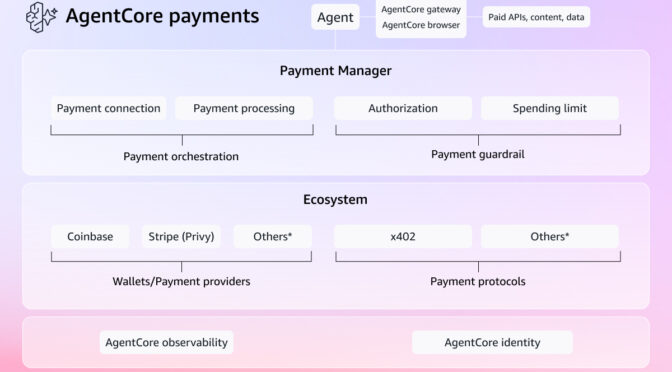
My most exciting news of last week: Amazon Bedrock AgentCore previewed the first managed payment capabilities enabling AI agents to autonomously access and pay for APIs, MCP servers, web content, and other agents. Built in partnership with Coinbase and Stripe, it removes the undifferentiated heavy lifting of building customized systems for billing, credential management, and compliance.
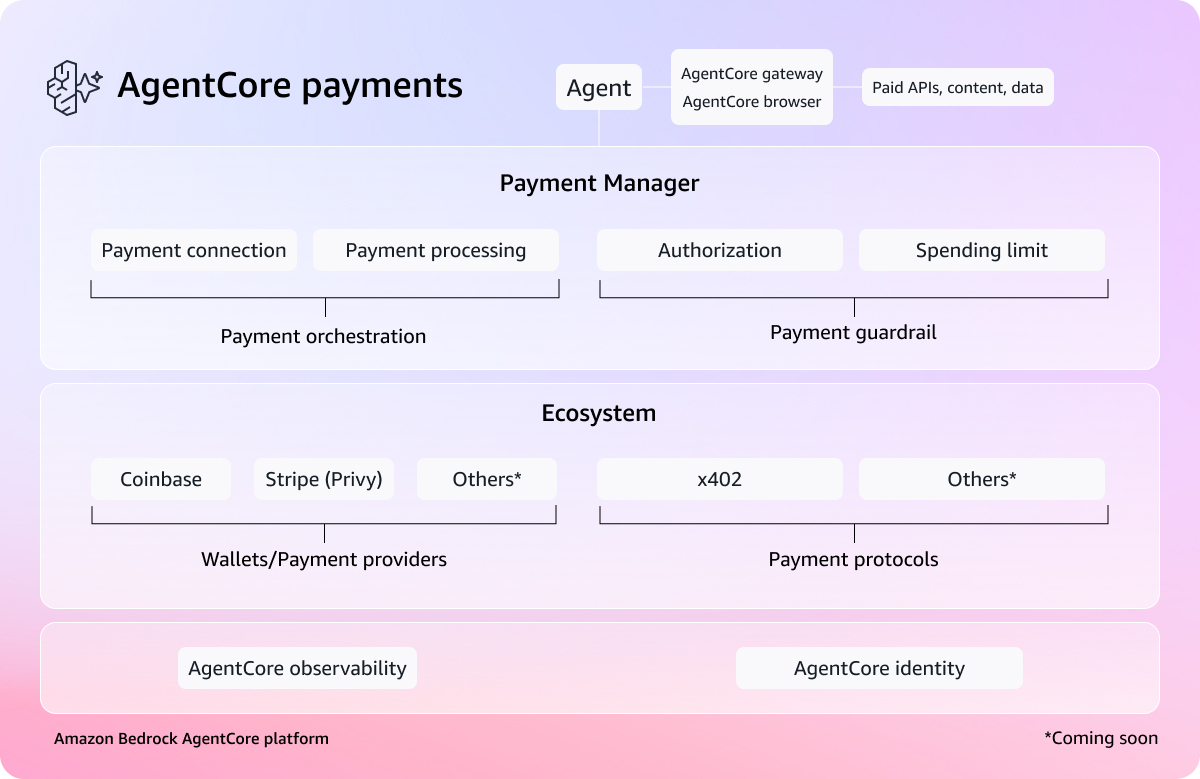
You can connect a Coinbase CDP wallet or Stripe Privy wallet as a payment connection, set session-level spending limits, and your agent transacts autonomously during execution. What excites me most is what AgentCore payments can unlock—like a research agent that can pay for real-time market data on the fly, or a coding agent calling paid APIs mid-task.
To learn more, visit the blog post, dive deeper using the documentation, and get started with the AgentCore CLI.
Last week’s launches
Here are last week’s launches that caught my attention:
- Agent Toolkit for AWS – A production-ready suite of tools and guidance, available at no additional charge, that helps AI coding agents build on AWS with fewer errors, lower token costs, and enterprise-grade security controls. The Agent Toolkit for AWS is the successor to the MCP servers, plugins, and skills available on AWS Labs. To get started, visit the quick start guide or browse the available skills and plugins on GitHub.
- AWS MCP Server GA – You can use a managed remote Model Context Protocol (MCP) server that gives AI agents and coding assistants secure, authenticated access to all AWS services through a small, fixed set of tools. It is part of the Agent Toolkit for AWS. To learn more, visit Seb Stormacq’s blog post.
- Amazon WorkSpaces for AI agents (Preview) – You can use AI agents to securely access and operate desktop applications through managed WorkSpaces environments. This capability allows organizations to automate everyday workflows at scale while maintaining full enterprise-grade governance and compliance. To learn more, visit Micah Walter’s blog post.
- Amazon EC2 M8idn/M8idb and R8idn/R8idb instances – These instances are powered by custom sixth-generation Intel Xeon Scalable processors available only on AWS and the latest sixth-generation AWS Nitro cards. These instances deliver up to 43% better compute performance per vCPU compared to previous-generation instances. M8idn/R8idn instances offer up to 600 Gbps network bandwidth, and M8idb/R8idb instances deliver up to 300 Gbps EBS bandwidth.
For a full list of AWS announcements, be sure to keep an eye on the What’s New with AWS page.
Additional updates
Here are some additional news items that you might find interesting:
- Valkey turns two – Valkey stands as proof that open, community-driven technology innovates faster, scales further, and delivers more value than any single-vendor model. Valkey has surpassed 100 million Docker pulls (up 17x year over year) and attracted more than 225 contributors who have submitted over 1,500 pull requests, roughly double the development pace of Redis over the same period. You can also use the latest Valkey 9.0 in Amazon ElastiCache.
- Query billion-scale vectors with SQL – You can learn how to query Amazon S3 Vectors from Amazon Aurora PostgreSQL-Compatible Edition using standard SQL, and how to combine vector similarity results with relational filters in a single query, for example, finding the most semantically similar products and then filtering by price, stock status, or tenant in one SQL statement.
- Building an end-to-end agentic SRE using AWS DevOps Agent – Learn how to configure DevOps Agent Spaces that define an investigation scope, integrating seamlessly with Amazon CloudWatch, Splunk, GitHub, and Slack. You can also learn how to trigger automated investigations via webhooks, generate mitigation plans, and hand off agent-ready specs to coding agents like Kiro for implementation.
For a full list of AWS blog posts, be sure to keep an eye on the AWS Blogs page.
Learn more about AWS, browse and join upcoming AWS-led in-person and virtual events, startup events, and developer-focused events as well as AWS Summits and AWS Community Days. Join the AWS Builder Center to connect with builders, share solutions, and access content that supports your development.
That’s all for this week. Check back next Monday for another Weekly Roundup!
— Channy

Why we use CAPTCHAs, (Mon, May 11th)

Another Universal Linux Local Privilege Escalation (LPE) Vulnerability: Dirty Frag, (Fri, May 8th)
This post was originally published on this site
Less than two weeks after the public disclosure of the Copy Fail vulnerability (CVE-2026-31431), another local privilege escalation (LPE) vulnerability in the Linux kernel has been revealed. Referred to as "Dirty Frag," this vulnerability was discovered and reported by Hyunwoo Kim (@v4bel) [1]. In this diary, I will provide a brief background on Dirty Frag, and discuss its relationship to Copy Fail. I will then discuss how to mitigate Dirty Frag and outline recommended next steps for system owners.
Modernize your workflows: Amazon WorkSpaces now gives AI agents their own desktop (preview)
This post was originally published on this site
Enterprises face a significant challenge when deploying AI agents: the desktop and legacy applications that power most business workflows are simply inaccessible to modern AI systems. According to a 2024 Gartner report, 75% of organizations run legacy applications that lack modern APIs, and 71% of Fortune 500 companies operate critical processes on mainframe systems without adequate programmatic access. For many organizations, this has meant choosing between delaying AI adoption or undertaking expensive and risky modernization projects.
Today, we are announcing that Amazon WorkSpaces now enables AI agents to securely operate desktop applications without requiring application modernization. The same managed virtual desktops that millions of employees use and trust can now also serve AI agents, turning WorkSpaces into infrastructure for scaling enterprise productivity, not just delivering it. Because agents operate within your existing WorkSpaces environment, there are no APIs to build, no application migrations to plan, and no new infrastructure to manage.
Some of our customers had an early opportunity to give their agents a WorkSpace. Chris Noon, Director, Nuvens Consulting shared with us, “WorkSpaces lets our clients give AI agents the same secure, governed desktop environment their employees already use — no custom API integrations, full audit trails, and enterprise-grade isolation out of the box. For regulated industries, that’s not a nice-to-have — it’s the baseline.”
Secure cloud desktop access for AI agents
With WorkSpaces, AI agents can securely access and operate desktop applications running inside managed WorkSpaces environments to complete complex business workflows. Agents authenticate through AWS Identity and Access Management (IAM) and connect via Workspaces with complete audit trails available through AWS CloudTrail and Amazon CloudWatch. Because agents operate within secure WorkSpaces environments rather than on local machines, your existing security controls and compliance policies remain fully intact.
Amazon Workspaces supports the industry-standard Model Context Protocol (MCP), which means WorkSpaces works with any agent framework, such as LangChain, CrewAI and Strands Agents.
Let’s try it out
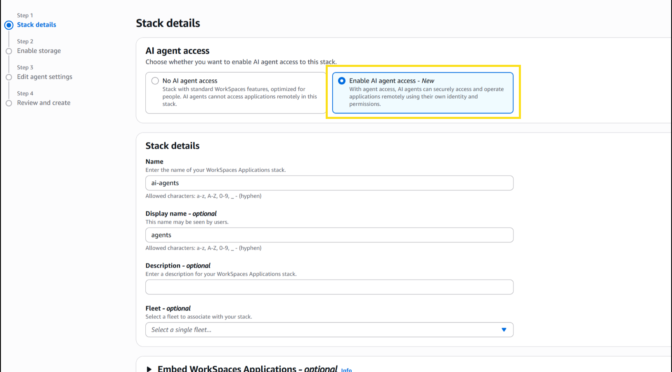
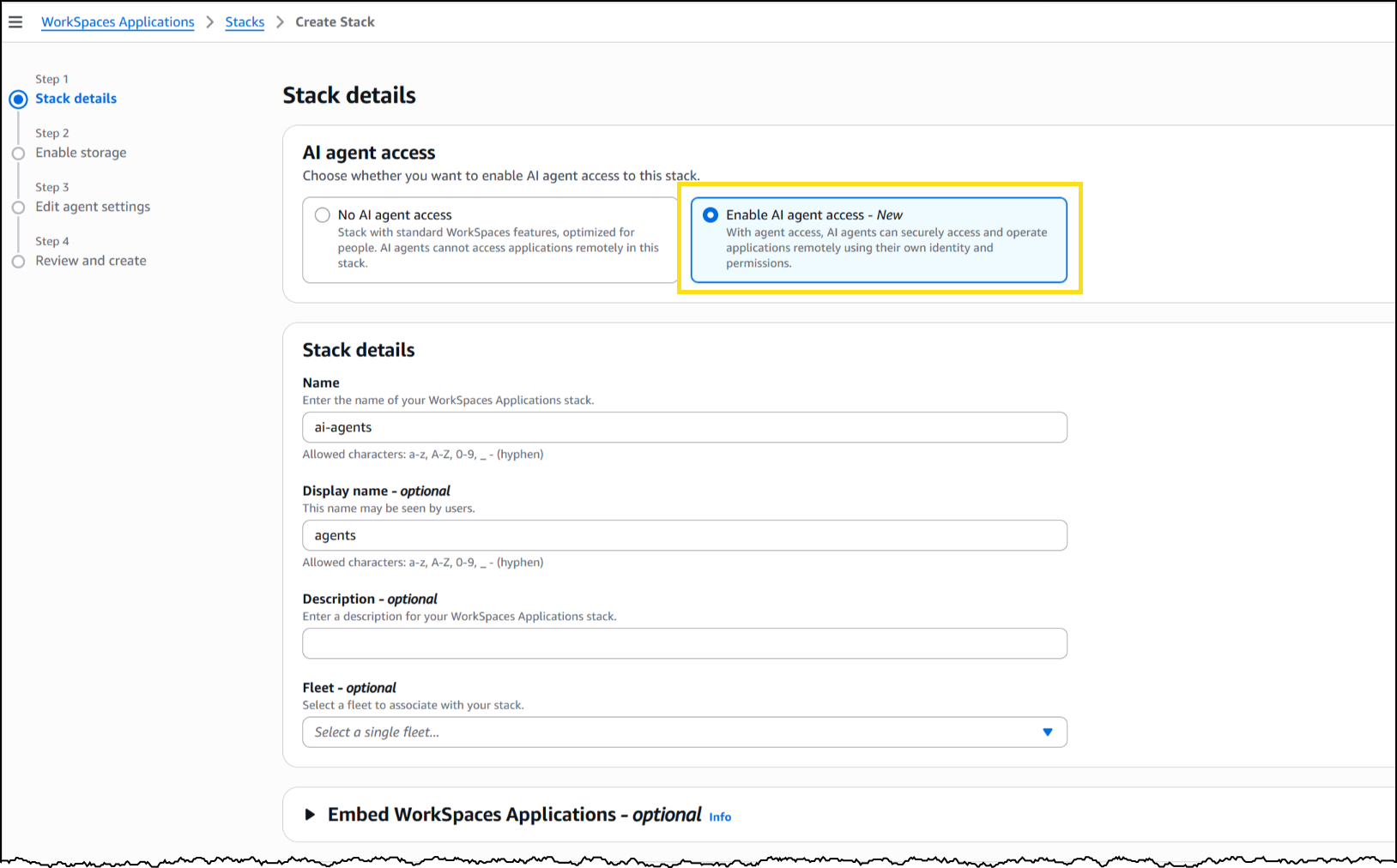
To set up a WorkSpaces environment for AI agents, I started in the AWS Management Console by creating a new WorkSpaces Applications stack—the environment definition that controls how agents connect and what they’re allowed to do.
From the Amazon WorkSpaces console, I chose Create stack and configured the basics: name, fleet association, and VPC endpoints. In Step 3 of the stack creation workflow, I noticed the new AI agents section with two options. The first, No AI agent access, is the default configuration for standard WorkSpaces designed for people. The second, Add AI Agents, allows AI agents to securely access and operate applications using their own identity and permissions. I selected Add AI Agents to enable agent connections on this stack.
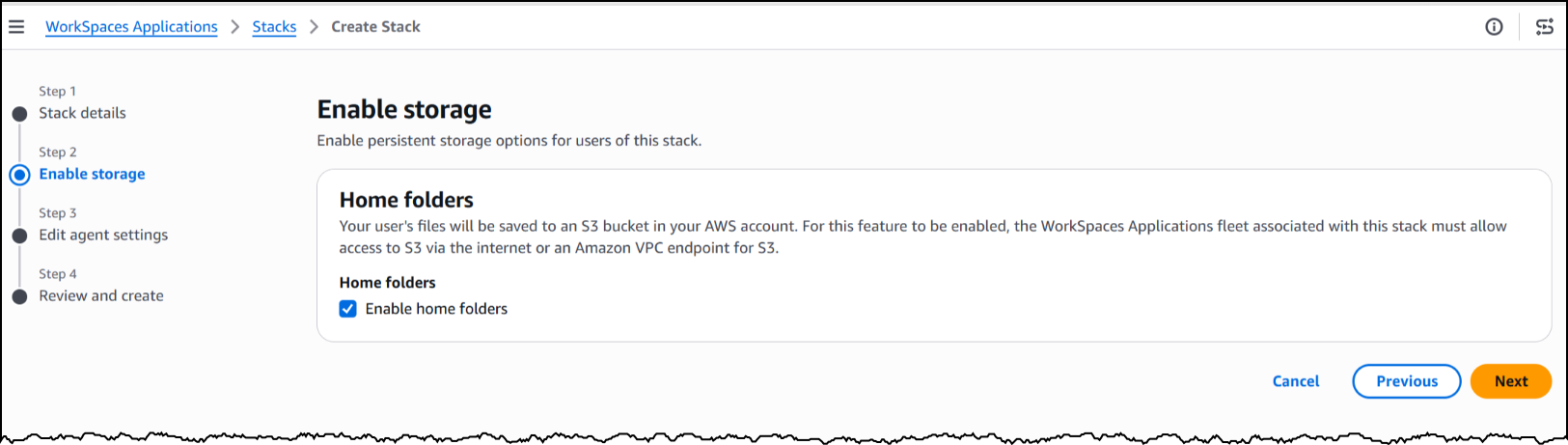
Next, I will enable storage before configuring the agent access settings to define how agents interact with the desktop.
Under Agent features, I enabled three capabilities. Computer input allows the agent to click, type, and scroll within the desktop. Computer vision allows the agent to capture screenshots of the desktop, which is how it “sees” the application. Finally, screenshot storage configures where session screenshots are stored for audit and debugging.
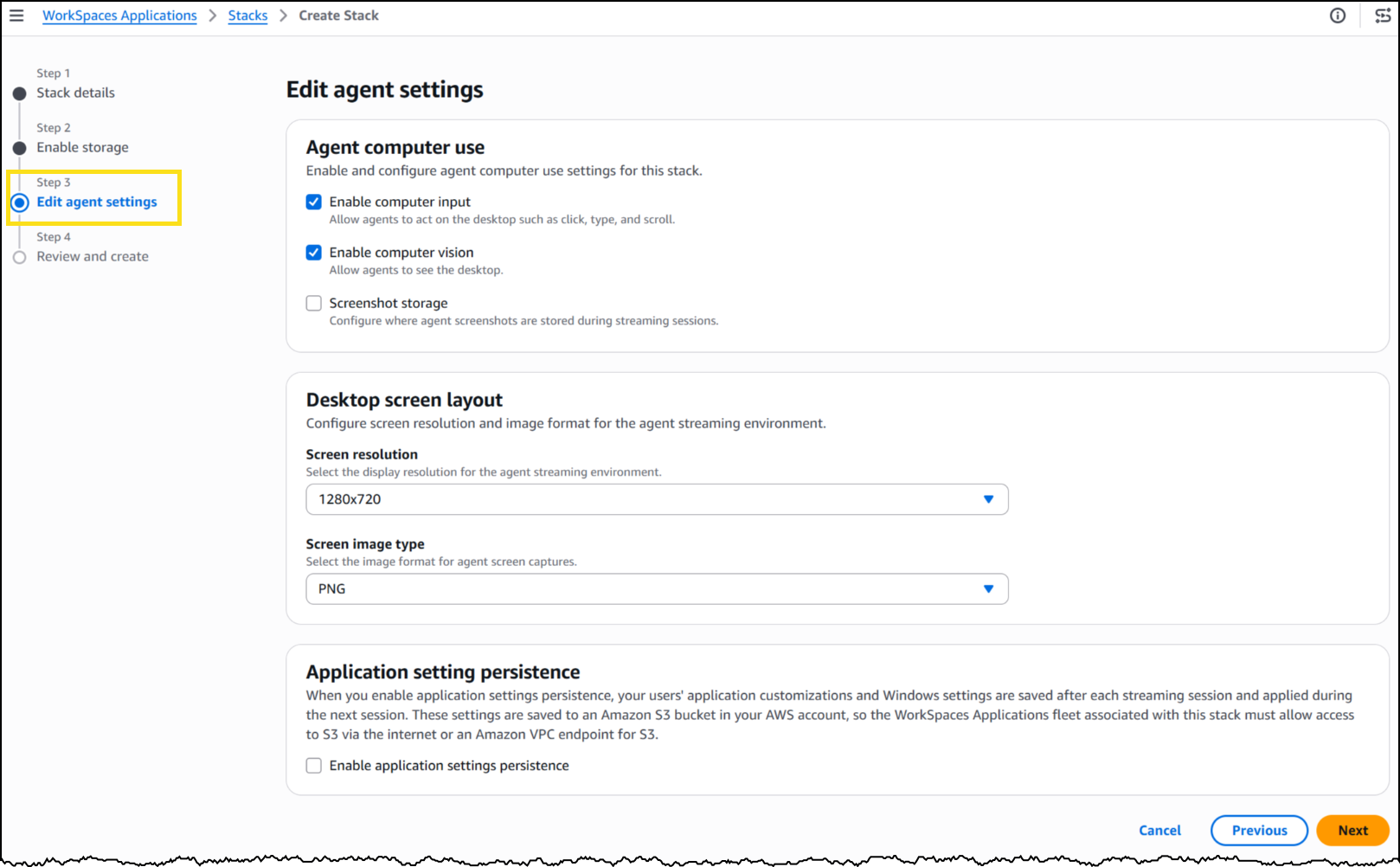
Under Desktop screen layout, I set the screen resolution to 1280×720 and image format to PNG. The resolution determines the fidelity of what the agent sees during a session—a complex application with dense UI elements might benefit from higher resolution, while a terminal-style interface works well at 720p.
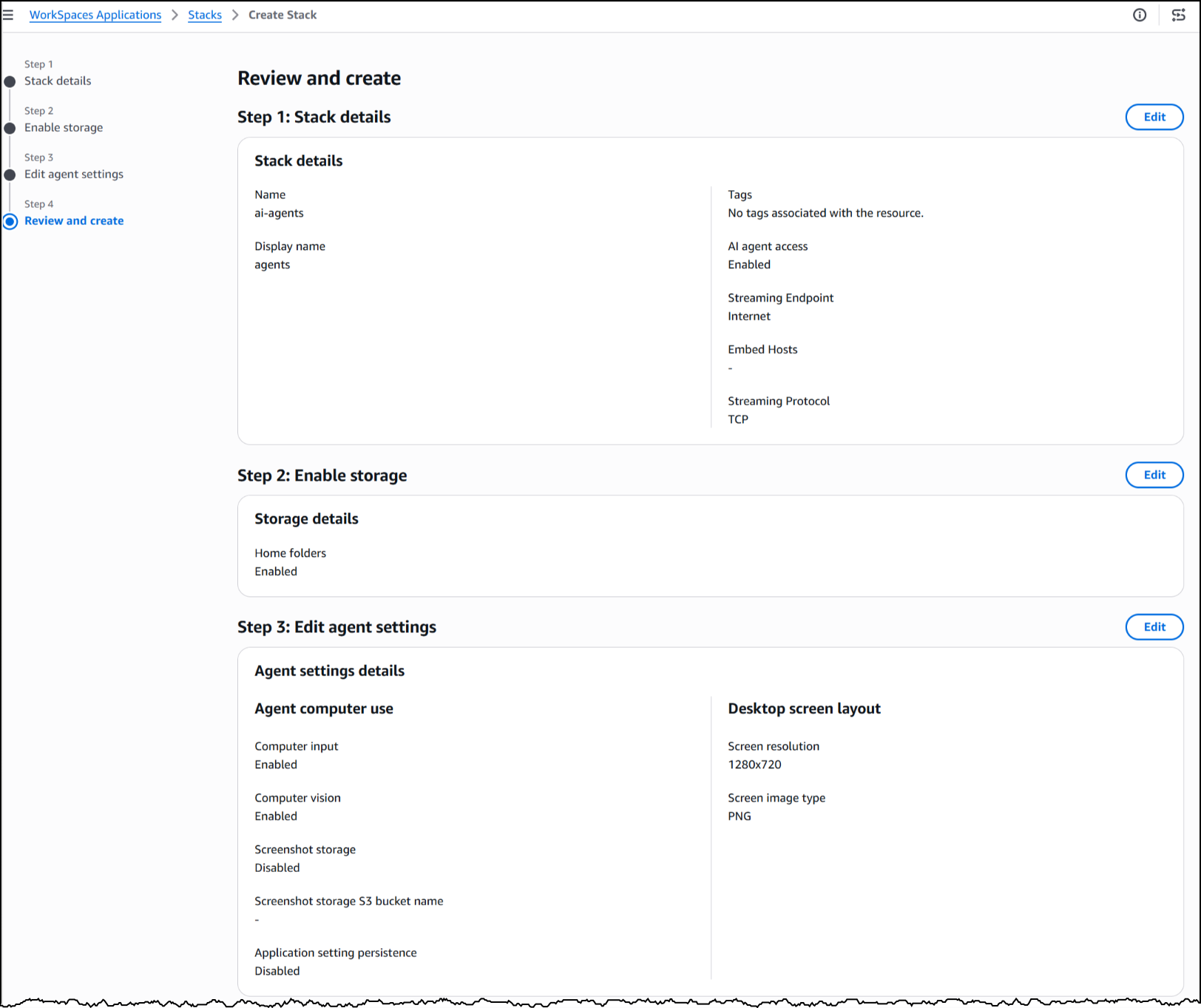
With my stack configured, WorkSpaces exposes a managed MCP endpoint. I pointed my agent framework to this endpoint, provided IAM credentials for authentication, and my agent began interacting with the desktop applications installed on the fleet’s image.
To see this in action, here’s an agent built with the Strands Agent SDK and Amazon Bedrock handling a prescription refill, looking up the patient record, searching for the medication, placing the order, and confirming a successful refill, all inside a sample pharmacy system with no API.
The application doesn’t know an agent is driving it. Nothing about the software was modified, rebuilt, or integrated. The agent worked with it exactly as it exists today.
Now available
This feature is available today in public preview at no additional cost in US East (N. Virginia, Ohio), US West (Oregon), Canada (Central), Europe (Frankfurt, Ireland, Paris), and Asia (Tokyo, Mumbai, Sydney, Seoul, Singapore) Regions.
Get started building today using our GitHub repo, or visit the WorkSpaces page for more details.
SSL.com rotates their root certificate today, (Tue, May 5th)
This post was originally published on this site
I just got an email from SSL.com last night, they are rotating out their root certificate today (May 5,2026). This is normal, business as usual stuff for a CA, but certificates get used for all kinds of things, and sometimes they aren't used like they should be, so sometimes hiccups happen.