Announcing Microsoft Desired State Configuration v3.2.0

This post was originally published on this site

Announcing DSC v3.2.0

We’re excited to announce the General Availability of Microsoft Desired State Configuration (DSC)
v3.2.0. This release delivers new built-in Windows resources, experimental Bicep integration via
gRPC, version pinning, a richer expression language, custom functions, and continued adapter
improvements. All these changes are driven by real-world use, partner feedback, and community
contributions. Special thanks to the WinGet team and the incredible DSC community.

For background on the DSC v3 platform, see:

What’s New in DSC v3.2

New Windows resources

DSC v3.2 ships several new built-in Windows resources, significantly expanding what you can manage
out of the box:

  • Microsoft.Windows/Service — manage Windows services
  • Microsoft.Windows/OptionalFeatureList — manage Windows Optional features
    • Requires using the ZIP package of DSC for now
  • Microsoft.Windows/FeatureOnDemandList — manage Windows Features on Demand
    • Requires using the ZIP package of DSC for now
  • Microsoft.Windows/FirewallRuleList — manage Windows Firewall rules
  • Microsoft.OpenSSH.SSHD/sshd_config — manage entire SSH server configuration
  • Microsoft.OpenSSH.SSHD/Subsystem and Microsoft.OpenSSH.SSHD/SubsystemList — manage SSH server
    configuration for subsystem entries
  • Microsoft.OpenSSH.SSHD/Windows — manage Windows SSH server configuration, such as the default
    shell

These resources are included in the DSC package and ready to use without additional installation.

Bicep integration via gRPC (experimental)

DSC v3.2 introduces a gRPC server, enabling Bicep to orchestrate DSC resources directly. The
dsc-bicep-ext extension is now included in the MSIX package and exposed on PATH.

This is the foundation for the Bicep to DSC integration. Write your configuration in Bicep. Bicep
orchestrates the execution directly over gRPC without going through ARM.

Extended WhatIf support

DSC v3.2 adds --what-if support to the dsc resource set command, letting you preview changes
before applying them:

dsc resource set --what-if --resource Microsoft.Windows/Service --input '{
    "name": "spooler",
    "startupType": "disabled"
}'

Prior to this release there was no way to run --what-if against individual resources. You could
use the --what-if flag with the dsc config set command, which ran all resources in your
configuration in --what-if mode.

Resource manifests can now declare whatIfReturns to describe what a what-if operation returns,
enabling richer preview output across resources.

Version pinning

DSC v3.2 supports pinning configuration documents to specific versions of DSC and pinning resource
instances in configuration documents to specific versions of the resource.

Now you can author a DSC configuration document and ensure that it only executes when the given
versions of DSC and resources that are available on the system. Prior to this release, DSC always
used the latest version of a resource discovered on a system for configuration operations.

The following example shows how to pin a configuration document to a specific version of DSC using
the version directive and how to pin individual resource instances to specific versions using the
requireVersion field.

$schema: https://aka.ms/dsc/schemas/v3/bundled/config/document.json
directives:
  version: '=3.2.0' # This configuration is only valid for exactly version 3.2.0
resources:
- name: os
  type: Microsoft/OSInfo
  requireVersion: '^1.0' # Resource versions >= 1.0.0 and < 2.0.0 are valid
  properties: {}
- name: echo
  type: Microsoft.DSC.Debug/Echo
  requireVersion: '>=1.0.0, <1.3'
  properties:
    output: echo

When DSC evaluates a resource version pin in a configuration document, it looks for the latest
version of the resource that meets the given requirement. If no compatible version is discovered
on the system, DSC raises an error.

Starting with version 3.2, when you specify the version directive, DSC raises an error when the
version of DSC operating on the configuration document isn’t compatible.

Expression language improvements

Configuration documents now support a richer expression syntax:

  • Lambda expressions with map() and filter() functions (ARM syntax)
  • dataUri() and dataUriToString() functions
  • reference() usage inside copy loops
  • requireVersion replaces apiVersion for version requirements

These additions make configuration documents more expressive and reduce the need to duplicate
values across resources.

Adapter improvements

DSC 3.2 adds support for adapted resource manifests to the PowerShell adapters. Resource authors can
create adapted resource manifests that prevent adapters from needing to do more intensive
discovery operations.

This release also includes other improvements to the PowerShell adapters:

  • Added automatic conversion of PowerShell streams to DSC traces. Resource authors can participate
    in DSC’s tracing model by using the normal Write-* cmdlets.
  • Fixed passing credentials to adapted PSDSC resource instances.

Metadata and execution improvements

  • Microsoft.DSC metadata is now split into directives and executionInformation — cleaner
    separation of configuration intent from execution context.
  • _refreshEnv resource metadata updates Windows environment variables during deployment without
    requiring a restart.
  • Resource manifests can now specify requireSecurityContext per operation, helping users avoid
    problems where they retrieve data for a resource with a get or test operation and then get an
    access denied error when they try to run the set command.
  • Resources and extensions can now be marked as deprecated, with a deprecation message surfaced
    at runtime.

New extension capabilities

DSC 3.2 adds support for two new extension capabilities: importing configurations and retrieving
secrets.

You can use an extension with the import capability to process arbitrary files as DSC
configuration documents. For example, a hypothetical extension with this capability could transform
the following TOML snippet into a DSC configuration document:

# example.dsc.toml
[directives]
version = '3.2.0'
[resources.os]
type       = 'Microsoft/OSInfo'
properties = {}

The resulting DSC configuration document:

# effective DSC configuration document
$schema: https://aka.ms/dsc/schemas/v3/bundled/config/document.json
directives:
  version: '=3.2.0' # This configuration is only valid for exactly version 3.2.0
resources:
- name: os
  type: Microsoft/OSInfo
  properties: {}

When you use the --file option with the dsc config * commands, DSC checks the file extension to
see whether an extension can process that file. If there is no DSC extension that handles the given
file extension, DSC tries to parse the file as a configuration document.

You can use a DSC extension with the secret capability to retrieve secrets at runtime. Presenting
secret retrieval through the extension model enables DSC to be used with secrets in a variety of
contexts without requiring the core engine to handle these operations directly. This capability is
paired with the new secret() configuration expression for retrieving secrets by name.

Experimental PowerShell discovery extension

DSC now includes a discovery extension for finding DSC resources in PowerShell modules. This
extension looks for resource manifests and adapted resource manifests located inside PowerShell
modules on the system. This makes it possible for resource authors to ship DSC resources written
in PowerShell that are not PSDSC resources.

For example, with this extension, DSC could discover a resource implemented as a PowerShell script
as long as the module also includes a valid manifest for the resource.

Bug fixes

  • Fixed duplicate resources appearing in dsc resource list
  • Added a clear error when attempting to use DISM resources via Appx (previously a silent failure)
  • Fixed executionInformation in config export results
  • Fixed discovery failures when encountering unsupported manifests

Community contributions

DSC v3.2 reflects the work of an active and growing contributor community. The following community
members made notable contributions to this release:

  • @Gijsreyn (Gijs Reijn) — experimental PowerShell discovery extension, lambda/map/filter
    expressions, dataUri functions, adapted resource manifest fixes, and more.
  • @mimachniak — PowerShell adapter credentials fix for passing username and password.

Thank you to everyone who filed issues, tested previews, and submitted fixes during the DSC v3.2
release cycle.

Installing DSC

On Windows, you can install DSC from the Microsoft Store using winget. Installing from the Store
gives you automatic updates.

Search for the latest version of DSC:

winget search DesiredStateConfiguration --source msstore

Name                              Id           Version
------------------------------------------------------
DesiredStateConfiguration         9NVTPZWRC6KQ Unknown
DesiredStateConfiguration-Preview 9PCX3HX4HZ0Z Unknown

Install DSC using the id parameter:

# Install latest stable
winget install --id 9NVTPZWRC6KQ --source msstore
# Install latest preview
winget install --id 9PCX3HX4HZ0Z --source msstore

To install the ZIP package on Windows, Linux, or macOS:

  1. Download the latest release from the PowerShell/DSC repository.
  2. Expand the release archive.
  3. Add the folder containing the expanded archive contents to your PATH environment variable.

Support lifecycle

DSC follows semantic versioning. DSC v3.2.0 is the current stable release. Patch releases update
the third digit of the semantic version number — for example, 3.2.1 is a patch update to 3.2.0.

Stable releases receive patches for critical bugs and security vulnerabilities for three months
after the next stable release. For example, v3.2.0 is supported for three months after v3.3.0 is
released.

Always update to the latest patch version of the release you’re using.

Looking ahead

Work continues on DSC v3.3, with previews starting shortly after the v3.2.0 GA release.

Call to action

For more information about DSC, see the DSC documentation. We value your feedback. Stop by our
GitHub repository and let us know of any issues you find.

Jason Helmick

Sr. Product Manager, PowerShell

The post Announcing Microsoft Desired State Configuration v3.2.0 appeared first on PowerShell Team.
Top announcements of the What’s Next with AWS, 2026

This post was originally published on this site

Today at the What’s Next with AWS, Matt Garman, CEO of AWS, Colleen Aubrey, SVP Amazon Applied AI Solutions, Julia White, CMO of AWS, and OpenAI leaders discussed how they and their customers are changing how businesses operate with agents.

Here’s our roundup of the biggest announcements from the event:

Amazon Quick is an AI assistant for work that connects to all of them, learns what matters to you, and takes action on your behalf. Starting today, you can use the new desktop app, sign up for Free and Plus pricing plans, generate visual assets in the chat, and easily connect Quick to even more apps.

  • Quick’s new desktop app (Preview): You can create a personalized experience by staying connected to your local files, calendar, and communications without opening a browser.
  • New Free and Plus pricing plans for Quick: You can sign up within minutes using your personal email address or existing Google, Apple, Github, or Amazon credentials—no AWS account required.
  • Generate visual assets on the fly: Available today, Quick now lets you create polished documents, presentations, infographics, and images directly from the chat interface, no design skills or hours of formatting required.
  • Easily connect Quick to even more apps: Also available today, Quick is expanding its native integrations to include Google Workspace, Zoom, Airtable, Dropbox, and Microsoft Teams.

To learn more, visit the About Amazon News post.

Amazon Connect is expanding from a single product into a set of four agentic AI solutions designed to work within your existing workflows: Amazon Connect Decisions (supply chains), Talent (hiring), Customer (customer experience), and Health (health care).

  • Amazon Connect Decisions is a supply chain planning and intelligence solution that shifts teams from crisis management to proactive planning and decisioning. AI teammates, combining 30 years of Amazon operational science and 25+ specialized supply chain tools, adapt to your business, learn from your team, and continuously improve your operations.
  • Amazon Connect Talent (Preview) is an agentic AI hiring solution built for talent acquisition leaders managing scaled hiring. It delivers AI-led interviews, science-backed assessments, and consistent evaluation, helping recruiters hire high quality candidates faster while providing applicants with a flexible interview experience that reduces human preconceptions.
  • Amazon Connect Customer, previously known as Amazon Connect, delivers intelligent, personalized customer experiences across voice, chat, and digital channels. Amazon Connect Customer now offers new configuration capabilities that enable organizations to set up conversational AI in weeks, not months, and configure experiences without technical expertise.
  • Amazon Connect Health delivers agentic patient verification, appointment management, patient insights, ambient documentation, and medical coding — giving patients faster access to care, clinicians more time for care, and staff capacity for specialized work.

To learn more, visit the About Amazon News post.

AWS and OpenAI extended partnership
AWS and OpenAI are bringing the latest OpenAI models to Amazon Bedrock, launching Codex on Amazon Bedrock, and launching Amazon Bedrock Managed Agents, powered by OpenAI (all in limited preview), giving enterprises the frontier intelligence they want on the infrastructure they trust.

  • OpenAI models on Amazon Bedrock (Limited preview): The latest OpenAI models, including GPT-5.5 and GPT-5.4, will be available in preview on Amazon Bedrock. Use OpenAI’s frontier models through the same Bedrock APIs you already rely on, with unified security, governance, and cost controls. No additional infrastructure to configure, no new security model to learn.
  • Codex on Amazon Bedrock (Limited preview): You can access the OpenAI coding agent within the AWS environments where they already operate at scale. You can authenticate using their AWS credentials, process inference through Amazon Bedrock infrastructure, and apply Codex usage toward their AWS cloud commitments. Codex on Bedrock is available through the Bedrock API, starting with the Codex CLI, the Codex desktop app, and Visual Studio Code extension.
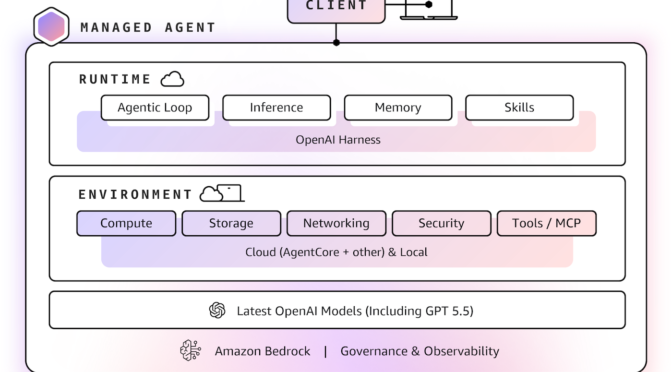
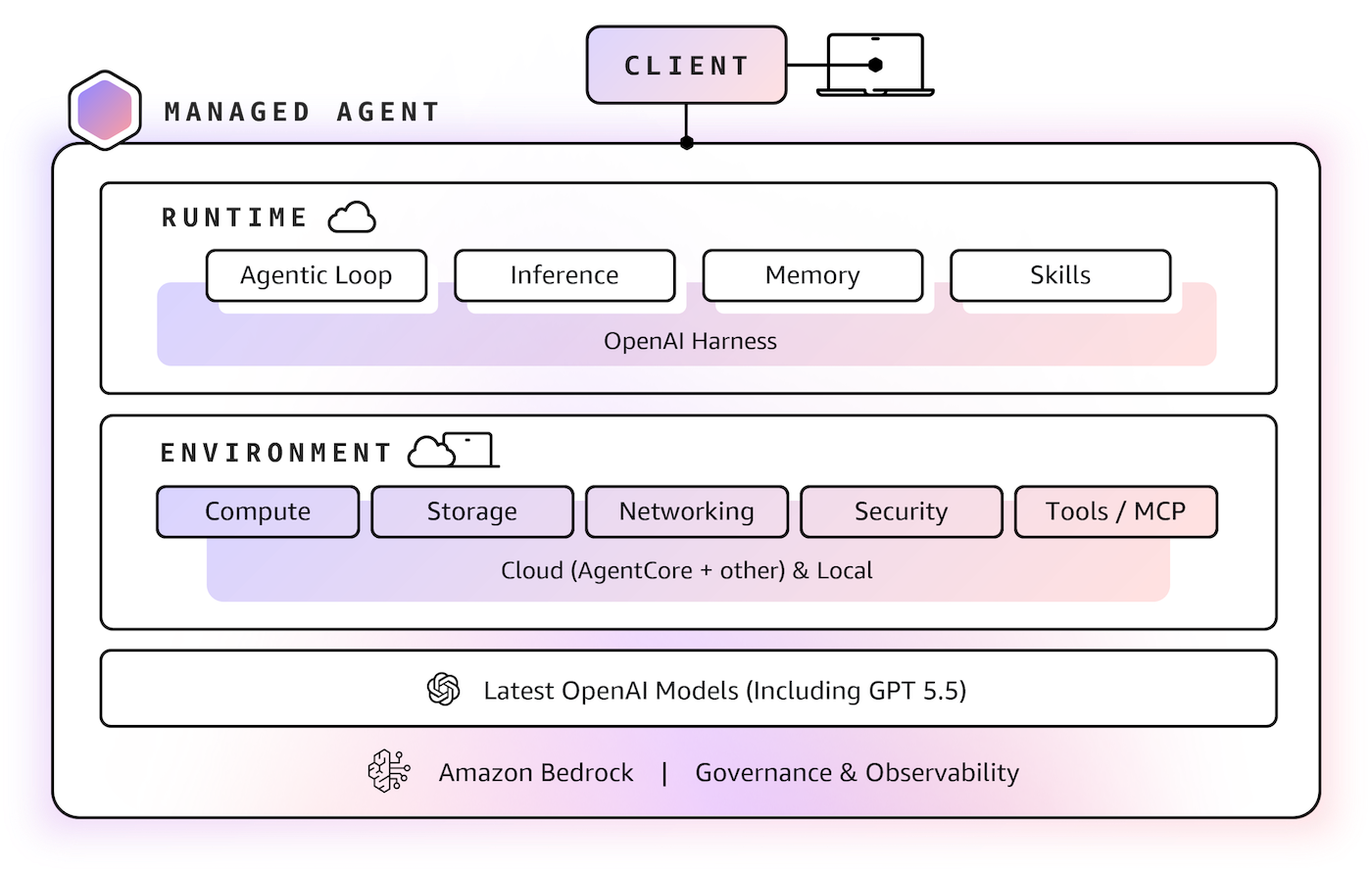
  • Amazon Bedrock Managed Agents, powered by OpenAI (Limited preview): Amazon Bedrock Managed Agents combines frontier AI models with trusted AWS infrastructure, enabling customers to quickly and easily build production-ready OpenAI-powered agents in the cloud. It is built with the OpenAI harness, which is engineered to unlock the full potential of OpenAI frontier models, delivering faster execution, sharper reasoning, and reliable steering of long-running tasks.

To learn more, visit the AWS What’s New post and About Amazon News post.

TeamPCP Supply Chain Campaign: Update 008 – 26-Day Pause Ends with Three Concurrent Compromises (Checkmarx KICS, Bitwarden CLI Cascade, xinference PyPI), CanisterSprawl npm Worm Identified, and Tier 1 Coverage Returns, (Mon, Apr 27th)

This post was originally published on this site

This update succeeds TeamPCP Supply Chain Campaign Update 007, published April 8, 2026, which left the campaign in credential-monetization mode following the Cisco source code theft via Trivy-linked credentials, Google GTIG's formal designation of the operators as UNC6780 (with their credential stealer named SANDCLOCK), and the lapsed CISA KEV remediation deadline for CVE-2026-33634 with no standalone federal advisory. The Sportradar publication deadline flagged in Update 007 (approximately April 10 to 11) lapsed without a public CipherForce dump, and CipherForce's leak infrastructure has remained offline. Twelve days after Update 007, the technical compromise picture changed sharply across the W17 window (April 20 through April 26).

Introducing Anthropic’s Claude Opus 4.7 model in Amazon Bedrock

This post was originally published on this site

Today, we’re announcing Claude Opus 4.7 in Amazon Bedrock, Anthropic’s most intelligent Opus model for advancing performance across coding, long-running agents, and professional work.

Claude Opus 4.7 is powered by Amazon Bedrock’s next generation inference engine, delivering enterprise-grade infrastructure for production workloads. Bedrock’s new inference engine has brand-new scheduling and scaling logic which dynamically allocates capacity to requests, improving availability particularly for steady-state workloads while making room for rapidly scaling services. It provides zero operator access—meaning customer prompts and responses are never visible to Anthropic or AWS operators—keeping sensitive data private.

According to Anthropic, Claude Opus 4.7 model provides improvements across the workflows that teams run in production such as agentic coding, knowledge work, visual understanding,long-running tasks. Opus 4.7 works better through ambiguity, is more thorough in its problem solving, and follows instructions more precisely.

  • Agentic coding: The model extends Opus 4.6’s lead in agentic coding, with stronger performance on long-horizon autonomy, systems engineering, and complex code reasoning tasks. According to Anthropic, the model records high-performance scores with 64.3% on SWE-bench Pro, 87.6% on SWE-bench Verified, and 69.4% on Terminal-Bench 2.0.
  • Knowledge work: The model advances professional knowledge work, with stronger performance on document creation, financial analysis, and multi-step research workflows. The model reasons through underspecified requests, making sensible assumptions and stating them clearly, and self-verifies its output to improve quality on the first step. According to Anthropic, the model reaches 64.4% on Finance Agent v1.1.
  • Long-running tasks: The model stays on track over longer horizons, with stronger performance over its full 1M token context window as it reasons through ambiguity and self-verifies its output.
  • Vision: the model adds high-resolution image support, improving accuracy on charts, dense documents, and screen UIs where fine detail matters.

The model is an upgrade from Opus 4.6 but may require prompting changes and harness tweaks to get the most out of the model. To learn more, visit Anthropic’s prompting guide.

Claude Opus 4.7 model in action
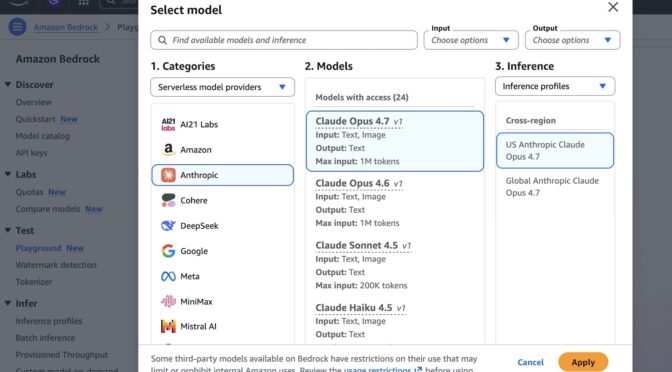
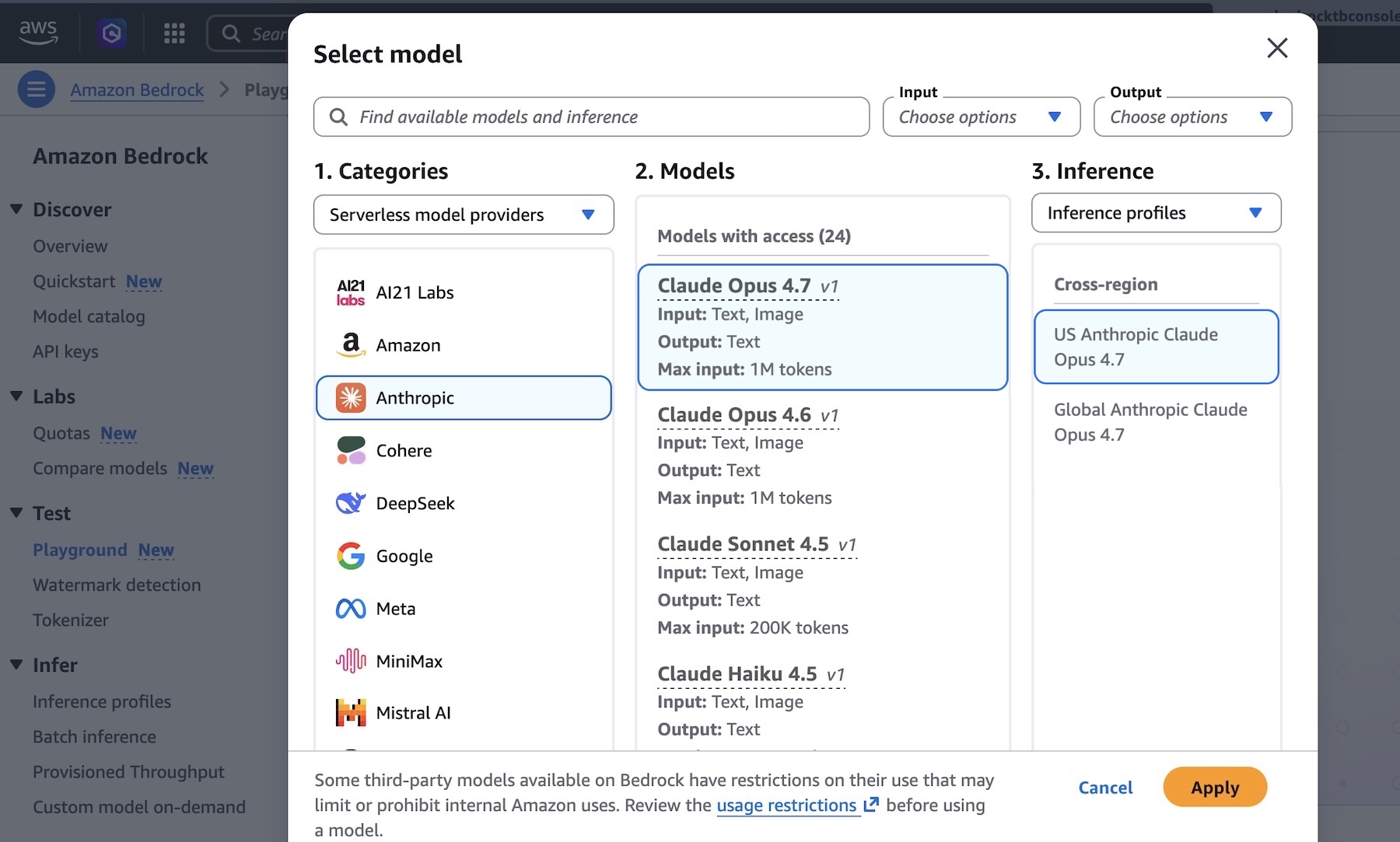
You can get started with Claude Opus 4.7 model in Amazon Bedrock console. Choose Playground under Test menu and choose Claude Opus 4.7 when you select model. Now, you can test your complex coding prompt with the model.

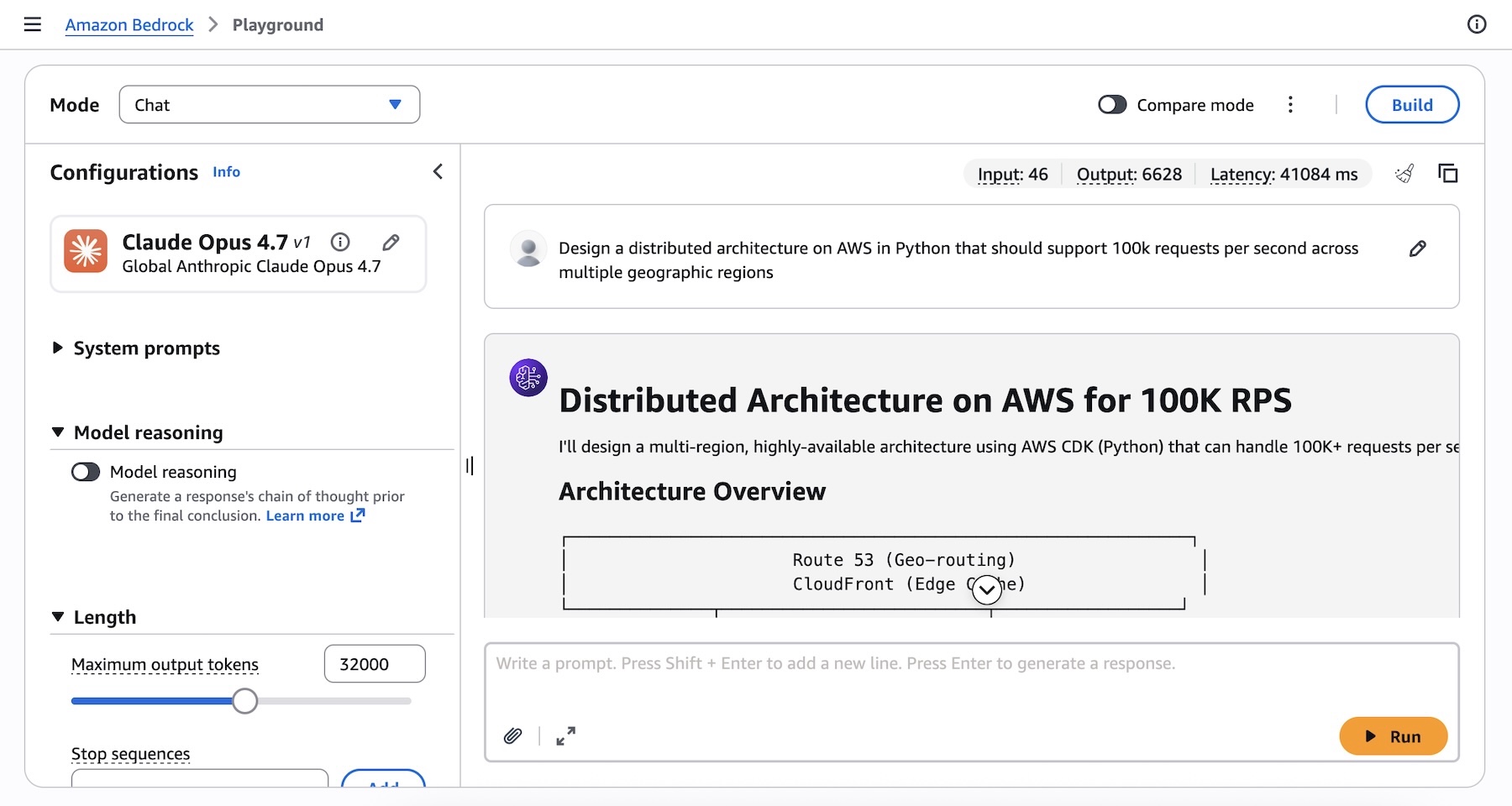
I run the following prompt example about technical architecture decision:
Design a distributed architecture on AWS in Python that should support 100k requests per second across multiple geographic regions.

You can also access the model programmatically using the Anthropic Messages API to call the bedrock-runtime through Anthropic SDK or bedrock-mantle endpoints, or keep using the Invoke and Converse API on bedrock-runtime through the AWS Command Line Interface (AWS CLI) and AWS SDK.

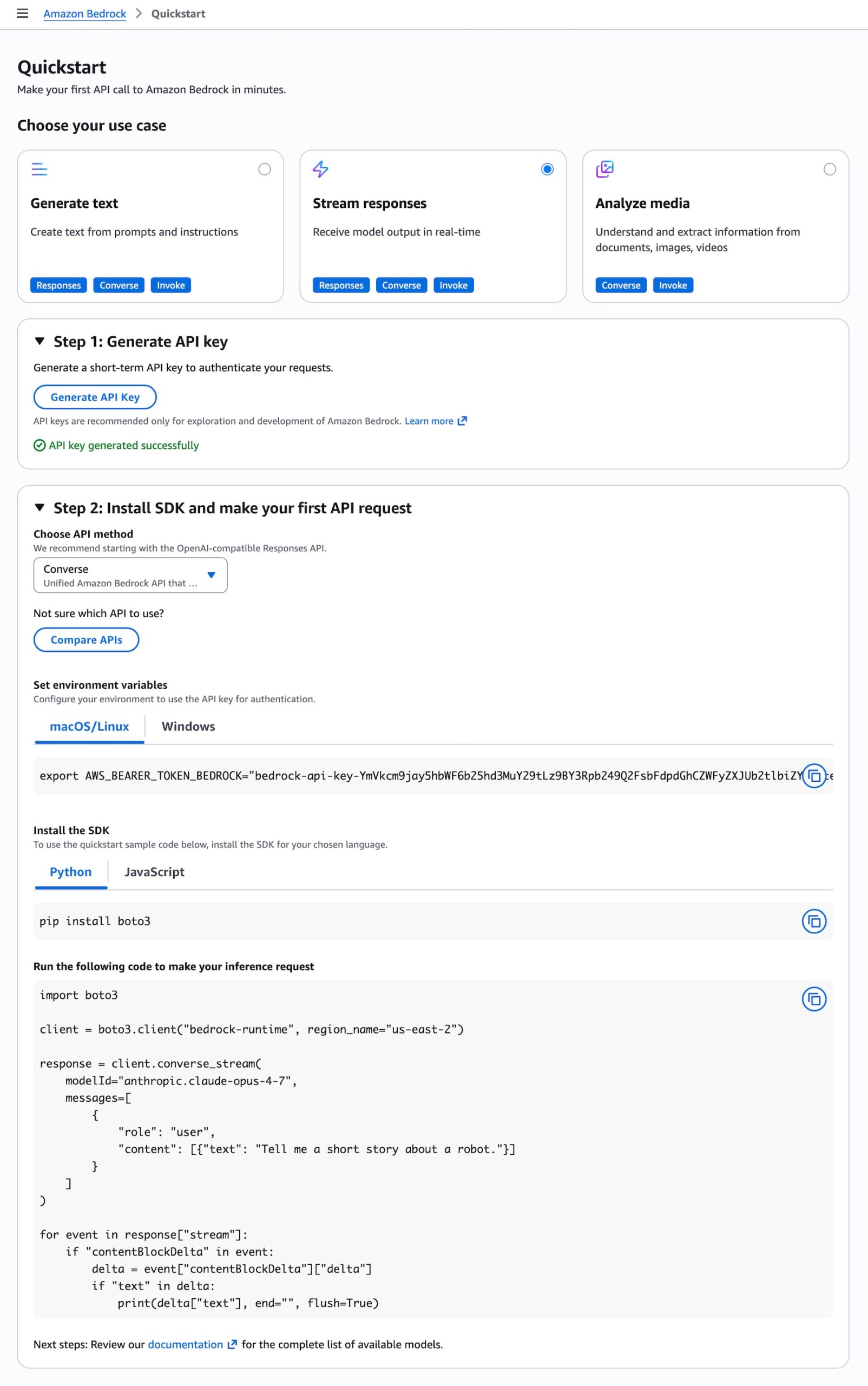
To get started with making your first API call to Amazon Bedrock in minutes, choose Quickstart in the left navigation pane in the console. After choosing your use case, you can generate a short term API key to authenticate your requests as testing purpose.

When you choose the API method such as the OpenAI-compatible Responses API, you can get sample codes to run your prompt to make your inference request using the model.


To invoke the model through the Anthropic Claude Messages API, you can proceed as follows using anthropic[bedrock] SDK package for a streamlined experience:

from anthropic import AnthropicBedrockMantle
# Initialize the Bedrock Mantle client (uses SigV4 auth automatically)
mantle_client = AnthropicBedrockMantle(aws_region=REGION)
# Create a message using the Messages API
message = mantle_client.messages.create(
    model="anthropic.claude-opus-4-7",
    max_tokens=2048,
    messages=[ 
	    {"role": "user", "content": "Design a distributed architecture on AWS in Python that should support 100k requests per second across multiple geographic regions"}
    ]
)
print(message.content[0].text)

You can also run the following command to invoke the model directly to bedrock-runtime endpoint using the AWS CLI and the Invoke API:

aws bedrock-runtime invoke-model  
 --model-id anthropic.claude-opus-4-7  
 --region us-east-1  
 --body '{"messages": [{"role": "user", "content": "Design a distributed architecture on AWS in Python that should support 100k requests per second across multiple geographic regions."}], "max_tokens": 512, "temperature": 0.5, "top_p": 0.9}'  
 --cli-binary-format raw-in-base64-out  
invoke-model-output.txt

For more intelligent reasoning capability, you can use Adaptive thinking with Claude Opus 4.7, which lets Claude dynamically allocate thinking token budgets based on the complexity of each request.

To learn more, visit the Anthropic Claude Messages API and check out code examples for multiple use cases and a variety of programming languages.

Things to know
Let me share some important technical details that I think you’ll find useful.

  • Choosing APIs: You can choose from a variety of Bedrock APIs for model inference, as well as the Anthropic Messages API. The Bedrock-native Converse API supports multi-turn conversations and Guardrails integration. The Invoke API provides direct model invocation and lowest-level control.
  • Scaling and capacity: Bedrock’s new inference engine is designed to rapidly provision and serve capacity across many different models. When accepting requests, we prioritize keeping steady state workloads running, and ramp usage and capacity rapidly in response to changes in demand. During periods of high demand, requests are queued, rather than rejected. Up to 10,000 requests per minute (RPM) per account per Region are available immediately, with more available upon request.

Now available
Anthropic’s Claude Opus 4.7 model is available today in the US East (N. Virginia), Asia Pacific (Tokyo), Europe (Ireland), and Europe (Stockholm) Regions; check the full list of Regions for future updates. To learn more, visit the Claude by Anthropic in Amazon Bedrock page and the Amazon Bedrock pricing page.

Give Anthropic’s Claude Opus 4.7 a try in the Amazon Bedrock console today and send feedback to AWS re:Post for Amazon Bedrock or through your usual AWS Support contacts.

— Channy

AWS Weekly Roundup: Claude Mythos Preview in Amazon Bedrock, AWS Agent Registry, and more (April 13, 2026)

This post was originally published on this site

In my last Week in Review post, I mentioned how much time I’ve been spending on AI-Driven Development Lifecycle (AI-DLC) workshops with customers this year. A common theme in those sessions is the need for better cost visibility. Teams are moving fast with AI, but as they go from experimenting to full production, finance and leadership really need to know who is using which resources and at what cost. That’s why I was so excited to see the launch of Amazon Bedrock new support for cost allocation by IAM user and role this week. This lets you tag IAM principals with attributes like team or cost center and then activate those tags in your Billing and Cost Management console. The resulting cost data flows into AWS Cost Explorer and the detailed Cost and Usage Report, giving you a clear line of sight into model inference spending. Whether you’re scaling agents across teams, tracking foundation model use by department, or running tools like Claude Code on Amazon Bedrock, this new feature is a game changer for tracking and managing your AI investments. You can get all the details on setting this up in the IAM principal cost allocation documentation.

Now, let’s get into this week’s AWS news…

Headlines
Amazon Bedrock now offers Claude Mythos Preview Anthropic’s most sophisticated AI model to date is now available on Amazon Bedrock as a gated research preview through Project Glasswing. Claude Mythos introduces a new model class focused on cybersecurity, capable of identifying sophisticated security vulnerabilities in software, analyzing large codebases, and delivering state of the art performance across cybersecurity, coding, and complex reasoning tasks. Security teams can use it to discover and address vulnerabilities in critical software before threats emerge. Access is currently limited to allowlisted organizations, with Anthropic and AWS prioritizing internet critical companies and open source maintainers.

AWS Agent Registry for centralized agent discovery and governance now in preview AWS launched Agent Registry through Amazon Bedrock AgentCore, providing organizations with a private catalog for discovering and managing AI agents, tools, skills, MCP servers, and custom resources. The registry helps teams locate existing capabilities rather than duplicating them, with semantic and keyword search, approval workflows, and CloudTrail audit trails. It is accessible via the AgentCore Console, AWS CLI, SDK, and as an MCP server queryable from IDEs.

Last week’s launches
Here are some launches and updates from this past week that caught my attention:

  • Announcing Amazon S3 Files, making S3 buckets accessible as file systems — Amazon S3 Files transforms S3 buckets into shared file systems that connect any AWS compute resource directly with your S3 data. Built on Amazon EFS technology, it delivers full file system semantics with low latency performance, caching actively used data and providing multiple terabytes per second of aggregate read throughput. Applications can access S3 data through both file system and S3 APIs simultaneously without code modifications or data migration.
  • Amazon OpenSearch Service supports Managed Prometheus and agent tracing —Amazon OpenSearch Service now provides a unified observability platform that consolidates metrics, logs, traces, and AI agent tracing into a single interface. The update includes native Prometheus integration with direct PromQL query support, RED metrics monitoring, and OpenTelemetry GenAI semantic convention support for LLM execution visibility. Operations teams can correlate slow traces to logs and overlay Prometheus metrics on dashboards without switching between tools.
  • Amazon WorkSpaces Advisor now available for AI powered troubleshooting— AWS launched Amazon WorkSpaces Advisor, an AI powered administrative tool that uses generative AI to help IT administrators troubleshoot Amazon WorkSpaces Personal deployments. It analyzes WorkSpace configurations, detects problems automatically, and provides actionable recommendations to restore service and optimize performance.
  • Amazon Braket adds support for Rigetti’s 108 qubit Cepheus QPU — Amazon Braket now offers access to Rigetti’s Cepheus-1-108Q device, the first 100+ qubit superconducting quantum processor on the platform. The modular design features twelve 9 qubit chiplets with CZ gates that offer enhanced resilience to phase errors. It supports multiple frameworks including Braket SDK, Qiskit, CUDA-Q, and Pennylane, with pulse level control for researchers.

For a full list of AWS announcements, be sure to keep an eye on the What’s New with AWS page.

Other AWS news
Here are some additional posts and resources that you might find interesting:

Upcoming AWS events
Check your calendar and sign up for upcoming AWS events:

  • What’s Next with AWS (April 28, Virtual) Join this livestream at 9am PT for a candid discussion about how agentic AI is transforming how businesses operate. Featuring AWS CEO Matt Garman, SVP Colleen Aubrey, and OpenAI leaders discussing emerging agent capabilities, Amazon’s internal experiences, and new agentic solutions and platform capabilities.

Browse here for upcoming AWS led in person and virtual events, startup events, and developer focused events.


That’s all for this week. Check back next Monday for another Weekly Roundup!

~ micah

Scans for EncystPHP Webshell, (Mon, Apr 13th)

This post was originally published on this site

Last week, I wrote about attackers scanning for various webshells, hoping to find some that do not require authentication or others that use well-known credentials. But some attackers are paying attention and are deploying webshells with more difficult-to-guess credentials. Today, I noticed some scans for what appears to be the "EncystPHP" web shell. Fortinet wrote about this webshell back in January. It appears to be a favorite among attackers compromising vulnerable FreePBX systems.

PowerShell MSI package deprecation and preview updates

This post was originally published on this site

Beginning with PowerShell 7.7-preview.1 (April 2026), the MSIX package will be the primary
installation method for PowerShell on Windows. We will no longer ship the MSI installer package for
new PowerShell releases.

For existing releases, including PowerShell 7.6, we will continue to provide MSI packages. However,
MSI isn’t planned for future releases, including PowerShell 7.7 GA and beyond.

Why we’re making this change

MSIX provides a modern installation and servicing model and is supported by Windows deployment
tools. It uses a declarative model that’s more predictable and reliable than MSI, which relies on
custom actions and scripts that can lead to inconsistent behavior. MSIX supports built-in update
mechanisms with differential updates. Microsoft is investing in improving MSIX.

MSI is a legacy technology. Servicing MSI installations requires external tooling and often results
in full reinstalls. MSI doesn’t meet modern accessibility requirements, particularly for screen
reader scenarios. To be accessible, MSI must present predictable tab stops and accurate
announcements for screen readers, which it doesn’t. Accessibility is a core requirement for
PowerShell.

This decision isn’t just about modernizing packaging for its own sake. It’s about ensuring that
PowerShell installations are modern and accessible for all users, now and in the future.

Looking forward

Our goal is to provide a fully accessible, reliable, and enterprise-ready installation experience.
At this time, MSIX doesn’t support all use case scenarios that MSI enabled, such as remoting and
execution by system-level services (like Task Scheduler). We recognize this gap and are actively
working to address it.

As part of this work, we’re investing in:

  • Improving MSIX support for system-level and enterprise deployment scenarios
  • Ensuring accessibility requirements are fully met across all installation paths
  • Providing clearer guidance and tooling for deployment at scale

We will continue to share updates as this work progresses.

Closing

We understand this change may require adjustments, especially in environments that rely heavily on
MSI-based deployment. We appreciate your patience as we make this transition.

Our focus is to ensure PowerShell remains accessible, predictable, and practical for all users.

— The PowerShell Team

The post PowerShell MSI package deprecation and preview updates appeared first on PowerShell Team.