
![Differentiating Between a Targeted Intrusion and an Automated Opportunistic Scanning [Guest Diary], (Wed, Mar 4th)](https://www.ironcastle.net/wp-content/uploads/2026/03/status-2.gif)
[This is a Guest Diary by Joseph Gruen, an ISC intern as part of the SANS.edu BACS program]
Monthly Archives: March 2026
Introducing OpenClaw on Amazon Lightsail to run your autonomous private AI agents
This post was originally published on this site
Today, we’re announcing the general availability of OpenClaw on Amazon Lightsail to launch OpenClaw instance, pairing your browser, enabling AI capabilities, and optionally connecting messaging channels. Your Lightsail OpenClaw instance is pre-configured with Amazon Bedrock as the default AI model provider. Once you complete setup, you can start chatting with your AI assistant immediately — no additional configuration required.
OpenClaw is an open-source self-hosted autonomous private AI agent that acts as a personal digital assistant by running directly on your computer. You can AI agents on OpenClaw through your browser to connect to messaging apps like WhatsApp, Discord, or Telegram to perform tasks such as managing emails, browsing the web, and organizing files, rather than just answering questions.
AWS customers have asked if they can run OpenClaw on AWS. Some of them blogged about running OpenClaw on Amazon EC2 instances. As someone who has experienced installing OpenClaw directly on my home device, I learned that this is not easy and that there are many security considerations.
So, let me introduce how to launch a pre-configured OpenClaw instance on Amazon Lightsail more easily and run it securely.
OpenClaw on Amazon Lightsail in action
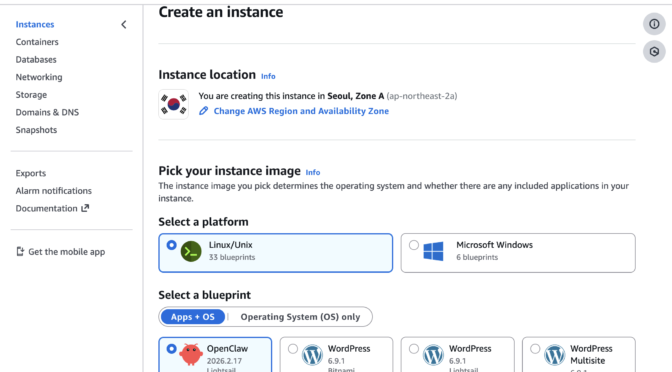
To get started, go to the Amazon Lightsail console and choose Create instance on the Instances section. After choosing your preferred AWS Region and Availability Zone, Linux/Unix platform to run your instance, choose OpenClaw under Select a blueprint.
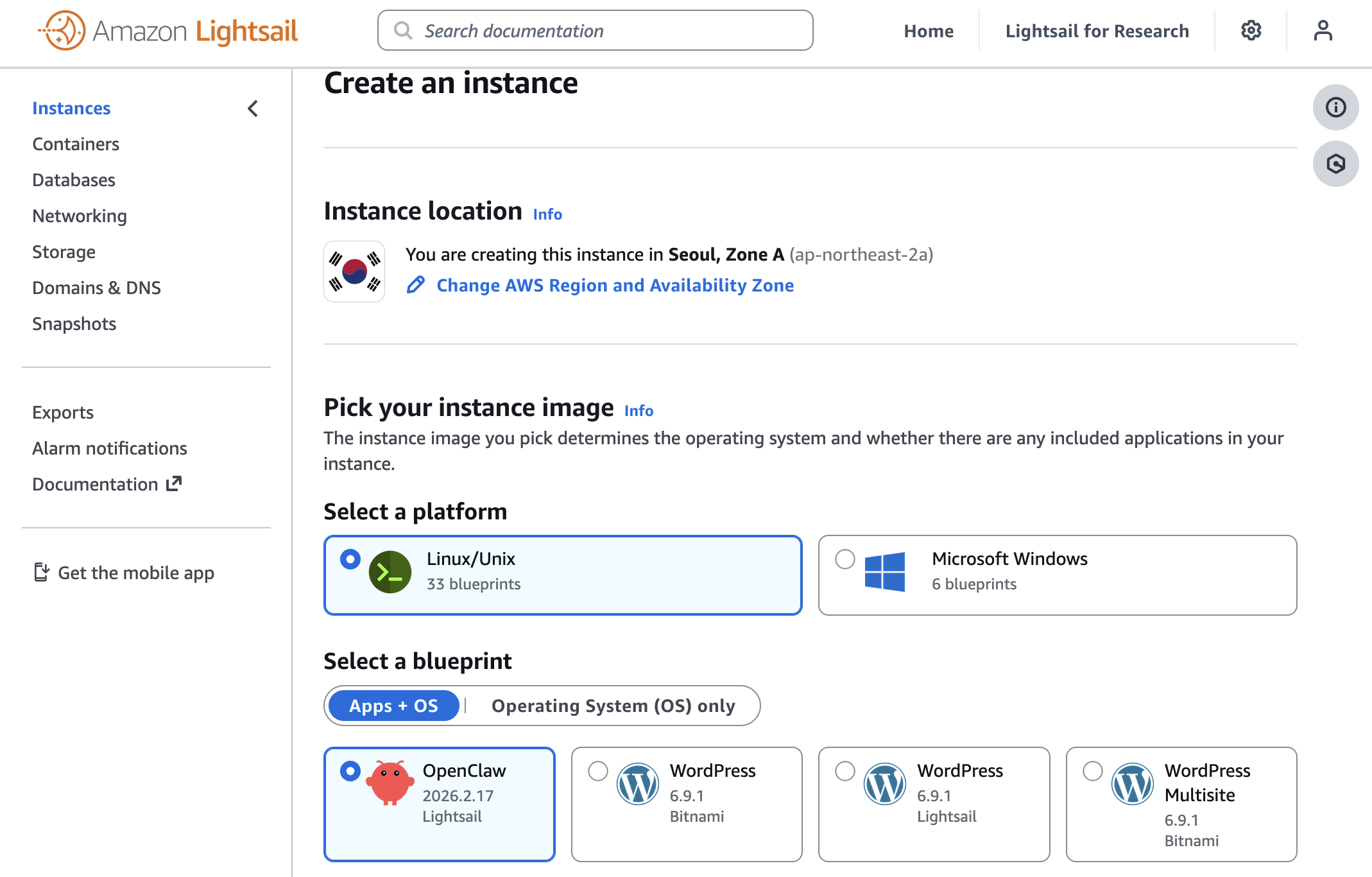
You can choose your instance plan (4 GB memory plan is recommended for optimal performance) and enter a name for your instance. Finally choose Create instance. Your instance will be in a Running state in a few minutes.
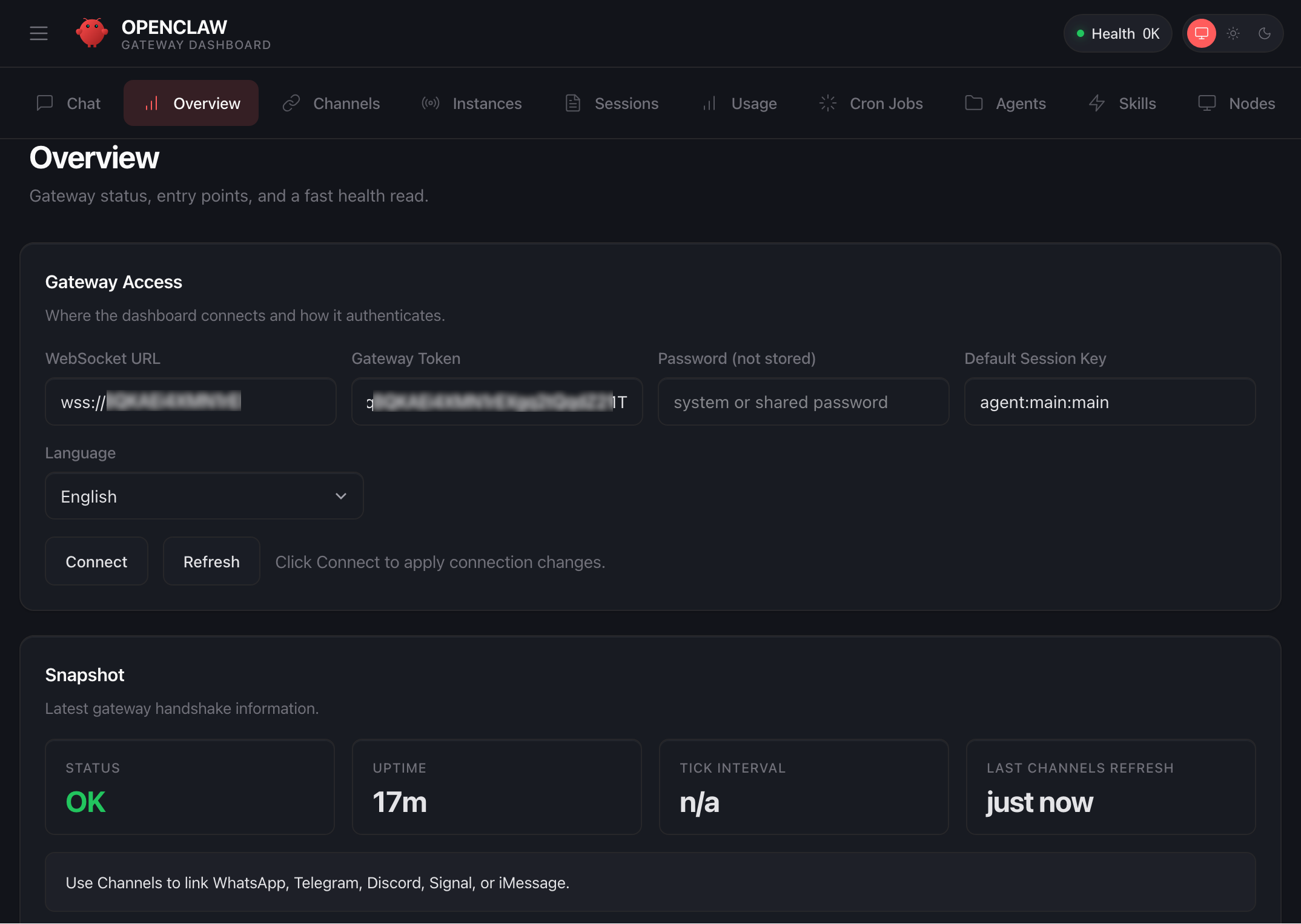
Before you can use the OpenClaw dashboard, you should pair your browser with OpenClaw. This creates a secure connection between your browser session and OpenClaw. To pair your browser with OpenClaw, choose Connect using SSH in the Getting started tab.
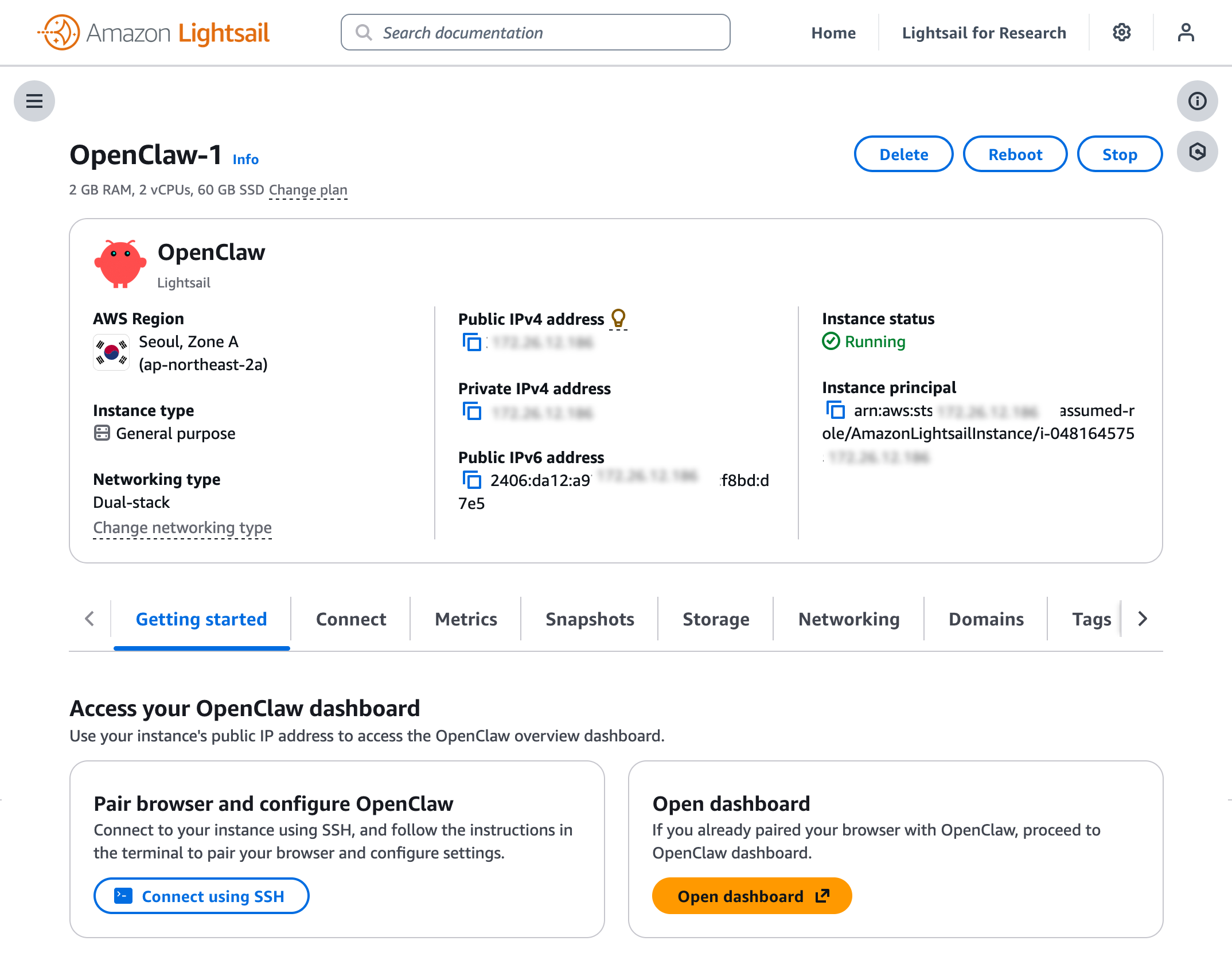
When a browser-based SSH terminal opens, you can see the dashboard URL, security credentials displayed in the welcome message. Copy them and open the dashboard in a new browser tab. In the OpenClaw dashboard, you can paste the copied access token into the Gateway Token field in the OpenClaw dashboard.
When prompted, press y to continue and a to approve with device pairing in the SSH terminal. When pairing is complete, you can see the OK status in the OpenClaw dashboard and your browser is now connected to your OpenClaw instance.
Your OpenClaw instance on Lightsail is configured to use Amazon Bedrock to power its AI assistant. To enable Bedrock API access, copy the script in the Getting started tab and run copied script into the AWS CloudShell terminal.
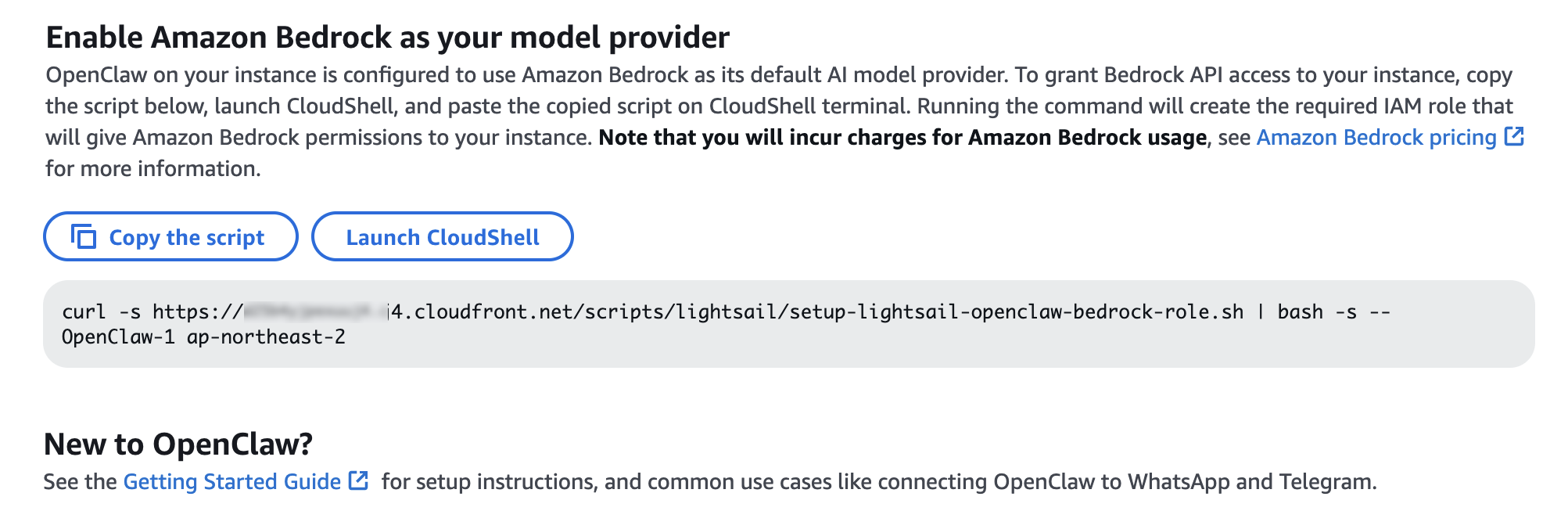
Once the script is complete, go to Chat in the OpenClaw dashboard to start using your AI assistant!
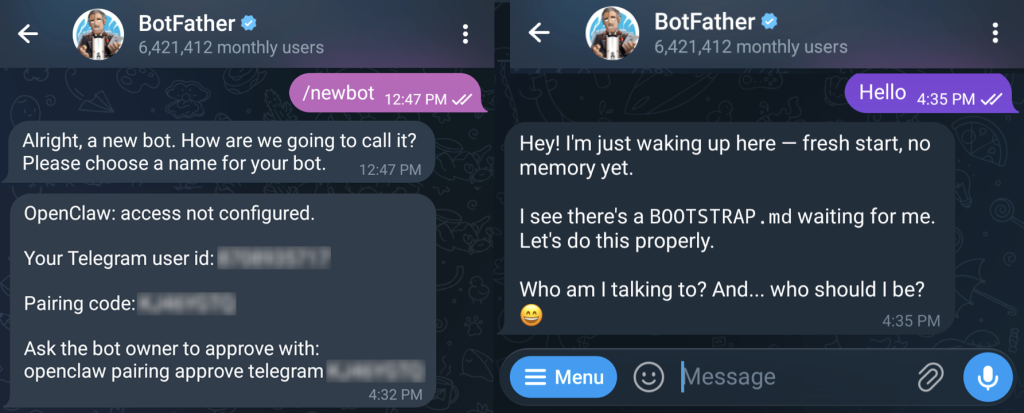
You can set up OpenClaw to work with messaging apps like Telegram and WhatsApp for interacting with your AI assistant directly from your phone or messaging client. To learn more, visit Get started with OpenClaw on Lightsail in the Amazon Lightsail User Guide.
Things to know
Here are key considerations to know about this feature:
- Permission — You can customize AWS IAM permissions granted to your OpenClaw instance. The setup script creates an IAM role with a policy that grants access to Amazon Bedrock. You can customize this policy at any time. But, you should be careful when modifying permissions because it may prevent OpenClaw from generating AI responses. To learn more, visit AWS IAM policies in the AWS documentation
- Cost — You pay for the instance plan you selected on an on-demand hourly rate only for what you use. Every message sent to and received from the OpenClaw assistant is processed through Amazon Bedrock using a token-based pricing model. If you select a third-party model distributed through AWS Marketplace such as Anthropic Claude or Cohere, there may be additional software fees on top of the per-token cost.
- Security — Running a personal AI agent on OpenClaw is powerful, but it may cause security threat if you are careless. I recommend to hide your OpenClaw gateway never to expose it to open internet. The gateway auth token is your password, so rotate it often and store it in your envirnment file not hardcoded in config file. To learn more about security tips, visit Security on OpenClaw gateway.
Now available
OpenClaw on Amazon Lightsail is now available in all AWS commercial Regions where Amazon Lightsail is available. For Regional availability and a future roadmap, visit the AWS Capabilities by Region.
Give a try in the Lightsail console and send feedback to AWS re:Post for Amazon Lightsail or through your usual AWS support contacts.
– Channy

Want More XWorm?, (Wed, Mar 4th)
This post was originally published on this site
And another XWorm[1] wave in the wild! This malware family is not new and heavily spread but delivery techniques always evolve and deserve to be described to show you how threat actors can be imaginative! This time, we are facing another piece of multi-technology malware.

Bruteforce Scans for CrushFTP , (Tue, Mar 3rd)
This post was originally published on this site
CrushFTP is a Java-based open source file transfer system. It is offered for multiple operating systems. If you run a CrushFTP instance, you may remember that the software has had some serious vulnerabilities: CVE-2024-4040 (the template-injection flaw that let unauthenticated attackers escape the VFS sandbox and achieve RCE), CVE-2025-31161 (the auth-bypass that handed over the crushadmin account on a silver platter), and the July 2025 zero-day CVE-2025-54309 that was actively exploited in the wild.

AWS Weekly Roundup: OpenAI partnership, AWS Elemental Inference, Strands Labs, and more (March 2, 2026)
This post was originally published on this site
This past week, I’ve been deep in the trenches helping customers transform their businesses through AI-DLC (AI-Driven Lifecycle) workshops. Throughout 2026, I’ve had the privilege of facilitating these sessions for numerous customers, guiding them through a structured framework that helps organizations identify, prioritize, and implement AI use cases that deliver measurable business value.

AI-DLC is a methodology that takes companies from AI experimentation to production-ready solutions by aligning technical capabilities with business outcomes. If you’re interested in learning more, check out this blog post that dives deeper into the framework, or watch as Riya Dani teaches me all about AI-DLC on our recent GenAI Developer Hour livestream!
Now, let’s get into this week’s AWS news…
 OpenAI and Amazon announced a multi-year strategic partnership to accelerate AI innovation for enterprises, startups, and end consumers around the world. Amazon will invest $50 billion in OpenAI, starting with an initial $15 billion investment and followed by another $35 billion in the coming months when certain conditions are met. AWS and OpenAI are co-creating a Stateful Runtime Environment powered by OpenAI models, available through Amazon Bedrock, which allows developers to keep context, remember prior work, work across software tools and data sources, and access compute.
AWS will serve as the exclusive third-party cloud distribution provider for OpenAI Frontier, enabling organizations to build, deploy, and manage teams of AI agents. OpenAI and AWS are expanding their existing $38 billion multi-year agreement by $100 billion over 8 years, with OpenAI committing to consume approximately 2 gigawatts of Trainium capacity, spanning both Trainium3 and next-generation Trainium4 chips.
Last week’s launches
Here are some launches and updates from this past week that caught my attention:
- AWS Security Hub Extended offers full-stack enterprise security with curated partner solutions — AWS launched Security Hub Extended, a plan that simplifies procurement, deployment, and integration of full-stack enterprise security solutions including 7AI, Britive, CrowdStrike, Cyera, Island, Noma, Okta, Oligo, Opti, Proofpoint, SailPoint, Splunk, Upwind, and Zscaler. With AWS as the seller of record, customers benefit from pre-negotiated pay-as-you-go pricing, a single bill, no long-term commitments, unified security operations within Security Hub, and unified Level 1 support for AWS Enterprise Support customers.
- Transform live video for mobile audiences with AWS Elemental Inference — AWS launched Elemental Inference, a fully managed AI service that automatically transforms live and on-demand video for mobile and social platforms in real time. The service uses AI-powered cropping to create vertical formats optimized for TikTok, Instagram Reels, and YouTube Shorts, and automatically extracts highlight clips with 6-10 second latency. Beta testing showed large media companies achieved 34% or more savings on AI-powered live video workflows. Deep dive into the Fox Sports implementation.
- MediaConvert introduces new video probe API — AWS Elemental MediaConvert introduced a free Probe API for quick metadata analysis of media files, reading header metadata to return codec specifications, pixel formats, and color space details without processing video content.
- OpenAI-compatible Projects API in Amazon Bedrock — Projects API provides application-level isolation for your generative AI workloads using OpenAI-compatible APIs in the Mantle inference engine in Amazon Bedrock. You can organize and manage your AI applications with improved access control, cost tracking, and observability across your organization.
- Amazon Location Service introduces LLM Context — Amazon Location launched curated AI Agent context as a Kiro power, Claude Code plugin, and agent skill in the open Agent Skills format, improving code accuracy and accelerating feature implementation for location-based capabilities.
- Amazon EKS Node Monitoring Agent is now open source — The Amazon EKS Node Monitoring Agent is now open source on GitHub, allowing visibility into implementation, customization, and community contributions.
- AWS AppConfig integrates with New Relic — AWS AppConfig launched integration with New Relic Workflow Automation for automated, intelligent rollbacks during feature flag deployments, reducing detection-to-remediation time from minutes to seconds.
For a full list of AWS announcements, be sure to keep an eye on the What’s New with AWS page.
Other AWS news
Here are some additional posts and resources that you might find interesting:
- Introducing Strands Labs — We created Strands Labs as a separate Git organization to support experimental agentic AI projects and push the frontier of agentic development. At launch, we’re making Strands Labs available with three projects. The first is Robots, the second is Robots Sim and the third is AI Functions.
- 6,000 AWS accounts, three people, one platform: Lessons learned — Architecture blog post on managing massive multi-account environments. Learn how ProGlove implemented a large-scale account-per-tenant model on AWS and how that model shifts complexity from service code to platform operations.
- Building intelligent event agents using Amazon Bedrock AgentCore and Amazon Bedrock Knowledge Bases — Practical guide to building event-driven agents. Check out how you can use Amazon Bedrock AgentCore components to rapidly productionize an event assistant—taking it from prototype to enterprise-ready deployment at scale.
From AWS community
Here are my personal favorite posts from AWS community:
- How to Run a Kiro AI Coding Workshop That Actually Works — Running a Kiro workshop at your company or user group? Here is the full step-by-step facilitator guide, resources, and references.
- RAG vs GraphRAG: When Agents Hallucinate Answers — This demo builds a travel booking agent with Strands Agents and compares RAG (FAISS) vs GraphRAG (Neo4j) to measure which approach reduces hallucinations when answering queries
- New output formats in AWS CLI v2 — You can now use two new features for the AWS Command Line Interface (AWS CLI) v2: structured error output and the “off” output format.
Upcoming AWS events
Check your calendar and sign up for upcoming AWS events:
- AWS at NVIDIA GTC 2026 — Join us at our AWS sessions, booths, demos, ancillary events in NVIDIA GTC 2026 on March 16 – 19, 2026 in San Jose. You can receive 20% off event passes through AWS and request a 1:1 meeting at GTC.
- AWS Summits — Join AWS Summits in 2026, free in-person events where you can explore emerging cloud and AI technologies, learn best practices, and network with industry peers and experts. Upcoming Summits include Paris (April 1), London (April 22), and Bengaluru (April 23–24).
- AWS Community Days — Community-led conferences where content is planned, sourced, and delivered by community leaders. Upcoming events include JAWS Days in Tokyo (March 7), Chennai (March 7), Slovakia (March 11), and Pune (March 21).
Browse here for upcoming AWS led in-person and virtual events, startup events, and developer-focused events.
That’s all for this week. Check back next Monday for another Weekly Roundup!
Quick Howto: ZIP Files Inside RTF, (Mon, Mar 2nd)
This post was originally published on this site
In diary entry "Quick Howto: Extract URLs from RTF files" I mentioned ZIP files.
There are OLE objects inside this RTF file:
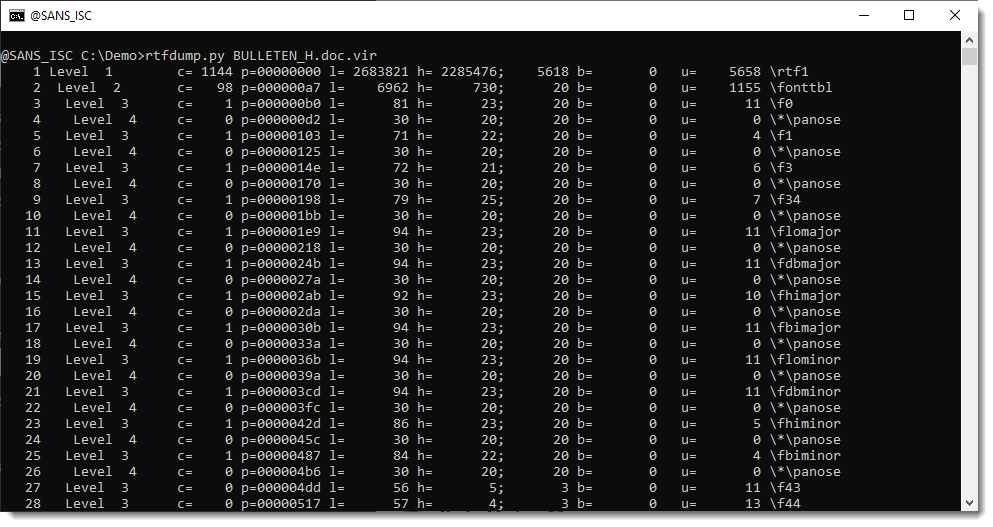
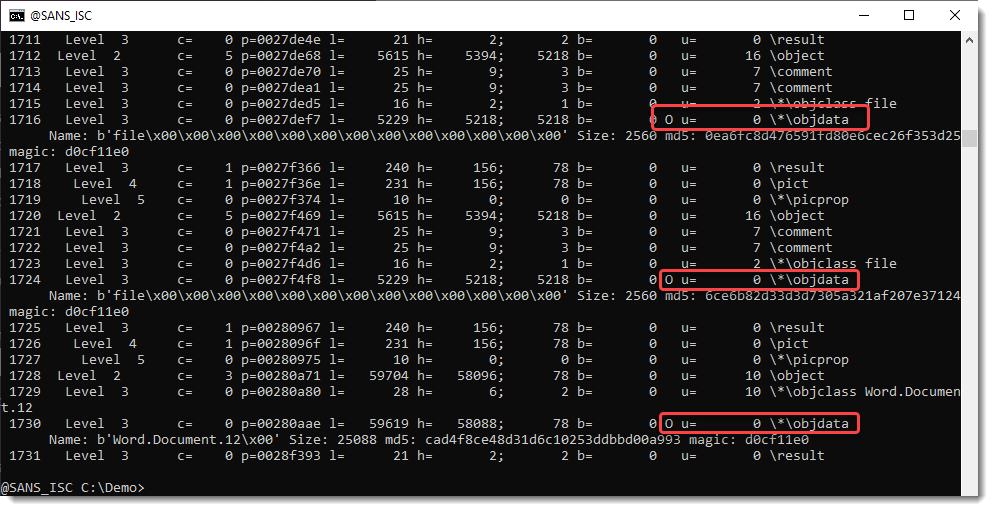
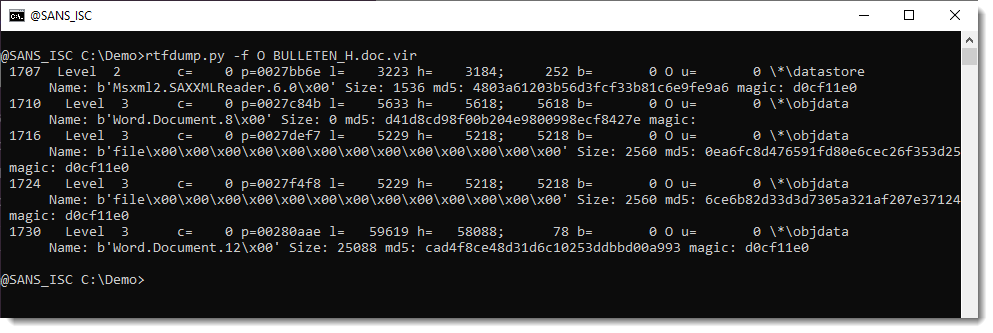
They can be analyzed with oledump.py like this:

Options –storages and -E %CLSID% are used to show the abused CLSID.

Stream CONTENTS contains the URL:
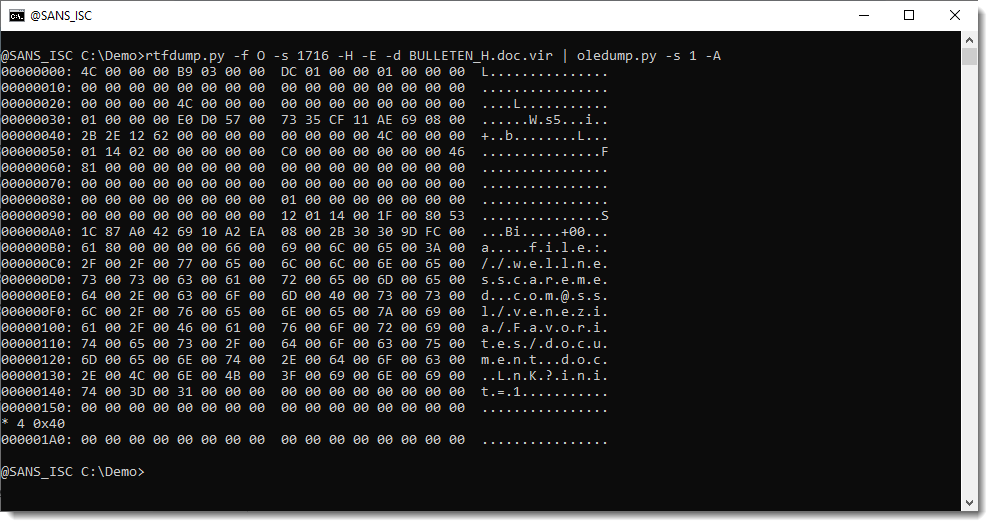
We extracted this URL with the method described in my previous diary entry "Quick Howto: Extract URLs from RTF files".
But this OLE object contains a .docx file.
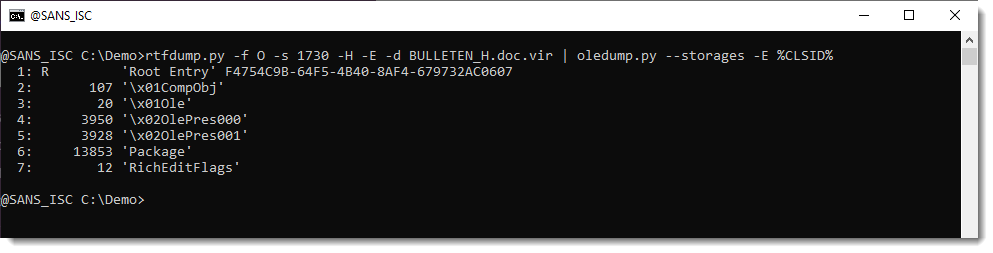

A .docx file is a ZIP container, and thus the URLs it contains are inside compressed files, and will not be extracted with the technique I explained.
But this file can be looked into with zipdump.py:
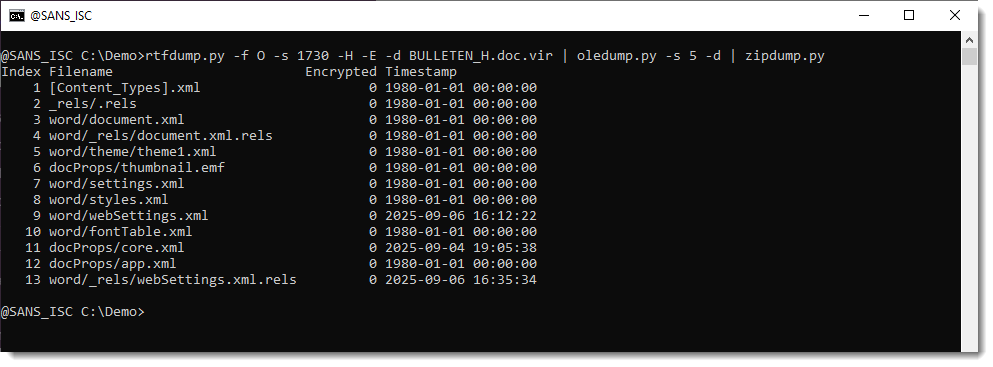
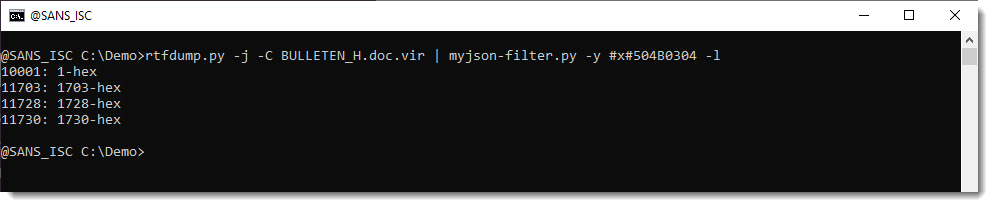
It is possible to search for ZIP files embedded inside RTF files: 50 4B 03 04 -> hex sequence of magic number header for file record in ZIP file.
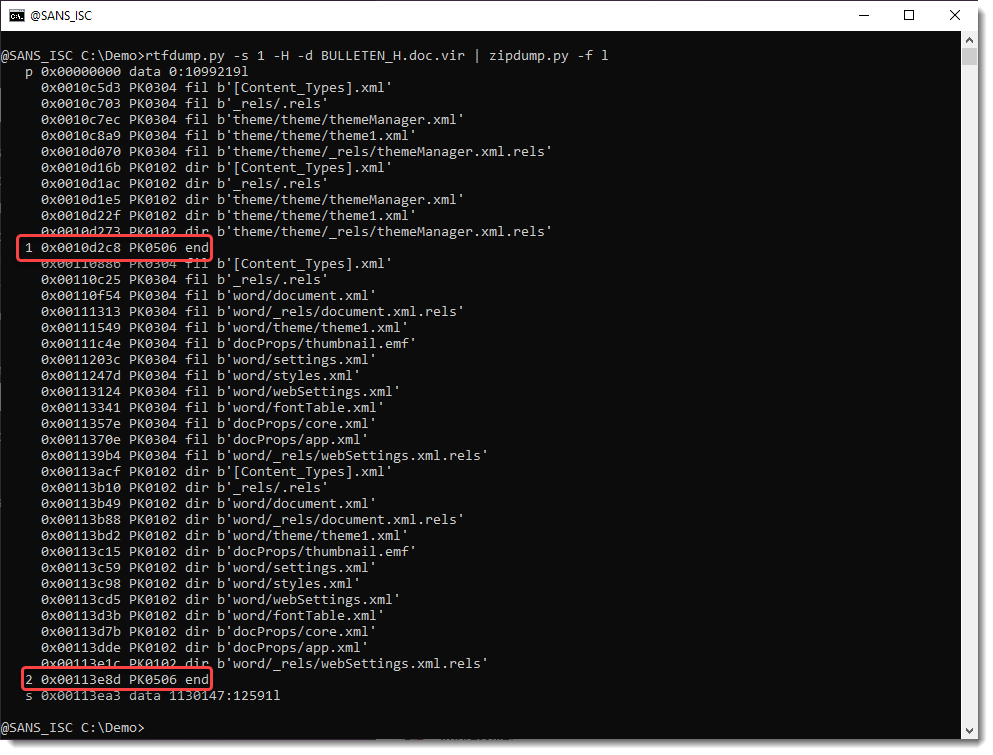
Search for all embedded ZIP files:
Extract URLs:


Didier Stevens
Senior handler
blog.DidierStevens.com
(c) SANS Internet Storm Center. https://isc.sans.edu Creative Commons Attribution-Noncommercial 3.0 United States License.