PowerShellGet 3.0 Preview 17

This post was originally published on this site

We are excited to announce that an update to our preview of PowerShellGet 3.0 is now available on the PowerShell Gallery!

This release includes a number of bug fixes as well as support for specifying the temporary path used during installation of PSResources.

How to Install PowerShellGet 3.0 Preview 17

Prerequisites

Please note that this preview release of PowerShellGet 3.0 does not support PowerShell 7.0, 7.1 or 7.2-preview1.

This is a temporary issue due to a dependency and should be resolved in future releases. This release does support Windows PowerShell 5.1, PowerShell 7.2 and 7.3-previews.

Please ensure that you have the latest (non-prerelease) version of PowerShellGet and PackageManagement installed. To check the version you currently have installed run the command Get-InstalledModule PowerShellGet, PackageManagement

The latest version of PowerShellGet is 2.2.5, and the latest version of PackageManagement is 1.4.7. To install the latest versions of these modules run the following: Install-Module PowerShellGet -Force -AllowClobber

Installing the Preview

To install this preview release side-by-side with your existing PowerShellGet version, open any PowerShell console and run: Install-Module PowerShellGet -Force -AllowPrerelease

If you have PowershellGet v3 already you can run Update-PSResource PowerShellGet -Prerelease

What to expect in this update

This release includes a number of bug fixes as well as additional support for specifying a temporary path for installation of PSResources. For additional context on scenarios where this may be useful please refer to this issue.

Features of this release

  • Add -TemporaryPath parameter to Install-PSResource, Save-PSResource, and Update-PSResource
  • Add String and SecureString as credential types in PSCredentialInfo
  • Expand acceptable paths for Publish-PSResource (Module root directory, module manifest file, script file)
  • Add -Force parameter to Register-PSResourceRepository cmdlet, to override an existing repository
  • Add a warning for when the script installation path is not in Path variable

Bug Fixes

  • Change casing of -IncludeXML to -IncludeXml
  • Update priority range for PSResourceRepository to 0-100
  • Editorial pass on cmdlet reference
  • Fix issue when PSScriptInfo has no empty lines
  • Make ConfirmImpact low for Register-PSResourceRepository and Save-PSResource
  • Fix -PassThru for Set-PSResourceRepository cmdlet to return all properties
  • Rename -FilePath parameter to -Path for PSScriptFileInfo cmdlets
  • Fix RequiredModules description and add Find example to docs
  • Remove unneeded inheritance in InstallHelper.cs
  • Make -Path a required parameter for Save-PSResource cmdlet
  • Improve script validation for publishing and installing

Features to Expect in Coming Preview Releases

This module is not yet complete. The focus for our next preview release is removing the dependency on the nuget APIs. This will allow us to resolve dependency loading issues that effect which versions of PowerShell this module will be compatible with. This update will also allow us to improve performance of the module and resolve a number of outstanding bugs that are due to limitations in the nuget APIs. For the full list of issues for our next preview release please refer to our GitHub project.

How to Track the Development of this Module

GitHub is the best place to track the bugs/feature requests related to this module. We have used a combination of projects and labels on our GitHub repo to track issues for this upcoming release. We are using the label Resolved-3.0 to label issues that we plan to release at some point before we release the module as GA (generally available).

To track issues/features for the next release, please refer to this GitHub project.

Timeline/Road Map

Expect to see preview releases as new functionality is added and bug fixes are made. User feedback will help us determine when we can have a Release Candidate version of the module which will be supported to be used in production. Based on user feedback, if we believe the 3.0 release is complete, then we will publish a 3.0 version of the module as Generally Available. Since these milestones are driven by quality, rather than date, we can not offer an exact timeline at this point.

How to Give feedback and Get Support

We cannot overstate how critical user feedback is at this stage in the development of the module. Feedback from preview releases help inform design decisions without incurring a breaking change once generally available and used in production.

In order to help us to make key decisions around the behavior of the module please give us feedback by opening issues in our GitHub repository.

Sydney Smith

PowerShell Team

The post PowerShellGet 3.0 Preview 17 appeared first on PowerShell Team.

PowerShell Extension for Visual Studio Code August 2022 Update

This post was originally published on this site

We are excited to announce that the August update to the PowerShell Extension for Visual Studio Code is now available on the extension marketplace.

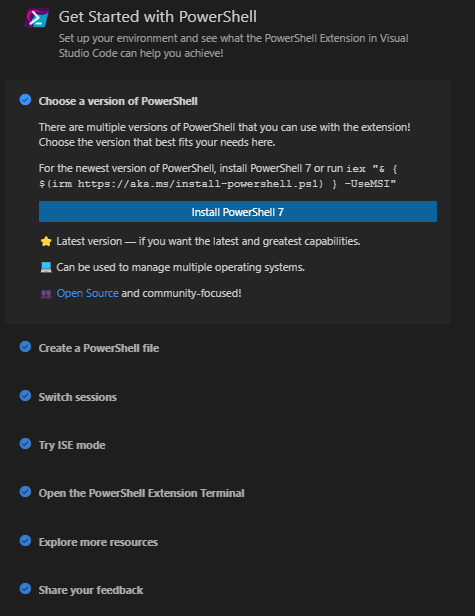
This release adds a walkthrough experience for getting started with PowerShell in VS Code, more regression tests, a major LSP client library update, and includes a number of bug fixes!

Updates in the August Release

Note that these updates all shipped in our PowerShell Preview Extension for VS Code before shipping in our stable channel.

Some highlights of August releases:

For the full list of changes please refer to our changelog.

Getting Started Walkthrough

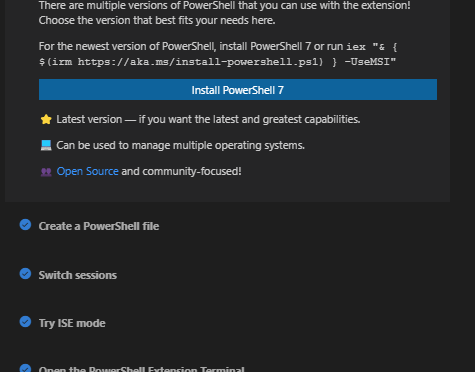
As a part of this release we have introduced a getting started experience for PowerShell in VS Code. This experience was designed through a series of customer surveys and interviews conducted by our summer intern. The walkthrough can be accessed on the Getting Started page in VS Code, or through the command pallette.

image

We look forward to getting more feedback on this walkthrough and learning how we can improve it.

LSP Client Library Update

This release also includes a major update to our LSP client library dependency, vscode-languageclient. The extension uses this library to start, connect, and communicate with the LSP server, PowerShell Editor Services.

By incorporating this update in vscode-powershell #4128 we were able to prevent a number of race conditions that could be encountered during startup, as the latest version of this library allows us to register our notification and request handlers before starting the server. The lifecycle management code was also given some much needed attention, and so startup and shut-down is now a more stable experience.

Please note that due to an upstream change, there is now a second notification when the server is stopped. We are working with the upstream team to de-duplicate this popup, and are also contemplating enabling a configurable auto-restart of the server.

Getting Support and Giving Feedback

While we hope the new implementation provides a much better user experience, there are bound to be issues. Please let us know if you run into anything.

If you encounter any issues with the PowerShell Extension in Visual Studio Code or have feature requests, the best place to get support is through our GitHub repository.

Sydney Smith and Andy Jordan PowerShell Team

The post PowerShell Extension for Visual Studio Code August 2022 Update appeared first on PowerShell Team.

Archive Module 2.0 Preview 2

This post was originally published on this site

We are excited to announce that the second preview of a rewrite of Microsoft.PowerShell.Archive, the module that lets you create and extract archives, is now available on the PowerShell Gallery.

This release is the second preview release of a rewrite of the module and is not feature complete. Please note that this release is only compatible with PowerShell 7.3.0-preview5 and up. For more information on what is proposed in this rewrite, or to give feedback on the design please refer to the RFC.

Installing the module

Please note that this release will only work with PowerShell 7.3.0-preview5 and up. Find and install the latest preview version of PowerShell here.

To install the Microsoft.PowerShell.Archive 2.0 preview 2 using PowerShellGet 2.2.5 run the following command

Install-Module Microsoft.PowerShell.Archive -AllowPrerelease

To install the Microsoft.PowerShell.Archive 2.0 preview 2 using PowerShellGet 3.0 previews run the following command

Install-PSResource Microsoft.PowerShell.Archive -Prerelease

Features of the release

This release contains the rewrite of the Expand-Archive cmdlet.

This cmdlet contains two parameter sets

Expand-Archive [-Path] <string> [[-DestinationPath] <string>] [-WriteMode {Create | Update | Overwrite}] [-PassThru] [-Filter <string[]>] [-WhatIf] [-Confirm] [<CommonParameters>]

Expand-Archive [-LiteralPath <string>] [-DestinationPath] <string>]  [-WriteMode {Create | Update | Overwrite}] [-PassThru] [-Filter <string[]>] [-WhatIf] [-Confirm] [<CommonParameters>]

Some features to note of this release

  • Added -WriteMode parameter to Expand-Archive
  • Added support for zip64
  • Fixed a bug where the entry names of files in a directory would not be correct when compressing an archive

Features of the next release

The next release will focus on additional features of the module. To track the progress of this release, look at this project in our GitHub repository.

Giving Feedback and Getting support

While we hope the new implementation provides a much better user experience, there are bound to be issues. Please let us know if you run into anything.

If you encounter any issues with the module or have feature requests, the best place to get support is through our GitHub repository.

Sydney

PowerShell Team

The post Archive Module 2.0 Preview 2 appeared first on PowerShell Team.

Announcing the release of Get-WhatsNew

This post was originally published on this site

We are pleased to announce the release of Get-WhatsNew, a cmdlet that delivers feature
information about new versions of PowerShell to your local terminal experience.

Stay informed with Get-WhatsNew

Between General Availability (GA), Long-Term Servicing (LTS), and Previews release, PowerShell ships
updates several times a year. At this pace, PowerShell users may become unaware of new features and
changes that improve automation, performance and security. Today, this information is provided through
release notes and the PowerShell
GitHub repository. Get-WhatsNew enables you to:

  • Learn about new features that enable new solutions
  • Get version-specific information to make upgrade decisions
  • View the information in disconnected scenarios (data ships with module)
  • View the information in Windows PowerShell 5.1 and higher
  • Get information for a single random feature for a message-of-the-day (MOTD) experience
  • Quickly open the release notes on the web version using the Online option

Installing WhatsNew

The Get-WhatsNew cmdlet ships in the
Microsoft.PowerShell.WhatsNew
module, which can be installed from the PowerShell Gallery.

Requirements:

  • Microsoft.PowerShell.WhatsNew is a cross platform module that requires Windows PowerShell 5.1
    or higher

To install Microsoft.PowerShell.WhatsNew:

Install-Module -Name Microsoft.PowerShell.WhatsNew

To install Microsoft.PowerShell.WhatsNew using the new
PowerShellGet.v3

Install-PSResource -Name Microsoft.PowerShell.WhatsNew

Using Get-WhatsNew

Get-WhatsNew displays PowerShell features by version. The cmdlet includes
complete help with several examples. Here are some highlights to get started:

To get the complete help information for Get-WhatsNew

Get-Help Get-WhatsNew -Full

To display the release notes for the version of PowerShell in which the cmdlet is running.

Get-WhatsNew

To display the release notes for PowerShell 7.2 regardless of which version the cmdlet is running.

Get-WhatsNew -Version 7.2

To display one randomly selected section of the release notes per version of PowerShell selected.
Add this to your profile to receive a Message-Of-The-Day (motd).

Get-WhatsNew -Daily -Version 6.0, 7.0, 7.1, 7.2

Future plans

We value your ideas and feedback and hope you will give WhatsNew a try. Stop by our
GitHub repository and let us know of any issues you find
or features you would like added.

The post Announcing the release of Get-WhatsNew appeared first on PowerShell Team.

PowerShell Extension for Visual Studio Code July 2022 Update

This post was originally published on this site

We are excited to announce that the July update to the PowerShell Extension for Visual Studio Code

is now available on the extension marketplace.

This release renames the “PowerShell Integrated Console” to the “PowerShell Extension Terminal” to align with VS Code’s verbiage, adds many regression tests, and includes a number of bug fixes!

Updates in the July release

Note that these updates all shipped in our PowerShell Preview Extension
for VS Code before shipping in our stable channel.

Some highlights of July release:

For the full list of changes please refer to our changelog.

Improvements to our tests

We are currently building out regression tests for the extension to cover everything we broke and subsequently fixed during the major rewrite earlier this year. We have a strong focus on quality,
and want to ensure we continue to deliver a production-ready, high-quality extension to you, our users.
We have made a large investment in improving the extension so we want to be able to
confidently continue to iterate on this project without inadvertently impacting the performance, stability, or feature set.

We’ve begun this work already, and are tracking in our GitHub repository.

Some highlights of this work so far include:

Getting support and giving feedback

While we hope the new implementation provides a much better user experience, there are bound to be issues. Please let us know if you run into anything.

If you encounter any issues with the PowerShell Extension in Visual Studio Code or have feature requests, the best place to get support is through our GitHub repository.

Sydney
PowerShell Team

The post PowerShell Extension for Visual Studio Code July 2022 Update appeared first on PowerShell Team.

PowerShellGet 3.0 Preview 16

This post was originally published on this site

We are excited to announce that an update to our preview of PowerShellGet 3.0 is now available on the PowerShell Gallery!

This release includes ScriptFileInfo cmdlets, Update-ModuleManifest support, and an AuthenticodeCheck for Install.

How to Install PowerShellGet 3.0 Preview 16

Prerequisites

Please note that this preview release of PowerShellGet 3.0 does not support PowerShell 7.0, 7.1 or 7.2-preview1.

This is a temporary issue due to a dependency and should be resolved in future releases. This release does support Windows PowerShell 5.1, PowerShell 7.2 and 7.3-previews.

Please ensure that you have the latest (non-prerelease) version of PowerShellGet and PackageManagement installed. To check the version you currently have installed run the command Get-InstalledModule PowerShellGet, PackageManagement

The latest version of PowerShellGet is 2.2.5, and the latest version of PackageManagement is 1.4.7. To install the latest versions of these modules run the following: Install-Module PowerShellGet -Force -AllowClobber

Installing the Preview

To install this preview release side-by-side with your existing PowerShellGet version, open any PowerShell console and run: Install-Module PowerShellGet -Force -AllowPrerelease

What to expect in this update

This update adds a number of cmdlets related to package metadata as well as a new -AuthenticodeCheck parameter for Install-PSResourceSave-PSResourceUpdate-PSResource.

Features of this release

  • New-ScriptFileInfo
  • Update-ScriptFileInfo
  • Test-ScriptFileInfo
  • Update-ModuleManifest
  • Implementation of Authenticode validation via -AuthenticodeCheck for Install-PSResource

Bug Fixes

  • Bug fix for installing modules with manifests that contain dynamic script blocks

Using -AuthenticodeCheck

In PowerShellGetv2 we performed what was called a PublisherCheck, for the sake of clarity in PowerShellGet 3.0 we have renamed this check to be specific to the check being made. The parameter is now opt-in and is called -AuthenticodeCheck. This check validates signed files and catalog files on Windows.

Features to Expect in Coming Preview Releases

This module is not yet complete. The focus for our next preview release is improving the performance of find/install. For the full list of issues for our next preview release please refer to our GitHub project.

How to Track the Development of this Module

GitHub is the best place to track the bugs/feature requests related to this module. We have used a combination of projects and labels on our GitHub repo to track issues for this upcoming release. We are using the label Resolved-3.0 to label issues that we plan to release at some point before we release the module as GA (generally available).

To track issues/features for the next release, please refer to this GitHub project.

Timeline/Road Map

Expect to see preview releases as new functionality is added and bug fixes are made. User feedback will help us determine when we can have a Release Candidate version of the module which will be supported to be used in production. Based on user feedback, if we believe the 3.0 release is complete, then we will publish a 3.0 version of the module as Generally Available. Since these milestones are driven by quality, rather than date, we cannot offer an exact timeline at this point.

How to Give feedback and Get Support

We cannot overstate how critical user feedback is at this stage in the development of the module. Feedback from preview releases help inform design decisions without incurring a breaking change once generally available and used in production.

In order to help us to make key decisions around the behavior of the module please give us feedback by opening issues in our GitHub repository.

Sydney Smith

PowerShell Team

The post PowerShellGet 3.0 Preview 16 appeared first on PowerShell Team.

vMotion issue when VM on a VVOL Datastore

Hi,


i installed im my lab with a vSphere 7.0.1 enviroment the NetApp VSC 9.7.1 wich brings the VASA provider for VVOLs to thest them on my NetApp Storage connected via NFS.


Installation works without issues and even the migration from the NFS 4.1 datastores to the VVOL datastore.


Then i noticed a problem with the VCSA: VCSA on a VVOL? Is this supported?


After a little bit more testing i noticed that this is a general vMotion problem when the VM is on a VVOL datastore. When the same VM is on a FS 4.1 datastore i have no issue.


I opened a case first at NetApp, but they didin’t found something in the logs and told me to open a case at vmware too. There i opened one week ago a case and provided all logs. But they took a very long time to decide which department should work on the case. Yesterday i talked first time with the support and today we finished the tests to be clear, yes the problem is only during a normal vMotion and only when the VM is on a VVOL. So he will forward the case to the storage guys.


While i’m waiting for the support, i think i write down here my issue perhaps someone esle had a similar problem…


Problem:


vMotion from one “host” to a other “host” stuck at 85% and then VM freezes for about 30 sec, then the vMotion continues and finishes. Then the VM is running again.


Here i have some log parts:


Log of the VM from source-host:

2020-10-14T15:52:14.200Z| vmx| W003: VMX has left the building: 0.


VMKernel from source-host:

2020-10-14T15:52:14.251Z cpu4:2105329)VVol: VVolRemoveDev:7163: Unlinking (VVOL_OBJTYPE_VMDK) VVol device rfc4122.80207299-548e-459c-bc0c-4d45318cfae2

2020-10-14T15:52:14.332Z cpu18:2099869)VVol: VVolRemoveDev:7163: Unlinking (VVOL_OBJTYPE_CONFIG) VVol device rfc4122.1edaed3d-4db9-44d6-a945-79567334ffa0


The VM has left the host at 17:52:14, so it must be started in the same sec on the destination…


Log of the VM from the destination-host:

2020-10-14T15:52:14.190Z| vcpu-0| I005: Transitioned vmx/execState/val to poweredOn

2020-10-14T15:52:14.191Z| vcpu-0| I005: MigrateSetState: Transitioning from state 12 to 0.

2020-10-14T15:52:54.205Z| vmx| I005: DiskUpgradeMultiwriter: Upgraded open disk ‘scsi0:0’ from multiwriter.


Here is a large gap between the sec 14 and 54 in the log, there is no message.


VMKernel from the destination-host:

2020-10-14T15:52:12.956Z cpu3:2103898)VVol: VVolMakeDev:6740: Creating a device for rfc4122.1edaed3d-4db9-44d6-a945-79567334ffa0 (Type VVOL_OBJTYPE_CONFIG)

2020-10-14T15:52:13.264Z cpu16:2103911)VVol: VVolMakeDev:6740: Creating a device for rfc4122.80207299-548e-459c-bc0c-4d45318cfae2 (Type VVOL_OBJTYPE_UNKNOWN)

2020-10-14T15:52:14.190Z cpu25:2103920)Hbr: 3731: Migration end received (worldID=2103906) (migrateType=1) (event=1) (isSource=0) (sharedConfig=1)

2020-10-14T15:52:14.191Z cpu8:2103915)VMotion: 3230: 8288837917254555216 D: VMotion bandwidth in last 1s: 27 MB/s,

2020-10-14T15:52:14.194Z cpu3:2103923)Swap: vm 2103906: 5135: Finish swapping in migration swap file. (faulted 0 pages). Success.

2020-10-14T15:52:44.200Z cpu25:2103905)NFSLock: 3302: lock .lck-1c7bdce900000000 expired: counter prev 584 3fc5805f-1e9c2009-3763-ac1f6bc58788 : curr 584 3fc5805f-1e9c2009-3763-ac1f6bc58788 (loop count 3)


This message i’m wondering about…


Hostd from the destination-host:

2020-10-14T15:52:13.138Z verbose hostd[2099792] [Originator@6876 sub=Vigor.Vmsvc.vm:/vmfs/volumes/vvol:fb1e3913ec4448e4-bf4e00000098990c/rfc4122.1edaed3d-4db9-44d6-a945-79567334ffa0/srv15 – Web-Server.vmx] VMotion destination started; powering on

2020-10-14T15:52:13.213Z info hostd[2100209] [Originator@6876 sub=Vmsvc.vm:/vmfs/volumes/vvol:fb1e3913ec4448e4-bf4e00000098990c/rfc4122.1edaed3d-4db9-44d6-a945-79567334ffa0/srv15 – Web-Server.vmx] VigorMigrateNotifyCb:: hostlog state changed from emigrating to none

2020-10-14T15:52:54.219Z verbose hostd[2100094] [Originator@6876 sub=Vmsvc.vm:/vmfs/volumes/vvol:fb1e3913ec4448e4-bf4e00000098990c/rfc4122.1edaed3d-4db9-44d6-a945-79567334ffa0/srv15 – Web-Server.vmx] VMotionStatusCb [8288837917254555216]: Succeeded

2020-10-14T15:52:54.219Z verbose hostd[2100094] [Originator@6876 sub=Vmsvc.vm:/vmfs/volumes/vvol:fb1e3913ec4448e4-bf4e00000098990c/rfc4122.1edaed3d-4db9-44d6-a945-79567334ffa0/srv15 – Web-Server.vmx] VMotionStatusCb: Firing ResolveCb

2020-10-14T15:52:54.219Z info hostd[2100094] [Originator@6876 sub=Vcsvc.VMotionDst.8288837917254555216] ResolveCb: VMX reports needsUnregister = false for migrateType MIGRATE_TYPE_VMOTION

2020-10-14T15:52:54.219Z info hostd[2100094] [Originator@6876 sub=Vcsvc.VMotionDst.8288837917254555216] ResolveCb: Succeeded

2020-10-14T15:52:54.220Z info hostd[2100094] [Originator@6876 sub=Vmsvc.vm:/vmfs/volumes/vvol:fb1e3913ec4448e4-bf4e00000098990c/rfc4122.1edaed3d-4db9-44d6-a945-79567334ffa0/srv15 – Web-Server.vmx] Disk access enabled.

2020-10-14T15:52:54.221Z info hostd[2100094] [Originator@6876 sub=Vmsvc.vm:/vmfs/volumes/vvol:fb1e3913ec4448e4-bf4e00000098990c/rfc4122.1edaed3d-4db9-44d6-a945-79567334ffa0/srv15 – Web-Server.vmx] State Transition (VM_STATE_IMMIGRATING -> VM_STATE_ON)

2020-10-14T15:52:54.225Z info hostd[2100094] [Originator@6876 sub=Vmsvc.vm:/vmfs/volumes/vvol:fb1e3913ec4448e4-bf4e00000098990c/rfc4122.1edaed3d-4db9-44d6-a945-79567334ffa0/srv15 – Web-Server.vmx] Send config update invoked


Here the same gap. Here i’m wondering abut the message „Disk access enabled“ in the sec 54, why so late?


The main question, what happens between the sec 14 und 54 and how to fix that?


Kind regards

Stefan

SSDP blocker

Hi
I have a very wired problem with my VM.
I’m using WMware Workstation 15 Pro on Windows 10 and created an VM which is running a Debian Linux (Raspbian Desktop) which has setup a network bridge.
On the VM I’m scanning the network for SSDP requests but I’m not able to receive all SSDP packages for some reason.
I then startet to play with the network configuration of VMWare. If my host is connected by WiFi and I set the bridge setting to automatic or select the WiFi interface, I don’t receive all SSDP packages within the VM. But on the host itself I receive all SSDP packages from the network.
If I then connect the host to the same network by ethernet cable and then set the bridge to the ethernet interface everything works fine. I receive all SSDP packages on the host as well as in the VM.
To me this makes no sense that it doesn’t also work with the WiFi interface.
I converted the VM into a ovf to run it with virtual box and there everything worked with the WiFi interface.
Is this maybe a bug of VMWare?


Thanks for your help.


Kevin

Not sure it's possible to update via alternate link in vCenter/Esxi

Id like to update vCenter and ESXI without having a gateway on my Management Network as denoted in vCenter. Instead I would like to update using the second nic connected to vCenter which does have a gateway and allows only vCenter updates though.


My lab is air gapped. I dont want to expose management services to the public internet. I will only use this other NIC1 as the update NIC, using vCenter as a ?proxy? tot he ESXI hosts.


If I need to I can put a VMK on the ESXI hosts to reach the public as well, but would rather not put Management services on that VMK. This would allow my system to be connected from the Public Network, defeating the idea of Air Gapped – I will only use this second connection while updating vCenter and ESXi hosts.


NIC0 – Management Network – No Gateway

NIC1 – DHCP with access to Internet (no management services assigned)


Is this possible? Am I missing something?


Maybe I should just make a soft proxy vm or something.


Thanks,

Eric

NSXY-T limited export version issue

Hi Community, we are facing the following problem: We downloaded a NSX-T Evaluation Version from VMWare und tested our planned deployment.


After successful tests we decided to use this already working setup as productive deployment.


Now we stumbled across the issue, that in the eval-version there is no IPSec and L2TP available due to export restrictions, it is a “limited export” version.


Now here is my question: can we backup the manager node configurations, install the regular NSX-T version from VMWare and restore the backup to the manager nodes without issues in regards to the limited export limitations? Do we need to redeploy edge nodes or reinstall  NSXT agents on the hosts? Maybe somebody has done this before? 


An answer would be highly appreciated!

Thanks to all of you!


Micha