Our First 2026 Heroes Cohort Is Here!

This post was originally published on this site

We’re thrilled to celebrate three exceptional developer community leaders as AWS Heroes. These individuals represent the heart of what makes the AWS community so vibrant. In addition to sharing technical knowledge, they build connections, forge genuine human relationships, and create pathways for others to grow. From pioneering cloud culture in mountain villages to leading cybersecurity education across continents, these Heroes demonstrate that true leadership extends beyond technical expertise to the communities we build and the lives we impact.

Maurizio Argoneto – Pignola, Italy

Community Hero Maurizio is a CTO and organizer of the AWS User Group Basilicata, recognized for his dedication to building tech ecosystems where they previously did not exist. For over a decade, he has pioneered cloud culture through a philosophy centered on genuine human connection and knowledge transfer. He founded an international tech conference in a small mountain village, creating a unique space where global experts and local talent meet, blending deep technical sessions on cloud architectures, DevOps, and web scaling with unconventional networking experiences. Beyond organizing events, Maurizio is a tireless mentor working across generations, which span from introducing children to coding to helping university students and professionals transition into cloud architecture. His impact is defined by a rare combination of technical leadership and inclusive community building that draws people from across Europe.

Ray Goh – Singapore

Artificial Intelligence Hero Ray Goh is a seasoned AWS machine learning and AI community leader based in Singapore and a long-standing contributor in various AWS community programs since 2018, from AWS ASEAN Cloud Warrior and AWS Dev/Cloud Alliance to being part of the pioneer batch of AWS Community Builders in 2020. He founded The Gen-C (a Generative AI Learning Community) in 2024, organizing regular public workshops at libraries across Singapore on topics ranging from LLM fine-tuning to AI agents on AWS. Ray has spoken at AWS re:Invent, AWS Summit ASEAN, AWS Community Day Hong Kong, and numerous user group meetups, and guest-authored for the AWS Machine Learning Blog. He spearheaded the world’s largest enterprise AWS DeepRacer program for DBS Bank in 2020, upskilling over 3,100 employees, and trained more than 1,300 ASEAN students in LLM techniques in 2025. His community work extends to skills-based CSR initiatives teaching AI and machine learning to women, children, and youths, with contributions featured on CNBC and Euromoney.

Sheyla Leacock – Panama City, Panama

Security Hero Sheyla Leacock is an IT security professional, mentor, technical author, and international speaker contributing to the global cloud and cybersecurity community. She has spoken at AWS Summit Mexico, AWS Summit LATAM in Peru, and led PeerTalk sessions at AWS re:Invent, while also leading the AWS User Group in Panama and regularly participating in AWS Community Days and regional meetups. Beyond AWS-focused events, she has delivered talks at more than 20 international conferences and publishes technical articles and educational content on AWS cloud computing and cybersecurity. She collaborates with universities as a guest lecturer, supporting the development of emerging technology and cybersecurity talent. Through community leadership, knowledge sharing, and education, she contributes to strengthening the AWS and cybersecurity ecosystem.

Learn More

Visit the AWS Heroes webpage if you’d like to learn more about the AWS Heroes program, or to connect with a Hero near you.

— Taylor

Scans for "adminer", (Wed, Mar 18th)

This post was originally published on this site

A very popular target of attackers scanning our honeypots is "phpmyadmin". phpMyAdmin is a script first released in the late 90s, before many security concepts had been discovered. It's rich history of vulnerabilities made it a favorite target. Its alternative, "adminer", began appearing about a decade later (https://www.adminer.org). One of its main "selling" points was simplicity. Adminer is just a single PHP file. It requires no configuration. Copy it to your server, and you are ready to go. "adminer" has a much better security record and claims to prioritize security in its development.

Twenty years of Amazon S3 and building what’s next

This post was originally published on this site

Twenty years ago today, on March 14, 2006, Amazon Simple Storage Service (Amazon S3) quietly launched with a modest one-paragraph announcement on the What’s New page:

Amazon S3 is storage for the Internet. It is designed to make web-scale computing easier for developers. Amazon S3 provides a simple web services interface that can be used to store and retrieve any amount of data, at any time, from anywhere on the web. It gives any developer access to the same highly scalable, reliable, fast, inexpensive data storage infrastructure that Amazon uses to run its own global network of web sites.

Even Jeff Barr’s blog post was only a few paragraphs, written before catching a plane to a developer event in California. No code examples. No demo. Very low fanfare. Nobody knew at the time that this launch would shape our entire industry.

The early days: Building blocks that just work
At its core, S3 introduced two straightforward primitives: PUT to store an object and GET to retrieve it later. But the real innovation was the philosophy behind it: create building blocks that handle the undifferentiated heavy lifting, which freed developers to focus on higher-level work.

From day one, S3 was guided by five fundamentals that remain unchanged today.

Security means your data is protected by default. Durability is designed for 11 nines (99.999999999%), and we operate S3 to be lossless. Availability is designed into every layer, with the assumption that failure is always present and must be handled. Performance is optimized to store virtually any amount of data without degradation. Elasticity means the system automatically grows and shrinks as you add and remove data, with no manual intervention required.

When we get these things right, the service becomes so straightforward that most of you never have to think about how complex these concepts are.

S3 today: Scale beyond imagination
Throughout 20 years, S3 has remained committed to its core fundamentals even as it’s grown to a scale that’s hard to comprehend.

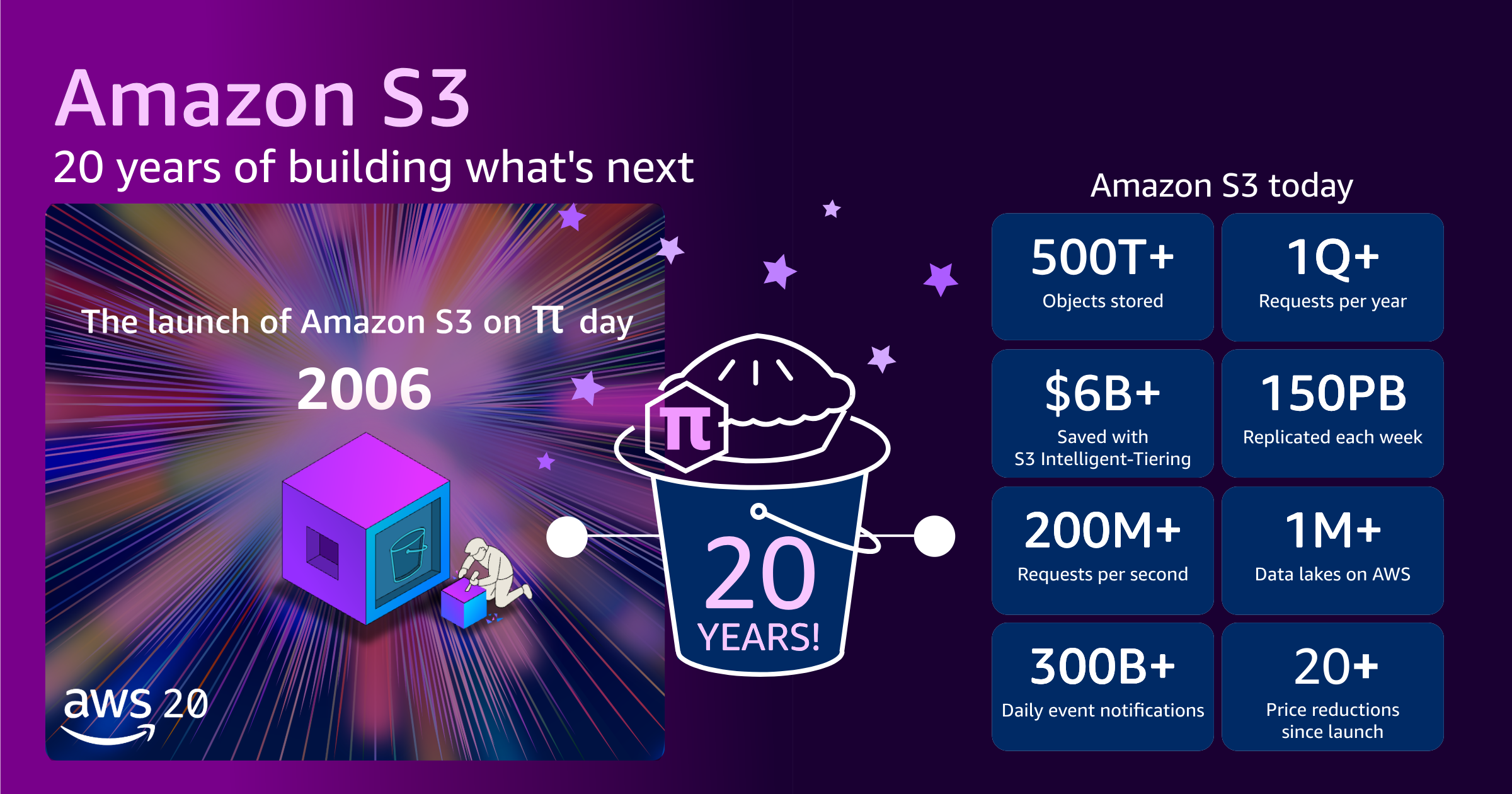
When S3 first launched, it offered approximately one petabyte of total storage capacity across about 400 storage nodes in 15 racks spanning three data centers, with 15 Gbps of total bandwidth. We designed the system to store tens of billions of objects, with a maximum object size of 5 GB. The initial price was 15 cents per gigabyte.

S3 key metrics illustration

Today, S3 stores more than 500 trillion objects and serves more than 200 million requests per second globally across hundreds of exabytes of data in 123 Availability Zones in 39 AWS Regions, for millions of customers. The maximum object size has grown from 5 GB to 50 TB, a 10,000 fold increase. If you stacked all of the tens of millions S3 hard drives on top of each other, they would reach the International Space Station and almost back.

Even as S3 has grown to support this incredible scale, the price you pay has dropped. Today, AWS charges slightly over 2 cents per gigabyte. That’s a price reduction of approximately 85% since launch in 2006. In parallel, we’ve continued to introduce ways to further optimize storage spend with storage tiers. For example, our customers have collectively saved more than $6 billion in storage costs by using Amazon S3 Intelligent-Tiering as compared to Amazon S3 Standard.

Over the past two decades, the S3 API has been adopted and used as a reference point across the storage industry. Multiple vendors now offer S3 compatible storage tools and systems, implementing the same API patterns and conventions. This means skills and tools developed for S3 often transfer to other storage systems, making the broader storage landscape more accessible.

Despite all of this growth and industry adoption, perhaps the most remarkable achievement is this: the code you wrote for S3 in 2006 still works today, unchanged. Your data went through 20 years of innovation and technical advances. We migrated the infrastructure through multiple generations of disks and storage systems. All the code to handle a request has been rewritten. But the data you stored 20 years ago is still available today, and we’ve maintained complete API backward compatibility. That’s our commitment to delivering a service that continually “just works.”

The engineering behind the scale
What makes S3 possible at this scale? Continuous innovation in engineering.

Much of what follows is drawn from a conversation between Mai-Lan Tomsen Bukovec, VP of Data and Analytics at AWS, and Gergely Orosz of The Pragmatic Engineer. The in-depth interview goes further into the technical details for those who want to go deeper. In the following paragraphs, I share some examples:

At the heart of S3 durability is a system of microservices that continuously inspect every single byte across the entire fleet. These auditor services examine data and automatically trigger repair systems the moment they detect signs of degradation. S3 is designed to be lossless: the 11 nines design goal reflects how the replication factor and re-replication fleet are sized, but the system is built so that objects aren’t lost.

S3 engineers use formal methods and automated reasoning in production to mathematically prove correctness. When engineers check in code to the index subsystem, automated proofs verify that consistency hasn’t regressed. This same approach proves correctness in cross-Region replication or for access policies.

Over the past 8 years, AWS has been progressively rewriting performance-critical code in the S3 request path in Rust. Blob movement and disk storage have been rewritten, and work is actively ongoing across other components. Beyond raw performance, Rust’s type system and memory safety guarantees eliminate entire classes of bugs at compile time. This is an essential property when operating at S3 scale and correctness requirements.

S3 is built on a design philosophy: “Scale is to your advantage.” Engineers design systems so that increased scale improves attributes for all users. The larger S3 gets, the more de-correlated workloads become, which improves reliability for everyone.

Looking forward
The vision for S3 extends beyond being a storage service to becoming the universal foundation for all data and AI workloads. Our vision is simple: you store any type of data one time in S3, and you work with it directly, without moving data between specialized systems. This approach reduces costs, eliminates complexity, and removes the need for multiple copies of the same data.

Here are a few standout launches from recent years:

  • S3 Tables – Fully managed Apache Iceberg tables with automated maintenance that optimize query efficiency and reduce storage cost over time.
  • S3 Vectors – Native vector storage for semantic search and RAG, supporting up to 2 billion vectors per index with sub-100ms query latency. In only 5 months (July–December 2025), you created more than 250,000 indices, ingested more than 40 billion vectors, and performed more than 1 billion queries.
  • S3 Metadata – Centralized metadata for instant data discovery, removing the need to recursively list large buckets for cataloging and significantly reducing time-to-insight for large data lakes.

Each of these capabilities operates at S3 cost structure. You can handle multiple data types that traditionally required expensive databases or specialized systems but are now economically feasible at scale.

From 1 petabyte to hundreds of exabytes. From 15 cents to 2 cents per gigabyte. From simple object storage to the foundation for AI and analytics. Through it all, our five fundamentals–security, durability, availability, performance, and elasticity–remain unchanged, and your code from 2006 still works today.

Here’s to the next 20 years of innovation on Amazon S3.

— seb

A React-based phishing page with credential exfiltration via EmailJS, (Fri, Mar 13th)

This post was originally published on this site

On Wednesday, a phishing message made its way into our handler inbox that contained a fairly typical low-quality lure, but turned out to be quite interesting in the end nonetheless. That is because the accompanying credential stealing web page was dynamically constructed using React and used a legitimate e-mail service for credential collection.

Introducing account regional namespaces for Amazon S3 general purpose buckets

This post was originally published on this site

Today, we’re announcing a new feature of Amazon Simple Storage Service (Amazon S3) you can use to create general purpose buckets in your own account regional namespace simplifying bucket creation and management as your data storage needs grow in size and scope. You can create general purpose bucket names across multiple AWS Regions with assurance that your desired bucket names will always be available for you to use.

With this feature, you can predictably name and create general purpose buckets in your own account regional namespace by appending your account’s unique suffix in your requested bucket name. For example, I can create the bucket mybucket-123456789012-us-east-1-an in my account regional namespace. mybucket is the bucket name prefix that I specified, then I add my account regional suffix to the requested bucket name: -123456789012-us-east-1-an. If another account tries to create buckets using my account’s suffix, their requests will be automatically rejected.

Your security teams can use AWS Identity and Access Management (AWS IAM) policies and AWS Organizations service control policies to enforce that your employees only create buckets in their account regional namespace using the new s3:x-amz-bucket-namespace condition key, helping teams adopt the account regional namespace across your organization.

Create your S3 bucket with account regional namespace in action
To get started, choose Create bucket in the Amazon S3 console. To create your bucket in your account regional namespace, choose Account regional namespace. If you choose this option, you can create your bucket with any name that is unique to your account and region.

This configuration supports all of the same features as general purpose buckets in the global namespace. The only difference is that only your account can use bucket names with your account’s suffix. The bucket name prefix and the account regional suffix combined must be between 3 and 63 characters long.

Using the AWS Command Line Interface (AWS CLI), you can create a bucket with account regional namespace by specifying the x-amz-bucket-namespace:account-regional request header and providing a compatible bucket name.

$ aws s3api create-bucket --bucket mybucket-123456789012-us-east-1-an 
   --bucket-namespace account-regional 
   --region us-east-1

You can use the AWS SDK for Python (Boto3) to create a bucket with account regional namespace using CreateBucket API request.

import boto3

class AccountRegionalBucketCreator:
    """Creates S3 buckets using account-regional namespace feature."""
    
    ACCOUNT_REGIONAL_SUFFIX = "-an"
    
    def __init__(self, s3_client, sts_client):
        self.s3_client = s3_client
        self.sts_client = sts_client
    
    def create_account_regional_bucket(self, prefix):
        """
        Creates an account-regional S3 bucket with the specified prefix.
        Resolves caller AWS account ID using the STS GetCallerIdentity API.
        Format: ---an
        """
        account_id = self.sts_client.get_caller_identity()['Account']
        region = self.s3_client.meta.region_name
        bucket_name = self._generate_account_regional_bucket_name(
            prefix, account_id, region
        )
        
        params = {
            "Bucket": bucket_name,
            "BucketNamespace": "account-regional"
        }
        if region != "us-east-1":
            params["CreateBucketConfiguration"] = {
                "LocationConstraint": region
            }
        
        return self.s3_client.create_bucket(**params)
    
    def _generate_account_regional_bucket_name(self, prefix, account_id, region):
        return f"{prefix}-{account_id}-{region}{self.ACCOUNT_REGIONAL_SUFFIX}"


if __name__ == '__main__':
    s3_client = boto3.client('s3')
    sts_client = boto3.client('sts')
    
    creator = AccountRegionalBucketCreator(s3_client, sts_client)
    response = creator.create_account_regional_bucket('test-python-sdk')
    
    print(f"Bucket created: {response}")

You can update your infrastructure as code (IaC) tools, such as AWS CloudFormation, to simplify creating buckets in your account regional namespace. AWS CloudFormation offers the pseudo parameters, AWS::AccountId and AWS::Region, making it easy to build CloudFormation templates that create account regional namespace buckets.

The following example demonstrates how you can update your existing CloudFormation templates to start creating buckets in your account regional namespace:

BucketName: !Sub "amzn-s3-demo-bucket-${AWS::AccountId}-${AWS::Region}-an"
BucketNamespace: "account-regional"

Alternatively, you can also use the BucketNamePrefix property to update your CloudFormation template. By using the BucketNamePrefix, you can provide only the customer defined portion of the bucket name and then it automatically adds the account regional namespace suffix based on the requesting AWS account and Region specified.

BucketNamePrefix: 'amzn-s3-demo-bucket'
BucketNamespace: "account-regional"

Using these options, you can build a custom CloudFormation template to easily create general purpose buckets in your account regional namespace.

Things to know
You can’t rename your existing global buckets to bucket names with account regional namespace, but you can create new general purpose buckets in your account regional namespace. Also, the account regional namespace is only supported for general purpose buckets. S3 table buckets and vector buckets already exist in an account-level namespace and S3 directory buckets exist in a zonal namespace.

To learn more, visit Namespaces for general purpose buckets in the Amazon S3 User Guide.

Now available
Creating general purpose buckets in your account regional namespace in Amazon S3 is now available in 37 AWS Regions including the AWS China and AWS GovCloud (US) Regions. You can create general purpose buckets in your account regional namespace at no additional cost.

Give it a try in the Amazon S3 console today and send feedback to AWS re:Post for Amazon S3 or through your usual AWS Support contacts.

— Channy

AWS Weekly Roundup: Amazon Connect Health, Bedrock AgentCore Policy, GameDay Europe, and more (March 9, 2026)

This post was originally published on this site

Fiti AWS Student Community Kenya!

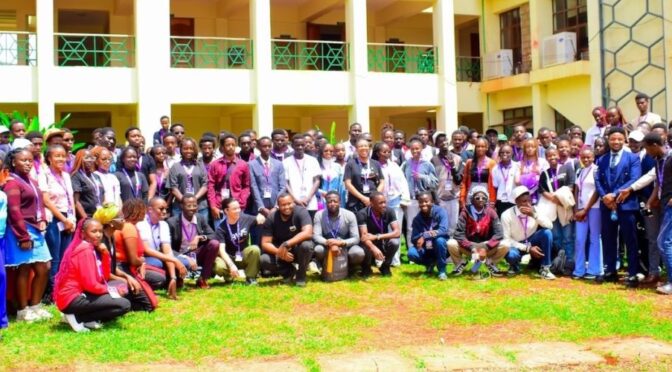
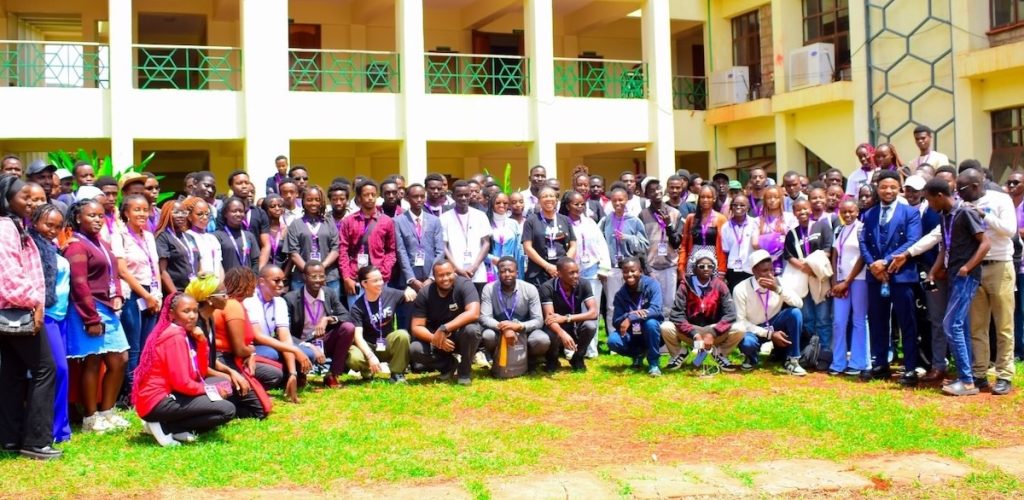
Last week was an incredible whirlwind: a round of meetups, hands-on workshops, and career discussions across Kenya that culminated with the AWS Student Community Day at Meru University of Science and Technology, with keynotes from my colleagues Veliswa and Tiffany, and sessions on everything from GitOps to cloud-native engineering, and a whole lot of AI agent building.

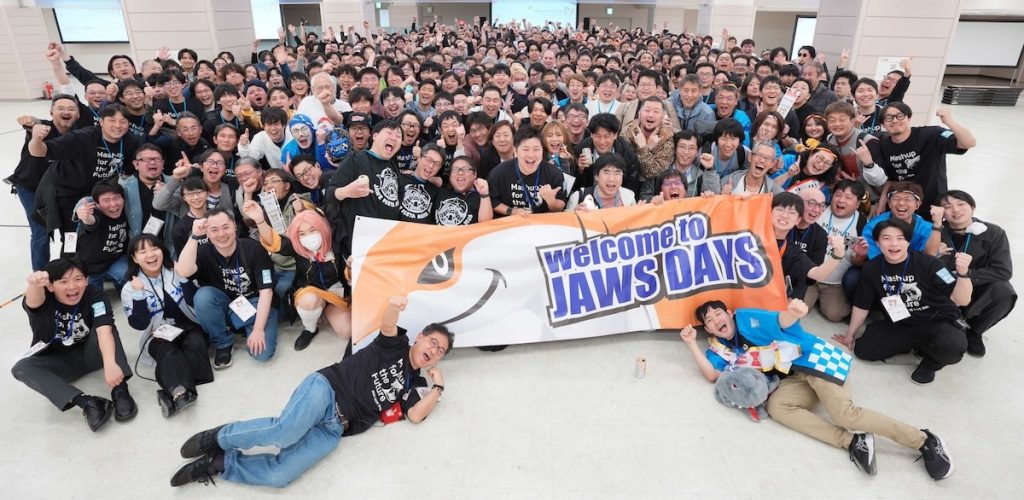
JAWS Days 2026 is the largest AWS Community Day in the world, with over 1,500 attendees on March 7th. This event started with a keynote speech on building an AI-driven development team by Jeff Barr, and included over 100 technical and community experience sessions, lightning talks, and workshops such as Game Days, Builders Card Challenges, and networking parties.

Now, let’s get into this week’s AWS news…

Last week’s launches
Here are some launches and updates from this past week that caught my attention:

  • Introducing Amazon Connect Health, Agentic AI Built for Healthcare — Amazon Connect Health is now generally available with five purpose-built AI agents for healthcare: patient verification, appointment management, patient insights, ambient documentation, and medical coding. All features are HIPAA-eligible and deployable within existing clinical workflows in days.
  • Policy in Amazon Bedrock AgentCore is now generally available — You can now use centralized, fine-grained controls for agent-tool interactions that operate outside your agent code. Security and compliance teams can define tool access and input validation rules using natural language that automatically converts to Cedar, the AWS open-source policy language.
  • Introducing OpenClaw on Amazon Lightsail to run your autonomous private AI agents — You can deploy a private AI assistant on your own cloud infrastructure with built-in security controls, sandboxed agent sessions, one-click HTTPS, and device pairing authentication. Amazon Bedrock serves as the default model provider, and you can connect to Slack, Telegram, WhatsApp, and Discord.
  • AWS announces pricing for VPC Encryption Controls — Starting March 1, 2026, VPC Encryption Controls transitions from free preview to a paid feature. You can audit and enforce encryption-in-transit of all traffic flows within and across VPCs in a region, with monitor mode to detect unencrypted traffic and enforce mode to prevent it.
  • Database Savings Plans now supports Amazon OpenSearch Service and Amazon Neptune Analytics — You can save up to 35% on eligible serverless and provisioned instance usage with a one-year commitment. Savings Plans automatically apply regardless of engine, instance family, size, or AWS Region.
  • AWS Elastic Beanstalk now offers AI-powered environment analysis — When your environment health is degraded, Elastic Beanstalk can now collect recent events, instance health, and logs and send them to Amazon Bedrock for analysis, providing step-by-step troubleshooting recommendations tailored to your environment’s current state.
  • AWS simplifies IAM role creation and setup in service workflows — You can now create and configure IAM roles directly within service workflows through a new in-console panel, without switching to the IAM console. The feature supports Amazon EC2, Lambda, EKS, ECS, Glue, CloudFormation, and more.
  • Accelerate Lambda durable functions development with new Kiro power — You can now build resilient, long-running multi-step applications and AI workflows faster with AI agent-assisted development in Kiro. The power dynamically loads guidance on replay models, step and wait operations, concurrent execution patterns, error handling, and deployment best practices.
  • Amazon GameLift Servers launches DDoS Protection — You can now protect session-based multiplayer games against DDoS attacks with a co-located relay network that authenticates client traffic using access tokens and enforces per-player traffic limits, at no additional cost to GameLift Servers customers.

For a full list of AWS announcements, be sure to keep an eye on the What’s New with AWS page.

From AWS community
Here are my personal favorite posts from AWS community and my colleagues:

  • I Built a Portable AI Memory Layer with MCP, AWS Bedrock, and a Chrome Extension — Learn how to build a persistent memory layer for AI agents using MCP and Amazon Bedrock, packaged as a Chrome extension that carries context across sessions and applications.
  • When the Model Is the Machine — Mike Chambers built an experimental app where an AI agent generates a complete, interactive web application at runtime from a single prompt — no codebase, no framework, no persistent state. A thought-provoking exploration of what happens when the model becomes the runtime.

Upcoming AWS events
Check your calendar and sign up for upcoming AWS events:

  • AWS Community GameDay Europe — Think you know AWS? Prove it at the AWS Community GameDay Europe on March 17, a gamified learning event where teams compete to solve real-world technical challenges using AWS services.
  • AWS at NVIDIA GTC 2026 — Join us at our AWS sessions, booths, demos, and ancillary events in NVIDIA GTC 2026 on March 16 – 19, 2026 in San Jose. You can receive 20% off event passes through AWS and request a 1:1 meeting at GTC.
  • AWS Summits — Join AWS Summits in 2026: free in-person events where you can explore emerging cloud and AI technologies, learn best practices, and network with industry peers and experts. Upcoming Summits include Paris (April 1), London (April 22), and Bengaluru (April 23–24).
  • AWS Community Days — Community-led conferences where content is planned, sourced, and delivered by community leaders. Upcoming events include Slovakia (March 11), Pune (March 21), and the AWSome Women Summit LATAM in Mexico City (March 28)

Browse here for upcoming AWS led in-person and virtual events, startup events, and developer-focused events.

That’s all for this week. Check back next Monday for another Weekly Roundup!

— seb

Introducing OpenClaw on Amazon Lightsail to run your autonomous private AI agents

This post was originally published on this site

Today, we’re announcing the general availability of OpenClaw on Amazon Lightsail to launch OpenClaw instance, pairing your browser, enabling AI capabilities, and optionally connecting messaging channels. Your Lightsail OpenClaw instance is pre-configured with Amazon Bedrock as the default AI model provider. Once you complete setup, you can start chatting with your AI assistant immediately — no additional configuration required.

OpenClaw is an open-source self-hosted autonomous private AI agent that acts as a personal digital assistant by running directly on your computer. You can AI agents on OpenClaw through your browser to connect to messaging apps like WhatsApp, Discord, or Telegram to perform tasks such as managing emails, browsing the web, and organizing files, rather than just answering questions.

AWS customers have asked if they can run OpenClaw on AWS. Some of them blogged about running OpenClaw on Amazon EC2 instances. As someone who has experienced installing OpenClaw directly on my home device, I learned that this is not easy and that there are many security considerations.

So, let me introduce how to launch a pre-configured OpenClaw instance on Amazon Lightsail more easily and run it securely.

OpenClaw on Amazon Lightsail in action
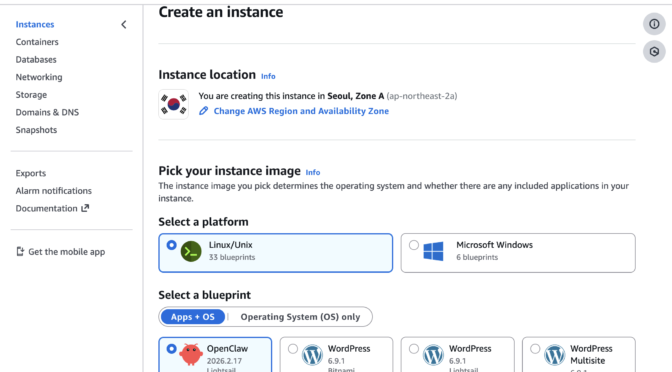
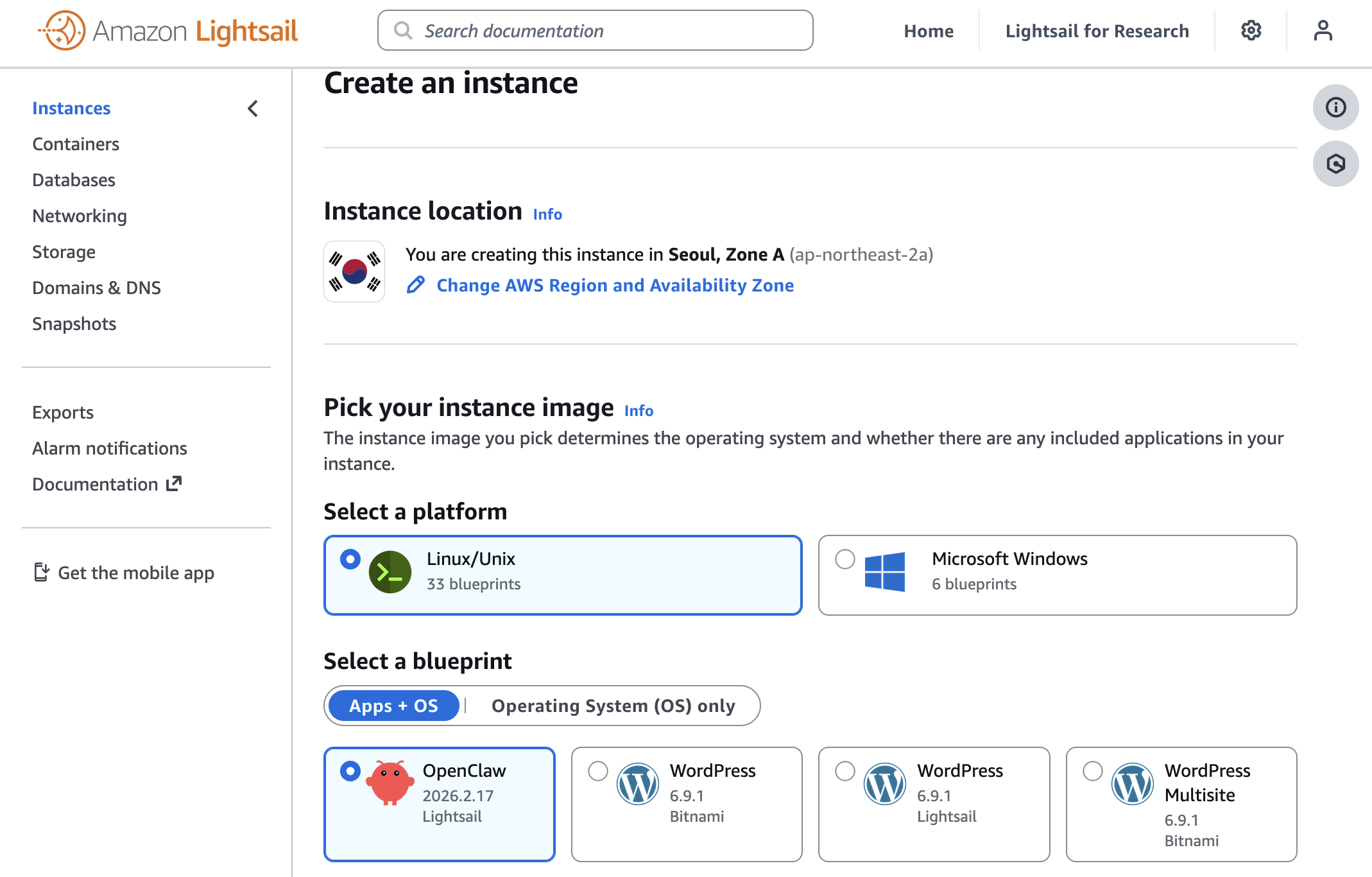
To get started, go to the Amazon Lightsail console and choose Create instance on the Instances section. After choosing your preferred AWS Region and Availability Zone, Linux/Unix platform to run your instance, choose OpenClaw under Select a blueprint.

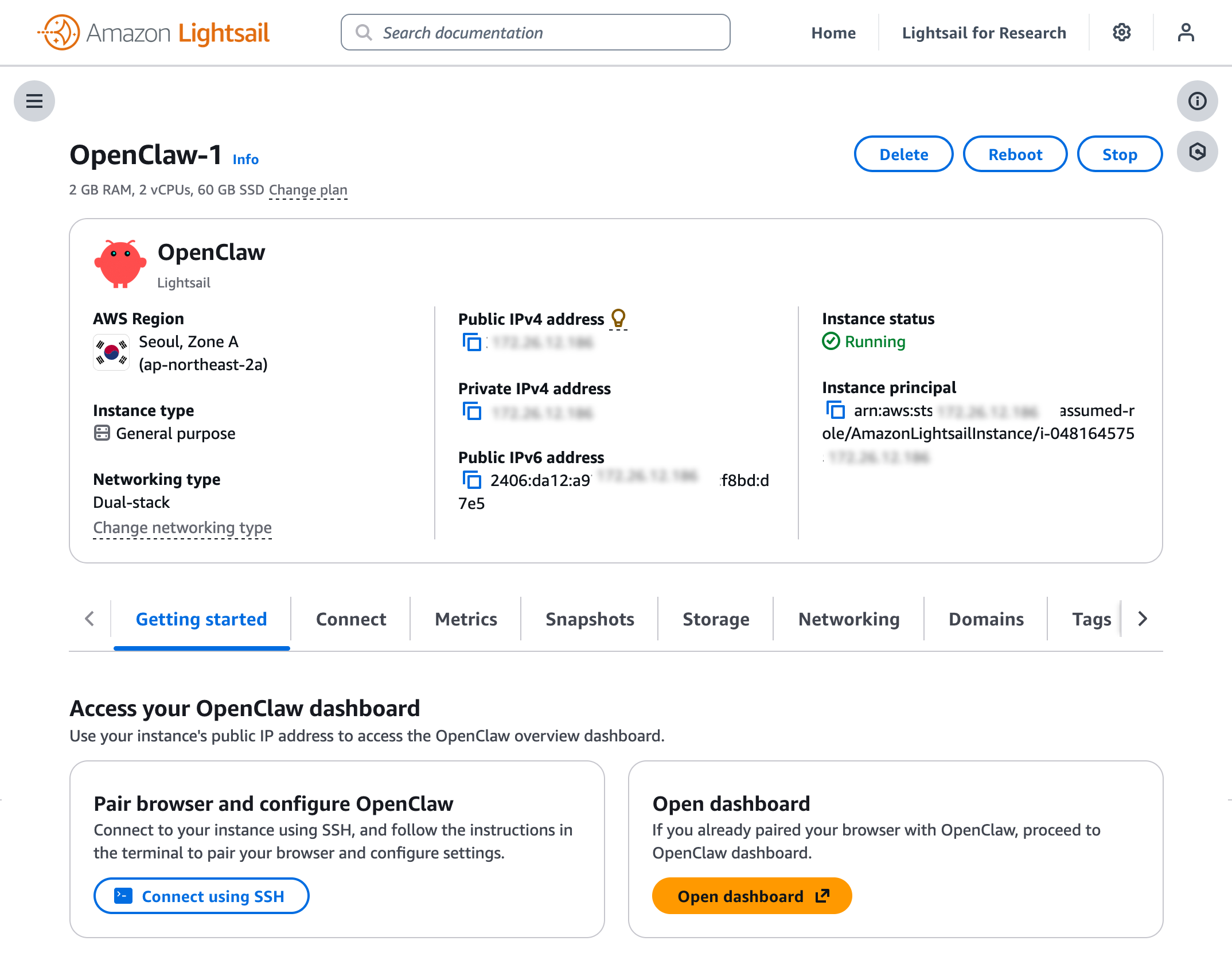
You can choose your instance plan (4 GB memory plan is recommended for optimal performance) and enter a name for your instance. Finally choose Create instance. Your instance will be in a Running state in a few minutes.

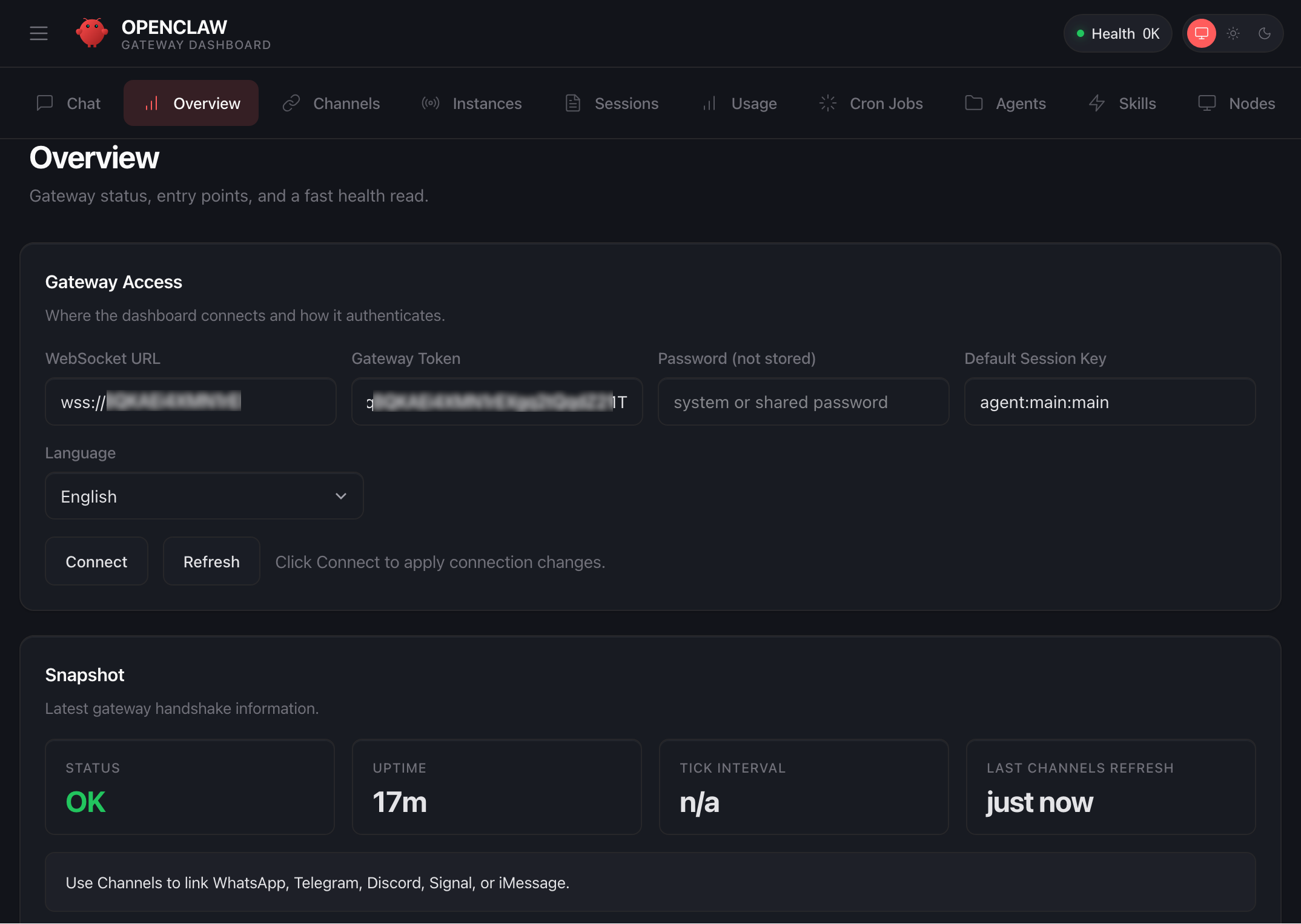
Before you can use the OpenClaw dashboard, you should pair your browser with OpenClaw. This creates a secure connection between your browser session and OpenClaw. To pair your browser with OpenClaw, choose Connect using SSH in the Getting started tab.

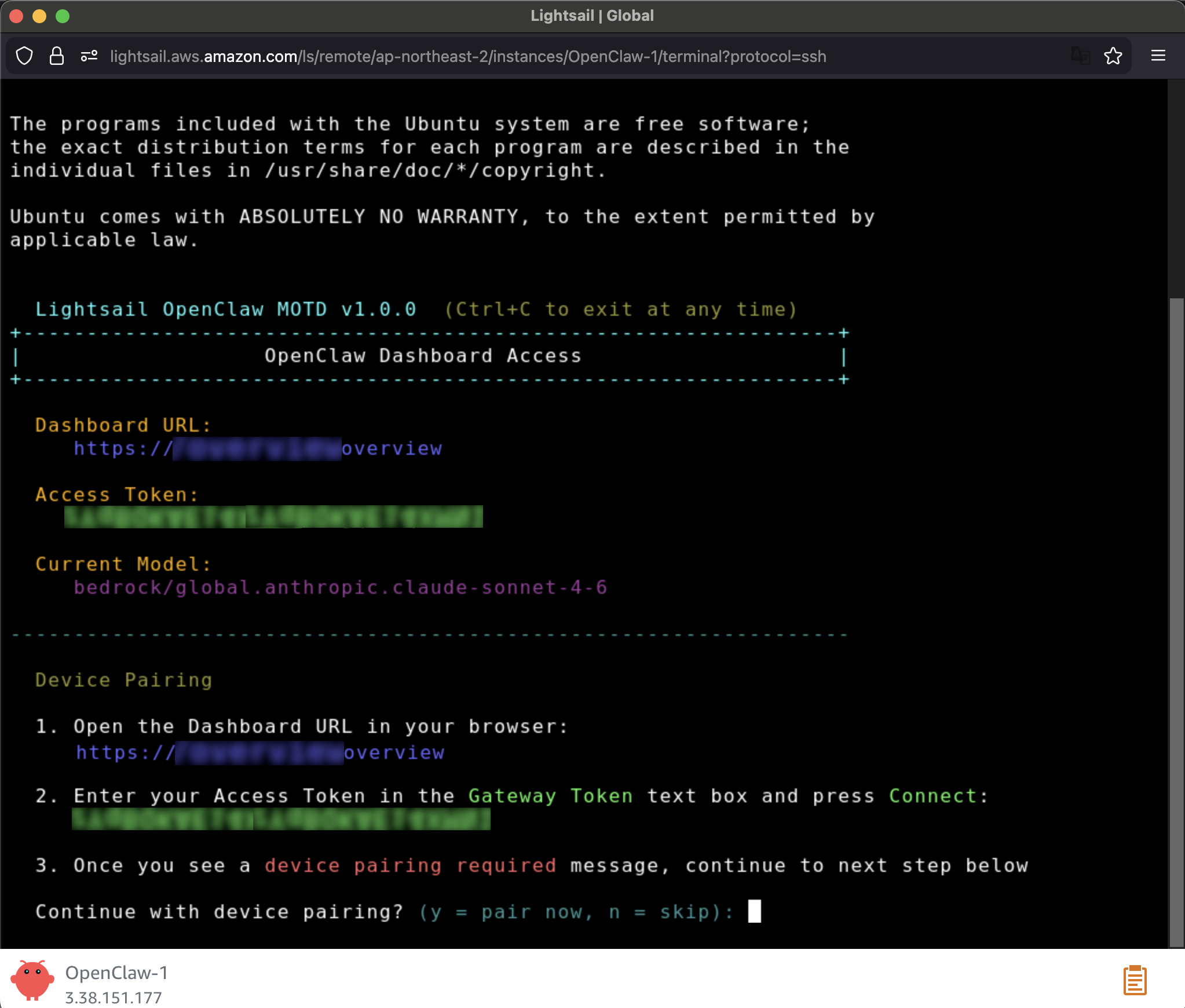
When a browser-based SSH terminal opens, you can see the dashboard URL, security credentials displayed in the welcome message. Copy them and open the dashboard in a new browser tab. In the OpenClaw dashboard, you can paste the copied access token into the Gateway Token field in the OpenClaw dashboard.

When prompted, press y to continue and a to approve with device pairing in the SSH terminal. When pairing is complete, you can see the OK status in the OpenClaw dashboard and your browser is now connected to your OpenClaw instance.

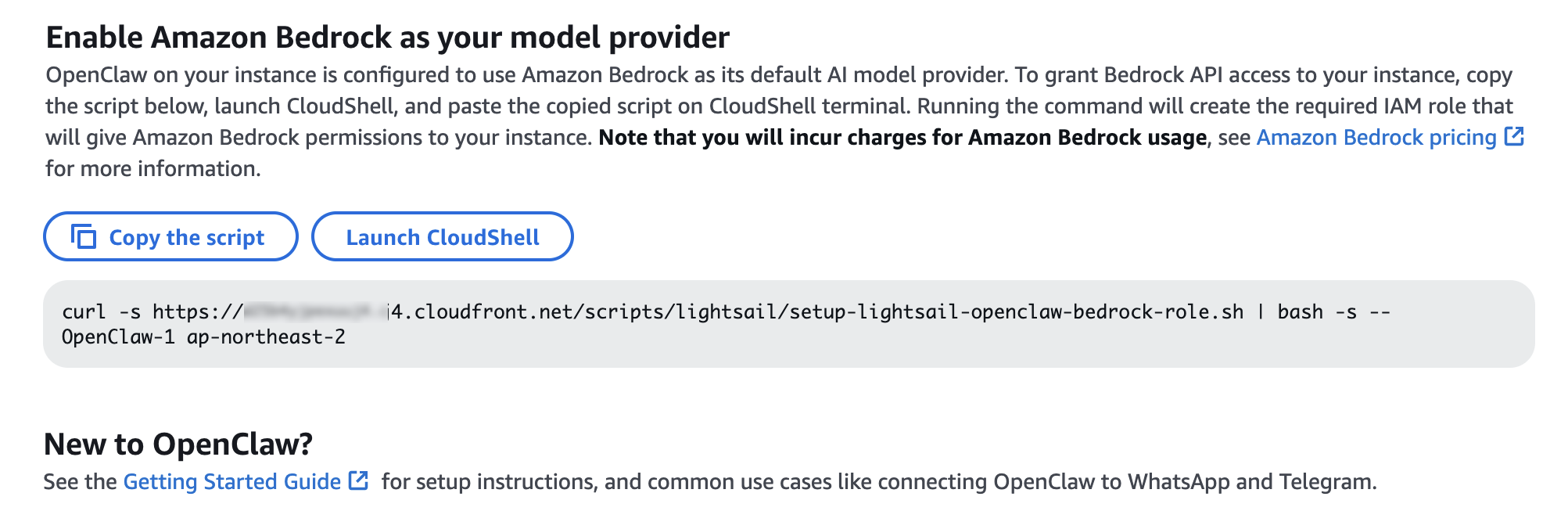
Your OpenClaw instance on Lightsail is configured to use Amazon Bedrock to power its AI assistant. To enable Bedrock API access, copy the script in the Getting started tab and run copied script into the AWS CloudShell terminal.

Once the script is complete, go to Chat in the OpenClaw dashboard to start using your AI assistant!

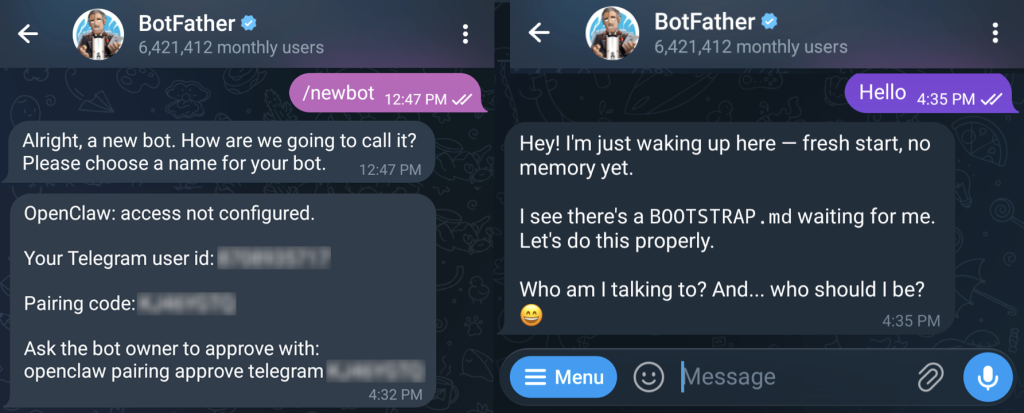
You can set up OpenClaw to work with messaging apps like Telegram and WhatsApp for interacting with your AI assistant directly from your phone or messaging client. To learn more, visit Get started with OpenClaw on Lightsail in the Amazon Lightsail User Guide.

Things to know
Here are key considerations to know about this feature:

  • Permission — You can customize AWS IAM permissions granted to your OpenClaw instance. The setup script creates an IAM role with a policy that grants access to Amazon Bedrock. You can customize this policy at any time. But, you should be careful when modifying permissions because it may prevent OpenClaw from generating AI responses. To learn more, visit AWS IAM policies in the AWS documentation
  • Cost — You pay for the instance plan you selected on an on-demand hourly rate only for what you use. Every message sent to and received from the OpenClaw assistant is processed through Amazon Bedrock using a token-based pricing model. If you select a third-party model distributed through AWS Marketplace such as Anthropic Claude or Cohere, there may be additional software fees on top of the per-token cost.
  • Security — Running a personal AI agent on OpenClaw is powerful, but it may cause security threat if you are careless. I recommend to hide your OpenClaw gateway never to expose it to open internet. The gateway auth token is your password, so rotate it often and store it in your envirnment file not hardcoded in config file. To learn more about security tips, visit Security on OpenClaw gateway.

Now available
OpenClaw on Amazon Lightsail is now available in all AWS commercial Regions where Amazon Lightsail is available. For Regional availability and a future roadmap, visit the AWS Capabilities by Region.

Give a try in the Lightsail console and send feedback to AWS re:Post for Amazon Lightsail or through your usual AWS support contacts.

– Channy

Bruteforce Scans for CrushFTP , (Tue, Mar 3rd)

This post was originally published on this site

CrushFTP is a Java-based open source file transfer system. It is offered for multiple operating systems. If you run a CrushFTP instance, you may remember that the software has had some serious vulnerabilities: CVE-2024-4040 (the template-injection flaw that let unauthenticated attackers escape the VFS sandbox and achieve RCE), CVE-2025-31161 (the auth-bypass that handed over the crushadmin account on a silver platter), and the July 2025 zero-day CVE-2025-54309 that was actively exploited in the wild.