Apple today released its typical feature update across it's operating systems (iOS, iPadOS, macOS, tvOS, watchOS, vision OS). With this update, Apple patched 84 different vulnerabilities. Updates are available for the "26" series of operating systems, as well as for the previous "18" version of iOS/iPadOS, and two versions back for macOS (version 14 and 15).
AWS Weekly Roundup: Amazon Bedrock AgentCore payments, Agent Toolkit for AWS, and more (May 11, 2026)
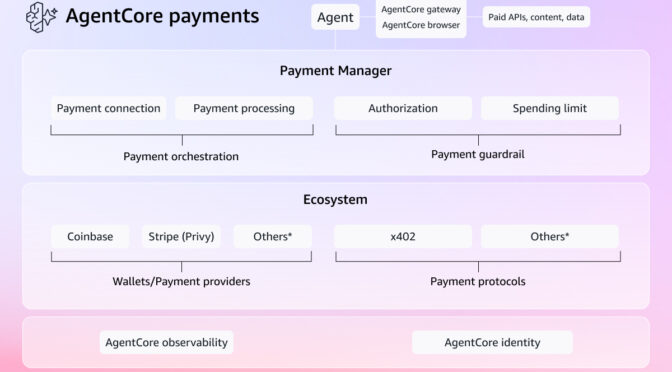
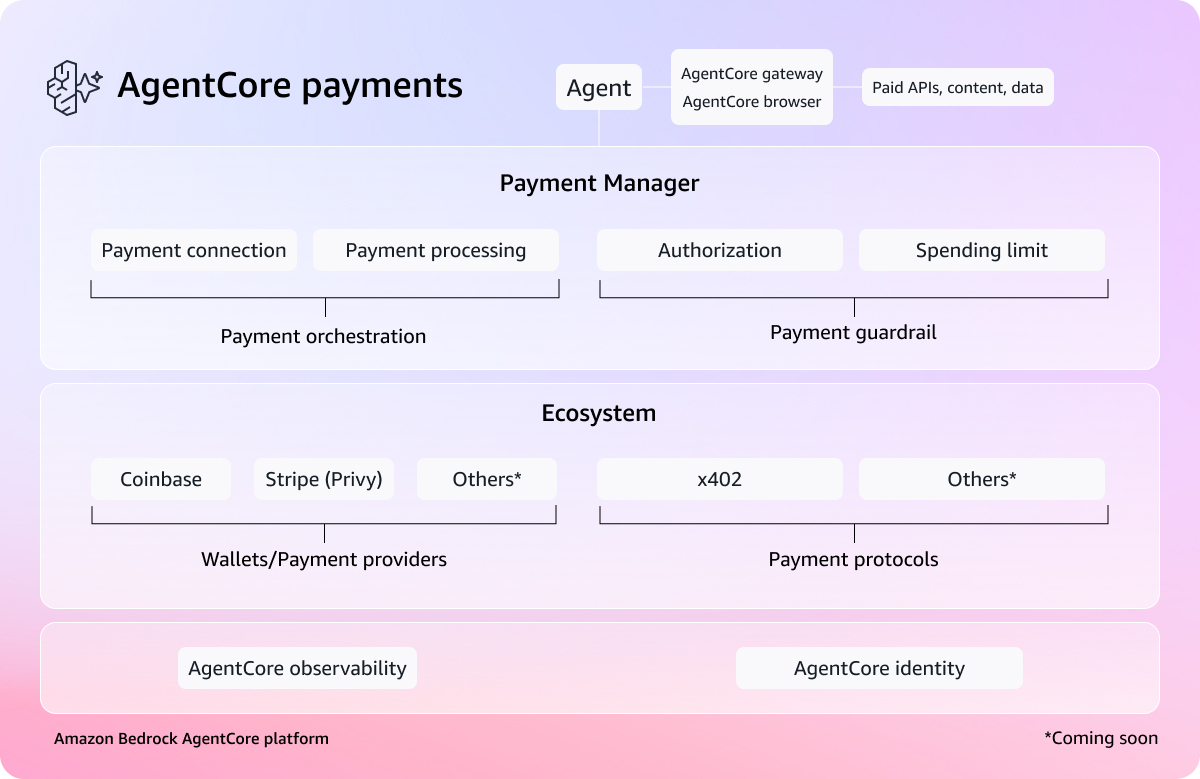
My most exciting news of last week: Amazon Bedrock AgentCore previewed the first managed payment capabilities enabling AI agents to autonomously access and pay for APIs, MCP servers, web content, and other agents. Built in partnership with Coinbase and Stripe, it removes the undifferentiated heavy lifting of building customized systems for billing, credential management, and compliance.

You can connect a Coinbase CDP wallet or Stripe Privy wallet as a payment connection, set session-level spending limits, and your agent transacts autonomously during execution. What excites me most is what AgentCore payments can unlock—like a research agent that can pay for real-time market data on the fly, or a coding agent calling paid APIs mid-task.
To learn more, visit the blog post, dive deeper using the documentation, and get started with the AgentCore CLI.
Last week’s launches
Here are last week’s launches that caught my attention:
- Agent Toolkit for AWS – A production-ready suite of tools and guidance, available at no additional charge, that helps AI coding agents build on AWS with fewer errors, lower token costs, and enterprise-grade security controls. The Agent Toolkit for AWS is the successor to the MCP servers, plugins, and skills available on AWS Labs. To get started, visit the quick start guide or browse the available skills and plugins on GitHub.
- AWS MCP Server GA – You can use a managed remote Model Context Protocol (MCP) server that gives AI agents and coding assistants secure, authenticated access to all AWS services through a small, fixed set of tools. It is part of the Agent Toolkit for AWS. To learn more, visit Seb Stormacq’s blog post.
- Amazon WorkSpaces for AI agents (Preview) – You can use AI agents to securely access and operate desktop applications through managed WorkSpaces environments. This capability allows organizations to automate everyday workflows at scale while maintaining full enterprise-grade governance and compliance. To learn more, visit Micah Walter’s blog post.
- Amazon EC2 M8idn/M8idb and R8idn/R8idb instances – These instances are powered by custom sixth-generation Intel Xeon Scalable processors available only on AWS and the latest sixth-generation AWS Nitro cards. These instances deliver up to 43% better compute performance per vCPU compared to previous-generation instances. M8idn/R8idn instances offer up to 600 Gbps network bandwidth, and M8idb/R8idb instances deliver up to 300 Gbps EBS bandwidth.
For a full list of AWS announcements, be sure to keep an eye on the What’s New with AWS page.
Additional updates
Here are some additional news items that you might find interesting:
- Valkey turns two – Valkey stands as proof that open, community-driven technology innovates faster, scales further, and delivers more value than any single-vendor model. Valkey has surpassed 100 million Docker pulls (up 17x year over year) and attracted more than 225 contributors who have submitted over 1,500 pull requests, roughly double the development pace of Redis over the same period. You can also use the latest Valkey 9.0 in Amazon ElastiCache.
- Query billion-scale vectors with SQL – You can learn how to query Amazon S3 Vectors from Amazon Aurora PostgreSQL-Compatible Edition using standard SQL, and how to combine vector similarity results with relational filters in a single query, for example, finding the most semantically similar products and then filtering by price, stock status, or tenant in one SQL statement.
- Building an end-to-end agentic SRE using AWS DevOps Agent – Learn how to configure DevOps Agent Spaces that define an investigation scope, integrating seamlessly with Amazon CloudWatch, Splunk, GitHub, and Slack. You can also learn how to trigger automated investigations via webhooks, generate mitigation plans, and hand off agent-ready specs to coding agents like Kiro for implementation.
For a full list of AWS blog posts, be sure to keep an eye on the AWS Blogs page.
Learn more about AWS, browse and join upcoming AWS-led in-person and virtual events, startup events, and developer-focused events as well as AWS Summits and AWS Community Days. Join the AWS Builder Center to connect with builders, share solutions, and access content that supports your development.
That’s all for this week. Check back next Monday for another Weekly Roundup!
— Channy
Why we use CAPTCHAs, (Mon, May 11th)
Another Universal Linux Local Privilege Escalation (LPE) Vulnerability: Dirty Frag, (Fri, May 8th)
Less than two weeks after the public disclosure of the Copy Fail vulnerability (CVE-2026-31431), another local privilege escalation (LPE) vulnerability in the Linux kernel has been revealed. Referred to as "Dirty Frag," this vulnerability was discovered and reported by Hyunwoo Kim (@v4bel) [1]. In this diary, I will provide a brief background on Dirty Frag, and discuss its relationship to Copy Fail. I will then discuss how to mitigate Dirty Frag and outline recommended next steps for system owners.
Modernize your workflows: Amazon WorkSpaces now gives AI agents their own desktop (preview)
Enterprises face a significant challenge when deploying AI agents: the desktop and legacy applications that power most business workflows are simply inaccessible to modern AI systems. According to a 2024 Gartner report, 75% of organizations run legacy applications that lack modern APIs, and 71% of Fortune 500 companies operate critical processes on mainframe systems without adequate programmatic access. For many organizations, this has meant choosing between delaying AI adoption or undertaking expensive and risky modernization projects.
Today, we are announcing that Amazon WorkSpaces now enables AI agents to securely operate desktop applications without requiring application modernization. The same managed virtual desktops that millions of employees use and trust can now also serve AI agents, turning WorkSpaces into infrastructure for scaling enterprise productivity, not just delivering it. Because agents operate within your existing WorkSpaces environment, there are no APIs to build, no application migrations to plan, and no new infrastructure to manage.
Some of our customers had an early opportunity to give their agents a WorkSpace. Chris Noon, Director, Nuvens Consulting shared with us, “WorkSpaces lets our clients give AI agents the same secure, governed desktop environment their employees already use — no custom API integrations, full audit trails, and enterprise-grade isolation out of the box. For regulated industries, that’s not a nice-to-have — it’s the baseline.”
Secure cloud desktop access for AI agents
With WorkSpaces, AI agents can securely access and operate desktop applications running inside managed WorkSpaces environments to complete complex business workflows. Agents authenticate through AWS Identity and Access Management (IAM) and connect via Workspaces with complete audit trails available through AWS CloudTrail and Amazon CloudWatch. Because agents operate within secure WorkSpaces environments rather than on local machines, your existing security controls and compliance policies remain fully intact.
Amazon Workspaces supports the industry-standard Model Context Protocol (MCP), which means WorkSpaces works with any agent framework, such as LangChain, CrewAI and Strands Agents.
Let’s try it out
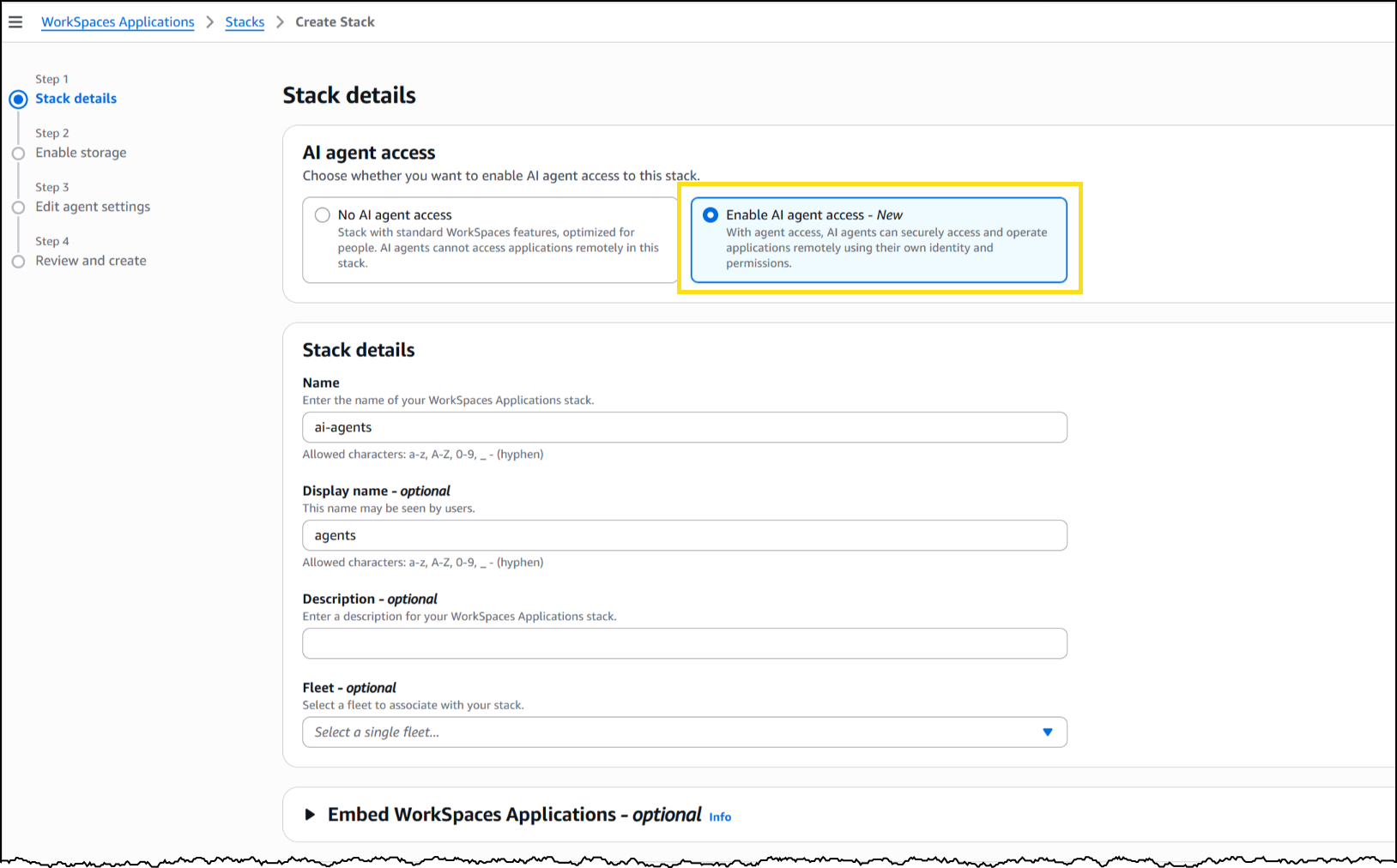
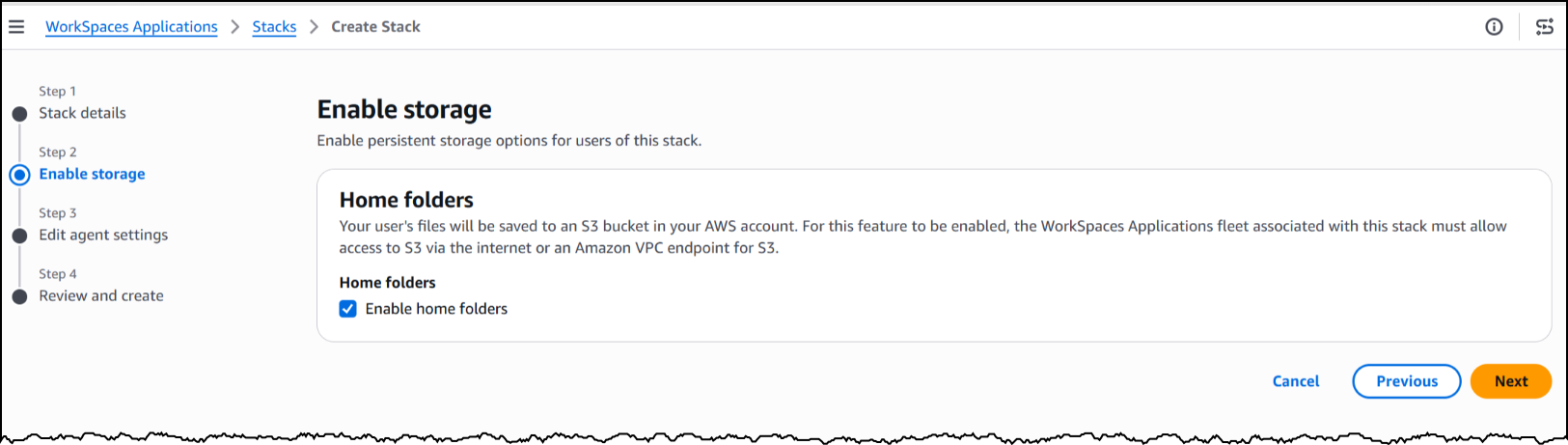
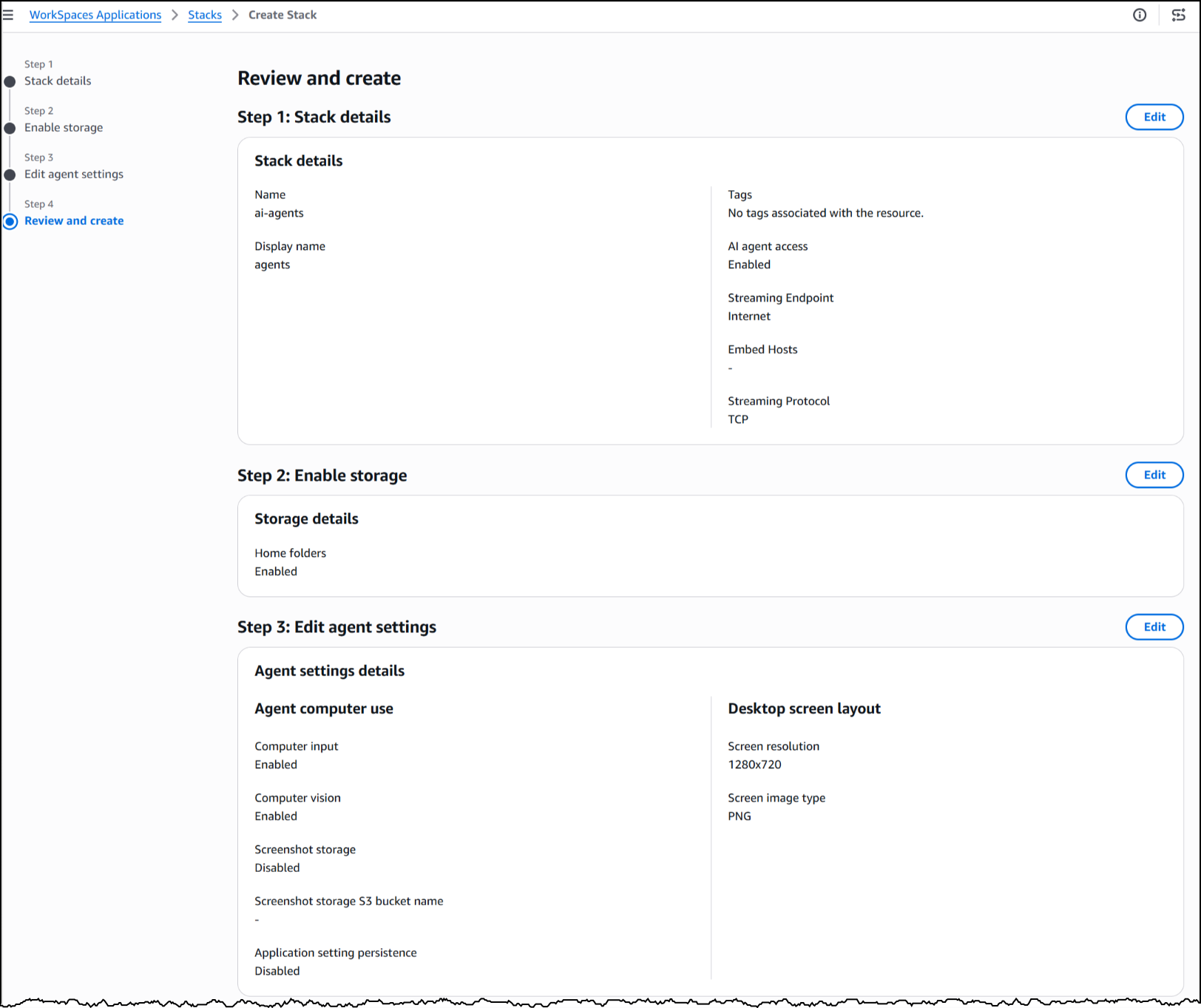
To set up a WorkSpaces environment for AI agents, I started in the AWS Management Console by creating a new WorkSpaces Applications stack—the environment definition that controls how agents connect and what they’re allowed to do.
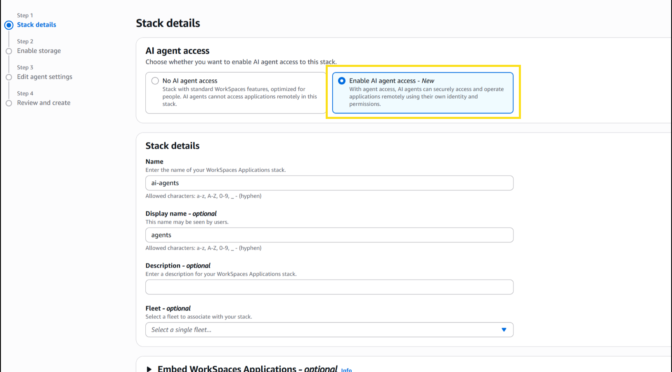
From the Amazon WorkSpaces console, I chose Create stack and configured the basics: name, fleet association, and VPC endpoints. In Step 3 of the stack creation workflow, I noticed the new AI agents section with two options. The first, No AI agent access, is the default configuration for standard WorkSpaces designed for people. The second, Add AI Agents, allows AI agents to securely access and operate applications using their own identity and permissions. I selected Add AI Agents to enable agent connections on this stack.

Next, I will enable storage before configuring the agent access settings to define how agents interact with the desktop.

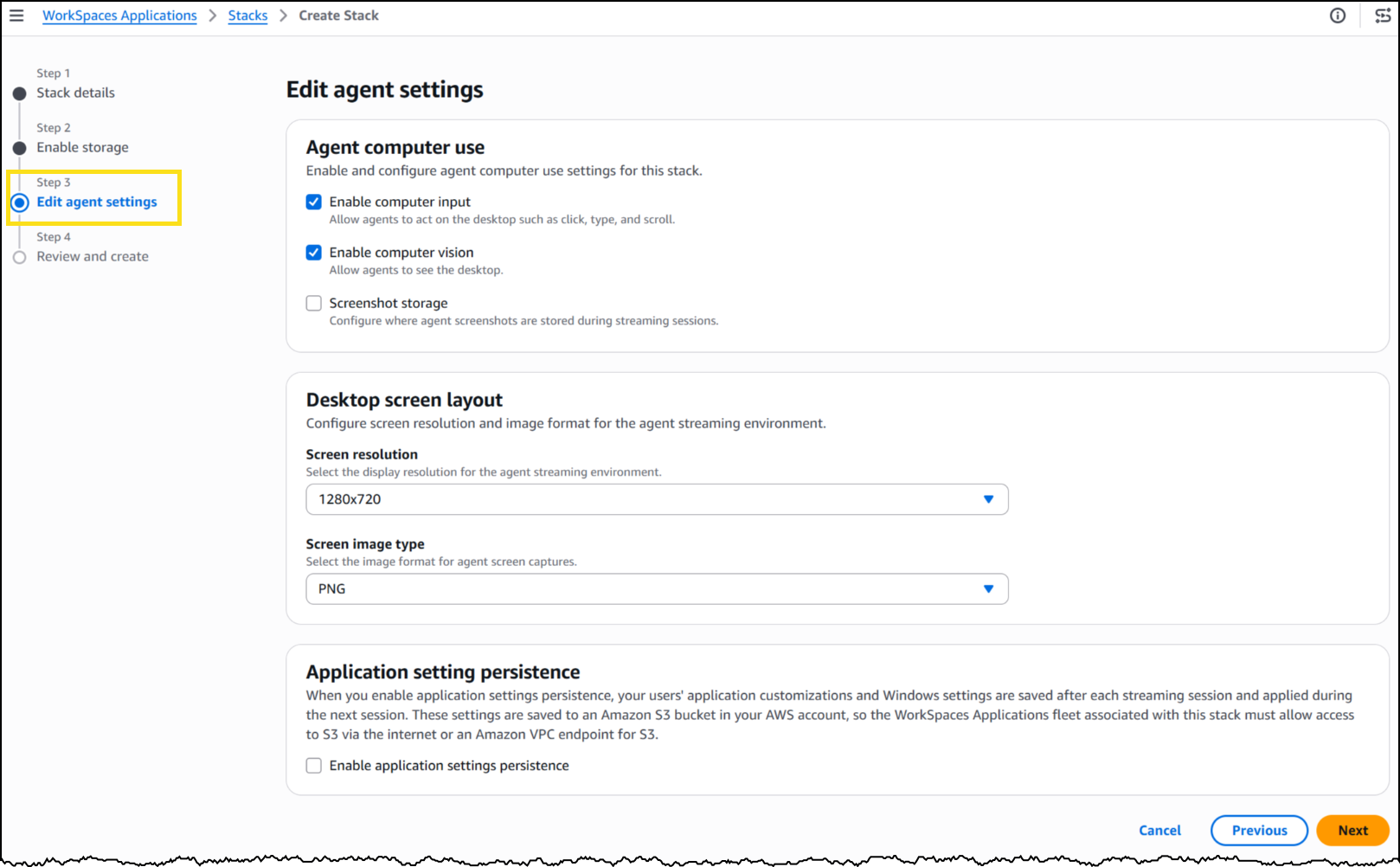
Under Agent features, I enabled three capabilities. Computer input allows the agent to click, type, and scroll within the desktop. Computer vision allows the agent to capture screenshots of the desktop, which is how it “sees” the application. Finally, screenshot storage configures where session screenshots are stored for audit and debugging.

Under Desktop screen layout, I set the screen resolution to 1280×720 and image format to PNG. The resolution determines the fidelity of what the agent sees during a session—a complex application with dense UI elements might benefit from higher resolution, while a terminal-style interface works well at 720p.

With my stack configured, WorkSpaces exposes a managed MCP endpoint. I pointed my agent framework to this endpoint, provided IAM credentials for authentication, and my agent began interacting with the desktop applications installed on the fleet’s image.
To see this in action, here’s an agent built with the Strands Agent SDK and Amazon Bedrock handling a prescription refill, looking up the patient record, searching for the medication, placing the order, and confirming a successful refill, all inside a sample pharmacy system with no API.
The application doesn’t know an agent is driving it. Nothing about the software was modified, rebuilt, or integrated. The agent worked with it exactly as it exists today.
Now available
This feature is available today in public preview at no additional cost in US East (N. Virginia, Ohio), US West (Oregon), Canada (Central), Europe (Frankfurt, Ireland, Paris), and Asia (Tokyo, Mumbai, Sydney, Seoul, Singapore) Regions.
Get started building today using our GitHub repo, or visit the WorkSpaces page for more details.
SSL.com rotates their root certificate today, (Tue, May 5th)
I just got an email from SSL.com last night, they are rotating out their root certificate today (May 5,2026). This is normal, business as usual stuff for a CA, but certificates get used for all kinds of things, and sometimes they aren't used like they should be, so sometimes hiccups happen.
Announcing Microsoft Desired State Configuration v3.2.0
Announcing DSC v3.2.0
We’re excited to announce the General Availability of Microsoft Desired State Configuration (DSC)
v3.2.0. This release delivers new built-in Windows resources, experimental Bicep integration via
gRPC, version pinning, a richer expression language, custom functions, and continued adapter
improvements. All these changes are driven by real-world use, partner feedback, and community
contributions. Special thanks to the WinGet team and the incredible DSC community.
For background on the DSC v3 platform, see:
- DSC v3.0.0 Announcement
- DSC v3.1.0 Announcement
What’s New in DSC v3.2
New Windows resources
DSC v3.2 ships several new built-in Windows resources, significantly expanding what you can manage
out of the box:
Microsoft.Windows/Service— manage Windows servicesMicrosoft.Windows/OptionalFeatureList— manage Windows Optional features- Requires using the ZIP package of DSC for now
Microsoft.Windows/FeatureOnDemandList— manage Windows Features on Demand- Requires using the ZIP package of DSC for now
Microsoft.Windows/FirewallRuleList— manage Windows Firewall rulesMicrosoft.OpenSSH.SSHD/sshd_config— manage entire SSH server configurationMicrosoft.OpenSSH.SSHD/SubsystemandMicrosoft.OpenSSH.SSHD/SubsystemList— manage SSH server
configuration for subsystem entriesMicrosoft.OpenSSH.SSHD/Windows— manage Windows SSH server configuration, such as the default
shell
These resources are included in the DSC package and ready to use without additional installation.
Bicep integration via gRPC (experimental)
DSC v3.2 introduces a gRPC server, enabling Bicep to orchestrate DSC resources directly. The
dsc-bicep-ext extension is now included in the MSIX package and exposed on PATH.
This is the foundation for the Bicep to DSC integration. Write your configuration in Bicep. Bicep
orchestrates the execution directly over gRPC without going through ARM.
Extended WhatIf support
DSC v3.2 adds --what-if support to the dsc resource set command, letting you preview changes
before applying them:
dsc resource set --what-if --resource Microsoft.Windows/Service --input '{
"name": "spooler",
"startupType": "disabled"
}'
Prior to this release there was no way to run --what-if against individual resources. You could
use the --what-if flag with the dsc config set command, which ran all resources in your
configuration in --what-if mode.
Resource manifests can now declare whatIfReturns to describe what a what-if operation returns,
enabling richer preview output across resources.
Version pinning
DSC v3.2 supports pinning configuration documents to specific versions of DSC and pinning resource
instances in configuration documents to specific versions of the resource.
Now you can author a DSC configuration document and ensure that it only executes when the given
versions of DSC and resources that are available on the system. Prior to this release, DSC always
used the latest version of a resource discovered on a system for configuration operations.
The following example shows how to pin a configuration document to a specific version of DSC using
the version directive and how to pin individual resource instances to specific versions using the
requireVersion field.
$schema: https://aka.ms/dsc/schemas/v3/bundled/config/document.json
directives:
version: '=3.2.0' # This configuration is only valid for exactly version 3.2.0
resources:
- name: os
type: Microsoft/OSInfo
requireVersion: '^1.0' # Resource versions >= 1.0.0 and < 2.0.0 are valid
properties: {}
- name: echo
type: Microsoft.DSC.Debug/Echo
requireVersion: '>=1.0.0, <1.3'
properties:
output: echo
When DSC evaluates a resource version pin in a configuration document, it looks for the latest
version of the resource that meets the given requirement. If no compatible version is discovered
on the system, DSC raises an error.
Starting with version 3.2, when you specify the version directive, DSC raises an error when the
version of DSC operating on the configuration document isn’t compatible.
Expression language improvements
Configuration documents now support a richer expression syntax:
- Lambda expressions with
map()andfilter()functions (ARM syntax) dataUri()anddataUriToString()functionsreference()usage insidecopyloopsrequireVersionreplacesapiVersionfor version requirements
These additions make configuration documents more expressive and reduce the need to duplicate
values across resources.
Adapter improvements
DSC 3.2 adds support for adapted resource manifests to the PowerShell adapters. Resource authors can
create adapted resource manifests that prevent adapters from needing to do more intensive
discovery operations.
This release also includes other improvements to the PowerShell adapters:
- Added automatic conversion of PowerShell streams to DSC traces. Resource authors can participate
in DSC’s tracing model by using the normalWrite-*cmdlets. - Fixed passing credentials to adapted PSDSC resource instances.
Metadata and execution improvements
Microsoft.DSCmetadata is now split intodirectivesandexecutionInformation— cleaner
separation of configuration intent from execution context._refreshEnvresource metadata updates Windows environment variables during deployment without
requiring a restart.- Resource manifests can now specify
requireSecurityContextper operation, helping users avoid
problems where they retrieve data for a resource with agetortestoperation and then get an
access denied error when they try to run thesetcommand. - Resources and extensions can now be marked as deprecated, with a deprecation message surfaced
at runtime.
New extension capabilities
DSC 3.2 adds support for two new extension capabilities: importing configurations and retrieving
secrets.
You can use an extension with the import capability to process arbitrary files as DSC
configuration documents. For example, a hypothetical extension with this capability could transform
the following TOML snippet into a DSC configuration document:
# example.dsc.toml
[directives]
version = '3.2.0'
[resources.os]
type = 'Microsoft/OSInfo'
properties = {}
The resulting DSC configuration document:
# effective DSC configuration document
$schema: https://aka.ms/dsc/schemas/v3/bundled/config/document.json
directives:
version: '=3.2.0' # This configuration is only valid for exactly version 3.2.0
resources:
- name: os
type: Microsoft/OSInfo
properties: {}
When you use the --file option with the dsc config * commands, DSC checks the file extension to
see whether an extension can process that file. If there is no DSC extension that handles the given
file extension, DSC tries to parse the file as a configuration document.
You can use a DSC extension with the secret capability to retrieve secrets at runtime. Presenting
secret retrieval through the extension model enables DSC to be used with secrets in a variety of
contexts without requiring the core engine to handle these operations directly. This capability is
paired with the new secret() configuration expression for retrieving secrets by name.
Experimental PowerShell discovery extension
DSC now includes a discovery extension for finding DSC resources in PowerShell modules. This
extension looks for resource manifests and adapted resource manifests located inside PowerShell
modules on the system. This makes it possible for resource authors to ship DSC resources written
in PowerShell that are not PSDSC resources.
For example, with this extension, DSC could discover a resource implemented as a PowerShell script
as long as the module also includes a valid manifest for the resource.
Bug fixes
- Fixed duplicate resources appearing in
dsc resource list - Added a clear error when attempting to use DISM resources via Appx (previously a silent failure)
- Fixed
executionInformationin config export results - Fixed discovery failures when encountering unsupported manifests
Community contributions
DSC v3.2 reflects the work of an active and growing contributor community. The following community
members made notable contributions to this release:
- @Gijsreyn (Gijs Reijn) — experimental PowerShell discovery extension,
lambda/map/filter
expressions,dataUrifunctions, adapted resource manifest fixes, and more. - @mimachniak — PowerShell adapter credentials fix for passing username and password.
Thank you to everyone who filed issues, tested previews, and submitted fixes during the DSC v3.2
release cycle.
Installing DSC
On Windows, you can install DSC from the Microsoft Store using winget. Installing from the Store
gives you automatic updates.
Search for the latest version of DSC:
winget search DesiredStateConfiguration --source msstore
Name Id Version
------------------------------------------------------
DesiredStateConfiguration 9NVTPZWRC6KQ Unknown
DesiredStateConfiguration-Preview 9PCX3HX4HZ0Z Unknown
Install DSC using the id parameter:
# Install latest stable
winget install --id 9NVTPZWRC6KQ --source msstore
# Install latest preview
winget install --id 9PCX3HX4HZ0Z --source msstore
To install the ZIP package on Windows, Linux, or macOS:
- Download the latest release from the PowerShell/DSC repository.
- Expand the release archive.
- Add the folder containing the expanded archive contents to your
PATHenvironment variable.
Support lifecycle
DSC follows semantic versioning. DSC v3.2.0 is the current stable release. Patch releases update
the third digit of the semantic version number — for example, 3.2.1 is a patch update to 3.2.0.
Stable releases receive patches for critical bugs and security vulnerabilities for three months
after the next stable release. For example, v3.2.0 is supported for three months after v3.3.0 is
released.
Always update to the latest patch version of the release you’re using.
Looking ahead
Work continues on DSC v3.3, with previews starting shortly after the v3.2.0 GA release.
Call to action
For more information about DSC, see the DSC documentation. We value your feedback. Stop by our
GitHub repository and let us know of any issues you find.
Jason Helmick
Sr. Product Manager, PowerShell
The post Announcing Microsoft Desired State Configuration v3.2.0 appeared first on PowerShell Team.

Top announcements of the What’s Next with AWS, 2026
Today at the What’s Next with AWS, Matt Garman, CEO of AWS, Colleen Aubrey, SVP Amazon Applied AI Solutions, Julia White, CMO of AWS, and OpenAI leaders discussed how they and their customers are changing how businesses operate with agents.
Here’s our roundup of the biggest announcements from the event:
Amazon Quick is an AI assistant for work that connects to all of them, learns what matters to you, and takes action on your behalf. Starting today, you can use the new desktop app, sign up for Free and Plus pricing plans, generate visual assets in the chat, and easily connect Quick to even more apps.
- Quick’s new desktop app (Preview): You can create a personalized experience by staying connected to your local files, calendar, and communications without opening a browser.
- New Free and Plus pricing plans for Quick: You can sign up within minutes using your personal email address or existing Google, Apple, Github, or Amazon credentials—no AWS account required.
- Generate visual assets on the fly: Available today, Quick now lets you create polished documents, presentations, infographics, and images directly from the chat interface, no design skills or hours of formatting required.
- Easily connect Quick to even more apps: Also available today, Quick is expanding its native integrations to include Google Workspace, Zoom, Airtable, Dropbox, and Microsoft Teams.
To learn more, visit the About Amazon News post.
Amazon Connect is expanding from a single product into a set of four agentic AI solutions designed to work within your existing workflows: Amazon Connect Decisions (supply chains), Talent (hiring), Customer (customer experience), and Health (health care).
- Amazon Connect Decisions is a supply chain planning and intelligence solution that shifts teams from crisis management to proactive planning and decisioning. AI teammates, combining 30 years of Amazon operational science and 25+ specialized supply chain tools, adapt to your business, learn from your team, and continuously improve your operations.
- Amazon Connect Talent (Preview) is an agentic AI hiring solution built for talent acquisition leaders managing scaled hiring. It delivers AI-led interviews, science-backed assessments, and consistent evaluation, helping recruiters hire high quality candidates faster while providing applicants with a flexible interview experience that reduces human preconceptions.
- Amazon Connect Customer, previously known as Amazon Connect, delivers intelligent, personalized customer experiences across voice, chat, and digital channels. Amazon Connect Customer now offers new configuration capabilities that enable organizations to set up conversational AI in weeks, not months, and configure experiences without technical expertise.
- Amazon Connect Health delivers agentic patient verification, appointment management, patient insights, ambient documentation, and medical coding — giving patients faster access to care, clinicians more time for care, and staff capacity for specialized work.
To learn more, visit the About Amazon News post.
AWS and OpenAI extended partnership
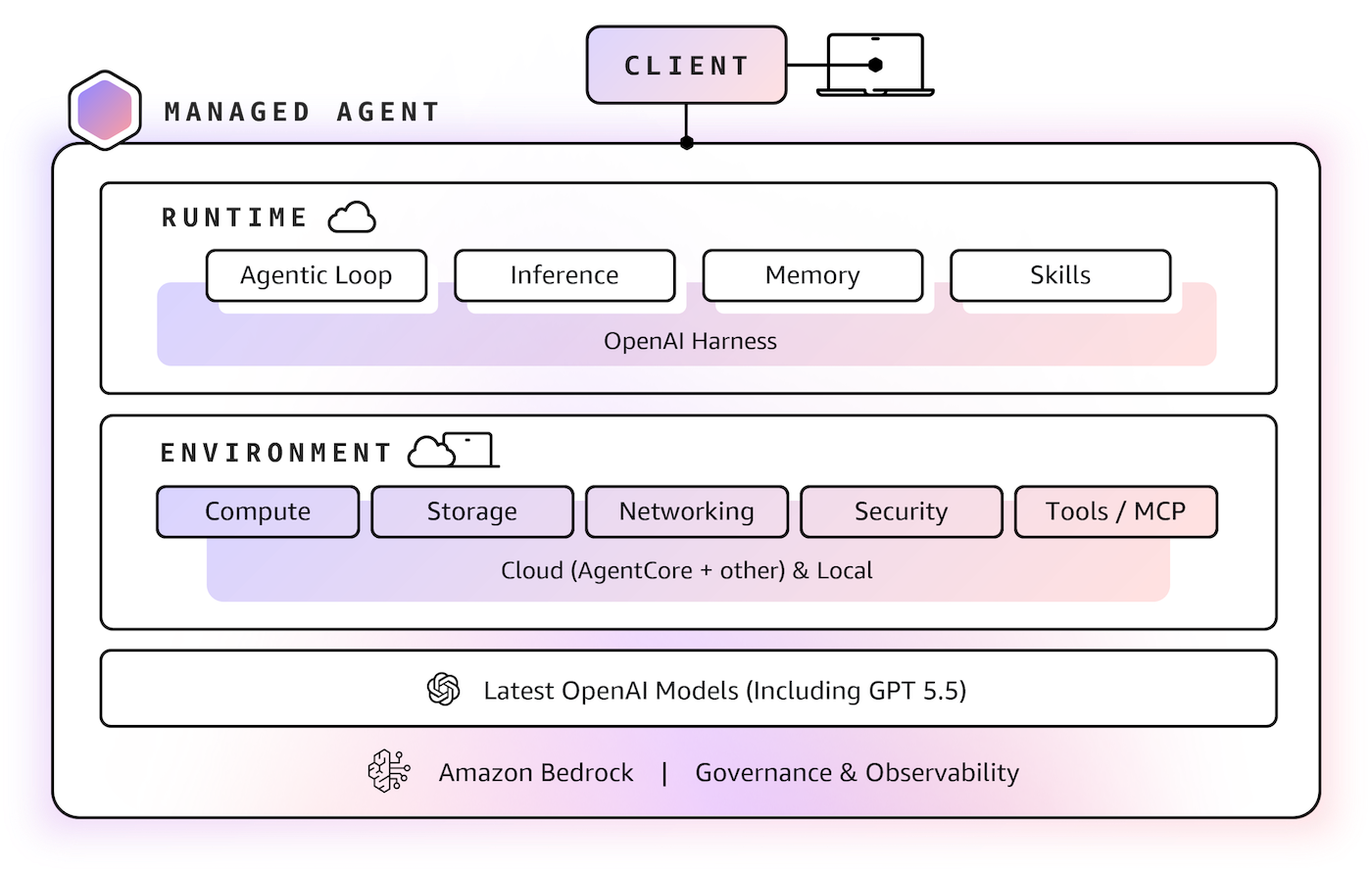
AWS and OpenAI are bringing the latest OpenAI models to Amazon Bedrock, launching Codex on Amazon Bedrock, and launching Amazon Bedrock Managed Agents, powered by OpenAI (all in limited preview), giving enterprises the frontier intelligence they want on the infrastructure they trust.
- OpenAI models on Amazon Bedrock (Limited preview): The latest OpenAI models, including GPT-5.5 and GPT-5.4, will be available in preview on Amazon Bedrock. Use OpenAI’s frontier models through the same Bedrock APIs you already rely on, with unified security, governance, and cost controls. No additional infrastructure to configure, no new security model to learn.
- Codex on Amazon Bedrock (Limited preview): You can access the OpenAI coding agent within the AWS environments where they already operate at scale. You can authenticate using their AWS credentials, process inference through Amazon Bedrock infrastructure, and apply Codex usage toward their AWS cloud commitments. Codex on Bedrock is available through the Bedrock API, starting with the Codex CLI, the Codex desktop app, and Visual Studio Code extension.
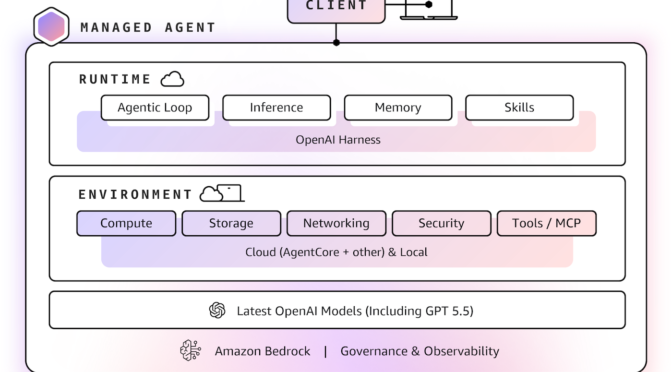
- Amazon Bedrock Managed Agents, powered by OpenAI (Limited preview): Amazon Bedrock Managed Agents combines frontier AI models with trusted AWS infrastructure, enabling customers to quickly and easily build production-ready OpenAI-powered agents in the cloud. It is built with the OpenAI harness, which is engineered to unlock the full potential of OpenAI frontier models, delivering faster execution, sharper reasoning, and reliable steering of long-running tasks.

To learn more, visit the AWS What’s New post and About Amazon News post.
TeamPCP Supply Chain Campaign: Update 008 – 26-Day Pause Ends with Three Concurrent Compromises (Checkmarx KICS, Bitwarden CLI Cascade, xinference PyPI), CanisterSprawl npm Worm Identified, and Tier 1 Coverage Returns, (Mon, Apr 27th)
This update succeeds TeamPCP Supply Chain Campaign Update 007, published April 8, 2026, which left the campaign in credential-monetization mode following the Cisco source code theft via Trivy-linked credentials, Google GTIG's formal designation of the operators as UNC6780 (with their credential stealer named SANDCLOCK), and the lapsed CISA KEV remediation deadline for CVE-2026-33634 with no standalone federal advisory. The Sportradar publication deadline flagged in Update 007 (approximately April 10 to 11) lapsed without a public CipherForce dump, and CipherForce's leak infrastructure has remained offline. Twelve days after Update 007, the technical compromise picture changed sharply across the W17 window (April 20 through April 26).
Handling the CVE Flood With EPSS, (Mon, Apr 20th)
Every morning, security people around the world face the same ritual: opening their vulnerability feed to find a lot of new CVE entries that appeared overnight. Over the past decade, this flood has become a defining challenge of modern defensive security. Some numbers[1]: