All posts by David

Esxi upgrade from 5.5 to 6.0U3 HPE custom offline bundle VMware-ESXi-6.0.0-Update3-6921384-HPE-600.10.2.0.23-Feb2018-depot.zip requires VSAN?

Hello all,


I am trying to upgrade one of my HPDL 380 G7 servers from Esxi Ver 5.5 to Esxi ver 6.0U3 using the esxcli and the VMware-ESXi-6.0.0-Update3-6921384-HPE-600.10.2.0.23-Feb2018-depot.zip.


I SSH into box and run


#esxcli software vib update -d “/vmfs/volumes/mydatastore/VMware-ESXi-6.0.0-Update3-6921384-HPE-600.10.2.0.23-Feb2018-depot.zip”


I receive the following about VSAN being required??

[DependencyError]

VIB VMware_bootbank_esx-base_6.0.0-3.79.6921384 requires vsan >= 6.0.0-3.79, but the requirement cannot be satisfied within the ImageProfile.

VIB VMware_bootbank_esx-base_6.0.0-3.79.6921384 requires vsan << 6.0.0-3.80, but the requirement cannot be satisfied within the ImageProfile.

Please refer to the log file for more details.


Can anyone provide any insight on how I can resolve this error and get my Dl380 G7 server to upgrade to esxi 6.0U3?


Much appreciated
HP Proliant 380G9 with H241 sas card

Hello

I have installed ESXi in HP Proliant 380G9, it has a Dual SAS port H241 controller


The problem that I have is that the OS only sees 1 port. I updated the firmware and drivers, and the issue is still there.


Any idea?


[root@USN:~] esxcli storage core adapter list

HBA Name  Driver  Link State UID Capabilities  Description

——–  —— ———- ——————– ———— ————————————————————

vmhba0    hpsa link-n/a sas.5001438042300370 (0000:03:00.0) Hewlett Packard Enterprise Smart Array P440ar

vmhba1    hpsa link-n/a sas.5001438040f60320 (0000:08:00.0) Hewlett Packard Enterprise Smart HBA H241

[root@USN:~]


Thanks and regards

vROps Editions: Series Overview – VMware Cloud Management


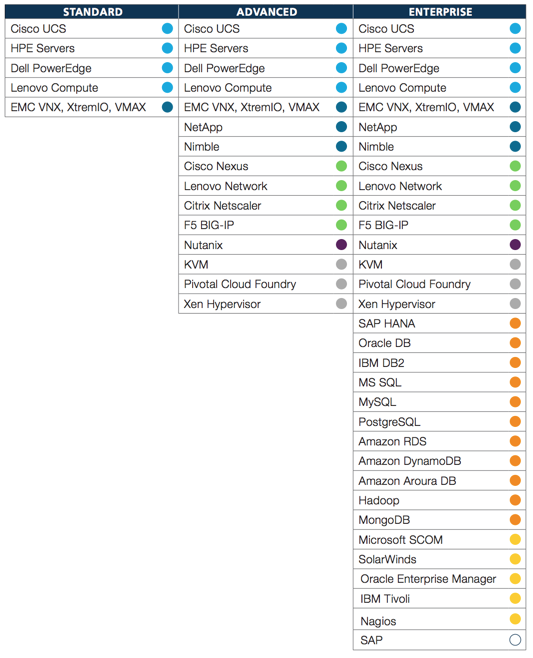
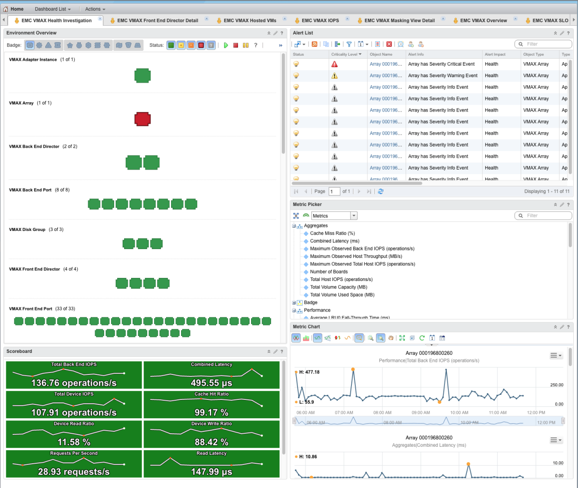
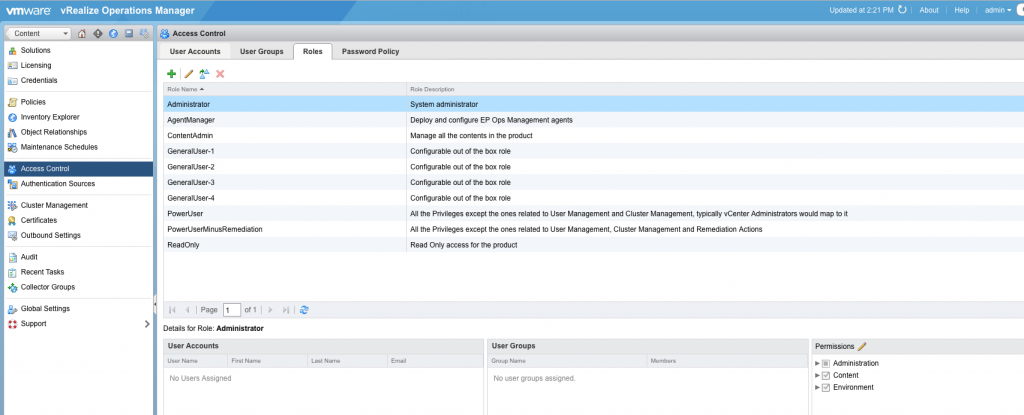
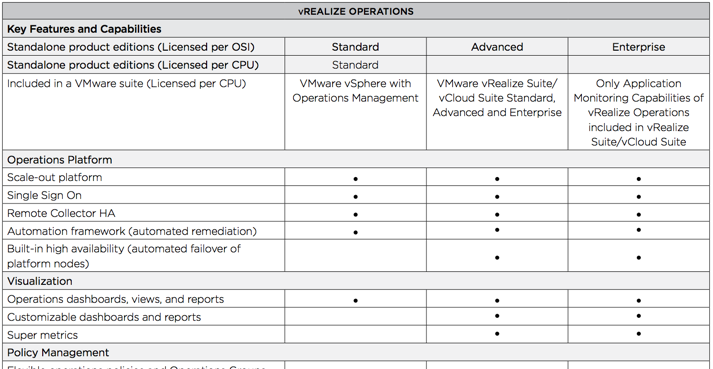
By Jennifer DeWaele This is part of a blog series on VMware vRealize Operations Manager Editions. The series breaks down the key aspects and differentiators between the three vROps Editions (Standard, Advanced, and Enterprise), including the critical components of extensibility and customization. The primary source of extensibility in vRealize Operations comes from Blue Medora’s True

Source: vROps Editions: Series Overview – VMware Cloud Management

Dual Monitor Won’t Enable on one Windows 7 machine but works on all other virtual desktops

I have something really odd here.  I have 10 Windows 7 Pro Virtual Desktops. All of them will work and enable dual monitors over PCoIP.   Doesn’t matter if it is a thin client, zero client or a PC with dual monitors.  They all work except for one Machine.  The machine not working is an exact duplicate of the other 9 virtual desktops and came from the same template.  It is a full virtual desktop like all the other ones.  This is on Horizon 6.1.1 with View Agent 6.2.2 running on all machines and same version of VMWare Tools.


From the same zero client I can log into one desktop and get dual screens and then from the same zero client I can log into the trouble virtual desktop and get one screen every time.


All vmware settings are the exactly same.  Allows 2 monitors, 3d is disabled and same amount of VRam.


I assume is is something in the Windows that doesn’t allow a second monitor but I can’t figure out what.  Anyone have any idea what I am missing?


Thanks,


J


Source: VMware