

A few days ago I wrote a diary called "Malicious Script Delivering More Maliciousness"[1]. In the malware infection chain, there was a JPEG picture that embedded the last payload delimited with "BaseStart-" and "-BaseEnd" tags.
All posts by David
Amazon EC2 Hpc8a Instances powered by 5th Gen AMD EPYC processors are now available
This post was originally published on this site
Today, we’re announcing the general availability of Amazon Elastic Compute Cloud (Amazon EC2) Hpc8a instances, a new high performance computing (HPC) optimized instance type powered by latest 5th Generation AMD EPYC processors with a maximum frequency of up to 4.5 GHz. These instances are ideal for compute-intensive tightly coupled HPC workloads, including computational fluid dynamics, simulations for faster design iterations, high-resolution weather modeling within tight operational windows, and complex crash simulations that require rapid time-to-results.
The new Hpc8a instances deliver up to 40% higher performance, 42% greater memory bandwidth, and up to 25% better price-performance compared to previous generation Hpc7a instances. Customers benefit from the high core density, memory bandwidth, and low-latency networking that helped them scale efficiently and reduce job completion times for their compute-intensive simulation workloads.
Hpc8a instances
Hpc8a instances are available with 192 cores, 768 GiB memory, and 300 Gbps Elastic Fabric Adapter (EFA) networking to run applications requiring high levels of inter node communications at scale.
| Instance Name | Physical Cores | Memory (Gib) | EFA Network Bandwidth (Gbps) | Network Bandwidth (Gbps) | Attached Storage |
| Hpc8a.96xlarge | 192 | 768 | Up to 300 | 75 | EBS Only |
Hpc8a instances are available in a single 96xlarge size with a 1:4 core-to-memory ratio. You will have the capability to right size based on HPC workload requirements by customizing the number of cores needed at launch instances. These instances also use sixth-generation AWS Nitro cards, which offload CPU virtualization, storage, and networking functions to dedicated hardware and software, enhancing performance and security for your workloads.
You can use Hpc8a instances with AWS ParallelCluster and AWS Parallel Computing Service (AWS PCS) to simplify workload submission and cluster creation and Amazon FSx for Lustre for sub-millisecond latencies and up to hundreds of gigabytes per second of throughput for storage. To achieve the best performance for HPC workloads, these instances have Simultaneous Multithreading (SMT) disabled.
Now available
Amazon EC2 Hpc8a instances are now available in US East (Ohio) and Europe (Stockholm) AWS Regions. For Regional availability and a future roadmap, search the instance type in the CloudFormation resources tab of AWS Capabilities by Region.
You can purchase these instances as On-Demand Instances and Savings Plan. To learn more, visit the Amazon EC2 Pricing page.
Give Hpc8a instances a try in the Amazon EC2 console. To learn more, visit the Amazon EC2 Hpc8a instances page and send feedback to AWS re:Post for EC2 or through your usual AWS Support contacts.
— Channy
Announcing Amazon SageMaker Inference for custom Amazon Nova models
This post was originally published on this site
Since we launched Amazon Nova customization in Amazon SageMaker AI at AWS NY Summit 2025, customers have been asking for the same capabilities with Amazon Nova as they do when they customize open weights models in Amazon SageMaker Inference. They also wanted have more control and flexibility in custom model inference over instance types, auto-scaling policies, context length, and concurrency settings that production workloads demand.
Today, we’re announcing the general availability of custom Nova model support in Amazon SageMaker Inference, a production-grade, configurable, and cost-efficient managed inference service to deploy and scale full-rank customized Nova models. You can now experience an end-to-end customization journey to train Nova Micro, Nova Lite, and Nova 2 Lite models with reasoning capabilities using Amazon SageMaker Training Jobs or Amazon HyperPod and seamlessly deploy them with managed inference infrastructure of Amazon SageMaker AI.
With Amazon SageMaker Inference for custom Nova models, you can reduce inference cost through optimized GPU utilization using Amazon Elastic Compute Cloud (Amazon EC2) G5 and G6 instances over P5 instances, auto-scaling based on 5-minute usage patterns, and configurable inference parameters. This feature enables deployment of customized Nova models with continued pre-training, supervised fine-tuning, or reinforcement fine-tuning for your use cases. You can also set advanced configurations about context length, concurrency, and batch size for optimizing the latency-cost-accuracy tradeoff for your specific workloads.
Let’s see how to deploy customized Nova models on SageMaker AI real-time endpoints, configure inference parameters, and invoke your models for testing.
Deploy custom Nova models in SageMaker Inference
At AWS re:Invent 2025, we introduced new serverless customization in Amazon SageMaker AI for popular AI models including Nova models. With a few clicks, you can seamlessly select a model and customization technique, and handle model evaluation and deployment. If you already have a trained custom Nova model artifact, you can deploy the models on SageMaker Inference through the SageMaker Studio or SageMaker AI SDK.
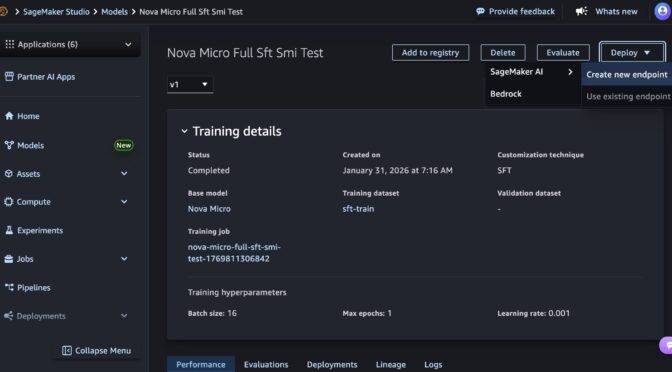
In the SageMaker Studio, choose a trained Nova model in Models in your models in the Models menu. You can deploy the model by choosing Deploy button, SageMaker AI and Create new endpoint.
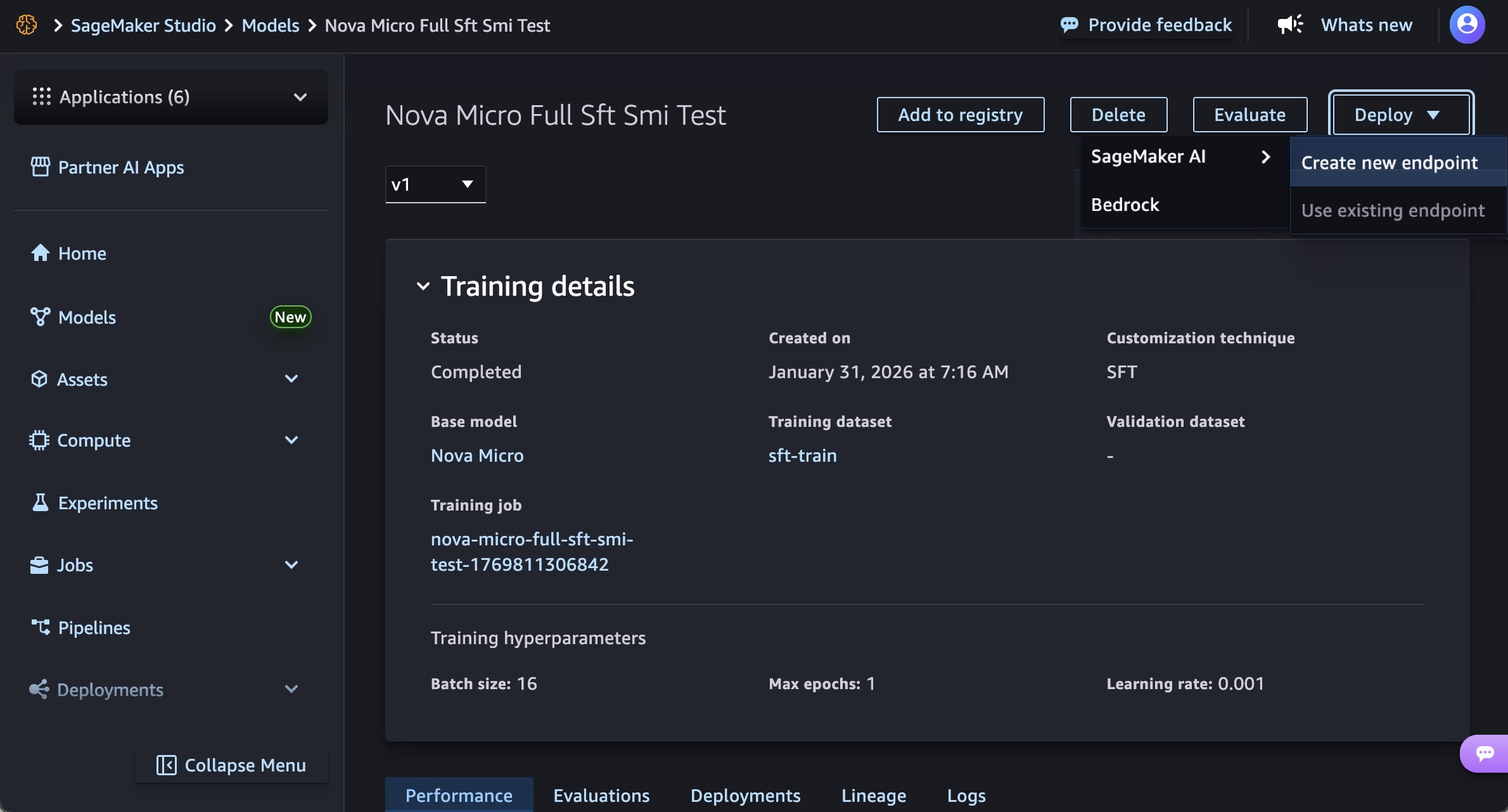
Choose the endpoint name, instance type, and advanced options such as instance count, max instance count, permission and networking, and Deploy button. At GA launch, you can use g5.12xlarge, g5.24xlarge, g5.48xlarge, g6.12xlarge, g6.24xlarge, g6.48xlarge, and p5.48xlarge instance types for the Nova Micro model, g5.24xlarge, g5.48xlarge, g6.24xlarge, g6.48xlarge, and p5.48xlarge for the Nova Lite model, and p5.48xlarge for the Nova 2 Lite model.
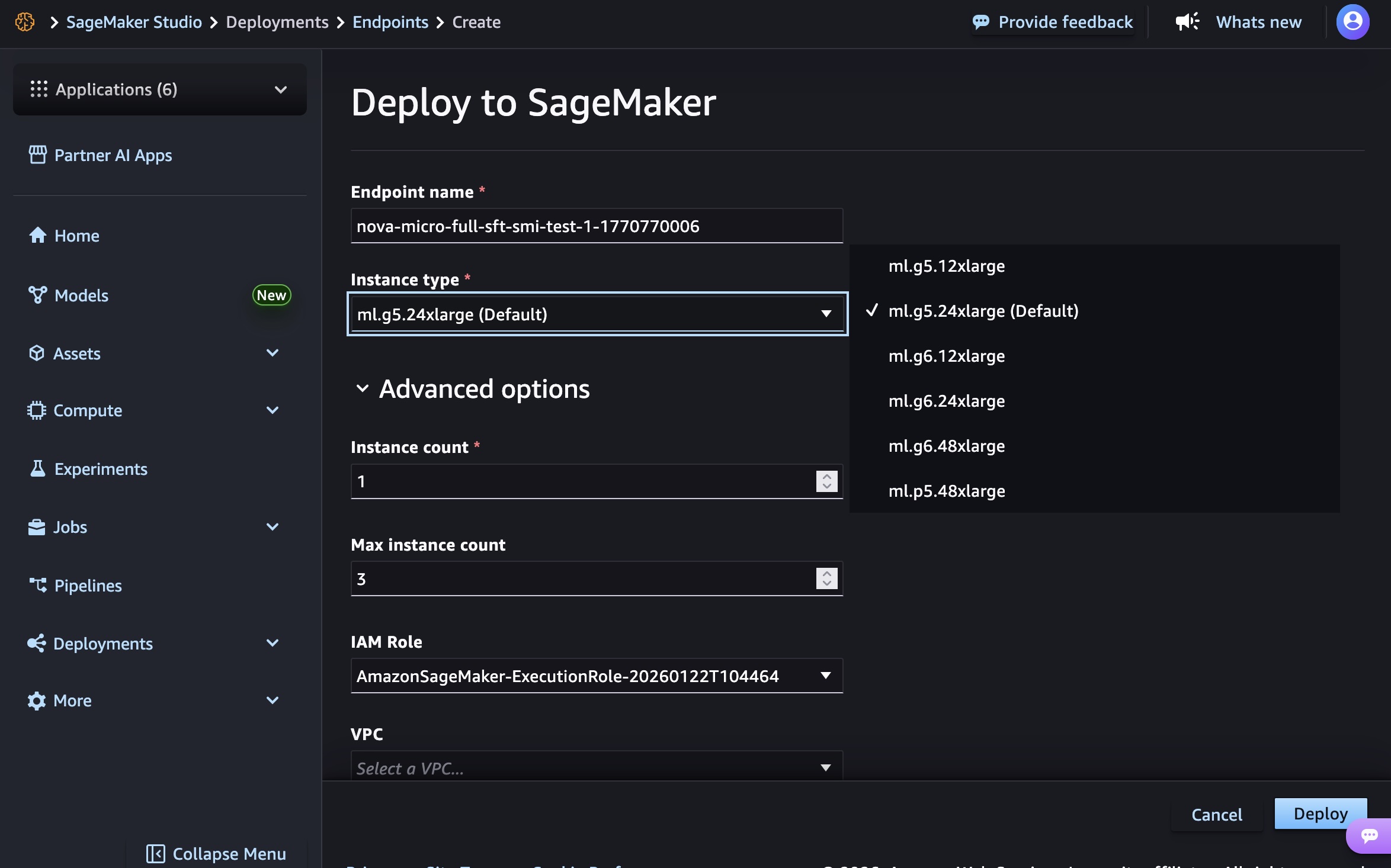
Creating your endpoint requires time to provision the infrastructure, download your model artifacts, and initialize the inference container.
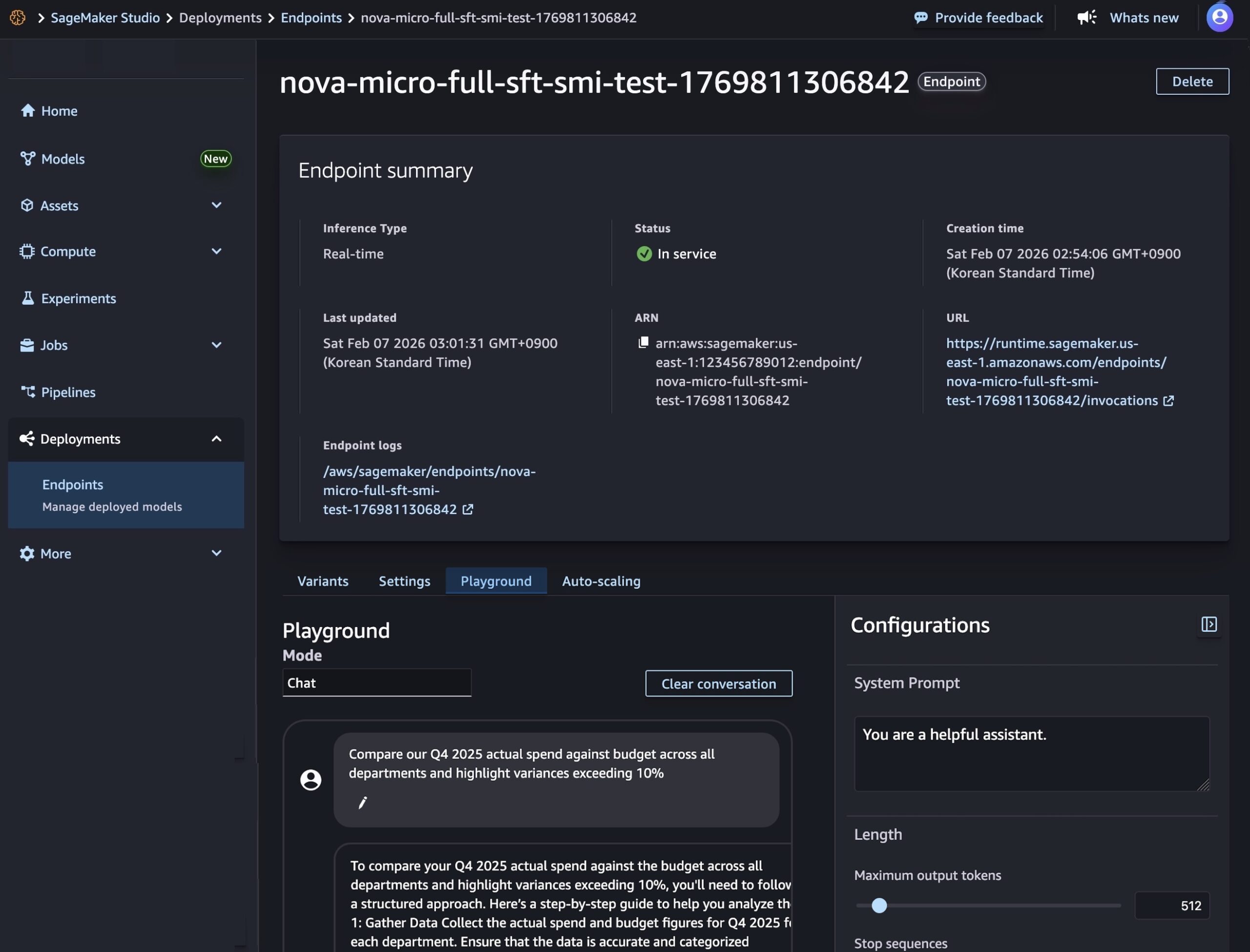
After model deployment completes and the endpoint status shows InService, you can perform real-time inference using the new endpoint. To test the model, choose the Playground tab and input your prompt in the Chat mode.
You can also use the SageMaker AI SDK to create two resources: a SageMaker AI model object that references your Nova model artifacts, and an endpoint configuration that defines how the model will be deployed.
The following code creates a SageMaker AI model that references your Nova model artifacts:
# Create a SageMaker AI model
    model_response = sagemaker.create_model(
        ModelName= 'Nova-micro-ml-g5-12xlarge',
        PrimaryContainer={
            'Image': '123456789012.dkr.ecr.us-east-1.amazonaws.com/nova-inference-repo:v1.0.0',
            'ModelDataSource': {
                'S3DataSource': {
                   'S3Uri': 's3://your-bucket-name/path/to/model/artifacts/',
                   'S3DataType': 'S3Prefix',
                   'CompressionType': 'None'
                }
            },
            # Model Parameters
            'Environment': {
                'CONTEXT_LENGTH': 8000,
                'CONCURRENCY': 16,
                'DEFAULT_TEMPERATURE': 0.0,
                'DEFAULT_TOP_P': 1.0
            }
        },
        ExecutionRoleArn=SAGEMAKER_EXECUTION_ROLE_ARN,
        EnableNetworkIsolation=True
    )
    print("Model created successfully!")
Next, create an endpoint configuration that defines your deployment infrastructure and deploy your Nova model by creating a SageMaker AI real-time endpoint. This endpoint will host your model and provide a secure HTTPS endpoint for making inference requests.
# Create Endpoint Configuration
    production_variant = {
        'VariantName': 'primary',
        'ModelName': 'Nova-micro-ml-g5-12xlarge',
        'InitialInstanceCount': 1,
        'InstanceType': 'ml.g5.12xlarge',
    }

    config_response = sagemaker.create_endpoint_config(
        EndpointConfigName= 'Nova-micro-ml-g5-12xlarge-Config',
        ProductionVariants= production_variant
    )
    print("Endpoint configuration created successfully!")

# Deploy your Noval model
    endpoint_response = sagemaker.create_endpoint(
        EndpointName= 'Nova-micro-ml-g5-12xlarge-endpoint',
        EndpointConfigName= 'Nova-micro-ml-g5-12xlarge-Config'
    )
    print("Endpoint creation initiated successfully!")
After the endpoint is created, you can send inference requests to generate predictions from your custom Nova model. Amazon SageMaker AI supports synchronous endpoints for real-time with streaming/non-streaming modes and asynchronous endpoints for batch processing.
For example, the following code creates streaming completion format for text generation:
# Streaming chat request with comprehensive parameters
streaming_request = {
"messages": [
        {"role": "user", "content": "Compare our Q4 2025 actual spend against budget across all departments and highlight variances exceeding 10%"}
    ],
    "max_tokens": 512,
    "stream": True,
    "temperature": 0.7,
    "top_p": 0.95,
    "top_k": 40,
    "logprobs": True,
    "top_logprobs": 2,
    "reasoning_effort": "low",  # Options: "low", "high"
    "stream_options": {"include_usage": True}
}

invoke_nova_endpoint(streaming_request)

def invoke_nova_endpoint(request_body):
"""
    Invoke Nova endpoint with automatic streaming detection.

    Args:
        request_body (dict): Request payload containing prompt and parameters

    Returns:
        dict: Response from the model (for non-streaming requests)
        None: For streaming requests (prints output directly)
    """
    body = json.dumps(request_body)
    is_streaming = request_body.get("stream", False)

    try:
        print(f"Invoking endpoint ({'streaming' if is_streaming else 'non-streaming'})...")

        if is_streaming:
            response = runtime_client.invoke_endpoint_with_response_stream(
                EndpointName=ENDPOINT_NAME,
                ContentType='application/json',
                Body=body
            )

            event_stream = response['Body']
            for event in event_stream:
                if 'PayloadPart' in event:
                    chunk = event['PayloadPart']
                    if 'Bytes' in chunk:
                        data = chunk['Bytes'].decode()
                        print("Chunk:", data)
        else:
            # Non-streaming inference
            response = runtime_client.invoke_endpoint(
                EndpointName=ENDPOINT_NAME,
                ContentType='application/json',
                Accept='application/json',
                Body=body
            )

            response_body = response['Body'].read().decode('utf-8')
            result = json.loads(response_body)
            print("✅ Response received successfully")
            return result

    except ClientError as e:
        error_code = e.response['Error']['Code']
        error_message = e.response['Error']['Message']
        print(f"❌ AWS Error: {error_code} - {error_message}")
    except Exception as e:
        print(f"❌ Unexpected error: {str(e)}")
To use full code examples, visit Customizing Amazon Nova models on Amazon SageMaker AI. To learn more about best practices on deploying and managing models, visit Best Practices for SageMaker AI.
Now available
Amazon SageMaker Inference for custom Nova models is available today in US East (N. Virginia) and US West (Oregon) AWS Regions. For Regional availability and a future roadmap, visit the AWS Capabilities by Region.
The feature supports Nova Micro, Nova Lite, and Nova 2 Lite models with reasoning capabilities, running on EC2 G5, G6, and P5 instances with auto-scaling support. You pay only for the compute instances you use, with per-hour billing and no minimum commitments. For more information, visit Amazon SageMaker AI Pricing page.
Give it a try in Amazon SageMaker AI console and send feedback to AWS re:Post for SageMaker or through your usual AWS Support contacts.
— Channy
AWS Weekly Roundup: Amazon EC2 M8azn instances, new open weights models in Amazon Bedrock, and more (February 16, 2026)
This post was originally published on this site
I joined AWS in 2021, and since then I’ve watched the Amazon Elastic Compute Cloud (Amazon EC2) instance family grow at a pace that still surprises me. From AWS Graviton-powered instances to specialized accelerated computing options, it feels like every few months there’s a new instance type landing that pushes performance boundaries further. As of February 2026, AWS offers over 1,160 Amazon EC2 instance types, and that number keeps climbing.
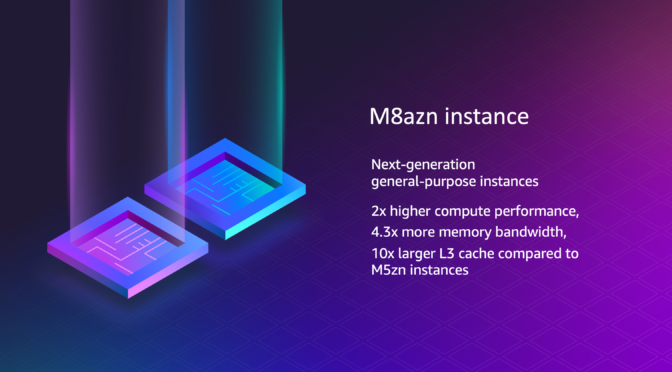
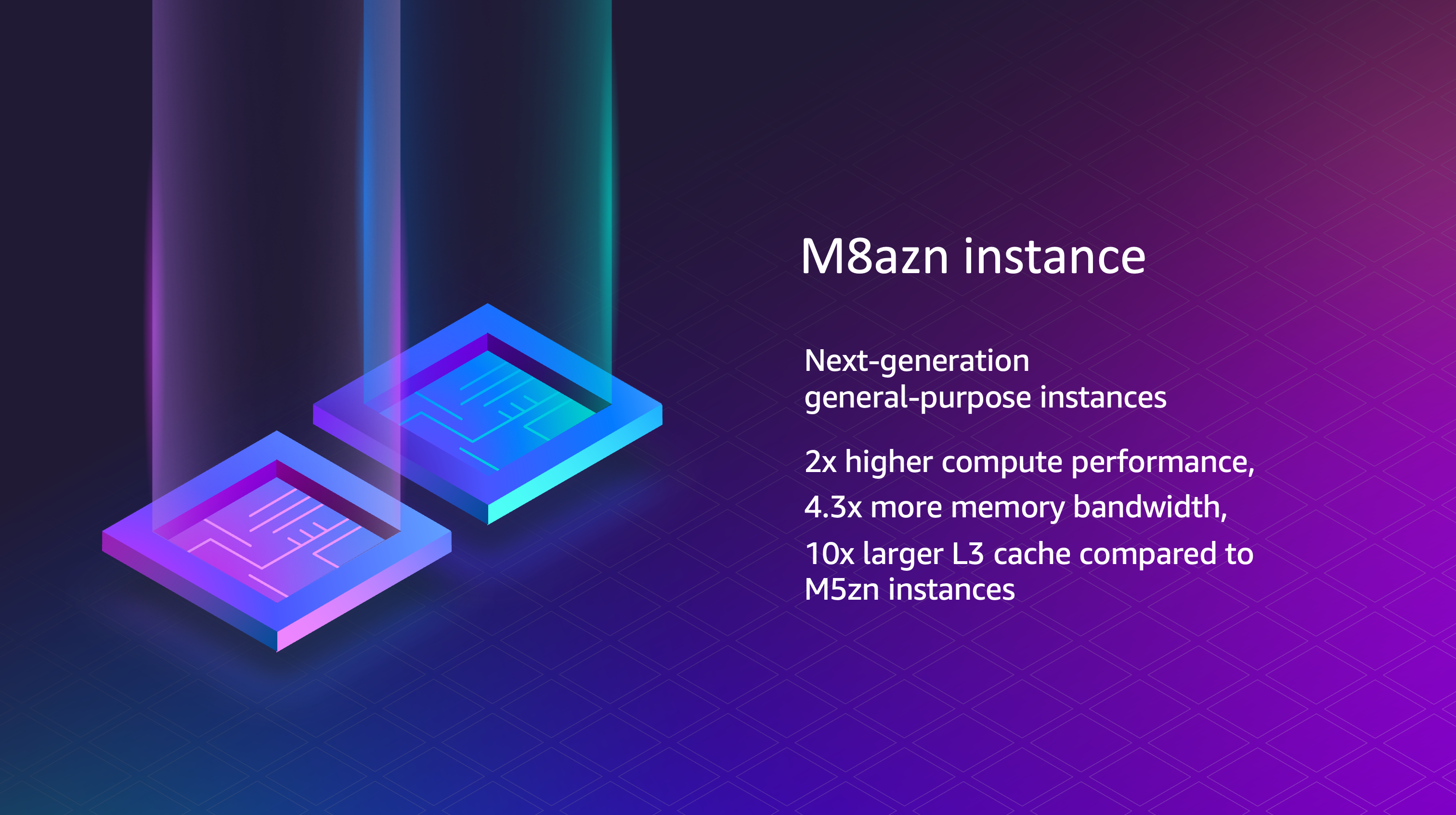
This week’s opening news is a good example: The general availability of Amazon EC2 M8azn instances. These are general purpose, high-frequency, high-network instances powered by fifth generation AMD EPYC processors, offering the highest maximum CPU frequency in the cloud at 5 GHz. Compared to the previous generation M5zn instances, M8azn instances deliver up to 2x compute performance, 4.3x higher memory bandwidth, and a 10x larger L3 cache. They also provide up to 2x networking throughput and up to 3x Amazon Elastic Block Store (Amazon EBS) throughput compared with M5zn.
Built on the AWS Nitro System using sixth generation Nitro Cards, M8azn instances target workloads such as real-time financial analytics, high-performance computing, high-frequency trading, CI/CD pipelines, gaming, and simulation modeling across automotive, aerospace, energy, and telecommunications. The instances feature a 4:1 ratio of memory to vCPU and are available in 9 sizes ranging from 2 to 96 vCPUs with up to 384 GiB of memory, including two bare metal variants. For more information visit the Amazon EC2 M8azn instance page.
Last week’s launches
Here are some of the other announcements from last week:
- Amazon Bedrock adds support for six fully managed open weights models – Amazon Bedrock now supports DeepSeek V3.2, MiniMax M2.1, GLM 4.7, GLM 4.7 Flash, Kimi K2.5, and Qwen3 Coder Next. These models span frontier reasoning and agentic coding workloads. DeepSeek V3.2 and Kimi K2.5 target reasoning and agentic intelligence, GLM 4.7 and MiniMax M2.1 support autonomous coding with large output windows, and Qwen3 Coder Next and GLM 4.7 Flash provide cost-efficient alternatives for production deployment. These models are powered by Project Mantle and provide out-of-the-box compatibility with OpenAI API specifications. With the launch, you can also use new open weight models–DeepSeek v3.2 , MiniMax 2.1, and Qwen3 Coder Next in Kiro, a spec-driven AI development tool.
- Amazon Bedrock expands support for AWS PrivateLink – Amazon Bedrock now supports AWS PrivateLink for the
bedrock-mantleendpoint, in addition to existing support for thebedrock-runtimeendpoint. The bedrock-mantle endpoint is powered by Project Mantle, a distributed inference engine for large-scale machine learning model serving on Amazon Bedrock. Project Mantle provides serverless inference with quality of service controls, higher default customer quotas with automated capacity management, and out-of-the-box compatibility with OpenAI API specifications. AWS PrivateLink support for OpenAI API-compatible endpoints is available in 14 AWS Regions. To get started, visit the Amazon Bedrock console or the OpenAI API compatibility documentation. - Amazon EKS Auto Mode announces enhanced logging for managed Kubernetes capabilities – You can now configure log delivery sources using Amazon CloudWatch Vended Logs in Amazon EKS Auto Mode. This helps you collect logs from Auto Mode’s managed Kubernetes capabilities for compute autoscaling, block storage, load balancing, and pod networking. Each Auto Mode capability can be configured as a CloudWatch Vended Logs delivery source with built-in AWS authentication and authorization at a reduced price compared to standard CloudWatch Logs. You can deliver logs to CloudWatch Logs, Amazon S3, or Amazon Data Firehose destinations. This feature is available in all Regions where EKS Auto Mode is available.
- Amazon OpenSearch Serverless now supports Collection Groups – You can use new Collection Groups to share OpenSearch Compute Units (OCUs) across collections with different AWS Key Management Service (AWS KMS) keys. Collection Groups reduce overall OCU costs through a shared compute model while maintaining collection-level security and access controls. They also introduce the ability to specify minimum OCU allocations alongside maximum OCU limits, providing guaranteed baseline capacity at startup for latency-sensitive applications. Collection Groups are available in all Regions where Amazon OpenSearch Serverless is currently available.
- Amazon RDS now supports backup configuration when restoring snapshots – You can view and modify the backup retention period and preferred backup window before and during snapshot restore operations. Previously, restored database instances and clusters inherited backup parameter values from snapshot metadata and could only be modified after restore was complete. You can now view backup settings as part of automated backups and snapshots, and specify or modify these values when restoring, eliminating the need for post-restoration modifications. This is available for all Amazon RDS database engines (MySQL, PostgreSQL, MariaDB, Oracle, SQL Server, and Db2) and Amazon Aurora (MySQL-Compatible and PostgreSQL-Compatible editions) in all AWS commercial Regions and AWS GovCloud (US) Regions at no additional cost.
For a full list of AWS announcements, be sure to keep an eye on the What’s New with AWS page.
Upcoming AWS events
Check your calendar and sign up for upcoming AWS events:
AWS Summits – Join AWS Summits in 2026, free in-person events where you can explore emerging cloud and AI technologies, learn best practices, and network with industry peers and experts. Upcoming Summits include Paris (April 1), London (April 22), and Bengaluru (April 23–24).
AWS AI and Data Conference 2026 – A free, single-day in-person event on March 12 at the Lyrath Convention Centre in Ireland. The conference covers designing, training, and deploying agents with Amazon Bedrock, Amazon SageMaker, and QuickSight, integrating them with AWS data services, and applying governance practices to operate them at scale. The agenda includes strategic guidance and hands-on labs for architects, developers, and business leaders.
AWS Community Days – Community-led conferences where content is planned, sourced, and delivered by community leaders, featuring technical discussions, workshops, and hands-on labs. Upcoming events include Ahmedabad (February 28), Slovakia (March 11), and Pune (March 21).
Join the AWS Builder Center to connect with builders, share solutions, and access content that supports your development. Browse here for upcoming AWS led in-person and virtual events and developer-focused events.
That’s all for this week. Check back next Monday for another Weekly Roundup!
This post is part of our Weekly Roundup series. Check back each week for a quick roundup of interesting news and announcements from AWS!

2026 64-Bits Malware Trend, (Mon, Feb 16th)
This post was originally published on this site
In 2022 (time flies!), I wrote a diary about the 32-bits VS. 64-bits malware landscape[1]. It demonstrated that, despite the growing number of 64-bits computers, the "old-architecture" remained the standard. In the SANS malware reversing training (FOR610[2]), we quickly cover the main differences between the two architectures. One of the conclusions is that 32-bits code is still popular because it acts like a comme denominator and allows threat actors to target more Windows computers. Yes, Microsoft Windows can smoothly execute 32-bits code on 64-bits computers. It is still the case in 2026? Did the situation evolved?

Apple Patches Everything: February 2026, (Wed, Feb 11th)
This post was originally published on this site
Today, Apple released updates for all of its operating systems (iOS, iPadOS, macOS, tvOS, watchOS, and visionOS). The update fixes 71 distinct vulnerabilities, many of which affect multiple operating systems. Older versions of iOS, iPadOS, and macOS are also updated.

WSL in the Malware Ecosystem, (Wed, Feb 11th)
This post was originally published on this site
WSL or “Windows Subsystem Linux”[1] is a feature in the Microsoft Windows ecosystem that allows users to run a real Linux environment directly inside Windows without needing a traditional virtual machine or dual boot setup. The latest version, WSL2, runs a lightweight virtualized Linux kernel for better compatibility and performance, making it especially useful for development, DevOps, and cybersecurity workflows where Linux tooling is essential but Windows remains the primary operating system. It was introduced a few years ago (2016) as part of Windows 10.
AWS Weekly Roundup: Claude Opus 4.6 in Amazon Bedrock, AWS Builder ID Sign in with Apple, and more (February 9, 2026)
This post was originally published on this site
Here are the notable launches and updates from last week that can help you build, scale, and innovate on AWS.
Last week’s launches
Here are the launches that got my attention this week.
Let’s start with news related to compute and networking infrastructure:
- Introducing Amazon EC2 C8id, M8id, and R8id instances: These new Amazon EC2 C8id, M8id, and R8id instances are powered by custom Intel Xeon 6 processors. These instances offer up to 43% higher performance and 3.3x more memory bandwidth compared to previous generation instances.
- AWS Network Firewall announces new price reductions: The service has added the hourly and data processing discounts on NAT Gateways that are service-chained with Network Firewall secondary endpoints. Additionally, AWS Network Firewall has removed additional data processing charges for Advanced Inspection, which enables Transport Layer Security (TLS) inspection of encrypted network traffic.
- Amazon ECS adds Network Load Balancer support for Linear and Canary deployments: Applications that commonly use NLB, such as those requiring TCP/UDP-based connections, low latency, long-lived connections, or static IP addresses, can take advantage of managed, incremental traffic shifting natively from ECS when rolling out updates.
- AWS Config now supports 30 new resource types: These range across key services including Amazon EKS, Amazon Q, and AWS IoT. This expansion provides greater coverage over your AWS environment, enabling you to more effectively discover, assess, audit, and remediate an even broader range of resources.
- Amazon DynamoDB global tables now support replication across multiple AWS accounts: DynamoDB global tables are a fully managed, serverless, multi-Region, and multi-active database. With this new capability, you can replicate tables across AWS accounts and Regions to improve resiliency, isolate workloads at the account level, and apply distinct security and governance controls.
- Amazon RDS now provides an enhanced console experience to connect to a database: The new console experience provides ready-made code snippets for Java, Python, Node.js, and other programming languages as well as tools like the
psqlcommand line utility. These code snippets are automatically adjusted based on your database’s authentication settings. For example, if your cluster uses IAM authentication, the generated code snippets will use token-based authentication to connect to the database. The console experience also includes integrated CloudShell access, offering the ability to connect to your databases directly from within the RDS console.
Then, I noticed three news items related to security and how you authenticate on AWS:
- AWS Builder ID now supports Sign in with Apple: AWS Builder ID, your profile for accessing AWS applications including AWS Builder Center, AWS Training and Certification, AWS re:Post, AWS Startups, and Kiro, now supports sign-in with Apple as a social login provider. This expansion of sign-in options builds on the existing sign-in with Google capability, providing Apple users with a streamlined way to access AWS resources without managing separate credentials on AWS.
- AWS STS now supports validation of select identity provider specific claims from Google, GitHub, CircleCI and OCI: You can reference these custom claims as condition keys in IAM role trust policies and resource control policies, expanding your ability to implement fine-grained access control for federated identities and help you establish your data perimeters. This enhancement builds upon IAM’s existing OIDC federation capabilities, which allow you to grant temporary AWS credentials to users authenticated through external OIDC-compatible identity providers.
- AWS Management Console now displays Account Name on the Navigation bar for easier account identification: You now have an easy way to identify your accounts at a glance. You can now quickly distinguish between accounts visually using the account name that appears in the navigation bar for all authorized users in that account.
- Amazon CloudFront announces mutual TLS support for origins: Now with origin mTLS support, you can implement a standardized, certificate-based authentication approach that eliminates operational burden. This enables organizations to enforce strict authentication for their proprietary content, ensuring that only verified CloudFront distributions can establish connections to backend infrastructure ranging from AWS origins and on-premises servers to third-party cloud providers and external CDNs.
Finally, there is not a single week without news around AI :
- Claude Opus 4.6 now available in Amazon Bedrock: Opus 4.6 is Anthropic’s most intelligent model to date and a premier model for coding, enterprise agents, and professional work. Claude Opus 4.6 brings advanced capabilities to Amazon Bedrock customers, including industry-leading performance for agentic tasks, complex coding projects, and enterprise-grade workflows that require deep reasoning and reliability.
- Structured outputs now available in Amazon Bedrock: Amazon Bedrock now supports structured outputs, a capability that provides consistent, machine-readable responses from foundation models that adhere to your defined JSON schemas. Instead of prompting for valid JSON and adding extra checks in your application, you can specify the format you want and receive responses that match it—making production workflows more predictable and resilient.
Upcoming AWS events
Check your calendars so that you can sign up for this upcoming event:
AWS Community Day Romania (April 23–24, 2026): This community-led AWS event brings together developers, architects, entrepreneurs, and students for more than 10 professional sessions delivered by AWS Heroes, Solutions Architects, and industry experts. Attendees can expect expert-led technical talks, insights from speakers with global conference experience, and opportunities to connect during dedicated networking breaks, all hosted at a premium venue designed to support collaboration and community engagement.
If you’re looking for more ways to stay connected beyond this event, join the AWS Builder Center to learn, build, and connect with builders in the AWS community.
Check back next Monday for another Weekly Roundup.

Broken Phishing URLs, (Thu, Feb 5th)
Amazon EC2 C8id, M8id, and R8id instances with up to 22.8 TB local NVMe storage are generally available
This post was originally published on this site
Last year, we launched the Amazon Elastic Compute Cloud (Amazon EC2) C8i instances, M8i instances, and R8i instances powered by custom Intel Xeon 6 processors available only on AWS with sustained all-core 3.9 GHz turbo frequency. They deliver the highest performance and fastest memory bandwidth among comparable Intel processors in the cloud.
Today we’re announcing new Amazon EC2 C8id, M8id, and R8id instances backed by up to 22.8TB of NVMe-based SSD block-level instance storage physically connected to the host server. These instances offer 3 times more vCPUs, memory and local storage compared to previous sixth-generation instances.
These instances deliver up to 43% higher compute performance and 3.3 times more memory bandwidth compared to previous sixth-generation instances. They also deliver up to 46% higher performance for I/O intensive database workloads, and up to 30% faster query results for I/O intensive real-time data analytics compared to previous sixth generation instances.
- C8id instances are ideal for compute-intensive workloads, including those that need access to high-speed, low-latency local storage like video encoding, image manipulation, and other forms of media processing.
- M8id instances are best for workloads that require a balance of compute and memory resources along with high-speed, low-latency local block storage, including data logging, media processing, and medium-sized data stores.
- R8id instances are designed for memory-intensive workloads such as large-scale SQL and NoSQL databases, in-memory databases, large-scale data analytics, and AI inference.
C8id, M8id, and R8id instances now scale up to 96xlarge (versus 32xlarge sizes in the sixth generation) with up to 384 vCPUs, 3TiB of memory, and 22.8TB of local storage that make it easier to scale up applications and drive greater efficiencies. These instances also offer two bare metal sizes (metal-48xl and metal-96xl), allowing you to right size your instances and deploy your most performance sensitive workloads that benefit from direct access to physical resources.
The instances are available in 11 sizes per family, as well as two bare metal configurations each:
| Instance Name | vCPUs | Memory (GiB) (C/M/R) | Local NVMe storage (GB) | Network bandwidth (Gbps) | EBS bandwidth (Gbps) |
|---|---|---|---|---|---|
| large | 2 | 4/8/16* | 1 x 118 | Up to 12.5 | Up to 10 |
| xlarge | 4 | 8/16/32* | 1 x 237 | Up to 12.5 | Up to 10 |
| 2xlarge | 8 | 16/32/64* | 1 x 474 | Up to 15 | Up to 10 |
| 4xlarge | 16 | 32/64/128* | 1 x 950 | Up to 15 | Up to 10 |
| 8xlarge | 32 | 64/128/256* | 1 x 1,900 | 15 | 10 |
| 12xlarge | 48 | 96/192/384* | 1 x 2,850 | 22.5 | 15 |
| 16xlarge | 64 | 128/256/512* | 1 x 3,800 | 30 | 20 |
| 24xlarge | 96 | 192/384/768* | 2 x 2,850 | 40 | 30 |
| 32xlarge | 128 | 256/512/1024* | 2 x 3,800 | 50 | 40 |
| 48xlarge | 192 | 384/768/1536* | 3 x 3,800 | 75 | 60 |
| 96xlarge | 384 | 768/1536/3072* | 6 x 3,800 | 100 | 80 |
| metal-48xl | 192 | 384/768/1536* | 3 x 3,800 | 75 | 60 |
| metal-96xl | 384 | 768/1536/3072* | 6 x 3,800 | 100 | 80 |
*Memory values are for C8id/M8id/R8id respectively.
These instances support the Instance Bandwidth Configuration (IBC) feature like other eighth-generation instance types, offering flexibility to allocate resources between network and Amazon Elastic Block Store (Amazon EBS) bandwidth. You can scale network or EBS bandwidth by 25%, allocating resources optimally for each workload. These instances also use sixth-generation AWS Nitro cards offloading CPU virtualization, storage, and networking functions to dedicated hardware and software, enhancing performance and security for your workloads.
You can use any Amazon Machine Images (AMIs) that include drivers for the Elastic Network Adapter (ENA) and NVMe to fully utilize the performance and capabilities. All current generation AWS Windows and Linux AMIs come with the AWS NVMe driver installed by default. If you use an AMI that does not have the AWS NVMe driver, you can manually install AWS NVMe drivers.
As I noted in my previous blog post, here are a couple of things to remind you about the local NVMe storage on these instances:
- You don’t have to specify a block device mapping in your AMI or during the instance launch; the local storage will show up as one or more devices (
/dev/nvme[0-26]n1on Linux) after the guest operating system has booted. - Each local NVMe device is hardware encrypted using the
XTS-AES-256block cipher and a unique key. Each key is destroyed when the instance is stopped or terminated. - Local NVMe devices have the same lifetime as the instance they are attached to and do not persist after the instance has been stopped or terminated.
To learn more, visit Amazon EBS volumes and NVMe in the Amazon EBS User Guide.
Now available
Amazon EC2 C8id, M8id and R8id instances are available in US East (N. Virginia), US East (Ohio), and US West (Oregon) AWS Regions. R8id instances are additionally available in Europe (Frankfurt) Region. For Regional availability and a future roadmap, search the instance type in the CloudFormation resources tab of AWS Capabilities by Region.
You can purchase these instances as On-Demand Instances, Savings Plans, and Spot Instances. These instances are also available as Dedicated Instances and Dedicated Hosts. To learn more, visit the Amazon EC2 Pricing page.
Give C8id, M8id, and R8id instances a try in the Amazon EC2 console. To learn more, visit the EC2 C8i instances, M8i instances, and R8i instances page and send feedback to AWS re:Post for EC2 or through your usual AWS Support contacts.
— Channy