

The finger.exe command is used in ClickFix attacks.
Tag Archives: SANS
Microsoft Office Russian Dolls, (Fri, Nov 14th)
This post was originally published on this site
You probably know what are the Russian or Matryoshka dolls. It's a set of wooden dolls of decreasing size placed one inside another[1]. I found an interesting Microsoft Office document that behaves like this. There was a big decrease in malicious Office documents due to the new Microsoft rules to prevent automatic VBA macros execution. But they remain used, especially RTF documents that exploits the good %%cve:2017-11882%%.
The document (SHA256:8437cf40bdd8b005b239c163e774ec7178195f0b80c75e8d27a773831479f68f) that I found uses another technique to prevent the RTF document to be spread directly to the victim. The RTF document is placed into the OOXML document:
remnux@remnux:~/malwarezoo/20251113$ zipdump.py mexico_november_po.docx
Index Filename Encrypted Timestamp
1 _rels/ 0 2025-10-22 21:55:10
2 docProps/ 0 2025-10-22 21:55:10
3 word/ 0 2025-11-12 02:58:50
4 [Content_Types].xml 0 2025-10-22 21:55:22
5 docProps/app.xml 0 1980-01-01 00:00:00
6 docProps/core.xml 0 1980-01-01 00:00:00
7 word/_rels/ 0 2025-10-22 21:55:10
8 word/theme/ 0 2025-10-22 21:55:10
9 word/document.xml 0 2025-11-12 02:59:04
10 word/endnotes.xml 0 1980-01-01 00:00:00
11 word/Engaging.rtf 0 2025-11-12 02:58:34
12 word/fontTable.xml 0 1980-01-01 00:00:00
13 word/footer1.xml 0 1980-01-01 00:00:00
14 word/footnotes.xml 0 1980-01-01 00:00:00
15 word/numbering.xml 0 1980-01-01 00:00:00
16 word/settings.xml 0 1980-01-01 00:00:00
17 word/styles.xml 0 1980-01-01 00:00:00
18 word/webSettings.xml 0 1980-01-01 00:00:00
19 word/theme/theme1.xml 0 1980-01-01 00:00:00
20 word/_rels/document.xml.rels 0 2025-11-12 02:58:58
21 word/_rels/settings.xml.rels 0 1980-01-01 00:00:00
22 _rels/.rels 0 1980-01-01 00:00:00
The file is referenced in the Word document:
remnux@remnux:~/malwarezoo/20251113$ zipdump.py mexico_november_po.docx -s 20 -d | grep Engaging.rtf
<Relationships xmlns="http://schemas.openxmlformats.org/package/2006/relationships">
...
<Relationship Type="http://schemas.openxmlformats.org/officeDocument/2006/relationships/aFChunk" Target="/word/Engaging.rtf" Id="YAjq8U"/>
</Relationships>

remnux@remnux:~/malwarezoo/20251113$ zipdump.py mexico_november_po.docx -s 9 -d | grep YAjq8U
<w:document xmlns:wpc=“http://schemas.microsoft.com/office/word/2010/wordprocessingCanvas”
...
<w:body><w:altChunk r:id=“YAjq8U”/>
...
</w:document>
The RTF document contains a shellcode that triggers the Equation Editor exploit. The next payload is C:Usersuser01AppDataLocalTemplicense.ini. It's a DLL (SHA256:d8ed658cc3d0314088cf8135399dbba9511e7f117d5ec93e6acc757b43e58dbc) that is invoked with the following function: IEX
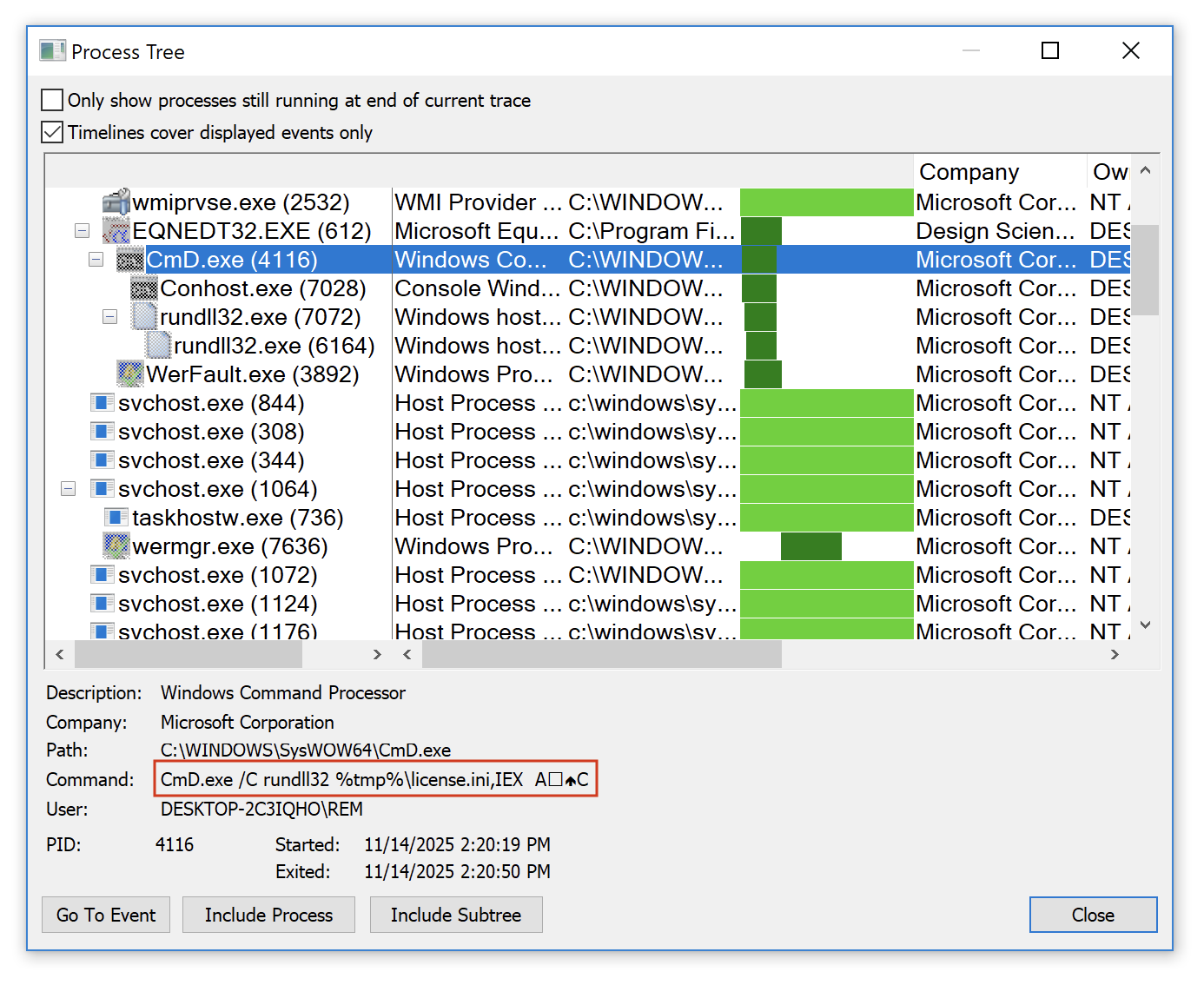
CmD.exe /C rundll32 %tmp%license.ini,IEX Ax12x0cC
You can see the special characters used as parameters to the function here:
This DLL is pretty well obfuscated, I'l still having a look at it but the malware family is not sure… Maybe another Formbook.
[1] https://en.wikipedia.org/wiki/Matryoshka_doll
Xavier Mertens (@xme)
Xameco
Senior ISC Handler – Freelance Cyber Security Consultant
PGP Key
(c) SANS Internet Storm Center. https://isc.sans.edu Creative Commons Attribution-Noncommercial 3.0 United States License.
Formbook Delivered Through Multiple Scripts, (Thu, Nov 13th)
This post was originally published on this site
When I’m teachning FOR610[1], I always say to my students that reverse engineering does not only apply to “executable files” (read: PE or ELF files). Most of the time, the infection path involves many stages to defeat the Security Analyst or security controls. Here is an example that I found yesterday. An email was received via an attached ZIP archive. It contained a simple file: “Payment_confirmation_copy_30K__202512110937495663904650431.vbs” (SHA256:d9bd350b04cd2540bbcbf9da1f3321f8c6bba1d8fe31de63d5afaf18a735744f) identified by 17/65 antiviruses on VT[2]. Let’s have a look at the infection path.
The VBS script was obfuscated but easy to reverse. First it started with a delay loop of 9 seconds:
Dim Hump
Hump = DateAdd(“s”, 9, Now())
Do Until (Now() > Hump)
    Wscript.Sleep 100
    Frozen = Frozen + 1
Loop
This allow the script to wait before performing nasty actions and avoid using the sleep() function which is often considered as suspicious. Then the script will generate a PowerShell script by concatenating a lot of strings. The “PowerShell” string is hidden behind this line:
Nestlers= array(79+1,79,80+7,60+9,82,83,72,69,76,76)
The script is reconstructed like this:
Roastable11 = Roastable11 + “mv 'udenri”
Roastable11 = Roastable11 + “gstjenes”
Roastable11 = Roastable11 + “te’;”
Roastable11 = Roastable11 + “function "
Roastable11 = Roastable11 + “Microcoulomb”
Roastable11 = Roastable11 + " ($s”
Roastable11 = Roastable11 + “kattes”
Roastable11 = Roastable11 + “kemas='sel”
Roastable11 = Roastable11 + “vang”
Roastable11 = Roastable11 + “av’)”
...
The result is executed with an Shell.Application object. The PowerShell script is also heavily obfuscated. Two functions are used for this purpose:
function Microcoulomb ($skatteskemas=‘selvangav’)
{
    $bletr=4;
    do {
        folkesangeren+=skatteskemas[$bletr];
        $bletr+=5;
        overhringens=Get-Date
    }
    until (!skatteskemas[$bletr]);
    $folkesangeren
}

function Blokbogstavers65 ($srlings)
{
    countryish22(srlings)
}
The second function just invokes an “Invoke-Expression” with the provided string. The first one reconstrusts strings by extraction some characters from the provided one. Example:
$mesoventrally=Microcoulomb ’ :::n TTTEJJJJTjjjj.nnnnw::::E’;
$mesoventrally+=Microcoulomb ‘i iiB SSSCccc l EE INNNNe * *n;;;;t’;
The variable meseventrally will containt “nET.wEBClIent”.
The first part of the deobfuscated script will prepare the download of the next payload:
while ((!brandmesterens))
{
    Blokbogstavers65 (Microcoulomb '...’) ;
    Blokbogstavers65 retsforflgende;
    Blokbogstavers65 (Microcoulomb '...');
    Blokbogstavers65 (Microcoulomb '...') ;
    Blokbogstavers65 (Microcoulomb '...’) ;
    fedayee=serigraphic[$dichotomically]
}
The loop waits for a successful download from ths URL: hxxps://drive[.]google[.]com/uc?export=download&id=1jFn0CatcuICOIjBsP_WxcI_faBI9WA9S
It stores the payload in C:UsersREMAppDataRoamingbudene.con. Once decoded, it’s another piece of PowerShell that also implements deobfuscation functions.
The script will invoke an msiexec.exe process and inject the FormBook into it. The injected payload is C:UsersREMAppDataLocalTempbin.exe (SHA256:12a0f592ba833fb80cc286e28a36dcdef041b7fc086a7988a02d9d55ef4c0a9d)[3]. The C2 server is 216[.]250[.]252[.]227:7719.
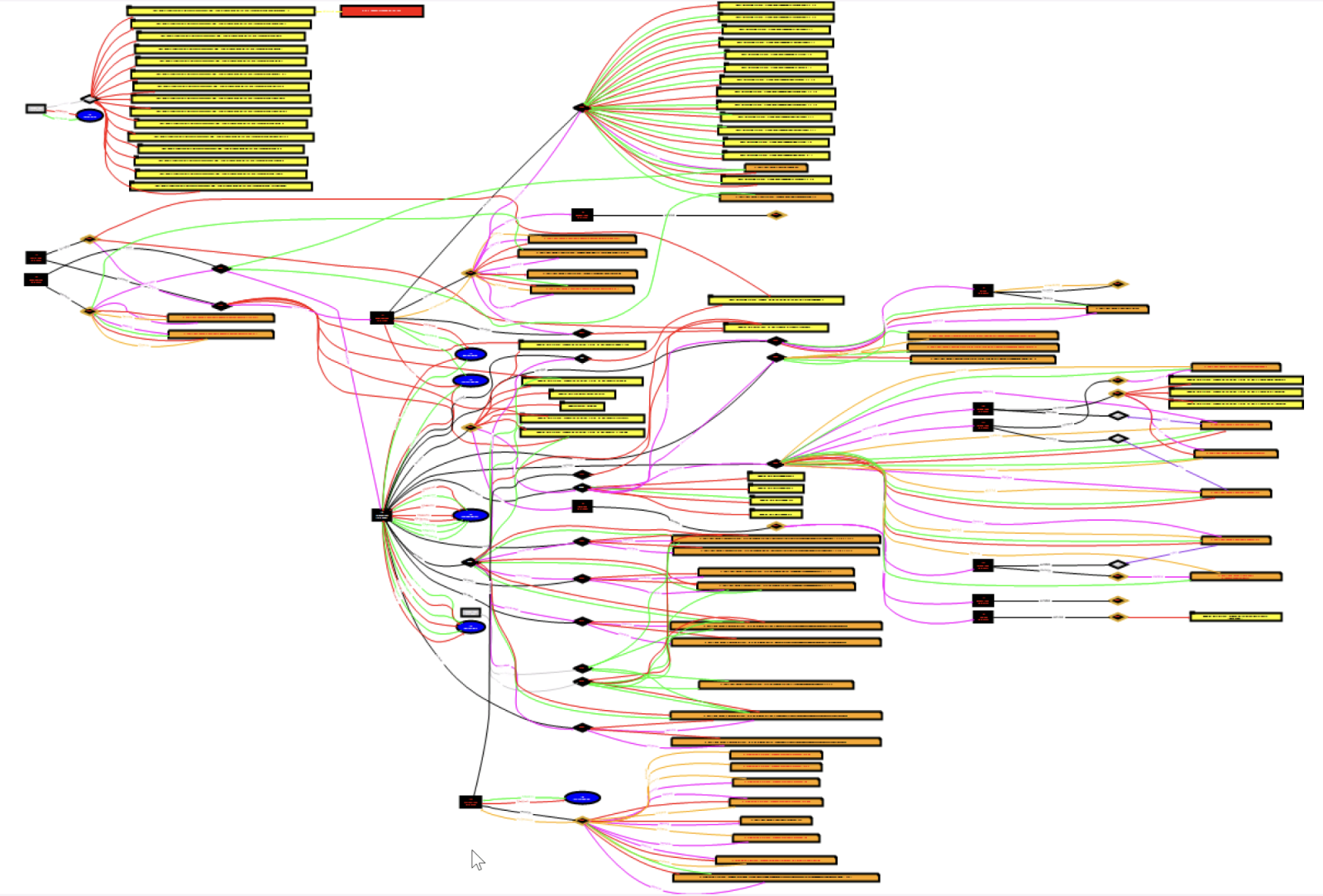
Here is an overview of the activity generated by all the scripts on the infected system:
[1] https://www.sans.org/cyber-security-courses/reverse-engineering-malware-malware-analysis-tools-techniques
[2] https://www.virustotal.com/gui/file/d9bd350b04cd2540bbcbf9da1f3321f8c6bba1d8fe31de63d5afaf18a735744f
[3] https://www.virustotal.com/gui/file/12a0f592ba833fb80cc286e28a36dcdef041b7fc086a7988a02d9d55ef4c0a9d
Xavier Mertens (@xme)
Xameco
Senior ISC Handler – Freelance Cyber Security Consultant
PGP Key
(c) SANS Internet Storm Center. https://isc.sans.edu Creative Commons Attribution-Noncommercial 3.0 United States License.
SmartApeSG campaign uses ClickFix page to push NetSupport RAT, (Wed, Nov 12th)
This post was originally published on this site
Introduction
This diary describes a NetSupport RAT infection I generated in my lab from the SmartApeSG campaign that used a ClickFix-style fake CAPTCHA page.
Known as ZPHP or HANEYMANEY, SmartApeSG is a campaign reported as early as June 2024. When it started, this campaign used fake browser update pages. But it currently uses the ClickFix method of fake CAPTCHA-style "verify you are human" pages.
This campaign pushes malicious NetSupport RAT packages for its initial malware infection, and I've seen follow-up malware from these NetSupport RAT infections.
How To Find SmartApeSG Activity
I can usually find SmartApeSG indicators from the Monitor SG account on Mastodon. I use URLscan to pivot on those indicators, so I can find compromised websites that lead to the SmartApeSG script.
The Infection
Sites compromised through this campaign display pages with a hidden injected script. Given the right conditions, this script kicks off a SmartApeSG chain of events. The image below shows an example.
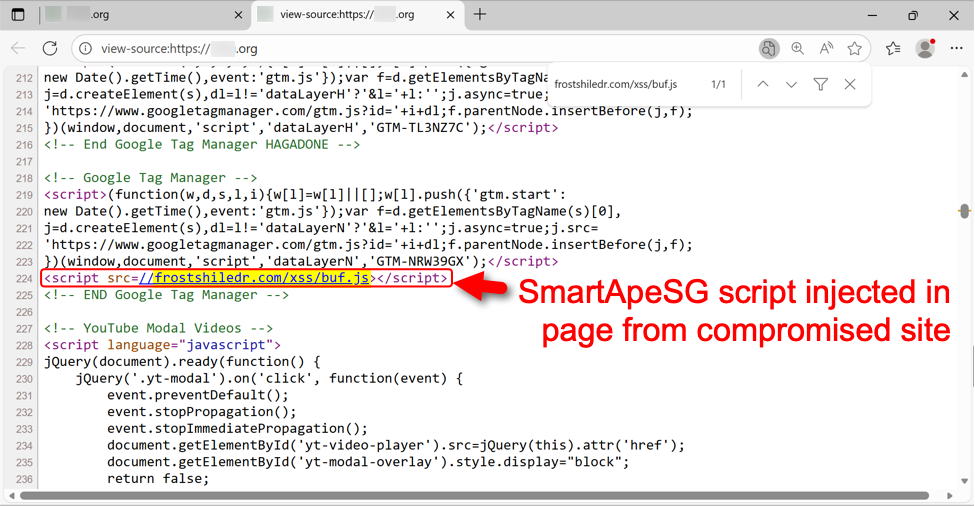
Shown above: Injected SmartApeSG script in a page from the compromised site.
In some cases, this injected script does not kick off the infection chain. I've had issues getting an infection chain during certain times of day, or if I try viewing the compromised website multiple times from the same source IP address. I don't know what the conditions are, but if those conditions are right, the compromised site shows a fake CAPTCHA-style "verify you are human" page.
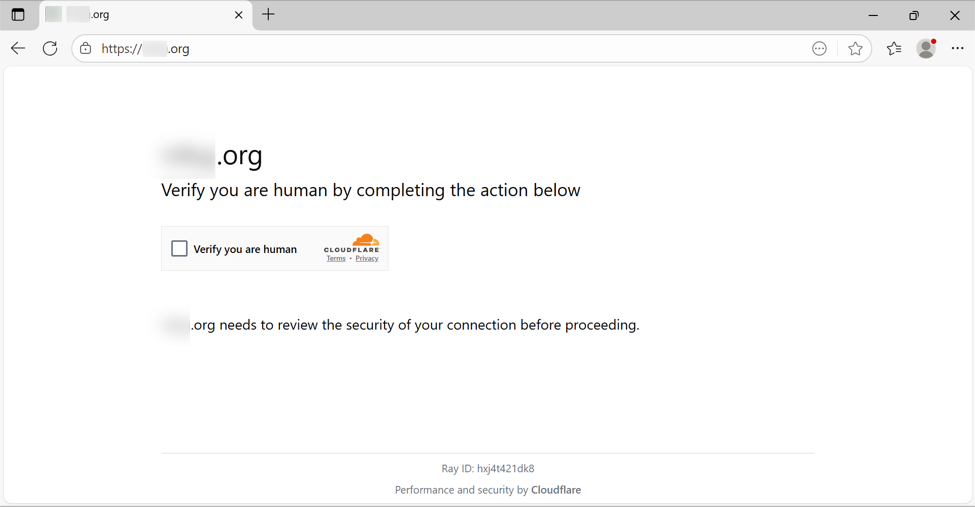
Shown above: Fake CAPTCHA page displayed by the compromised site.
Clicking the "verify you are human" box does the following:
- Injects malicious content into the Windows host's clipboard
- Generates a pop-up with instructions to open a Run window, paste content into the window, and run it.
The clipboard-injected content is a command string that uses the mshta command to retrieve and run malicious content that will generate a NetSupport RAT infection.
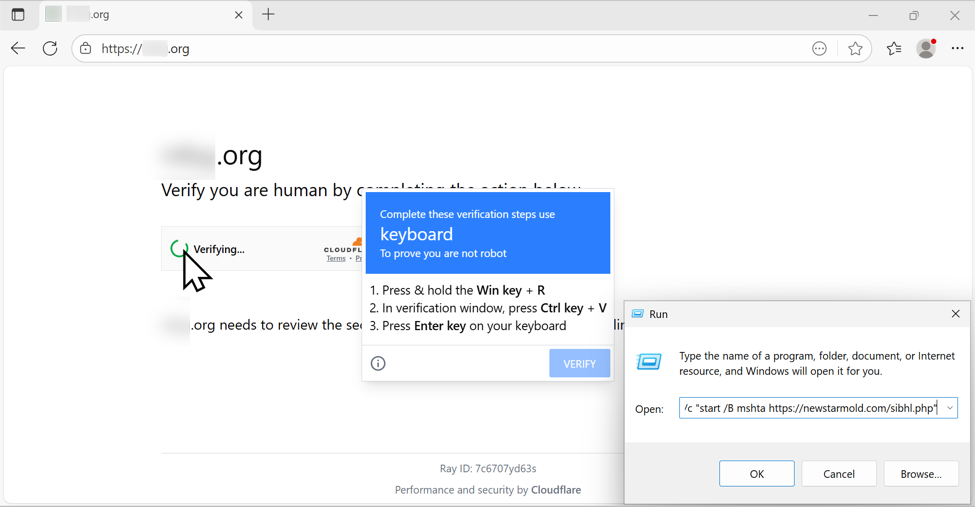
Shown above: Following ClickFix directions to paste content (a malicious command) into the Run window.
Below is a URL list of the HTTPS traffic directly involved in this infection.
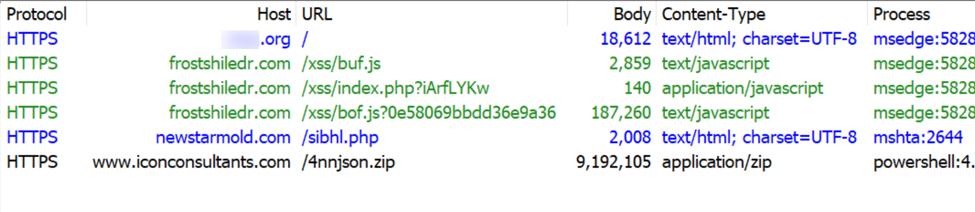
Shown above: HTTPS traffic directly involved in this SmartApe SG activity.
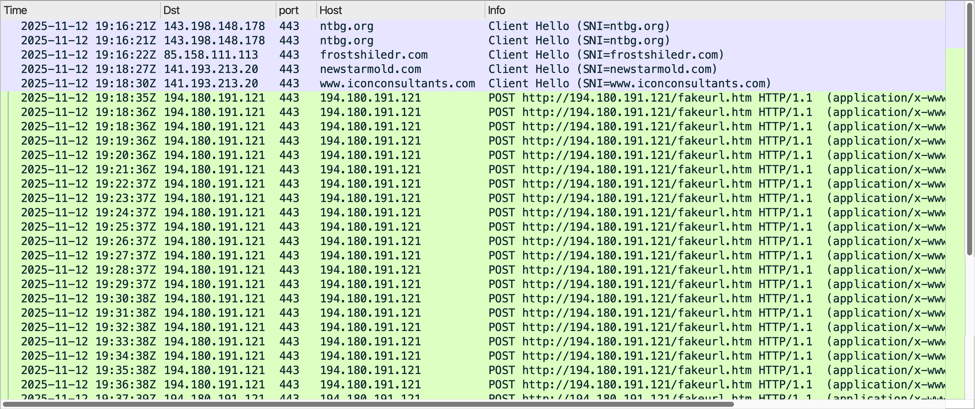
Shown above: Traffic from the infection filtered in Wireshark.
The malicious NetSupport RAT package stays persistent on the infected host through a Start Menu shortcut. The shortcut runs a .js file in the user's AppDataLocalTemp directory. That .js file runs the NetSupport RAT executable located in a folder under the C:ProgramData directory.
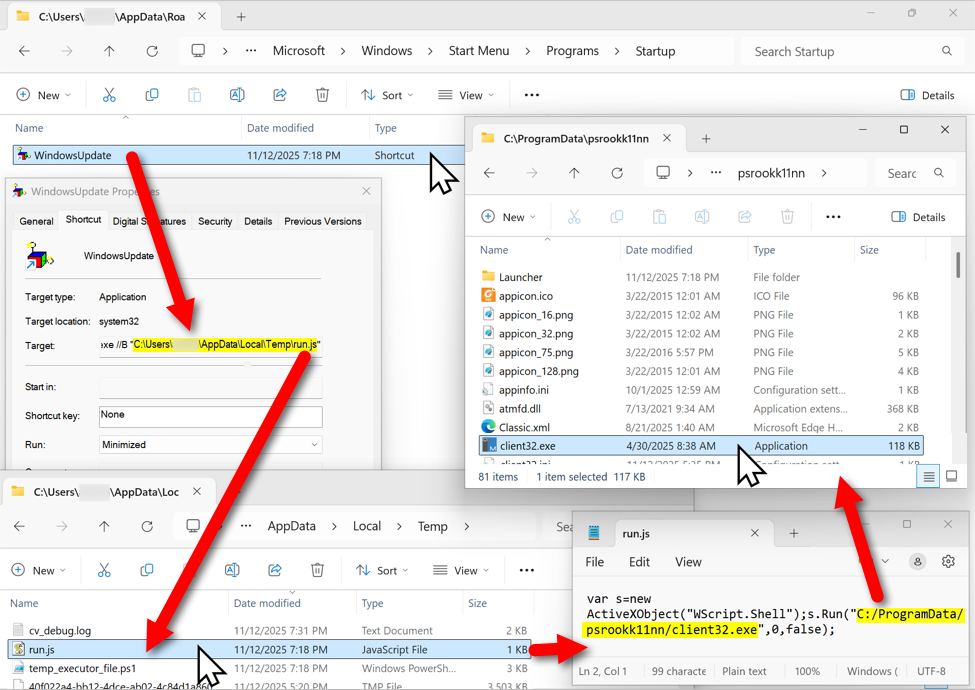
Shown above: The malicious NetSupport RAT package, persistent on an infected Windows host.
Indicators From This Activity
The following URLs were noted in traffic from this infection:
- hxxps[:]//frostshiledr[.]com/xss/buf.js <– injected SmartApeSG script
- hxxps[:]//frostshiledr[.]com/xss/index.php?iArfLYKw
- hxxps[:]//frostshiledr[.]com/xss/bof.js?0e58069bbdd36e9a36 <– fake CAPCHA page/ClickFix instructions
- hxxps[:]//newstarmold[.]com/sibhl.php <– Script retrieved by ClickFix command
- hxxps[:]//www.iconconsultants[.]com/4nnjson.zip <– zip archive containing malicious NetSupport RAT package
- hxxp[:]//194.180.191[.]121/fakeurl.htm <– NetSupport RAT C2 traffic over TCP port 443
The following is the zip archive containing the malicious NetSupport RAT package:
- SHA256 hash: 1e9a1be5611927c22a8c934f0fdd716811e0c93256b4ee784fadd9daaf2459a1
- File size: 9,192,105 bytes
- File type: Zip archive data, at least v1.0 to extract, compression method=store
- File location: hxxps[:]//www.iconconsultants[.]com/4nnjson.zip
- Saved to disk as: C:ProgramDatapsrookk11nn.zip
Note: These domains change on a near-daily basis, and the NetSupport RAT package and C2 server also frequently change.
—
Bradley Duncan
brad [at] malware-traffic-analysis.net
(c) SANS Internet Storm Center. https://isc.sans.edu Creative Commons Attribution-Noncommercial 3.0 United States License.

Microsoft Patch Tuesday for November 2025, (Tue, Nov 11th)
It isn't always defaults: Scans for 3CX usernames, (Mon, Nov 10th)
This post was originally published on this site
Today, I noticed scans using the username "FTP_3cx" showing up in our logs. 3CX is a well-known maker of business phone system software [1]. My first guess was that this was a default user for one of their systems. But Google came up empty for this particular string. The 3CX software does not appear to run an FTP server, but it offers a feature to back up configurations to an FTP server [2]. The example user used in the documentation is "3cxftpuser", not "FTP_3cx". Additionally, the documentation notes that the FTP server can run on a different system from the 3CX software. For a backup, it would not make much sense to have it all run on the same system.
The scans we are seeing likely target FTP servers users set up to back up 3CX configurations, and not the 3CX software itself. I am not familiar enough with 3CX to know precisely what the backup contains, but it most likely includes sufficient information to breach the 3CX installation.
The credentials we observe with our Cowrie-based honeypots are collected for telnet and ftp. In particular, on Linux systems, you often use a system user to connect via FTP. Any credentials working via FTP will also work for telnet or SSH. Keep that in mind when configuring a user for FTP access, and of course, FTP should not be your first choice for backing up sensitive data, but we all know it does happen.
Here are the passwords attacks are attempting to use:
| Password | Count |
|---|---|
| 3CXBackup | 4 |
| 3CXbackups | 4 |
| telecom | 1 |
| testbackup | 1 |
| backup3cx | 1 |
| ebsftpuser | 1 |
| ftp_cxn | 1 |
| ftp_inx | 1 |
Here are some other "3cx" related usernames we have seen in the past:
| Username |
|---|
| 3cx |
| 3CXBackup |
| 3cxbackups |
| backup3cx |
| ftp3cx |
| FTP_3cx |
If anyone with more 3CX experience reads this, is there a reason for someone to use these usernames? Or are there any defaults I didn't find?
[1] https://www.3cx.com
[2] https://www.3cx.com/docs/ftp-server-pbx-backups-linux/
—
Johannes B. Ullrich, Ph.D. , Dean of Research, SANS.edu
Twitter|
(c) SANS Internet Storm Center. https://isc.sans.edu Creative Commons Attribution-Noncommercial 3.0 United States License.
Binary Breadcrumbs: Correlating Malware Samples with Honeypot Logs Using PowerShell [Guest Diary], (Wed, Nov 5th)
This post was originally published on this site
[This is a Guest Diary by David Hammond, an ISC intern as part of the SANS.edu BACS program]
My last college credit on my way to earning a bachelor's degree was an internship opportunity at the Internet Storm Center. A great opportunity, but one that required the care and feeding of a honeypot. The day it arrived I plugged the freshly imaged honeypot into my home router and happily went about my day. I didn’t think too much about it until the first attack observation was due. You see, I travel often, but my honeypot does not. Furthermore, the administrative side of the honeypot was only accessible through the internal network. I wasn’t about to implement a whole remote solution just to get access while on the road. Instead, I followed some very good advice. I started downloading regular backups of the honeypot logs on a Windows laptop I frequently had with me.
The internship program encouraged us to at least initially review our honeypot logs with command line utilities, such as jq and all its flexibility with filtering. Combined with other standard Unix-like operating system tools, such as wc (word count), less, head, and cut, it was possible to extract exactly what I was looking for. I initially tried using more graphical tools but found I enjoy "living" in the command line better. When I first start looking at logs, I was not always sure of what I’m looking for. Command line tools allow me to quickly look for outliers in the data. I can see what sticks out by negating everything that looks the same.
So, what’s the trouble? None of these tools were available on my Windows laptop. Admittedly, most of what I mention above are available for Windows, but my ability to install software was restricted on this machine, and I knew that native alternatives existed. At the time I had several directories of JSON logs, and a long list of malware hash values corresponding to an attack I was interested in understanding better. Here’s how a few lines of PowerShell can transform scattered honeypot logs into a clear picture of what really happened.
First, let’s start with the script in two parts. Here’s the PowerShell array containing malware hash values:
$hashes = @(
"00deea7003eef2f30f2c84d1497a42c1f375d802ddd17bde455d5fde2a63631f",
"0131d2f87f9bc151fb2701a570585ed4db636440392a357a54b8b29f2ba842da",
"01ba4719c80b6fe911b091a7c05124b64eeece964e09c058ef8f9805daca546b",
"0291de841b47fe19557c2c999ae131cd571eb61782a109b9ef5b4a4944b6e76d",
"02a95dae81a8dd3545ce370f8c0ee300beff428b959bd7cec2b35e8d1cd7024e",
"062ba629c7b2b914b289c8da0573c179fe86f2cb1f70a31f9a1400d563c3042a",
"0be1c3511c67ecb8421d0be951e858bb3169ac598d068bae3bc8451e883946cc",
"0cbd5117413a0cab8b22f567b5ec5ec63c81b2f0f58e8e87146ecf7aace2ec71",
"0d2d316bc4937a2608e8d9a3030a545973e739805c3449b466984b27598fcdec",
"0d58ee0cd46d5908f31ba415f2e006c1bb0215b0ecdc27dd2b3afa74799e17bd"
)
The $hashes = @( ) between quoted, comma-separated values, establishes a PowerShell array of strings which represents the hashes we want to search for. Now let’s look at how we put this array to use.
Get-ChildItem -Path "C:UsersDaveLogs" -Filter 'cowrie.json.*' -Recurse |
ForEach-Object {
$jsonContent = Get-Content $_.FullName
write-output $_.FullName
foreach ($hash in $hashes) {
$searchResults = $null
$searchResults = $jsonContent | Select-String $hash
if (![string]::IsNullOrEmpty($searchResults)) {
write-output $searchResults
}
}
}
Let's walk through the execution of the script. The first statement, Get-ChildItem, recurses every folder in the specified path (C:UsersDaveLogs) and passes along all filenames that match the filter argument. Each filename is passed through the "pipe" (|) directly into the first ForEach-Object statement. You can see what’s passed by observing the output of the write-output $_.FullName line. The $_ is a variable designation which represents whatever is passed through the pipe. In this case, we know what kind of data to expect (a filename) so we can access it’s attribute, "FullName". This tells us the specific JSON log file currently being searched.
Now let’s get into the meat of the script. The main body of the script contains two nested For-Loops. The outer loop begins with the first "ForEach-Object" block of code. The inner loop is described by the lowercase "foreach" block. We already know the name of the JSON log we’ll be searching next, so the next line, $jsonContent = Get-Content $_.FullName sets that up to happen. It takes the content of the first filename passed to $_ though the pipe, reads the contents of that filename, and stores the text in a variable named $jsonContent. Now we’ve got our first log to search, all we have to do is run through the list of hash values to search for! This takes us to the point of the script where we reach the inner-loop. The foreach inner-loop is similar to the outer loop with the exception of how it processes data. The statement, foreach ($hash in $hashes) takes each hash value found in the $hashes array and puts a copy of it into $hash before executing the code block it contains.
When the inner-loop runs it does three things. First, $searchResults = $null empties the value of the $searchResults variable. This is also called "initializing" the variable, and it’s a good practice whenever you're working with loops that re-use the same variable names. Second, with the variable clear and ready to accept new values, the next line accomplishes a few things.
$searchResults = $jsonContent | Select-String $hash
Starting to the right of the equals sign, we’re passing the JSON log text $jsonContent into the command "Select-String" while also passing Select-String a single argument, $hash. Remember earlier when the lowercase foreach loop started, it takes each value found in the $hashes array and (one at a time) places their values into $hash before executing the block of code below it. So we’re passing the text in $jsonContent through another pipe to Select-String, which takes that text and searches for the value $hash within the contents of $jsonContent. The results of Search-String are then stored in the variable named $searchResults.
if (![string]::IsNullOrEmpty($searchResults)) {
write-output $searchResults
}
Third and finally, we have an if statement to determine whether the prior Select-String produced any results. If it found the $hash value it was looking for, the $searchResults variable will contain data. If not, it will remain empty ($null). The if statement makes that determination and prints the $searchResults it found. Note the ! at the beginning of the statement which tells it to evaluate as, "if not empty."
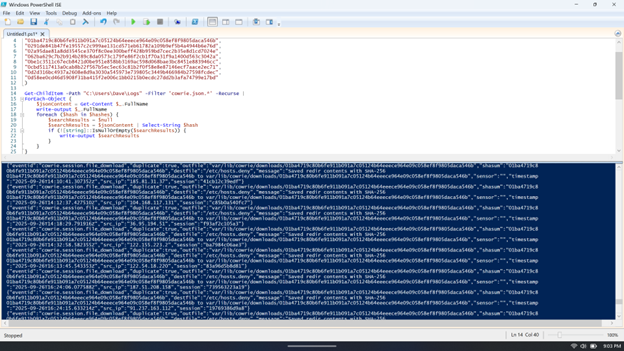
While compact in size, this script introduces the PowerShell newcomer to a variety of useful functions: traversing files and folders, retrieving text, searching text, and nested loops are all sophisticated techniques. If you save this script, you can adapt it in many ways whenever a quick solution is needed. Understanding the tools that are available to us in any environment and having practice adapting those tools to our circumstances makes us all better cybersecurity professionals.
[1] https://www.sans.edu/cyber-security-programs/bachelors-degree/
———–
Guy Bruneau IPSS Inc.
My GitHub Page
Twitter: GuyBruneau
gbruneau at isc dot sans dot edu
(c) SANS Internet Storm Center. https://isc.sans.edu Creative Commons Attribution-Noncommercial 3.0 United States License.
Updates to Domainname API, (Wed, Nov 5th)
This post was originally published on this site
For several years, we have offered a "new domain" list of recently registered (or, more accurately, recently discovered) domains. This list is offered via our API (https://isc.sans.edu/api). However, the size of the list has been causing issues, resulting in a "cut-off" list being returned. To resolve this issue, I updated the API call. It is sort of backward compatible, but it will not allow you to retrieve the full list. Additionally, we offer a simple "static file" containing the complete list. This file should be used whenever possible instead of the API.
To retrieve the full list, updated hourly, use:
We also offer past versions of this list for the last few days. For example:
I have not decided yet how long to keep these historic lists. The same data can be retrieved via the API request below. Likely, I will keep the last week as a "precompiled" list.
For the API, you may now retrieve partial copies of the list. The full URL for the API is:
https://isc.sans.edu/api/recentdomains/[date]/[searchstring]/[start]/[count]
For example:
https://isc.sans.edu/api/recentdomains/2025-11-05/sans/0/1000?json
Will return all domains found today (November 5th) that contain the string "sans". The first 1,000 matches are returned.
date: The date in "YYYY-MM-DD" format. The word "today" can be used instead of the current date if you only want the most recent data. The default is "today".
searchstring: only domains containing this string will be returned. Use "+" as a wildcard to get all domains. This defaults to returning any domain.
start: The number of the record to start with (defaults to 0)
count: How many records to return (defaults to all records)
In return, you will receive XML by default, but you may easily switch to other formats by adding, for example, "?json" to the end of the URL, which will return JSON.
The data returned remains the same:
{

    "domainname": "applewood-artisans.com",

    "ip": null,

    "type": null,

    "firstseen": "2025-11-04",

    "score": 0,

    "scorereason": "High entropy: 3.57 (+0.36)"

  },
domainname: The domain name
ip: IPv4 address (if available)
type: currently not used
firstseen: Date the domain name was first seen
score: The "anomaly score"
scorereason: reason behind the score
One of the sources of this data is the Certificate Transparency logs. It is possible that we will see new certificates for older domains that have not yet made it into our list of "existing" domains. As a result, you will see some older domains listed as "new" because they were not previously included in our feeds.
Regarding all our data: Use it at your own risk. The data is provided on a best-effort basis at no cost. Commercial use is permitted as long as the data is attributed to us and not resold. We do not recommend using the data as a block list. Instead, use it to "add color to your logs". The data may provide some useful context for other data you collect.
Why do we have a somewhat unusual API, rather than a more standard-compliant REST, GraphQL, or even SOAP API? Well, the API predates these standards (except for SOAP… and do you really want me to use SOAP?). At one point, we may offer something closer to whatever the REST standard will look like at the time, but don't hold your breath; there are a few other projects I want to complete first.
Feedback and bug reports are always welcome.
—
Johannes B. Ullrich, Ph.D. , Dean of Research, SANS.edu
Twitter|
(c) SANS Internet Storm Center. https://isc.sans.edu Creative Commons Attribution-Noncommercial 3.0 United States License.
Apple Patches Everything, Again, (Tue, Nov 4th)
This post was originally published on this site
Apple released its expected set of operating system upgrades. This is a minor feature upgrade that also includes fixes for 110 different vulnerabilities. As usual for Apple, many of the vulnerabilities affect multiple operating systems. None of the vulnerabilities is marked as already exploited. Apple only offers very sparse vulnerability descriptions. Here are some vulnerabilities that may be worth watching:
CVE-2025-43338, CVE-2025-43372: A memory corruption vulnerability in ImageIO. ImageIO is responsible for rendering images, and vulnerabilities like this have been exploited in the past for remote code execution. CVE-2025-43400, a vulnerability affecting FontParser, could have a similar impact.
CVE-2025-43431: A memory corruption issue in WebKit. This could be used to execute code via Safari.
| iOS 26.1 and iPadOS 26.1 | macOS Tahoe 26.1 | macOS Sequoia 15.7.2 | macOS Sonoma 14.8.2 | tvOS 26.1 | watchOS 26.1 | visionOS 26.1 | Safari 26.1 | Xcode 26.1 |
|---|---|---|---|---|---|---|---|---|
| CVE-2025-31199: An app may be able to access sensitive user data. Affects Spotlight |
||||||||
| x | ||||||||
| CVE-2025-43292: An app may be able to access sensitive user data. Affects CoreMedia |
||||||||
| x | ||||||||
| CVE-2025-43294: An app may be able to access sensitive user data. Affects MallocStackLogging |
||||||||
| x | x | x | ||||||
| CVE-2025-43322: An app may be able to access user-sensitive data. Affects Admin Framework |
||||||||
| x | x | x | ||||||
| CVE-2025-43334: An app may be able to access user-sensitive data. Affects sudo |
||||||||
| x | x | x | ||||||
| CVE-2025-43335: An app may be able to access user-sensitive data. Affects Security |
||||||||
| x | x | x | ||||||
| CVE-2025-43336: An app with root privileges may be able to access private information. Affects SoftwareUpdate |
||||||||
| x | x | x | ||||||
| CVE-2025-43337: An app may be able to access sensitive user data. Affects AppleMobileFileIntegrity |
||||||||
| x | ||||||||
| CVE-2025-43338: Processing a maliciously crafted media file may lead to unexpected app termination or corrupt process memory. Affects ImageIO |
||||||||
| x | ||||||||
| CVE-2025-43348: An app may bypass Gatekeeper checks. Affects Finder |
||||||||
| x | x | x | ||||||
| CVE-2025-43350: An attacker may be able to view restricted content from the lock screen. Affects Control Center |
||||||||
| x | ||||||||
| CVE-2025-43351: An app may be able to access protected user data. Affects StorageKit |
||||||||
| x | ||||||||
| CVE-2025-43361: A malicious app may be able to read kernel memory. Affects Audio |
||||||||
| x | x | |||||||
| CVE-2025-43364: An app may be able to break out of its sandbox. Affects NetFSFramework |
||||||||
| x | ||||||||
| CVE-2025-43372: Processing a maliciously crafted media file may lead to unexpected app termination or corrupt process memory. Affects ImageIO |
||||||||
| x | ||||||||
| CVE-2025-43373: An app may be able to cause unexpected system termination or corrupt kernel memory. Affects Wi-Fi |
||||||||
| x | x | x | ||||||
| CVE-2025-43377: An app may be able to cause a denial-of-service. Affects Model I/O |
||||||||
| x | x | |||||||
| CVE-2025-43378: An app may be able to access sensitive user data. Affects AppleMobileFileIntegrity |
||||||||
| x | x | |||||||
| CVE-2025-43379: An app may be able to access protected user data. Affects AppleMobileFileIntegrity |
||||||||
| x | x | x | x | x | x | x | ||
| CVE-2025-43380: Parsing a file may lead to an unexpected app termination. Affects sips |
||||||||
| x | x | x | ||||||
| CVE-2025-43381: A malicious app may be able to delete protected user data. Affects CoreServicesUIAgent |
||||||||
| x | ||||||||
| CVE-2025-43382: An app may be able to access sensitive user data. Affects AppleMobileFileIntegrity |
||||||||
| x | x | x | ||||||
| CVE-2025-43383: Processing a maliciously crafted media file may lead to unexpected app termination or corrupt process memory. Affects Model I/O |
||||||||
| x | x | x | x | |||||
| CVE-2025-43384: Processing a maliciously crafted media file may lead to unexpected app termination or corrupt process memory. Affects Model I/O |
||||||||
| x | ||||||||
| CVE-2025-43387: A malicious app may be able to gain root privileges. Affects DiskArbitration |
||||||||
| x | x | |||||||
| CVE-2025-43389: An app may be able to access sensitive user data. Affects Notes |
||||||||
| x | x | x | x | x | ||||
| CVE-2025-43390: An app may be able to access user-sensitive data. Affects AppleMobileFileIntegrity |
||||||||
| x | x | |||||||
| CVE-2025-43391: An app may be able to access sensitive user data. Affects Photos |
||||||||
| x | x | x | x | |||||
| CVE-2025-43392: A website may exfiltrate image data cross-origin. Affects WebKit Canvas |
||||||||
| x | x | x | x | x | x | |||
| CVE-2025-43393: An app may be able to break out of its sandbox. Affects quarantine |
||||||||
| x | ||||||||
| CVE-2025-43394: An app may be able to access protected user data. Affects bootp |
||||||||
| x | x | x | ||||||
| CVE-2025-43395: An app may be able to access protected user data. Affects configd |
||||||||
| x | x | x | ||||||
| CVE-2025-43396: A sandboxed app may be able to access sensitive user data. Affects Installer |
||||||||
| x | x | x | ||||||
| CVE-2025-43397: An app may be able to cause a denial-of-service. Affects SoftwareUpdate |
||||||||
| x | x | x | ||||||
| CVE-2025-43398: An app may be able to cause unexpected system termination. Affects Kernel |
||||||||
| x | x | x | x | x | x | x | ||
| CVE-2025-43399: An app may be able to access protected user data. Affects Siri |
||||||||
| x | x | |||||||
| CVE-2025-43400: Processing a maliciously crafted font may lead to unexpected app termination or corrupt process memory. Affects FontParser |
||||||||
| x | x | |||||||
| CVE-2025-43401: A remote attacker may be able to cause a denial-of-service. Affects CoreAnimation |
||||||||
| x | x | x | ||||||
| CVE-2025-43402: An app may be able to cause unexpected system termination or corrupt process memory. Affects WindowServer |
||||||||
| x | ||||||||
| CVE-2025-43404: An app may be able to access sensitive user data. Affects Sandbox |
||||||||
| x | ||||||||
| CVE-2025-43405: An app may be able to access user-sensitive data. Affects Photos |
||||||||
| x | x | x | ||||||
| CVE-2025-43406: An app may be able to access sensitive user data. Affects Sandbox |
||||||||
| x | ||||||||
| CVE-2025-43407: An app may be able to break out of its sandbox. Affects Assets |
||||||||
| x | x | x | x | x | x | |||
| CVE-2025-43408: An attacker with physical access may be able to access contacts from the lock screen. Affects Share Sheet |
||||||||
| x | x | x | ||||||
| CVE-2025-43409: An app may be able to access sensitive user data. Affects Spotlight |
||||||||
| x | x | |||||||
| CVE-2025-43411: An app may be able to access user-sensitive data. Affects PackageKit |
||||||||
| x | x | x | ||||||
| CVE-2025-43412: An app may be able to break out of its sandbox. Affects TCC |
||||||||
| x | x | x | ||||||
| CVE-2025-43413: A sandboxed app may be able to observe system-wide network connections. Affects libxpc |
||||||||
| x | x | x | x | x | x | x | ||
| CVE-2025-43414: A shortcut may be able to access files that are normally inaccessible to the Shortcuts app. Affects Shortcuts |
||||||||
| x | x | x | ||||||
| CVE-2025-43420: An app may be able to access sensitive user data. Affects Dock |
||||||||
| x | x | x | ||||||
| CVE-2025-43421: Processing maliciously crafted web content may lead to an unexpected process crash. Affects WebKit |
||||||||
| x | x | x | x | |||||
| CVE-2025-43422: An attacker with physical access to a device may be able to disable Stolen Device Protection. Affects Stolen Device Protection |
||||||||
| x | ||||||||
| CVE-2025-43423: An attacker with physical access to an unlocked device paired with a Mac may be able to view sensitive user information in system logging. Affects Audio |
||||||||
| x | x | x | x | |||||
| CVE-2025-43424: A malicious HID device may cause an unexpected process crash. Affects Multi-Touch |
||||||||
| x | x | |||||||
| CVE-2025-43425: Processing maliciously crafted web content may lead to an unexpected process crash. Affects WebKit |
||||||||
| x | x | x | x | x | x | |||
| CVE-2025-43426: An app may be able to access sensitive user data. Affects Contacts |
||||||||
| x | x | |||||||
| CVE-2025-43427: Processing maliciously crafted web content may lead to an unexpected process crash. Affects WebKit |
||||||||
| x | x | x | x | x | ||||
| CVE-2025-43429: Processing maliciously crafted web content may lead to an unexpected process crash. Affects WebKit |
||||||||
| x | x | x | x | x | x | |||
| CVE-2025-43430: Processing maliciously crafted web content may lead to an unexpected process crash. Affects WebKit |
||||||||
| x | ||||||||
| CVE-2025-43431: Processing maliciously crafted web content may lead to memory corruption. Affects WebKit |
||||||||
| x | x | x | x | x | x | |||
| CVE-2025-43432: Processing maliciously crafted web content may lead to an unexpected process crash. Affects WebKit |
||||||||
| x | x | x | x | x | x | |||
| CVE-2025-43434: Processing maliciously crafted web content may lead to an unexpected Safari crash. Affects WebKit |
||||||||
| x | x | x | x | x | ||||
| CVE-2025-43436: An app may be able to enumerate a user's installed apps. Affects CoreServices |
||||||||
| x | x | x | x | x | ||||
| CVE-2025-43439: An app may be able to fingerprint the user. Affects On-device Intelligence |
||||||||
| x | x | |||||||
| CVE-2025-43440: Processing maliciously crafted web content may lead to an unexpected process crash. Affects WebKit |
||||||||
| x | x | x | x | x | x | |||
| CVE-2025-43442: An app may be able to identify what other apps a user has installed. Affects Accessibility |
||||||||
| x | ||||||||
| CVE-2025-43443: Processing maliciously crafted web content may lead to an unexpected process crash. Affects WebKit |
||||||||
| x | x | x | x | x | x | |||
| CVE-2025-43444: An app may be able to fingerprint the user. Affects Installer |
||||||||
| x | x | x | x | x | ||||
| CVE-2025-43445: Processing a maliciously crafted media file may lead to unexpected app termination or corrupt process memory. Affects CoreText |
||||||||
| x | x | x | x | x | x | x | ||
| CVE-2025-43446: An app may be able to modify protected parts of the file system. Affects Assets |
||||||||
| x | x | x | ||||||
| CVE-2025-43448: An app may be able to break out of its sandbox. Affects CloudKit |
||||||||
| x | x | x | x | x | x | x | ||
| CVE-2025-43449: A malicious app may be able to track users between installs. Affects Apple TV Remote |
||||||||
| x | ||||||||
| CVE-2025-43450: An app may be able to learn information about the current camera view before being granted camera access. Affects Camera |
||||||||
| x | ||||||||
| CVE-2025-43452: Keyboard suggestions may display sensitive information on the lock screen. Affects Text Input |
||||||||
| x | ||||||||
| CVE-2025-43454: A device may persistently fail to lock. Affects Siri |
||||||||
| x | ||||||||
| CVE-2025-43455: A malicious app may be able to take a screenshot of sensitive information in embedded views. Affects Apple Account |
||||||||
| x | x | x | x | |||||
| CVE-2025-43459: An attacker with physical access to a locked Apple Watch may be able to view Live Voicemail. Affects Phone |
||||||||
| x | ||||||||
| CVE-2025-43460: An attacker with physical access to a locked device may be able to view sensitive user information. Affects Status Bar |
||||||||
| x | ||||||||
| CVE-2025-43461: An app may be able to access protected user data. Affects configd |
||||||||
| x | ||||||||
| CVE-2025-43462: An app may be able to cause unexpected system termination or corrupt kernel memory. Affects Apple Neural Engine |
||||||||
| x | x | x | x | x | ||||
| CVE-2025-43463: An app may be able to access sensitive user data. Affects StorageKit |
||||||||
| x | ||||||||
| CVE-2025-43464: Visiting a website may lead to an app denial-of-service. Affects dyld |
||||||||
| x | ||||||||
| CVE-2025-43465: An app may be able to access sensitive user data. Affects ATS |
||||||||
| x | ||||||||
| CVE-2025-43466: An app may be able to access sensitive user data. Affects AppleMobileFileIntegrity |
||||||||
| x | ||||||||
| CVE-2025-43467: An app may be able to gain root privileges. Affects Installer |
||||||||
| x | ||||||||
| CVE-2025-43468: An app may be able to access sensitive user data. Affects AppleMobileFileIntegrity |
||||||||
| x | x | x | ||||||
| CVE-2025-43469: An app may be able to access sensitive user data. Affects NSSpellChecker |
||||||||
| x | x | x | ||||||
| CVE-2025-43471: An app may be able to access sensitive user data. Affects Admin Framework |
||||||||
| x | ||||||||
| CVE-2025-43472: An app may be able to gain root privileges. Affects zsh |
||||||||
| x | x | x | ||||||
| CVE-2025-43473: An app may be able to access sensitive user data. Affects Shortcuts |
||||||||
| x | ||||||||
| CVE-2025-43474: An app may be able to cause unexpected system termination or read kernel memory. Affects GPU Drivers |
||||||||
| x | x | x | ||||||
| CVE-2025-43476: An app may be able to break out of its sandbox. Affects SharedFileList |
||||||||
| x | x | x | ||||||
| CVE-2025-43477: An app may be able to access sensitive user data. Affects Siri |
||||||||
| x | x | x | ||||||
| CVE-2025-43478: An app may be able to cause unexpected system termination. Affects ASP TCP |
||||||||
| x | x | x | ||||||
| CVE-2025-43479: An app may be able to access sensitive user data. Affects CoreServices |
||||||||
| x | x | x | ||||||
| CVE-2025-43480: A malicious website may exfiltrate data cross-origin. Affects WebKit |
||||||||
| x | x | x | x | x | x | |||
| CVE-2025-43481: An app may be able to break out of its sandbox. Affects Disk Images |
||||||||
| x | x | |||||||
| CVE-2025-43493: Visiting a malicious website may lead to address bar spoofing. Affects Safari |
||||||||
| x | x | x | x | |||||
| CVE-2025-43495: An app may be able to monitor keystrokes without user permission. Affects WebKit |
||||||||
| x | ||||||||
| CVE-2025-43496: Remote content may be loaded even when the 'Load Remote Images' setting is turned off. Affects Mail Drafts |
||||||||
| x | x | x | x | x | ||||
| CVE-2025-43497: An app may be able to break out of its sandbox. Affects BackBoardServices |
||||||||
| x | ||||||||
| CVE-2025-43498: An app may be able to access sensitive user data. Affects FileProvider |
||||||||
| x | x | x | x | x | ||||
| CVE-2025-43499: An app may be able to access sensitive user data. Affects Shortcuts |
||||||||
| x | x | x | ||||||
| CVE-2025-43500: An app may be able to access sensitive user data. Affects Sandbox Profiles |
||||||||
| x | x | x | x | |||||
| CVE-2025-43502: An app may be able to bypass certain Privacy preferences. Affects Safari |
||||||||
| x | x | x | x | |||||
| CVE-2025-43503: Visiting a malicious website may lead to user interface spoofing. Affects Safari |
||||||||
| x | x | x | x | x | ||||
| CVE-2025-43504: A user in a privileged network position may be able to cause a denial-of-service. Affects lldb |
||||||||
| x | ||||||||
| CVE-2025-43505: Processing a maliciously crafted file may lead to heap corruption. Affects GNU |
||||||||
| x | ||||||||
| CVE-2025-43506: iCloud Private Relay may not activate when more than one user is logged in at the same time. Affects Networking |
||||||||
| x | ||||||||
| CVE-2025-43507: An app may be able to fingerprint the user. Affects Find My |
||||||||
| x | x | x | x | |||||
—
Johannes B. Ullrich, Ph.D. , Dean of Research, SANS.edu
Twitter|
(c) SANS Internet Storm Center. https://isc.sans.edu Creative Commons Attribution-Noncommercial 3.0 United States License.

XWiki SolrSearch Exploit Attempts (CVE-2025-24893) with link to Chicago Gangs/Rappers, (Mon, Nov 3rd)
This post was originally published on this site
XWiki describes itself as "The Advanced Open-Source Enterprise Wiki" and considers itself an alternative to Confluence and MediaWiki. In February, XWiki released an advisory (and patch) for an arbitrary remote code execution vulnerability. Affected was the SolrSearch component, which any user, even with minimal "Guest" privileges, can use. The advisory included PoC code, so it is a bit odd that it took so long for the vulnerability to be widely exploited.