The Federal Bureau of Investigation (FBI) and Cybersecurity and Infrastructure Security Agency (CISA) are releasing this joint Cybersecurity Advisory (CSA) in response to the active exploitation of CVE-2023-27350. This vulnerability occurs in certain versions of PaperCut NG and PaperCut MF and enables an unauthenticated actor to execute malicious code remotely without credentials. PaperCut released a patch in March 2023.
According to FBI observed information, malicious actors exploited CVE-2023-27350 beginning in mid-April 2023 and continuing through the present. In early May 2023, also according to FBI information, a group self-identifying as the Bl00dy Ransomware Gang attempted to exploit vulnerable PaperCut servers against the Education Facilities Subsector.
This joint advisory provides detection methods for exploitation of CVE-2023-27350 as well and indicators of compromise (IOCs) associated with Bl00dy Ransomware Gang activity. FBI and CISA strongly encourage users and administrators to immediately apply patches, and workarounds if unable to patch. FBI and CISA especially encourage organizations who did not patch immediately to assume compromise and hunt for malicious activity using the detection signatures in this CSA. If potential compromise is detected, organizations should apply the incident response recommendations included in this CSA.
CVE-2023-27350 allows a remote actor to bypass authentication and conduct remote code execution on the following affected installations of PaperCut:[1]
Version 8.0.0 to 19.2.7
Version 20.0.0 to 20.1.6
Version 21.0.0 to 21.2.10
Version 22.0.0 to 22.0.8
PaperCut servers vulnerable to CVE-2023-27350 implement improper access controls in the SetupCompleted Java class, allowing malicious actors to bypass user authentication and access the server as an administrator. After accessing the server, actors can leverage existing PaperCut software features for remote code execution (RCE). There are currently two publicly known proofs of concept for achieving RCE in vulnerable PaperCut software:
Using the print scripting interface to execute shell commands.
Using the User/Group Sync interface to execute a living-off-the-land-style attack.
FBI and CISA note that actors may develop other methods for RCE.
The PaperCut server process pc-app.exe runs with SYSTEM- or root-level privileges. When the software is exploited to execute other processes such as cmd.exe or powershell.exe, these child processes are created with the same privileges. Commands supplied with the execution of these processes will also run with the same privileges. As a result, a wide range of post-exploitation activity is possible following initial access and compromise.
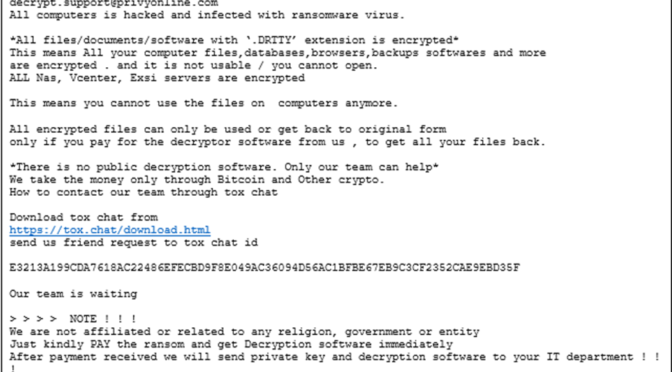
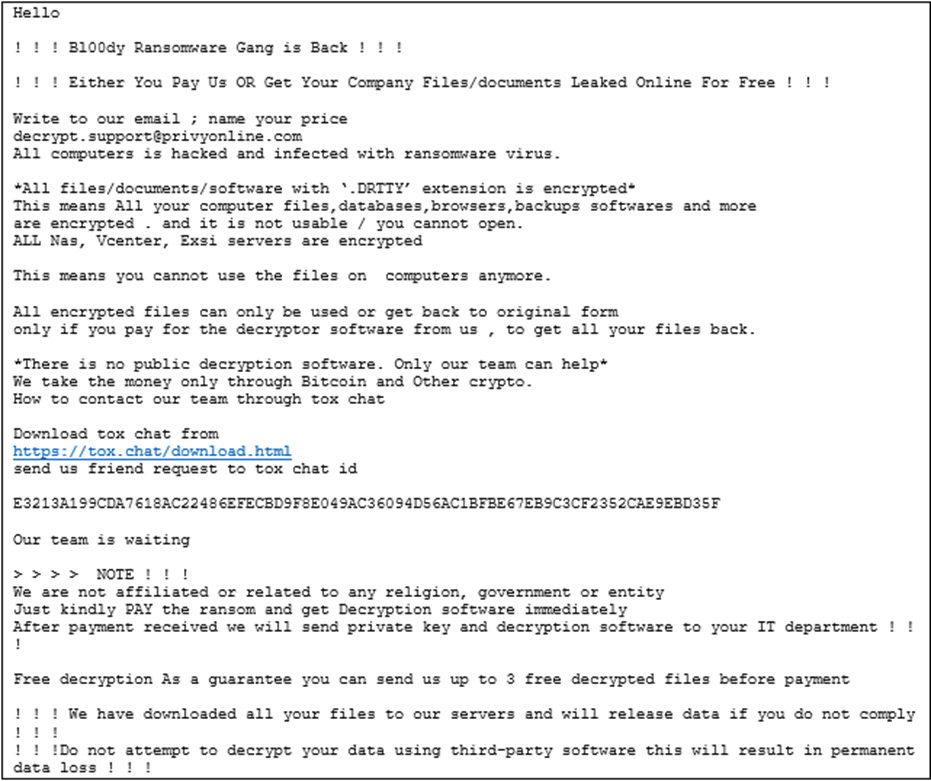
Education Facilities Subsector entities maintained approximately 68% of exposed, but not necessarily vulnerable, U.S.-based PaperCut servers. In early May 2023, according to FBI information, the Bl00dy Ransomware Gang gained access to victim networks across the Education Facilities Subsector where PaperCut servers vulnerable to CVE-2023-27350 were exposed to the internet. Ultimately, some of these operations led to data exfiltration and encryption of victim systems. The Bl00dy Ransomware Gang left ransom notes on victim systems demanding payment in exchange for decryption of encrypted files (see Figure 1).
Figure 1: Example Bl00dy Gang Ransomware Note
According to FBI information, legitimate remote management and maintenance (RMM) software was downloaded and executed on victim systems via commands issued through PaperCut’s print scripting interface. External network communications through Tor and/or other proxies from inside victim networks helped Bl00dy Gang ransomware actors mask their malicious network traffic. The FBI also identified information relating to the download and execution of command and control (C2) malware such as DiceLoader, TrueBot, and Cobalt Strike Beacons, although it is unclear at which stage in the attack these tools were executed.
DETECTION METHODS
Network defenders should focus detection efforts on three key areas:
Network traffic signatures – Look for network traffic attempting to access the SetupCompleted page of an exposed and vulnerable PaperCut server.
System monitoring – Look for child processes spawned from a PaperCut server’s pc-app.exe process.
Server settings and log files – Look for evidence of malicious activity in PaperCut server settings and log files.
Network Traffic Signatures
To exploit CVE-2023-27350, a malicious actor must first visit the SetupCompleted page of the intended target, which will provide the adversary with authentication to the targeted PaperCut server. Deploy the following Emerging Threat Suricata signatures to detect when GET requests are sent to the SetupCompleted page. (Be careful of improperly formatted double-quotation marks if copying and pasting signatures from this advisory.)
Note that some of the techniques identified in this section can affect the availability or stability of a system. Defenders should follow organizational policies and incident response best practices to minimize the risk to operations while threat hunting.
alert http any any -> $HOME_NET any (

  msg:"ET EXPLOIT PaperCut MF/NG SetupCompleted Authentication Bypass (CVE-2023-27350)";

  flow:established,to_server;

  http.method; content:"GET";

  http.uri; content:"/app?service=page/SetupCompleted"; bsize:32; fast_pattern;

  reference:cve,2023-27350;

  classtype:attempted-admin;
Note that these signatures and other rule-based detections, including YARA rules, may fail to detect more advanced iterations of CVE-2023-27350 exploits. Actors are known to adapt exploits to circumvent rule-based detections formulated for the original iterations of exploits observed in the wild. For example, the first rule above detected some of the first known exploits of CVE-2023-27350, but a slight modification of the exploit’s GET request can evade that rule. The second rule was designed to detect a broader range of activity than the first rule.
The following additional Emerging Threat Suricata signatures are designed to detect Domain Name System (DNS) lookups of known malicious domains associated with recent PaperCut exploitation:
alert dns $HOME_NET any -> any any (msg:"ET TROJAN Possible PaperCut MF/NG Post Exploitation Domain in DNS Lookup (windowcsupdates .com)"; dns_query; content:"windowcsupdates.com"; nocase; isdataat:!1,relative; pcre:"/(?:^|.)windowcsupdates.com$/"; reference:url,www.huntress.com/blog/critical-vulnerabilities-in-papercut-print-management-software; classtype:trojan-activity; metadata:affected_product Windows_XP_Vista_7_8_10_Server_32_64_Bit, attack_target Client_Endpoint, deployment Perimeter, former_category MALWARE, performance_impact Low, signature_severity Major, updated_at 2023_04_21;)
alert dns $HOME_NET any -> any any (msg:"ET ATTACK_RESPONSE Possible PaperCut MF/NG Post Exploitation Domain in DNS Lookup (anydeskupdate .com)"; dns_query; content:"anydeskupdate.com"; nocase; isdataat:!1,relative; pcre:"/(?:^|.)anydeskupdate.com$/"; reference:url,www.huntress.com/blog/critical-vulnerabilities-in-papercut-print-management-software; classtype:trojan-activity; metadata:affected_product Windows_XP_Vista_7_8_10_Server_32_64_Bit, attack_target Client_Endpoint, deployment Perimeter, former_category MALWARE, performance_impact Low, signature_severity Major, updated_at 2023_04_21;)
alert dns $HOME_NET any -> any any (msg:"ET TROJAN Possible PaperCut MF/NG Post Exploitation Domain in DNS Lookup (anydeskupdates .com)"; dns_query; content:"anydeskupdates.com"; nocase; isdataat:!1,relative; pcre:"/(?:^|.)anydeskupdates.com$/"; reference:url,www.huntress.com/blog/critical-vulnerabilities-in-papercut-print-management-software; classtype:trojan-activity; metadata:affected_product Windows_XP_Vista_7_8_10_Server_32_64_Bit, attack_target Client_Endpoint, deployment Perimeter, former_category MALWARE, performance_impact Low, signature_severity Major, updated_at 2023_04_21;)
alert dns $HOME_NET any -> any any (msg:"ET TROJAN Possible PaperCut MF/NG Post Exploitation Domain in DNS Lookup (windowservicecemter .com)"; dns_query; content:"windowservicecemter.com"; nocase; isdataat:!1,relative; pcre:"/(?:^|.)windowservicecemter.com$/"; reference:url,www.huntress.com/blog/critical-vulnerabilities-in-papercut-print-management-software; classtype:trojan-activity; metadata:affected_product Windows_XP_Vista_7_8_10_Server_32_64_Bit, attack_target Client_Endpoint, deployment Perimeter, former_category MALWARE, performance_impact Low, signature_severity Major, updated_at 2023_04_21;)
alert dns $HOME_NET any -> any any (msg:"ET ATTACK_RESPONSE Possible PaperCut MF/NG Post Exploitation Domain in DNS Lookup (winserverupdates .com)"; dns_query; content:"winserverupdates.com"; nocase; isdataat:!1,relative; pcre:"/(?:^|.)winserverupdates.com$/"; reference:url,www.huntress.com/blog/critical-vulnerabilities-in-papercut-print-management-software; classtype:trojan-activity; metadata:affected_product Windows_XP_Vista_7_8_10_Server_32_64_Bit, attack_target Client_Endpoint, deployment Perimeter, former_category MALWARE, performance_impact Low, signature_severity Major, updated_at 2023_04_21;)
alert dns $HOME_NET any -> any any (msg:"ET TROJAN Possible PaperCut MF/NG Post Exploitation Domain in DNS Lookup (netviewremote .com)"; dns_query; content:"netviewremote.com"; nocase; isdataat:!1,relative; pcre:"/(?:^|.)netviewremote.com$/"; reference:url,www.huntress.com/blog/critical-vulnerabilities-in-papercut-print-management-software; classtype:trojan-activity; metadata:affected_product Windows_XP_Vista_7_8_10_Server_32_64_Bit, attack_target Client_Endpoint, deployment Perimeter, former_category MALWARE, performance_impact Low, signature_severity Major, updated_at 2023_04_21;)
alert dns $HOME_NET any -> any any (msg:"ET TROJAN Possible PaperCut MF/NG Post Exploitation Domain in DNS Lookup (updateservicecenter .com)"; dns_query; content:"updateservicecenter.com"; nocase; isdataat:!1,relative; pcre:"/(?:^|.)updateservicecenter.com$/"; reference:url,www.huntress.com/blog/critical-vulnerabilities-in-papercut-print-management-software; classtype:trojan-activity; metadata:affected_product Windows_XP_Vista_7_8_10_Server_32_64_Bit, attack_target Client_Endpoint, deployment Perimeter, former_category MALWARE, performance_impact Low, signature_severity Major, updated_at 2023_04_21;)
alert dns $HOME_NET any -> any any (msg:"ET TROJAN Possible PaperCut MF/NG Post Exploitation Domain in DNS Lookup (windowservicecenter .com)"; dns_query; content:"windowservicecenter.com"; nocase; isdataat:!1,relative; pcre:"/(?:^|.)windowservicecenter.com$/"; reference:url,www.huntress.com/blog/critical-vulnerabilities-in-papercut-print-management-software; classtype:trojan-activity; metadata:affected_product Windows_XP_Vista_7_8_10_Server_32_64_Bit, attack_target Client_Endpoint, deployment Perimeter, former_category MALWARE, performance_impact Low, signature_severity Major, updated_at 2023_04_21;)
alert dns $HOME_NET any -> any any (msg:"ET TROJAN Possible PaperCut MF/NG Post Exploitation Domain in DNS Lookup (windowservicecentar .com)"; dns_query; content:"windowservicecentar.com"; nocase; isdataat:!1,relative; pcre:"/(?:^|.)windowservicecentar.com$/"; reference:url,www.huntress.com/blog/critical-vulnerabilities-in-papercut-print-management-software; classtype:trojan-activity; metadata:affected_product Windows_XP_Vista_7_8_10_Server_32_64_Bit, attack_target Client_Endpoint, deployment Perimeter, former_category ATTACK_RESPONSE, performance_impact Low, signature_severity Major, updated_at 2023_04_21;)
Note that these signatures may also not work if the actor modified activity to evade detection by known rules.
System Monitoring
A child process is spawned under pc-app.exe when the vulnerable PaperCut software is used to execute another process, which is the PaperCut server process. Malicious activity against PaperCut servers in mid-April used the RCE to supply commands to a cmd.exe or powershell.exe child process, which were then used to conduct further network exploitation. The following YARA rule may detect malicious activity[2].
title: PaperCut MF/NG Vulnerability

authors: Huntress DE&TH Team

description: Detects suspicious code execution from vulnerable PaperCut versions MF and NG

logsource:

  category: process_creation

  product: windows

detection:

  selection:

    ParentImage|endswith: “pc-app.exe”

    Image|endswith:

      - “cmd.exe”

      - “powershell.exe”

  condition: selection

level: high

falsepositives:

  - Expected admin activity
More advanced versions of the exploit can drop a backdoor executable, use living-off-the-land binaries, or attempt to evade the above YARA rule by spawning an additional child process in-between pc-app.exe and a command-line interpreter.
Server Settings and Log Files
Network defenders may be able to identify suspicious activity by reviewing the PaperCut server options to identify unfamiliar print scripts or User/Group Sync settings.
If the PaperCut Application Server logs have debug mode enabled, lines containing SetupCompleted at a time not correlating with the server installation or upgrade may be indicative of a compromise. Server logs can be found in [app-path]/server/logs/*.* where server.log is normally the most recent log file.
Any of the following server log entries may be indicative of a compromise:
User "admin" updated the config key “print.script.sandboxed”
User "admin" updated the config key “device.script.sandboxed”
Admin user "admin" modified the print script on printer
User/Group Sync settings changed by "admin"
Indicators of Compromise
See Table 1 through Table 6 for IOCs obtained from FBI investigations and open-source information as of early May 2023.
If compromise is suspected or detected, organizations should:
Create a backup of the current PaperCut server(s).
Wipe the PaperCut Application Server and/or Site Server and rebuild it.
Restore the database from a “safe” backup point. Using a backup dated prior to April 2023 would be prudent, given that exploitation in-the-wild exploitation began around early April.
Execute additional security response procedures and carry out best practices around potential compromise.
Report the compromise to CISA via CISA’s 24/7 Operations Center (report@cisa.gov or 888-282-0870). The FBI encourages recipients of this document to report information concerning suspicious or criminal activity to their local FBI field office or IC3.gov. Regarding specific information that appears in this communication, the context and individual indicators, particularly those of a non-deterministic or ephemeral nature (such as filenames or IP addresses), may not be indicative of a compromise. Indicators should always be evaluated in light of an organization’s complete information security situation.
MITIGATIONS
FBI and CISA recommend organizations:
Upgrade PaperCut to the latest version.
If unable to immediately patch, ensure vulnerable PaperCut servers are not accessible over the internet and implement one of the following network controls:
Option 1: External controls: Block all inbound traffic from external IP addresses to the web management portal (port 9191 and 9192 by default).
Option 2: Internal and external controls: Block all traffic inbound to the web management portal. Note: The server cannot be managed remotely after this step.
Follow best cybersecurity practices in your production and enterprise environments, including mandating phishing-resistant multifactor authentication (MFA) for all staff and for all services. For additional best practices, see CISA’s Cross-Sector Cybersecurity Performance Goals (CPGs). The CPGs, developed by CISA and the National Institute of Standards and Technology (NIST), are a prioritized subset of IT and OT security practices that can meaningfully reduce the likelihood and impact of known cyber risks and common TTPs. Because the CPGs are a subset of best practices, CISA and FBI also recommend all organizations implement a comprehensive information security program based on a recognized framework, such as the NIST Cybersecurity Framework (CSF).
APT28 accesses poorly maintained Cisco routers and deploys malware on unpatched devices using CVE-2017-6742.
Overview and Context
The UK National Cyber Security Centre (NCSC), the US National Security Agency (NSA), US Cybersecurity and Infrastructure Security Agency (CISA) and US Federal Bureau of Investigation (FBI) are releasing this joint advisory to provide details of tactics, techniques and procedures (TTPs) associated with APT28’s exploitation of Cisco routers in 2021.
As of 2021, APT28 has been observed using commercially available code repositories, and post-exploit frameworks such as Empire. This included the use of PowerShell Empire, in addition to Python versions of Empire.
Reconnaissance
Use of SNMP Protocol to Access Routers
In 2021, APT28 used infrastructure to masquerade Simple Network Management protocol (SNMP) access into Cisco routers worldwide. This included a small number based in Europe, US government institutions and approximately 250 Ukrainian victims.
SNMP is designed to allow network administrators to monitor and configure network devices remotely, but it can also be misused to obtain sensitive network information and, if vulnerable, exploit devices to penetrate a network.
A number of software tools can scan the entire network using SNMP, meaning that poor configuration such as using default or easy-to-guess community strings, can make a network susceptible to attacks.
Weak SNMP community strings, including the default “public,” allowed APT28 to gain access to router information. APT28 sent additional SNMP commands to enumerate router interfaces. [T1078.001]
The compromized routers were configured to accept SNMP v2 requests. SNMP v2 doesn’t support encryption and so all data, including community strings, is sent unencrypted.
Exploitation of CVE-2017-6742
APT28 exploited the vulnerability CVE-2017-6742 (Cisco Bug ID: CSCve54313) [T1190]. This vulnerability was first announced by Cisco on 29 June 2017, and patched software was made available.
Cisco’s published advisory provided workarounds, such as limiting access to SNMP from trusted hosts only, or by disabling a number of SNMP Management Information bases (MIBs).
Malware Deployment
For some of the targeted devices, APT28 actors used an SNMP exploit to deploy malware, as detailed in the NCSC’s Jaguar Tooth Malware Analysis Report. This malware obtained further device information, which is exfiltrated over trivial file transfer protocol (TFTP), and enabled unauthenticated access via a backdoor.
The actor obtained this device information by executing a number of Command Line Interface (CLI) commands via the malware. It includes discovery of other devices on the network by querying the Address Resolution Protocol (ARP) table to obtain MAC addresses. [T1590]
Indicators of Compromise (IoCs)
Please refer to the accompanying Malware Analysis Report for indicators of compromise which may help to detect this activity.
MITRE ATT&CK®
This advisory has been compiled with respect to the MITRE ATT&CK® framework, a globally accessible knowledge base of adversary tactics and techniques based on real-world observations.
Access was gained to perform reconnaissance on victim devices. Further detail of how this was achieved in available in the MITRE ATT&CK section of the Jaguar Tooth MAR.
Conclusion
APT28 has been known to access vulnerable routers by using default and weak SNMP community strings, and by exploiting CVE-2017-6742 (Cisco Bug ID: CSCve54313) as published by Cisco.
TTPs in this advisory may still be used against vulnerable Cisco devices. Organizations are advised to follow the mitigation advice in this advisory to defend against this activity.
Reporting
UK organizations should report any suspected compromises to the NCSC.
US organisations should contact CISA’s 24/7 Operations Centre at report@cisa.gov or (888) 282-0870.
Do not use SNMP if you are not required to configure or manage devices remotely to prevent unauthorized users from accessing your router.
If you are required to manage routers remotely, establish allow and deny lists for SNMP messages to prevent unauthorized users from accessing your router.
Do not allow unencrypted (i.e., plaintext) management protocols, such as SNMP v2 and Telnet. Where encrypted protocols aren’t possible, you should carry out any management activities from outside the organization through an encrypted virtual private network (VPN), where both ends are mutually authenticated.
Enforce a strong password policy. Don’t reuse the same password for multiple devices. Each device should have a unique password. Where possible, avoid legacy password-based authentication and implement two-factor authentication based on public-private key.
Disable legacy unencrypted protocols such as Telnet and SNMP v1 or v2c. Where possible, use modern encrypted protocols such as SSH and SNMP v3. Harden the encryption protocols based on current best security practice. The NCSC strongly advises owners and operators to retire and replace legacy devices that can’t be configured to use SNMP v3.
Use logging tools to record commands executed on your network devices, such as TACACS+ and Syslog. Use these logs to immediately highlight suspicious events and keep a record of events to support an investigation if the device’s integrity is ever in question. See NCSC guidance on monitoring and logging.
If you suspect your router has been compromised:
Follow Cisco’s advice for verifying the Cisco IOS image.
Revoke all keys associated with that router. When replacing the router configuration be sure to create new keys rather than pasting from the old configuration.
Replace both the ROMMON and Cisco IOS image with an image that has been sourced directly from the Cisco website, in case third party and internal repositories have been compromised.
Note: this joint Cybersecurity Advisory (CSA) is part of an ongoing #StopRansomware effort to publish advisories for network defenders that detail ransomware variants and ransomware threat actors. These #StopRansomware advisories include recently and historically observed tactics, techniques, and procedures (TTPs) and indicators of compromise (IOCs) to help organizations protect against ransomware. Visit stopransomware.gov to see all #StopRansomware advisories and to learn more about other ransomware threats and no-cost resources.
Actions to take today to mitigate cyber threats from ransomware:
The Federal Bureau of Investigation (FBI), the Cybersecurity and Infrastructure Security Agency (CISA), and the Multi-State Information Sharing & Analysis Center (MS-ISAC) are releasing this joint CSA to disseminate known LockBit 3.0 ransomware IOCs and TTPs identified through FBI investigations as recently as March 2023.
The LockBit 3.0 ransomware operations function as a Ransomware-as-a-Service (RaaS) model and is a continuation of previous versions of the ransomware, LockBit 2.0, and LockBit. Since January 2020, LockBit has functioned as an affiliate-based ransomware variant; affiliates deploying the LockBit RaaS use many varying TTPs and attack a wide range of businesses and critical infrastructure organizations, which can make effective computer network defense and mitigation challenging.
The FBI, CISA, and the MS-ISAC encourage organizations to implement the recommendations in the mitigations section of this CSA to reduce the likelihood and impact of ransomware incidents.
Note: This advisory uses the MITRE ATT&CK® for Enterprise framework, version 12. See the MITRE ATT&CK Tactics and Techniques section for a table of the threat actors’ activity mapped to MITRE ATT&CK for Enterprise.
CAPABILITIES
LockBit 3.0, also known as “LockBit Black,” is more modular and evasive than its previous versions and shares similarities with Blackmatter and Blackcat ransomware.
LockBit 3.0 is configured upon compilation with many different options that determine the behavior of the ransomware. Upon the actual execution of the ransomware within a victim environment, various arguments can be supplied to further modify the behavior of the ransomware. For example, LockBit 3.0 accepts additional arguments for specific operations in lateral movement and rebooting into Safe Mode (see LockBit Command Line parameters under Indicators of Compromise). If a LockBit affiliate does not have access to passwordless LockBit 3.0 ransomware, then a password argument is mandatory during the execution of the ransomware. LockBit 3.0 affiliates failing to enter the correct password will be unable to execute the ransomware [T1480.001]. The password is a cryptographic key which decodes the LockBit 3.0 executable. By protecting the code in such a manner, LockBit 3.0 hinders malware detection and analysis with the code being unexecutable and unreadable in its encrypted form. Signature-based detections may fail to detect the LockBit 3.0 executable as the executable’s encrypted potion will vary based on the cryptographic key used for encryption while also generating a unique hash. When provided the correct password, LockBit 3.0 will decrypt the main component, continue to decrypt or decompress its code, and execute the ransomware.
LockBit 3.0 will only infect machines that do not have language settings matching a defined exclusion list. However, whether a system language is checked at runtime is determined by a configuration flag originally set at compilation time. Languages on the exclusion list include, but are not limited to, Romanian (Moldova), Arabic (Syria), and Tatar (Russia). If a language from the exclusion list is detected [T1614.001], LockBit 3.0 will stop execution without infecting the system.
INITIAL ACCESS
Affiliates deploying LockBit 3.0 ransomware gain initial access to victim networks via remote desktop protocol (RDP) exploitation [T1133], drive-by compromise [T1189], phishing campaigns [T1566], abuse of valid accounts [T1078], and exploitation of public-facing applications [T1190].
EXECUTION AND INFECTION PROCESS
During the malware routine, if privileges are not sufficient, LockBit 3.0 attempts to escalate to the required privileges [TA0004]. LockBit 3.0 performs functions such as:
Enumerating system information such as hostname, host configuration, domain information, local drive configuration, remote shares, and mounted external storage devices [T1082]
Enabling automatic logon for persistence and privilege escalation [T1547]
Deleting log files, files in the recycle bin folder, and shadow copies residing on disk [T1485], [T1490]
LockBit 3.0 attempts to spread across a victim network by using a preconfigured list of credentials hardcoded at compilation time or a compromised local account with elevated privileges [T1078]. When compiled, LockBit 3.0 may also enable options for spreading via Group Policy Objects and PsExec using the Server Message Block (SMB) protocol. LockBit 3.0 attempts to encrypt [T1486] data saved to any local or remote device, but skips files associated with core system functions.
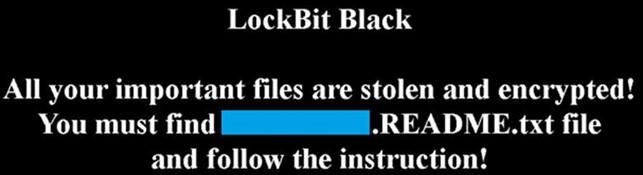
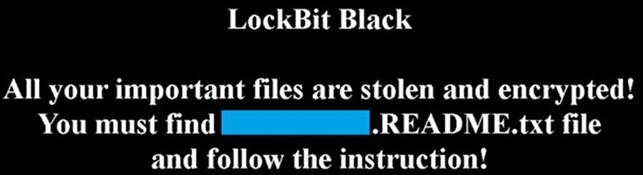
After files are encrypted, LockBit 3.0 drops a ransom note with the new filename .README.txt and changes the host’s wallpaper and icons to LockBit 3.0 branding [T1491.001]. If needed, LockBit 3.0 will send encrypted host and bot information to a command and control (C2) server [T1027].
Once completed, LockBit 3.0 may delete itself from the disk [T1070.004] as well as any Group Policy updates that were made, depending on which options were set at compilation time.
EXFILTRATION
LockBit 3.0 affiliates use Stealbit, a custom exfiltration tool used previously with LockBit 2.0 [TA0010]; rclone, an open-source command line cloud storage manager [T1567.002]; and publicly available file sharing services, such as MEGA [T1567.002], to exfiltrate sensitive company data files prior to encryption. While rclone and many publicly available file sharing services are primarily used for legitimate purposes, they can also be used by threat actors to aid in system compromise, network exploration, or data exfiltration. LockBit 3.0 affiliates often use other publicly available file sharing services to exfiltrate data as well [T1567] (see Table 1).
Table 1: Anonymous File Sharing Sites Used to Exfiltrate Data Before System Encryption
File Sharing Site
https://www.premiumize[.]com
https://anonfiles[.]com
https://www.sendspace[.]com
https://fex[.]net
https://transfer[.]sh
https://send.exploit[.]in
LEVERAGING FREEWARE AND OPEN-SOURCE TOOLS
LockBit affiliates have been observed using various freeware and open-source tools during their intrusions. These tools are used for a range of activities such as network reconnaissance, remote access and tunneling, credential dumping, and file exfiltration. Use of PowerShell and Batch scripts
are observed across most intrusions, which focus on system discovery, reconnaissance, password/credential hunting, and privilege escalation. Artifacts of professional penetration-testing tools such as Metasploit and Cobalt Strike have also been observed. See Table 2 for a list of legitimate freeware and open-source tools LockBit affiliates have repurposed for ransomware operations:
Table 2: Freeware and Open-Source Tools Used by LockBit 3.0 Affiliates
The IOCs and malware characteristics outlined below were derived from field analysis. The following samples are current as of March 2023.
LockBit 3.0 Black Icon
LockBit 3.0 Wallpaper
LockBit Command Line Parameters
LockBit Parameters
Description
-del
Self-delete.
-gdel
Remove LockBit 3.0 group policy changes.
-gspd
Spread laterally via group policy.
-pass (32 character value)
(Required) Password used to launch LockBit 3.0.
-path (File or path)
Only encrypts provided file or folder.
-psex
Spread laterally via admin shares.
-safe
Reboot host into Safe Mode.
-wall
Sets LockBit 3.0 Wallpaper and prints out LockBit 3.0 ransom note.
Mutual Exclusion Object (Mutex) Created
When executed, LockBit 3.0 will create the mutex, Global,
and check to see if this mutex has already been created to avoid running more than one instance of the ransomware.
UAC Bypass via Elevated COM Interface
LockBit 3.0 is capable of bypassing User Account Control (UAC) to execute code with elevated privileges via elevated Component Object Model (COM) Interface. C:WindowsSystem32dllhost.exe is spawned with high integrity with the command line GUID 3E5FC7F9-9A51-4367-9063-A120244FBEC.
For example, %SYSTEM32%dllhost.exe/Processid:{3E5FC7F9-9A51-4367-9063- A120244FBEC7}.
Volume Shadow Copy Deletion
LockBit 3.0 uses Windows Management Instrumentation (WMI) to identify and delete Volume Shadow Copies. LockBit 3.0 uses select * from Win32_ShadowCopy to query for Volume Shadow copies, Win32_ShadowCopy.ID to obtain the ID of the shadow copy, and DeleteInstance to delete any shadow copies.
LockBit 3.0 has a Safe Mode feature to circumvent endpoint antivirus and detection. Depending upon the host operating system, the following command is launched to reboot the system to Safe Mode with Networking:
Operating System
Safe Mode with Networking command
Vista and newer
bcdedit /set {current} safeboot network
Pre-Vista
bootcfg /raw /a /safeboot:network /id 1
Operating System
Disable Safe mode reboot
Vista and newer
bcdedit /deletevalue {current} safeboot
Pre-Vista
bootcfg /raw /fastdetect /id 1
Group Policy Artifacts
The following are Group Policy Extensible Markup Language (XML) files identified after a LockBit 3.0 infection:
Once new group policies are added, a PowerShell command using Group Policy update (GPUpdate) applies the new group policy changes to all computers on the AD domain.
~~~ LockBit 3.0 the world’s fastest and most stable ransomware from 2019~~~
>>>>> Your data is stolen and encrypted.
If you don’t pay the ransom, the data will be published on our TOR darknet sites. Keep in mind that once your data appears on our leak site, it could be bought by your competitors at any second, so don’t hesitate for a long time. The sooner you pay the ransom, the sooner your company will be safe.
Network Connections
If configured, Lockbit 3.0 will send two HTTP POST requests to one of the C2servers. Information about the victim host and bot are encrypted with an Advanced Encryption Standard (AES) key and encoded in Base64.
Example of HTTP POST request
POST /?7F6Da=u5a0TdP0&Aojq=&NtN1W=OuoaovMvrVJSmPNaA5&fckp9=FCYyT6b7kdyeEXywS8I8 HTTP/1.1
Accept: */*
Accept-Encoding: gzip, deflate, br Content-Type: text/plain
User-Agent: Safari/537.36
Host:
Connection: Keep-Alive LIWy=RJ51lB5GM&a4OuN=&LoSyE3=8SZ1hdlhzld4&DHnd99T=rTx9xGlInO6X0zWW&2D6=Bokz&T1guL=MtRZsFCRMKyBmfmqI& 6SF3g=JPDt9lfJIQ&wQadZP= Xni=AboZOXwUw&2rQnM4=94L&0b=ZfKv7c&NO1d=M2kJlyus&AgbDTb=xwSpba&8sr=EndL4n0HVZjxPR& m4ZhTTH=sBVnPY&xZDiygN=cU1pAwKEztU&=5q55aFIAfTVQWTEm&4sXwVWcyhy=l68FrIdBESIvfCkvYl
Example of information found in encrypted data
{
"bot_version":"X",
"bot_id":"X",
"bot_company":"X", "host_hostname":"X", "host_user":"X",
"host_os":"X",
"host_domain":"X",
"host_arch":"X",
"host_lang":"X", "disks_info":[
{
"disk_name":"X",
"disk_size":"XXXX", "free_size":"XXXXX"
}
LockBit 3.0 will enumerate system information to include hostname, host configuration, domain information, local drive configuration, remote shares, and mounted external storage devices.
System Location Discovery: System Language Discovery
LockBit 3.0 actors use (1) rclone, an open source command line cloud storage manager to exfiltrate and (2) MEGA, a publicly available file sharing service for data exfiltration.
LockBit 3.0 changes the host system’s wallpaper and icons to the LockBit 3.0 wallpaper and icons, respectively.
MITIGATIONS
The FBI, CISA, and the MS-ISAC recommend organizations implement the mitigations below to improve your organization’s cybersecurity posture on the basis of LockBit 3.0’s activity. These mitigations align with the Cross-Sector Cybersecurity Performance Goals (CPGs) developed by CISA and the National Institute of Standards and Technology (NIST). The CPGs provide a minimum set of practices and protections that CISA and NIST recommend all organizations implement. CISA and NIST based the CPGs on existing cybersecurity frameworks and guidance to protect against the most common and impactful TTPs. Visit CISA’s Cross-Sector Cybersecurity Performance Goals for more information on the CPGs, including additional recommended baseline protections.
Implement a recovery plan to maintain and retain multiple copies of sensitive or proprietary data and servers [CPG 7.3] in a physically separate, segmented, and secure location (e.g., hard drive, storage device, the cloud).
Refrain from requiring password changes more frequently than once per year. Note: NIST guidance suggests favoring longer passwords instead of requiring regular and frequent password resets. Frequent password resets are more likely to result in users developing password “patterns” cyber criminals can easily decipher.
Require administrator credentials to install software
Require phishing-resistant multifactor authentication [CPG 1.3] for all services to the extent possible, particularly for webmail, virtual private networks, and accounts that access critical systems.
Keep all operating systems, software, and firmware up to date. Timely patching is one of the most efficient and cost-effective steps an organization can take to minimize its exposure to cybersecurity threats.
Segment networks [CPG 8.1] to prevent the spread of ransomware. Network segmentation can help prevent the spread of ransomware by controlling traffic flows between—and access to—various subnetworks and by restricting adversary lateral movement.
Identify, detect, and investigate abnormal activity and potential traversal of the indicated ransomware with a networking monitoring tool. To aid in detecting the ransomware, implement a tool that logs and reports all network traffic, including lateral movement activity on a network [CPG 5.1]. Endpoint detection and response (EDR) tools are particularly useful for detecting lateral connections as they have insight into common and uncommon network connections for each host.
Install, regularly update, and enable real time detection for antivirus software on all hosts.
Review domain controllers, servers, workstations, and active directories for new and/or unrecognized accounts.
Audit user accounts with administrative privileges and configure access controls according to the principle of least privilege [CPG 1.5].
Disable unused ports.
Consider adding an email banner to emails [CPG 8.3] received from outside your organization.
Disable hyperlinks in received emails.
Implement time-based access for accounts set at the admin level and higher. For example, the Just-in-Time (JIT) access method provisions privileged access when needed and can support enforcement of the principle of least privilege (as well as the Zero Trust model). This is a process where a network-wide policy is set in place to automatically disable admin accounts at the Active Directory level when the account is not in direct need. Individual users may submit their requests through an automated process that grants them access to a specified system for a set timeframe when they need to support the completion of a certain task.
Disable command-line and scripting activities and permissions. Privilege escalation and lateral movement often depend on software utilities running from the command line. If threat actors are not able to run these tools, they will have difficulty escalating privileges and/or moving laterally.
Maintain offline backups of data, and regularly maintain backup and restoration [CPG 7.3]. By instituting this practice, the organization ensures they will not be severely interrupted, and/or only have irretrievable data.
Ensure all backup data is encrypted, immutable (i.e., cannot be altered or deleted), and covers the entire organization’s data infrastructure [CPG 3.3].
VALIDATE SECURITY CONTROLS
In addition to applying mitigations, the FBI, CISA, and the MS-ISAC recommend exercising, testing, and validating your organization’s security program against the threat behaviors mapped to the MITRE ATT&CK for Enterprise framework in this advisory. The FBI, CISA, and the MS-ISAC authoring agencies recommend testing your existing security controls inventory to assess how they perform against the ATT&CK techniques described in this advisory.
To get started:
Select an ATT&CK technique described in this advisory (see Table 3).
Align your security technologies against the technique.
Test your technologies against the technique.
Analyze your detection and prevention technologies performance.
Repeat the process for all security technologies to obtain a set of comprehensive performance data.
Tune your security program, including people, processes, and technologies, based on the data generated by this process.
The FBI, CISA, and the MS-ISAC recommend continually testing your security program at scale and in a production environment to ensure optimal performance against the MITRE ATT&CK techniques identified in this advisory.
RESOURCES
Stopransomware.gov is a whole-of-government approach that gives one central location for ransomware resources and alerts.
The FBI is seeking any information that can be legally shared, including:
Boundary logs showing communication to and from foreign IP addresses
Sample ransom note
Communications with LockBit 3.0 actors
Bitcoin wallet information
Decryptor files
Benign sample of an encrypted file
The FBI, CISA, and MS-ISAC do not encourage paying ransom, as payment does not guarantee victim files will be recovered. Furthermore, payment may also embolden adversaries to target additional organizations, encourage other criminal actors to engage in the distribution of ransomware, and/or fund illicit activities. Regardless of whether you or your organization have decided to pay the ransom, the FBI and CISA urge you to promptly report ransomware incidents to a local FBI Field Office or CISA at report@cisa.gov. State, local, tribal, and territorial (SLTT) government entities can also report to the MS-ISAC (SOC@cisecurity.org or 866-787-4722).
DISCLAIMER
The information in this report is being provided “as is” for informational purposes only. The FBI, CISA, and the MS-ISAC do not endorse any commercial product or service, including any subjects of analysis. Any reference to specific commercial products, processes, or services by service mark, trademark, manufacturer, or otherwise, does not constitute or imply endorsement, recommendation, or favoring by the FBI, CISA, or the MS-ISAC.
From November 2022 through early January 2023, the Cybersecurity and Infrastructure Security Agency (CISA) and authoring organizations identified the presence of indicators of compromise (IOCs) at a federal civilian executive branch (FCEB) agency. Analysts determined that multiple cyber threat actors, including an APT actor, were able to exploit a .NET deserialization vulnerability (CVE-2019-18935) in Progress Telerik user interface (UI) for ASP.NET AJAX, located in the agency’s Microsoft Internet Information Services (IIS) web server. Successful exploitation of this vulnerability allows for remote code execution. According to Progress Software, Telerik UI for ASP.NET AJAX builds before R1 2020 (2020.1.114) are vulnerable to this exploit.[1]
Actions to take today to mitigate malicious cyber activity:
Implement a patch management solution to ensure compliance with the latest security patches.
Validate output from patch management and vulnerability scanning against running services to check for discrepancies and account for all services.
Limit service accounts to the minimum permissions necessary to run services.
CISA, the Federal Bureau of Investigation (FBI), and the Multi-State Information Sharing and Analysis Center (MS-ISAC) are releasing this joint Cybersecurity Advisory (CSA) to provide IT infrastructure defenders with tactics, techniques, and procedures (TTPs), IOCs, and methods to detect and protect against similar exploitation.
Note: This advisory uses the MITRE ATT&CK® for Enterprise framework, version 12. See the MITRE ATT&CK Tactics and Techniques section for a table of the threat actors’ activity mapped to MITRE ATT&CK tactics and techniques with corresponding detection and mitigation recommendations.
Overview
CISA and authoring organizations assess that, beginning as late as November 2022, threat actors successfully exploited a .NET deserialization vulnerability (CVE-2019-18935) in an instance of Telerik UI for ASP.NET AJAX Q2 2013 SP1 (version 2013.2.717) running on an FCEB agency’s Microsoft IIS server. This exploit, which results in interactive access with the web server, enabled the threat actors to successfully execute remote code on the vulnerable web server. Though the agency’s vulnerability scanner had the appropriate plugin for CVE-2019-18935, it failed to detect the vulnerability due to the Telerik UI software being installed in a file path it does not typically scan. This may be the case for many software installations, as file paths widely vary depending on the organization and installation method.
In addition to CVE-2019-18935, this version (2013.2.717) of Telerik UI for ASP.NET AJAX contains the following known vulnerabilities: CVE-2017-11357, CVE-2017-11317, and CVE-2017-9248. Analysis suggests that cyber threat actors exploited CVE-2019-18935 in conjunction with either CVE-2017-11357 or CVE-2017-11317. Australian Cyber Security Centre (ACSC) Advisory 2020-004 assesses that exploitation of CVE-2019-18935 is only possible with knowledge of Telerik RadAsyncUpload encryption keys.[2] Threat actors can obtain these keys through either prior knowledge or exploitation of vulnerabilities—CVE-2017-11357 or CVE-2017-11317—present in older, unpatched versions of Telerik released between 2007 and 2017. Forensic evidence is not available to definitively confirm exploitation of either CVE-2017-11357 or CVE-2017-11317.
Threat Actor Activity
CISA and authoring organizations observed multiple cyber threat actors, including an APT actor—hereafter referred to as Threat Actor 1 (TA1)—and known cybercriminal actor XE Group—hereafter referred to as Threat Actor 2 (TA2)—conducting reconnaissance and scanning activities [T1595.002] that correlate to the successful exploitation of CVE-2019-18935 in the agency’s IIS server running Telerik UI for ASP.NET AJAX [T1190].
When exploiting the vulnerability, the threat actors uploaded malicious dynamic-link library (DLL) files (some masqueraded as portable network graphics [PNG] files) [T1105] to the C:WindowsTemp directory. The malicious files were then executed from the C:WindowsTemp directory via the w3wp.exe process—a legitimate process that runs on IIS servers. This process is routine for handling requests sent to web servers and delivering content. The review of antivirus logs identified that some DLL files were created [T1055.001] and detected as early as August 2021.
CISA and authoring organizations confirmed that some malicious files dropped on the IIS server are consistent with a previously reported file naming convention that threat actors commonly use when exploiting CVE-2019-18935.[3] The threat actors name the files in the Unix Epoch time format and use the date and time as recorded on the target system. The file naming convention follows the pattern [10 digits].[7 digits].dll (e.g., a file created on October 31, 2022, could be 1667203023.5321205.dll).
The names of some of the PNG files were misleading. For example, file 1596835329.5015914.png, which decodes to August 7, 2020, 21:22:09 UTC, first appeared on October 13, 2022, but the file system shows a creation date of August 7, 2020. The uncorrelated Unix Epoch time format may indicate that the threat actors used the timestomping [T1070.006] technique. This file naming convention is a primary IOC used by the threat actors.
In many cases, malicious artifacts were not available for analysis because the threat actors’ malware—that looks for and removes files with the .dll file extension—removed files [T1070.004] from the C:WindowsTemp directory. Through full packet data capture analysis and reverse engineering of malicious DLL files, no indications of additional malicious activity or sub-processes were found executed by the w3wp.exe process. CISA observed error messages being sent to the threat actors’ command and control (C2) server when permission restraints prevented the service account from executing the malicious DLLs and writing new files.
Network activity analysis was consistent with the artifacts provided for review. Analysts did not observe evidence of privilege escalation or lateral movement.
Threat Actor 1
CISA and authoring organizations observed TA1 exploiting CVE-2019-18935 for system enumeration beginning in August 2022. The vulnerability allows a threat actor to upload malicious DLLs on a target system and execute them by abusing a legitimate process, e.g., the w3wp.exe process. In this instance, TA1 was able to upload malicious DLL files to the C:WindowsTemp directory and then achieve remote code execution, executing the DLL files via the w3wp.exe process.
At least nine DLL files used for discovery [TA0007], C2 [TA0011], and defense evasion [TA0005]. All of the analyzed samples have network parameters, including host name, domain name, Domain Name System (DNS) server Internet Protocol (IP) address and machine name, Network Basic Input/Output System (NetBIOS) ID, adapter information, IP address, subnet, gateway IP, and Dynamic Host Configuration Protocol (DHCP) server [T1016]. All analyzed samples communicate this collected data to a C2 server at IP address 137.184.130[.]162 or 45.77.212[.]12. The C2 traffic to these IP addresses uses a non-application layer protocol [T1095] by leveraging Transmission Control Protocol (TCP) clear text (i.e., unencrypted) over port 443. Analysis also identified that:
Some of the analyzed samples can load additional libraries; enumerate the system, processes, files, directories [T1083]; and write files.
Other analyzed samples can delete DLL files ending with the .dll extension in the C:WindowsTemp directory on the server. TA1 may use this capability to hide additional malicious activity on the network.
CISA, in coordination with the authoring organizations, identified and observed the following threat actor IPs and timestamps associated with this activity:
Table 1: Observed TA1 IPs and Timestamps
IP Address
First Identified
Last Identified
137.184.130[.]162
09/26/2022
10/08/2022
45.77.212[.]12
10/07/2022
11/25/2022
104.225.129[.]102
10/10/2022
11/16/2022
149.28.85[.]24
10/12/2022
10/17/2022
185.186.245[.]72
10/18/2022
10/18/2022
193.8.172[.]113
09/25/2022
09/25/2022
193.8.172[.]13
09/25/2022
10/17/2022
216.120.201[.]12
10/13/2022
11/10/2022
5.34.178[.]246
09/25/2022
09/25/2022
79.133.124[.]242
09/25/2022
09/25/2022
92.38.169[.]193
09/27/2022
10/08/2022
92.38.176[.]109
09/12/2022
09/25/2022
92.38.176[.]130
09/25/2022
10/07/2022
Threat Actor 2
TA2—identified as likely the cybercriminal actor XE Group—often includes xe[word] nomenclature in original filenames and registered domains. Volexity lists this naming convention and other observed TTPs as common for this threat actor group.[4]
As early as August 2021, CISA and authoring organizations observed TA2 delivering malicious PNG files that, following analysis, were masqueraded DLL files to avoid detection [T1036.005]. Similar to TA1, TA2 exploited CVE-2019-18935 and was able to upload at least three unique DLL files into the C:WindowsTemp directory that TA2 executed via the w3wp.exe process. These DLL files drop and execute reverse (remote) shell utilities for unencrypted communication with C2 IP addresses associated with the malicious domains listed in Table 2. Note: At the time of analysis, the domains resolved to the listed IP addresses.
Table 2: TA2 IPs and Resolving Domains
IP Address
Resolving Domains
184.168.104[.]171
xework[.]com
xegroups[.]com
hivnd[.]com
144.96.103[.]245
xework[.]com
Analysis of DLL files determined the files listed in Table 3 were dropped, decoded, and attempted to connect to the respective malicious domains. Embedded payloads dropped by the DLL files were observed using the command line utility certutil[.]exe and writing new files as xesvrs[.]exe to invoke reverse shell utilities execution.
Table 3: Identified Malicious Files
Filename
Description
XEReverseShell.exe
DLL files (masqueraded as PNG files) located in the C:WindowsTemp directory contain a base64 encoded file with the internal name XEReverseShell.exe, which was dropped into the same directory as sortcombat.exe.
When executed, the reverse shell utility attempts to connect to xework[.]com or xegroups[.]com to obtain the IP address of the C2 server and port number for unencrypted communication.
Note: It is likely the threat actors changed the file extension from .dll to .png to avoid detection.
Multi-OS_ReverseShell.exe
Reverse shell utility decoded from the base64 encoded file xesmartshell.tmp.
When executed, it will attempt to connect to xegroups[.]com or xework[.]com to obtain the IP address of the C2 server and port number for unencrypted communication.
SortVistaCompat
Base64 encoded payload dropped from Multi-OS_ReverseShell.exe. This file receives the C2 IP and port from xework[.]com.
When the TA2 malware is executed a DLL file drops an executable (XEReverseShell.exe) that attempts to pull a C2 IP address and port number from xework[.]com or xegroups[.]com.
If no port or IP address is found, the program will exit.
If a port and IP address are found, the program will establish a listener and wait for further commands.
If communication is established between the TA2 malware and the C2:
The malware will identify the operating system (Windows or Linux) and create the appropriate shell (cmd or bash), sending system information back to the C2.
The C2 server may send the command xesetshell, causing the malware to connect to the server and download a file called small.txt—a base64-encoded webshell that the malware decodes and places in the C:WindowsTemp directory.
The C2 server may send the command xequit, causing the malware to sleep for a period of time determined by the threat actors.
The two files xesmartshell.tmp and SortVistaCompat have the capability to drop an Active Server Pages (ASPX) webshell—a base64 encoded text file small.txt decoded [T1140] as small.aspx [T1505.003]—to enumerate drives; to send, receive, and delete files; and to execute incoming commands. The webshell contains an interface for easily browsing files, directories, or drives on the system, and allows the user to upload or download files to any directory. No webshells were observed to be dropped on the target system, likely due to the abused service account having restrictive write permissions.
Actors used a non-application layer protocol (TCP) for w3wp.exe process exploitation, C2, and enumeration on the IIS server.
DETECTION METHODS
CISA and authoring organizations recommend that organizations review the steps listed in this section and Table 4: Identified ATT&CK Techniques for Enterprise to detect similar activity on IIS servers.
Yara Rule
CISA developed the following YARA rule from the base proof-of-concept code for CVE-2019-18935.[5] Note: Authoring organizations do not guarantee all malicious DLL files (if identified) will use the same code provided in this YARA rule.
CISA, FBI, and MS-ISAC recommend that organizations utilize a centralized log collection and monitoring capability, as well as implement or increase logging and forensic data retention. Longer retention policies improve the availability of data for forensic analysis and aid thorough identification of incident scope.
Centralized log collection and monitoring allows for the discovery of webshell and other exploit activity. For example, organizations should monitor for external connections made from the IIS server to unknown external IP addresses. Logging may also be available—if enabled at the router or firewall—for any outbound connections initiated with PowerShell.
Access- and security-focused firewall (e.g., Web Application Firewall [WAF]) logs can be collected and stored for use in both detection and forensic analysis activities. Organizations should use a WAF to guard against publicly known web application vulnerabilities, in addition to guarding against common web application attacks.
Creation of Malicious DLLs
CISA, FBI, and MS-ISAC recommend that organizations use process monitoring—which provides visibility into file system and application process activity—to detect suspicious executable files running from the C:WindowsTemp directory. Process monitoring via Windows Event Code 4688 will detect the legitimate w3wp.exe process running suspicious DLL files and other anomalous child processes. Note: Enabling this event may inundate security event logging. Use centralized log collection to prevent log rollover, increase log retention and archiving, and/or enable command line event logging.
Forensic analysis commonly identified the threat actors taking the following steps:
Create one of the DLL files (C:WindowsTemp1665890187.8690152.dll) by process w3wp.exe PID 6484.
Load the newly created DLL into a currently running IIS process, w3wp.exe PID 6484.
Make a TCP connection using w3wp.exe PID 6484 to 45.77.212[.]12 over port 443.
Invoke C:WindowsSystem32vcruntime140.dll (Windows C runtime library) to execute payload.
Steps 1 and 2 occur every time a malicious DLL file is created. In some cases, an ASP .NET temp file was created, but this may have indicated benign IIS server activity. Note: The Process ID (PID) used in this example is unique to this investigation and is not universal. IP address 45.77.212[.]12 correlates to TA1, but the pattern can be used as general practice to identify similar activity.
Additional Searching for IIS Servers
The following information was derived from artifact analysis and is provided to equip IT infrastructure defenders searching for similar activity on an IIS server. Several artifacts can be referenced to assist in determining if CVE-2019-18935 has been successfully exploited.
File Type: DLL
Location: – %SystemDrive%WindowsTemp
When this CVE is exploited, it uploads malicious DLL files to the C:WindowsTemp directory. The malicious DLL file naming convention translates to the exact time the file was uploaded to the server.
The time is represented in a series of digits, known as Unix Epoch time. The files observed during this investigation contained two sets of digits separated by a period (.) before the DLL extension (.dll). Example: 1667206973.2270932.dll
Nearly all recovered files contain a series of 10 digits to the left of the period (.) and seven digits to the right. However, one file contained only five digits in the second set, which should be taken into consideration when writing regex patterns to search for the existence of these files. Example Regex: d{10}.d{1,8}.dll
These numbers can be copied and translated from digits into readable language with the month, day, year, hour, minute, and seconds displayed.
Log Type: IIS
Location: – %SystemDrive%inetpublogsLogFiles
When investigating IIS logs, specific fields were searched for and captured during the time of each connection.
If the Unix Epoch time signature has been translated from a DLL filename, specific logs can be searched based on that time. However, if the Unix Epoch time signature has not been translated, the following will still work, but may take longer for the query to run.
The four most important fields to identify this traffic are noted in the following table. These descriptions are sourced directly from Microsoft.[6]
Table 5: Four Fields Searched in IIS Logs
General Name
Field Name
Description
Method
cs-method
Requested action; for example, a GET method
URI Stem
cs-uri-stem
Universal Resource Identifier (URI), or target, of the action
URI Query
cs-uri-query
The query, if any, that the client was trying to perform; A URI query is necessary only for dynamic pages.
Protocol Status
sc-status
Hypertext Transfer Protocol (HTTP) or File Transfer Protocol (FTP) status code
Note: Depending on how logs are collected and stored, the field names may not be an exact match; this should be taken into consideration when constructing queries.
When ingesting logs into security information and event management (SIEM), the final field names did not use a hyphen (-) but used an underscore (_).
Example: cs_method instead of cs-method
Artifacts:
Table 6: Information Contained in Two Observed IIS Events
Field Name
Artifact
cs-method
POST
>cs-uri-stem
/Telerik.Web.UI.WebResource.axd
cs-uri-query
type=rau
sc-status
200 and 302
When reviewing logs, two IIS events were observed with the same timestamp each time this CVE-2019-18935 was exploited. Both events contained the same information in the cs-method, cs-uri-stem, and cs-uri-query. One event had a sc-status of 200 and the other had a sc-status of 302.
Kroll Artifact Parser and Extractor (KAPE), a forensic artifact collector and parser, was used to extract the Windows event logs from a backup image of the compromised IIS server. All field names refer to the labels provided via KAPE exports. The strings are of value and can be used to locate other artifacts if different tools are used. Note: The payload data in the following table has been shortened to only necessary strings to obscure and protect victim information.
Table 7: Example Payload Data
EventID
Payload
1309
3005, An unhandled exception has occurred[*redacted*]w3wp.exe[*redacted*]InvalidCastException, Unable to cast object of type ‘System.Configuration.Install.AssemblyInstaller’ to type ‘Telerik.Web.UI.IAsyncUploadConfiguration’.n at Telerik.Web.UI.AsyncUploadHandler.GetConfiguration(String rawData)n at Telerik.Web.UI.AsyncUploadHandler.EnsureSetup()n at Telerik.Web.UI.AsyncUploadHandler.ProcessRequest(HttpContext context)n at Telerik.Web.UI.HandlerRouter.ProcessHandler(String handlerKey, HttpContext context)n at Telerik.Web.UI.WebResource.ProcessRequest(HttpContext context)n at System.Web.HttpApplication.CallHandlerExecutionStep.System.Web.HttpApplication.IExecutionStep.Execute()n at System.Web.HttpApplication.ExecuteStepImpl(IExecutionStep step)n at System.Web.HttpApplication.ExecuteStep(IExecutionStep step, Boolean& completedSynchronously)nn, [*redacted*]/Telerik.Web.UI.WebResource.axd?type=rau, /Telerik.Web.UI.WebResource.axd, [*redacted*], False, [*redacted*], 15, [*redacted*], False, at Telerik.Web.UI.AsyncUploadHandler.GetConfiguration(String rawData)n at Telerik.Web.UI.AsyncUploadHandler.EnsureSetup()n at Telerik.Web.UI.AsyncUploadHandler.ProcessRequest(HttpContext context)n at Telerik.Web.UI.HandlerRouter.ProcessHandler(String handlerKey, HttpContext context)n at Telerik.Web.UI.WebResource.ProcessRequest(HttpContext context)n at System.Web.HttpApplication.CallHandlerExecutionStep.System.Web.HttpApplication.IExecutionStep.Execute()n at System.Web.HttpApplication.ExecuteStepImpl(IExecutionStep step)n at System.Web.HttpApplication.ExecuteStep(IExecutionStep step, Boolean& completedSynchronously)n”,”Binary”:””}}
Authoring organizations recommend looking for the following key strings in the payload:
w3wp.exe: This is the parent process that executes the code inside the malicious DLLs.
System.Configuration.Install.AssemblyInstaller: Figure 1 is from the creator’s GitHub repo,[7] where the string can be observed in the code. As presented by Bishop Fox and proven during authoring organizations’ investigation of IIS server logs, an exception does not mean that the exploit failed, but more likely that it executed successfully.[3]
Figure 1: Threat Actor Assembly Installer
If a Werfault crash report was written, Windows event application logs may contain evidence of this— even if the DLLs have been removed from the system as part of a cleanup effort by the threat actors.
The EventID field maps to Windows EventIDs for an easy filter. Users can leverage the Windows EventIDs to find malicious DLL with the Unix Epoch time-based name inside the C:WindowsTemp directory.
Depending how log analysis is performed, various filters can be determined. However, if regex is available, the example listed in Table 8 above can be reused to match the Unix Epoch timestamp convention to assist in filtering.
Additional Analysis
When evidence of malicious DLLs is found, reverse engineering will need to be conducted to fully understand what actions occur as the malicious files could do nearly anything. Leveraging Windows security event logs, as well as Windows PowerShell logs, may provide insight into what actions the DLLs are taking. CISA and authoring organizations recommend the following process:
Convert any discovered malicious DLL timestamps to readable format.
Export the Windows security event and PowerShell logs from the device.
Search for new processes created via w3wp.exe in Windows security event logs (e.g., Windows EventID 4688 New Process created).
Search for new PIDs from identified events. Investigate to determine if they spawned any other processes.
Example: CMD.EXE launching PowerShell or running other commands such as nslookup or netstat. Note: This is not an exhaustive list.
Search for EventID 600 in PowerShell logs.
Trellix XDR Platform Searching
If Trellix XDR Platform is deployed in an environment and a standard HX triage audit is completed in a timely manner of the suspected use of CVE-2019-18935, an organization can search for file write events from known web processes. This will identify the executables written by the web server process. CISA and authoring organizations specifically recommend searching for the following field value pair:
Table 9: Field Value Pair for Searching
Field
Value Begins With
TextAtLowestOffset
MZ
MITIGATIONS
Note: These mitigations align with the Cross-Sector Cybersecurity Performance Goals (CPGs) developed by CISA and the National Institute of Standards and Technology (NIST). The CPGs provide a minimum set of practices and protections that CISA and NIST recommend all organizations implement. CISA and NIST based the CPGs on existing cybersecurity frameworks and guidance to protect against the most common and impactful threats, tactics, techniques, and procedures. Visit CISA’s Cross-Sector Cybersecurity Performance Goals for more information on the CPGs, including additional recommended baseline protections.
Manage Vulnerabilities and Configurations
Upgrade all instances of Telerik UI ASP.NET AJAX to the latest version after appropriate testing. Keep all software up to date and prioritize patching to known exploited vulnerabilities (KEVs). [CPG 5.1]
Implement a patch management solution to ensure compliance with the latest security patches. A patch management solution that inventories all software running in addition to vulnerability scanning is recommended.
Ensure vulnerability scanners are configured to scan a comprehensive scope of devices and locations. For example, as noted in the Technical Details section, the victim organization had the appropriate plugin for CVE-2019-18935, but the vulnerability went undetected due to the Telerik UI software being installed in a file path not typically scanned. To identify unpatched instances of software vulnerabilities, organizations using vulnerability scanners should be aware that all installations may not be considered “typical” and may require full file scans of web applications.
Note: Vulnerability scanners may have limitations in detecting vulnerabilities, such as only being able to identify Windows Installer-installed applications, which was the case with this agency’s vulnerability scanner. The Telerik UI software was installed via a continuous integration (CI) and continuous delivery (CD) pipeline rather than the Windows Installer. This highlights the importance of using a comprehensive approach for vulnerability scanning that considers all potential installation methods and file paths.
Validate output from patch management and vulnerability scanning solutions against running services to check for discrepancies and account for all services.
Segment Networks Based on Function
Implement network segmentation to separate network segments based on role and functionality. Proper network segmentation significantly reduces the ability for threat actor lateral movement by controlling traffic flows between—and access to—various subnetworks. (See CISA’s Layering Network Security Through Segmentation infographic and the National Security Agency’s Segment Networks and Deploy Application-Aware Defenses.) [CPG 8.1]
Isolate similar systems and implement micro-segmentation with granular access and policy restrictions to modernize cybersecurity and adopt zero trust principles for both network perimeter and internal devices. Logical and physical segmentation are critical to limiting and preventing lateral movement, privilege escalation, and exfiltration. Utilize access control lists (ACLs), hardened firewalls, and network monitoring devices to regulate, monitor, and audit cross-segment access and data transfers.
MFA can still be leveraged for secure access using a jump server—an asset placed between the external and internal networks that serves as an intermediary for access—to facilitate connections if assets do not have the capability to support MFA implementation.
For additional guidance on secure MFA configurations, visit cisa.gov/mfa. [CPG 1.3]
Monitor and analyze activity logs generated from Microsoft IIS and remote PowerShell. Collect access and security focused logs (IDS/IDPS, firewall, DLP, VPN) and ensure logs are securely stored for a specified duration informed by risk or pertinent regulatory guidance. [CPG 3.1, 3.2]
Evaluate user permissions and maintain separate user accounts for all actions and activities not associated with the administrator role, e.g., for business email, web browsing, etc. All privileges should be reevaluated on a recurring basis to validate continued need for a given set of permissions. [CPG 1.5]
Limit service accounts to the minimum permissions necessary to run services. CISA observed numerous error messages in network logs indicative of failed attempts to write files to additional directories or move laterally.
Maintain a robust asset management policy through comprehensive documentation of assets, tracking current version information to maintain awareness of outdated software, and mapping assets to business and critical functions.
Determine the need and functionality of assets that require public internet exposure. [CPG 2.3]
VALIDATE SECURITY CONTROLS
In addition to applying mitigations, CISA, FBI, and MS-ISAC recommend exercising, testing, and validating your organization’s security program against the threat behaviors mapped to the MITRE ATT&CK for Enterprise framework in this advisory. CISA and co-sealers recommend testing your existing security controls inventory to assess how they perform against the ATT&CK techniques described in this advisory.
To get started:
Select an ATT&CK technique described in this advisory (see Table 4).
Align your security technologies against the selected technique.
Test your technologies against the technique.
Analyze your detection and prevention technologies’ performance.
Repeat the process for all security technologies to obtain a set of comprehensive performance data.
Tune your security program—including people, processes, and technologies—based on the data generated by this process.
CISA, FBI, and MS-ISAC recommend continually testing your security program, at scale, in a production environment to ensure optimal performance against the MITRE ATT&CK techniques identified in this advisory.
The Cybersecurity and Infrastructure Security Agency (CISA) is releasing this Cybersecurity Advisory (CSA) detailing activity and key findings from a recent CISA red team assessment—in coordination with the assessed organization—to provide network defenders recommendations for improving their organization’s cyber posture.
Actions to take today to harden your local environment:
Establish a security baseline of normal network activity; tune network and host-based appliances to detect anomalous behavior.
Conduct regular assessments to ensure appropriate procedures are created and can be followed by security staff and end users.
In 2022, CISA conducted a red team assessment (RTA) at the request of a large critical infrastructure organization with multiple geographically separated sites. The team gained persistent access to the organization’s network, moved laterally across the organization’s multiple geographically separated sites, and eventually gained access to systems adjacent to the organization’s sensitive business systems (SBSs). Multifactor authentication (MFA) prompts prevented the team from achieving access to one SBS, and the team was unable to complete its viable plan to compromise a second SBSs within the assessment period.
Despite having a mature cyber posture, the organization did not detect the red team’s activity throughout the assessment, including when the team attempted to trigger a security response.
CISA is releasing this CSA detailing the red team’s tactics, techniques, and procedures (TTPs) and key findings to provide network defenders of critical infrastructure organizations proactive steps to reduce the threat of similar activity from malicious cyber actors. This CSA highlights the importance of collecting and monitoring logs for unusual activity as well as continuous testing and exercises to ensure your organization’s environment is not vulnerable to compromise, regardless of the maturity of its cyber posture.
CISA encourages critical infrastructure organizations to apply the recommendations in the Mitigations section of this CSA—including conduct regular testing within their security operations center—to ensure security processes and procedures are up to date, effective, and enable timely detection and mitigation of malicious activity.
Note: This advisory uses the MITRE ATT&CK® for Enterprise framework, version 12. See the appendix for a table of the red team’s activity mapped to MITRE ATT&CK tactics and techniques.
Introduction
CISA has authority to, upon request, provide analyses, expertise, and other technical assistance to critical infrastructure owners and operators and provide operational and timely technical assistance to Federal and non-Federal entities with respect to cybersecurity risks. (See generally 6 U.S.C. §§ 652[c][5], 659[c][6].) After receiving a request for a red team assessment (RTA) from an organization and coordinating some high-level details of the engagement with certain personnel at the organization, CISA conducted the RTA over a three-month period in 2022.
During RTAs, a CISA red team emulates cyber threat actors to assess an organization’s cyber detection and response capabilities. During Phase I, the red team attempts to gain and maintain persistent access to an organization’s enterprise network while avoiding detection and evading defenses. During Phase II, the red team attempts to trigger a security response from the organization’s people, processes, or technology.
The “victim” for this assessment was a large organization with multiple geographically separated sites throughout the United States. For this assessment, the red team’s goal during Phase I was to gain access to certain sensitive business systems (SBSs).
Phase I: Red Team Cyber Threat Activity
Overview
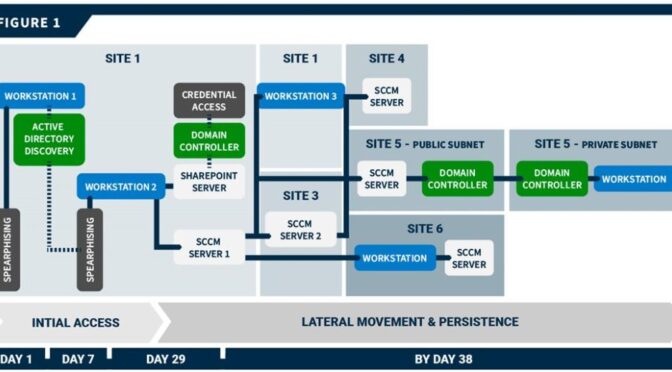
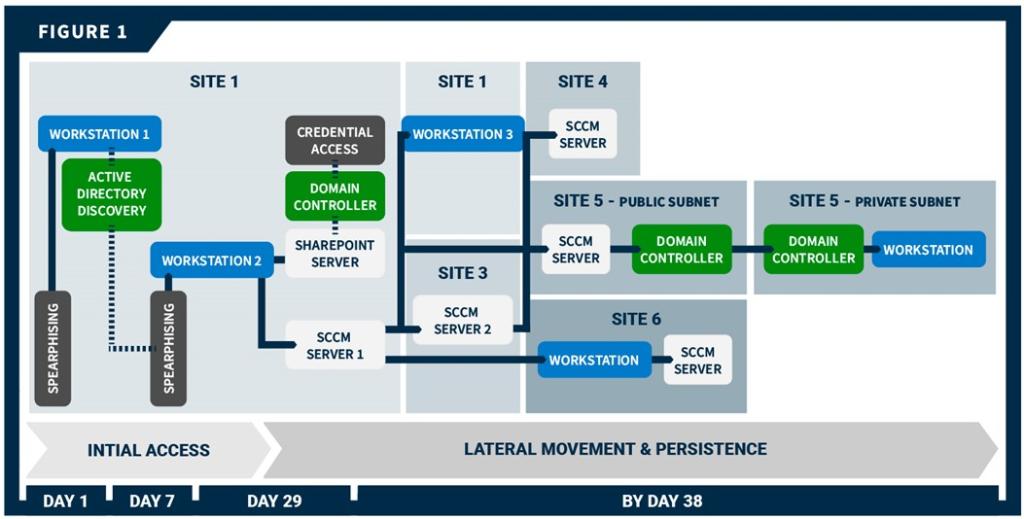
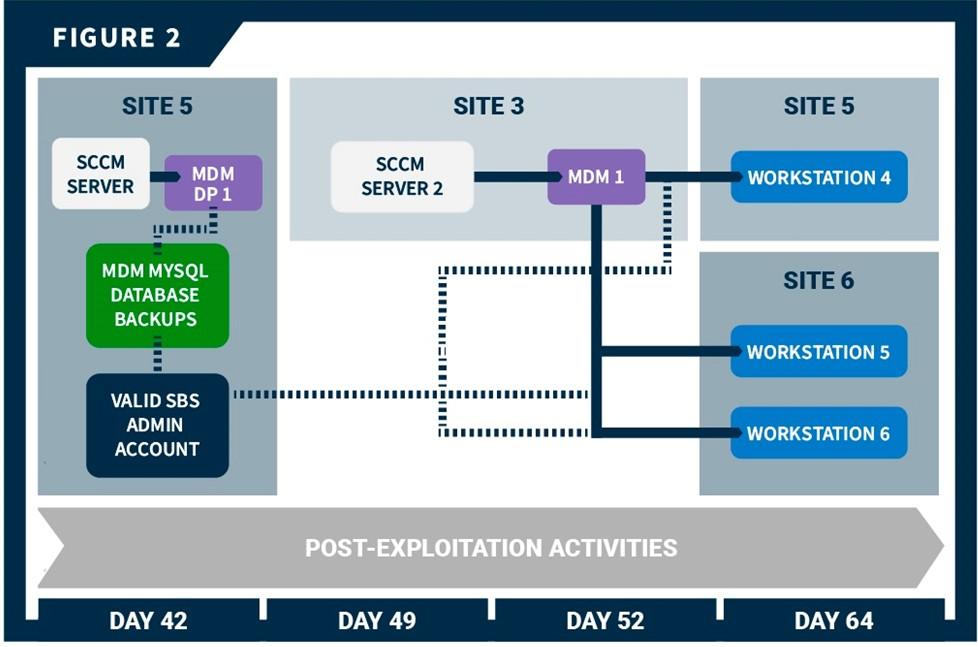
The organization’s network was segmented with both logical and geographical boundaries. CISA’s red team gained initial access to two organization workstations at separate sites via spearphishing emails. After gaining access and leveraging Active Directory (AD) data, the team gained persistent access to a third host via spearphishing emails. From that host, the team moved laterally to a misconfigured server, from which they compromised the domain controller (DC). They then used forged credentials to move to multiple hosts across different sites in the environment and eventually gained root access to all workstations connected to the organization’s mobile device management (MDM) server. The team used this root access to move laterally to SBS-connected workstations. However, a multifactor authentication (MFA) prompt prevented the team from achieving access to one SBS, and Phase I ended before the team could implement a seemingly viable plan to achieve access to a second SBS.
Initial Access and Active Directory Discovery
The CISA red team gained initial access [TA0001] to two workstations at geographically separated sites (Site 1 and Site 2) via spearphishing emails. The team first conducted open-source research [TA0043] to identify potential targets for spearphishing. Specifically, the team looked for email addresses [T1589.002] as well as names [T1589.003] that could be used to derive email addresses based on the team’s identification of the email naming scheme. The red team sent tailored spearphishing emails to seven targets using commercially available email platforms [T1585.002]. The team used the logging and tracking features of one of the platforms to analyze the organization’s email filtering defenses and confirm the emails had reached the target’s inbox.
The team built a rapport with some targeted individuals through emails, eventually leading these individuals to accept a virtual meeting invite. The meeting invite took them to a red team-controlled domain [T1566.002] with a button, which, when clicked, downloaded a “malicious” ISO file [T1204]. After the download, another button appeared, which, when clicked, executed the file.
Two of the seven targets responded to the phishing attempt, giving the red team access to a workstation at Site 1 (Workstation 1) and a workstation at Site 2. On Workstation 1, the team leveraged a modified SharpHound collector, ldapsearch, and command-line tool, dsquery, to query and scrape AD information, including AD users [T1087.002], computers [T1018], groups [T1069.002], access control lists (ACLs), organizational units (OU), and group policy objects (GPOs) [T1615]. Note: SharpHound is a BloodHound collector, an open-source AD reconnaissance tool. Bloodhound has multiple collectors that assist with information querying.
There were 52 hosts in the AD that had Unconstrained Delegation enabled and a lastlogon timestamp within 30 days of the query. Hosts with Unconstrained Delegation enabled store Kerberos ticket-granting tickets (TGTs) of all users that have authenticated to that host. Many of these hosts, including a Site 1 SharePoint server, were Windows Server 2012R2. The default configuration of Windows Server 2012R2 allows unprivileged users to query group membership of local administrator groups.
The red team queried parsed Bloodhound data for members of the SharePoint admin group and identified several standard user accounts with administrative access. The team initiated a second spearphishing campaign, similar to the first, to target these users. One user triggered the red team’s payload, which led to installation of a persistent beacon on the user’s workstation (Workstation 2), giving the team persistent access to Workstation 2.
Lateral Movement, Credential Access, and Persistence
The red team moved laterally [TA0008] from Workstation 2 to the Site 1 SharePoint server and had SYSTEM level access to the Site 1 SharePoint server, which had Unconstrained Delegation enabled. They used this access to obtain the cached credentials of all logged-in users—including the New Technology Local Area Network Manager (NTLM) hash for the SharePoint server account. To obtain the credentials, the team took a snapshot of lsass.exe [T1003.001] with a tool called nanodump, exported the output, and processed the output offline with Mimikatz.
The team then exploited the Unconstrained Delegation misconfiguration to steal the DC’s TGT. They ran the DFSCoerce python script (DFSCoerce.py), which prompted DC authentication to the SharePoint server using the server’s NTLM hash. The team then deployed Rubeus to capture the incoming DC TGT [T1550.002], [T1557.001]. (DFSCoerce abuses Microsoft’s Distributed File System [MS-DFSNM] protocol to relay authentication against an arbitrary server.[1])
The team then used the TGT to harvest advanced encryption standard (AES)-256 hashes via DCSync [T1003.006] for the krbtgt account and several privileged accounts—including domain admins, workstation admins, and a system center configuration management (SCCM) service account (SCCM Account 1). The team used the krbtgt account hash throughout the rest of their assessment to perform golden ticket attacks [T1558.001] in which they forged legitimate TGTs. The team also used the asktgt command to impersonate accounts they had credentials for by requesting account TGTs [T1550.003].
The team first impersonated the SCCM Account 1 and moved laterally to a Site 1 SCCM distribution point (DP) server (SCCM Server 1) that had direct network access to Workstation 2. The team then moved from SCCM Server 1 to a central SCCM server (SCCM Server 2) at a third site (Site 3). Specifically, the team:
Queried the AD using Lightweight Directory Access Protocol (LDAP) for information about the network’s sites and subnets [T1016]. This query revealed all organization sites and subnets broken down by classless inter-domain routing (CIDR) subnet and description.
Used LDAP queries and domain name system (DNS) requests to identify recently active hosts.
Listed existing network connections [T1049] on SCCM Server 1, which revealed an active Server Message Block (SMB) connection from SCCM Server 2.
Attempted to move laterally to the SCCM Server 2 via AppDomain hijacking, but the HTTPS beacon failed to call back.
Attempted to move laterally with an SMB beacon [T1021.002], which was successful.
The team also moved from SCCM Server 1 to a Site 1 workstation (Workstation 3) that housed an active server administrator. The team impersonated an administrative service account via a golden ticket attack (from SCCM Server 1); the account had administrative privileges on Workstation 3. The user employed a KeePass password manager that the team was able to use to obtain passwords for other internal websites, a kernel-based virtual machine (KVM) server, virtual private network (VPN) endpoints, firewalls, and another KeePass database with credentials. The server administrator relied on a password manager, which stored credentials in a database file. The red team pulled the decryption key from memory using KeeThief and used it to unlock the database [T1555.005].
At the organization’s request, the red team confirmed that SCCM Server 2 provided access to the organization’s sites because firewall rules allowed SMB traffic to SCCM servers at all other sites.
The team moved laterally from SCCM Server 2 to an SCCM DP server at Site 5 and from the SCCM Server 1 to hosts at two other sites (Sites 4 and 6). The team installed persistent beacons at each of these sites. Site 5 was broken into a private and a public subnet and only DCs were able to cross that boundary. To move between the subnets, the team moved through DCs. Specifically, the team moved from the Site 5 SCCM DP server to a public DC; and then they moved from the public DC to the private DC. The team was then able to move from the private DC to workstations in the private subnet.
The team leveraged access available from SCCM 2 to move around the organization’s network for post-exploitation activities (See Post-Exploitation Activity section).
See Figure 1 for a timeline of the red team’s initial access and lateral movement showing key access points.
Figure 1: Red Team Cyber Threat Activity: Initial Access and Lateral Movement
While traversing the network, the team varied their lateral movement techniques to evade detection and because the organization had non-uniform firewalls between the sites and within the sites (within the sites, firewalls were configured by subnet). The team’s primary methods to move between sites were AppDomainManager hijacking and dynamic-link library (DLL) hijacking [T1574.001]. In some instances, they used Windows Management Instrumentation (WMI) Event Subscriptions [T1546.003].
The team impersonated several accounts to evade detection while moving. When possible, the team remotely enumerated the local administrators group on target hosts to find a valid user account. This technique relies on anonymous SMB pipe binds [T1071], which are disabled by default starting with Windows Server 2016. In other cases, the team attempted to determine valid accounts based on group name and purpose. If the team had previously acquired the credentials, they used asktgt to impersonate the account. If the team did not have the credentials, they used the golden ticket attack to forge the account.
Post-Exploitation Activity: Gaining Access to SBSs
With persistent, deep access established across the organization’s networks and subnetworks, the red team began post-exploitation activities and attempted to access SBSs. Trusted agents of the organization tasked the team with gaining access to two specialized servers (SBS 1 and SBS 2). The team achieved root access to three SBS-adjacent workstations but was unable to move laterally to the SBS servers:
Phase I ended before the team could implement a plan to move to SBS 1.
An MFA prompt blocked the team from moving to SBS 2, and Phase I ended before they could implement potential workarounds.
However, the team assesses that by using Secure Shell (SSH) session socket files (see below), they could have accessed any hosts available to the users whose workstations were compromised.
Plan for Potential Access to SBS 1
Conducting open-source research [1591.001], the team identified that SBS 1 and 2 assets and associated management/upkeep staff were located at Sites 5 and 6, respectively. Adding previously collected AD data to this discovery, the team was able to identify a specific SBS 1 admin account. The team planned to use the organization’s mobile device management (MDM) software to move laterally to the SBS 1 administrator’s workstation and, from there, pivot to SBS 1 assets.
The team identified the organization’s MDM vendor using open-source and AD information [T1590.006] and moved laterally to an MDM distribution point server at Site 5 (MDM DP 1). This server contained backups of the MDM MySQL database on its D: drive in the Backup directory. The backups included the encryption key needed to decrypt any encrypted values, such as SSH passwords [T1552]. The database backup identified both the user of the SBS 1 administrator account (USER 2) and the user’s workstation (Workstation 4), which the MDM software remotely administered.
The team moved laterally to an MDM server (MDM 1) at Site 3, searched files on the server, and found plaintext credentials [T1552.001] to an application programming interface (API) user account stored in PowerShell scripts. The team attempted to leverage these credentials to browse to the web login page of the MDM vendor but were unable to do so because the website directed to an organization-controlled single-sign on (SSO) authentication page.
The team gained root access to workstations connected to MDM 1—specifically, the team accessed Workstation 4—by:
Selecting an MDM user from the plaintext credentials in PowerShell scripts on MDM 1.
While in the MDM MySQL database,
Elevating the selected MDM user’s account privileges to administrator privileges, and
Modifying the user’s account by adding Create Policy and Delete Policy permissions [T1098], [T1548].
Creating a policy via the MDM API [T1106], which instructed Workstation 4 to download and execute a payload to give the team interactive access as root to the workstation.
Verifying their interactive access.
Resetting permissions back to their original state by removing the policy via the MDM API and removing Create Policy and Delete Policy and administrator permissions and from the MDM user’s account.
While interacting with Workstation 4, the team found an open SSH socket file and a corresponding netstat connection to a host that the team identified as a bastion host from architecture documentation found on Workstation 4. The team planned to move from Workstation 4 to the bastion host to SBS 1. Note: A SSH socket file allows a user to open multiple SSH sessions through a single, already authenticated SSH connection without additional authentication.
The team could not take advantage of the open SSH socket. Instead, they searched through SBS 1 architecture diagrams and documentation on Workstation 4. They found a security operations (SecOps) network diagram detailing the network boundaries between Site 5 SecOps on-premises systems, Site 5 non-SecOps on-premises systems, and Site 5 SecOps cloud infrastructure. The documentation listed the SecOps cloud infrastructure IP ranges [T1580]. These “trusted” IP addresses were a public /16 subnet; the team was able to request a public IP in that range from the same cloud provider, and Workstation 4 made successful outbound SSH connections to this cloud infrastructure. The team intended to use that connection to reverse tunnel traffic back to the workstation and then access the bastion host via the open SSH socket file. However, Phase 1 ended before they were able to implement this plan.
Attempts to Access SBS 2
Conducting open-source research, the team identified an organizational branch [T1591] that likely had access to SBS 2. The team queried the AD to identify the branch’s users and administrators. The team gathered a list of potential accounts, from which they identified administrators, such as SYSTEMS ADMIN or DATA SYSTEMS ADMINISTRATOR, with technical roles. Using their access to the MDM MySQL database, the team queried potential targets to (1) determine the target’s last contact time with the MDM and (2) ensure any policy targeting the target’s workstation would run relatively quickly [T1596.005]. Using the same methodology as described by the steps in the Plan for Potential Access to SBS 1 section above, the team gained interactive root access to two Site 6 SBS 2-connected workstations: a software engineering workstation (Workstation 5) and a user administrator workstation (Workstation 6).
The Workstation 5 user had bash history files with what appeared to be SSH passwords mistyped into the bash prompt and saved in bash history [T1552.003]. The team then attempted to authenticate to SBS 2 using a similar tunnel setup as described in the Access to SBS 1 section above and the potential credentials from the user’s bash history file. However, this attempt was unsuccessful for unknown reasons.
On Workstation 6, the team found a .txt file containing plaintext credentials for the user. Using the pattern discovered in these credentials, the team was able to crack the user’s workstation account password [T1110.002]. The team also discovered potential passwords and SSH connection commands in the user’s bash history. Using a similar tunnel setup described above, the team attempted to log into SBS 2. However, a prompt for an MFA passcode blocked this attempt.
See figure 2 for a timeline of the team’s post exploitation activity that includes key points of access.
Figure 2: Red Team Cyber Threat Activity: Post Exploitation
Command and Control
The team used third-party owned and operated infrastructure and services [T1583] throughout their assessment, including in certain cases for command and control (C2) [TA0011]. These included:
Cobalt Strike and Merlin payloads for C2 throughout the assessment. Note: Merlin is a post-exploit tool that leverages HTTP protocols for C2 traffic.
The team maintained multiple Cobalt Strike servers hosted by a cloud vendor. They configured each server with a different domain and used the servers for communication with compromised hosts. These servers retained all assessment data.
Two commercially available cloud-computing platforms.
The team used these platforms to create flexible and dynamic redirect servers to send traffic to the team’s Cobalt Strike servers [T1090.002]. Redirecting servers make it difficult for defenders to attribute assessment activities to the backend team servers. The redirectors used HTTPS reverse proxies to redirect C2 traffic between the target organization’s network and the Cobalt Strike team servers [T1071.002]. The team encrypted all data in transit [T1573] using encryption keys stored on team’s Cobalt Strike servers.
A cloud service to rapidly change the IP address of the team’s redirecting servers in the event of detection and eradication.
Content delivery network (CDN) services to further obfuscate some of the team’s C2 traffic.
This technique leverages CDNs associated with high-reputation domains so that the malicious traffic appears to be directed towards a reputation domain but is actually redirected to the red team-controlled Cobalt Strike servers.
The team used domain fronting [T1090.004] to disguise outbound traffic in order to diversify the domains with which the persistent beacons were communicating. This technique, which also leverages CDNs, allows the beacon to appear to connect to third-party domains, such as nytimes.com, when it is actually connecting to the team’s redirect server.
Phase II: Red Team Measurable Events Activity
The red team executed 13 measurable events designed to provoke a response from the people, processes, and technology defending the organization’s network. See Table 1 for a description of the events, the expected network defender activity, and the organization’s actual response.
Table 1: Measurable Events
Measurable Event
Description
MITRE ATT&CK Technique(s)
Expected Detection Points
Expected Network Defender Reactions
Reported Reactions
Internal Port Scan
Launch scan from inside the network from a previously gained workstation to enumerate ports on target workstation, server, and domain controller system(s).
Comprehensive Active Directory and Host Enumeration
Perform AD enumeration by querying all domain objects from the DC; and enumerating trust relationships within the AD Forest, user accounts, and current session information from every domain computer (Workstation and Server).
Workstation Admin Lateral Movement—Workstation to Workstation
Use a previously compromised workstation admin account to upload and execute a payload via SMB and Windows Service Creation, respectively, on several target Workstations.
Detect and identify source IP and source process of malicious traffic
Investigate destination IP address
Triage compromised host
Develop response plan
Malicious file was removed by antivirus
Ransomware Simulation
Execute simulated ransomware on multiple Workstation systems to simulate a ransomware attack.
Note: This technique does NOT encrypt files on the target system.
N/A
End User Reporting
Investigate end user reported event
Triage compromised host
Develop response Plan
Four users reported event to defensive staff
Findings
Key Issues
The red team noted the following key issues relevant to the security of the organization’s network. These findings contributed to the team’s ability to gain persistent, undetected access across the organization’s sites. See the Mitigations section for recommendations on how to mitigate these issues.
Insufficient host and network monitoring. Most of the red team’s Phase II actions failed to provoke a response from the people, processes, and technology defending the organization’s network. The organization failed to detect lateral movement, persistence, and C2 activity via their intrusion detection or prevention systems, endpoint protection platform, web proxy logs, and Windows event logs. Additionally, throughout Phase I, the team received no deconflictions or confirmation that the organization caught their activity. Below is a list of some of the higher risk activities conducted by the team that were opportunities for detection:
Phishing
Lateral movement reuse
Generation and use of the golden ticket
Anomalous LDAP traffic
Anomalous internal share enumeration
Unconstrained Delegation server compromise
DCSync
Anomalous account usage during lateral movement
Anomalous outbound network traffic
Anomalous outbound SSH connections to the team’s cloud servers from workstations
Lack of monitoring on endpoint management systems. The team used the organization’s MDM system to gain root access to machines across the organization’s network without being detected. Endpoint management systems provide elevated access to thousands of hosts and should be treated as high value assets (HVAs) with additional restrictions and monitoring.
KRBTGT never changed. The Site 1 krbtgt account password had not been updated for over a decade. The krbtgt account is a domain default account that acts as a service account for the key distribution center (KDC) service used to encrypt and sign all Kerberos tickets for the domain. Compromise of the krbtgt account could provide adversaries with the ability to sign their own TGTs, facilitating domain access years after the date of compromise. The red team was able to use the krbtgt account to forge TGTs for multiple accounts throughout Phase I.
Excessive permissions to standard users. The team discovered several standard user accounts that have local administrator access to critical servers. This misconfiguration allowed the team to use the low-level access of a phished user to move laterally to an Unconstrained Delegation host and compromise the entire domain.
Hosts with Unconstrained Delegation enabled unnecessarily. Hosts with Unconstrained Delegation enabled store the Kerberos TGTs of all users that authenticate to that host, enabling actors to steal service tickets or compromise krbtgt accounts and perform golden ticket or “silver ticket” attacks. The team performed an NTLM-relay attack to obtain the DC’s TGT, followed by a golden ticket attack on a SharePoint server with Unconstrained Delegation to gain the ability to impersonate any Site 1 AD account.
Use of non-secure default configurations. The organization used default configurations for hosts with Windows Server 2012 R2. The default configuration allows unprivileged users to query group membership of local administrator groups. The red team used and identified several standard user accounts with administrative access from a Windows Server 2012 R2 SharePoint server.
Additional Issues
The team noted the following additional issues.
Ineffective separation of privileged accounts. Some workstations allowed unprivileged accounts to have local administrator access; for example, the red team discovered an ordinary user account in the local admin group for the SharePoint server. If a user with administrative access is compromised, an actor can access servers without needing to elevate privileges. Administrative and user accounts should be separated, and designated admin accounts should be exclusively used for admin purposes.
Lack of server egress control. Most servers, including domain controllers, allowed unrestricted egress traffic to the internet.
Inconsistent host configuration. The team observed inconsistencies on servers and workstations within the domain, including inconsistent membership in the local administrator group among different servers or workstations. For example, some workstations had “Server Admins” or “Domain Admins” as local administrators, and other workstations had neither.
Potentially unwanted programs. The team noticed potentially unusual software, including music software, installed on both workstations and servers. These extraneous software installations indicate inconsistent host configuration (see above) and increase the attack surfaces for malicious actors to gain initial access or escalate privileges once in the network.
Mandatory password changes enabled. During the assessment, the team keylogged a user during a mandatory password change and noticed that only the final character of their password was modified. This is potentially due to domain passwords being required to be changed every 60 days.
Smart card use was inconsistent across the domain. While the technology was deployed, it was not applied uniformly, and there was a significant portion of users without smartcard protections enabled. The team used these unprotected accounts throughout their assessment to move laterally through the domain and gain persistence.
Noted Strengths
The red team noted the following technical controls or defensive measures that prevented or hampered offensive actions:
The organization conducts regular, proactive penetration tests and adversarial assessments and invests in hardening their network based on findings.
The team was unable to discover any easily exploitable services, ports, or web interfaces from more than three million external in-scope IPs. This forced the team to resort to phishing to gain initial access to the environment.
Service account passwords were strong. The team was unable to crack any of the hashes obtained from the 610 service accounts pulled. This is a critical strength because it slowed the team from moving around the network in the initial parts of the Phase I.
The team did not discover any useful credentials on open file shares or file servers. This slowed the progress of the team from moving around the network.
MFA was used for some SBSs. The team was blocked from moving to SBS 2 by an MFA prompt.
There were strong security controls and segmentation for SBS systems. Direct access to SBS were located in separate networks, and admins of SBS used workstations protected by local firewalls.
MITIGATIONS
CISA recommends organizations implement the recommendations in Table 2 to mitigate the issues listed in the Findings section of this advisory. These mitigations align with the Cross-Sector Cybersecurity Performance Goals (CPGs) developed by CISA and the National Institute of Standards and Technology (NIST). The CPGs provide a minimum set of practices and protections that CISA and NIST recommend all organizations implement. CISA and NIST based the CPGs on existing cybersecurity frameworks and guidance to protect against the most common and impactful threats, tactics, techniques, and procedures. See CISA’s Cross-Sector Cybersecurity Performance Goals for more information on the CPGs, including additional recommended baseline protections.
Table 2: Recommendations to Mitigate Identified Issues
Issue
Recommendation
Insufficient host and network monitoring
Establish a security baseline of normal network traffic and tune network appliances to detect anomalous behavior [CPG 3.1]. Tune host-based products to detect anomalous binaries, lateral movement, and persistence techniques.
Create alerts for Windows event log authentication codes, especially for the domain controllers. This could help detect some of the pass-the-ticket, DCSync, and other techniques described in this report.
From a detection standpoint, focus on identity and access management (IAM) rather than just network traffic or static host alerts.
Consider who is accessing what (what resource), from where (what internal host or external location), and when (what day and time the access occurs).
Look for access behavior that deviates from expected or is indicative of AD abuse.
Reduce the attack surface by limiting the use of legitimate administrative pathways and tools such as PowerShell, PSExec, and WMI, which are often used by malicious actors. CISA recommends selecting one tool to administer the network, ensuring logging is turned on [CPG 3.1], and disabling the others.
Consider using “honeypot” service principal names (SPNs) to detect attempts to crack account hashes [CPG 1.1].
Conduct regular assessments to ensure processes and procedures are up to date and can be followed by security staff and end users.
Consider using red team tools, such as SharpHound, for AD enumeration to identify users with excessive privileges and misconfigured hosts (e.g., with Unconstrained Delegation enabled).
Ensure all commercial tools deployed in your environment are regularly tuned to pick up on relevant activity in your environment.
Lack of monitoring on endpoint management systems
Treat endpoint management systems as HVAs with additional restrictions and monitoring because they provide elevated access to thousands of hosts.
KRBTGT never changed
Change the krbtgt account password on a regular schedule such as every 6 to 12 months or if it becomes compromised. Note that this password change must be carefully performed to effectively change the credential without breaking AD functionality. The password must be changed twice to effectively invalidate the old credentials. However, the required waiting period between resets must be greater than the maximum lifetime period of Kerberos tickets, which is 10 hours by default. See Microsoft’s KRBTGT account maintenance considerations guidance for more information.
Excessive permissions to standard users and ineffective separation of privileged accounts
Implement the principle of least privilege:
Grant standard user rights for standard user tasks such as email, web browsing, and using line-of-business (LOB) applications.
Periodically audit standard accounts and minimize where they have privileged access.
Periodically Audit AD permissions to ensure users do not have excessive permissions and have not been added to admin groups.
Evaluate which administrative groups should administer which servers/workstations. Ensure group members administrative accounts instead of standard accounts.
Separate administrator accounts from user accounts [CPG 1.5]. Only allow designated admin accounts to be used for admin purposes. If an individual user needs administrative rights over their workstation, use a separate account that does not have administrative access to other hosts, such as servers.
Consider using a privileged access management (PAM) solution to manage access to privileged accounts and resources [CPG 3.4]. PAM solutions can also log and alert usage to detect any unusual activity and may have helped stop the red team from accessing resources with admin accounts. Note: password vaults associated with PAM solutions should be treated as HVAs with additional restrictions and monitoring (see below).
Configure time-based access for accounts set at the admin level and higher. For example, the just-in-time (JIT) access method provisions privileged access when needed and can support enforcement of the principle of least privilege, as well as the Zero Trust model. This is a process in which a network-wide policy is set in place to automatically disable administrator accounts at the AD level when the account is not in direct need. When individual users need the account, they submit their requests through an automated process that enables access to a system but only for a set timeframe to support task completion.
Hosts with Unconstrained Delegation enabled
Remove Unconstrained Delegation from all servers. If Unconstrained Delegation functionality is required, upgrade operating systems and applications to leverage other approaches (e.g., constrained delegation) or explore whether systems can be retired or further isolated from the enterprise. CISA recommends Windows Server 2019 or greater.
Consider disabling or limiting NTLM and WDigest Authentication if possible, including using their use as criteria for prioritizing updates to legacy systems or for segmenting the network. Instead use more modern federation protocols (SAML, OIDC) or Kerberos for authentication with AES-256 bit encryption [CPG 3.4].
Keep systems and software up to date [CPG 5.1]. If updates cannot be uniformly installed, update insecure configurations to meet updated standards.
Lack of server egress control
Configure internal firewalls and proxies to restrict internet traffic from hosts that do not require it. If a host requires specific outbound traffic, consider creating an allowlist policy of domains.
If on-premise, require MFA for admin and apply network segmentation [CPG 1.3]. Use solutions with end-to-end encryption where applicable [CPG 3.3].
If cloud-based, evaluate the provider to ensure use of strong security controls such as MFA and end-to-end encryption [CPG 1.3, 3.3].
Inconsistent host configuration
Establish a baseline/gold-image for workstations and servers and deploy from that image [CPG 2.5]. Use standardized groups to administer hosts in the network.
Potentially unwanted programs
Implement software allowlisting to ensure users can only install software from an approved list [CPG 2.1].
Remove unnecessary, extraneous software from servers and workstations.
Mandatory password changes enabled
Consider only requiring changes for memorized passwords in the event of compromise. Regular changing of memorized passwords can lead to predictable patterns, and both CISA and the National Institute of Standards and Technology (NIST) recommend against changing passwords on regular intervals.
Additionally, CISA recommends organizations implement the mitigations below to improve their cybersecurity posture:
Provide users with regular training and exercises, specifically related to phishing emails [CPG 4.3]. Phishing accounts for majority of initial access intrusion events.
Reduce the risk of credential compromise via the following:
Place domain admin accounts in the protected users group to prevent caching of password hashes locally; this also forces Kerberos AES authentication as opposed to weaker RC4 or NTLM.
Implement Credential Guard for Windows 10 and Server 2016 (Refer to Microsoft: Manage Windows Defender Credential Guard for more information). For Windows Server 2012R2, enable Protected Process Light for Local Security Authority (LSA).
Refrain from storing plaintext credentials in scripts [CPG 3.4]. The red team discovered a PowerShell script containing plaintext credentials that allowed them to escalate to admin.
Upgrade to Windows Server 2019 or greater and Windows 10 or greater. These versions have security features not included in older operating systems.
As a long-term effort, CISA recommends organizations prioritize implementing a more modern, Zero Trust network architecture that:
Leverages secure cloud services for key enterprise security capabilities (e.g., identity and access management, endpoint detection and response, policy enforcement).
Upgrades applications and infrastructure to leverage modern identity management and network access practices.
Centralizes and streamlines access to cybersecurity data to drive analytics for identifying and managing cybersecurity risks.
Invests in technology and personnel to achieve these goals.
CISA encourages organizational IT leadership to ask their executive leadership the question: Can the organization accept the business risk of NOT implementing critical security controls such as MFA? Risks of that nature should typically be acknowledged and prioritized at the most senior levels of an organization.
VALIDATE SECURITY CONTROLS
In addition to applying mitigations, CISA recommends exercising, testing, and validating your organization’s security program against the threat behaviors mapped to the MITRE ATT&CK for Enterprise framework in this advisory. CISA recommends testing your existing security controls inventory to assess how they perform against the ATT&CK techniques described in this advisory.
To get started:
Select an ATT&CK technique described in this advisory (see Table 3).
Align your security technologies against the technique.
Test your technologies against the technique.
Analyze your detection and prevention technologies’ performance.
Repeat the process for all security technologies to obtain a set of comprehensive performance data.
Tune your security program, including people, processes, and technologies, based on the data generated by this process.
CISA recommends continually testing your security program, at scale, in a production environment to ensure optimal performance against the MITRE ATT&CK techniques identified in this advisory.
During Phase II, the team leveraged compromised workstation and domain admin accounts to execute a payload via Windows Service Creation on target workstations and the DC.
Event Triggered Execution: Windows Management Instrumentation Event Subscription
The team obtained the cached credentials from a SharePoint server account by taking a snapshot of lsass.exe with a tool called nanodump, exporting the output and processing the output offline with Mimikatz.
The team ran the DFSCoerce python script, which prompted DC authentication to a server using the server’s NTLM hash. The team then deployed Rubeus to capture the incoming DC TGT.
The team queried AD for AD users (during Phase I and II), including for members of a SharePoint admin group and several standard user accounts with administrative access.
The team ran the DFSCoerce python script, which prompted DC authentication to a server using the server’s NTLM hash. The team then deployed Rubeus to capture the incoming DC TGT.
The team remotely enumerated the local administrators group on target hosts to find valid user accounts. This technique relies on anonymous SMB pipe binds, which are disabled by default starting with Server 2016.
During Phase II, the team established sessions that originated from a target Workstation and from the DC directly to an external host over a clear text protocol.
Note: This joint Cybersecurity Advisory (CSA) is part of an ongoing #StopRansomware effort to publish advisories for network defenders that detail various ransomware variants and ransomware threat actors. These #StopRansomware advisories include recently and historically observed tactics, techniques, and procedures (TTPs) and indicators of compromise (IOCs) to help organizations protect against ransomware. Visit stopransomware.gov to see all #StopRansomware advisories and to learn more about other ransomware threats and no-cost resources.
Actions to take today to mitigate cyber threats from ransomware:
The Federal Bureau of Investigation (FBI) and the Cybersecurity and Infrastructure Security Agency (CISA) are releasing this joint CSA to disseminate known Royal ransomware IOCs and TTPs identified through FBI threat response activities as recently as January 2023.
Since approximately September 2022, cyber criminals have compromised U.S. and international organizations with a Royal ransomware variant. FBI and CISA believe this variant, which uses its own custom-made file encryption program, evolved from earlier iterations that used “Zeon” as a loader. After gaining access to victims’ networks, Royal actors disable antivirus software and exfiltrate large amounts of data before ultimately deploying the ransomware and encrypting the systems. Royal actors have made ransom demands ranging from approximately $1 million to $11 million USD in Bitcoin. In observed incidents, Royal actors do not include ransom amounts and payment instructions as part of the initial ransom note. Instead, the note, which appears after encryption, requires victims to directly interact with the threat actor via a .onion URL (reachable through the Tor browser). Royal actors have targeted numerous critical infrastructure sectors including, but not limited to, Manufacturing, Communications, Healthcare and Public Healthcare (HPH), and Education.
FBI and CISA encourage organizations to implement the recommendations in the Mitigations section of this CSA to reduce the likelihood and impact of ransomware incidents.
Note: This advisory uses the MITRE ATT&CK® for Enterprise framework, version 12. See MITRE ATT&CK for Enterprise for all referenced tactics and techniques.
Royal ransomware uses a unique partial encryption approach that allows the threat actor to choose a specific percentage of data in a file to encrypt. This approach allows the actor to lower the encryption percentage for larger files, which helps evade detection.[1] In addition to encrypting files, Royal actors also engage in double extortion tactics in which they threaten to publicly release the encrypted data if the victim does not pay the ransom.
Initial Access
Royal actors gain initial access to victim networks in a number of ways including:
Phishing. According to third-party reporting, Royal actors most commonly (in 66.7% of incidents) gain initial access to victim networks via successful phishing emails [T1566].
According to open-source reporting, victims have unknowingly installed malware that delivers Royal ransomware after receiving phishing emails containing malicious PDF documents [T1566.001], and malvertising [T1566.002].[2]
Remote Desktop Protocol (RDP). The second most common vector Royal actors use (in 13.3% of incidents) for initial access is RDP compromise.
Public-facing applications. FBI has also observed Royal actors gain initial access through exploiting public-facing applications [T1190].
Brokers. Reports from trusted third-party sources indicate that Royal actors may leverage brokers to gain initial access and source traffic by harvesting virtual private network (VPN) credentials from stealer logs.
Command and Control
Once Royal actors gain access to the network, they communicate with command and control (C2) infrastructure and download multiple tools [T1105]. Legitimate Windows software is repurposed by Royal operators to strengthen their foothold in the victim’s network. Ransomware operators often use open-source projects to aid their intrusion activities; Royal operators have recently been observed using Chisel, a tunneling tool transported over HTTP and secured via SSH [T1572], to communicate with their C2 infrastructure. FBI has observed multiple Qakbot C2s used in Royal ransomware attacks, but has not yet determined if Royal ransomware exclusively uses Qakbot C2s.
Lateral Movement and Persistence
Royal actors often use RDP to move laterally across the network [T1021.001]. Microsoft Sysinternals tool PsExec has also been used to aid lateral movement. FBI has observed Royal actors using remote monitoring and management (RMM) software, such as AnyDesk, LogMeIn, and Atera, for persistence in the victim’s network [T1133]. In some instances, the actors moved laterally to the domain controller. In one confirmed case, the actors used a legitimate admin account to remotely log on to the domain controller [T1078]. Once on the domain controller, the threat actor deactivated antivirus protocols [T1562.001] by modifying Group Policy Objects [T1484.001].
Exfiltration
Royal actors exfiltrate data from victim networks by repurposing legitimate cyber pentesting tools, such as Cobalt Strike, and malware tools and derivatives, such as Ursnif/Gozi, for data aggregation and exfiltration. According to third-party reporting, Royal actors’ first hop in exfiltration and other operations is usually a U.S. IP address.
Note: In reference to Cobalt Strike and other tools mentioned above, a tool repository used by Royal was identified at IP: 94.232.41[.]105 in December 2022.
Encryption
Before starting the encryption process, Royal actors:
Use Windows Restart Manager to determine whether targeted files are currently in use or blocked by other applications [T1486].[1]
Use Windows Volume Shadow Copy service (vssadmin.exe) to delete shadow copies to prevent system recovery.[1]
FBI has found numerous batch (.bat) files on impacted systems which are typically transferred as an encrypted 7zip file. Batch files create a new admin user [T1078.002], force a group policy update, set pertinent registry keys to auto-extract [T1119] and execute the ransomware, monitor the encryption process, and delete files upon completion—including Application, System, and Security event logs [T1070.001].
Malicious files have been found in victim networks in the following directories:
C:Temp
C:UsersAppDataRoaming
C:Users
C:ProgramData
Indicators of Compromise (IOC)
See table 1 and 2 for Royal ransomware IOCs that FBI obtained during threat response activities as of January 2023. Note: Some of the observed IP addresses are several months old. FBI and CISA recommend vetting or investigating these IP addresses prior to taking forward-looking action, such as blocking.
Table 1: Royal Ransomware Associated Files, Hashes, and IP addresses as of January 2023
The actors encrypted data to determine which files were being used or blocked by other applications.
MITIGATIONS
FBI and CISA recommend network defenders apply the following mitigations to limit potential adversarial use of common system and network discovery techniques and to reduce the risk of compromise by Royal ransomware. These mitigations follow CISA’s Cybersecurity Performance Goals (CPGs), which provide a minimum set of practices and protections that are informed by the most common and impactful threats, tactics, techniques, and procedures, and which yield goals that all organizations across critical infrastructure sectors should implement:
Implement a recovery plan to maintain and retain multiple copies of sensitive or proprietary data and servers [CPG 7.3] in a physically separate, segmented, and secure location (i.e., hard drive, storage device, the cloud).
Refrain from requiring password changes more frequently than once per year. Note: NIST guidance suggests favoring longer passwords instead of requiring regular and frequent password resets. Frequent password resets are more likely to result in users developing password patterns cyber criminals can easily decipher.
Require administrator credentials to install software.
Require multifactor authentication [CPG 1.3] for all services to the extent possible, particularly for webmail, virtual private networks, and accounts that access critical systems.
Keep all operating systems, software, and firmware up to date. Timely patching is one of the most efficient and cost-effective steps an organization can take to minimize its exposure to cybersecurity threats.
Segment networks [CPG 8.1]. Network segmentation can help prevent the spread of ransomware by controlling traffic flows between—and access to—various subnetworks and by restricting adversary lateral movement.
Identify, detect, and investigate abnormal activity and potential traversal of the indicated ransomware with a networking monitoring tool. To aid in detecting ransomware, implement a tool that logs and reports all network traffic [CPG 5.1], including lateral movement activity on a network. Endpoint detection and response (EDR) tools are useful for detecting lateral connections as they have insight into common and uncommon network connections for each host.
Install, regularly update, and enable real time detection for antivirus software on all hosts.
Review domain controllers, servers, workstations, and active directories for new and/or unrecognized accounts.
Audit user accounts with administrative privileges and configure access controls according to the principle of least privilege [CPG 1.5].
Disable unused ports.
Consider adding an email banner to emails [CPG 8.3] received from outside your organization.
Implement time-based access for accounts set at the admin level and higher. For example, the Just-in-Time (JIT) access method provisions privileged access when needed and can support enforcement of the principle of least privilege (as well as the Zero Trust model). This is a process where a network-wide policy is set in place to automatically disable admin accounts at the Active Directory level when the account is not in direct need. Individual users may submit their requests through an automated process that grants them access to a specified system for a set timeframe when they need to support the completion of a certain task.
Disable command-line and scripting activities and permissions. Privilege escalation and lateral movement often depend on software utilities running from the command line. If threat actors are not able to run these tools, they will have difficulty escalating privileges and/or moving laterally.
Maintain offline backups of data, and regularly maintain backup and restoration [CPG 7.3]. By instituting this practice, the organization ensures they will not be severely interrupted, and/or only have irretrievable data.
Ensure all backup data is encrypted, immutable (i.e., cannot be altered or deleted), and covers the entire organization’s data infrastructure [CPG 3.3].
RESOURCES
Stopransomware.gov is a whole-of-government approach that gives one central location for ransomware resources and alerts.
Resource to mitigate a ransomware attack: CISA-Multi-State Information Sharing and Analysis Center (MS-ISAC) Joint Ransomware Guide.
FBI is seeking any information that can be shared, to include boundary logs showing communication to and from foreign IP addresses, a sample ransom note, communications with Royal actors, Bitcoin wallet information, decryptor files, and/or a benign sample of an encrypted file.
Additional details requested include: a targeted company Point of Contact, status and scope of infection, estimated loss, operational impact, transaction IDs, date of infection, date detected, initial attack vector, host and network based indicators.
FBI and CISA do not encourage paying ransom as payment does not guarantee victim files will be recovered. Furthermore, payment may also embolden adversaries to target additional organizations, encourage other criminal actors to engage in the distribution of ransomware, and/or fund illicit activities. Regardless of whether you or your organization have decided to pay the ransom, FBI and CISA urge you to promptly report ransomware incidents to a local FBI Field Office, or CISA at https://www.cisa.gov/report.
DISCLAIMER
The information in this report is being provided “as is” for informational purposes only. CISA and FBI do not endorse any commercial product or service, including any subjects of analysis. Any reference to specific commercial products, processes, or services by service mark, trademark, manufacturer, or otherwise, does not constitute or imply endorsement, recommendation, or favoring by CISA or the FBI.
The Cybersecurity and Infrastructure Security Agency (CISA) and the Federal Bureau of Investigation (FBI) are releasing this joint Cybersecurity Advisory (CSA) in response to the ongoing ransomware campaign, known as “ESXiArgs.” Malicious actors may be exploiting known vulnerabilities in VMware ESXi servers that are likely running unpatched and out-of-service or out-of-date versions of VMware ESXi software to gain access and deploy ransomware. The ESXiArgs ransomware encrypts configuration files on ESXi servers, potentially rendering virtual machines (VMs) unusable.
CISA has released an ESXiArgs recovery script at github.com/cisagov/ESXiArgs-Recover. Organizations that have fallen victim to ESXiArgs ransomware can use this script to attempt to recover their files. This CSA provides guidance on how to use the script.
ESXiArgs actors have compromised over 3,800 servers globally. CISA and FBI encourage all organizations managing VMware ESXi servers to:
Update servers to the latest version of VMware ESXi software,
Harden ESXi hypervisors by disabling the Service Location Protocol (SLP) service, and
Ensure the ESXi hypervisor is not exposed to the public internet.
If malicious actors have compromised your organization with ESXiArgs ransomware, CISA and FBI recommend following the script and guidance provided in this CSA to attempt to recover access to your files.
Note: CISA and FBI will update this CSA as more information becomes available.
Technical Details
Open-source reporting indicates that malicious actors are exploiting known vulnerabilities in VMware ESXi software to gain access to servers and deploy ESXiArgs ransomware. The actors are likely targeting end-of-life ESXi servers or ESXi servers that do not have the available ESXi software patches applied.[1]
ESXiArgs ransomware encrypts certain configuration files on ESXi servers, potentially rendering VMs unusable. Specifically, the ransomware encrypts configuration files associated with the VMs; it does not encrypt flat files. As a result, it is possible, in some cases, for victims to reconstruct the encrypted configuration files based on the unencrypted flat file. The recovery script documented below automates the process of recreating configuration files. The full list of file extensions encrypted by the malware is: vmdk, vmx, vmxf, vmsd, vmsn, vswp, vmss, nvram, vmem.
Recovery Guidance
CISA and FBI do not encourage paying the ransom as payment does not guarantee victim files will be recovered. Furthermore, payment may also embolden adversaries to target additional organizations, encourage other criminal actors to engage in the distribution of ransomware, and/or fund illicit activities. Regardless of whether you or your organization have decided to pay the ransom, CISA and FBI urge you to promptly report ransomware incidents to a local FBI Field Office, or to CISA at cisa.gov/report.
CISA is providing these steps to enable organizations to attempt recovery of their VMs. CISA’s GitHub ESXiArgs recovery script, which also outlines these steps, is available at github.com/cisagov/ESXiArgs-Recover. CISA is aware that some organizations have reported success in recovering files without paying ransoms. CISA’s script is based on findings published by third-party researchers.[2]
Any organization seeking to use CISA’s ESXiArgs recovery script should carefully review the script to determine if it is appropriate for their environment before deploying it. This script does not seek to delete the encrypted configuration files, but instead seeks to create new configuration files that enable access to the VMs. While CISA works to ensure that scripts like this one are safe and effective, this script is delivered without warranty, either implicit or explicit. Do not use this script without understanding how it may affect your system. CISA does not assume liability for damage caused by this script. Note: Organizations that run into problems with the script can create a GitHub issue at https://github.com/cisagov/ESXiArgs-Recover/issues; CISA will do our best to resolve concerns.
Quarantine or take affected hosts offline to ensure that repeat infection does not occur.
Download CISA’s recovery script and save it as /tmp/recover.sh.
For example, with wget: wget -O /tmp/recover.shhttps://raw.githubusercontent.com/cisagov/ESXiArgs-Recover/main/recover.sh.
Give the script execute permissions:chmod +x /tmp/recover.sh
Navigate to the folder of a VM you would like to recover and runlsto view the files.
Note: You may browse these folders by running ls /vmfs/volumes/datastore1. For instance, if the folder is called example, run cd /vmfs/volumes/datastore1/example.
View files by runningls. Note the name of the VM (via naming convention: [name].vmdk).
Run the recovery script with /tmp/recover.sh [name], where [name] is the name of the VM determined previously.
If the VM is a thin format, run /tmp/recover.sh [name] thin.
If successful, the recovery script will output that it has successfully run. If unsuccessful, it may not be possible for the recovery script to recover your VMs; consider engaging external incident response help.
If the script succeeded, re-register the VM.
If the ESXi web interface is inaccessible, remove the ransom note and restore access via the following steps. (Note: Taking the steps below moves the ransom note to the file ransom.html. Consider archiving this file for future incident review.)
Run cd /usr/lib/vmware/hostd/docroot/ui/ && mv index.html ransom.html && mv index1.html index.html.
Run cd /usr/lib/vmware/hostd/docroot && mv index.html ransom.html && rm index.html && mv index1.html index.html.
Reboot the ESXi server (e.g., with the reboot command). After a few minutes, you should be able to navigate to the web interface.
In the ESXi web interface, navigate to the Virtual Machines page.
If the VM you restored already exists, right click on the VM and select Unregister (see figure 1).
Figure 1: Unregistering the virtual machine.
Select Create / Register VM (see figure 2).
Select Register an existing virtual machine (see figure 2).
Figure 2: Registering the virtual machine, selecting machine to register.
Click Select one or more virtual machines, a datastore or a directory to navigate to the folder of the VM you restored. Select the vmx file in the folder (see figure 3).
Figure 3: Registering the virtual machine, finalizing registration.
Select Next and Finish. You should now be able to use the VM as normal.
Figure 3: Registering the virtual machine, finalizing registration.
Select Next and Finish. You should now be able to use the VM as normal.
Update servers to the latest software version, disable the Service Location Protocol (SLP) service, and ensure the ESXi hypervisor is not configured to be exposed to the public internet before putting systems back online.
Additional Incident Response
The above script only serves as a method to recover essential services. Although CISA and FBI have not seen any evidence that the actors have established persistence, we recommend organizations take the following additional incident response actions after applying the script:
Review network logging to and from ESXi hosts and the guest VMs for unusual scanning activity.
Review traffic from network segments occupied by the ESXi hosts and guests. Consider restricting non-essential traffic to and from these segments.
If you detect activity from the above, implement your incident response plan. CISA and FBI urge you to promptly report ransomware incidents to a local FBI Field Office, or to CISA at cisa.gov/report.
Organizations should also collect and review artifacts, such as running processes/services, unusual authentications, and recent network connections.
See the joint CSA from the cybersecurity authorities of Australia, Canada, New Zealand, the United Kingdom, and the United States on Technical Approaches to Uncovering and Remediating Malicious Activity for additional guidance on hunting or investigating a network, and for common mistakes in incident handling. CISA also encourages government network administrators to see CISA’s Federal Government Cybersecurity Incident and Vulnerability Response Playbooks. Although tailored to federal civilian branch agencies, these playbooks provide operational procedures for planning and conducting cybersecurity incident and vulnerability response activities and detail steps for both incident and vulnerability response.
Additional resources for recovering .vmdk files can be found on a third-party researcher’s website.[2]
Mitigations
Note: These mitigations align with the cross-sector Cybersecurity Performance Goals (CPGs) developed by CISA and the National Institute of Standards and Technology (NIST). The CPGs provide a minimum set of practices and protections that CISA and NIST recommend all organizations implement. CISA and NIST based the CPGs on existing cybersecurity frameworks and guidance to protect against the most common and impactful threats, tactics, techniques, and procedures. For more information on the CPGs, including additional recommended baseline protections, see cisa.gov/cpg.
CISA and FBI recommend all organizations:
Temporarily remove connectivity for the associated ESXi server(s).
Upgrade your ESXi servers to the latest version of VMware ESXi software[CPG 5.1]. ESXi releases are cumulative, and the latest builds are documented in VMware’s article, Build numbers and versions of VMware ESXi/ESX.
Harden ESXi hypervisors by disabling the Service Location Protocol (SLP) service, which ESXiArgs may leverage. For more information on executing workarounds, see VMware’s guidance How to Disable/Enable the SLP Service on VMware ESXi.
Ensure your ESXi hypervisor is not configured to be exposed to the public internet.
In addition, CISA and FBI recommend organizations apply the following recommendations to prepare for, mitigate/prevent, and respond to ransomware incidents.
Preparing for Ransomware
Maintain offline backups of data, and regularly test backup and restoration [CPG 7.3]. These practices safeguard an organization’s continuity of operations or at least minimize potential downtime from a ransomware incident and protect against data losses.
Ensure all backup data is encrypted, immutable (i.e., cannot be altered or deleted), and covers the entire organization’s data infrastructure.
Create, maintain, and exercise a basic cyber incident response plan and associated communications plan that includes response procedures for a ransomware incident [CPG 7.1, 7.2].
Mitigating and Preventing Ransomware
Restrict Server Message Block (SMB) Protocol within the network to only access servers that are necessary and remove or disable outdated versions of SMB (i.e., SMB version 1). Threat actors use SMB to propagate malware across organizations.
Require phishing-resistant MFA for as many services as possible [CPG 1.3]—particularly for webmail, VPNs, accounts that access critical systems, and privileged accounts that manage backups.
Review the security posture of third-party vendors and those interconnected with your organization. Ensure all connections between third-party vendors and outside software or hardware are monitored and reviewed for suspicious activity.
Implement allow-listing policies for applications and remote access that only allow systems to execute known and permitted programs.
Open document readers in protected viewing modes to help prevent active content from running.
Implement user training program and phishing exercises to raise awareness among users about the risks of visiting suspicious websites, clicking on suspicious links, and opening suspicious attachments. Reinforce the appropriate user response to phishing and spearphishing emails.
Require administrator credentials to install software [CPG 1.5].
Audit user accounts with administrative or elevated privileges and configure access controls with least privilege in mind [CPG 1.5].
Install and regularly update antivirus and antimalware software on all hosts.
Consider adding an email banner to messages coming from outside your organizations.
Disable hyperlinks in received emails.
Consider participating in CISA’s no-costAutomated Indicator Sharing (AIS) program to receive real-time exchange of machine-readable cyber threat indicators and defensive measures.
Responding to Ransomware Incidents
If a ransomware incident occurs at your organization:
Follow your organization’s Ransomware Response Checklist (see Preparing for Ransomware section).
Scan backups. If possible, scan backup data with an antivirus program to check that it is free of malware. This should be performed using an isolated, trusted system to avoid exposing backups to potential compromise.
Follow the notification requirements as outlined in your cyber incident response plan.
Note: CISA and FBI strongly discourage paying ransoms as doing so does not guarantee files and records will be recovered. Furthermore, payment may also embolden adversaries to target additional organizations, encourage other criminal actors to engage in the distribution of ransomware, and/or fund illicit activities.
Resources
See Stopransomware.gov, a whole-of-government approach, for ransomware resources and alerts.
Acknowledgements
CISA and FBI would like to thank VMware for their contributions to this CSA.
The Cybersecurity and Infrastructure Security Agency (CISA) and the Federal Bureau of Investigation (FBI) are releasing this joint Cybersecurity Advisory (CSA) in response to the ongoing ransomware campaign, known as “ESXiArgs.” Malicious actors may be exploiting known vulnerabilities in VMware ESXi servers that are likely running unpatched and out-of-service or out-of-date versions of VMware ESXi software to gain access and deploy ransomware. The ESXiArgs ransomware encrypts configuration files on ESXi servers, potentially rendering virtual machines (VMs) unusable.
CISA has released an ESXiArgs recovery script at github.com/cisagov/ESXiArgs-Recover. Organizations that have fallen victim to ESXiArgs ransomware can use this script to attempt to recover their files. This CSA provides guidance on how to use the script.
ESXiArgs actors have compromised over 3,800 servers globally. CISA and FBI encourage all organizations managing VMware ESXi servers to:
Update servers to the latest version of VMware ESXi software,
Harden ESXi hypervisors by disabling the Service Location Protocol (SLP) service, and
Ensure the ESXi hypervisor is not exposed to the public internet.
If malicious actors have compromised your organization with ESXiArgs ransomware, CISA and FBI recommend following the script and guidance provided in this CSA to attempt to recover access to your files.
Download the PDF version of this report: pdf, 712 kb.
Note: CISA and FBI will update this CSA as more information becomes available.
Technical Details
Open-source reporting indicates that malicious actors are exploiting known vulnerabilities in VMware ESXi software to gain access to servers and deploy ESXiArgs ransomware. The actors are likely targeting end-of-life ESXi servers or ESXi servers that do not have the available ESXi software patches applied.[1]
ESXiArgs ransomware encrypts certain configuration files on ESXi servers, potentially rendering VMs unusable. Specifically, the ransomware encrypts configuration files associated with the VMs; it does not encrypt flat files. As a result, it is possible, in some cases, for victims to reconstruct the encrypted configuration files based on the unencrypted flat file. The recovery script documented below automates the process of recreating configuration files. The full list of file extensions encrypted by the malware is: vmdk, vmx, vmxf, vmsd, vmsn, vswp, vmss, nvram, vmem.
Recovery Guidance
CISA and FBI do not encourage paying the ransom as payment does not guarantee victim files will be recovered. Furthermore, payment may also embolden adversaries to target additional organizations, encourage other criminal actors to engage in the distribution of ransomware, and/or fund illicit activities. Regardless of whether you or your organization have decided to pay the ransom, CISA and FBI urge you to promptly report ransomware incidents to a local FBI Field Office, or to CISA at cisa.gov/report.
CISA is providing these steps to enable organizations to attempt recovery of their VMs. CISA’s GitHub ESXiArgs recovery script, which also outlines these steps, is available at github.com/cisagov/ESXiArgs-Recover. CISA is aware that some organizations have reported success in recovering files without paying ransoms. CISA’s script is based on findings published by third-party researchers.[2]
Any organization seeking to use CISA’s ESXiArgs recovery script should carefully review the script to determine if it is appropriate for their environment before deploying it. This script does not seek to delete the encrypted configuration files, but instead seeks to create new configuration files that enable access to the VMs. While CISA works to ensure that scripts like this one are safe and effective, this script is delivered without warranty, either implicit or explicit. Do not use this script without understanding how it may affect your system. CISA does not assume liability for damage caused by this script. Note: Organizations that run into problems with the script can create a GitHub issue at https://github.com/cisagov/ESXiArgs-Recover/issues; CISA will do our best to resolve concerns.
1. Quarantine or take affected hosts offline to ensure that repeat infection does not occur.
2. Download CISA’s recovery script and save it as /tmp/recover.sh.
For example, with wget: wget -O /tmp/recover.shhttps://raw.githubusercontent.com/cisagov/ESXiArgs-Recover/main/recover.sh.
3. Give the script execute permissions:chmod +x /tmp/recover.sh
4. Navigate to the folder of a VM you would like to recover and runlsto view the files. Note: You may browse these folders by running ls /vmfs/volumes/datastore1. For instance, if the folder is called example, run cd /vmfs/volumes/datastore1/example.
5. View files by runningls. Note the name of the VM (via naming convention: [name].vmdk).
6. Run the recovery script with /tmp/recover.sh [name], where [name] is the name of the VM determined previously.
a. If the VM is a thin format, run /tmp/recover.sh [name] thin.
b. If successful, the recovery script will output that it has successfully run. If unsuccessful, it may not be possible for the recovery script to recover your VMs; consider engaging external incident response help.
7. If the script succeeded, re-register the VM.
a. If the ESXi web interface is inaccessible, remove the ransom note and restore access via the following steps. (Note: Taking the steps below moves the ransom note to the file ransom.html. Consider archiving this file for future incident review.)
Run cd /usr/lib/vmware/hostd/docroot/ui/ && mv index.html ransom.html && mv index1.html index.html.
Run cd /usr/lib/vmware/hostd/docroot && mv index.html ransom.html && rm index.html && mv index1.html index.html.
Reboot the ESXi server (e.g., with the reboot command). After a few minutes, you should be able to navigate to the web interface.
b. In the ESXi web interface, navigate to the Virtual Machines page.
If the VM you restored already exists, right click on the VM and select Unregister (see figure 1).
Select Create / Register VM (see figure 2).
Select Register an existing virtual machine (see figure 2).
Click Select one or more virtual machines, a datastore or a directory to navigate to the folder of the VM you restored. Select the vmx file in the folder (see figure 3).
Select Next and Finish. You should now be able to use the VM as normal.
8. Update servers to the latest software version, disable the Service Location Protocol (SLP) service, and ensure the ESXi hypervisor is not configured to be exposed to the public internet before putting systems back online.
Additional Incident Response
The above script only serves as a method to recover essential services. Although CISA and FBI have not seen any evidence that the actors have established persistence, we recommend organizations take the following additional incident response actions after applying the script:
Review network logging to and from ESXi hosts and the guest VMs for unusual scanning activity.
Review traffic from network segments occupied by the ESXi hosts and guests. Consider restricting non-essential traffic to and from these segments.
If you detect activity from the above, implement your incident response plan. CISA and FBI urge you to promptly report ransomware incidents to a local FBI Field Office, or to CISA at cisa.gov/report.
Organizations should also collect and review artifacts, such as running processes/services, unusual authentications, and recent network connections.
See the joint CSA from the cybersecurity authorities of Australia, Canada, New Zealand, the United Kingdom, and the United States on Technical Approaches to Uncovering and Remediating Malicious Activity for additional guidance on hunting or investigating a network, and for common mistakes in incident handling. CISA also encourages government network administrators to see CISA’s Federal Government Cybersecurity Incident and Vulnerability Response Playbooks. Although tailored to federal civilian branch agencies, these playbooks provide operational procedures for planning and conducting cybersecurity incident and vulnerability response activities and detail steps for both incident and vulnerability response.
Additional resources for recovering .vmdk files can be found on a third-party researcher’s website.[2]
Mitigations
Note: These mitigations align with the cross-sector Cybersecurity Performance Goals (CPGs) developed by CISA and the National Institute of Standards and Technology (NIST). The CPGs provide a minimum set of practices and protections that CISA and NIST recommend all organizations implement. CISA and NIST based the CPGs on existing cybersecurity frameworks and guidance to protect against the most common and impactful threats, tactics, techniques, and procedures. For more information on the CPGs, including additional recommended baseline protections, see cisa.gov/cpg.
CISA and FBI recommend all organizations:
Temporarily remove connectivity for the associated ESXi server(s).
Upgrade your ESXi servers to the latest version of VMware ESXi software[CPG 5.1]. ESXi releases are cumulative, and the latest builds are documented in VMware’s article, Build numbers and versions of VMware ESXi/ESX.
Harden ESXi hypervisors by disabling the Service Location Protocol (SLP) service, which ESXiArgs may leverage. For more information on executing workarounds, see VMware’s guidance How to Disable/Enable the SLP Service on VMware ESXi.
Ensure your ESXi hypervisor is not configured to be exposed to the public internet.
In addition, CISA and FBI recommend organizations apply the following recommendations to prepare for, mitigate/prevent, and respond to ransomware incidents.
Preparing for Ransomware
Maintain offline backups of data, and regularly test backup and restoration [CPG 7.3]. These practices safeguard an organization’s continuity of operations or at least minimize potential downtime from a ransomware incident and protect against data losses.
Ensure all backup data is encrypted, immutable (i.e., cannot be altered or deleted), and covers the entire organization’s data infrastructure.
Create, maintain, and exercise a basic cyber incident response plan and associated communications plan that includes response procedures for a ransomware incident [CPG 7.1, 7.2].
Mitigating and Preventing Ransomware
Restrict Server Message Block (SMB) Protocol within the network to only access servers that are necessary and remove or disable outdated versions of SMB (i.e., SMB version 1). Threat actors use SMB to propagate malware across organizations.
Require phishing-resistant MFA for as many services as possible [CPG 1.3]—particularly for webmail, VPNs, accounts that access critical systems, and privileged accounts that manage backups.
Review the security posture of third-party vendors and those interconnected with your organization. Ensure all connections between third-party vendors and outside software or hardware are monitored and reviewed for suspicious activity.
Implement allow-listing policies for applications and remote access that only allow systems to execute known and permitted programs.
Open document readers in protected viewing modes to help prevent active content from running.
Implement user training program and phishing exercises to raise awareness among users about the risks of visiting suspicious websites, clicking on suspicious links, and opening suspicious attachments. Reinforce the appropriate user response to phishing and spearphishing emails.
Require administrator credentials to install software [CPG 1.5].
Audit user accounts with administrative or elevated privileges and configure access controls with least privilege in mind [CPG 1.5].
Install and regularly update antivirus and antimalware software on all hosts.
Consider adding an email banner to messages coming from outside your organizations.
Disable hyperlinks in received emails.
Consider participating in CISA’s no-costAutomated Indicator Sharing (AIS) program to receive real-time exchange of machine-readable cyber threat indicators and defensive measures.
Responding to Ransomware Incidents
If a ransomware incident occurs at your organization:
Follow your organization’s Ransomware Response Checklist (see Preparing for Ransomware section).
Scan backups. If possible, scan backup data with an antivirus program to check that it is free of malware. This should be performed using an isolated, trusted system to avoid exposing backups to potential compromise.
Follow the notification requirements as outlined in your cyber incident response plan.
Note: CISA and FBI strongly discourage paying ransoms as doing so does not guarantee files and records will be recovered. Furthermore, payment may also embolden adversaries to target additional organizations, encourage other criminal actors to engage in the distribution of ransomware, and/or fund illicit activities.
Resources
See Stopransomware.gov, a whole-of-government approach, for ransomware resources and alerts.
Acknowledgements
CISA and FBI would like to thank VMware for their contributions to this CSA.
To provide the best experiences, we use technologies like cookies to store and/or access device information. Consenting to these technologies will allow us to process data such as browsing behavior or unique IDs on this site. Not consenting or withdrawing consent, may adversely affect certain features and functions.
Functional
Always active
The technical storage or access is strictly necessary for the legitimate purpose of enabling the use of a specific service explicitly requested by the subscriber or user, or for the sole purpose of carrying out the transmission of a communication over an electronic communications network.
Preferences
The technical storage or access is necessary for the legitimate purpose of storing preferences that are not requested by the subscriber or user.
Statistics
The technical storage or access that is used exclusively for statistical purposes.The technical storage or access that is used exclusively for anonymous statistical purposes. Without a subpoena, voluntary compliance on the part of your Internet Service Provider, or additional records from a third party, information stored or retrieved for this purpose alone cannot usually be used to identify you.
Marketing
The technical storage or access is required to create user profiles to send advertising, or to track the user on a website or across several websites for similar marketing purposes.