Category Archives: Powershell

Completion Predictor v0.1.1 Release

This post was originally published on this site

We’ve recently released a new version of the Completion Predictor! We’ve been highlighting
this predictor when showing off some of the new improvements in the
PSReadLine 2.3.x betas and wanted to share some of the awesome things you can do with this
predictor.

Completion Predictor v0.1.1

If you are unfamiliar with the Completion Predictor, this is a plugin in predictor that we released
last year that provides tab completion to help give prediction results. This means it can work for
helping fill out parameters of cmdlets and properties and methods of objects. The Version 0.1.1
release contains some experience improvements and some new completion capabilities.

Installing Completion Predictor v0.1.1

First and foremost, how can you get this predictor? The release is available from the
PowerShell Gallery.

Use the following command to install CompletionPredictor using PowerShellGet v2.x:

Install-Module -Name CompletionPredictor

If you are using PowerShellGet v3, you can use the following command:

Install-PSResource -Name CompletionPredictor

Argument Completion Improvements

cd and dir

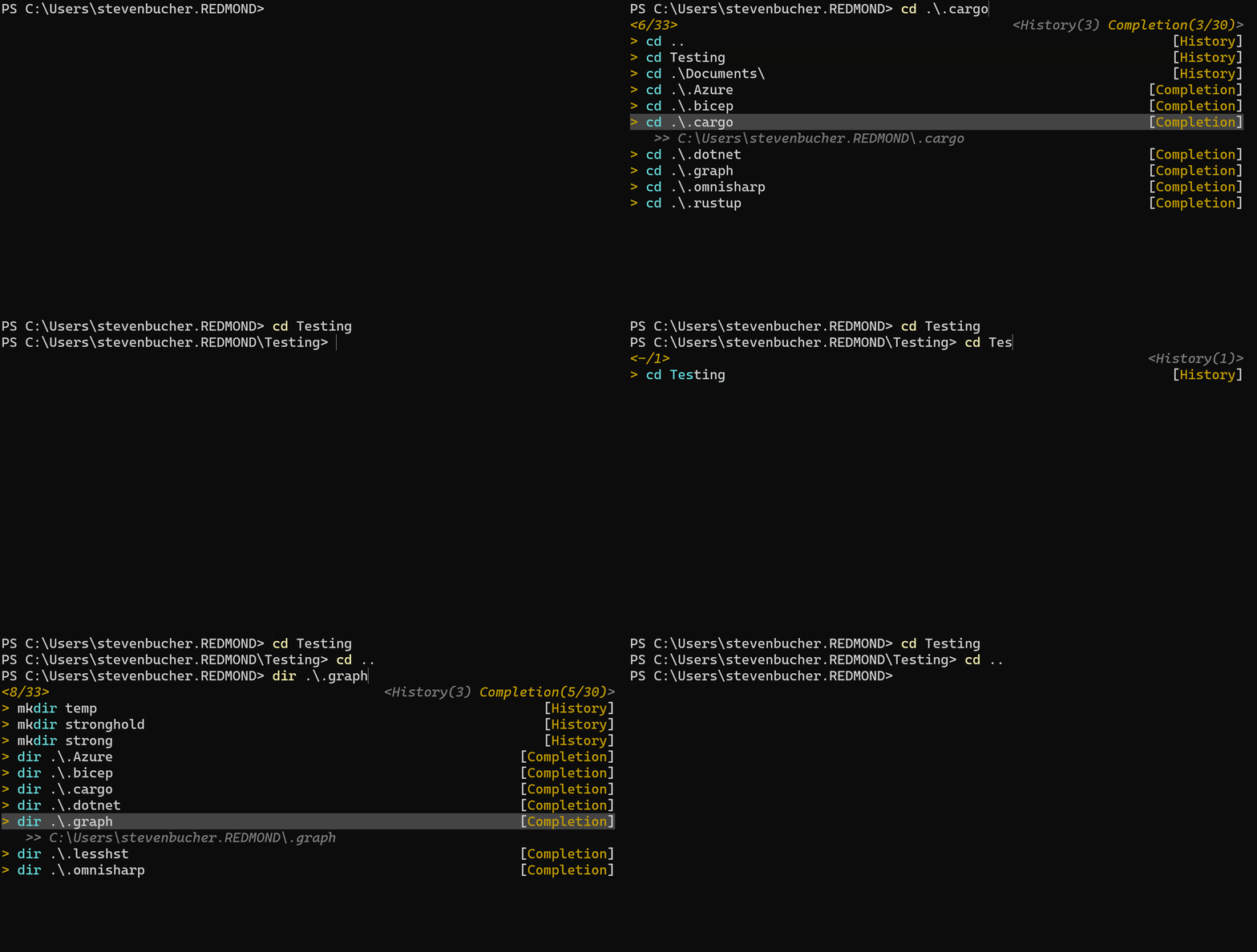
Using tab completion we’re able to give predictions on the next folders you may want to navigate to
with cd or view the contents of with dir.

Screenshot showing cd and dir argument completion.

git

Another argument completion improvement was with git. These are improvements that we’ve found
works best for our workflow but may help with your git workflow as well!

Merging branches

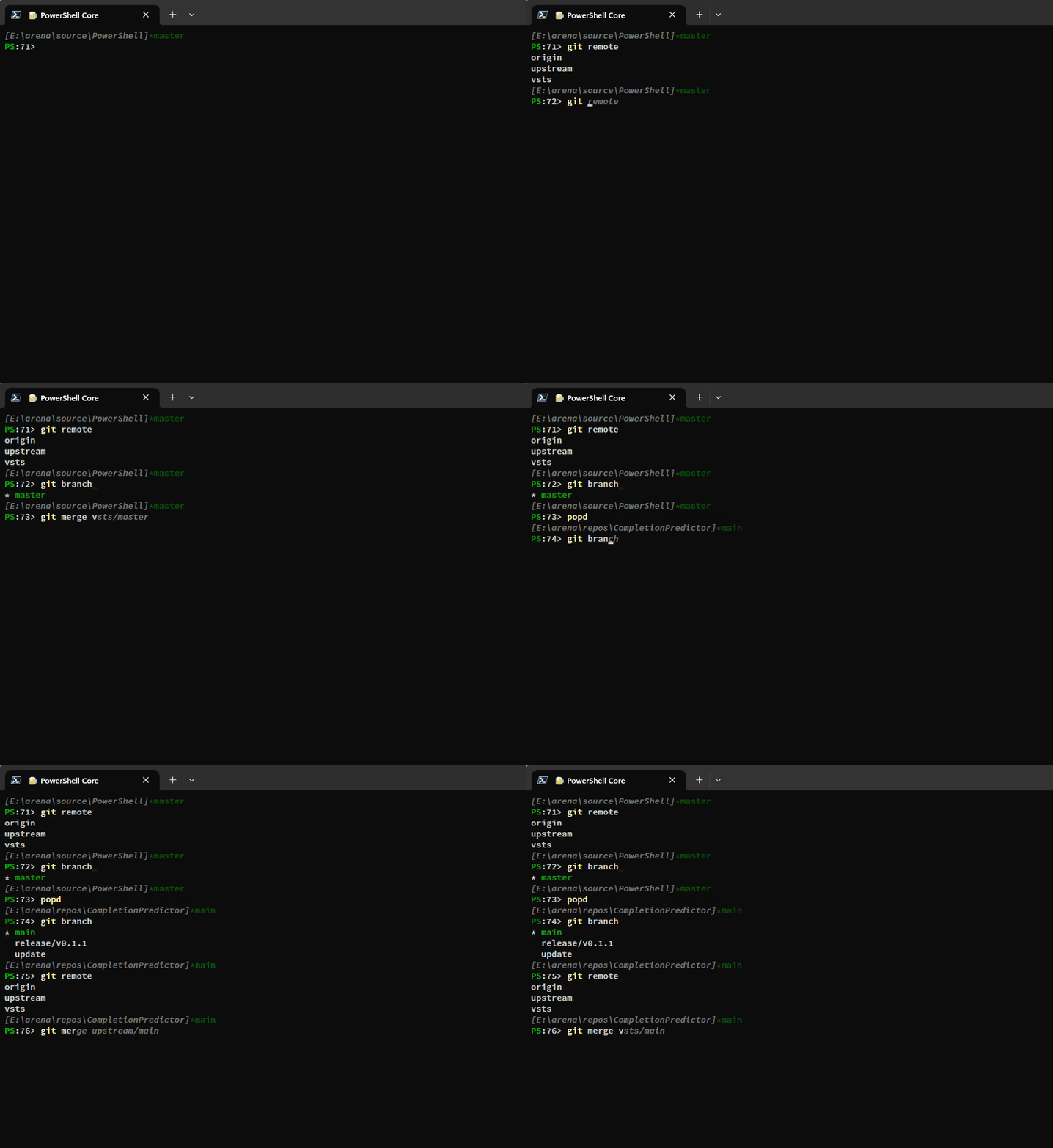
Completion Predictor is able to look at remote and local branches available to accelerate your flow
when using git merge. Here is an example of it working.

Screenshot showing git merge prediction completion.


Checking out and deleting branches

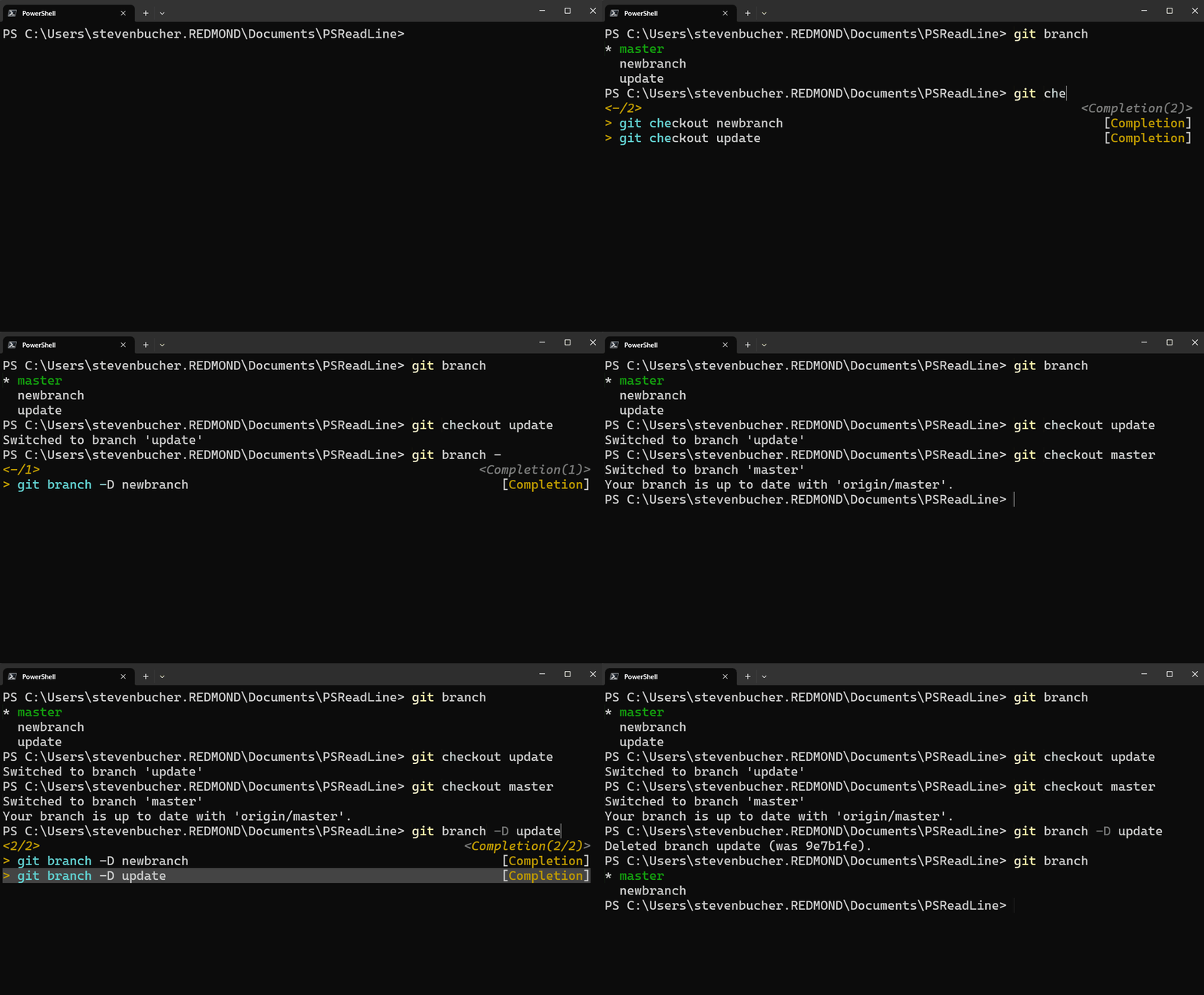
Similarly, to the merge behavior, the completion predictor is now able to give predictions on what
branch you may want to use when checking out or deleting branches. This only works with the
subcommands git checkout and git branch -D. The predictor intentionally doesn’t include the
current branch you are in when giving results.

Screenshot showing git branch -D prediction completion.

As I mentioned, we added these improvements to help with our specific git workflows. Typically, the
rough flow we’ve is the following:

  • git fetch --all -p -> to get the latest changes in that repo
  • git merge -> sync the default branch
  • git branch -D -> delete the old working branches that were already removed from the remote side
  • git checkout -> checkout a new branch to work in
  • git push -> push the new branch to remote to then create a PR

This isn’t a blog post about how to best use git, so please refer to other online resources to
learn git. This is just the workflow we like to use that helped us create the git improvements
to the Completion Predictor.

Feedback

You can find the rest of the changes in this release in the changelog on the release page. We
love getting feedback on these predictors we make! The entire source code for this predictor is
available on GitHub and can be a great starting point for making your own predictor! Please
feel free to open issues or PRs on the GitHub page for improvements that may work for you and
others! Enjoy!

Steven Bucher and Dongbo Wang

Completion Predictor and PSReadLine Maintainers

The post Completion Predictor v0.1.1 Release appeared first on PowerShell Team.

PowerShell Extension for Visual Studio Code Spring 2023 Update

This post was originally published on this site

We are excited to announce that an update to the PowerShell Extension for Visual Studio Code is now available in the extension marketplace.

In recent updates, we include a new “attach .NET debugger” debug configuration for binary PowerShell modules, better handling of start-up failures when the PowerShell version is unsupported, and have merged the PowerShell Preview extension and PowerShell “stable” extension into a single extension with a Prelease release channel.

The “PowerShell Preview” extension has now been officially deprecated, with “preview” releases now available via the “pre-release” option on the stable “PowerShell” extension in the marketplace. While you should be migrated automatically, feel free to just uninstall the preview and install the now one-and-only extension, but please keep testing our pre-releases! This change makes it much simpler to use, as you no longer have to switch between two different extensions and instead can use VS Code’s marketplace to install your choice of version!

Highlights in the March, April and May Releases

Note that these updates all shipped in our prelease channel for VS Code before shipping in our stable channel.

For the full list of changes please refer to our changelog.

Getting Support and Giving Feedback

While we hope the new implementation provides a much better user experience, there are bound to be issues. Please let us know if you run into anything.

If you encounter any issues with the PowerShell Extension in Visual Studio Code or have feature requests, the best place to get support is through our GitHub repository.

Sydney Smith
PowerShell Team

The post PowerShell Extension for Visual Studio Code Spring 2023 Update appeared first on PowerShell Team.

PSReadLine 2.3.1-beta1 Release

This post was originally published on this site

We pleased to announce another release of PSReadLine 2.3.1-beta1! We have had various bug fixes
and minor improvements in this release, as well as a big new feature to ListView of Predictors! Let’s
jump right in!

Installing PSReadLine 2.3.1-beta1

How do you install this release? The release is available from the PowerShell Gallery.

Use the following command to install PSReadLine using PowerShellGet v2.x:

Install-Module -Name PSReadLine -AllowPrerelease -Force

If you are using PowerShellGet v3, you can use the following command:

Install-PSResource -Name PSReadLine -AllowPrerelease -Force

You must include the Force parameter to install this version side by side with the default
stable version.

Note


You must restart your PowerShell session to use the new version of
PSReadLine.

ListView tool tip view

In this preview, we enabled a new tooltip view in the ListView mode of PSReadLine Predictors.
Tooltips were part of the original design but were never presented to the user until this release.
Tooltips are enabled by default, but you can disable them by running the following command:

Set-PSReadLineOption -ShowToolTips:$false

And then can re-enable by running:

Set-PSReadLineOption -ShowToolTips

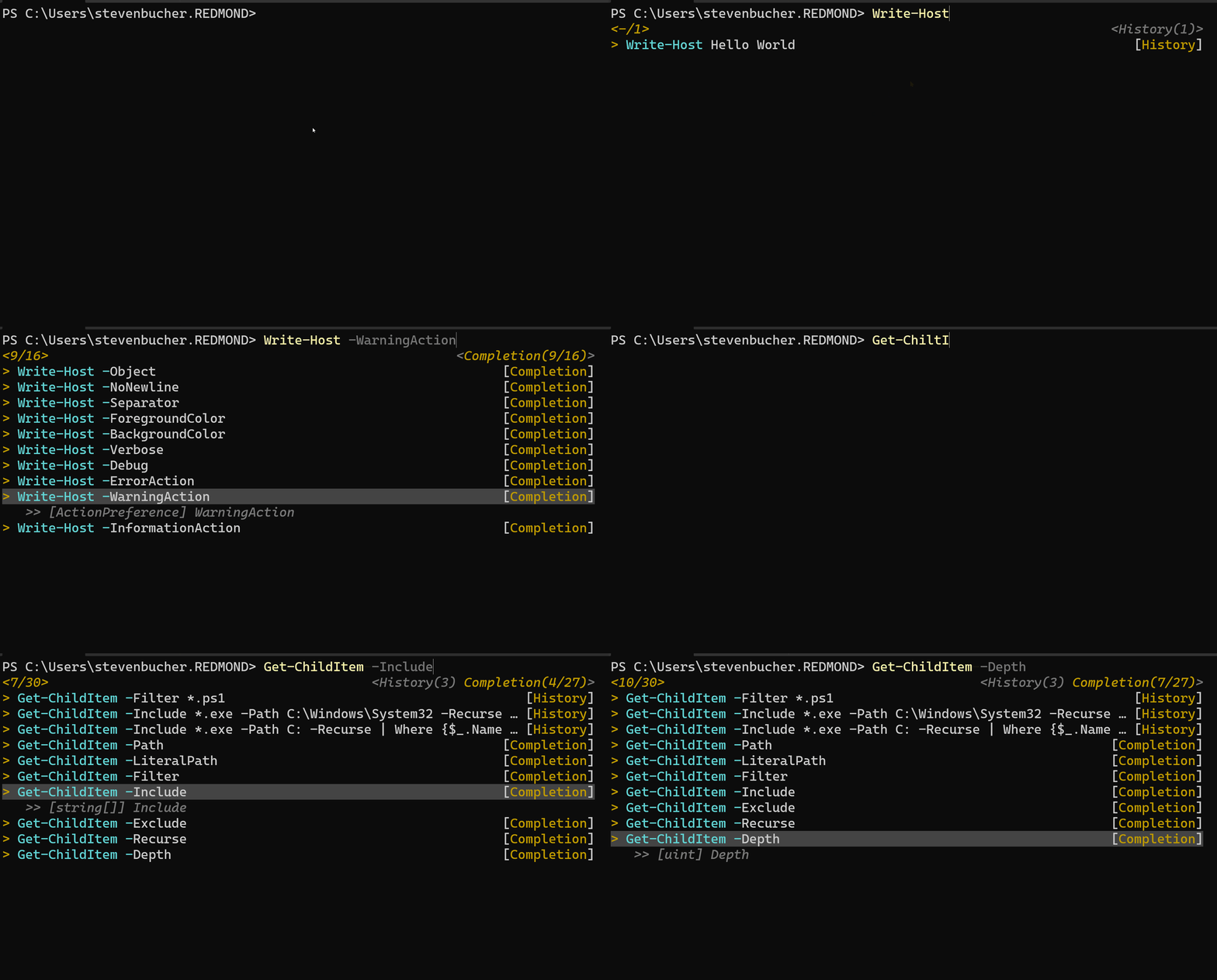
The following screenshot shows the CompletionPredictor providing tooltips to show details
about each parameter of Write-Host and GetChildItem.

Gif showing the tool tip option.

Tooltips are only available for results from plugin predictors. Predictions from History don’t have
tooltips. A plugin predictor can populate the tooltip with other descriptions to help provider more
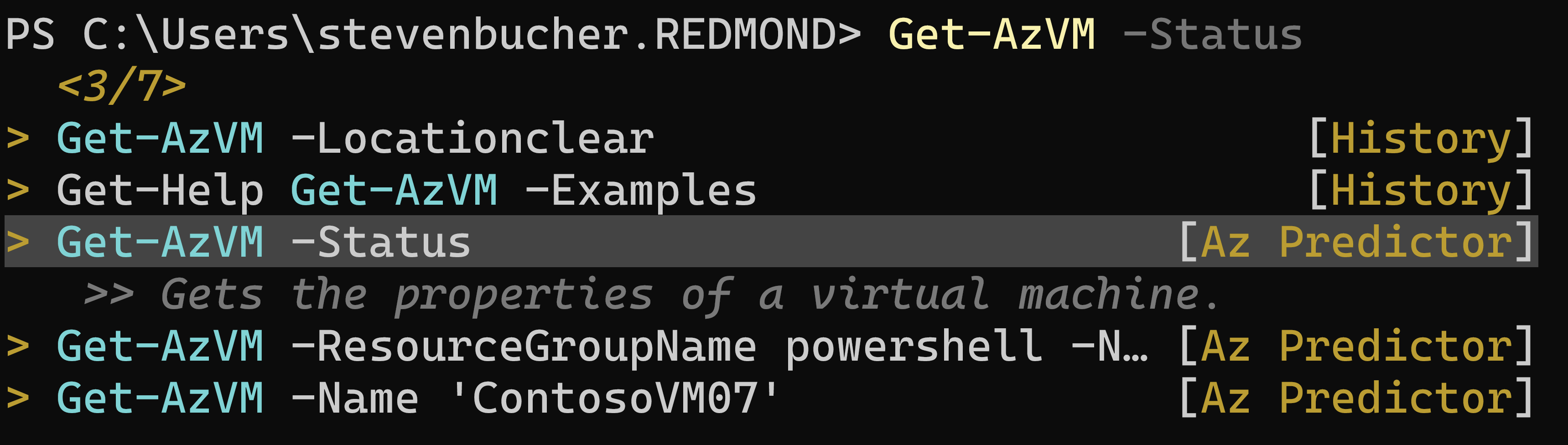
details into what is being predicted. For example, the Az.Tools.Predictor module provides
details about what the suggested cmdlet does.

Screenshot showing Az predictor tool tip

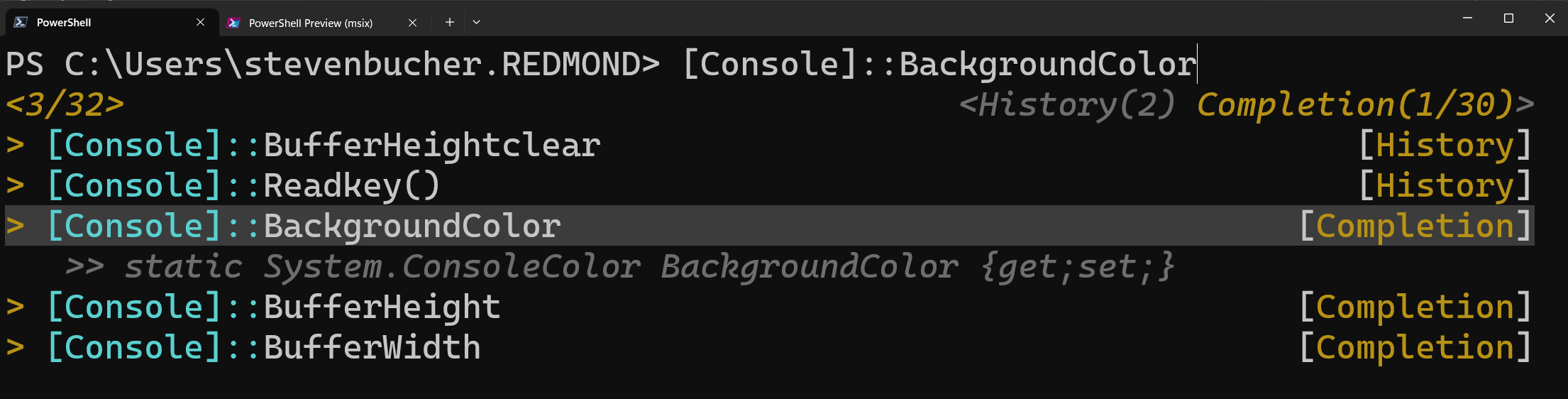
It’s also helpful when working with .NET objects:

Screenshot showing the .NET object tool tip completion

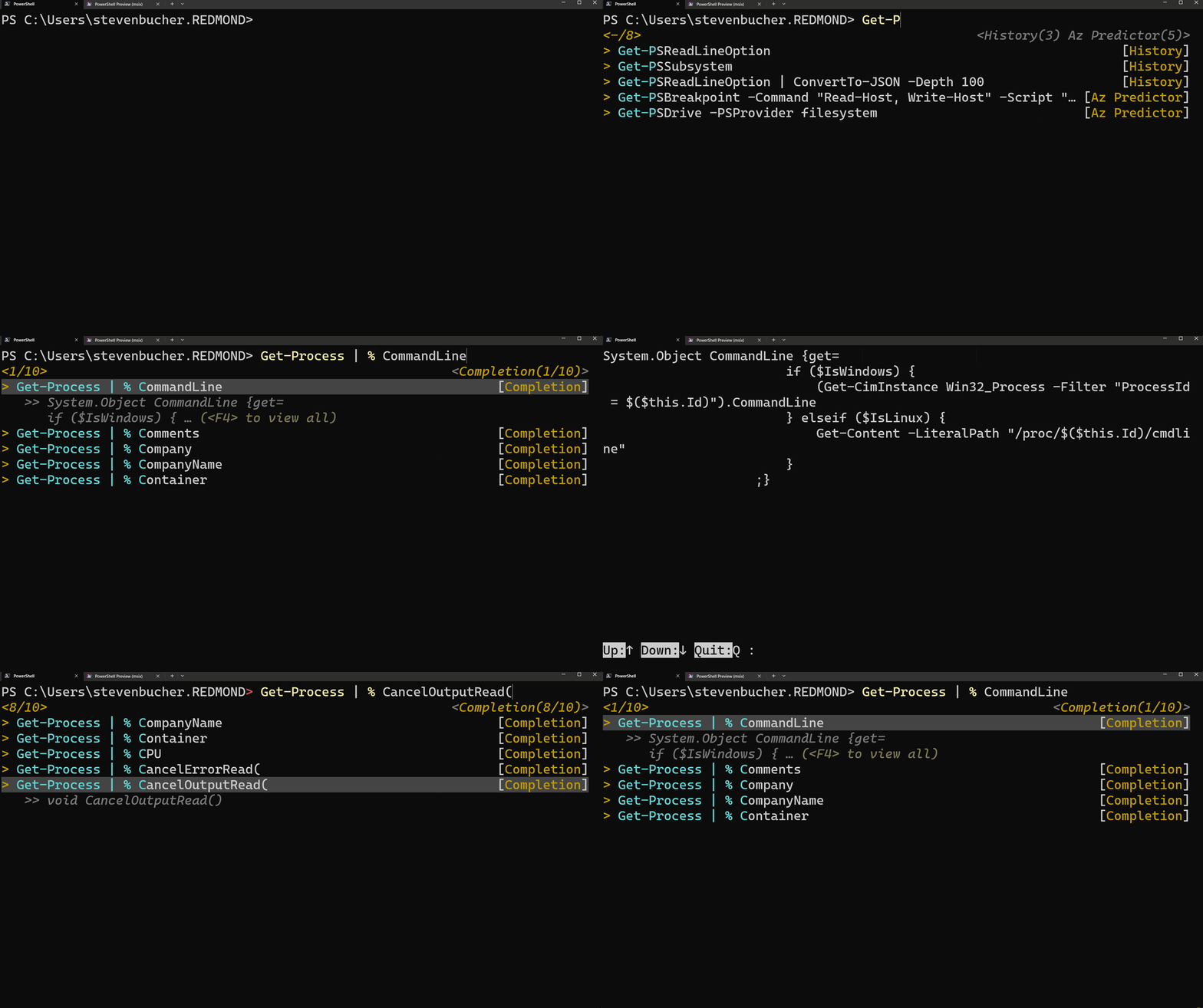
For long tooltips, ListView shows up to four lines of the tooltip. You can get more information
for the selected item by pressing the F4 key.

GIF showing the F4 capabilities to expand a tooltip

See our changelog for a complete list of bug fixes and changes.

Feedback

As usual, we love getting your feedback! Since this is a beta release, designs and features are
subject to change. Please submit bugs, feature requests, or questions to the repository. Your
feedback is greatly appreciated!

Steven Bucher and Dongbo Wang

PSReadLine Maintainers

The post PSReadLine 2.3.1-beta1 Release appeared first on PowerShell Team.

PowerShellGet 3.0 Preview 20

This post was originally published on this site

We are excited to announce that an update to our preview of PowerShellGet 3.0 is now available on the PowerShell Gallery!

This release includes a major refactor of the module to remove the dependency on the NuGet client APIs for remote repositories.

This version of the module, along with the PowerShellGet compatibility module, will be shipping in the next preview of PowerShell 7.4 (preview 3).

How to Install PowerShellGet 3.0 Preview 20

Prerequisites

Please ensure that you have the latest (non-prerelease) version of PowerShellGet and PackageManagement installed. To check the version you currently have installed run the command Get-InstalledModule PowerShellGet, PackageManagement

The latest version of PowerShellGet is 2.2.5, and the latest version of PackageManagement is 1.4.7. To install the latest versions of these modules run the following: Install-Module PowerShellGet -Force -AllowClobber

Installing the Preview

To install this preview release side-by-side with your existing PowerShellGet version, open any PowerShell console and run: Install-Module PowerShellGet -Force -AllowPrerelease

What to expect in this update

This update moves off of the NuGet client APIs and uses direct REST API calls for remote repositories. It also includes the below bug fixes.

Bug Fixes

  • Updates to dependency installation
  • Update to retrieving all packages installed on machine
  • PSResourceInfo version correctly displays 2 or 3 digit version numbers
  • Using Find-PSresource with -CommandName or -DSCResourceName parameters returns an object with a properly expanded ParentResource member
  • Find-PSResource no longer returns duplicate results
  • Find-PSResource lists repository ‘PSGalleryScripts’ which does not exist for Get-PSResourceRepository

Features to Expect in Coming Preview Releases

This module is not yet complete. The focus for our next preview release is to move off of the NuGet APIs for local repositories. For the full list of issues for our next preview release please refer to our GitHub project.

How to Track the Development of this Module

GitHub is the best place to track the bugs/feature requests related to this module. We have used a combination of projects and labels on our GitHub repo to track issues for this upcoming release. We are using the label Resolved-3.0 to label issues that we plan to release at some point before we release the module as GA (generally available).

To track issues/features for the next release, please refer to this GitHub project.

How to Give feedback and Get Support

We cannot overstate how critical user feedback is at this stage in the development of the module. Feedback from preview releases help inform design decisions without incurring a breaking change once generally available and used in production.

In order to help us to make key decisions around the behavior of the module please give us feedback by opening issues in our GitHub repository.

Sydney Smith

PowerShell Team

The post PowerShellGet 3.0 Preview 20 appeared first on PowerShell Team.

PowerShell Extension for Visual Studio Code February 2023 Update

This post was originally published on this site

We are excited to announce that the February update to the PowerShell Extension for Visual Studio CodeΒ is now available on the extension marketplace.

In this update we rewrote all the symbol logic. Classes (and their properties and methods) are now proper symbols. We now have a single visitor that builds a cached dictionary of symbols for each file instead of a dozen similar-yet-different Abstract Symbol Tree (AST) PowerShell script visitors handling different parts of each symbol-related request. This was a massive simplification of the code that also leads to huge performance improvements across all the symbol related features.

Updates in the February Release

Note that these updates all shipped in ourΒ PowerShell Preview ExtensionΒ for VS Code before shipping in our stable channel.

Some highlights of the February preview releases:

A number of performance improvements to the following:

For the full list of changes please refer to ourΒ changelog.

Getting Support and Giving Feedback

While we hope the new implementation provides a much better user experience, there are bound to be issues. Please let us know if you run into anything.

If you encounter any issues with the PowerShell Extension in Visual Studio Code or have feature requests, the best place to get support is through ourΒ GitHub repository.

Sydney Smith

PowerShell Team

The post PowerShell Extension for Visual Studio Code February 2023 Update appeared first on PowerShell Team.

PowerShell Extension for Visual Studio Code January 2023 Update

This post was originally published on this site

We are excited to announce that the January update to the PowerShell Extension for Visual Studio Code is now available on the extension marketplace.

This first stable release for the new year includes a multitude of fixes for the debugger! Expanding variables with properties that are inaccessible no longer causes a short-circuit preventing the rest of the properties from being expanded, variable values whose expansion results in PowerShell code being executed now works as expected, and in general all the correct properties are now present. We look forward to adding the ability to view static and private fields in a future update.

Updates in the January Release

Note that these updates all shipped in our PowerShell Preview Extension for VS Code before shipping in our stable channel.

Some highlights of the January preview releases:

For the full list of changes please refer to our changelog.

Getting Support and Giving Feedback

While we hope the new implementation provides a much better user experience, there are bound to be issues. Please let us know if you run into anything.

If you encounter any issues with the PowerShell Extension in Visual Studio Code or have feature requests, the best place to get support is through our GitHub repository.

Sydney Smith

PowerShell Team

The post PowerShell Extension for Visual Studio Code January 2023 Update appeared first on PowerShell Team.

PowerShellGet 3.0 Preview 18

This post was originally published on this site

We are excited to announce that an update to our preview of PowerShellGet 3.0 is now available on the PowerShell Gallery!

This release includes a number of bug fixes as well as Get-PSScriptFileInfo cmdlet.

How to Install PowerShellGet 3.0 Preview 18

Prerequisites

Please note that this preview release of PowerShellGet 3.0 does not support PowerShell 7.0, 7.1 or 7.2-preview1.

This is a temporary issue due to a dependency and should be resolved in future releases. This release does support Windows PowerShell 5.1, PowerShell 7.2 and 7.3.

Please ensure that you have the latest (non-prerelease) version of PowerShellGet and PackageManagement installed. To check the version you currently have installed run the command Get-InstalledModule PowerShellGet, PackageManagement

The latest version of PowerShellGet is 2.2.5, and the latest version of PackageManagement is 1.4.7. To install the latest versions of these modules run the following: Install-Module PowerShellGet -Force -AllowClobber

Installing the Preview

To install this preview release side-by-side with your existing PowerShellGet version, open any PowerShell console and run: Install-Module PowerShellGet -Force -AllowPrerelease

What to expect in this update

This update fixes a number of bugs and adds support for the Get-PSScriptFileInfo cmdlet.

Features of this release

  • Add Get-PSScriptFileInfo cmdlet
  • Allow CredentialInfo parameter to accept a hashtable

Bug Fixes

  • Publish-PSResource now preserves folder and file structure
  • Fix verbose message for untrusted repos gaining trust
  • Fix for Update-PSResource attempting to reinstall latest preview version
  • Add SupportsWildcards() attribute to parameters accepting wildcards
  • Perform Repository trust check when installing a package
  • Fix casing of PSResource in Install-PSResource
  • Update .nuspec ‘license’ property to ‘licenseUrl’

Features to Expect in Coming Preview Releases

This module is not yet complete. The focus for our next preview release is improving the performance of find/install by refactoring these cmdlets. For the full list of issues for our next preview release please refer to our GitHub project.

How to Track the Development of this Module

GitHub is the best place to track the bugs/feature requests related to this module. We have used a combination of projects and labels on our GitHub repo to track issues for this upcoming release. We are using the label Resolved-3.0 to label issues that we plan to release at some point before we release the module as GA (generally available).

To track issues/features for the next release, please refer to this GitHub project.

Timeline/Road Map

Expect to see preview releases as new functionality is added and bug fixes are made. User feedback will help us determine when we can have a Release Candidate version of the module which will be supported to be used in production. Based on user feedback, if we believe the 3.0 release is complete, then we will publish a 3.0 version of the module as Generally Available. Since these milestones are driven by quality, rather than date, we can not offer an exact timeline at this point.

How to Give feedback and Get Support

We cannot overstate how critical user feedback is at this stage in the development of the module. Feedback from preview releases help inform design decisions without incurring a breaking change once generally available and used in production.

In order to help us to make key decisions around the behavior of the module please give us feedback by opening issues in our GitHub repository.

Sydney Smith

PowerShell Team

The post PowerShellGet 3.0 Preview 18 appeared first on PowerShell Team.

Announcing PowerShell Crescendo 1.1.0-preview01

This post was originally published on this site

We’re pleased to announce the release of PowerShell Crescendo 1.1.0-preview01. Crescendo
is a framework to rapidly develop PowerShell cmdlets for common command line tools, regardless of
platform. This preview includes a new schema, support for argument value transformation, the ability
to bypass the output handler, and improved error handling.

This is a community driven release built from the many suggestions and requests received directly or
from our Github. Thank you PowerShell Community for your adoption and suggestions!

The preview release is now available for download on the PowerShell Gallery.

Installing Crescendo

Requirements:

  • Microsoft.PowerShell.Crescendo requires PowerShell 7.0 or higher

To install Microsoft.PowerShell.Crescendo:

Install-Module -Name Microsoft.PowerShell.Crescendo -AllowPreRelease

To install Microsoft.PowerShell.Crescendo using the new PowerShellGet v3:

Install-PSResource -Name Microsoft.PowerShell.Crescendo -AllowPreRelease

Highlighted features

This preview release includes many fixes and suggestions. Here are just a few of the highlights
added for this preview.

New schema version

The Crescendo schema has been updated to include support for two new members to the Parameter
class, ArgumentTransform and ArgumentTransformType. The schema works with supported tools like
Visual Studio Code to provide intellisense and tooltips during the authoring experience.

URL location of the always-available Crescendo schema:

{
   "$schema": "https://aka.ms/PowerShell/Crescendo/Schemas/2022-06",
   "Commands": []
}

Prevent overwriting of the module manifest

Crescendo creates both the module .psm1 and the module manifest .psd1 when
Export-CrescendoModule is executed. This can create problems when you have customized the module
manifest beyond the scope of Crescendo. The Export-CrescendoModule cmdlet now provides a
NoClobberManifest switch parameter to prevent the manifest from being overwritten.

Export-CrescendoModule -ConfigurationFile .myconfig.json -ModuleName .Mymodule -NoClobberManifest

Note


The NoClobberManifest switch parameter prevents Crescendo from
updating the module manifest. You are responsible for manually updating the manifest with any new
cmdlets and settings.

Bypass output handling entirely

Some native commands respond with different output depending on whether the output is sent to the
screen or the pipeline. Pastel is an example of a command that changes its output
from a graphical screen representation to a single string value when used in a pipeline. Crescendo
output handling is pipeline based and can cause these applications to return unwanted results.
Crescendo now supports the ability to bypass the output handler entirely.

To bypass all output handling by Crescendo:

"OutputHandlers": [
    {
        "ParameterSetName": "Default",
        "HandlerType": "ByPass"
    }
]

Handling error output

Previously, native command errors weren’t captured by Crescendo and allowed to stream directly to
the user. This prevented you from creating enhanced error handling. Crescendo now captures the
generated command error output (stderr) and is now available to the output handler. Error messages
are placed in a queue. You can access the queue in your output handler using a new function,
Pop-CrescendoNativeError.

If you don’t define an output handler, Crescendo uses the default handler. The default output
handler ensures that errors respect the -ErrorVariable and -ErrorAction parameters and adds
errors to $Error.

Adding an output handler that includes Pop-CrescendoNativeError allows you to inspect errors in
the output handler so you can handle them or pass them through to the caller.

"OutputHandlers": [
    {
        "ParameterSetName": "Default",
        "StreamOutput": true,
        "HandlerType": "Inline",
        "Handler": "PROCESS { $_ } END { Pop-CrescendoNativeError -EmitAsError }"
    }
]

Argument value transformation

You may find situations where the input values handed to a Crescendo wrapped command should be
translated to a different value for the underlying native command. Crescendo now supports argument
transformation to support these scenarios. We updated the schema to add two new members to the
Parameter class, ArgumentTransform and ArgumentTransformType. Use these members to transform
parameter arguments inline or invoke a script block that takes the parameter value as an argument.
The default value for ArgumentTransformType is inline.

Example: Multiplication of a value.

"Parameters": [
    {
        "Name": "mult2",
        "OriginalName": "--p3",
        "ParameterType": "int",
        "OriginalPosition": 2,
        "ArgumentTransform": "param([int]$v) $v * 2"
    }
]

Example: Accepting an ordered hashtable.

"Parameters": [
    {
        "Name": "hasht2",
        "OriginalName": "--p1ordered",
        "ParameterType": "System.Collections.Specialized.OrderedDictionary",
        "OriginalPosition": 0,
        "ArgumentTransform": "param([System.Collections.Specialized.OrderedDictionary]$v) $v.Keys.ForEach({''{0}={1}'' -f $_,$v[$_]}) -join '',''"
    }
]

Example: Argument transformation with join.

"Parameters": [
    {
        "Name": "join",
        "OriginalName": "--p2",
        "ParameterType": "string[]",
        "OriginalPosition": 1,
        "ArgumentTransform": "param([string[]]$v) $v -join '',''"
    }
]

Example: Calling a script based transformation.

"Parameters": [
    {
        "Name" : "Param1",
        "ArgumentTransform": "myfunction",
        "ArgumentTransformType" : "function"
    }
]

More information

To get started using Crescendo, check out the documentation.

Future plans

We value your ideas and feedback and hope you give Crescendo a try. Stop by our
GitHub repository and let us know of any issues you find or features you would like added.

The post Announcing PowerShell Crescendo 1.1.0-preview01 appeared first on PowerShell Team.

PowerShell 7.3 General Availability

This post was originally published on this site

We’re proud to announce the general availability of PowerShell 7.3!
PowerShell 7.3 is built on top of .NET 7 and as a non-LTS (Long Term Support) release will be supported for 18 months.
PowerShell 7.2 is still the current LTS (3-year supported) release of PowerShell.

How do I get it?

Since PowerShell 7 is supported on Windows, Linux, and macOS, there are a variety of ways to get it.
If you had installed the previous PowerShell 7 stable release (7.2) via the Windows Store,
you will be automatically updated to 7.3 GA.
However, if you installed the MSI and chose to be updated via Microsoft Update, since 7.2 is a LTS release,
you will not be automatically upgraded to 7.3 and needs to be manually installed.

What’s new?

You can see a video of demos I presented at this year’s PSConfEU minicon.
It covers some of the major changes including new features and important bug fixes.
Lots of the work presented were contributions fromm the community!

Known issues

We found a last minute issue that should not affect most users that we will fix in an expected 7.3.1 release in December.
Due to an issue with our framework dependent package to be included with the .NET SDK Docker images,
the .NET 7 GA SDK image will still have PowerShell 7.3-rc.1 included.
This should not have any functional impact to users and we expect to update the image with PowerShell 7.3 GA in December.

Focus on the shell

The major theme for this release is focusing on making PowerShell 7 a great shell environment.
Here, “native command” means an executable that is not a PowerShell cmdlet or function.

Improvement to native command argument passing

Windows and Linux/macOS have fundamental differences in how native command arguments are handled specifically when quotes are involved.
We added a new feature $PSNativeCommandArgumentPassing
to control how PowerShell passes arguments to native commands.
The default behavior for Windows and Linux/macOS should work as most users expect in their respective environments.

Another area to make native commands work more like cmdlets is error handling.
Unlike cmdlets, native commands use their exit code to convey success or failure.

Consistency in error handling for native commands

Although stderr is often used for error messages,
it is also used for progress, information, warnings, etc. because native commands don’t have the rich streams that PowerShell cmdlets have.
Although a non-zero exit code does NOT always indicate an error, the convention for native commands is that a non-zero exit code typically indicates an error.

A new feature $PSNativeCommandUseErrorActionPreference
allows you to have PowerShell treat a non-zero exit code as an error.
This means that you can set $ErrorActionPreference
to Stop and have PowerShell stop execution whether a cmdlet had an error or a native command had a non-zero exit code.

This simplifies scripts that previously would have to check $LASTEXITCODE
after execution of a native command or wrap it in a helper function.

What’s next?

PowerShell 7.4 will be our next LTS release and expected to be built on .NET 8 for next year.
We’ll have a separate blog post early next year to discuss the investments of the PowerShell/OpenSSH team for 2023.
We appreciate all the efforts of the community, both individuals and working group members,
and look forward to your continued feedback and contributions!

The post PowerShell 7.3 General Availability appeared first on PowerShell Team.

PSScriptAnalyzer (PSSA) 1.21.0 has been released

This post was originally published on this site

Overview

We are happy to announce the release of PSScriptAnalyzer 1.21. This minor version update includes:

  • Three new rules
  • Enhances one rule
  • Pipeline support to Invoke-Formatter
  • Four bug fixes
  • Improved message details in PSUseCorrectCasing
  • Lots of documentation updates
  • Updated system requirements

A big portion of changes are in less visible areas such as the maintenance of dependencies and CI.

System requirements

Starting with this version the minimum requirements are changing as follows:

  • For PowerShell ‘Core’ users ($PSVersionTable.PSEdition -eq 'Core'):

    The minimum required PowerShell version increases from 7.0.3 to 7.0.11. With PowerShell 7.0
    reached end of life this December, the next version of PSScriptAnalyzer will require 7.2.

    Use $PSVersionTable.PSVersion to see which version of PowerShell you are using. For more
    information about supported versions of PowerShell, see the
    PowerShell support lifecycle.

  • For Windows PowerShell users (version 3 to 5.1 or ($PSVersionTable.PSEdition -ne 'Core'))

    The minimum required version of the .NET Framework runtime increased from 4.5.2 to 4.6.2.
    Versions 4.5.2., 4.6 and 4.6.1 have reached end of support this year. This change should not
    impact the majority of users on supported and patched OS versions.

    For more details about .NET support, see
    .NET Framework blog post.

For more information, see the full changelog.

New Rules

AvoidMultipleTypeAttributes

This rule is to call out the usage of multiple type attributes in a function that the parser accepts
as valid syntax but can later cause unexpected behavior or an error at runtime.

For example, the following function

function foo { [switch][string] $Param1 }

will throw the following error when the function is invoked:

Cannot convert the “” value of type “System.String” to type “System.Management.Automation.SwitchParameter”

Thanks to GitHub user hankyi95 for contributing this rule.

AvoidSemicolonsAsLineTerminators

The rule detects the usage of a trailing semicolon at the end of a line, which is not required in
most PowerShell scripts and can be omitted. This rule is not enabled by default and can be used by
Invoke-Formatter.

The latest Preview version of the PowerShell extension for Visual Studio Code already includes
PSScriptAnalyzer 1.21.0 and can control this formatting rule via a new
powershell.codeFormatting.avoidSemicolonsAsLineTerminators setting. This should soon be available
in the non-preview version of the extension as well.

Thanks to Aliaksei (GitHub user tempora-mutantur) for contributing this rule.

AvoidUsingBrokenHashAlgorithms

This rule inspects the Get-FileHash cmdlet for usage of either MD5 or SHA-1 as the value
to the -Algorithm parameter since those algorithms are no longer considered secure. Users
should consider replacing the value with SHA256, SHA384, SHA512, or other safer algorithms
where possible. It is understood there will be legacy or backwards compatibility cases where this
cannot be done. PSScriptAnalyzer has a suppression feature that can be used to document the
reason for it in your code.

Thanks to Michael Van Leeuwen (GitHub user MJVL) for contributing this rule.

Enhancements

Invoke-Formatter now accepts input via the pipeline, either just as a string or
[pscustomobject] with parameter values.

The AvoidUsingPlainTextForPassword rule is the first built-in rule to now return more than one
suggestion for correction. In addition to suggesting the usage of SecureString, it now offers
an alternative suggestion with PSCredential.

With version 2.40.0 of the az CLI, its entrypoint changed from a batch script to an az.ps1
script. Since this script just passed its received arguments as $args as-is to python, it is still
a CLI and not a script with parameters. But it causes now a AvoidUsingPositionalParameters
warning, which is a false positive. We therefore added a CommandAllowList configuration to it,
which has az in it by default.

Documentation changes

In order to keep documentation all consolidated in one location, we have moved the documentation in
the repo to the repo of docs.microsoft.com. Please see the documentation notice in the
repo in order to get more specific details.

Outlook

Expect more formatting rules and options in the next release and continue giving us feedback. We are
looking to increase our release frequency now that the Microsoft internal build has moved to a new
system, which is what caused some delay to this release. To reduce maintenance, we are looking to
drop support for PowerShell version 3 and 4 in future versions of PSScriptAnalyzer, which would also
align it with the PowerShell extension for Visual Studio Code where this change was successful. The
first step could be to increase the value of the PowerShellVersion property in the module manifest
but still ship the version specific binaries so that it would still work if one changed its value in
the manifest.

On behalf of the Script Analyzer team,

Christoph Bergmeister, Project Maintainer from the community, Avanade

Jim Truher, Senior Software Engineer, PowerShell Team, Microsoft

The post PSScriptAnalyzer (PSSA) 1.21.0 has been released appeared first on PowerShell Team.